
LensCast 0.2.0
Turn your phone into a networked camera: web, MJPEG and RTSP streaming
Download
27.66 MB
38downloads
14this week
FreeFreeware
0reviews
Screenshots
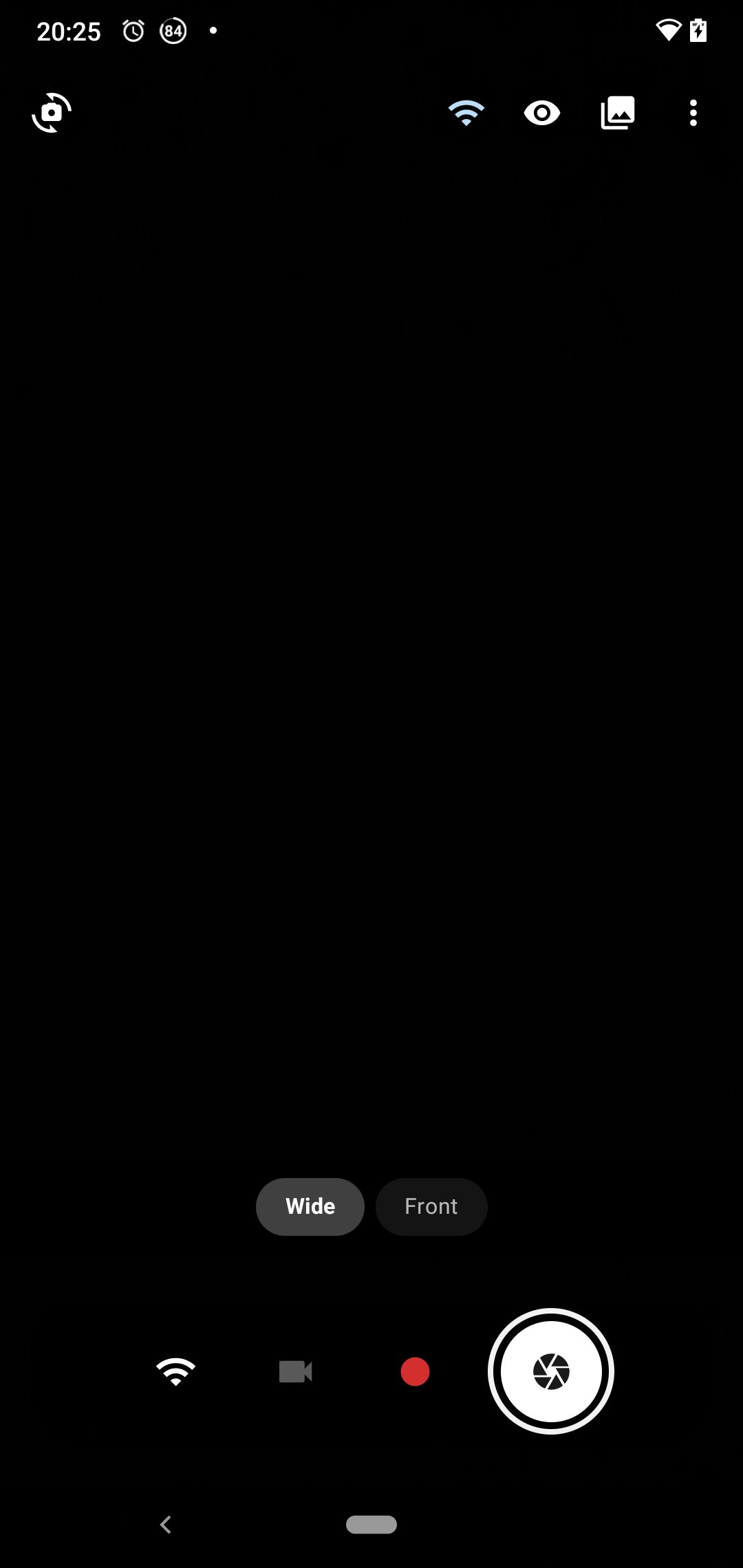
About LensCast
LensCast turns your Android device into a networked camera station with professional controls, remote web access, interval photography, and scheduled recording.
Camera
• Live preview with a professional quick settings bar
• Manual controls: exposure compensation, ISO, white balance, focus mode, zoom
• Multi-lens support (ultra-wide, wide, telephoto) with runtime lens switching
• HDR, image stabilization, resolution up to 4K, frame rate 15–60 fps
• Photo capture and video recording
• Night vision / IR mode, scene modes, manual focus distance, color temperature
Live streaming
• Real-time MJPEG video streaming to any web browser on the same network
• Low-latency in-browser playback (WebCodecs over WebSocket) with automatic fallback to MJPEG and HLS
• RTSP streaming with AAC audio and H.264/H.265 video at 480p/720p/1080p for VLC, OBS, and NVRs
• ONVIF Profile S device service (off by default) so NVRs such as Home Assistant can discover the camera
• HTTPS mode with a self-signed on-device certificate
Web dashboard
• Watch the live stream, browse and download photos and recordings
• Full remote control of camera and stream settings
• Optional password authentication
Automation
• Object detection gate (optional): the open-source EfficientDet-Lite0 model — Apache-2.0, downloaded on demand with a pinned SHA-256 from TensorFlow's official hosting — triggers MQTT alerts or recording when configured objects appear
• Sound-event gate (optional): the open-source YAMNet model — Apache-2.0, also downloaded on demand with a pinned SHA-256 — triggers alerts or recording when configured sounds are detected
• Interval photography and scheduled or continuous recording
• Quiet hours for notifications
Optional network services (all off by default; each runs only when you enable and configure it)
• Telegram backup: auto-uploads new captures to the Telegram chat you choose (api.telegram.org)
• Web Push notifications: delivers encrypted detection alerts through your browser vendor's push service (such as Google's FCM or Mozilla's autopush)
• Model downloads: the optional detection models above are fetched on demand from TensorFlow's official hosting on Google Cloud storage
• STUN server for WebRTC streaming (WHIP push / WHEP viewing): blank by default, so streaming stays on your local network without contacting any third-party server
No ads, no tracking, no cloud defaults. All processing stays on your device; the web dashboard is served by a built-in HTTP server on your local network.
Note: the F-Droid build ships without the in-app self-updater; updates come from F-Droid.
License: GPL-3.0-or-later
Camera
• Live preview with a professional quick settings bar
• Manual controls: exposure compensation, ISO, white balance, focus mode, zoom
• Multi-lens support (ultra-wide, wide, telephoto) with runtime lens switching
• HDR, image stabilization, resolution up to 4K, frame rate 15–60 fps
• Photo capture and video recording
• Night vision / IR mode, scene modes, manual focus distance, color temperature
Live streaming
• Real-time MJPEG video streaming to any web browser on the same network
• Low-latency in-browser playback (WebCodecs over WebSocket) with automatic fallback to MJPEG and HLS
• RTSP streaming with AAC audio and H.264/H.265 video at 480p/720p/1080p for VLC, OBS, and NVRs
• ONVIF Profile S device service (off by default) so NVRs such as Home Assistant can discover the camera
• HTTPS mode with a self-signed on-device certificate
Web dashboard
• Watch the live stream, browse and download photos and recordings
• Full remote control of camera and stream settings
• Optional password authentication
Automation
• Object detection gate (optional): the open-source EfficientDet-Lite0 model — Apache-2.0, downloaded on demand with a pinned SHA-256 from TensorFlow's official hosting — triggers MQTT alerts or recording when configured objects appear
• Sound-event gate (optional): the open-source YAMNet model — Apache-2.0, also downloaded on demand with a pinned SHA-256 — triggers alerts or recording when configured sounds are detected
• Interval photography and scheduled or continuous recording
• Quiet hours for notifications
Optional network services (all off by default; each runs only when you enable and configure it)
• Telegram backup: auto-uploads new captures to the Telegram chat you choose (api.telegram.org)
• Web Push notifications: delivers encrypted detection alerts through your browser vendor's push service (such as Google's FCM or Mozilla's autopush)
• Model downloads: the optional detection models above are fetched on demand from TensorFlow's official hosting on Google Cloud storage
• STUN server for WebRTC streaming (WHIP push / WHEP viewing): blank by default, so streaming stays on your local network without contacting any third-party server
No ads, no tracking, no cloud defaults. All processing stays on your device; the web dashboard is served by a built-in HTTP server on your local network.
Note: the F-Droid build ships without the in-app self-updater; updates come from F-Droid.
License: GPL-3.0-or-later
| Release info | Update on Nov 06, 2026 |
|---|---|
| Release notes | Since 0.1.9: • Automation: new if/then rules engine — up to 16 rules, each running up to 8 actions (camera settings, torch, stream, recording, siren, detection toggles) without touching the phone • Automation: event triggers and ONLY WHEN conditions — rules fire on motion, sound, tamper, power and streaming edges, gated by conditions like charging, Wi-Fi, a time window or streaming active, combinable ALL/ANY • Automation: time-of-day rules gain boot catch-up, fire history, per-rule cooldowns, and a per-rule missed-run policy (catch up, skip, or fire within a window after the scheduled moment) • Automation: redesigned automation screen — structured rule cards with WHEN / ONLY WHEN / THEN summaries, a fuller editor with grouped pickers, reorderable conditions and actions, live rule preview, a discard guard and a rotation-proof draft • Background: new Keep Awake setting (on by default) holds a wake lock while the app runs, so a mounted security phone keeps firing rules after the screen locks — quitting the app releases it • Streaming fix: the session wake lock is now renewed during long streams, so a locked phone no longer goes dark after the first streaming hour • Under the hood: nine modules refactored behind seams (push transports, web transport, detection alert sinks, settings credentials, camera policies) with no user-visible behavior change Full Changelog: https://github.com/raulshma/lenscast/compare/v0.1.9...v0.2.0 |
| Listing data | F-Droid |
Reviews
No reviews yet. Be the first to review LensCast.
Used LensCast? Tell other visitors what you thought.
Log in to write a reviewOther products by this publisher
- "No Distractions" for YouTube 4.10 ----
- #Bible 11.6 "Incredible App - My sister shared this app with me a few weeks ago and it is truly incredible.
- #filmphotography 1.4.2 So, you decided to shoot on film?
- $quirrel 1.5.1 $quirrel Budget & Finance helps you plan each paycheck, track spending, manage debt, and see what is safe to spend before the next payday.
- % Percentage Calculator Pro 1.41 This is the Pro version of % Percentage Calculator.
Most viewed Android Art & Design
-
1
 Vector Camera 2.1.0
Wireframe, text, and color effects for your camera
-
2
 Butterfly 2.6.2
Take notes, draw freely, and organize ideas across an endless workspace
- 3 DrawAnywhere 2.3 Floating canvas for drawing, annotating, and highlighting over other apps.
- 4 Datamosh 1.1 Create live datamoshed videos with your camera
-
5
 Cams 2.5.3
Simple RTSP viewer for IP cameras
-
6
 Open Camera 1.56.2
Camera App
- 7 Aves Libre 1.15.9 Gallery and metadata explorer
- 8 DeltaCamera 1.1 Record movement (deltas) in one single image
- 9 FreePaint 1.2.0 A vector graphics drawing app for Android.
- 10 BabbyPaint 0.2.0 Simple little paint application for kids.
Most downloaded Android Art & Design
-
1
 Pocket Paint 2.14.1
Advanced Paint
- 2 Folder Camera 1.0.3 Take photos straight into folders, with optional secure transfer to your PC
-
3
 MotionEye Client for Android 1.1.0.54
Android Motioneye Client App using Backend of motionEye
- 4 BabbyPaint 0.2.0 Simple little paint application for kids.
-
5
LensCast 0.2.0
Turn your phone into a networked camera: web, MJPEG and RTSP streaming
-
6
 Sentinel Lens 1.0.3
Facial recognition surveillance with alerts
-
7
Butterfly 2.6.2
Take notes, draw freely, and organize ideas across an endless workspace
-
8
 Sketching (PFA) 1.1.3
(SECUSO) Create sketches without advertisement or unnecessary permissions
-
9
 CameraFileCopy 0.6.8
use your camera to transfer data – even in airplane mode
-
10
 Photok - Secure Photo Vault 3.8.0
Private Photo Vault, Hide Photos & Videos.