
InstaCal 4.0
Photograph the school calendar on the fridge and every date on it is ready to add.
Download
147.35 MB
12downloads
4this week
FreeCommercial
0reviews
Screenshots
About InstaCal
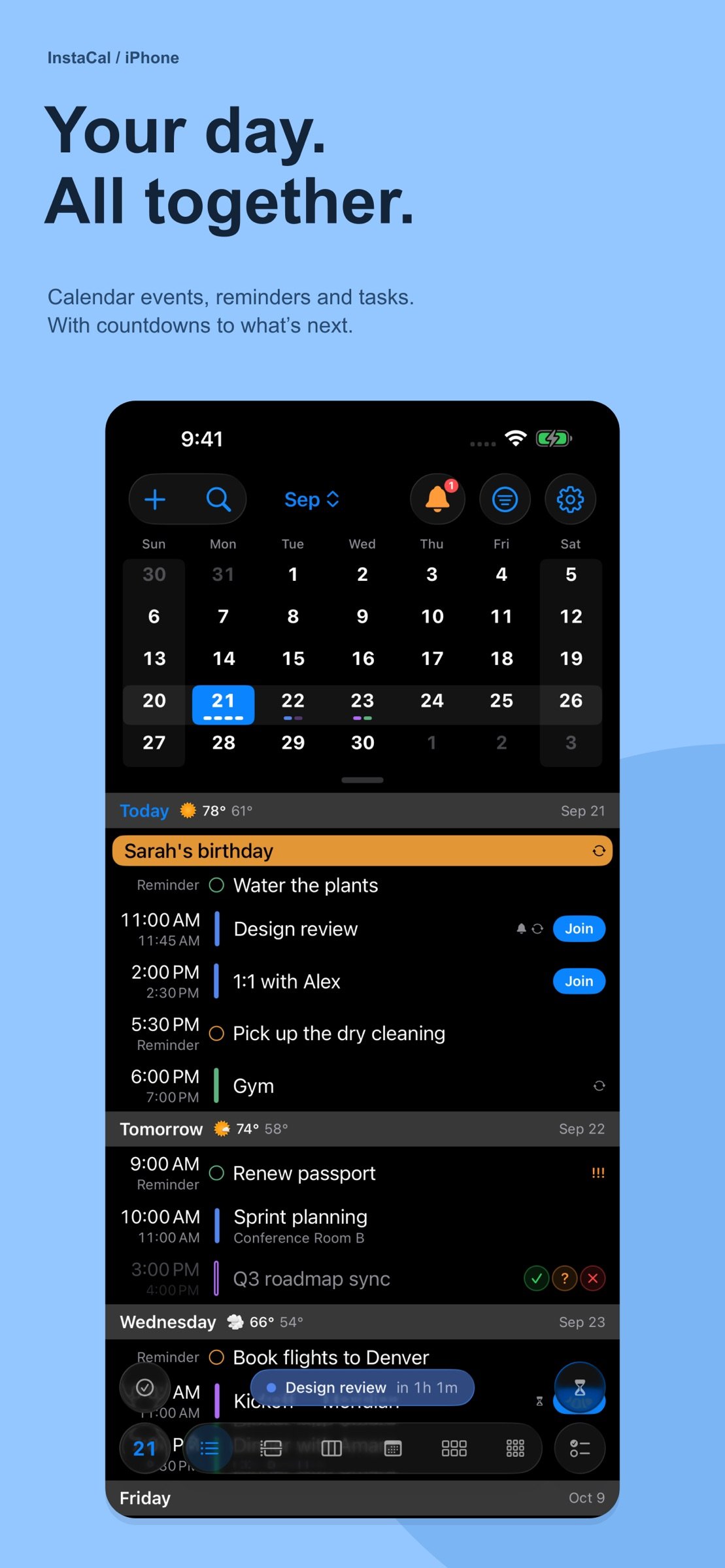
Photograph the school calendar on the fridge and every date on it is ready to add. Type “Lunch with Sam Friday at noon” and it’s on your calendar. InstaCal brings events, reminders, tasks and countdowns together, shows your time six ways from Agenda to Year, and includes the Mac and Apple Watch apps in the same purchase.
ONE PURCHASE. FOUR PLATFORMS.
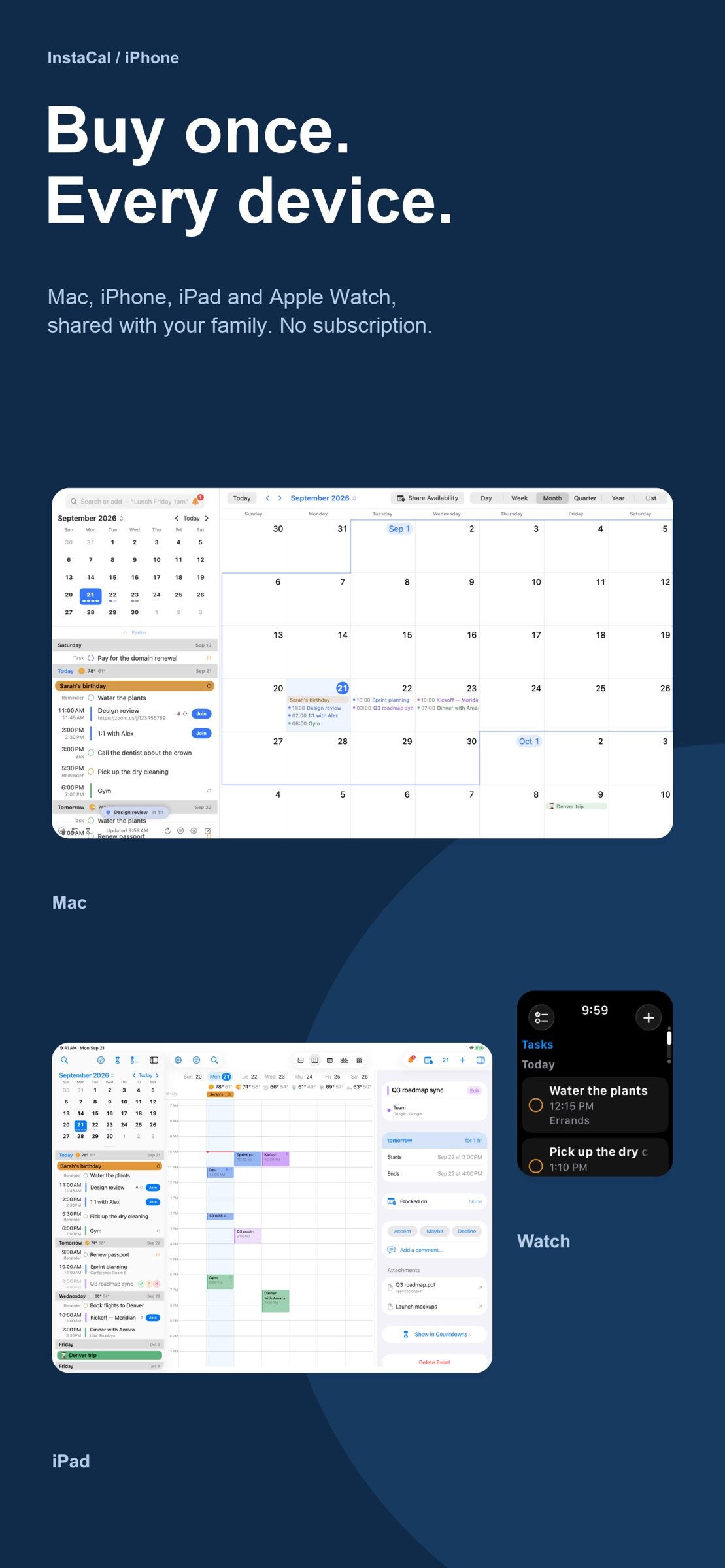
• Mac: a menu bar calendar and full calendar window.
• iPhone: your agenda, widgets and the Live Countdown.
• iPad: calendar, agenda and event details side by side.
• Apple Watch: upcoming plans, tasks, countdowns and complications.
Share it with up to five family members through Family Sharing. No subscription, and no InstaCal account to create.
ADD FROM IMAGE
Photograph a school calendar, newsletter, invitation or class schedule, or share a photo, screenshot, PDF or web page. Every event, to-do and weekly class on it is ready to review and add. InstaCal reads it with Apple Intelligence, unticks what’s already on your calendar, and can put your child’s name in front of each title. Requires an iPhone or iPad with Apple Intelligence.
SIX VIEWS, AND ROOM TO TRY MORE
Move between Agenda, Day, Week, Month, Quarter and Year. In Day and Week, pick up an event and drag it to a new time; overlapping events stack instead of squeezing into slivers. On iPad, put the mini month and agenda beside the calendar. On iPhone Duo, each posture keeps its own layout, with upright styles like Planner Week, Wall Calendar and Quadrants built around the hinge.
A LOOK THAT’S YOURS
Choose Classic, Full Color or Pictures: a street view of where an event is, or a fitting picture for plans like Haircut or Halloween. Pick an accent color, and your widgets and Apple Watch follow it. Turn on the Chinese lunar calendar for lunar dates, festivals and the 24 solar terms across the app, widgets and Apple Watch.
EVENTS, REMINDERS, TASKS AND COUNTDOWNS
• See calendar events and Apple Reminders together.
• Organize tasks in lists with tags, priorities and checklists.
• Count down to trips, birthdays and milestones.
• Put one event on several dates at once with Add Another Date.
• Join online meetings and respond to supported invitations.
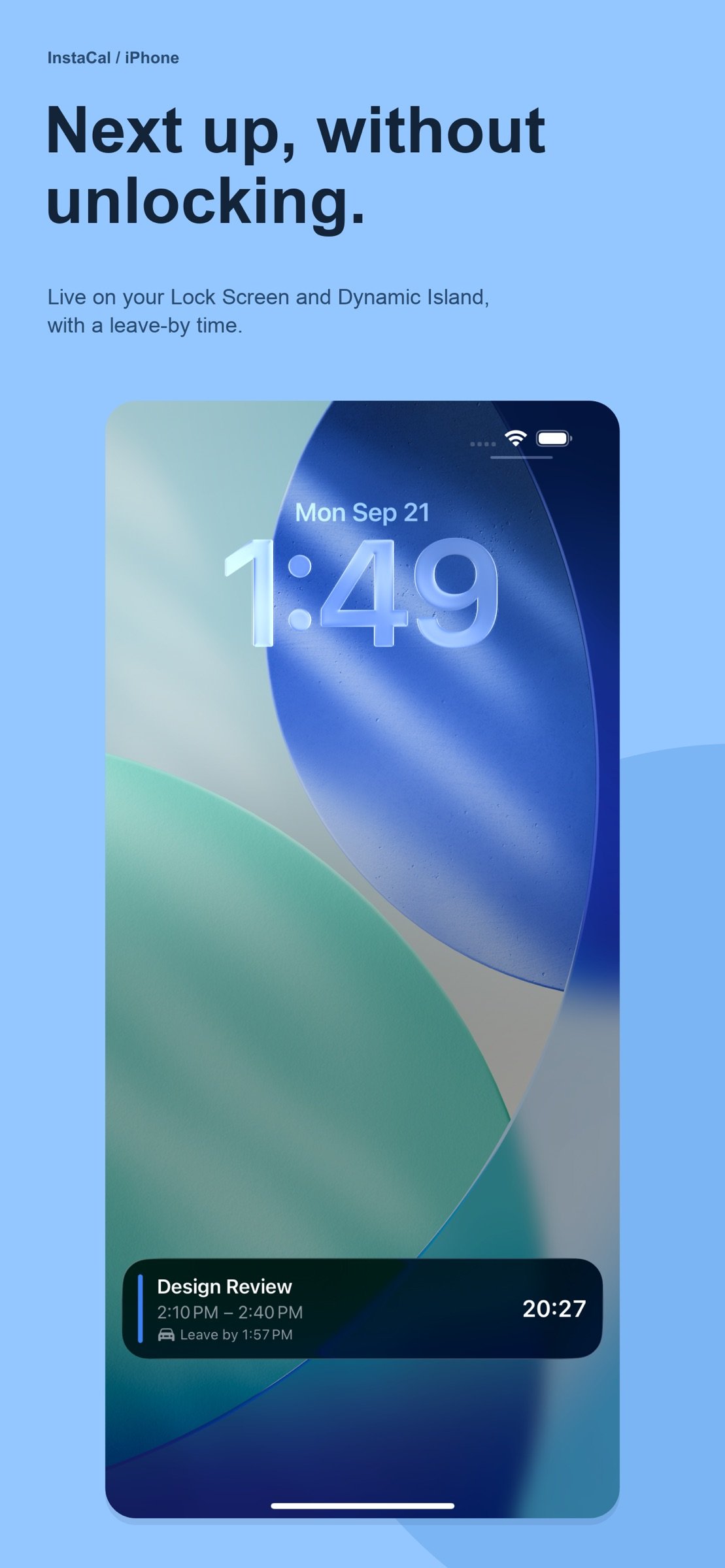
• See weather and moon phases, and get leave-by guidance for your next event.
ADD PLANS IN YOUR OWN WORDS
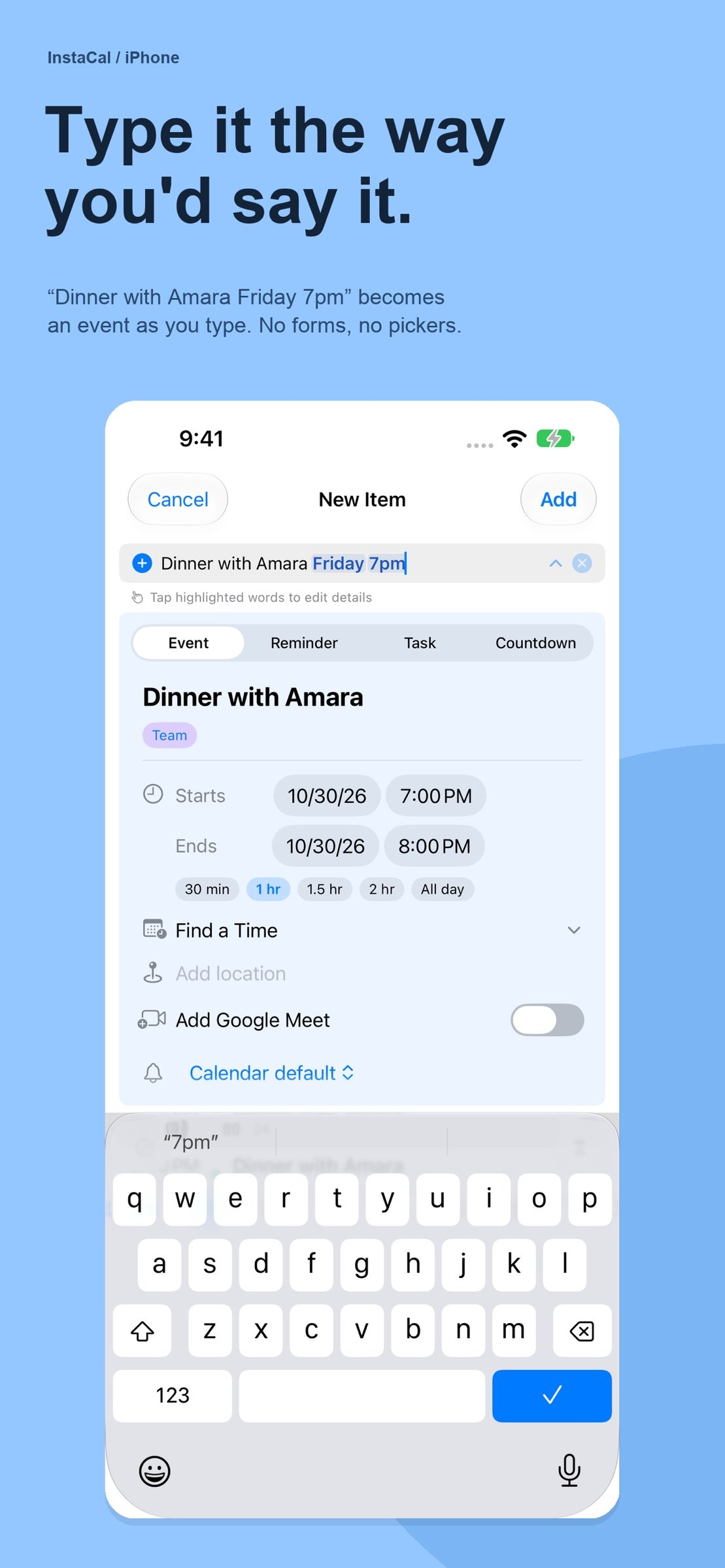
Type “Lunch with Sam tomorrow at noon” to create an event. Quick Add understands dates and times in 31 languages, with processing on your device. Use Quick Edit to move, rename or cancel events from the same field.
WIDGETS THAT KEEP PLANS CLOSE
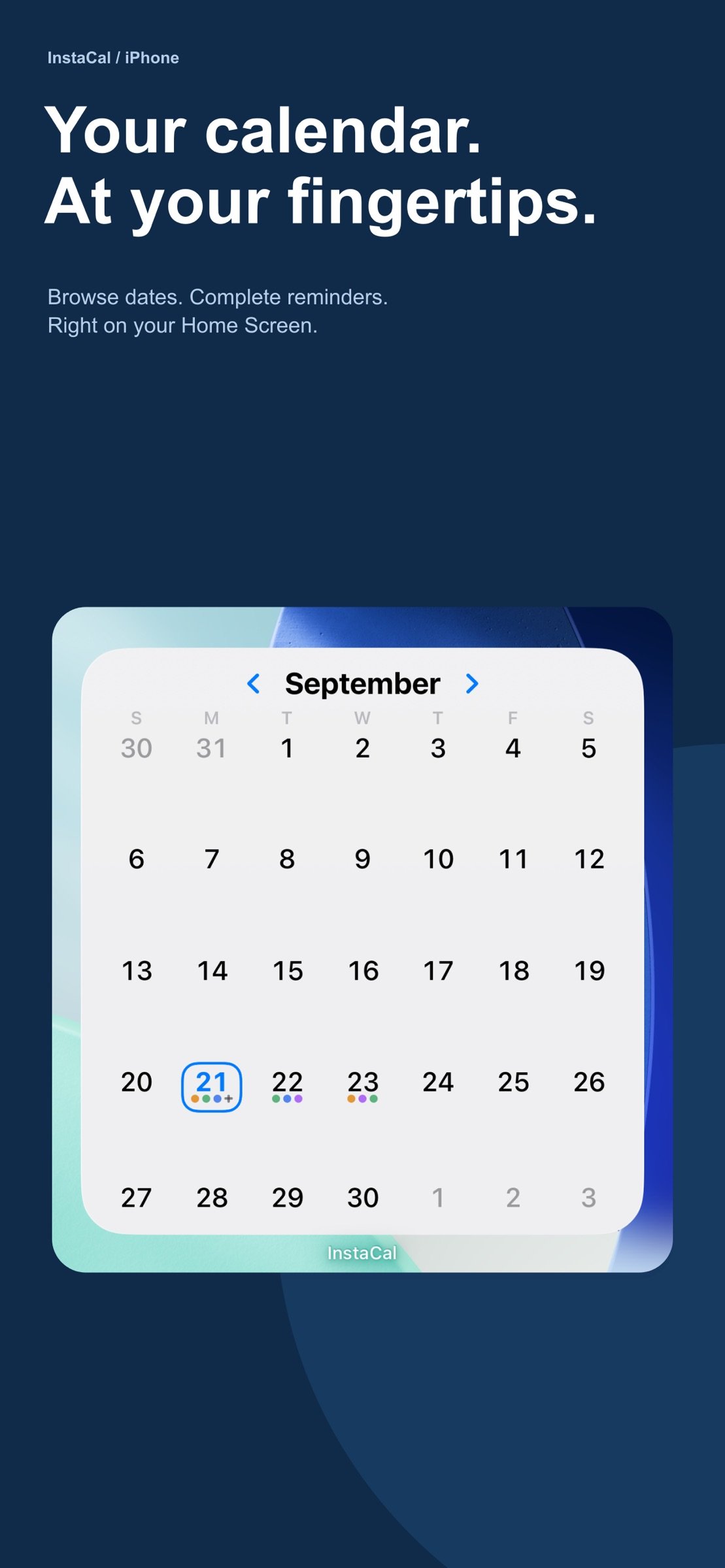
Browse dates and check off reminders in interactive widgets. Keep your agenda, next event and countdowns on your Home Screen, Lock Screen or Mac desktop. On supported iPhones, the Live Countdown counts down to your next event on the Lock Screen, in the Dynamic Island and in your Apple Watch’s Smart Stack.
MAKE ROOM FOR YOUR DAY
Use calendar sets, choose colors and display a second time zone. Your settings sync through your own iCloud. Add plans with Siri, Shortcuts or the Quick Add control on iPhone and iPad.
WORKS WITH THE CALENDARS YOU USE
Use calendars available through Apple Calendar, or connect Google and Microsoft accounts directly for richer event and invitation support.
IN YOUR LANGUAGE
The interface and Quick Add are available in 31 languages, from German and Japanese to Thai and Ukrainian. Dates and week starts follow your region.
PRIVACY
No advertising, tracking or usage analytics. Natural-language entry is processed on your device. Add from Image reads shared pages with Apple Intelligence and Private Cloud Compute. Optional feature-request submissions and event pictures send the content you provide to online services; see our privacy policy for details.
FOR RETURNING CUSTOMERS
If you bought InstaCal before, this rebuilt version is yours at no extra charge, however long ago you bought it.
Questions? Visit instacalapp.com/support/.
Some features require supported devices or services.
License: Commercial
ONE PURCHASE. FOUR PLATFORMS.
• Mac: a menu bar calendar and full calendar window.
• iPhone: your agenda, widgets and the Live Countdown.
• iPad: calendar, agenda and event details side by side.
• Apple Watch: upcoming plans, tasks, countdowns and complications.
Share it with up to five family members through Family Sharing. No subscription, and no InstaCal account to create.
ADD FROM IMAGE
Photograph a school calendar, newsletter, invitation or class schedule, or share a photo, screenshot, PDF or web page. Every event, to-do and weekly class on it is ready to review and add. InstaCal reads it with Apple Intelligence, unticks what’s already on your calendar, and can put your child’s name in front of each title. Requires an iPhone or iPad with Apple Intelligence.
SIX VIEWS, AND ROOM TO TRY MORE
Move between Agenda, Day, Week, Month, Quarter and Year. In Day and Week, pick up an event and drag it to a new time; overlapping events stack instead of squeezing into slivers. On iPad, put the mini month and agenda beside the calendar. On iPhone Duo, each posture keeps its own layout, with upright styles like Planner Week, Wall Calendar and Quadrants built around the hinge.
A LOOK THAT’S YOURS
Choose Classic, Full Color or Pictures: a street view of where an event is, or a fitting picture for plans like Haircut or Halloween. Pick an accent color, and your widgets and Apple Watch follow it. Turn on the Chinese lunar calendar for lunar dates, festivals and the 24 solar terms across the app, widgets and Apple Watch.
EVENTS, REMINDERS, TASKS AND COUNTDOWNS
• See calendar events and Apple Reminders together.
• Organize tasks in lists with tags, priorities and checklists.
• Count down to trips, birthdays and milestones.
• Put one event on several dates at once with Add Another Date.
• Join online meetings and respond to supported invitations.
• See weather and moon phases, and get leave-by guidance for your next event.
ADD PLANS IN YOUR OWN WORDS
Type “Lunch with Sam tomorrow at noon” to create an event. Quick Add understands dates and times in 31 languages, with processing on your device. Use Quick Edit to move, rename or cancel events from the same field.
WIDGETS THAT KEEP PLANS CLOSE
Browse dates and check off reminders in interactive widgets. Keep your agenda, next event and countdowns on your Home Screen, Lock Screen or Mac desktop. On supported iPhones, the Live Countdown counts down to your next event on the Lock Screen, in the Dynamic Island and in your Apple Watch’s Smart Stack.
MAKE ROOM FOR YOUR DAY
Use calendar sets, choose colors and display a second time zone. Your settings sync through your own iCloud. Add plans with Siri, Shortcuts or the Quick Add control on iPhone and iPad.
WORKS WITH THE CALENDARS YOU USE
Use calendars available through Apple Calendar, or connect Google and Microsoft accounts directly for richer event and invitation support.
IN YOUR LANGUAGE
The interface and Quick Add are available in 31 languages, from German and Japanese to Thai and Ukrainian. Dates and week starts follow your region.
PRIVACY
No advertising, tracking or usage analytics. Natural-language entry is processed on your device. Add from Image reads shared pages with Apple Intelligence and Private Cloud Compute. Optional feature-request submissions and event pictures send the content you provide to online services; see our privacy policy for details.
FOR RETURNING CUSTOMERS
If you bought InstaCal before, this rebuilt version is yours at no extra charge, however long ago you bought it.
Questions? Visit instacalapp.com/support/.
Some features require supported devices or services.
License: Commercial
| Release info | Update on Nov 05, 2026 |
|---|---|
| Release notes | • Add from Image: photograph a school calendar, a newsletter, an invitation or a gym’s class schedule, or share a photo, screenshot, PDF or web page to InstaCal, and every event, to-do and weekly class on it is ready to review and add. InstaCal reads the page privately with Apple Intelligence, unticks anything already on your calendar, and can put your child’s name in front of each title. Needs an iPhone or iPad with Apple Intelligence. • Pictures: see where an event is as a live street view, or a fitting picture for plans like Haircut or Halloween, and let Full Color paint each event as a solid block of its calendar’s color. Setup now asks how your day should look, Classic, Full Color or Pictures, on a live agenda, and you can change your mind in Settings. Pick your own photo of a place with Change Photo, or turn the street view to the angle you like and choose Use This View, and with iCloud sync on it follows you to your other iPhone, iPad and Mac. • iPhone Duo and iPad, side by side: the mini month and agenda on the left and the calendar on the right, with a divider you drag and a Duo menu for the arrangement. Hold the Duo upright and choose a style built around the hinge: Month + Agenda, Two Weeks, Month + Two Days, Quadrants, Planner Week, Tall Week, Wall Calendar, or Pick Each Half to put any view in either half. Each way you hold the Duo keeps its own layout in Settings › iPhone Duo; on iPad the same page is Settings › Split Layout. • The Live Countdown is back on your Lock Screen and in the Dynamic Island, and now counts down in your Apple Watch’s Smart Stack too. Your next event’s countdown starts by itself, switches to time left at the start, and says Ended when it’s over. Choose how early it appears in Settings › Widgets & Live Activity. • Chinese lunar calendar: turn it on in Settings › Date & Time › Alternate Calendar, and every day in Month, Quarter, the Home Screen widgets and on your Apple Watch carries its lunar date, with festivals and the 24 solar |
| Listing data | App Store |
Reviews
No reviews yet. Be the first to review InstaCal.
Used InstaCal? Tell other visitors what you thought.
Log in to write a reviewOther products by this publisher
- "No Distractions" for YouTube 4.10 ----
- #Bible 11.6 "Incredible App - My sister shared this app with me a few weeks ago and it is truly incredible.
- #filmphotography 1.4.2 So, you decided to shoot on film?
- $quirrel 1.5.1 $quirrel Budget & Finance helps you plan each paycheck, track spending, manage debt, and see what is safe to spend before the next payday.
- % Percentage Calculator Pro 1.41 This is the Pro version of % Percentage Calculator.
Most viewed iOS Productivity
-
1
 WordPress 27.4
Manage or create your WordPress blog or website right from your iOS device: create and edit posts and pages, upload your favorite photos and videos, view stats and reply to comments.
- 2 Voice Translator - Alive 1.6 Translation app that turns your iPhone into an interpreter instantly.
-
3
 Claude by Anthropic 1.261111.19
Meet Claude, your AI problem solver and thinking partner.
-
4
 WristMemo 2.0
WristMemo turns your Apple Watch into an all-day voice recorder.
- 5 "No Distractions" for YouTube 4.10 ----
- 6 (beat) for iOS 0.5.10 An elegant Fountain screenwriting app, created by a screenwriter for screenwriters.
-
7
 Life360 26.43.0
Whether at home, online, or on the move, our comprehensive family safety features bring peace of mind to your loved ones AND help safeguard your personal belongings.
-
8
 Colicine 1.3.0
Have you ever been there—
-
9
 DeepSeek 2.8.0
Experience seamless interaction with DeepSeek's official AI assistant for free!
-
10
 Howbout 16.7.2
The shared calendar for friends, couples, and family
Most downloaded iOS Productivity
- 1 Voice Translator - Alive 1.6 Translation app that turns your iPhone into an interpreter instantly.
-
2
DeepSeek 2.8.0
Experience seamless interaction with DeepSeek's official AI assistant for free!
-
3
 SessionsAI 1.2.1
Sessions AI is a private AI workspace that runs entirely on your iPhone, iPad, or Mac.
-
4
 Voices AI 1.16.15
Discover Voices, the premier voice transformation app designed exclusively for iOS.
-
5
 Block Distracting Websites 1.11
"It's a great way to save time, and stop browsing Reddit when you should be doing coursework."
-
6
 Plot Digitizer 1.4.1
Plot Digitizer is an app to extract numerical data from plot images.
-
7
 Google Docs 1.2026.45104
Create, edit, and collaborate on online documents with the Google Docs app.
-
8
 Pixy Mood Tracker 1.110.0
Track your mood, one pixel at a time.
-
9
 MyHyundai with Bluelink 5.4.5
The MyHyundai app makes getting information about your Hyundai vehicle easier than ever.
-
10
 ScreenRecess 1.0.0
A gentle nudge to put your device down when it’s hard to stop.