
I Need That Widget 1.6
"I Need That Widget" brings clean, focused calendar and reminder widgets to your Home Screen and Lock Screen.
Download
9.37 MB
0downloads
0this week
FreeCommercial
0reviews
Screenshots
About I Need That Widget
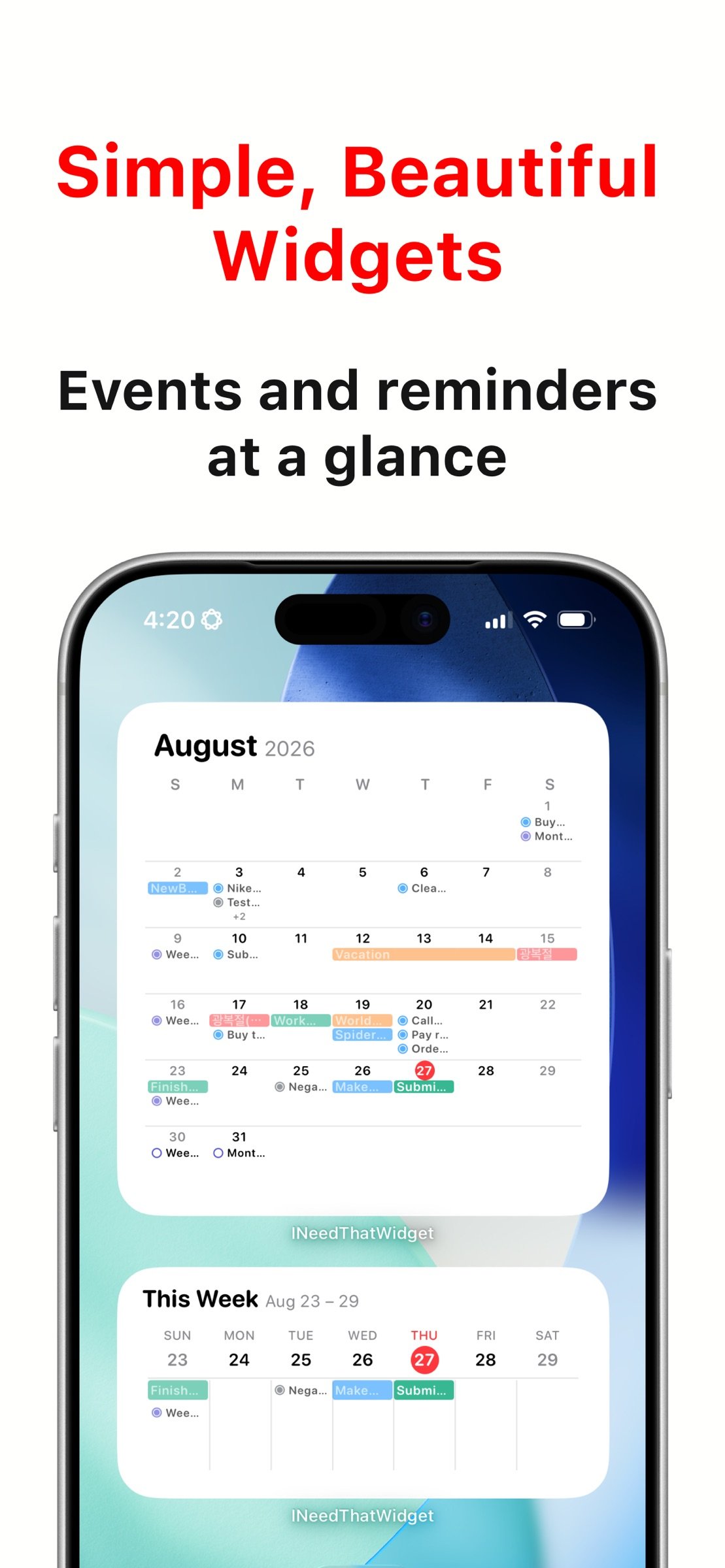
"I Need That Widget" brings clean, focused calendar and reminder widgets to your Home Screen and Lock Screen. See today's schedule, upcoming events and reminders, weekly plans, a full monthly calendar, and today's reminders at a glance without digging through apps. Your calendar and reminder data stays private on your device.
KEY FEATURES
- Home Screen Widgets for different layouts
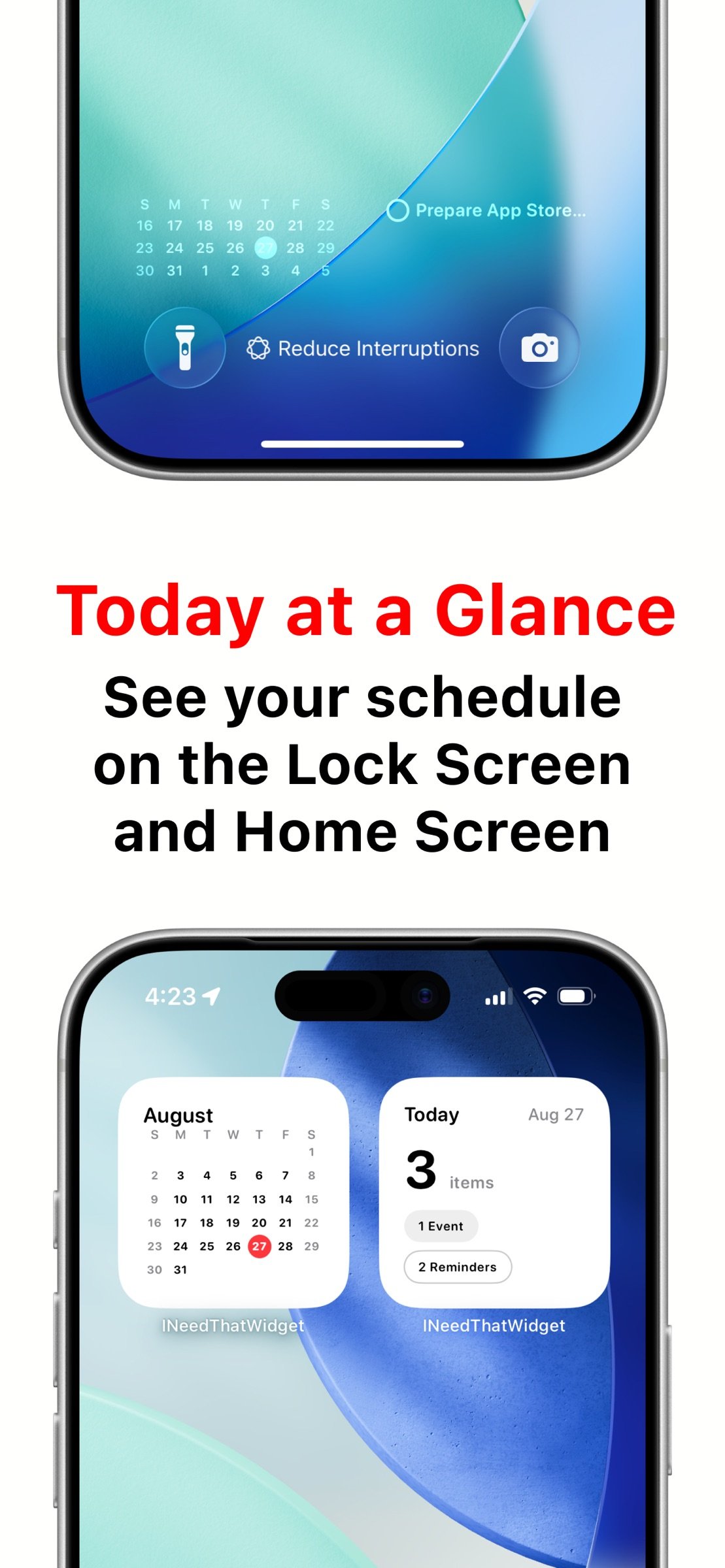
- Small: Month Calendar or Today Counts
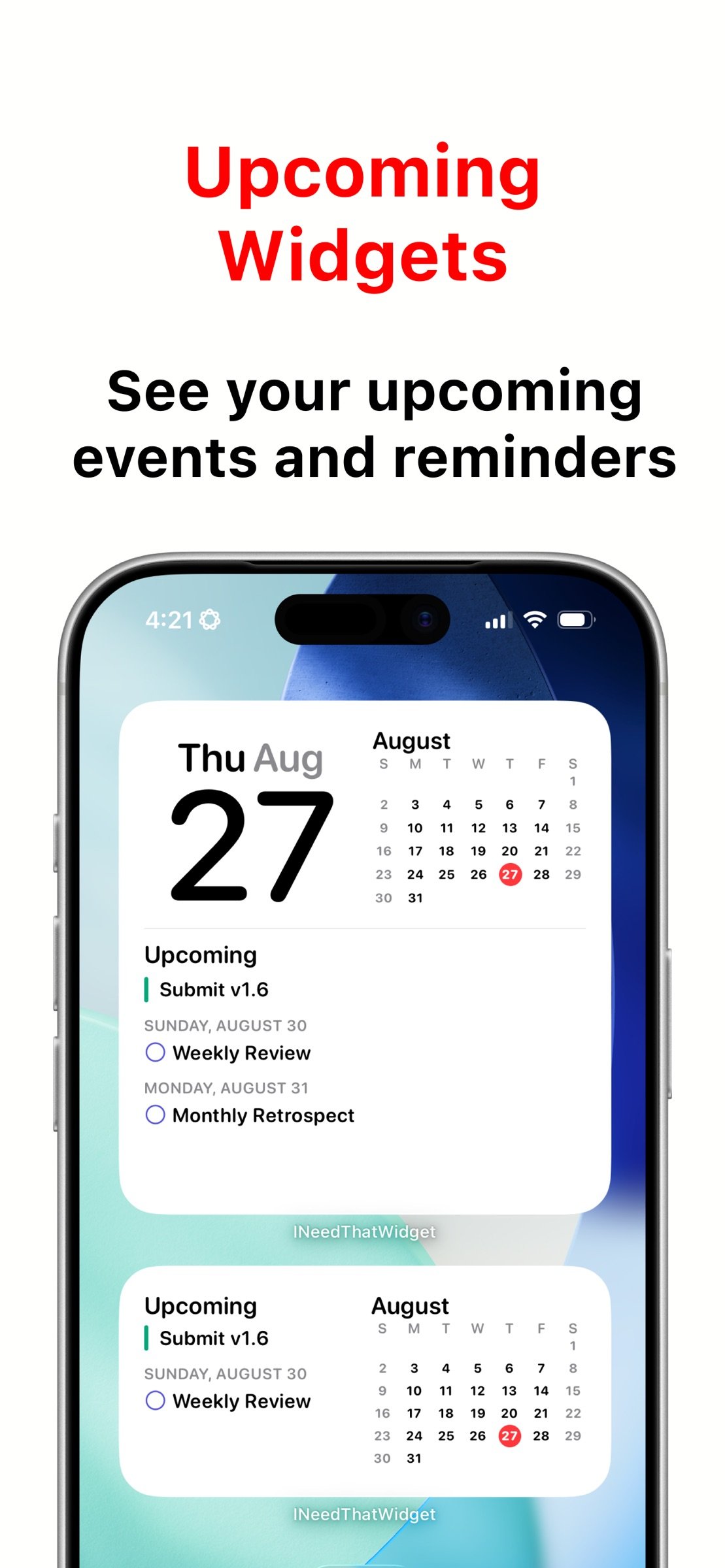
- Medium: Upcoming events and reminders, or Weekly Calendar
- Large: Full Month Grid or Compact Event List
- Lock Screen Widgets
- View a compact 3-week calendar directly on your Lock Screen
- See today's reminders from the Lock Screen with the reminder widget
- Focus Calendar Filters
- Choose which calendars stay visible while a Focus is active
- Apply the same calendar filter in the app and widgets
- Turn off the active Focus filter from the app when needed
- Today Counts Widget
- See today's total event and reminder count at a glance
- Get a quick summary for busy days or free days
- Reminder Support
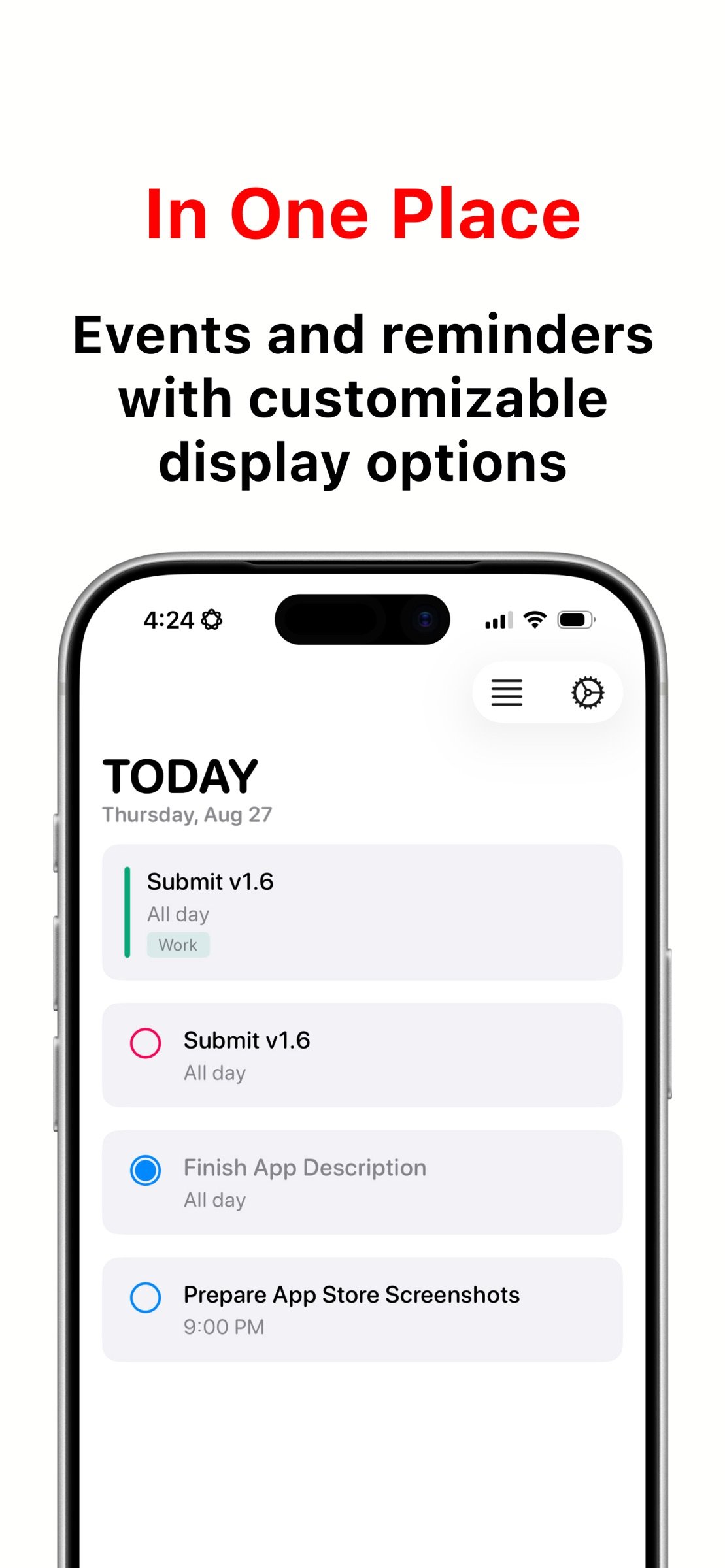
- View reminders alongside calendar events
- See today's reminders and upcoming reminders in widgets
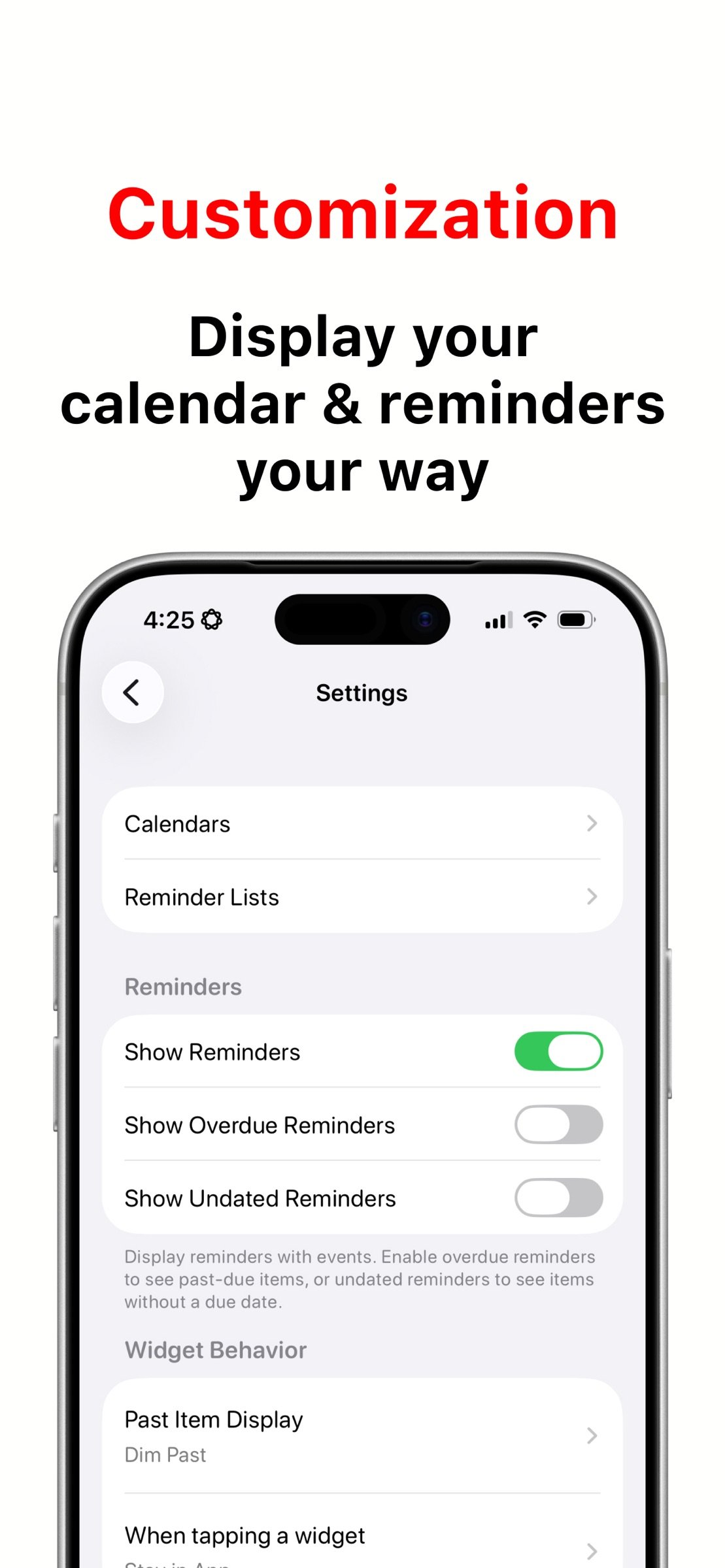
- Choose whether to show overdue reminders and reminders without due dates
- View recurring and all-day reminders more reliably
- Open reminder details from supported widgets and app views
- Weekly Calendar Widget
- See your week in a clean 7-day layout
- Choose a rolling 7-day view starting today, or use your selected week-start setting
- Choose the first day of the week in the app settings, or follow your system setting
- Open in Your Preferred Calendar App
- Apple Calendar, Google Calendar, and Fantastical supported
- Tap widgets and jump into the calendar app you prefer
- Improved fallback helps widget taps recover when permissions or destination apps need attention
- Customizable
- Choose which calendars and reminder lists to show
- Choose between the new calendar-inspired app icon and the Classic icon
- Toggle all-day events
- Control reminder visibility
- Choose how to display past items
- Localized
- Available in English, Korean, German, Spanish, French, Arabic, Dutch, Hindi, Japanese, Simplified Chinese, Traditional Chinese, and Portuguese
- Includes regional variants such as English (UK), English (Canada), English (Australia), Spanish (Mexico), Spanish (Spain), Portuguese (Portugal), and Portuguese (Brazil)
- Privacy First
- Your calendar and reminder data stays on your device
- No accounts, no servers, no tracking
- Clean and Simple
- No ads
- No clutter
- No subscription
PERFECT FOR
- Checking your schedule without opening Calendar
- Seeing today's workload instantly
- Viewing reminders from the Home Screen or Lock Screen
- Planning your week from the Home Screen
- Keeping a calendar visible on the Lock Screen
- Filtering calendars around your current Focus
- Choosing a widget layout that fits your workflow
- People who want simple, readable calendar widgets
PRIVACY & SIMPLICITY
Your calendar and reminder data never leaves your device. "I Need That Widget" is built for people who want practical widgets, minimal design, and quick access to what matters most.
An in-app FAQ explains widget setup and answers common questions.
License: Commercial
KEY FEATURES
- Home Screen Widgets for different layouts
- Small: Month Calendar or Today Counts
- Medium: Upcoming events and reminders, or Weekly Calendar
- Large: Full Month Grid or Compact Event List
- Lock Screen Widgets
- View a compact 3-week calendar directly on your Lock Screen
- See today's reminders from the Lock Screen with the reminder widget
- Focus Calendar Filters
- Choose which calendars stay visible while a Focus is active
- Apply the same calendar filter in the app and widgets
- Turn off the active Focus filter from the app when needed
- Today Counts Widget
- See today's total event and reminder count at a glance
- Get a quick summary for busy days or free days
- Reminder Support
- View reminders alongside calendar events
- See today's reminders and upcoming reminders in widgets
- Choose whether to show overdue reminders and reminders without due dates
- View recurring and all-day reminders more reliably
- Open reminder details from supported widgets and app views
- Weekly Calendar Widget
- See your week in a clean 7-day layout
- Choose a rolling 7-day view starting today, or use your selected week-start setting
- Choose the first day of the week in the app settings, or follow your system setting
- Open in Your Preferred Calendar App
- Apple Calendar, Google Calendar, and Fantastical supported
- Tap widgets and jump into the calendar app you prefer
- Improved fallback helps widget taps recover when permissions or destination apps need attention
- Customizable
- Choose which calendars and reminder lists to show
- Choose between the new calendar-inspired app icon and the Classic icon
- Toggle all-day events
- Control reminder visibility
- Choose how to display past items
- Localized
- Available in English, Korean, German, Spanish, French, Arabic, Dutch, Hindi, Japanese, Simplified Chinese, Traditional Chinese, and Portuguese
- Includes regional variants such as English (UK), English (Canada), English (Australia), Spanish (Mexico), Spanish (Spain), Portuguese (Portugal), and Portuguese (Brazil)
- Privacy First
- Your calendar and reminder data stays on your device
- No accounts, no servers, no tracking
- Clean and Simple
- No ads
- No clutter
- No subscription
PERFECT FOR
- Checking your schedule without opening Calendar
- Seeing today's workload instantly
- Viewing reminders from the Home Screen or Lock Screen
- Planning your week from the Home Screen
- Keeping a calendar visible on the Lock Screen
- Filtering calendars around your current Focus
- Choosing a widget layout that fits your workflow
- People who want simple, readable calendar widgets
PRIVACY & SIMPLICITY
Your calendar and reminder data never leaves your device. "I Need That Widget" is built for people who want practical widgets, minimal design, and quick access to what matters most.
An in-app FAQ explains widget setup and answers common questions.
License: Commercial
| Release info | New Release on Aug 30, 2026 |
|---|---|
| Release notes | NEW in v1.6 Customize your calendars, widgets, and app experience with Focus filters, more flexible layouts, a new app icon, and expanded language support. New - Filter calendars by Focus so the app and widgets show only what matters in the active Focus. - Choose between the new calendar-inspired app icon and the Classic icon from Settings. - Set the first day of the week for the new Weekly Widget, or follow your system setting. - More languages are now available across the app, widgets, and settings, including Arabic, Dutch, French, Hindi, Japanese, Chinese, Portuguese, and regional English and Spanish variants. Improved - Upcoming widgets handle more events and reminders across widget sizes, with better date grouping, overflow handling, spacing, and title sizing. - Widgets now apply Focus filters and calendar preferences more consistently. - RTL layouts, month titles, accessibility labels, and regional localization fallbacks are more polished. - Legacy Weekly Calendar widgets now guide you to the new widget with clear migration instructions. Fixed - Recurring all-day reminders now appear correctly in Upcoming and Weekly widgets. - Widget overflow fallbacks no longer lose date groups or create unstable summaries. |
| Listing data | App Store |
Reviews
No reviews yet. Be the first to review I Need That Widget.
Used I Need That Widget? Tell other visitors what you thought.
Log in to write a reviewOther products by this publisher
- #Bible 11.5 "Incredible App - My sister shared this app with me a few weeks ago and it is truly incredible.
- % Percentage Calculator Pro 1.41 This is the Pro version of % Percentage Calculator.
- (beat) for iOS 0.5.8 An elegant Fountain screenwriting app, created by a screenwriter for screenwriters.
- (Deep) HIARCS Chess Explorer 1.14 Chess database, analysis and game playing program
- (How to) Pronounce PRO 1.5.6 This is a PRO version of (How to) Pronounce.
Most viewed iOS Productivity
- 1 Voice Translator - Alive 1.6 Translation app that turns your iPhone into an interpreter instantly.
-
2
 WordPress 27.3
Manage or create your WordPress blog or website right from your iOS device: create and edit posts and pages, upload your favorite photos and videos, view stats and reply to comments.
WordPress 27.3
Manage or create your WordPress blog or website right from your iOS device: create and edit posts and pages, upload your favorite photos and videos, view stats and reply to comments.
- 3 (beat) for iOS 0.5.8 An elegant Fountain screenwriting app, created by a screenwriter for screenwriters.
-
4
 Life360 26.39.0
Whether at home, online, or on the move, our comprehensive family safety features bring peace of mind to your loved ones AND help safeguard your personal belongings.
Life360 26.39.0
Whether at home, online, or on the move, our comprehensive family safety features bring peace of mind to your loved ones AND help safeguard your personal belongings.
-
5
 Ralph Breaks the Internet 1.2.3
Now loading: Ralph Breaks the Internet stickers!
Ralph Breaks the Internet 1.2.3
Now loading: Ralph Breaks the Internet stickers!
-
6
 Facebook Creator Studio 8.0
Creator Studio is an AI-powered daily companion for Facebook creators that tells them exactly how to grow -- Remove distractions and focus on what's most important.
Facebook Creator Studio 8.0
Creator Studio is an AI-powered daily companion for Facebook creators that tells them exactly how to grow -- Remove distractions and focus on what's most important.
-
7
 Howbout 16.5.3
The shared calendar for friends, couples, and family
Howbout 16.5.3
The shared calendar for friends, couples, and family
-
8
 Claude by Anthropic 1.261014.20
Meet Claude, your AI problem solver and thinking partner.
Claude by Anthropic 1.261014.20
Meet Claude, your AI problem solver and thinking partner.
-
9
 Skool Communities 1.1.21
The official Skool app.
Skool Communities 1.1.21
The official Skool app.
-
10
 Linktree 3.64.0
Linktree is the largest link in bio tool used by over 70 million people and organizations around the world.
Linktree 3.64.0
Linktree is the largest link in bio tool used by over 70 million people and organizations around the world.
Most downloaded iOS Productivity
- 1 Voice Translator - Alive 1.6 Translation app that turns your iPhone into an interpreter instantly.
-
2
 GridCal 1.0
Most calendar apps open on a day or a week.
GridCal 1.0
Most calendar apps open on a day or a week.
-
3
 Beer Buddy 6.43
Your friend wants you to get a notification when they take a drink.
Beer Buddy 6.43
Your friend wants you to get a notification when they take a drink.
-
4
 Birthday Reminder Pro+ 3.6.2
Birthday Reminder Pro+ is the easiest and most effective way to remind you of your friends' and family members' birthdays so that you never forget another Birthday ever again.
Birthday Reminder Pro+ 3.6.2
Birthday Reminder Pro+ is the easiest and most effective way to remind you of your friends' and family members' birthdays so that you never forget another Birthday ever again.
-
5
 HP 26.4.0
The go-to app for your HP devices.
HP 26.4.0
The go-to app for your HP devices.
-
6
 Tampermonkey 5.6.6243
Tampermonkey is a widely popular browser extension compatible with all major browsers.
Tampermonkey 5.6.6243
Tampermonkey is a widely popular browser extension compatible with all major browsers.
-
7
 Open Relay 6.4.1
Your AI. Your server.
Open Relay 6.4.1
Your AI. Your server.
-
8
 KeePassium (KeePass passwords) 2.5
KeePassium is an open-source password manager compatible with KeePass/KeePassXC.
KeePassium (KeePass passwords) 2.5
KeePassium is an open-source password manager compatible with KeePass/KeePassXC.
-
9
 Wallabag Reader 7.13
Save web articles and read them later—on your terms.
Wallabag Reader 7.13
Save web articles and read them later—on your terms.
-
10
Life360 26.39.0
Whether at home, online, or on the move, our comprehensive family safety features bring peace of mind to your loved ones AND help safeguard your personal belongings.