
25downloads
1this week
FreeCommercial
0reviews
Screenshots
About FormWright 3D
Make a character. Build a precise prop. Bring it to life.
FormWright 3D brings modeling, sculpting, painting and animation together on iPad and iPhone. Move from an idea to a textured model, a performance or a camera take in one local project. One purchase, with no subscription or in-app purchases.
MAKE: SHAPE YOUR IDEA
Model with points, edges and faces, modifiers, instances and symmetry. Sculpt a clay sphere or grow organic forms with Branch Forms. Paint directly on models with texture layers and symmetry, then explore live procedural materials. Retopo Draw on regular iPad layouts helps you lay out loops and strips and refine topology.
MAKE: WORK WITH DIMENSIONS
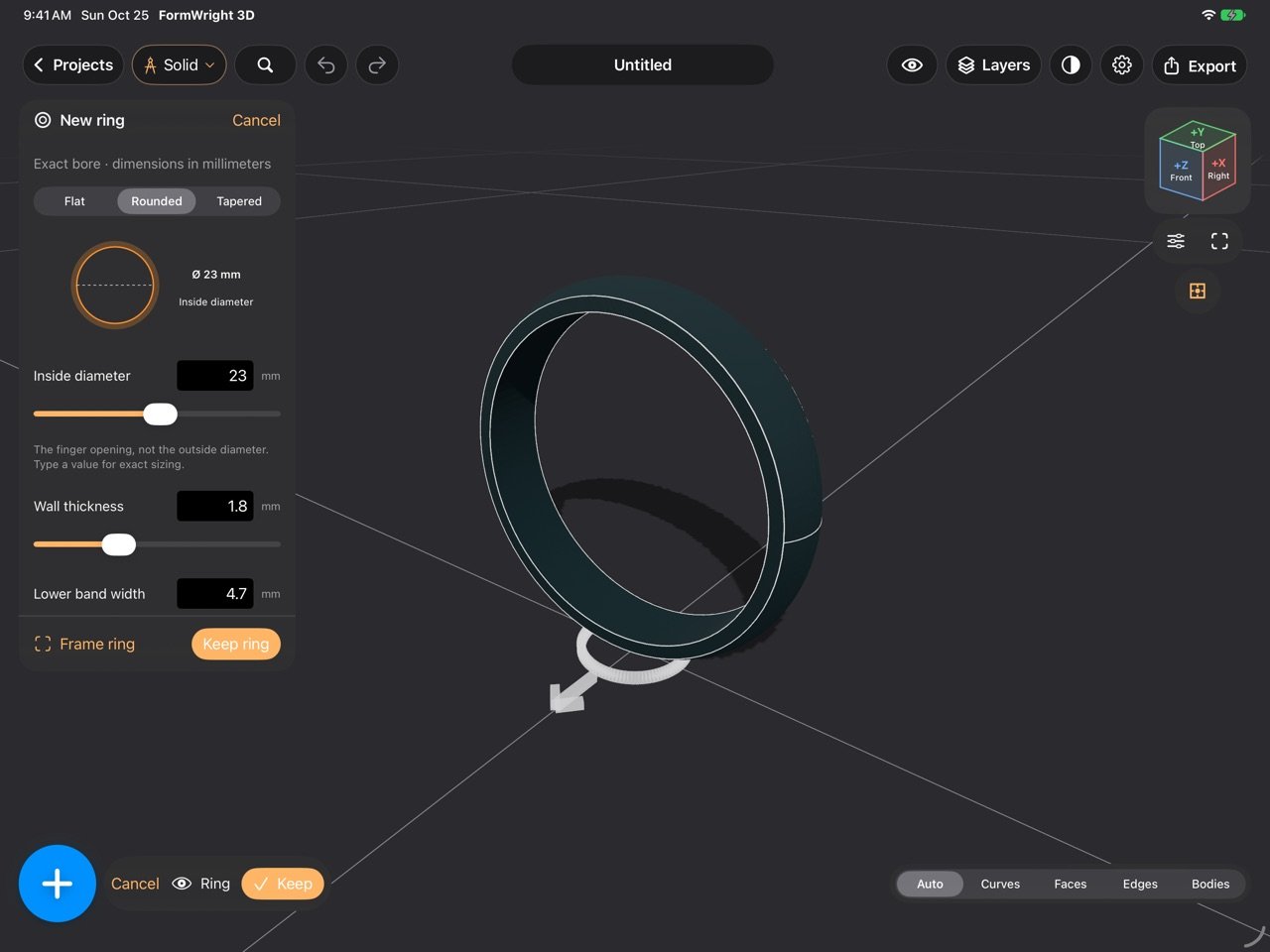
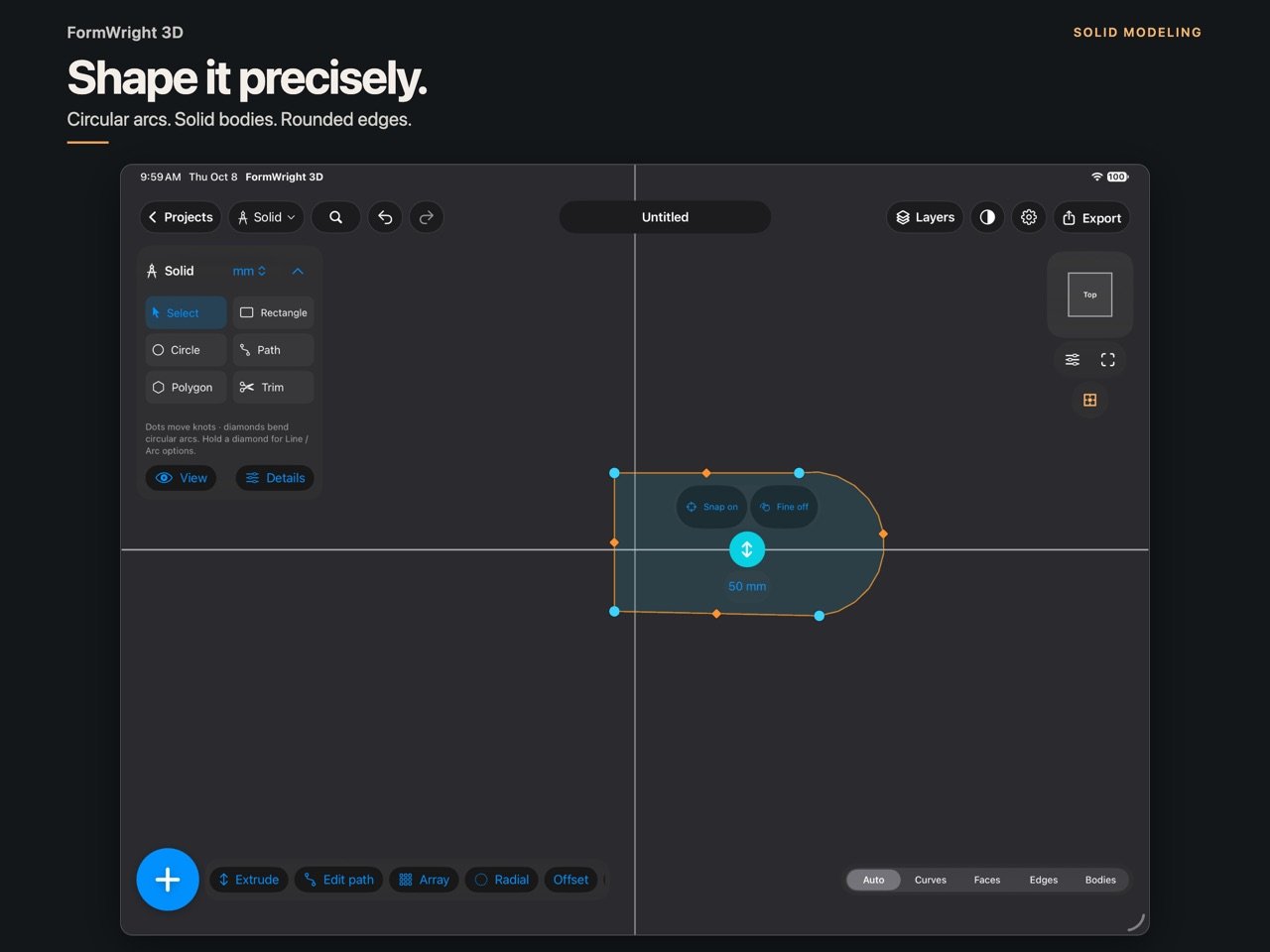
Use Solid for sketches, circular-arc paths, extrusions, cuts, fillets, chamfers, insets, pockets and repeated patterns. Create Flat, Rounded or Tapered ring blanks with an exact inside diameter, wall thickness and band width in millimeters. Inspect details with close-up navigation. Export exact Solid geometry as STEP, or bake a mesh for Sculpt and Paint while retaining the Solid source.
MOVE: RIG AND ANIMATE
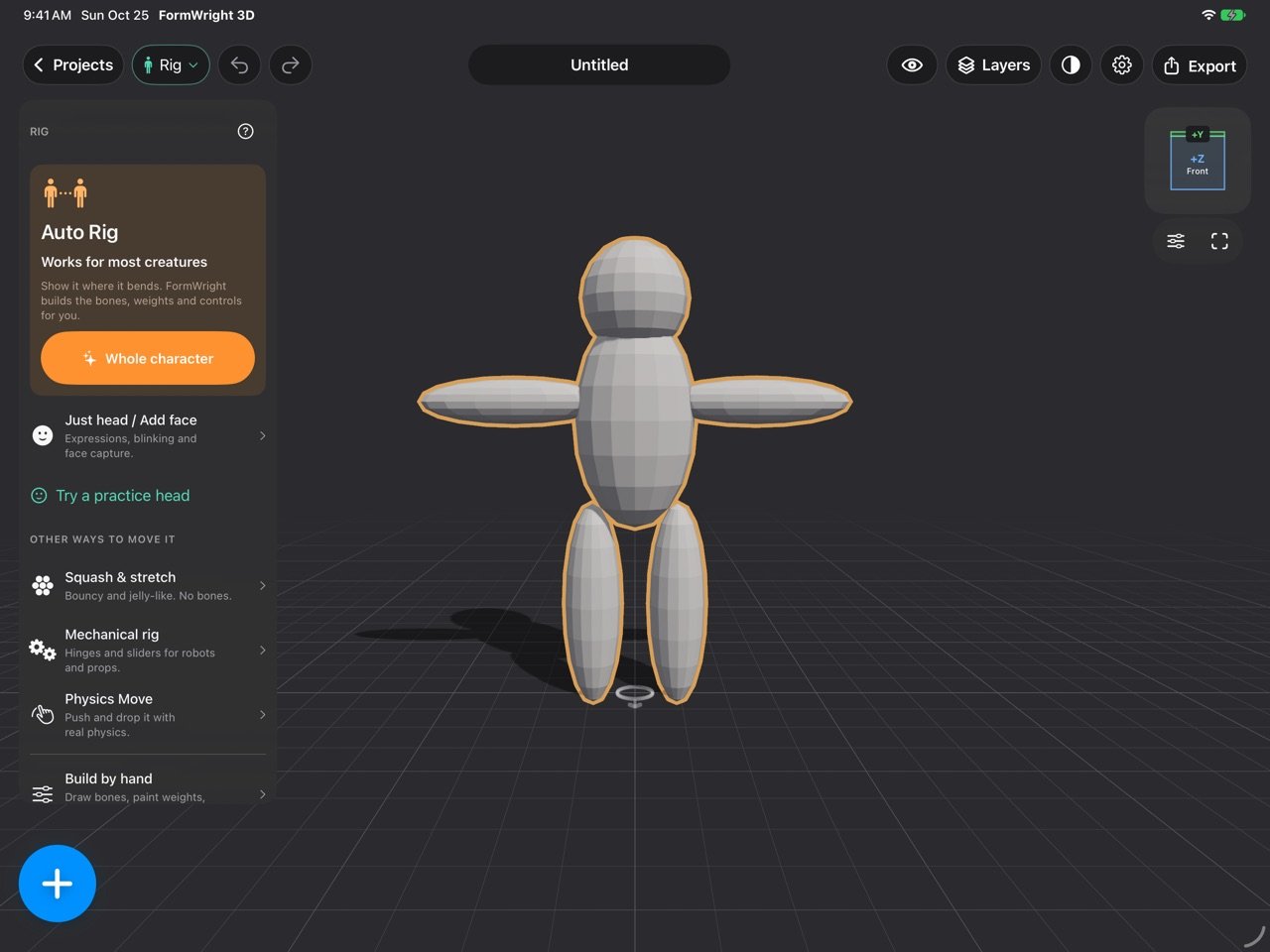
Start with guided Auto Rig, adjust landmarks and weights, and test a pose. Face Auto Rig offers expression starting points for suitable meshes. Use keyframes, curves, ghosts and trails, or record movement in Perform and layer it into your animation. Preview supported rigid-body reactions and bake them to editable keys. Auto rigs and face shapes are editable starting points; results depend on your model and topology.
SHOOT: LIGHT AND SHARE
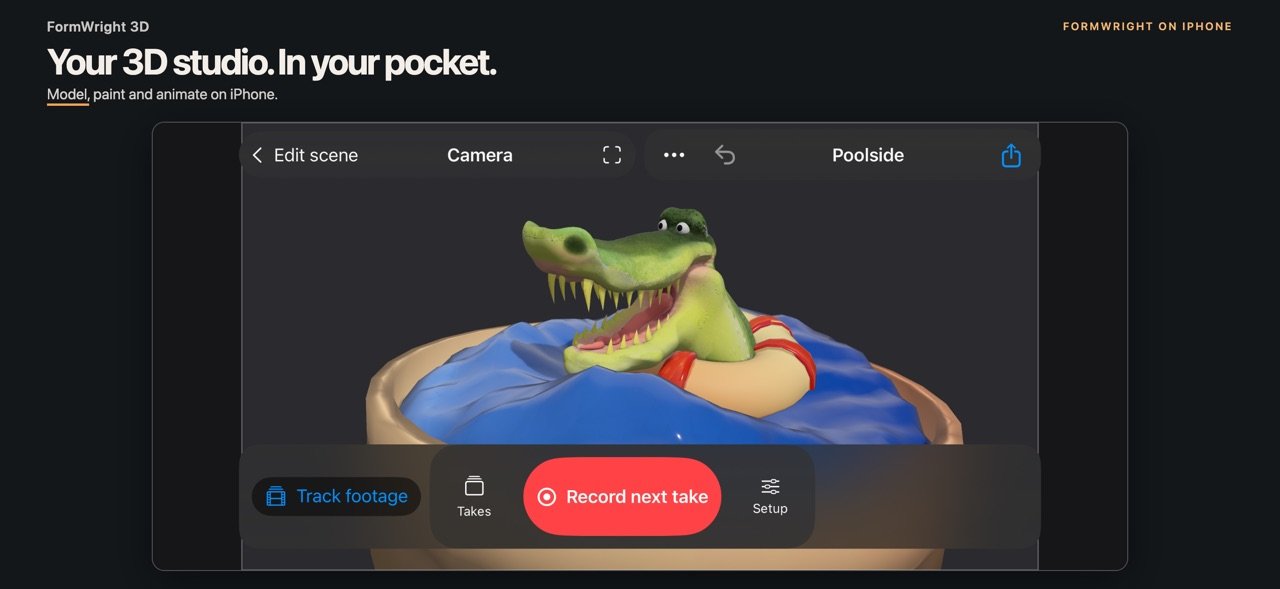
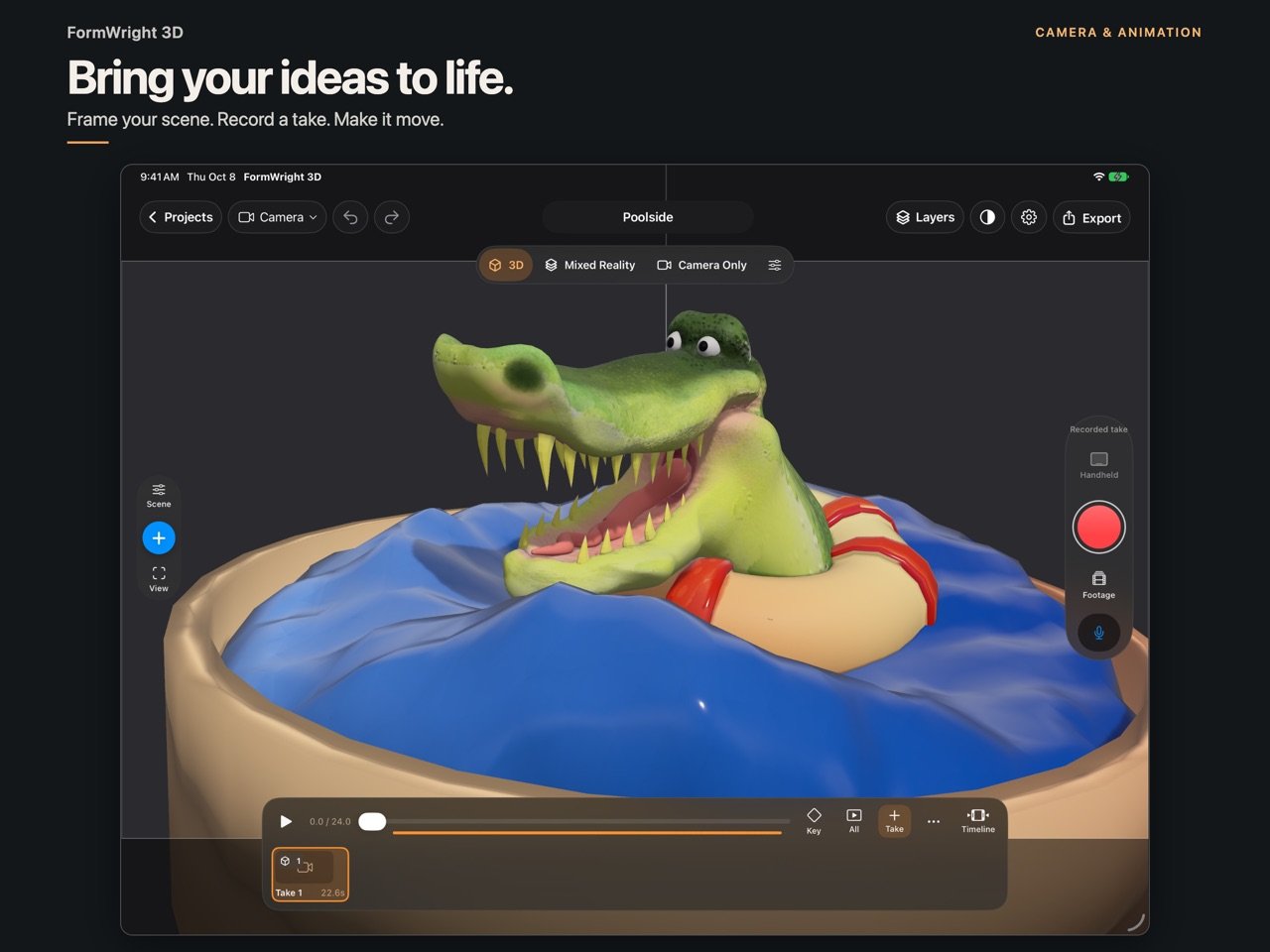
Set lights, shadows and photo-based environments. Frame camera takes, add imported audio or optional voice recordings, and export video. On supported hardware, explore handheld camera control, mixed reality and body, hand or face motion capture. Footage tracking estimates camera movement and may drift with blur, occlusion or low detail.
A WORKSPACE THAT FITS
Use full-screen iPad controls or compact iPhone panels. Arrange and pin supported panels on regular iPad layouts. Keep photo references nearby. Optional time-lapse captures silent editing snapshots after you start it; recordings stay on this device and can be exported separately.
YOUR PROJECTS, YOUR FILES
Save locally and share editable .da3 projects with referenced assets. Open older .fw3d and .formwright projects as separate copies. Exchange supported geometry, materials and animation through USDZ, GLB, OBJ and FBX; export STL or 3MF for printing. Formats preserve different parts of a scene, with guidance for baking or simplified output.
ONE PURCHASE
No FormWright account, subscription, ads or tracking SDKs. Creative processing stays on your device. Existing owners receive version 1.3 as an update. Your original work can be used in personal or commercial projects; imported assets retain their owners' terms.
BEFORE YOU START
Apple Pencil is optional; hover needs compatible hardware. Retopo Draw needs a regular iPad layout. AR and capture features depend on device capabilities; room scanning needs supported LiDAR hardware. The optional Watch companion provides lightweight previews and orientation control through a paired iPhone; direct Watch-to-iPad control is not included.
Solid uses direct modeling with a read-only feature record. Changing an earlier sketch does not rebuild an extrusion. Ring dimensions remain editable until another Solid operation changes the shape. Full sketch constraints, automatic tangency, revolve and shell are not included. Keep backups before updating important projects; earlier app versions may not open newer project data. Complex geometry and exports can take longer.
Privacy, support and open-source acknowledgments are available in Settings and on the developer website.
FormWright 3D brings modeling, sculpting, painting and animation together on iPad and iPhone. Move from an idea to a textured model, a performance or a camera take in one local project. One purchase, with no subscription or in-app purchases.
MAKE: SHAPE YOUR IDEA
Model with points, edges and faces, modifiers, instances and symmetry. Sculpt a clay sphere or grow organic forms with Branch Forms. Paint directly on models with texture layers and symmetry, then explore live procedural materials. Retopo Draw on regular iPad layouts helps you lay out loops and strips and refine topology.
MAKE: WORK WITH DIMENSIONS
Use Solid for sketches, circular-arc paths, extrusions, cuts, fillets, chamfers, insets, pockets and repeated patterns. Create Flat, Rounded or Tapered ring blanks with an exact inside diameter, wall thickness and band width in millimeters. Inspect details with close-up navigation. Export exact Solid geometry as STEP, or bake a mesh for Sculpt and Paint while retaining the Solid source.
MOVE: RIG AND ANIMATE
Start with guided Auto Rig, adjust landmarks and weights, and test a pose. Face Auto Rig offers expression starting points for suitable meshes. Use keyframes, curves, ghosts and trails, or record movement in Perform and layer it into your animation. Preview supported rigid-body reactions and bake them to editable keys. Auto rigs and face shapes are editable starting points; results depend on your model and topology.
SHOOT: LIGHT AND SHARE
Set lights, shadows and photo-based environments. Frame camera takes, add imported audio or optional voice recordings, and export video. On supported hardware, explore handheld camera control, mixed reality and body, hand or face motion capture. Footage tracking estimates camera movement and may drift with blur, occlusion or low detail.
A WORKSPACE THAT FITS
Use full-screen iPad controls or compact iPhone panels. Arrange and pin supported panels on regular iPad layouts. Keep photo references nearby. Optional time-lapse captures silent editing snapshots after you start it; recordings stay on this device and can be exported separately.
YOUR PROJECTS, YOUR FILES
Save locally and share editable .da3 projects with referenced assets. Open older .fw3d and .formwright projects as separate copies. Exchange supported geometry, materials and animation through USDZ, GLB, OBJ and FBX; export STL or 3MF for printing. Formats preserve different parts of a scene, with guidance for baking or simplified output.
ONE PURCHASE
No FormWright account, subscription, ads or tracking SDKs. Creative processing stays on your device. Existing owners receive version 1.3 as an update. Your original work can be used in personal or commercial projects; imported assets retain their owners' terms.
BEFORE YOU START
Apple Pencil is optional; hover needs compatible hardware. Retopo Draw needs a regular iPad layout. AR and capture features depend on device capabilities; room scanning needs supported LiDAR hardware. The optional Watch companion provides lightweight previews and orientation control through a paired iPhone; direct Watch-to-iPad control is not included.
Solid uses direct modeling with a read-only feature record. Changing an earlier sketch does not rebuild an extrusion. Ring dimensions remain editable until another Solid operation changes the shape. Full sketch constraints, automatic tangency, revolve and shell are not included. Keep backups before updating important projects; earlier app versions may not open newer project data. Complex geometry and exports can take longer.
Privacy, support and open-source acknowledgments are available in Settings and on the developer website.
| Release info | Update on Nov 04, 2026 |
|---|---|
| Release notes | Version 1.3 helps you move from making a model to bringing it to life. • Precision ring blanks: Flat, Rounded and Tapered profiles with exact millimeter dimensions, editable sizing and clearer close-up controls. • Guided Auto Rig and Face Auto Rig, with landmark placement, weight editing, pose tests and expression starting points. • Expanded timeline keys and curves, layered Perform motion, Quick Moves and editable baked physics reactions. • Make, Move and Shoot workspace groups, clearer view controls, and movable, pinnable panels on regular iPad layouts. • Photo references, visual Add tools, and silent, optional time-lapse recordings that you can export separately. • Editable .da3 project sharing, separate-copy opening of older .fw3d and .formwright files, and clearer import/save progress. • Sculpting, selection, duplication, playback and project-opening improvements. One-time purchase; existing owners receive this update. No subscription or in-app purchases. Auto rigs and expression shapes are starting points that may need adjustment. Ring sizing stays editable until another Solid operation changes the shape. Capture features depend on hardware; supported export formats preserve different parts of your scene. Keep a backup before updating important projects. |
| Listing data | App Store |
Reviews
No reviews yet. Be the first to review FormWright 3D.
Used FormWright 3D? Tell other visitors what you thought.
Log in to write a reviewOther products by this publisher
- "No Distractions" for YouTube 4.10 ----
- #Bible 11.6 "Incredible App - My sister shared this app with me a few weeks ago and it is truly incredible.
- #filmphotography 1.4.2 So, you decided to shoot on film?
- $quirrel 1.5.1 $quirrel Budget & Finance helps you plan each paycheck, track spending, manage debt, and see what is safe to spend before the next payday.
- % Percentage Calculator Pro 1.41 This is the Pro version of % Percentage Calculator.
Most viewed iOS Photo & Video
-
1
 ShortDiShow 2.0
Drama Quest Island — An offline interactive short-drama adventure.
-
2
 Infuse 8.5.10
Infuse: Enterprise provides the same great features as the standard version of Infuse and includes permanent access to all Pro features via a traditional paid app.
-
3
 AI Video Generator 2.0.3
Vixel – AI Video Generator
-
4
 OPlayer 4.8
Play all your videos directly without having to convert them!
-
5
 Necrometer II 1.2
Necrometer II is a paranormal investigation companion designed for ghost hunters and researchers.
-
6
 CapCut 20.1.0
CapCut offers easy-to-use video editing functions, in-APP fonts and effects, advanced features such as keyframe animation, smooth slow-motion, chroma key, and stabilization, to help you capture and snip moments.
-
7
 Ai Photo 1.1.2
AI Photo Retouch – BG Eraser
- 8 #filmphotography 1.4.2 So, you decided to shoot on film?
-
9
 Treblo 1.6.5
Make songs with the world's best AI music model.
-
10
 Pop Dot Comics 1.48
Create a comic worthy of the Sunday newspaper or your favorite pulp-fiction cover.
Most downloaded iOS Photo & Video
-
1
Infuse 8.5.10
Infuse: Enterprise provides the same great features as the standard version of Infuse and includes permanent access to all Pro features via a traditional paid app.
-
2
 DJI Fly 1.21.18
DJI Fly is designed to help pilots fly drones with ease.
-
3
 Analog Radio 3.0
The iPhone and iPad devices don't have the FM/AM radio antenna installed.
-
4
 TurboCollage Automatic 1.2.4
#1 Easy automatic photo collage maker for iPhone & iPad.
-
5
 Rozeta Sequencer Suite 1.3.16
Rozeta is a suite of MIDI sequencers and controllers that lets you explore a new, freeform approach to sequencing and controlling mobile music apps.
-
6
 ReelyGo 1.1.42
ReelyGo: Your Daily Drama Escape
-
7
Treblo 1.6.5
Make songs with the world's best AI music model.
-
8
Pop Dot Comics 1.48
Create a comic worthy of the Sunday newspaper or your favorite pulp-fiction cover.
-
9
 AGAIN. Rehearsal Notes 2.0.1
AGAIN. is the rehearsal app that remembers why the band stopped — and, new in Version 2, who said what in a writing session or a table read.
-
10
 Sun Scout 1.5.0
If your work or play requires sunlight, Sun Scout is built for you.