Exposure Check 4
Exposure Check brings professional-grade exposure analysis to your iPhone, iPad, and Mac for 1 low price!
Download
30.11 MB
1downloads
1this week
FreeCommercial
0reviews
Screenshots

About Exposure Check
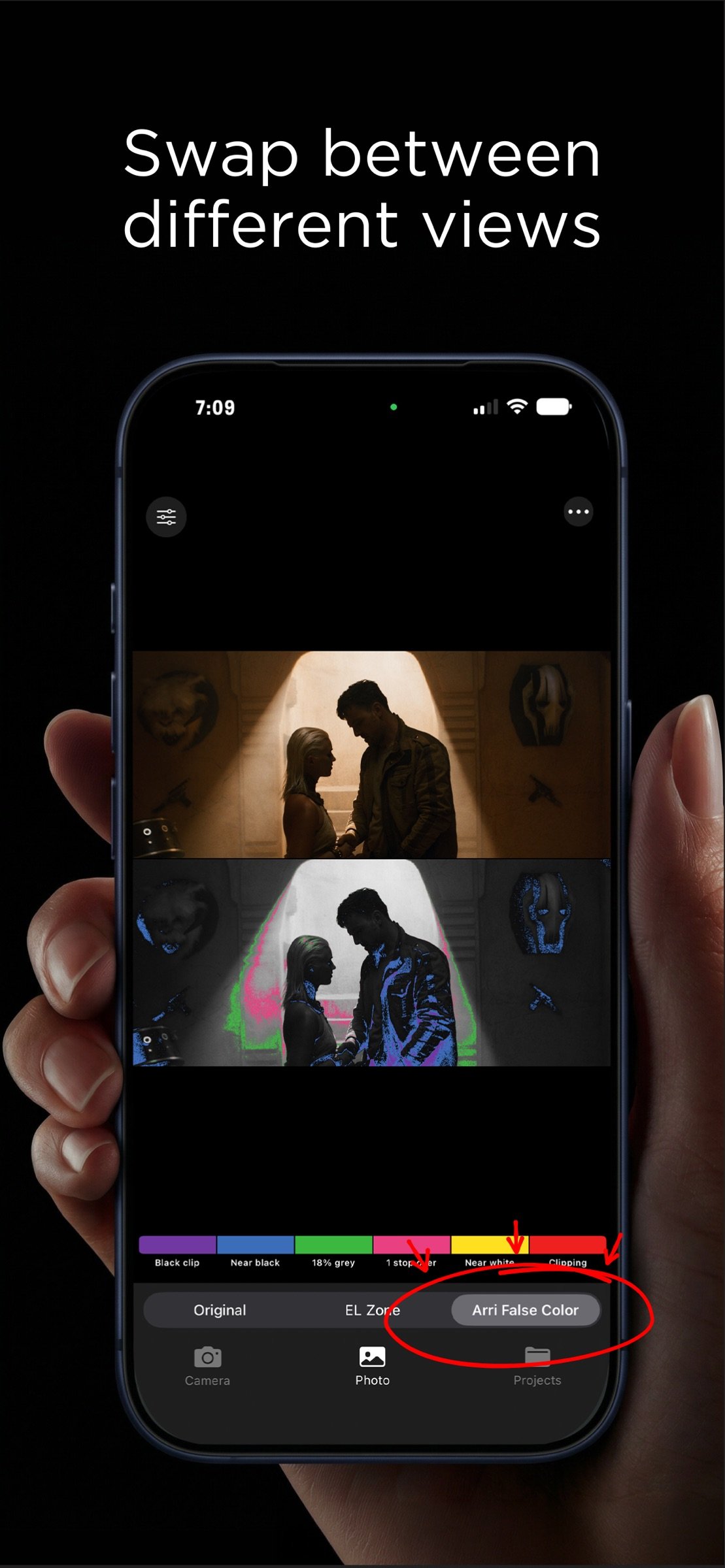
Exposure Check brings professional-grade exposure analysis to your iPhone, iPad, and Mac for 1 low price! False color imaging — used by cinematographers on set worldwide — reveals exactly where your highlights clip and shadows crush before it's too late. Use this tool to import images from Movies, TV Shows, and more to reveal how professional cinematographers exposed their final graded images.
SHOOT IN APPLE LOG
Capture with the in-app camera in Apple Log and read exposure the way you would on a pro monitor. Zone and False Color overlays follow the exact Apple Log curve, so every zone lines up with true scene stops — the full dynamic range of your sensor, measured in real light.
REAL-TIME FALSE COLOR CAMERA
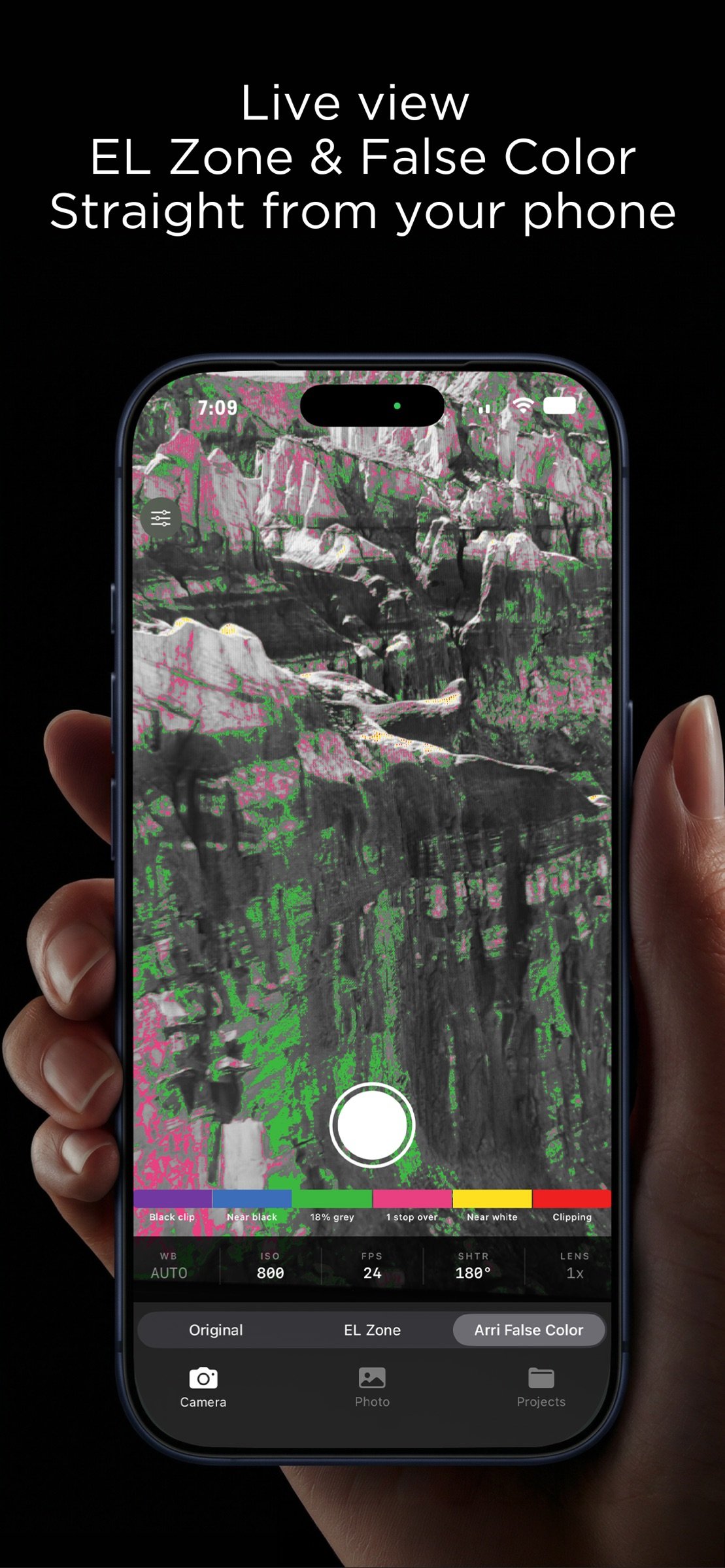
See your scene through a live false color overlay as you shoot. Instantly identify overexposed highlights, underexposed shadows, and perfectly exposed midtones — the same tools used on professional film sets, now in your pocket.
TAP TO METER
Tap anywhere in the frame for an instant zone readout and a recommended f-stop. Simulate any lens aperture with the IRIS control and get a recommendation to place your subject at 18% middle gray — before you roll.
ZONE SYSTEM ANALYSIS
Exposure Check maps your image into distinct one-stop tonal zones so you can evaluate exposure with precision and intent.
MANUAL CAMERA CONTROLS
Take full control with manual ISO, shutter angle, white balance, frame rate, and lens selection — plus pinch-to-zoom lens switching and a live, draggable histogram.
ANALYZE ANY PHOTO
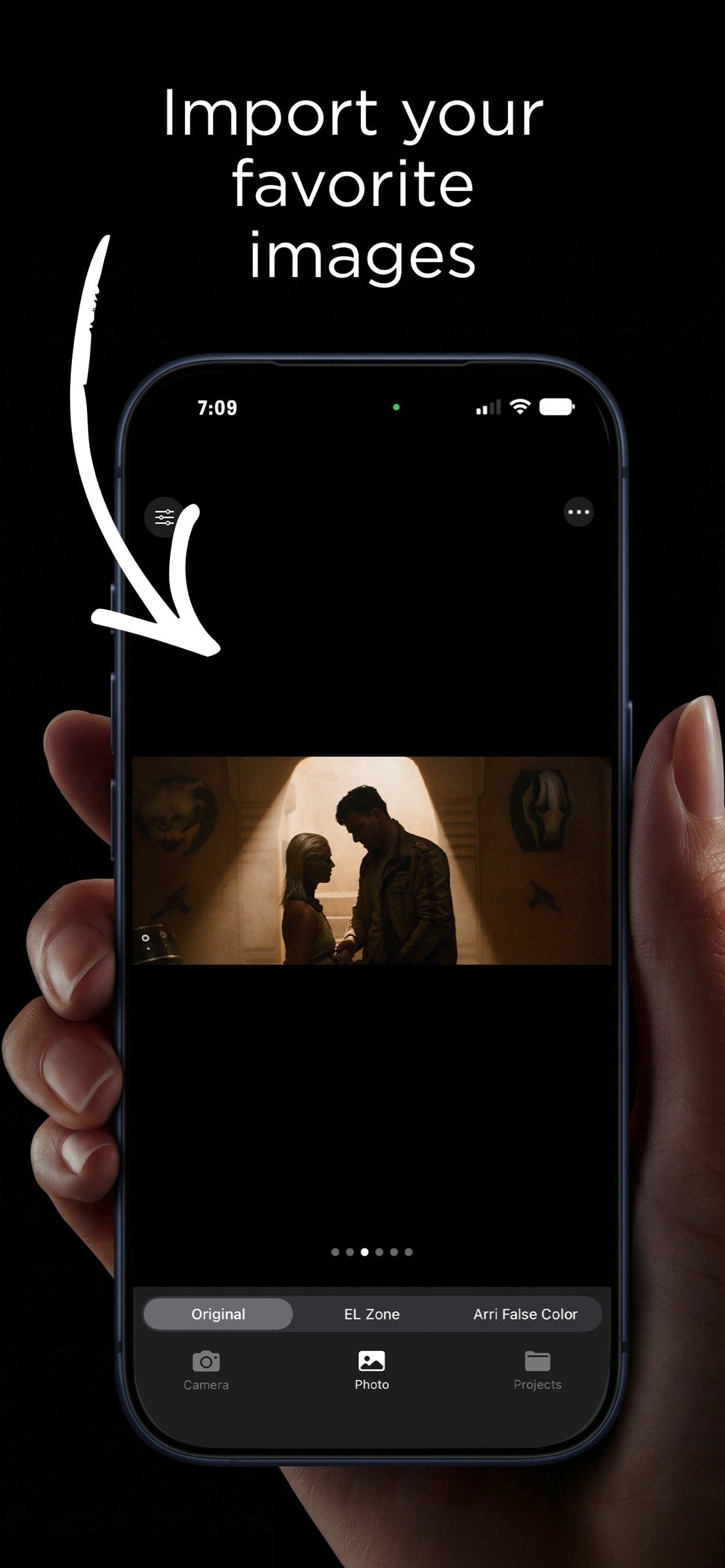
Import photos from your library and run Zone or False Color analysis instantly. The stacked compare view shows your original and analyzed image together so you can see exactly what the exposure is doing.
ORGANIZE WITH PROJECTS
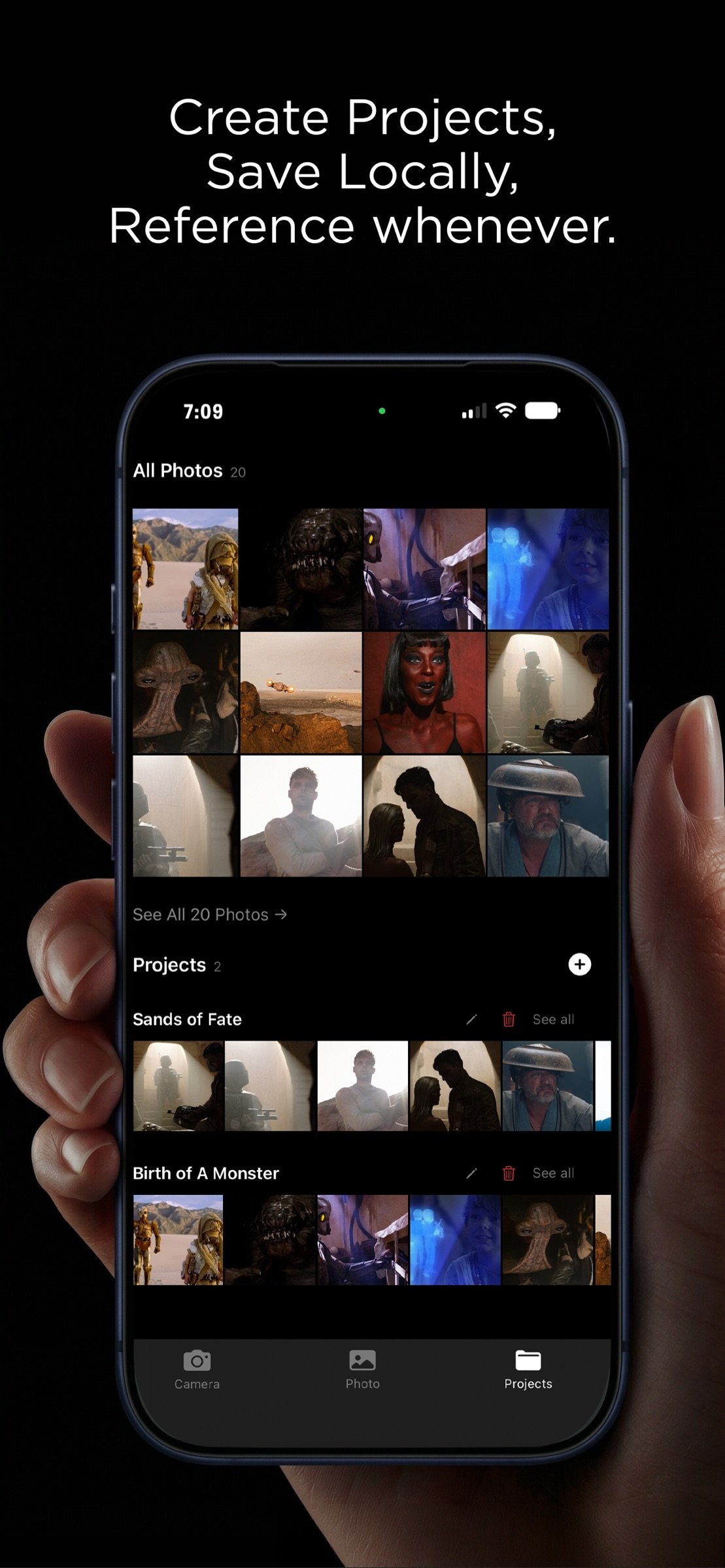
Create projects to keep your shots organized. Import directly from your photo library, move and copy images between projects, and review your work in a clean full-screen viewer with smooth swipe navigation.
KEY FEATURES
-Live Apple Log capture with real-time Zone and False Color overlays
-Exact Apple Log curve — every zone is a true scene stop
-Tap to meter: zone readout + recommended f-stop anywhere in the frame
-Simulated IRIS with 18% gray recommendations
-Manual ISO, shutter angle, white balance, FPS, and lens controls
-Pinch-to-zoom lens switching and a live, draggable histogram
-Import and analyze photos from your library
-Stacked compare view — original above, analyzed below
-Adjustable color reference bar
-Project organization with multi-select, move, and copy
-Full-screen image viewer with smooth swipe navigation
-Share processed images directly from the app
-iPhone, iPad, and Mac supported
A note on accuracy: On graded or imported images, overlays reflect the how the image was graded — not the exposure captured on set. For true scene-stop readings, shoot in Apple LOG with the built-in camera.
Whether you're on set, shooting in the field, or reviewing work in post — Exposure Check gives you the exposure tools professionals rely on.
License: Commercial
SHOOT IN APPLE LOG
Capture with the in-app camera in Apple Log and read exposure the way you would on a pro monitor. Zone and False Color overlays follow the exact Apple Log curve, so every zone lines up with true scene stops — the full dynamic range of your sensor, measured in real light.
REAL-TIME FALSE COLOR CAMERA
See your scene through a live false color overlay as you shoot. Instantly identify overexposed highlights, underexposed shadows, and perfectly exposed midtones — the same tools used on professional film sets, now in your pocket.
TAP TO METER
Tap anywhere in the frame for an instant zone readout and a recommended f-stop. Simulate any lens aperture with the IRIS control and get a recommendation to place your subject at 18% middle gray — before you roll.
ZONE SYSTEM ANALYSIS
Exposure Check maps your image into distinct one-stop tonal zones so you can evaluate exposure with precision and intent.
MANUAL CAMERA CONTROLS
Take full control with manual ISO, shutter angle, white balance, frame rate, and lens selection — plus pinch-to-zoom lens switching and a live, draggable histogram.
ANALYZE ANY PHOTO
Import photos from your library and run Zone or False Color analysis instantly. The stacked compare view shows your original and analyzed image together so you can see exactly what the exposure is doing.
ORGANIZE WITH PROJECTS
Create projects to keep your shots organized. Import directly from your photo library, move and copy images between projects, and review your work in a clean full-screen viewer with smooth swipe navigation.
KEY FEATURES
-Live Apple Log capture with real-time Zone and False Color overlays
-Exact Apple Log curve — every zone is a true scene stop
-Tap to meter: zone readout + recommended f-stop anywhere in the frame
-Simulated IRIS with 18% gray recommendations
-Manual ISO, shutter angle, white balance, FPS, and lens controls
-Pinch-to-zoom lens switching and a live, draggable histogram
-Import and analyze photos from your library
-Stacked compare view — original above, analyzed below
-Adjustable color reference bar
-Project organization with multi-select, move, and copy
-Full-screen image viewer with smooth swipe navigation
-Share processed images directly from the app
-iPhone, iPad, and Mac supported
A note on accuracy: On graded or imported images, overlays reflect the how the image was graded — not the exposure captured on set. For true scene-stop readings, shoot in Apple LOG with the built-in camera.
Whether you're on set, shooting in the field, or reviewing work in post — Exposure Check gives you the exposure tools professionals rely on.
License: Commercial
| Release info | New Release on Jul 15, 2026 |
|---|---|
| Release notes | The biggest update to Exposure Check yet. Recalibrated exposure engine • Zone and False Color overlays now follow the exact Apple Log curve — every zone lines up with true scene stops. • Tap anywhere for a zone readout and a recommended f-stop. • Simulated IRIS: preview any aperture and get a recommendation to place your subject at 18% gray. • New ISO steps (250 / 500) for finer exposure control. A smoother, cleaner app • Overlays renamed to simply "Zone" and "False Color," with clearer readouts. • Project photos now open full screen on iPad and swipe smoothly between images — just like the Photo tab. • Faster thumbnails and browsing throughout. • New What's New screen and About section with quick access to support. Reminder: true Zone readings require a LOG image from a camera. iPhones Pro models with Apple log are capable of this. On graded or imported images, overlays are for reference only based on the final grade. |
| Listing data | App Store |
Reviews
No reviews yet. Be the first to review Exposure Check.
Used Exposure Check? Tell other visitors what you thought.
Log in to write a reviewOther products by this publisher
- "No Distractions" for YouTube 4.10 ----
- #Bible 11.5 "Incredible App - My sister shared this app with me a few weeks ago and it is truly incredible.
- #filmphotography 1.4.2 So, you decided to shoot on film?
- % Percentage Calculator Pro 1.41 This is the Pro version of % Percentage Calculator.
- (beat) for iOS 0.5.9 An elegant Fountain screenwriting app, created by a screenwriter for screenwriters.
Most viewed iOS Photo & Video
-
1
 AI Video Generator 2.0.2
Vixel – AI Video Generator
AI Video Generator 2.0.2
Vixel – AI Video Generator
-
2
 Infuse 8.5.8
Infuse: Enterprise provides the same great features as the standard version of Infuse and includes permanent access to all Pro features via a traditional paid app.
Infuse 8.5.8
Infuse: Enterprise provides the same great features as the standard version of Infuse and includes permanent access to all Pro features via a traditional paid app.
-
3
 CapCut 19.9.0
CapCut offers easy-to-use video editing functions, in-APP fonts and effects, advanced features such as keyframe animation, smooth slow-motion, chroma key, and stabilization, to help you capture and snip moments.
CapCut 19.9.0
CapCut offers easy-to-use video editing functions, in-APP fonts and effects, advanced features such as keyframe animation, smooth slow-motion, chroma key, and stabilization, to help you capture and snip moments.
-
4
 Ai Photo 1.1.2
AI Photo Retouch – BG Eraser
Ai Photo 1.1.2
AI Photo Retouch – BG Eraser
-
5
 TouchSiren Delta 3.1
--------------------------------------------------------------
TouchSiren Delta 3.1
--------------------------------------------------------------
-
6
 JLab 1.4.2
Compatible Models:
JLab 1.4.2
Compatible Models:
-
7
 Sci-Fi Keyboard 3.0
Make your keyboard a Sci-Fi input panel.
Sci-Fi Keyboard 3.0
Make your keyboard a Sci-Fi input panel.
-
8
 Locket Widget 2.70.0
Locket is a widget that shows live photos from your best friends, right to your Home Screen.
Locket Widget 2.70.0
Locket is a widget that shows live photos from your best friends, right to your Home Screen.
-
9
 CNU 3.0.12
CNU?????????????????????,???????????????
CNU 3.0.12
CNU?????????????????????,???????????????
-
10
 Emoji Maker 3.11.3
Emoji Up is an emoji maker that lets you create your own custom emojis.
Emoji Maker 3.11.3
Emoji Up is an emoji maker that lets you create your own custom emojis.
Most downloaded iOS Photo & Video
-
1
Infuse 8.5.8
Infuse: Enterprise provides the same great features as the standard version of Infuse and includes permanent access to all Pro features via a traditional paid app.
-
2
 DJI Fly 1.21.18
DJI Fly is designed to help pilots fly drones with ease.
DJI Fly 1.21.18
DJI Fly is designed to help pilots fly drones with ease.
-
3
 Analog Radio 3.0
The iPhone and iPad devices don't have the FM/AM radio antenna installed.
Analog Radio 3.0
The iPhone and iPad devices don't have the FM/AM radio antenna installed.
-
4
 ReelyGo 1.1.41
ReelyGo: Your Daily Drama Escape
ReelyGo 1.1.41
ReelyGo: Your Daily Drama Escape
-
5
 SSS IPTV, Simple, Smart Super 1.0.2
An Easiest way to watch TV Online or Movies or Series, Bring your Own list M3u,
SSS IPTV, Simple, Smart Super 1.0.2
An Easiest way to watch TV Online or Movies or Series, Bring your Own list M3u,
-
6
 TurboCollage Automatic 1.2.4
#1 Easy automatic photo collage maker for iPhone & iPad.
TurboCollage Automatic 1.2.4
#1 Easy automatic photo collage maker for iPhone & iPad.
-
7
 AGAIN. Rehearsal Notes 2.0.1
AGAIN. is the rehearsal app that remembers why the band stopped — and, new in Version 2, who said what in a writing session or a table read.
AGAIN. Rehearsal Notes 2.0.1
AGAIN. is the rehearsal app that remembers why the band stopped — and, new in Version 2, who said what in a writing session or a table read.
-
8
 Treblo 1.6.0
Make songs with the world's best AI music model.
Treblo 1.6.0
Make songs with the world's best AI music model.
-
9
 Koala FX 1.0.2
*** IMPORTANT! Koala FX is an Audio Unit Effect plugin (AUv3) which requires a compatible host or DAW to work such as Garageband, Beat Maker 3, AUM etc ***
Koala FX 1.0.2
*** IMPORTANT! Koala FX is an Audio Unit Effect plugin (AUv3) which requires a compatible host or DAW to work such as Garageband, Beat Maker 3, AUM etc ***
-
10
 Rozeta Sequencer Suite 1.3.16
Rozeta is a suite of MIDI sequencers and controllers that lets you explore a new, freeform approach to sequencing and controlling mobile music apps.
Rozeta Sequencer Suite 1.3.16
Rozeta is a suite of MIDI sequencers and controllers that lets you explore a new, freeform approach to sequencing and controlling mobile music apps.