13downloads
0this week
FreeFreeware
0reviews
Screenshots
About DualScribe
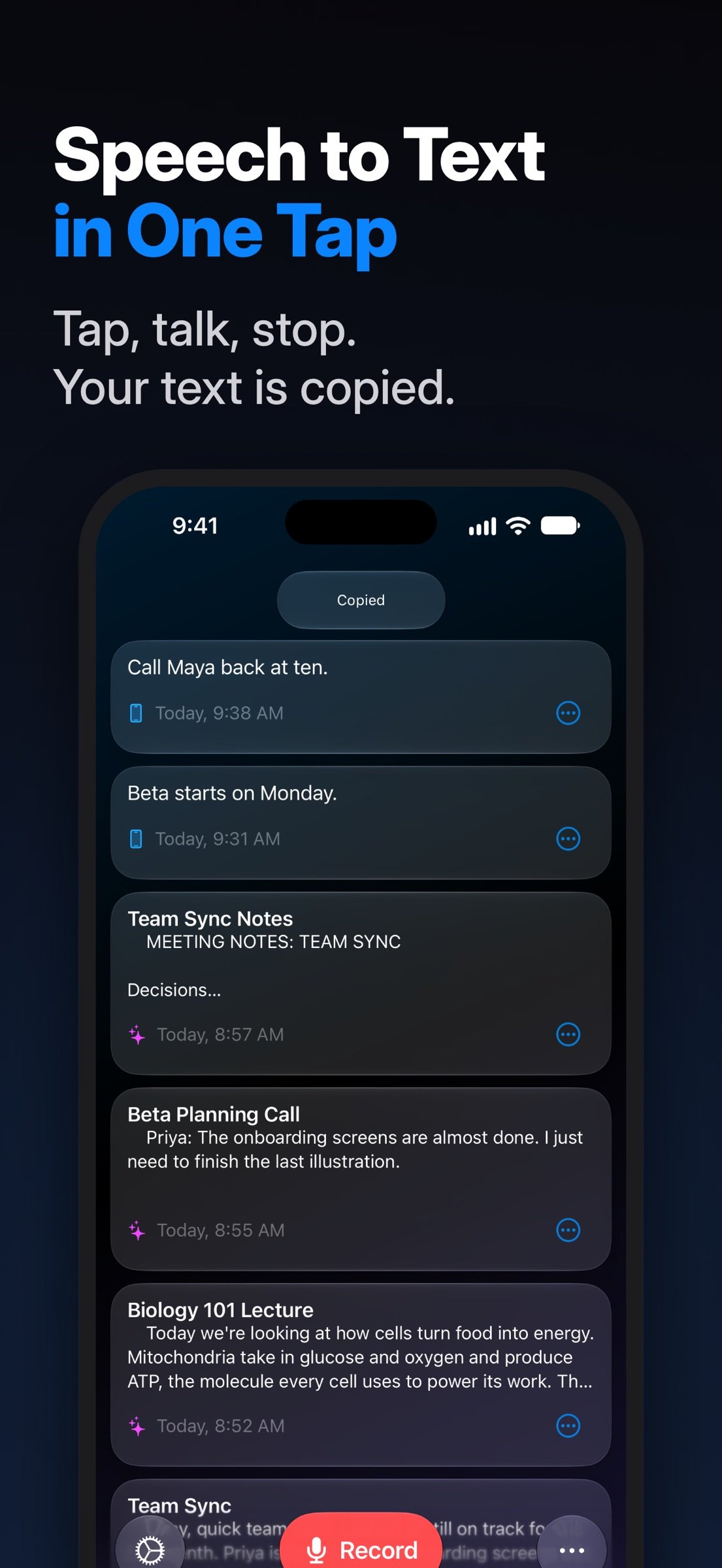
Tap Record. Talk. Tap Stop. Your words show up as text, already copied, often about 2 seconds later.
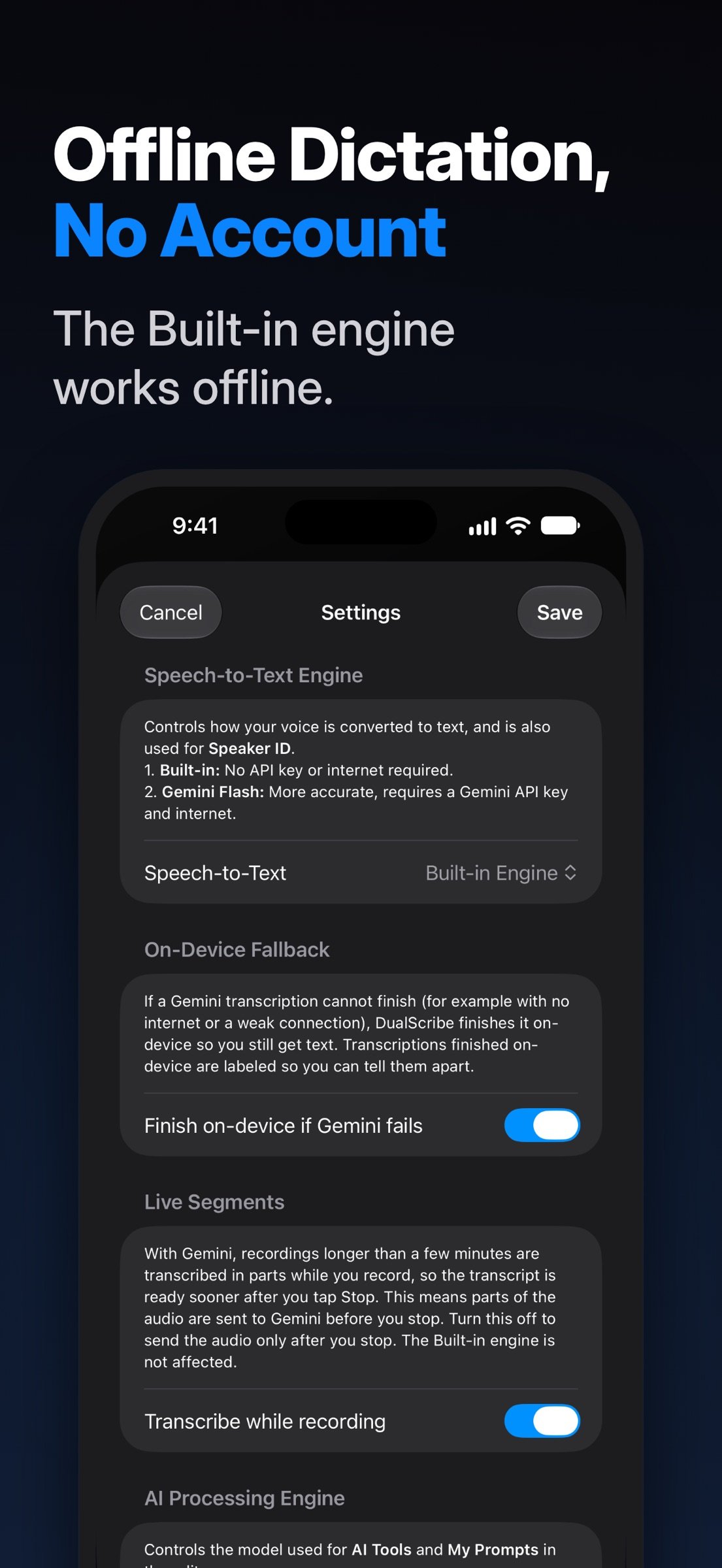
Pick Gemini, Google's AI, with your own Google API key (free from Google), or the Built-in engine that works offline.
Free to try. No ads, no account.
YOUR RECORDING DOESN'T GET LOST
- Phone call? The recording stops, is saved and turns into text right away.
- App closed mid-recording? The recording is recovered the next time you open DualScribe.
- Storage almost full? The recording stops and is saved.
- Gemini busy? DualScribe moves to another Google model, or finishes the text on your device.
HOW IT WORKS
- One big Record button. Tap, talk, tap Stop.
- Your text is copied the moment it's ready. Paste it into any app.
- With Gemini, long meetings and lectures are transcribed in parts while you record, so the text is often ready seconds after you stop.
- Lock your screen, or switch apps after Stop, and transcription keeps going.
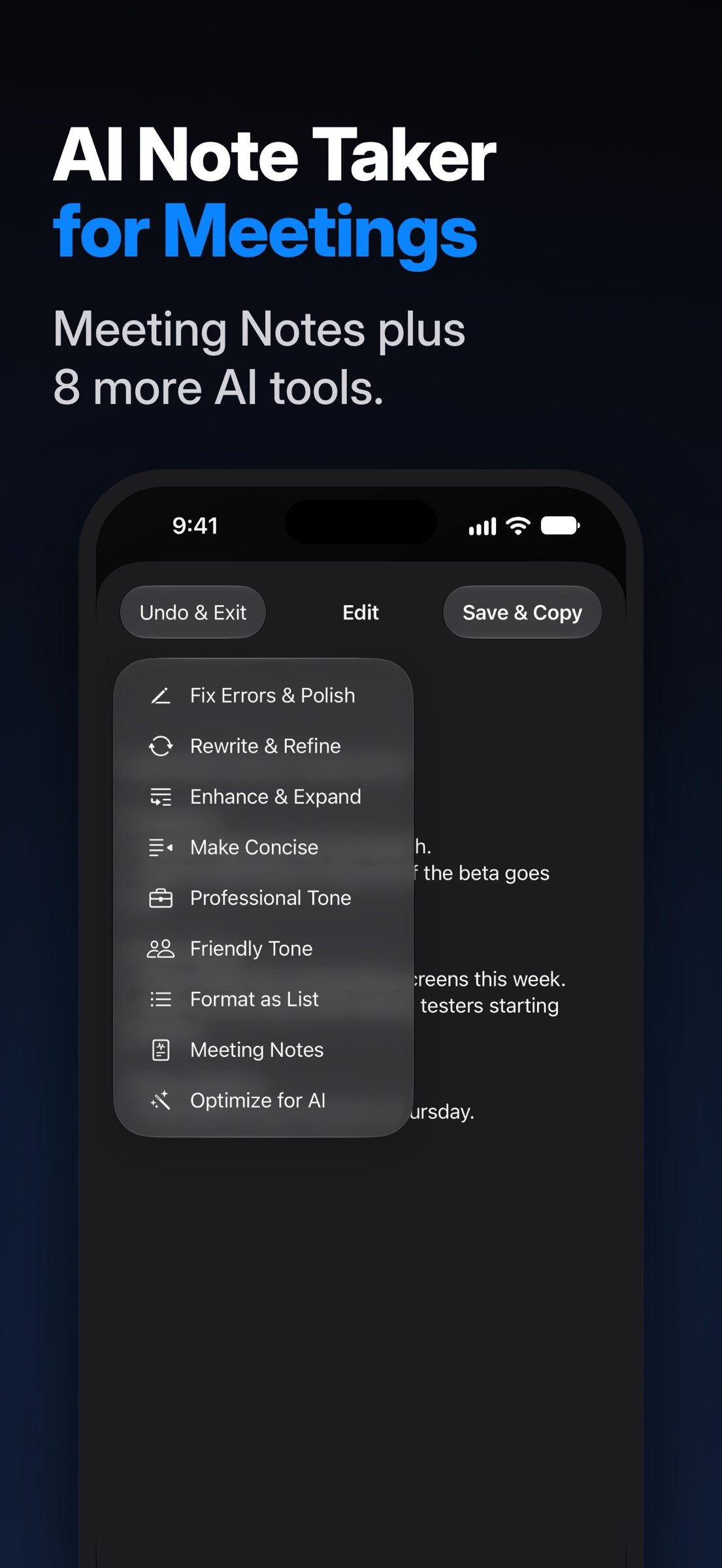
- Clean it up with 9 one-tap AI tools.
BUILT FOR IPHONE DUO
- Closed, everything fits the outer screen. Open, transcripts and the recorder sit side by side.
- A recording keeps going when you fold or unfold.
TWO ENGINES. YOU PICK.
- Gemini, Google's AI. More accurate than Built-in, and great with long recordings, punctuation and formatting. It uses your own Gemini API key, free from Google AI Studio in about a minute. Nothing is sent to Gemini until you add your key and turn it on.
- Built-in, Apple's speech recognition. Works offline. Your audio stays on your device.
CLEAN IT UP IN ONE TAP
- Fix Errors & Polish
- Rewrite & Refine
- Enhance & Expand
- Make Concise
- Professional Tone
- Friendly Tone
- Format as List
- Meeting Notes
- Optimize for AI, which turns a rambling thought into a clear prompt for any AI chatbot
Plus:
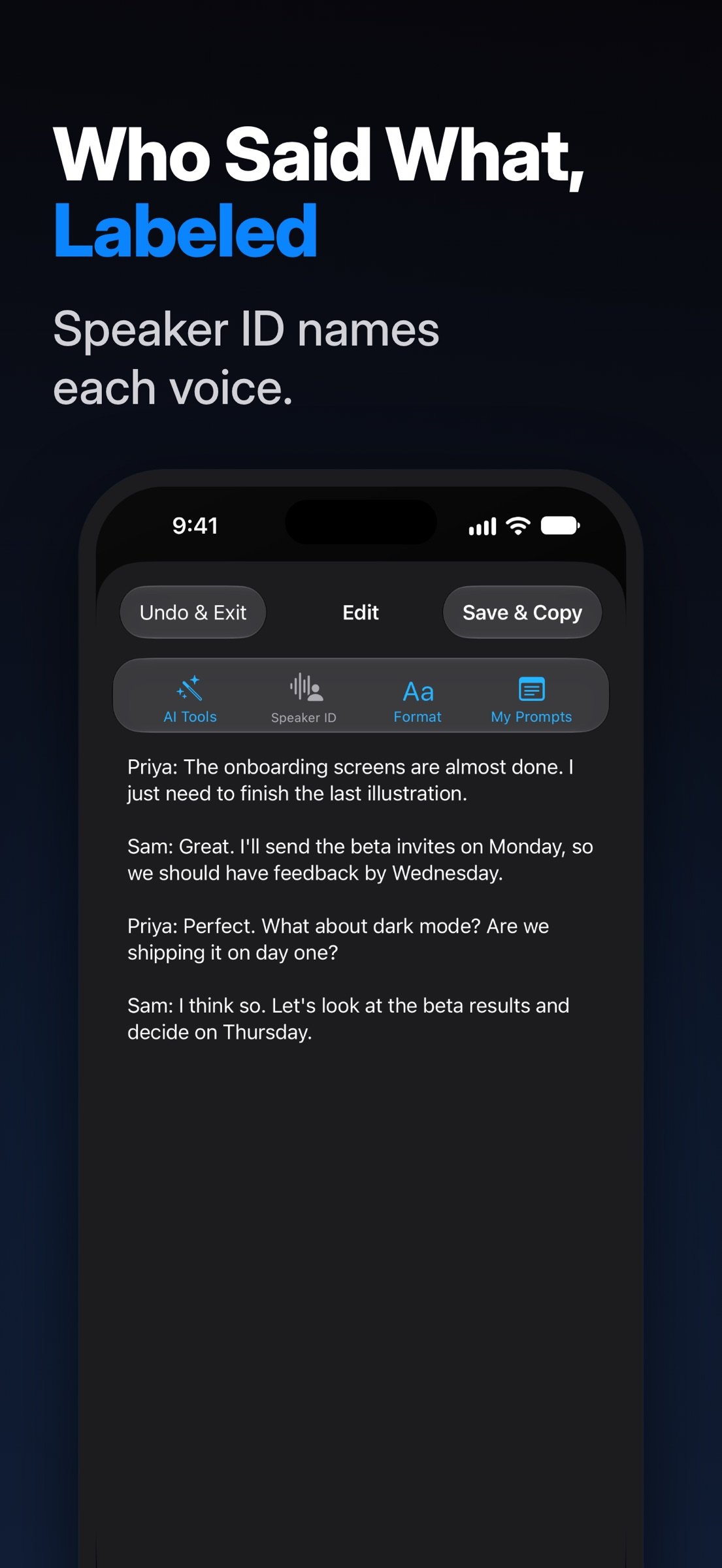
- Speaker ID labels who said what and can suggest names. It uses Gemini.
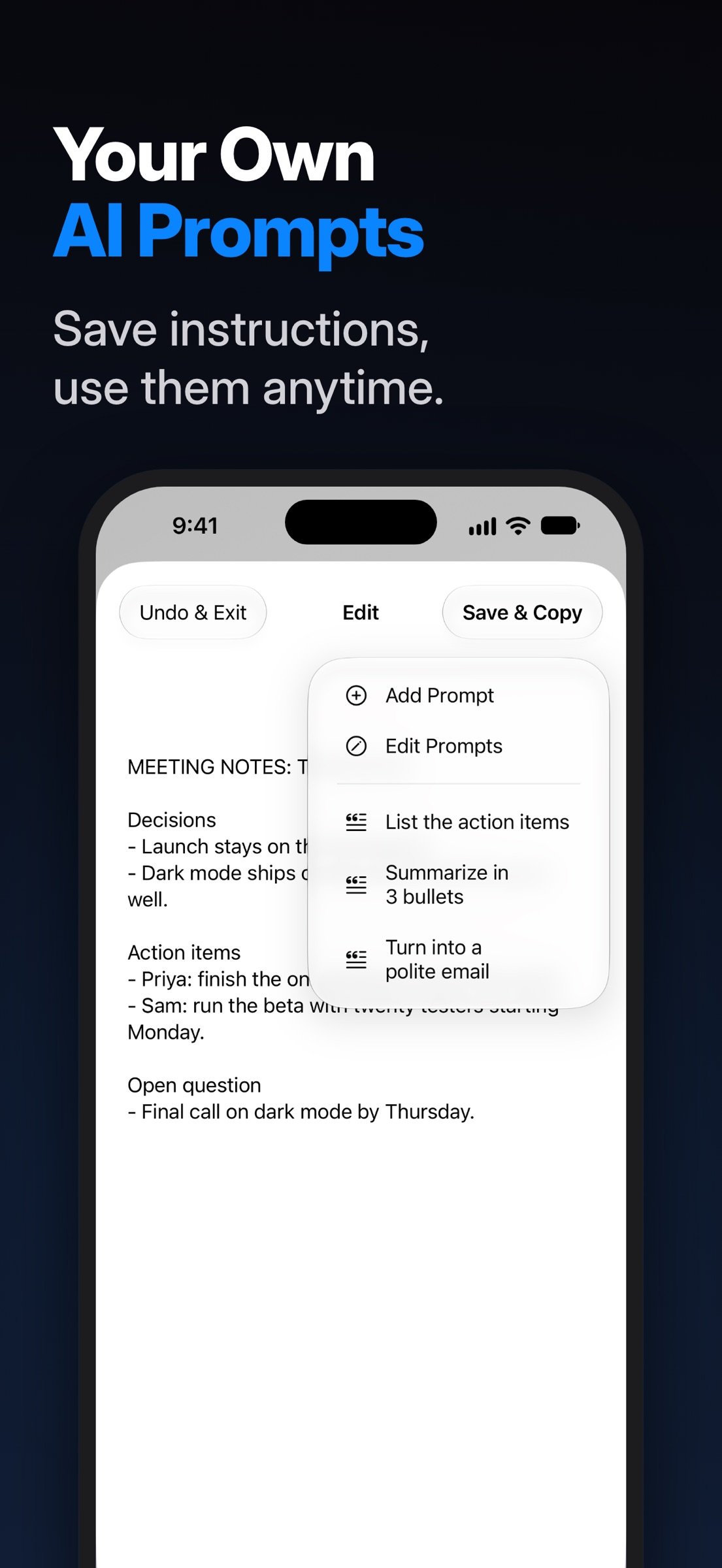
- My Prompts lets you save your own instructions and run them on any transcript.
- Find & Replace, change case and clean up line breaks.
- AI tools and My Prompts run with Gemini, or right on your device when Apple Intelligence is turned on.
HANDY EXTRAS
- Combine several transcripts into one
- Add your own titles and search everything
- iCloud Sync keeps your transcripts and My Prompts up to date on all your devices
- Export the audio file
- Home Screen quick actions: Start Recording and Paste Text
- Use the built-in mic or an external one, like AirPods
- Optional notifications about your recordings and transcripts
- VoiceOver support, with a two-finger double tap to record
PRIVACY, IN PLAIN WORDS
- Transcripts are stored on your device, and in your own private iCloud while iCloud Sync is on.
- No account. DualScribe has no servers of its own, so your words never reach the developer.
- With Gemini, your audio and the text you use with AI tools and My Prompts go to Google under your own Google account and terms. On the free tier, Google may use it to improve its products. To keep everything on your device, set both engines to Built-in and turn off iCloud Sync.
DUALSCRIBE PRO
- Try every feature free for your first recordings. DualScribe Pro then unlocks unlimited recordings, AI Tools, Speaker ID, My Prompts, Paste and Combine Text, and Reprocess.
- In the US, $0.99 per month or $6.99 per year, each with a 1-week free trial. One subscription works on all your devices.
- Already using DualScribe? If you first opened it on a device before November 11, 2026, everything stays free on that device.
- Payment is charged to your Apple Account. It renews automatically unless canceled at least 24 hours before the period ends. Manage or cancel in your Apple Account settings.
- Terms of Use: [link removed]
- Privacy Policy: [link removed]
Google and Gemini are trademarks of Google LLC. DualScribe is independent and not affiliated with or endorsed by Google.
Pick Gemini, Google's AI, with your own Google API key (free from Google), or the Built-in engine that works offline.
Free to try. No ads, no account.
YOUR RECORDING DOESN'T GET LOST
- Phone call? The recording stops, is saved and turns into text right away.
- App closed mid-recording? The recording is recovered the next time you open DualScribe.
- Storage almost full? The recording stops and is saved.
- Gemini busy? DualScribe moves to another Google model, or finishes the text on your device.
HOW IT WORKS
- One big Record button. Tap, talk, tap Stop.
- Your text is copied the moment it's ready. Paste it into any app.
- With Gemini, long meetings and lectures are transcribed in parts while you record, so the text is often ready seconds after you stop.
- Lock your screen, or switch apps after Stop, and transcription keeps going.
- Clean it up with 9 one-tap AI tools.
BUILT FOR IPHONE DUO
- Closed, everything fits the outer screen. Open, transcripts and the recorder sit side by side.
- A recording keeps going when you fold or unfold.
TWO ENGINES. YOU PICK.
- Gemini, Google's AI. More accurate than Built-in, and great with long recordings, punctuation and formatting. It uses your own Gemini API key, free from Google AI Studio in about a minute. Nothing is sent to Gemini until you add your key and turn it on.
- Built-in, Apple's speech recognition. Works offline. Your audio stays on your device.
CLEAN IT UP IN ONE TAP
- Fix Errors & Polish
- Rewrite & Refine
- Enhance & Expand
- Make Concise
- Professional Tone
- Friendly Tone
- Format as List
- Meeting Notes
- Optimize for AI, which turns a rambling thought into a clear prompt for any AI chatbot
Plus:
- Speaker ID labels who said what and can suggest names. It uses Gemini.
- My Prompts lets you save your own instructions and run them on any transcript.
- Find & Replace, change case and clean up line breaks.
- AI tools and My Prompts run with Gemini, or right on your device when Apple Intelligence is turned on.
HANDY EXTRAS
- Combine several transcripts into one
- Add your own titles and search everything
- iCloud Sync keeps your transcripts and My Prompts up to date on all your devices
- Export the audio file
- Home Screen quick actions: Start Recording and Paste Text
- Use the built-in mic or an external one, like AirPods
- Optional notifications about your recordings and transcripts
- VoiceOver support, with a two-finger double tap to record
PRIVACY, IN PLAIN WORDS
- Transcripts are stored on your device, and in your own private iCloud while iCloud Sync is on.
- No account. DualScribe has no servers of its own, so your words never reach the developer.
- With Gemini, your audio and the text you use with AI tools and My Prompts go to Google under your own Google account and terms. On the free tier, Google may use it to improve its products. To keep everything on your device, set both engines to Built-in and turn off iCloud Sync.
DUALSCRIBE PRO
- Try every feature free for your first recordings. DualScribe Pro then unlocks unlimited recordings, AI Tools, Speaker ID, My Prompts, Paste and Combine Text, and Reprocess.
- In the US, $0.99 per month or $6.99 per year, each with a 1-week free trial. One subscription works on all your devices.
- Already using DualScribe? If you first opened it on a device before November 11, 2026, everything stays free on that device.
- Payment is charged to your Apple Account. It renews automatically unless canceled at least 24 hours before the period ends. Manage or cancel in your Apple Account settings.
- Terms of Use: [link removed]
- Privacy Policy: [link removed]
Google and Gemini are trademarks of Google LLC. DualScribe is independent and not affiliated with or endorsed by Google.
| Release info | Update on Nov 13, 2026 |
|---|---|
| Release notes | App improvements and optimizations. |
| Listing data | App Store |
Reviews
No reviews yet. Be the first to review DualScribe.
Used DualScribe? Tell other visitors what you thought.
Log in to write a reviewOther products by this publisher
- "No Distractions" for YouTube 4.10 ----
- #Bible 11.6 "Incredible App - My sister shared this app with me a few weeks ago and it is truly incredible.
- #filmphotography 1.4.2 So, you decided to shoot on film?
- $quirrel 1.5.1 $quirrel Budget & Finance helps you plan each paycheck, track spending, manage debt, and see what is safe to spend before the next payday.
- % Percentage Calculator Pro 1.41 This is the Pro version of % Percentage Calculator.
Most viewed iOS Productivity
-
1
 WordPress 27.4
Manage or create your WordPress blog or website right from your iOS device: create and edit posts and pages, upload your favorite photos and videos, view stats and reply to comments.
- 2 Voice Translator - Alive 1.6 Translation app that turns your iPhone into an interpreter instantly.
-
3
 Claude by Anthropic 1.261113.19
Meet Claude, your AI problem solver and thinking partner.
-
4
 Life360 26.43.5
Whether at home, online, or on the move, our comprehensive family safety features bring peace of mind to your loved ones AND help safeguard your personal belongings.
-
5
 WristMemo 2.0
WristMemo turns your Apple Watch into an all-day voice recorder.
- 6 "No Distractions" for YouTube 4.10 ----
-
7
 Colicine 1.3.0
Have you ever been there—
- 8 (beat) for iOS 0.5.10 An elegant Fountain screenwriting app, created by a screenwriter for screenwriters.
-
9
 DeepSeek 2.8.0
Experience seamless interaction with DeepSeek's official AI assistant for free!
-
10
 Howbout 16.7.2
The shared calendar for friends, couples, and family
Most downloaded iOS Productivity
- 1 Voice Translator - Alive 1.6 Translation app that turns your iPhone into an interpreter instantly.
-
2
DeepSeek 2.8.0
Experience seamless interaction with DeepSeek's official AI assistant for free!
-
3
 SessionsAI 1.2.1
Sessions AI is a private AI workspace that runs entirely on your iPhone, iPad, or Mac.
-
4
 Voices AI 1.16.15
Discover Voices, the premier voice transformation app designed exclusively for iOS.
-
5
 Block Distracting Websites 1.11
"It's a great way to save time, and stop browsing Reddit when you should be doing coursework."
-
6
 Plot Digitizer 1.4.1
Plot Digitizer is an app to extract numerical data from plot images.
-
7
 Google Docs 1.2026.45104
Create, edit, and collaborate on online documents with the Google Docs app.
-
8
 MyHyundai with Bluelink 5.4.5
The MyHyundai app makes getting information about your Hyundai vehicle easier than ever.
-
9
 Pixy Mood Tracker 1.110.0
Track your mood, one pixel at a time.
-
10
 ScreenRecess 1.0.0
A gentle nudge to put your device down when it’s hard to stop.