
Cantonese Keyboard - Jyutping 0.68.0
Easy-to-use Cantonese input method with pronunciation lookup and dictionary.
Download
45.93 MB
58downloads
1this week
FreeFreeware
0reviews
Screenshots
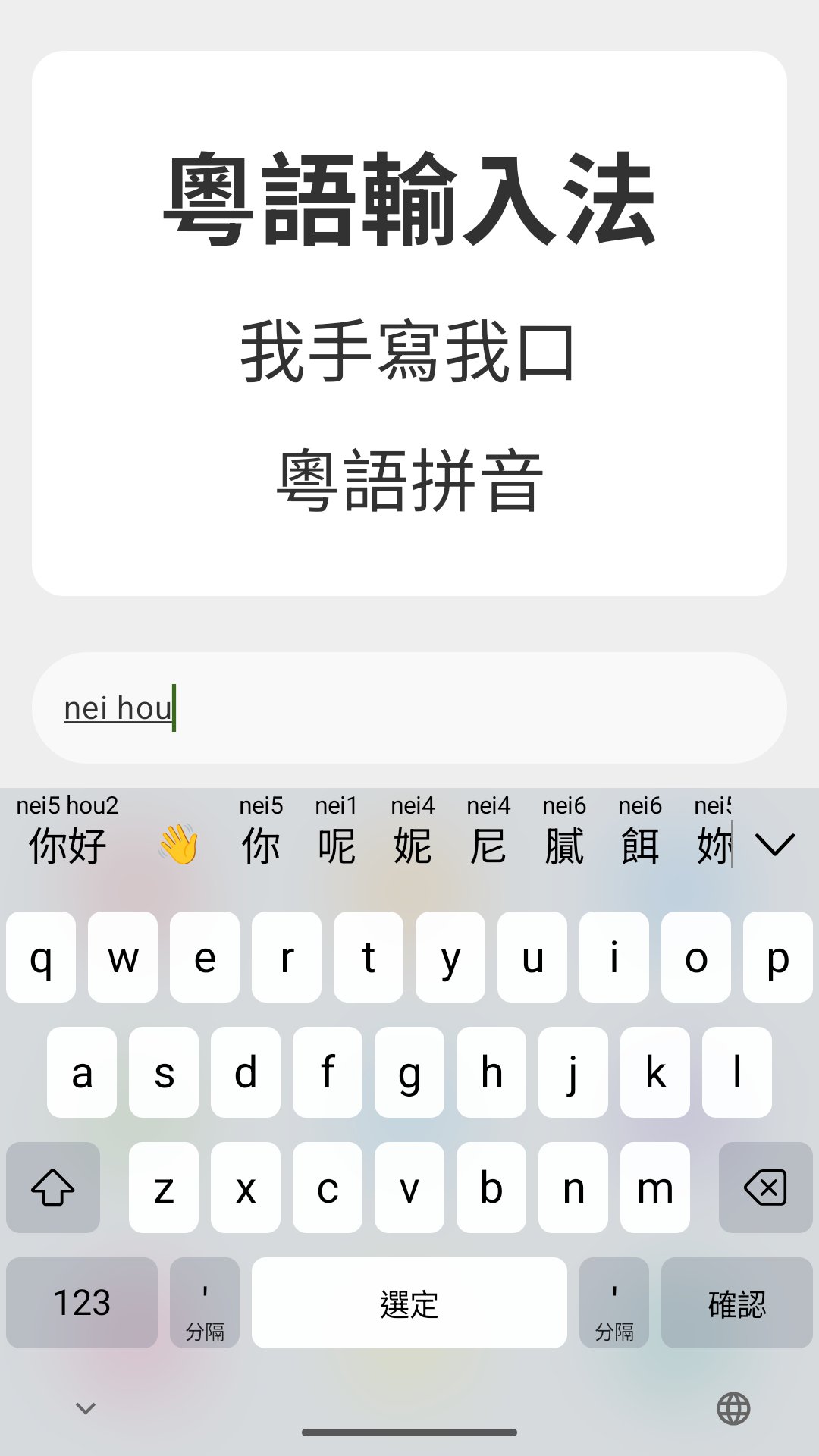
About Cantonese Keyboard - Jyutping
Jyutping is a Cantonese input method that is intuitive and efficient--making typing fast, accurate, and effortless.
Type Cantonese just as you speak it -- naturally and fluently.
Every input reinforces your pronunciation. The more you use Jyutping, the more familiar you become with Cantonese.
Ready to use right out of the box, with virtually no complicated setup.
Open source, ad-free, and fully offline -- no privacy concerns.
Based on the Jyutping romanization scheme developed by the Linguistic Society of Hong Kong (LSHK), and compatible with various spelling habits.
You can perform reverse lookup of Jyutping using Mandarin Pinyin, Cangjie, Quick (Sucheng), Stroke input, and character decomposition. Detailed explanations are available within the app.
Keyboard feature highlights:
o Standard Jyutping input, e.g. neihou -> ??
o Abbreviated Jyutping input, e.g. nh / nhou / neih -> ??
o Tone input support for greater accuracy, helping learners master Cantonese tones and pronunciation
o Candidate words display corresponding Jyutping syllables, making typing easier while reinforcing correct pronunciation
o Supports both Traditional and Simplified Chinese characters, with Traditional characters distinguishing between Hong Kong and Taiwan standards
o Reverse lookup via Mandarin Pinyin: prefix with R (e.g. rlin -> ?)
o Reverse lookup via Cangjie or Quick (Sucheng): prefix with V (e.g. vdd -> ?)
o Reverse lookup via stroke input: prefix with X (e.g. xwsad -> ?)
o Reverse lookup via character decomposition: prefix with Q (e.g. qmukmuk -> ?)
o Emoji suggestions that match Cantonese expressions, e.g. daai cung (??) suggests the tiger emoji
o A rich vocabulary tailored to Cantonese usage and grammar for smooth, natural typing
o Includes common English vocabulary for seamless bilingual input
o Multiple keyboard layouts available: 26-key QWERTY, 26-key triple-spell, 9-key (T9), etc.
o Fully supports light and dark modes, with adjustable keyboard height
o Convenient editing tools: copy, cut, paste, and cursor movement
o Optional sound and haptic feedback for key presses
The main app provides extensive Cantonese resources for convenient learning and reference:
o Detailed guides for using all Jyutping keyboard functions
o Jyutping scheme tables of initials, finals, and tones
o Common Cantonese phrases and expressions
o Pronunciations of commonly used Cantonese words
o Cantonese pronunciation lookup and dictionary search
o Text-to-Jyutping conversion
o Cantonese text-to-speech
We respect user privacy and do not collect any personal information.
This app is fully open source on GitHub:
[link removed]
To learn more about Jyutping and Cantonese keyboards, visit our official website:
[link removed]
License: CC0-1.0
| Release info | Update on Nov 17, 2026 |
|---|---|
| Release notes | Added more reverse lookup methods for Jyutping on the 9-key keyboard, including Cangjie, Quick (Sucheng), Stroke, and character decomposition. |
| Listing data | F-Droid |
Reviews
No reviews yet. Be the first to review Cantonese Keyboard - Jyutping.
Used Cantonese Keyboard - Jyutping? Tell other visitors what you thought.
Log in to write a reviewOther products by this publisher
- "No Distractions" for YouTube 4.10 ----
- #Bible 11.6.1 "Incredible App - My sister shared this app with me a few weeks ago and it is truly incredible.
- #filmphotography 1.4.2 So, you decided to shoot on film?
- #LookBusy Fake Calendar Events 1.0.6 Look Busy scans your work calendar for open time slots and fills them with realistic-looking (but secretly fake) work events.
- #Small Talk Is Canceled 1.0.2 #Small Talk Is Canceled — Conversations That Matter
Most viewed Android Keyboard & Ime
-
1
 VocaPhone 0.2.7
Voice dictation keyboard that transcribes on hardware you control
- 2 FlorisBoard 0.5.2 An open-source keyboard which respects your privacy. Currently in beta.
- 3 Kinetica 3.1.0 Two-thumb keyboard: both thumbs swipe and tap at once. No network access.
-
4
 KeliBoard 4.0.2
Customizable open-source keyboard
-
5
 Parakeetype 0.6.0
Fast on-device speech-to-text keyboard and voice input - no cloud, no tracking.
- 6 AdaptKey 1.3.29 Privacy-first Android keyboard that learns your typing style. Fully offline.
-
7
 Xime IME 3.5.0-alpha.3
A Rime-based Chinese IME for Wubi and Pinyin input
- 8 CleverKeys 1.5.0 Open-source gesture keyboard with Termux support
- 9 ICS Theme for AnySoftKeyboard 5.1.6158 Ice Cream Sandwich Theme for AnySoftKeyboard
- 10 Afrikaans for AnySoftKeyboard 5.1.6158 Afrikaans Language Pack for AnySoftKeyboard
Most downloaded Android Keyboard & Ime
- 1 Kinetica 3.1.0 Two-thumb keyboard: both thumbs swipe and tap at once. No network access.
-
2
 KeyTab 0.24
Keyboard (IME) with tabbed file manager, offline word prediction and TAB key.
-
3
 Ezhuthola: Malayalam Keyboard 0.6.0
Type Malayalam in Manglish. No ads, no tracking, no internet.
- 4 Guileless Bopomofo Keyboard 5.2.3 A simple Bopomofo software keyboard (input method editor) for typing Hanyu
-
5
 ReteKey 0.2.7
Hangul keyboard with Esc, Tab, Ctrl and F-keys. 470 KB, one permission.
-
6
Xime IME 3.5.0-alpha.3
A Rime-based Chinese IME for Wubi and Pinyin input
-
7
 Voice Keyboard 1.16.0
Speech-to-text keyboard that uses your own Whisper API key
-
8
 zinna-IME 0.1.2
Offline Japanese keyboard with mozc conversion, flick and qwerty
-
9
 Traditional T9 64.0
A T9 keyboard inspired by the classic Nokia phones of the 2000s.
-
10
 MX3 Button Mapper 0.0.56
Remap MX3 Air Mouse remote buttons on Google TV