
Calculator M3 1.7.0
Clean, private calculator — no tracking, no ads, optional on-device AI.
Download
13.07 MB · app-release.apk
79downloads
1this week
FreeFreeware
0reviews
Screenshots
About Calculator M3
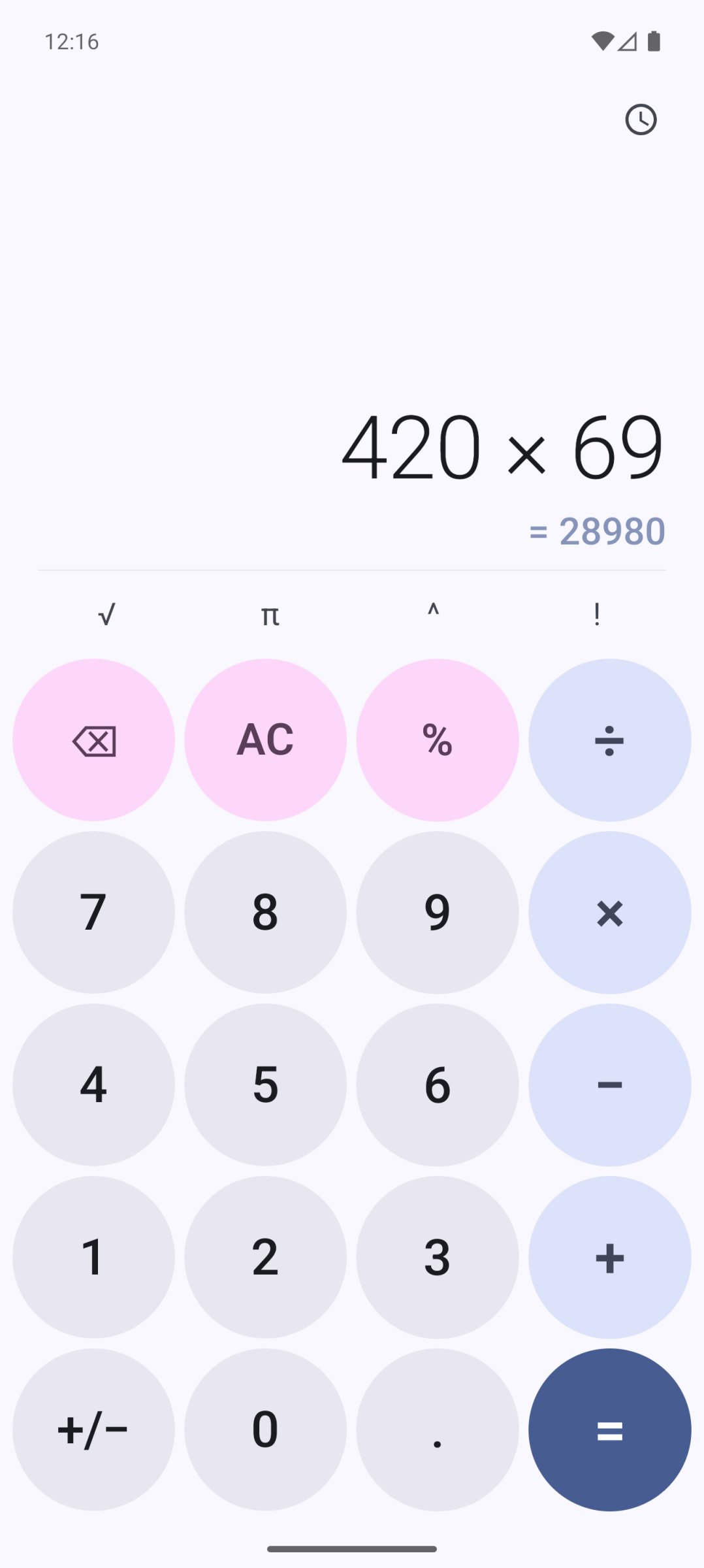
Every calculation you make is your business -- not Big Tech's. Calculator M3 is a beautifully designed calculator built with Material 3 that works entirely offline for everyday math, with zero data collection, zero analytics, and zero tracking.
Unlike other calculators, this app doesn't phone home. No usage tracking, no telemetry, no ad frameworks buried in the code. It does math -- and an optional, fully on-device AI math solver -- and nothing else.
? Full expression evaluation
? Live result preview
? Scientific functions
? Calculation history
? Material 3 dynamic theming
? 18 languages, following your device language
? Works offline (with an optional on-device AI math solver)
FULL EXPRESSION EVALUATION
Type complete mathematical expressions with proper operator precedence (PEMDAS) and parentheses up to 20 levels deep. See the result update in real-time as you type.
- Full PEMDAS operator precedence
- Parentheses with 20 levels of nesting
- Live result preview as you type
- Tap anywhere in the expression to edit
- High-precision BigDecimal arithmetic
- Engineering notation for large numbers
SCIENTIFIC FUNCTIONS
- Square root (?)
- Pi (?) constant
- Power (^) exponentiation
- Factorial (!) for values 0-99
- Percent (%) with consumer-style support
- Implicit multiplication (2?, 3?2, etc.)
CALCULATION HISTORY
- Stores up to 100 recent calculations
- Persists across app restarts
- Tap entries to reload them
- Clear history when needed
AI MATH SOLVER (OPTIONAL, EXPERIMENTAL)
An experimental extra for higher-RAM devices: photograph a handwritten math expression and let an on-device AI model read and solve it -- entirely on your device, with nothing sent to any server.
? HOW TO TURN IT ON: the AI features are hidden until you unlock them. In the calculator, tap the "AC" (all-clear) button 7 times in quick succession -- a countdown guides the final taps. A camera icon then appears in the top-left corner, and the unlock is remembered.
- Needs a 6 GB+ device and a one-time vision-model download (2.6-4.9 GB)
- Take a photo with your system camera, or pick one from your gallery
- Choose from several open vision models (Gemma 4, Gemma 3n)
- Models run fully on-device, GPU-accelerated where supported
- Choose Fast, Balanced or Accurate: faster settings look at the photo in less detail and can answer in about half the time
- The solution is shown with cleanly formatted math -- fractions, roots, and exponents
- Internet is used only once, to download the model you choose -- over Wi-Fi by default; the app asks before using mobile data
- No photo, calculation, or usage data ever leaves your device
MATERIAL 3 DESIGN
- Material You dynamic colors (Android 12+)
- Automatic light and dark mode
- Smooth button press animations
- Haptic feedback
- Adaptive layout for portrait, landscape, and foldable devices
- Auto-sizing display for long expressions
PRIVACY & OPEN SOURCE
- 100% open source (GPL v3)
- No tracking, analytics, or ads
- No data collection of any kind
- The calculator itself needs no network at all
- Internet is used only if you opt in to download an AI model -- never to send your data
- Your calculations and photos stay on your device, period
WORKS ON ALL DEVICES
- Phones in portrait and landscape
- Foldable devices (Pixel Fold, Galaxy Z Fold)
- Tablets
- Responsive button sizing and layout
License: GPL-3.0-only
| Release info | Update on Nov 08, 2026 |
|---|---|
| Release notes | ? What's new o AI Math Solver: new Fast / Balanced / Accurate switch on the photo screen. Fast looks at the photo in less detail and can answer in about half the time; Accurate stays the default o When there's no single number to use (e.g. the answer is a fraction), the model's full working opens at its end instead of a "failed" message o A final answer that contradicts the model's own working is no longer offered for "Use" o The AI intro now shows the correct download size (2.6-4.9 GB) Install o F-Droid: https://f-droid.org/packages/com.vagujhelyigergely.calculatorm3/ (F-Droid builds each version itself, so it can appear there later than here) o APK: app-release.apk below Checksums | Algorithm | Value | |------------|-------| | MD5 | d022af539d30401709e1b3d8367f5829 | | SHA1 | 6eb534f478847d148b589ba1bb7ce06cefc6269c | | SHA-256| eef3c771ac71a297360b13f4bf61b5bee1ac9124cb1a27ba1ce7b7b0f6ccc8dc | What's Changed o AI intro: the model download is 2.6-4.9 GB, not 4-6 GB by @gergelyvagujhelyi in https://github.com/gergelyvagujhelyi/CalculatorM3/pull/115 o AI answer: reject a final line that contradicts the model's own working by @gergelyvagujhelyi in https://github.com/gergelyvagujhelyi/CalculatorM3/pull/116 o Speed/quality switch for AI scans: Fast, Balanced, Accurate by @gergelyvagujhelyi in https://github.com/gergelyvagujhelyi/CalculatorM3/pull/117 o Failed AI answer: show the model's output open, scrolled to its end by @gergelyvagujhelyi in https://github.com/gergelyvagujhelyi/CalculatorM3/pull/118 o Release 1.7.0: version, changelog, docs and refreshed AI screenshots by @gergelyvagujhelyi in https://github.com/gergelyvagujhelyi/CalculatorM3/pull/119 Full Changelog: https://github.com/gergelyvagujhelyi/CalculatorM3/compare/v1.6.2...v1.7.0 |
| Listing data | F-Droid |
Reviews
No reviews yet. Be the first to review Calculator M3.
Used Calculator M3? Tell other visitors what you thought.
Log in to write a reviewOther products by this publisher
- "No Distractions" for YouTube 4.10 ----
- #Bible 11.6.1 "Incredible App - My sister shared this app with me a few weeks ago and it is truly incredible.
- #filmphotography 1.4.2 So, you decided to shoot on film?
- #LookBusy Fake Calendar Events 1.0.6 Look Busy scans your work calendar for open time slots and fills them with realistic-looking (but secretly fake) work events.
- #Small Talk Is Canceled 1.0.2 #Small Talk Is Canceled — Conversations That Matter
Most viewed Android Calculator
-
1
 DayCalcy 3.44.0
Simple ofline date calculator with reminder.
- 2 DozenCalc 0.9 A dozenal (duodecimal, or base twelve) calculator
- 3 Compound Calculator 0.1.0 Simple offline compound interest calculator
- 4 Graph 89 1.2.0 A TI Graphing Calculator Emulator
-
5
Calculator M3 1.7.0
Clean, private calculator — no tracking, no ads, optional on-device AI.
-
6
 ArityCalc 1.59
Scientific calculator for Android 5+
- 7 Digital Calculator 1.2.1 A neumorphic themed digital calculator which has keyboard and dark mode support
- 8 dahliaOS Calculator 1.2.1 Perform basic calculations
- 9 Distribution Calculator 0.03.01 Easily operate with uncertainty
- 10 Inflation Calculator 2.19 Inflation calculator for various countries
Most downloaded Android Calculator
-
1
 VAT Calculator 11
Calculate VAT for any country in the world
-
2
 Schulrechner 1.15.1
The calculator you know from school
-
3
DayCalcy 3.44.0
Simple ofline date calculator with reminder.
-
4
Calculator M3 1.7.0
Clean, private calculator — no tracking, no ads, optional on-device AI.
-
5
 NerdCalci 4.9.8
Calculator for nerds with variables, syntax highlighting, and file sessions
-
6
 DumberKit: Calculator 1.1.0
Calculator, unit and currency converter for keypad phones
-
7
 Vanilla 4.2.3
A cute and elegant calculator app for Android
-
8
 SoulCalc 1.2.3
Notepad-style calculator with variables, line references, multi-line support
-
9
 OpenCalc 3.2.1
Simple and beautiful calculator for Android
-
10
 RPNcalc 1.3.1
A simple, modern calculator that uses RPN (Reverse Polish Notation).