13downloads
5this week
FreeCommercial
0reviews
Screenshots
About AnalogDAW Strips
The sound of AnalogDAW, in your AUv3 host.
AnalogDAW Strips brings Channel, Bus, and Master effects to iPhone, iPad, and Mac. Work with the processors, factory defaults, control ranges, and default stage orders from AnalogDAW in three focused, native audio plugins.
CHANNEL
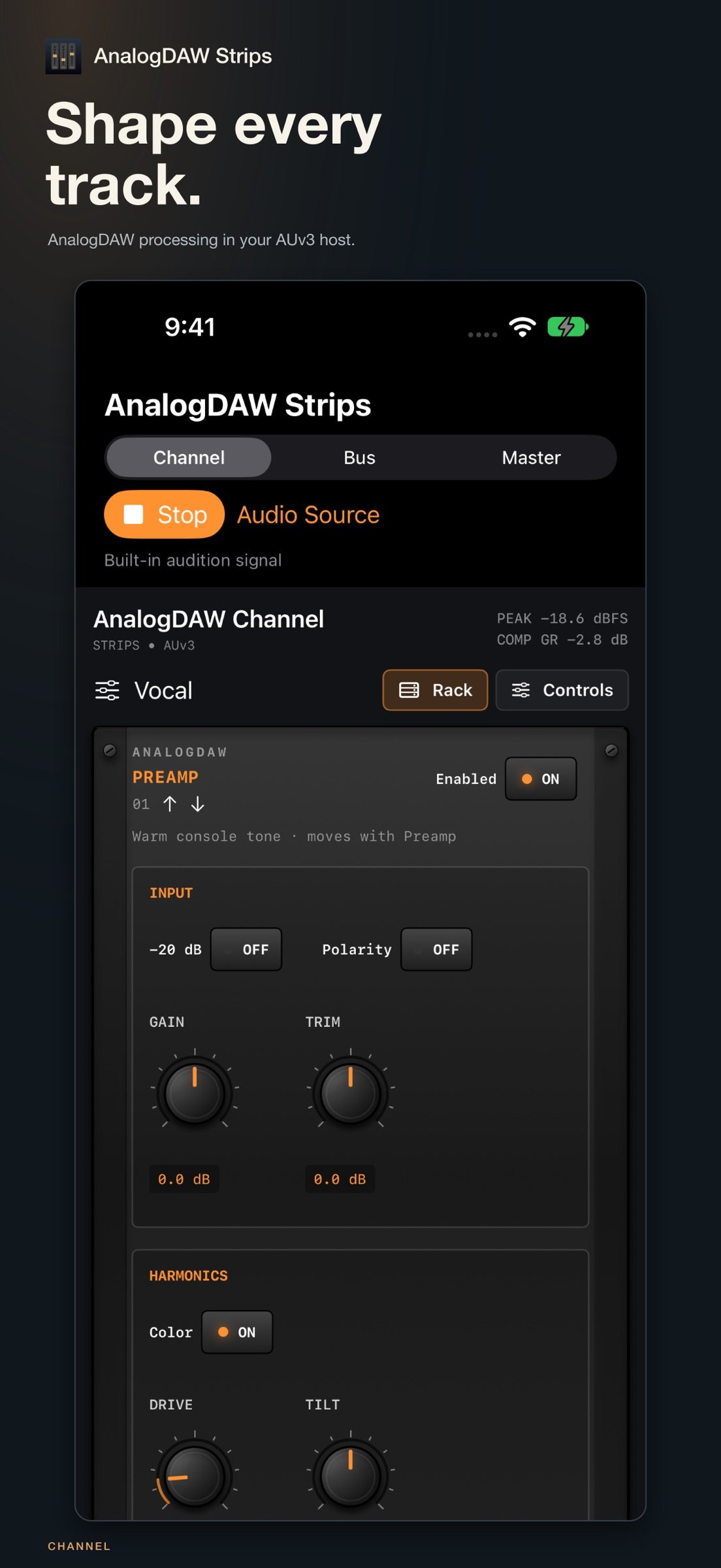
Start with a preamp and its attached Warm tone. Shape the signal with high-pass and low-pass filters, a gate, four-band EQ with Bloom, five compressor circuits, and a de-esser. Input pad, polarity, gain, and trim keep gain staging close at hand.
BUS AND AUX
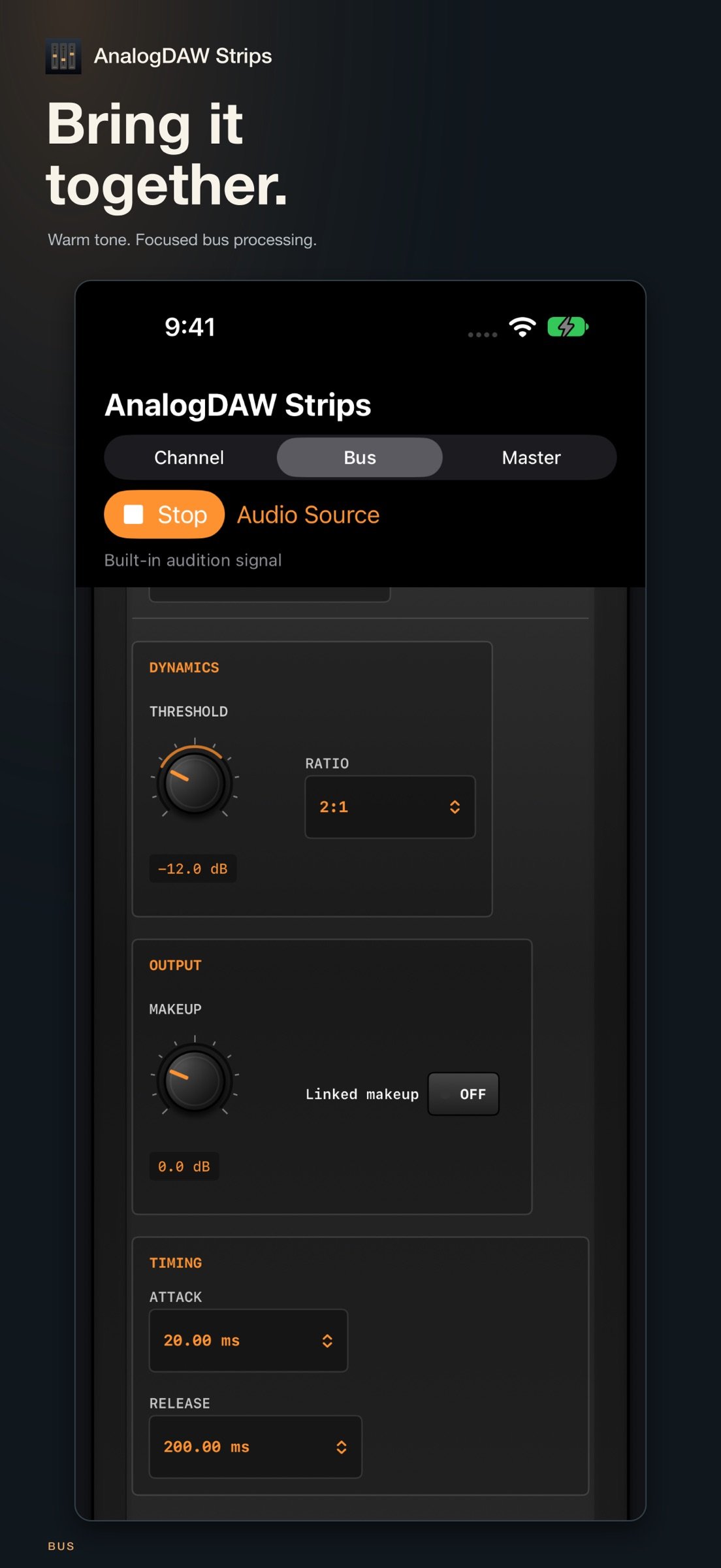
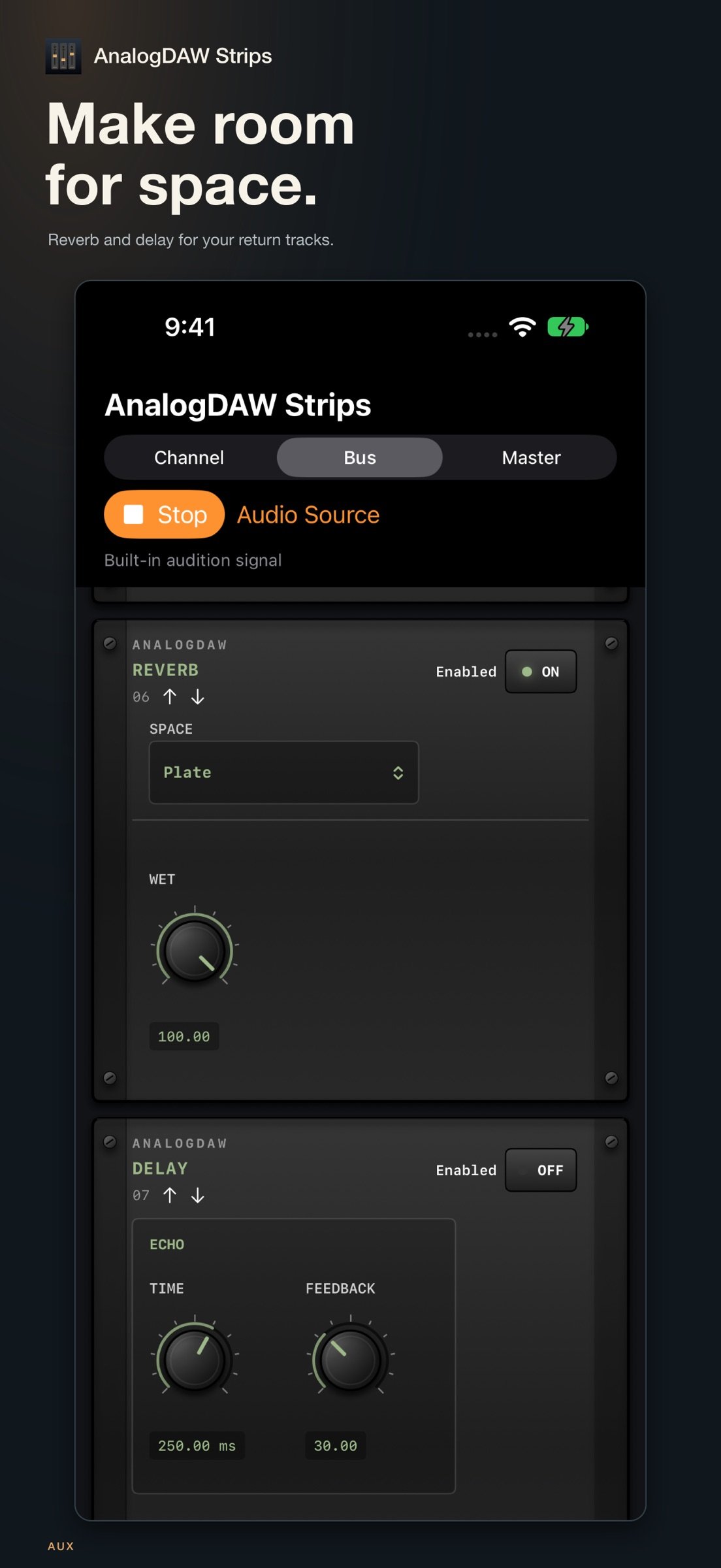
Use Bus mode for group processing: filters, gate, de-esser, EQ, compression, and fixed Warm output coloration. Switch to Aux for seven stereo reverb spaces and feedback delay, with wet-only defaults for return tracks.
MASTER
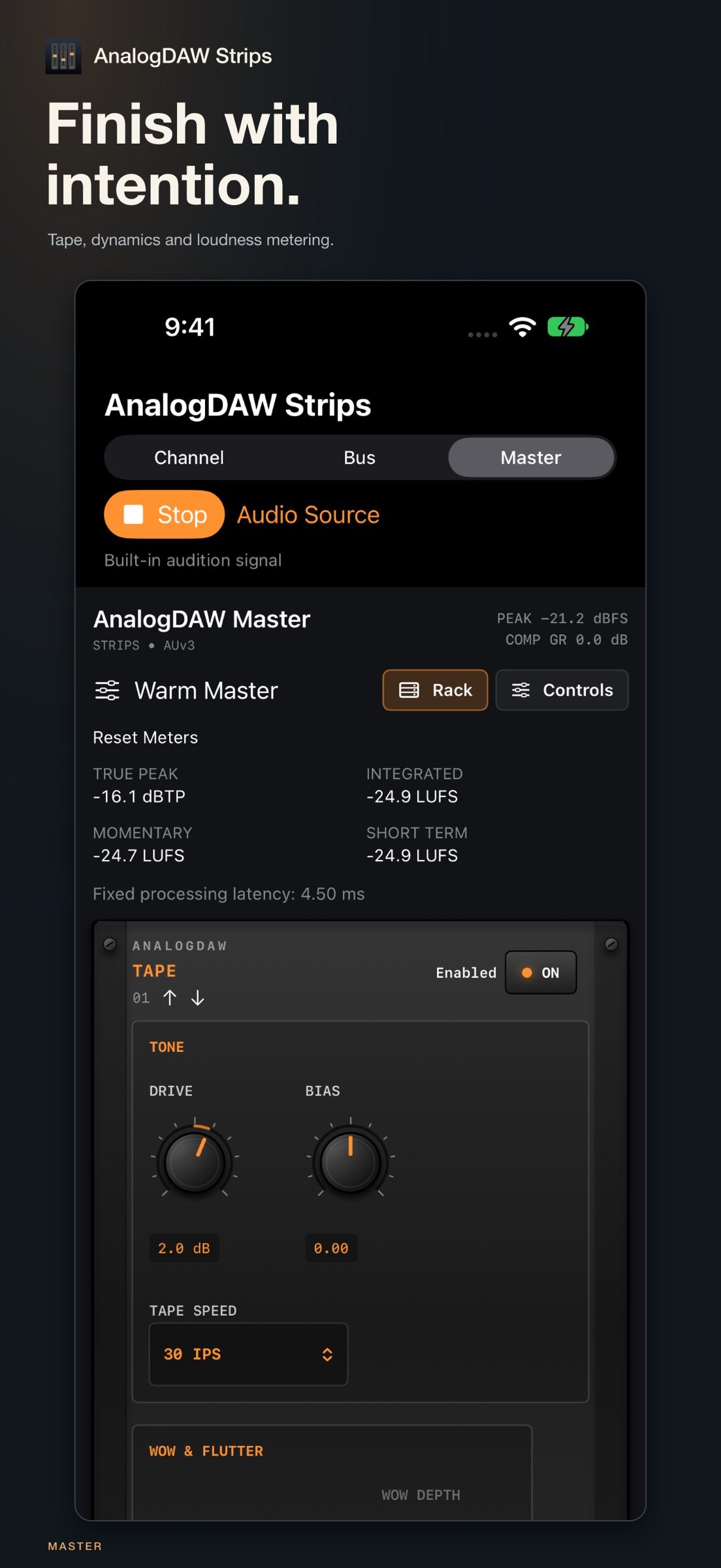
Add tape drive, bias, 15/30 IPS speed, and optional wow and flutter. Refine the mix with filters, EQ, and compression, then control the final level with a limiter. Read true peak and momentary, short-term, and integrated loudness.
FIVE COMPRESSOR CIRCUITS
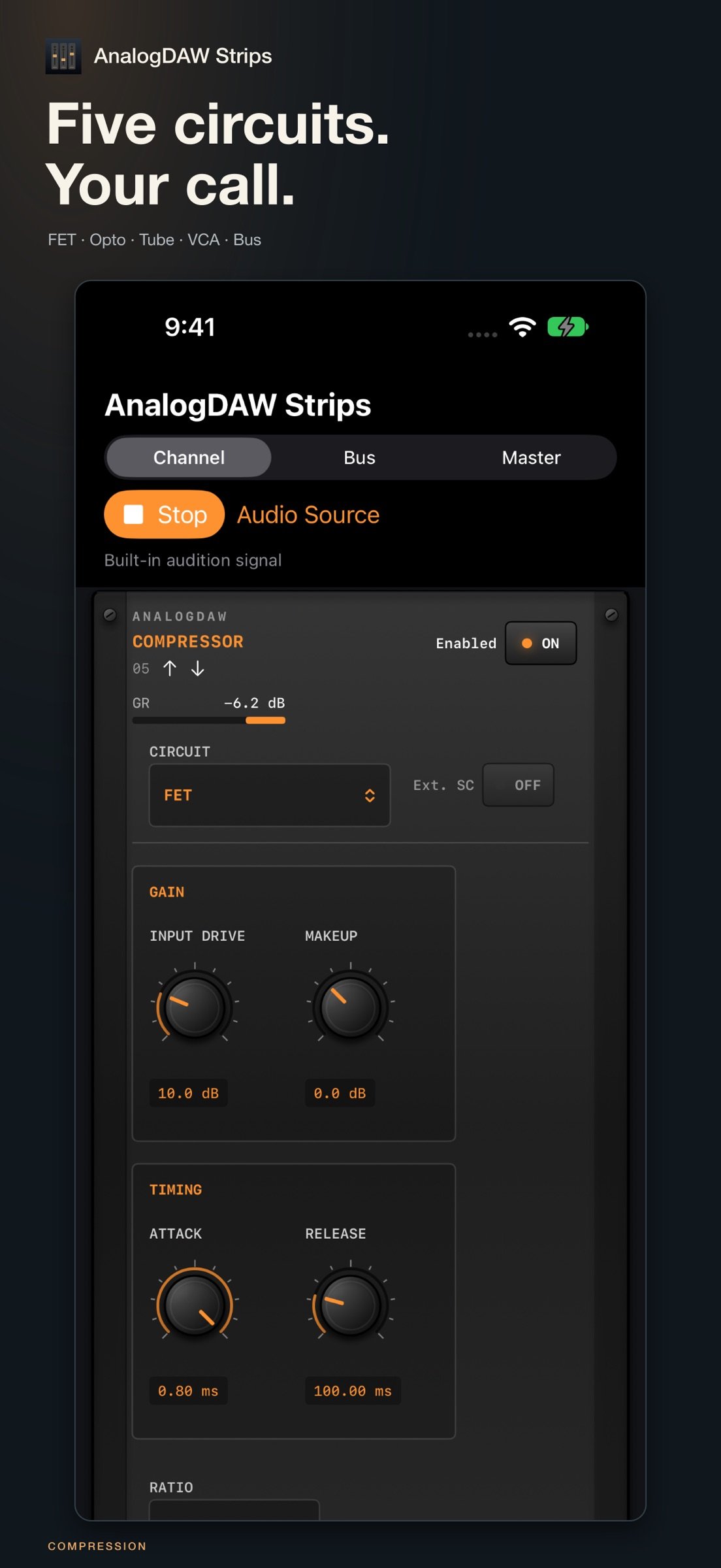
Choose FET, Opto, Tube, VCA, or Bus. Each circuit presents its own controls, including FET all-buttons mode, Tube time constants, VCA Over Easy, and Bus Auto release and linked makeup.
A WORKFLOW THAT FITS
Use the Rack layout for rotary controls or switch to Controls for sliders. Enter exact values, reset individual controls, reorder supported stages, load factory presets, and save user presets. Automate parameters and recall settings through your host's project state. Gate and compressor accept an external sidechain when the host supplies one.
AUDITION ON YOUR DEVICE
The included app previews all three strips using a built-in signal or an audio file you choose. Audio processing stays on your device. No account, ads, or tracking.
Requires an AUv3-compatible host to use the effects in another app. Supports mono and stereo audio. Host routing, sidechain availability, automation, and plugin window behavior depend on the host. This suite contains AUv3 effects, not VST or AAX plugins.
User preset libraries are local to the app or individual extension; they do not synchronize between them. Your host can save and recall plugin settings in its projects.
License: Commercial
AnalogDAW Strips brings Channel, Bus, and Master effects to iPhone, iPad, and Mac. Work with the processors, factory defaults, control ranges, and default stage orders from AnalogDAW in three focused, native audio plugins.
CHANNEL
Start with a preamp and its attached Warm tone. Shape the signal with high-pass and low-pass filters, a gate, four-band EQ with Bloom, five compressor circuits, and a de-esser. Input pad, polarity, gain, and trim keep gain staging close at hand.
BUS AND AUX
Use Bus mode for group processing: filters, gate, de-esser, EQ, compression, and fixed Warm output coloration. Switch to Aux for seven stereo reverb spaces and feedback delay, with wet-only defaults for return tracks.
MASTER
Add tape drive, bias, 15/30 IPS speed, and optional wow and flutter. Refine the mix with filters, EQ, and compression, then control the final level with a limiter. Read true peak and momentary, short-term, and integrated loudness.
FIVE COMPRESSOR CIRCUITS
Choose FET, Opto, Tube, VCA, or Bus. Each circuit presents its own controls, including FET all-buttons mode, Tube time constants, VCA Over Easy, and Bus Auto release and linked makeup.
A WORKFLOW THAT FITS
Use the Rack layout for rotary controls or switch to Controls for sliders. Enter exact values, reset individual controls, reorder supported stages, load factory presets, and save user presets. Automate parameters and recall settings through your host's project state. Gate and compressor accept an external sidechain when the host supplies one.
AUDITION ON YOUR DEVICE
The included app previews all three strips using a built-in signal or an audio file you choose. Audio processing stays on your device. No account, ads, or tracking.
Requires an AUv3-compatible host to use the effects in another app. Supports mono and stereo audio. Host routing, sidechain availability, automation, and plugin window behavior depend on the host. This suite contains AUv3 effects, not VST or AAX plugins.
User preset libraries are local to the app or individual extension; they do not synchronize between them. Your host can save and recall plugin settings in its projects.
License: Commercial
| Release info | New Release on Oct 19, 2026 |
|---|---|
| Listing data | App Store |
Reviews
No reviews yet. Be the first to review AnalogDAW Strips.
Used AnalogDAW Strips? Tell other visitors what you thought.
Log in to write a reviewOther products by this publisher
- "No Distractions" for YouTube 4.10 ----
- #Bible 11.5 "Incredible App - My sister shared this app with me a few weeks ago and it is truly incredible.
- #filmphotography 1.4.2 So, you decided to shoot on film?
- $quirrel 1.5.1 $quirrel Budget & Finance helps you plan each paycheck, track spending, manage debt, and see what is safe to spend before the next payday.
- % Percentage Calculator Pro 1.41 This is the Pro version of % Percentage Calculator.
Most viewed iOS Photo & Video
-
1
 Infuse 8.5.9
Infuse: Enterprise provides the same great features as the standard version of Infuse and includes permanent access to all Pro features via a traditional paid app.
-
2
 ShortDiShow 2.0
Drama Quest Island — An offline interactive short-drama adventure.
-
3
 AI Video Generator 2.0.2
Vixel – AI Video Generator
-
4
 OPlayer 4.8
Play all your videos directly without having to convert them!
-
5
 Necrometer II 1.2
Necrometer II is a paranormal investigation companion designed for ghost hunters and researchers.
-
6
 CapCut 20.0.0
CapCut offers easy-to-use video editing functions, in-APP fonts and effects, advanced features such as keyframe animation, smooth slow-motion, chroma key, and stabilization, to help you capture and snip moments.
-
7
 TouchSiren Delta 3.1
--------------------------------------------------------------
-
8
 Ai Photo 1.1.2
AI Photo Retouch – BG Eraser
-
9
 CNU 3.0.12
CNU?????????????????????,???????????????
-
10
 Treblo 1.6.0
Make songs with the world's best AI music model.
Most downloaded iOS Photo & Video
-
1
Infuse 8.5.9
Infuse: Enterprise provides the same great features as the standard version of Infuse and includes permanent access to all Pro features via a traditional paid app.
-
2
 DJI Fly 1.21.18
DJI Fly is designed to help pilots fly drones with ease.
-
3
 ReelyGo 1.1.42
ReelyGo: Your Daily Drama Escape
-
4
 TurboCollage Automatic 1.2.4
#1 Easy automatic photo collage maker for iPhone & iPad.
-
5
 Analog Radio 3.0
The iPhone and iPad devices don't have the FM/AM radio antenna installed.
-
6
 AGAIN. Rehearsal Notes 2.0.1
AGAIN. is the rehearsal app that remembers why the band stopped — and, new in Version 2, who said what in a writing session or a table read.
-
7
Treblo 1.6.0
Make songs with the world's best AI music model.
-
8
 Pop Dot Comics 1.48
Create a comic worthy of the Sunday newspaper or your favorite pulp-fiction cover.
-
9
 Rozeta Sequencer Suite 1.3.16
Rozeta is a suite of MIDI sequencers and controllers that lets you explore a new, freeform approach to sequencing and controlling mobile music apps.
-
10
 SSS IPTV, Simple, Smart Super 1.0.2
An Easiest way to watch TV Online or Movies or Series, Bring your Own list M3u,