
Ad And Stuff DNS Filter 8.6.111
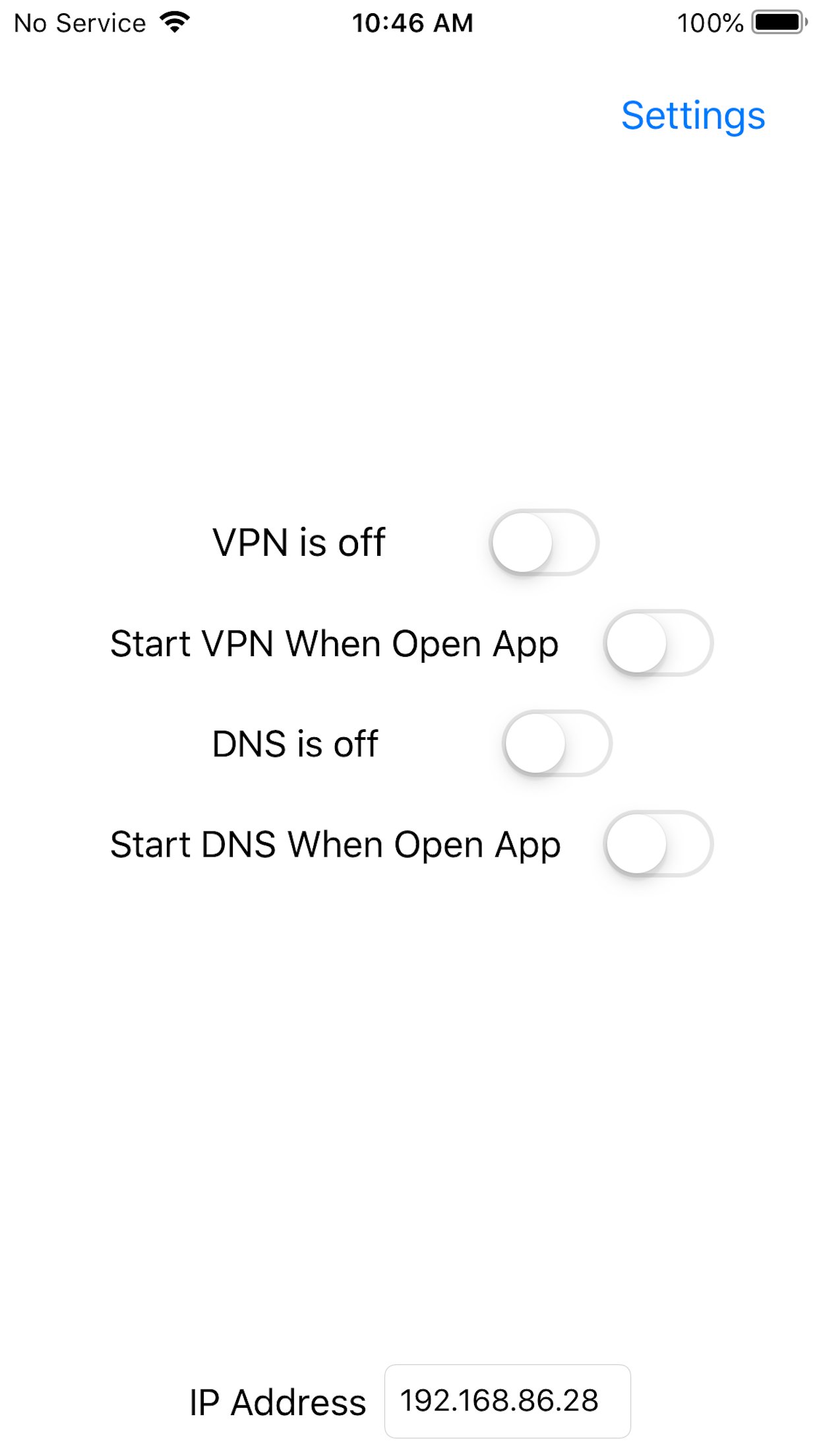
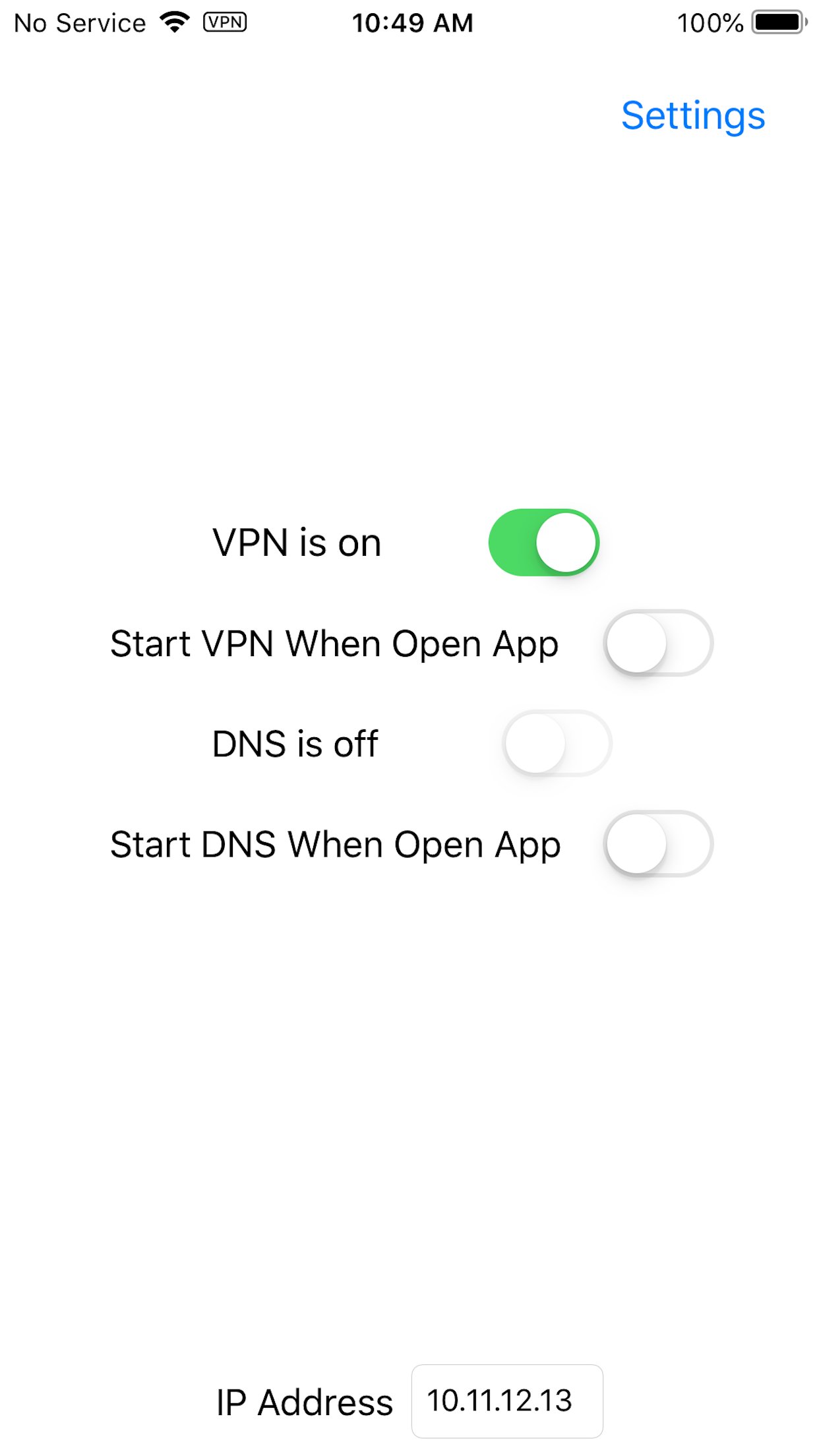
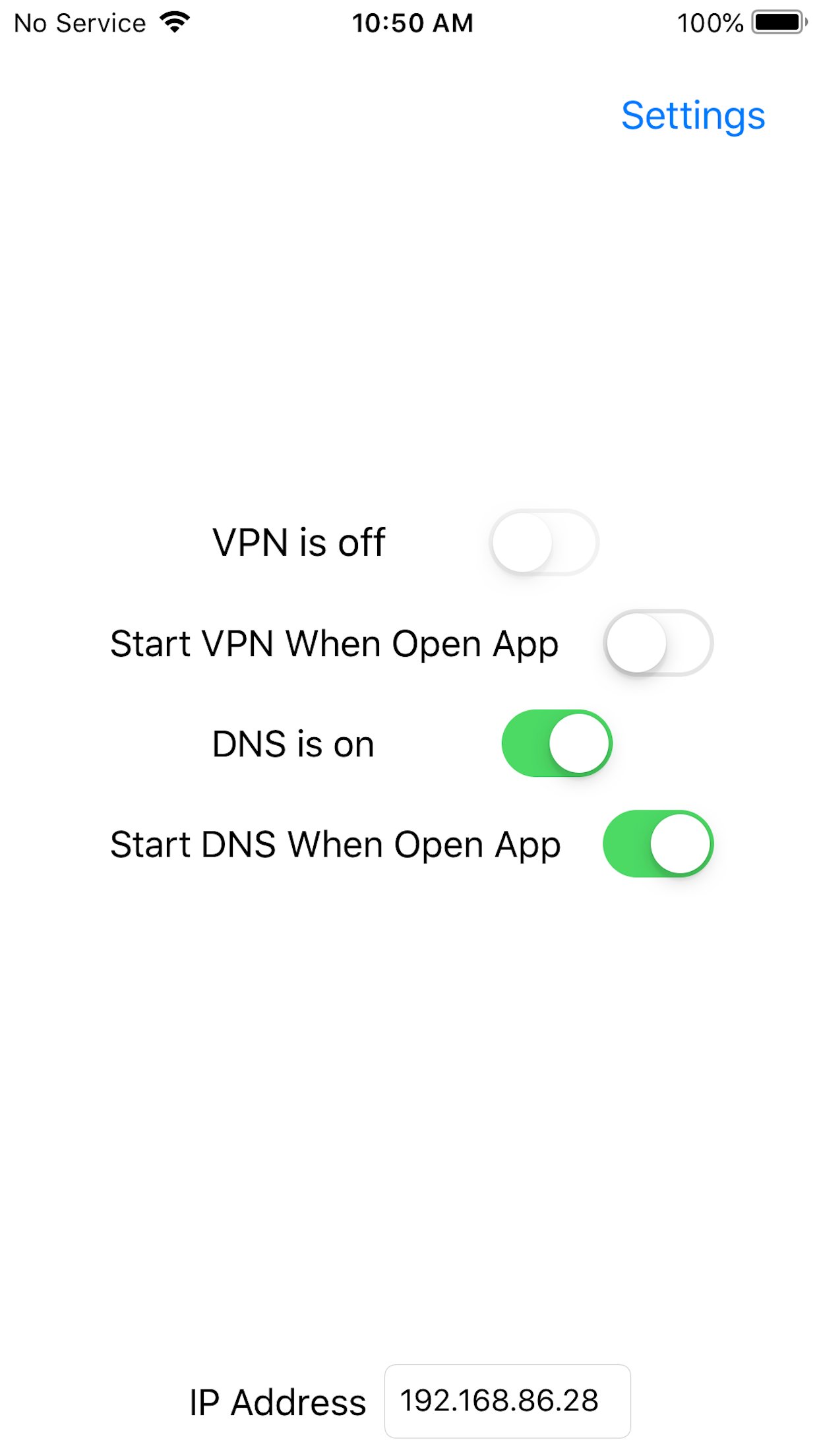
Ad And Stuff DNS Filter can operate as a local VPN or as a DNS server.
Download
16.47 MB
14downloads
2this week
FreeCommercial
0reviews
Screenshots

About Ad And Stuff DNS Filter
Ad And Stuff DNS Filter can operate as a local VPN or as a DNS server.
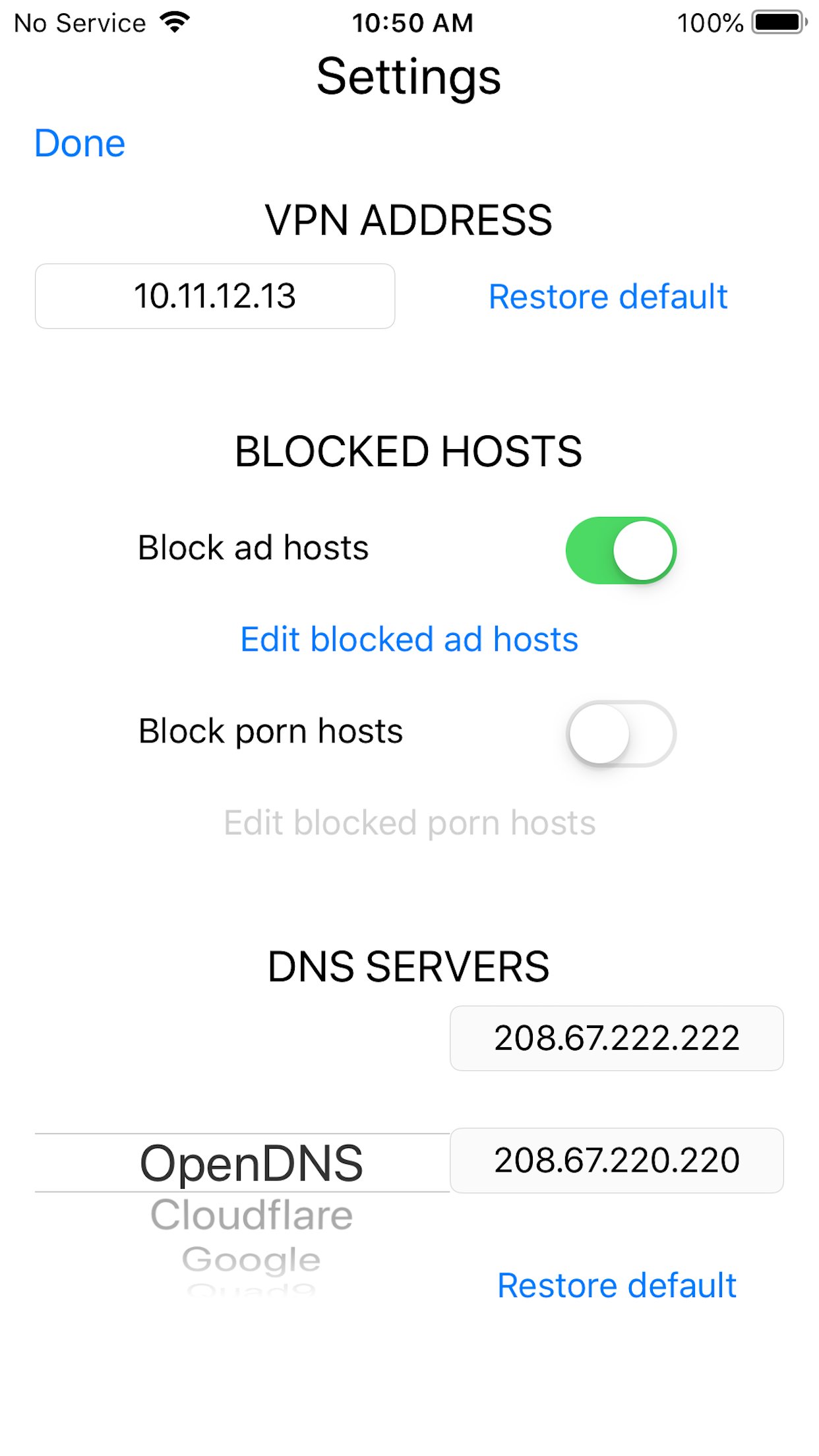
It uses the VPN on the device to filter URLs, much like a hosts file, but better. It optionally blocks ads and adult content. Its settings allow you to do the following:
-- set an internal IP address for the VPN in case the default one, 10.11.12.13, has a conflict on your LAN,
-- restore the default internal IP address,
-- optionally block ads and adult content,
-- add ad and adult content hosts to be blocked or remove ones in its internal database to keep them from being blocked,
-- change the DNS servers from OpenDNS to one of the several wired DNS providers or provide your own DNS servers,
-- and restore the default DNS servers.
It works by routing DNS calls only through the VPN. The VPN replies with Unknown if the requested host is in the app's internal database. Otherwise, it passes the request to the DNS provider selected for the VPN. The only external calls explicitly made by the app are to the DNS provider - the app does not call home or anywhere else and does not collect any data, personal or otherwise. The VPN also seemless works when changing wifi networks or going mobile.
The DNS server uses the same database and like the VPN, optionally blocks ads and adult content. It shares the same settings except that the VPN address does not apply to it.
The VPN and DNS server cannot run at the same time, and either of them can be started automatically when the app starts. Due to restrictions iOS apps have running in the background, it cannot be a DNS server for apps running on the device since it goes to sleep when another app comes to the foreground. However, it can put older devices, like iPhone 6's that are running iOS 12, to use as DNS servers that can be used by any other devices running on the same wifi network. To run as DNS servers, the devices must remain on with the DNS app running in the foreground and should be plugged in. The device's IP address is on the screen and is the one that should be used to make it a DNS server for specific devices. They should also be provided a static IP address so other devices using it as a DNS server do not have to be changed. The static IP address to use is the one displayed on the screen.
As of version 3.0, it blocks domains for the VPN and DNS server that are one edit away or a single set of transposed characters (for instance appel.com) from hundreds of the most popular domains. A single edit means a single character substituted (aople.com), a single character deleted (aple.com), or a single character inserted (appple.com).
In addition to protecting you from the simple mistyping of a URL, it will also protect you from going to links in emails and websites that are purposely crafted in this manner to deceive you. As of version 5.5.0, this app will block domains from these popular domains where an 'm' has been replaced with 'rn', like for instance apple.corn. It can be turned off with the Typo check in the Settings.
In addition to protecting you from the simple mistyping of a URL, it will also protect you from going to links in emails and websites that are purposely crafted in this manner to deceive you.
As of version 6.4.0, this app will block domains from these popular domains where an 'm' has been replaced with 'rn', like for instance apple.corn. It can be turned off with the Typo check in the Settings.
In addition to protecting you from the simple mistyping of a URL, it will also protect you from going to links in emails and websites that are purposely crafted in this manner to deceive you. It can be turned off with the Typo check in the Settings. If by some chance, you encounter a URL you need with one of these characteristics, it can be whitelisted in the Settings. And it does not affect performance - you won't notice the difference in web browsers or other applications.
License: Commercial
It uses the VPN on the device to filter URLs, much like a hosts file, but better. It optionally blocks ads and adult content. Its settings allow you to do the following:
-- set an internal IP address for the VPN in case the default one, 10.11.12.13, has a conflict on your LAN,
-- restore the default internal IP address,
-- optionally block ads and adult content,
-- add ad and adult content hosts to be blocked or remove ones in its internal database to keep them from being blocked,
-- change the DNS servers from OpenDNS to one of the several wired DNS providers or provide your own DNS servers,
-- and restore the default DNS servers.
It works by routing DNS calls only through the VPN. The VPN replies with Unknown if the requested host is in the app's internal database. Otherwise, it passes the request to the DNS provider selected for the VPN. The only external calls explicitly made by the app are to the DNS provider - the app does not call home or anywhere else and does not collect any data, personal or otherwise. The VPN also seemless works when changing wifi networks or going mobile.
The DNS server uses the same database and like the VPN, optionally blocks ads and adult content. It shares the same settings except that the VPN address does not apply to it.
The VPN and DNS server cannot run at the same time, and either of them can be started automatically when the app starts. Due to restrictions iOS apps have running in the background, it cannot be a DNS server for apps running on the device since it goes to sleep when another app comes to the foreground. However, it can put older devices, like iPhone 6's that are running iOS 12, to use as DNS servers that can be used by any other devices running on the same wifi network. To run as DNS servers, the devices must remain on with the DNS app running in the foreground and should be plugged in. The device's IP address is on the screen and is the one that should be used to make it a DNS server for specific devices. They should also be provided a static IP address so other devices using it as a DNS server do not have to be changed. The static IP address to use is the one displayed on the screen.
As of version 3.0, it blocks domains for the VPN and DNS server that are one edit away or a single set of transposed characters (for instance appel.com) from hundreds of the most popular domains. A single edit means a single character substituted (aople.com), a single character deleted (aple.com), or a single character inserted (appple.com).
In addition to protecting you from the simple mistyping of a URL, it will also protect you from going to links in emails and websites that are purposely crafted in this manner to deceive you. As of version 5.5.0, this app will block domains from these popular domains where an 'm' has been replaced with 'rn', like for instance apple.corn. It can be turned off with the Typo check in the Settings.
In addition to protecting you from the simple mistyping of a URL, it will also protect you from going to links in emails and websites that are purposely crafted in this manner to deceive you.
As of version 6.4.0, this app will block domains from these popular domains where an 'm' has been replaced with 'rn', like for instance apple.corn. It can be turned off with the Typo check in the Settings.
In addition to protecting you from the simple mistyping of a URL, it will also protect you from going to links in emails and websites that are purposely crafted in this manner to deceive you. It can be turned off with the Typo check in the Settings. If by some chance, you encounter a URL you need with one of these characteristics, it can be whitelisted in the Settings. And it does not affect performance - you won't notice the difference in web browsers or other applications.
License: Commercial
| Release info | Update on Nov 10, 2026 |
|---|---|
| Release notes | Database update. |
| Listing data | App Store |
Reviews
No reviews yet. Be the first to review Ad And Stuff DNS Filter.
Used Ad And Stuff DNS Filter? Tell other visitors what you thought.
Log in to write a reviewOther products by this publisher
- "No Distractions" for YouTube 4.10 ----
- #Bible 11.6.1 "Incredible App - My sister shared this app with me a few weeks ago and it is truly incredible.
- #filmphotography 1.4.2 So, you decided to shoot on film?
- $quirrel 1.5.1 $quirrel Budget & Finance helps you plan each paycheck, track spending, manage debt, and see what is safe to spend before the next payday.
- % Percentage Calculator Pro 1.41 This is the Pro version of % Percentage Calculator.
Most viewed iOS Productivity
-
1
 WordPress 27.4
Manage or create your WordPress blog or website right from your iOS device: create and edit posts and pages, upload your favorite photos and videos, view stats and reply to comments.
- 2 Voice Translator - Alive 1.6 Translation app that turns your iPhone into an interpreter instantly.
-
3
 Claude by Anthropic 1.261116.19
Meet Claude, your AI problem solver and thinking partner.
-
4
 Life360 26.44.0
Whether at home, online, or on the move, our comprehensive family safety features bring peace of mind to your loved ones AND help safeguard your personal belongings.
-
5
 WristMemo 2.0
WristMemo turns your Apple Watch into an all-day voice recorder.
- 6 "No Distractions" for YouTube 4.10 ----
-
7
 Colicine 1.3.0
Have you ever been there—
- 8 (beat) for iOS 0.5.10 An elegant Fountain screenwriting app, created by a screenwriter for screenwriters.
-
9
 DeepSeek 2.8.0
Experience seamless interaction with DeepSeek's official AI assistant for free!
-
10
 Howbout 16.8.0
The shared calendar for friends, couples, and family
Most downloaded iOS Productivity
- 1 Voice Translator - Alive 1.6 Translation app that turns your iPhone into an interpreter instantly.
-
2
DeepSeek 2.8.0
Experience seamless interaction with DeepSeek's official AI assistant for free!
-
3
 SessionsAI 1.2.1
Sessions AI is a private AI workspace that runs entirely on your iPhone, iPad, or Mac.
-
4
 Voices AI 1.16.15
Discover Voices, the premier voice transformation app designed exclusively for iOS.
-
5
 Block Distracting Websites 1.11
"It's a great way to save time, and stop browsing Reddit when you should be doing coursework."
-
6
 Plot Digitizer 1.4.1
Plot Digitizer is an app to extract numerical data from plot images.
-
7
 Google Docs 1.2026.47103
Create, edit, and collaborate on online documents with the Google Docs app.
-
8
 MyHyundai with Bluelink 5.4.6
The MyHyundai app makes getting information about your Hyundai vehicle easier than ever.
-
9
 Pixy Mood Tracker 1.110.0
Track your mood, one pixel at a time.
-
10
 Minder 1.4
Minder turns your phone into a pair of eyes that watch you work.