18downloads
1this week
FreeFreeware
0reviews
Screenshots
About Workout Time!
Home Screen
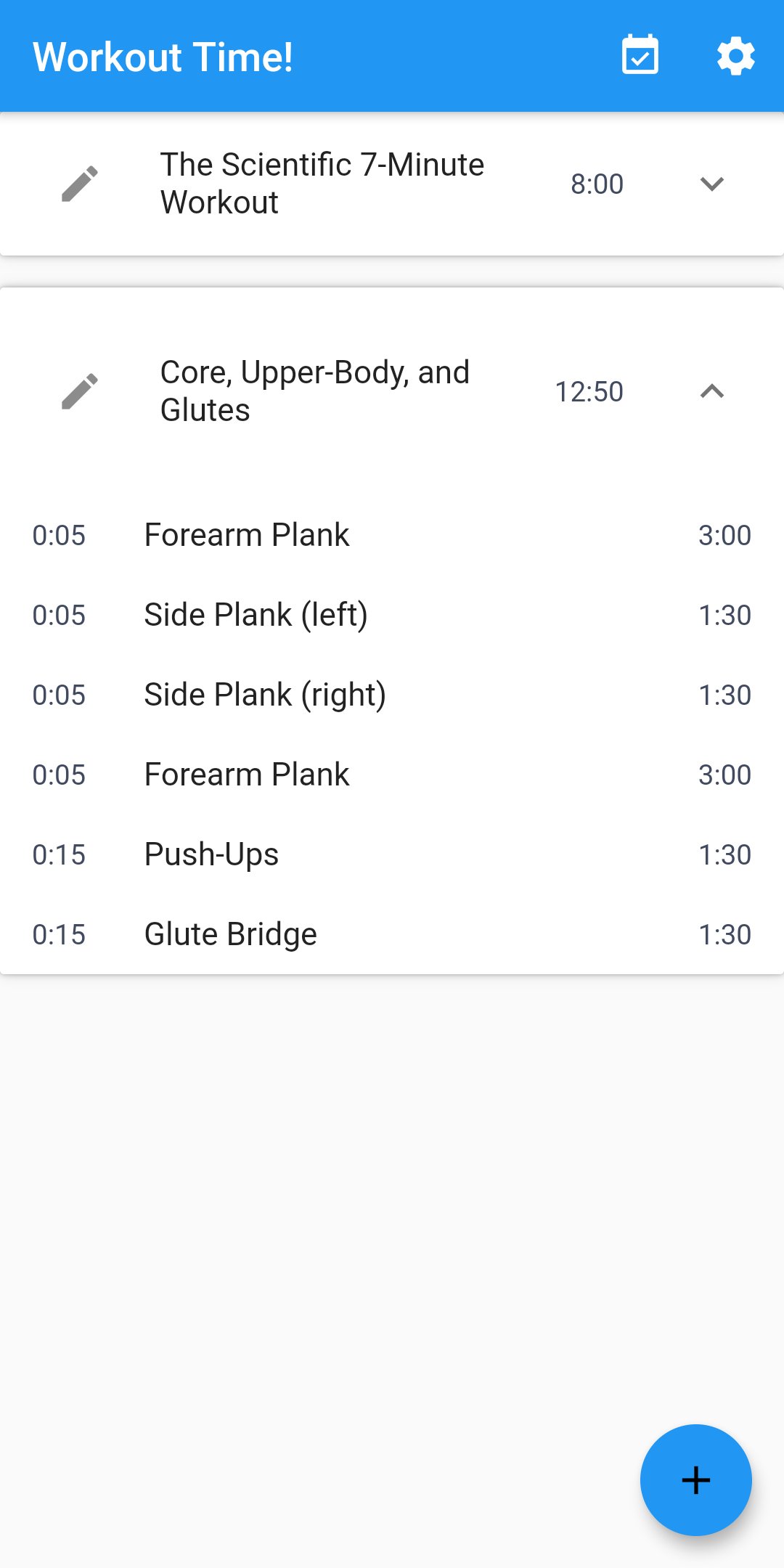
Lists all workouts (the app comes with two predefined workouts, and others can be created or imported). Tapping on the pencil icon on the left of a workout will go to the Edit Screen, tapping on the title or duration of a workout will start it from the beginning, tapping on the "?" symbol on the right will show a list of the exercises it contains. Each exercise has a preparation/rest time before it (shown on the left), and a duration (shown on the right). Tapping on an exercise in the list will start the workout at that exercise. To add a new workout, tap on the "+" button on the bottom right corner and select "Create" to build it from scratch or "Import" to load a workout in JSON format. At the top-right corner of the home screen are two icons: a calendar with a checkmark in it (tapping this will go to the Log Screen) and a gear (tapping this will go to the Settings Screen).
Workout Screen
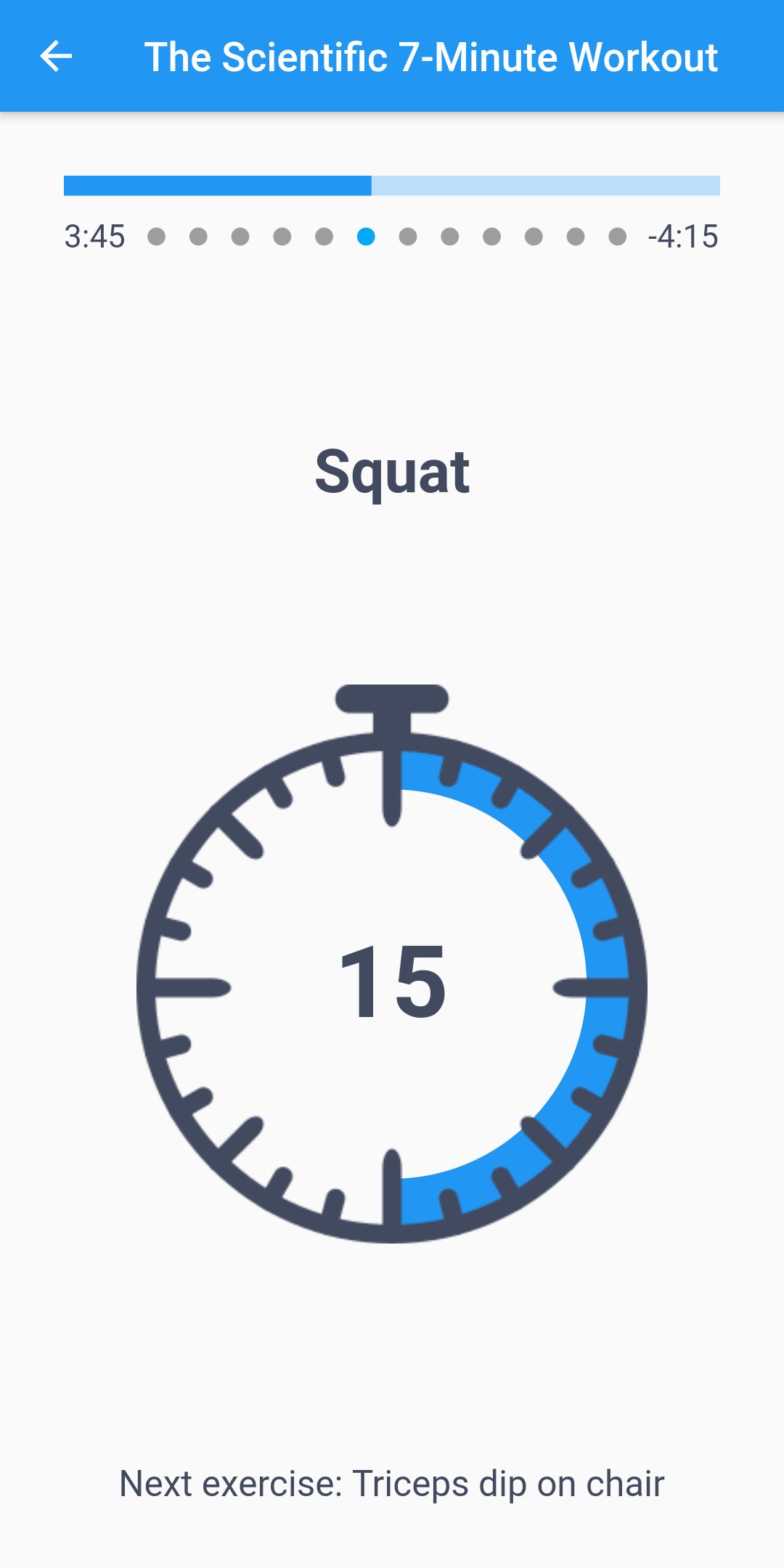
When a workout is running there is a progress bar at the top showing the current point in the workout, with the time elapsed on the left and the time remaining (indicated with a "-") on the right. In between these two times are a series of dots that represent the exercises in the workout, with the current exercise highlighted in blue. Below this is the name of the current exercise. During the exercise preparation time the name will have "Get ready for" before it (tapping on this will skip the preparation and begin the exercise). Below the exercise name is a stopwatch showing the current progress in that exercise, with the remaining time in the middle. Tapping on the stopwatch will pause the workout (indicated by blinking time inside the stopwatch), and tapping again will resume it. At the bottom of the screen is the name of the next exercise. Tapping on this will skip to the next exercise.
Edit screen
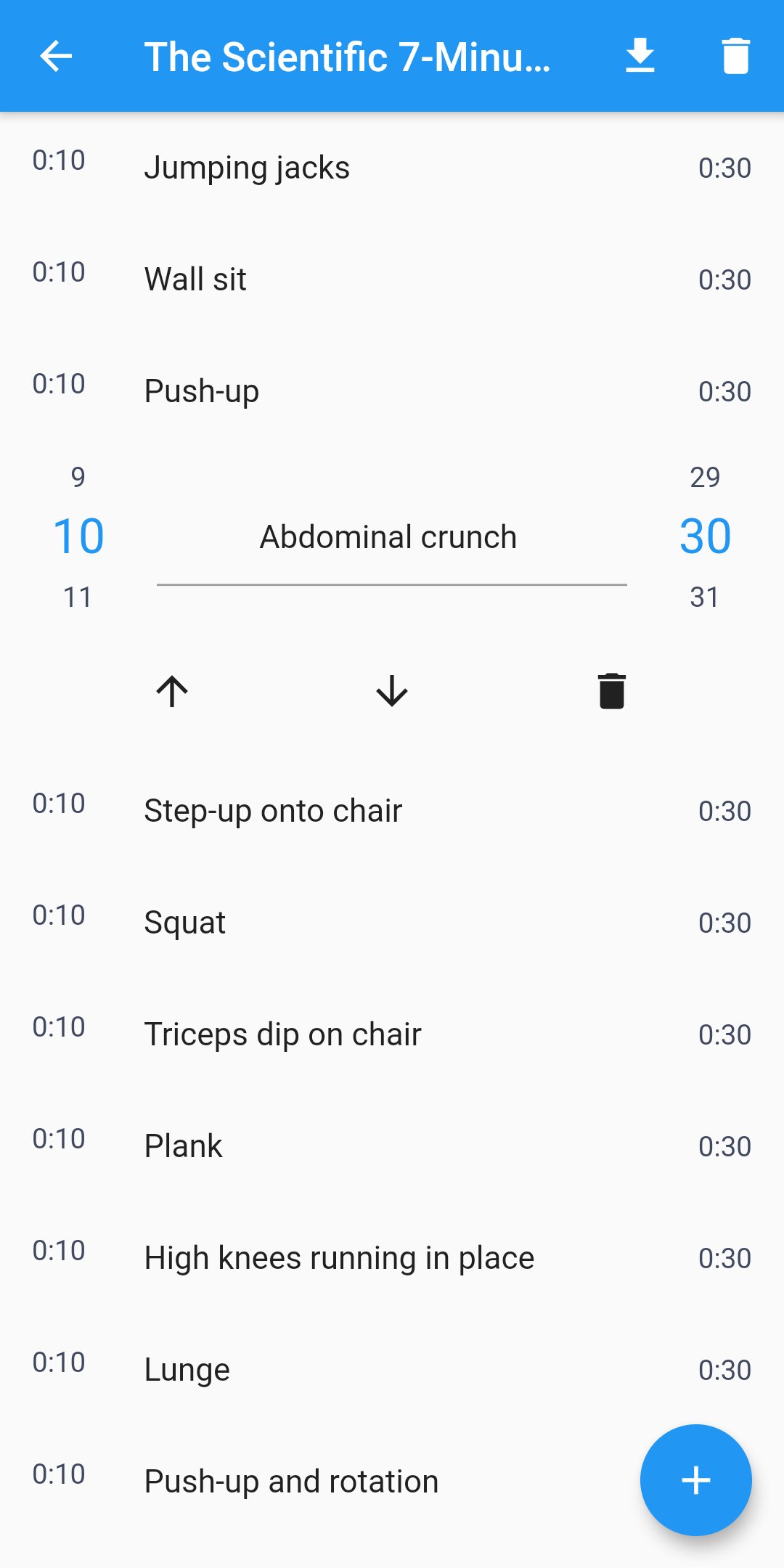
Lists all exercises in a workout, with the preparation time on the left and the duration on the right. To change an exercise, tap on it and the two times will become spinners that can be swiped up or down to modify the time. Long-pressing on the spinner allows modifying the number with the keyboard (must be a number of seconds without any punctuation). Tapping on the exercise name will bring up the keyboard to edit it. Under the name are three icons: an up arrow to move the exercise higher in the list, a down arrow to move it lower, and a trash can to delete the it. In the top-right corner of the screen are two icons: a download icon to save the workout in JSON format to the Downloads folder, and a trash can to delete the entire workout.
Log Screen
Lists all the executions of workouts, with the date and time on the left and the name of the workout on the right. At the top-right corner of the screen is a download icon that will save this list in JSON format to the Downloads folder.
Settings Screen
This screen has three dropdown menus to select the sound to play for the last 3 seconds of preparation/exercise time, at the start and end of each exercise, and at the end of the workout. There are 4 options for each: nothing, a beep, a ding, or an applause.
License: GPL-3.0-or-later
Lists all workouts (the app comes with two predefined workouts, and others can be created or imported). Tapping on the pencil icon on the left of a workout will go to the Edit Screen, tapping on the title or duration of a workout will start it from the beginning, tapping on the "?" symbol on the right will show a list of the exercises it contains. Each exercise has a preparation/rest time before it (shown on the left), and a duration (shown on the right). Tapping on an exercise in the list will start the workout at that exercise. To add a new workout, tap on the "+" button on the bottom right corner and select "Create" to build it from scratch or "Import" to load a workout in JSON format. At the top-right corner of the home screen are two icons: a calendar with a checkmark in it (tapping this will go to the Log Screen) and a gear (tapping this will go to the Settings Screen).
Workout Screen
When a workout is running there is a progress bar at the top showing the current point in the workout, with the time elapsed on the left and the time remaining (indicated with a "-") on the right. In between these two times are a series of dots that represent the exercises in the workout, with the current exercise highlighted in blue. Below this is the name of the current exercise. During the exercise preparation time the name will have "Get ready for" before it (tapping on this will skip the preparation and begin the exercise). Below the exercise name is a stopwatch showing the current progress in that exercise, with the remaining time in the middle. Tapping on the stopwatch will pause the workout (indicated by blinking time inside the stopwatch), and tapping again will resume it. At the bottom of the screen is the name of the next exercise. Tapping on this will skip to the next exercise.
Edit screen
Lists all exercises in a workout, with the preparation time on the left and the duration on the right. To change an exercise, tap on it and the two times will become spinners that can be swiped up or down to modify the time. Long-pressing on the spinner allows modifying the number with the keyboard (must be a number of seconds without any punctuation). Tapping on the exercise name will bring up the keyboard to edit it. Under the name are three icons: an up arrow to move the exercise higher in the list, a down arrow to move it lower, and a trash can to delete the it. In the top-right corner of the screen are two icons: a download icon to save the workout in JSON format to the Downloads folder, and a trash can to delete the entire workout.
Log Screen
Lists all the executions of workouts, with the date and time on the left and the name of the workout on the right. At the top-right corner of the screen is a download icon that will save this list in JSON format to the Downloads folder.
Settings Screen
This screen has three dropdown menus to select the sound to play for the last 3 seconds of preparation/exercise time, at the start and end of each exercise, and at the end of the workout. There are 4 options for each: nothing, a beep, a ding, or an applause.
License: GPL-3.0-or-later
| Release info | New Release on Dec 25, 2021 |
|---|---|
| Release notes | - Fixed scrolling on home screen (thanks to @derkoessi) |
| Listing data | F-Droid |
Reviews
No reviews yet. Be the first to review Workout Time!.
Used Workout Time!? Tell other visitors what you thought.
Log in to write a reviewOther products by this publisher
- "No Distractions" for YouTube 4.10 ----
- #Bible 11.6 "Incredible App - My sister shared this app with me a few weeks ago and it is truly incredible.
- #filmphotography 1.4.2 So, you decided to shoot on film?
- $quirrel 1.5.1 $quirrel Budget & Finance helps you plan each paycheck, track spending, manage debt, and see what is safe to spend before the next payday.
- % Percentage Calculator Pro 1.41 This is the Pro version of % Percentage Calculator.
Most viewed Android Health & Fitness
-
1
 Fencing Scores 2.26
Pool and tournament management for fencing competitions
-
2
 Open Biking 1.1.0
Bluetooth application for generating training on an indoor bike (CBC Pro-form)
-
3
 Albi 1.8.1
A health tracking app that respects your privacy
- 4 Daily Dozen 30 Keep track of the foods that Dr Greger recommends in his book How Not to Die
- 5 HIIT 1.0.2 Interval timer
- 6 Bluemoon 1.3.0 Open source, privacy friendly menstruation tracking app. Your period, your data!
-
7
 Baby Monito 1.0.7
Track your baby's feedings, diapers and weight, privately and offline
-
8
 Chompass - Calorie Tracker 6.0.0
Ad-free AI calorie tracker. Snap, speak, or type meals. Open source.
- 9 Spartathlon 0.8.2 View info about the Spartathlon foot race
-
10
 Mood Cairns 1.2.1
Private, fully offline mood tracker with tags and charts. No network access.
Most downloaded Android Health & Fitness
-
1
 Megrim: Migraine Log 1.0.8
Private, offline migraine log with automatic on-device pattern insights.
- 2 Kalimory 1.1.0 Calm, offline bodyweight training with guided workouts and progressions
-
3
 Mindfulness Meditation 7
Selection of audio guides for mindfulness meditation
-
4
Mood Cairns 1.2.1
Private, fully offline mood tracker with tags and charts. No network access.
- 5 iTrack workout tracker 1.8.1 Open-source workout tracker for managing your fitness routines
-
6
 Mindful Attention Awareness Scale 9
Find out how mindful you are on a scale of 1 to 6
-
7
 SimpleHIIT 1.06
Customisable HIIT timer with animated exercises
-
8
 Smoking Tracker 1.9.2
Track your smoking and see daily, weekly, monthly and yearly statistics
-
9
 Open Eats Journal 1.22.0
Open Eats Journal is a free nutrition, calories and weight tracking app
- 10 GDF HEMA Timer 1.1.23+1123 A precise and minimal timer for HEMA training and sparring.