toPhonetics Converter 3.1
toPhonetics is an app that provides fully interactive transcriptions of English texts.
Download
12.63 MB
9downloads
1this week
FreeCommercial
0reviews
Screenshots
About toPhonetics Converter
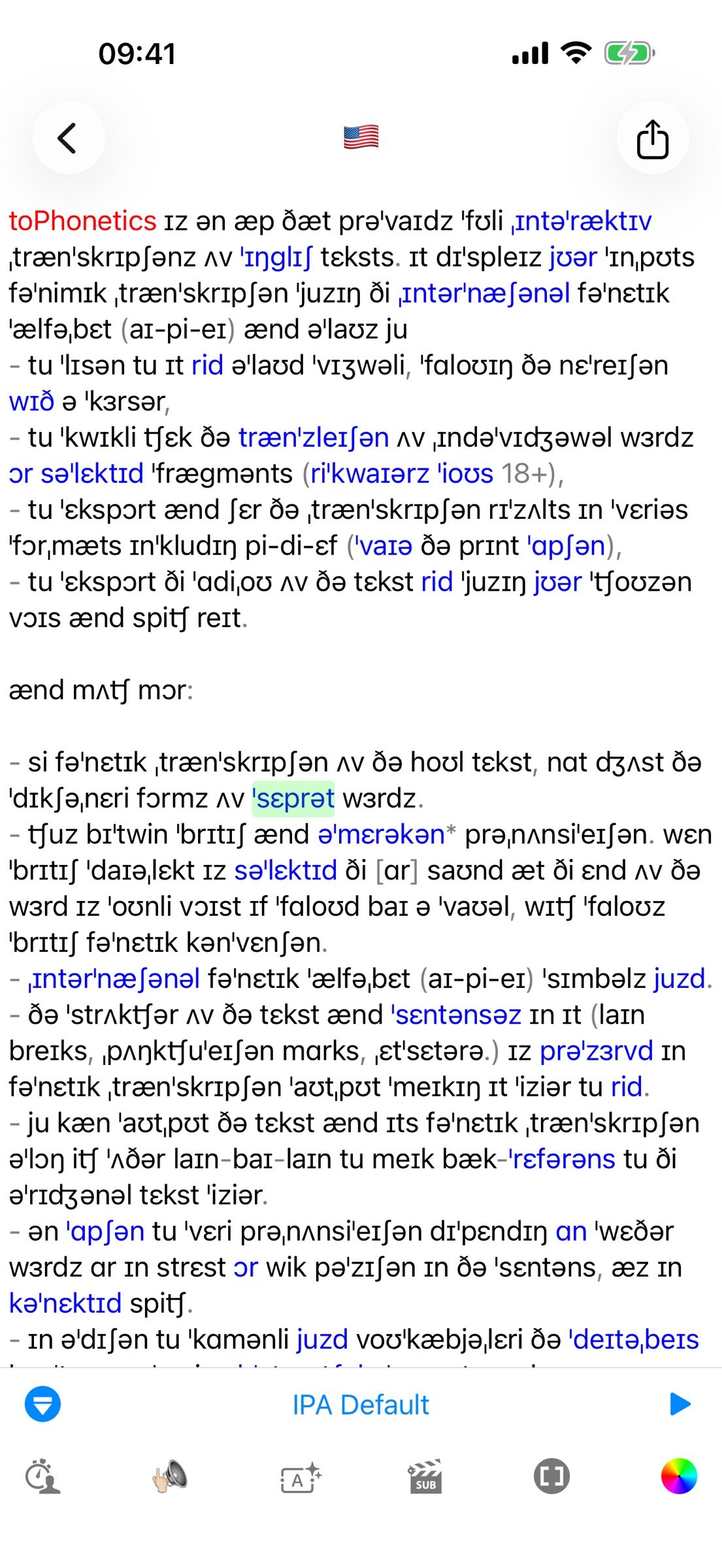
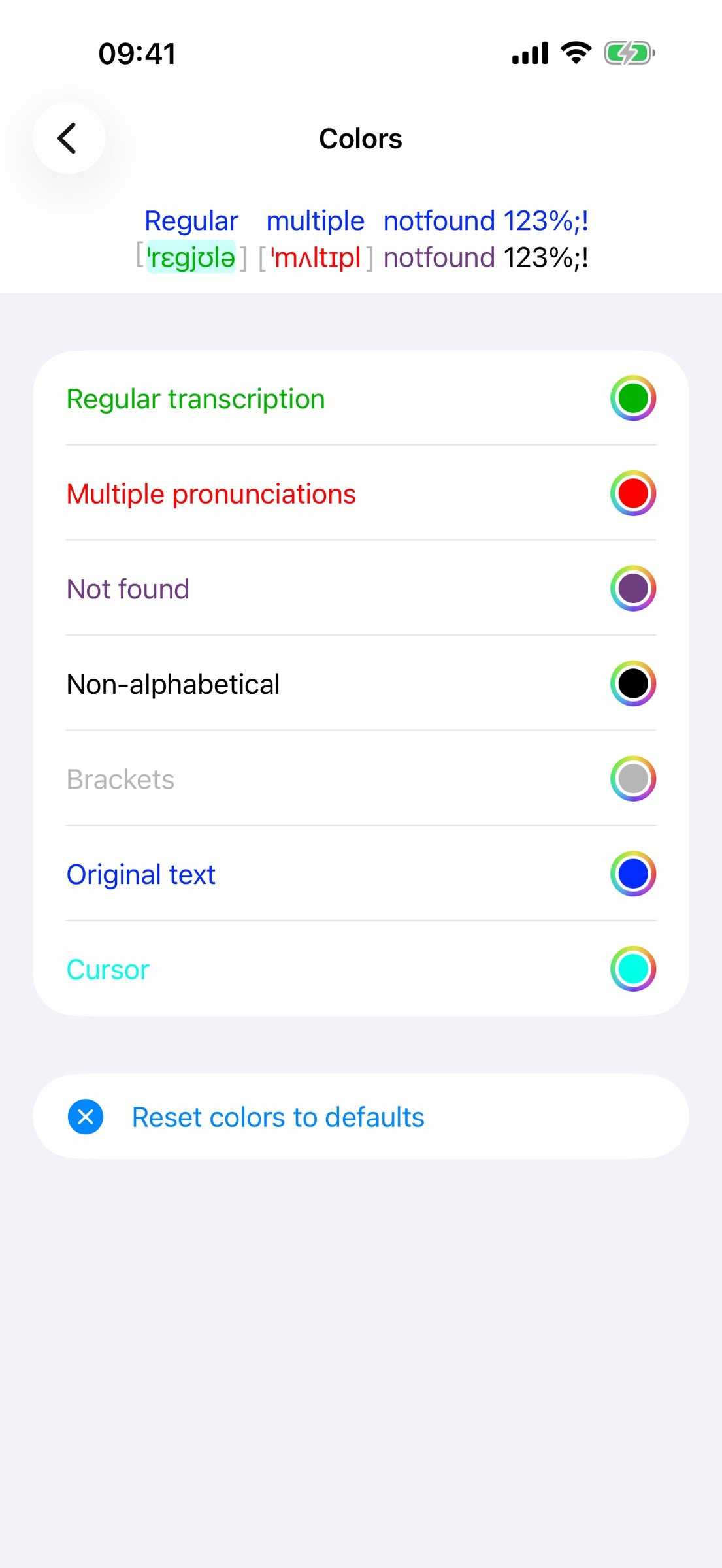
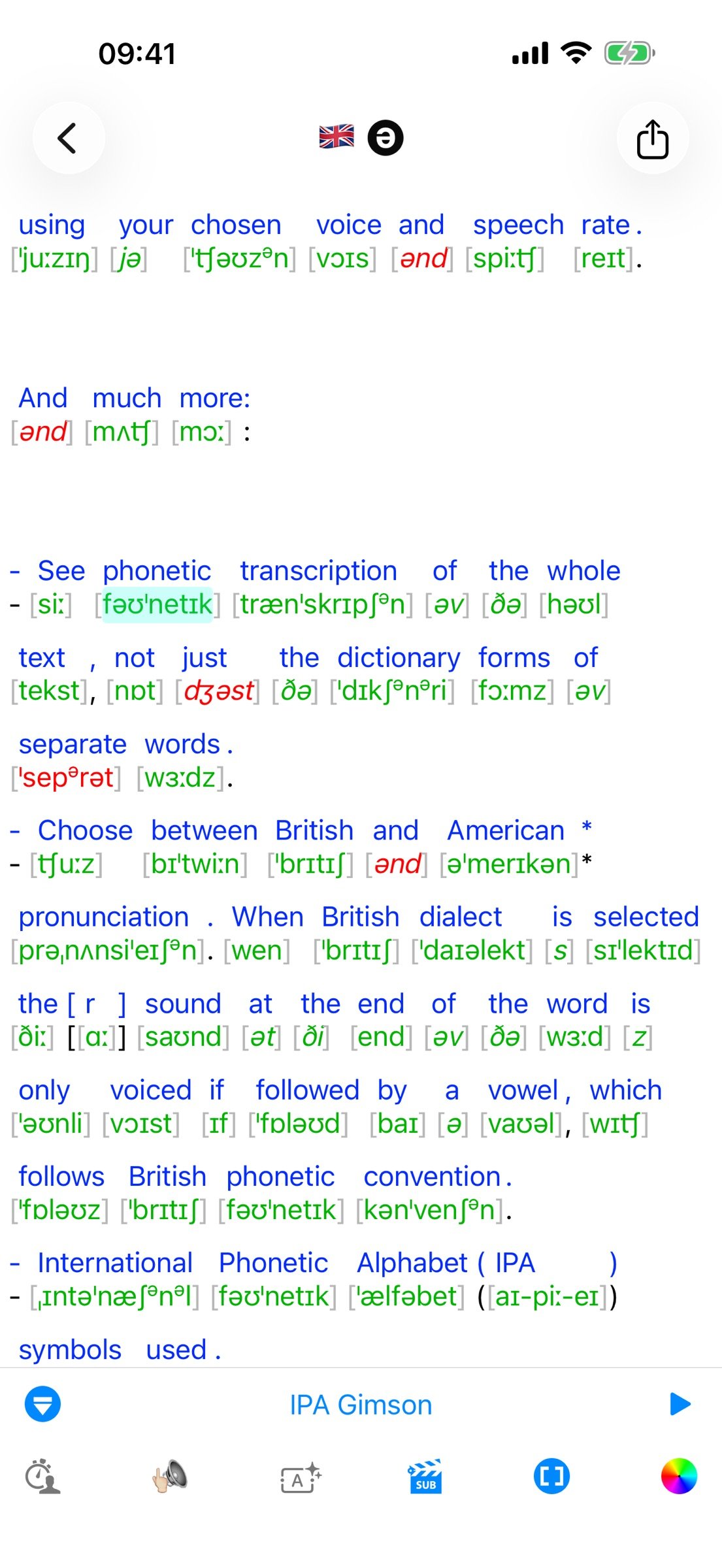
toPhonetics is an app that provides fully interactive transcriptions of English texts. It displays your input's phonemic transcription using the International Phonetic Alphabet (IPA) and allows you
• to listen to it read aloud visually, following the narration with a cursor,
• to quickly check the translation of individual words or selected fragments (requires iOS 18+),
• to export and share the transcription results in various formats including PDF (via the Print option),
• to export the audio of the text read using your chosen voice and speech rate.
And much more:
- See phonetic transcription of the whole text, not just the dictionary forms of separate words.
- Choose between British and American* pronunciation. When British dialect is selected the [r] sound at the end of the word is only voiced if followed by a vowel, which follows British phonetic convention.
- International Phonetic Alphabet (IPA) symbols used.
- The structure of the text and sentences in it (line breaks, punctuation marks, etc.) is preserved in phonetic transcription output making it easier to read.
- You can output the text and its phonetic transcription along each other line-by-line to make back-reference to the original text easier.
- An option to vary pronunciation depending on whether words are in stressed or weak position in the sentence, as in connected speech. Weak forms are italicized in the output.
- Words in CAPS are interpreted as acronyms if the word is not found in the database. Acronym transcriptions will be shown with hyphens between letters.
- In addition to commonly used vocabulary the database contains a very substantial amount of place names (including names of countries, their capitals, US states, UK counties), nationalities and popular names.
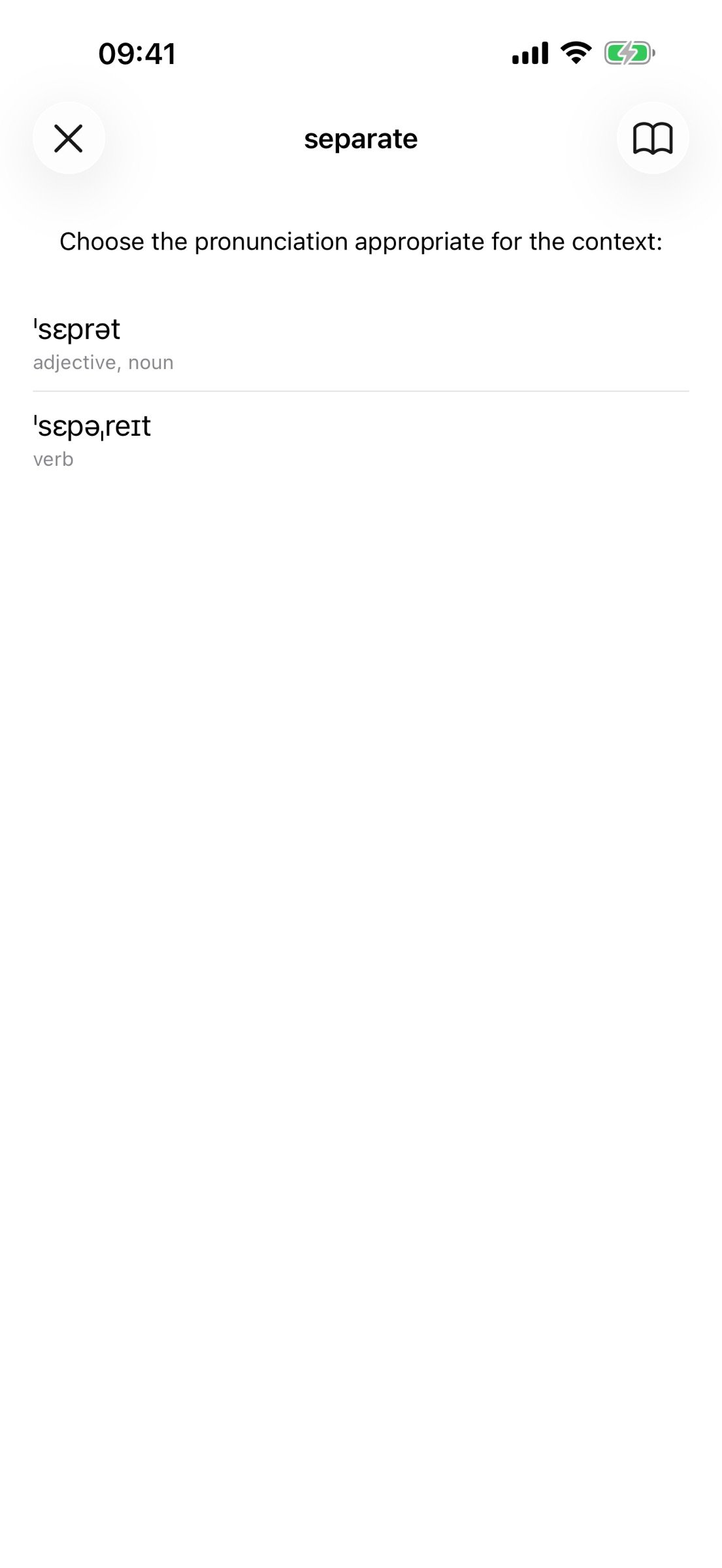
- Where a word has a number of possible pronunciations (highlighted in blue in the output) you can select the one that agrees with the context by tapping on it.
- Print out the output results, share via email or copy to pasteboard.
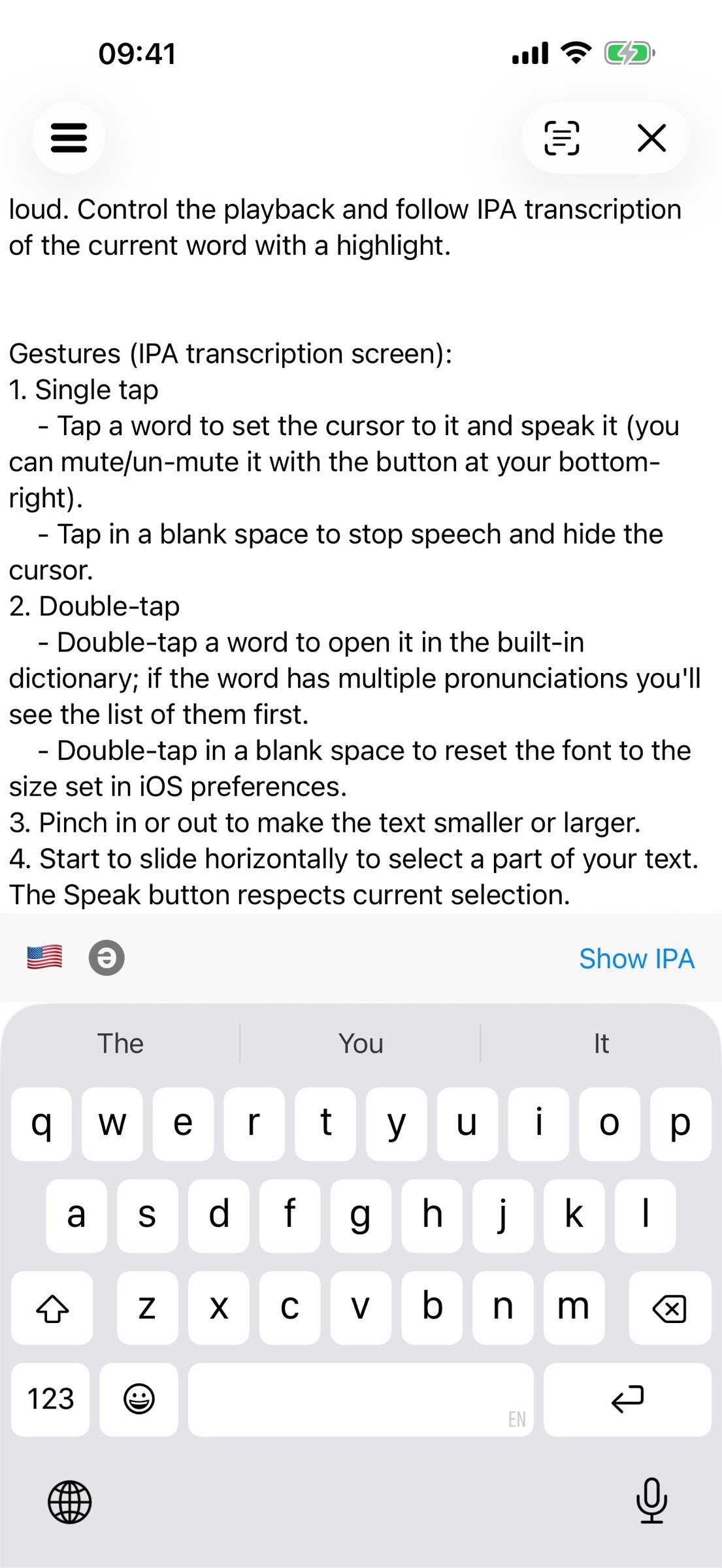
- Let the built-in speech synthesiser read your text out loud. Control the playback and follow IPA transcription of the current word with a highlight. Speech audio can be exported as a file.
- Custom URL scheme to open toPhonetics from 3rd-party apps.
Gestures (IPA transcription screen):
1. Single tap
- Tap a word to set the cursor to it and speak it (you can mute/un-mute it with the button at your bottom-right).
- Tap in a blank space to stop speech and hide the cursor.
2. Double-tap
- Double-tap a word to open it in the built-in dictionary; if the word has multiple pronunciations you'll see the list of them first.
- Double-tap in a blank space to reset the font to the size set in iOS preferences.
3. Pinch in or out to make the text smaller or larger.
4. Start to slide horizontally to select a part of your text. The Speak button respects current selection.
*) American transcriptions are based on the open Carnegie Mellon University Pronouncing Dictionary.
License: Commercial
| Release info | New Release on Jun 05, 2026 |
|---|---|
| Release notes | Bugfixes: - selection gesture in IPA screen; - missing IPA results when translation target language; - crash on translation after returning from Color settings; - bordered liquid glass appearance. |
| Listing data | App Store |
Reviews
No reviews yet. Be the first to review toPhonetics Converter.
Used toPhonetics Converter? Tell other visitors what you thought.
Log in to write a reviewOther products by this publisher
- "No Distractions" for YouTube 4.10 ----
- #Bible 11.6.1 "Incredible App - My sister shared this app with me a few weeks ago and it is truly incredible.
- #filmphotography 1.4.2 So, you decided to shoot on film?
- #LookBusy Fake Calendar Events 1.0.6 Look Busy scans your work calendar for open time slots and fills them with realistic-looking (but secretly fake) work events.
- #Small Talk Is Canceled 1.0.2 #Small Talk Is Canceled — Conversations That Matter
Most viewed iOS Education
-
1
 VanDraw 1.0.10
Ever wished you could draw like your favorite artists?
-
2
 Bible 11.36.1
Take God’s Word with you wherever you go with the free YouVersion Bible App.
- 3 #Bible 11.6.1 "Incredible App - My sister shared this app with me a few weeks ago and it is truly incredible.
-
4
 Yanilomo 1.2.0
Yanilomo is a crew board for shorts and student films.
-
5
 Bible Chat 5.1.9
Bible Chat: Built for Christians Who Want to Hear God in the Noise of Everyday Life
-
6
 Healthy Horse 5.1.0
Estimate your horse's body weight and ideal weight in seconds, using equations developed through University of Minnesota research.
-
7
 ClassLink LaunchPad 41.0.5
Your school or organization must have CLASSLINK LAUNCHPAD WEB EDITION for this app to work.
- 8 (How to) Pronounce PRO 1.5.6 This is a PRO version of (How to) Pronounce.
-
9
 Another Monster At the End... 7.2
This is an animated storybook app, which will humorously help teach your child early reading and logic skills.
-
10
 AntiqSnap 2.12.1
Discover the true value of your antiques with AntiqSnap – from ceramics and glassware to furniture, silverware, jewelry, and other antiques and collectibles.
Most downloaded iOS Education
-
1
Another Monster At the End... 7.2
This is an animated storybook app, which will humorously help teach your child early reading and logic skills.
-
2
 Lost Person Behavior 1.0.9
The Lost Person Behavior App is based upon the Search and Rescue (SAR) international gold standard reference tool on where to look for lost and missing persons.
-
3
 Sailing Reference 2.1.4
Sailing Reference is the comprehensive reference guide for all of your nautical navigation needs.
-
4
 Greek English Lexicon 1.0
A Greek–English Lexicon, commonly known as LSJ, is a standard lexicographical work of the Ancient Greek language.
-
5
 Talking Thai English Dictionary+Phrasebook 2.3
Whether you're on a short trip to Thailand, working with Thais, or studying the Thai language in-depth, this is the one dictionary you can really use.
-
6
 Bible 4.7.0
Bible KJV - Daily Bible Verse is a free KJV Bible study tool that people read bible verse of the day, listen to the audio bible - the holy bible king james version, share and learn king james version bible.
-
7
 Pre-Trip 1.6
Prepare for your CDL pre-trip inspection with guided study, spoken practice, and realistic mock testing.
-
8
 TouchChat HD- AAC w/ WordPower 2026.3.0
TouchChat is a full-featured Augmentative and Alternative Communication (AAC) solution for individuals who have difficulty using their natural voice.
-
9
Yanilomo 1.2.0
Yanilomo is a crew board for shorts and student films.
-
10
 HamClock 3.5.1
HamClock is a handy clock with features for amateur radio operators!