8downloads
0this week
FreeCommercial
0reviews
Screenshots
About Stitch Garden
Turn your cross stitch chart into a working companion. Highlight a thread colour, mark completed stitches and see your progress grow.
Open Pattern Maker (.xsd), Open Cross Stitch (.oxs), PCStitch (.pat) and PDF charts exported from design software, including symbol-only and black-and-white prints and charts laid out as an image — not scans or photos of paper charts. A sample chart is included, so you can explore the app as soon as you open it.
STITCH WITH EASE
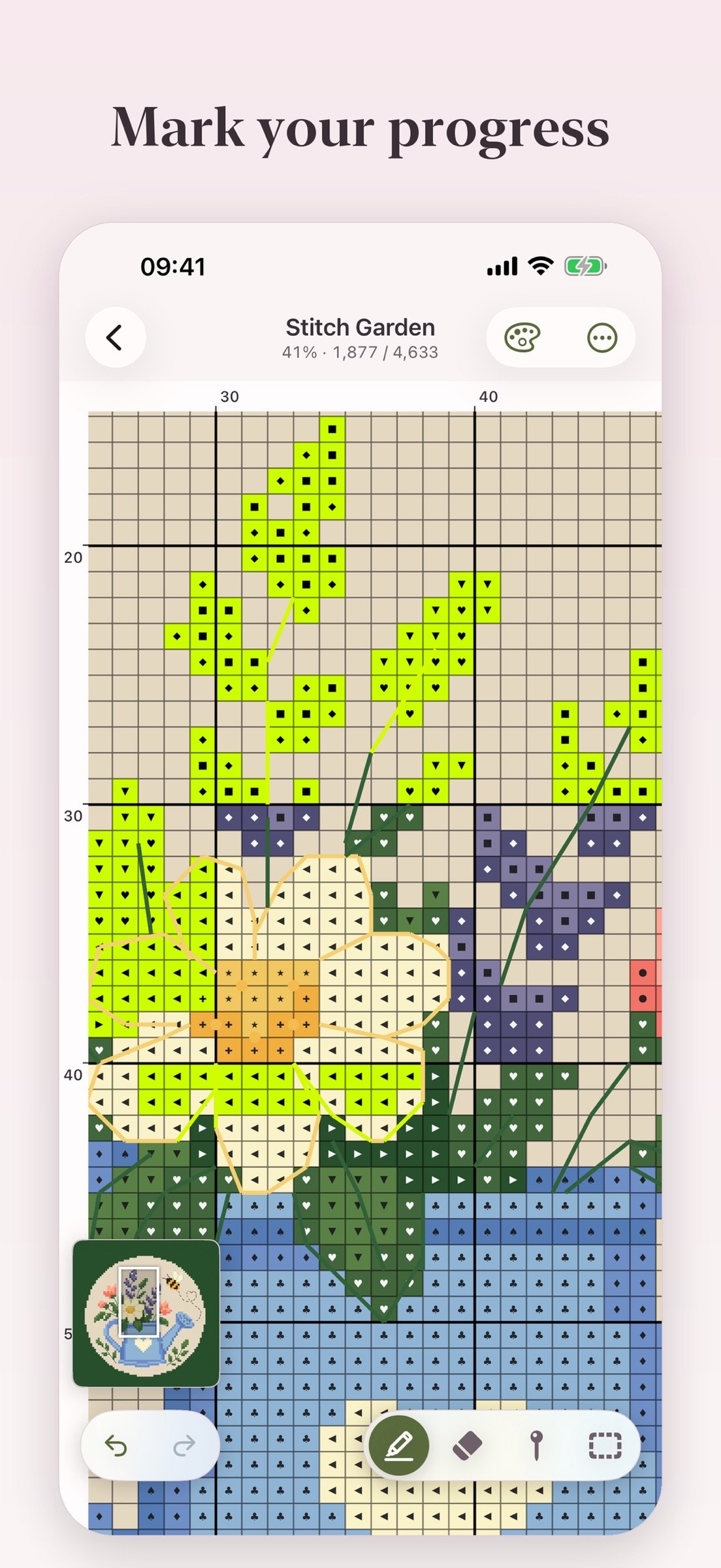
• Tap or drag to mark completed stitches. Erase marks, undo and redo.
• Fill a whole colour in one press.
• Highlight each symbol to find its stitches across the whole chart, and lock the colour so a stray tap doesn't switch it.
• See how many stitches to work in each run, along rows, columns or both — without counting each square on the screen.
• Keep track of parked needles so you know where to return.
• Select a rectangular or freehand work region to focus on one part of the chart.
• Find your way around large charts with the navigator and rulers.
• Mark the centre of the chart, and the centre of every block of ten.
• Use the app in any of eleven languages.
ORGANISE YOUR CHARTS
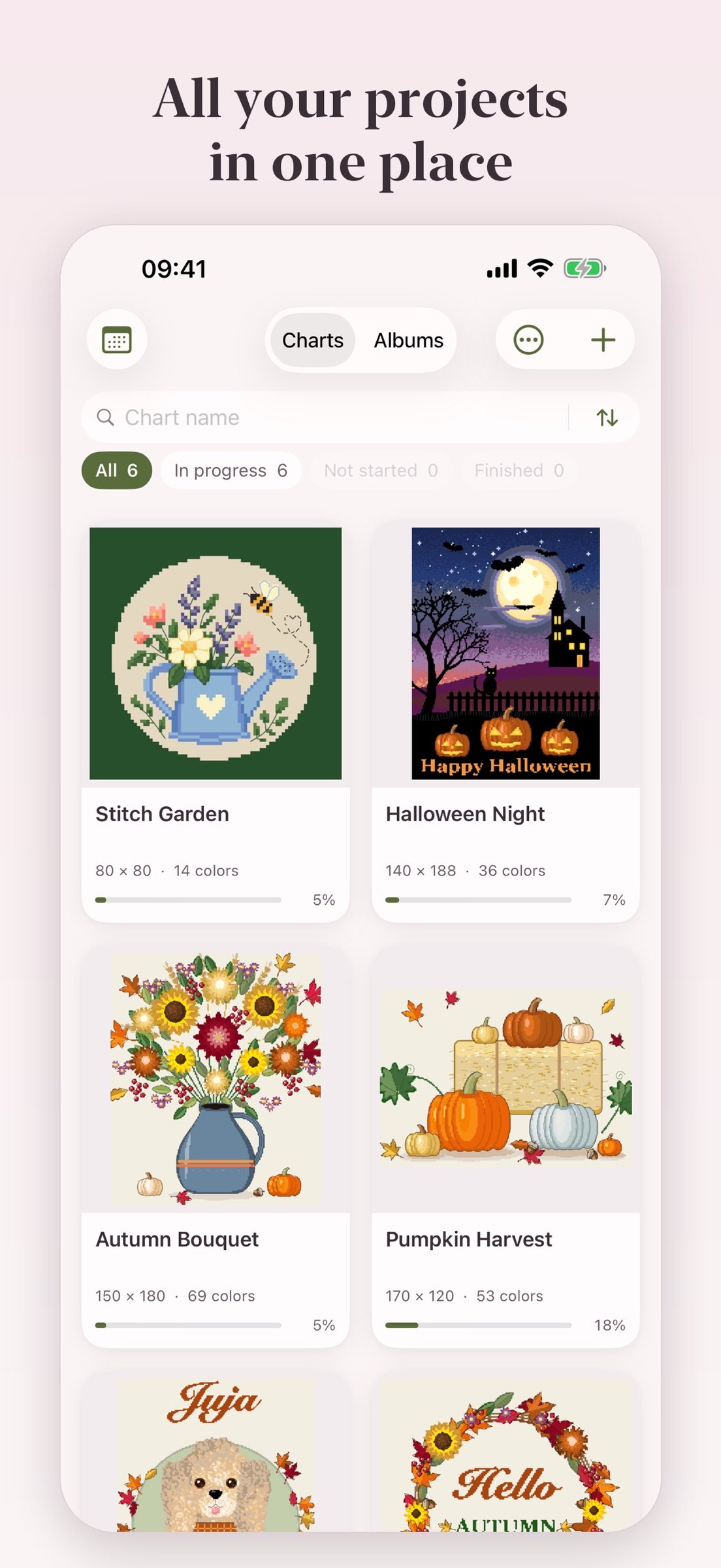
• Gather charts into albums — by designer, by season, by what's next.
• Keep a chart in several albums at once; nothing disappears from your shelf.
• Search, filter and sort within each album.
YOUR CHART, YOUR WAY
• Hide what you don't need with layers — symbols, crosses, half stitches, quarters, backstitch, French knots, beads or your marked progress. Each chart remembers its own.
• Rotate the chart in quarter turns to match the way you position your canvas.
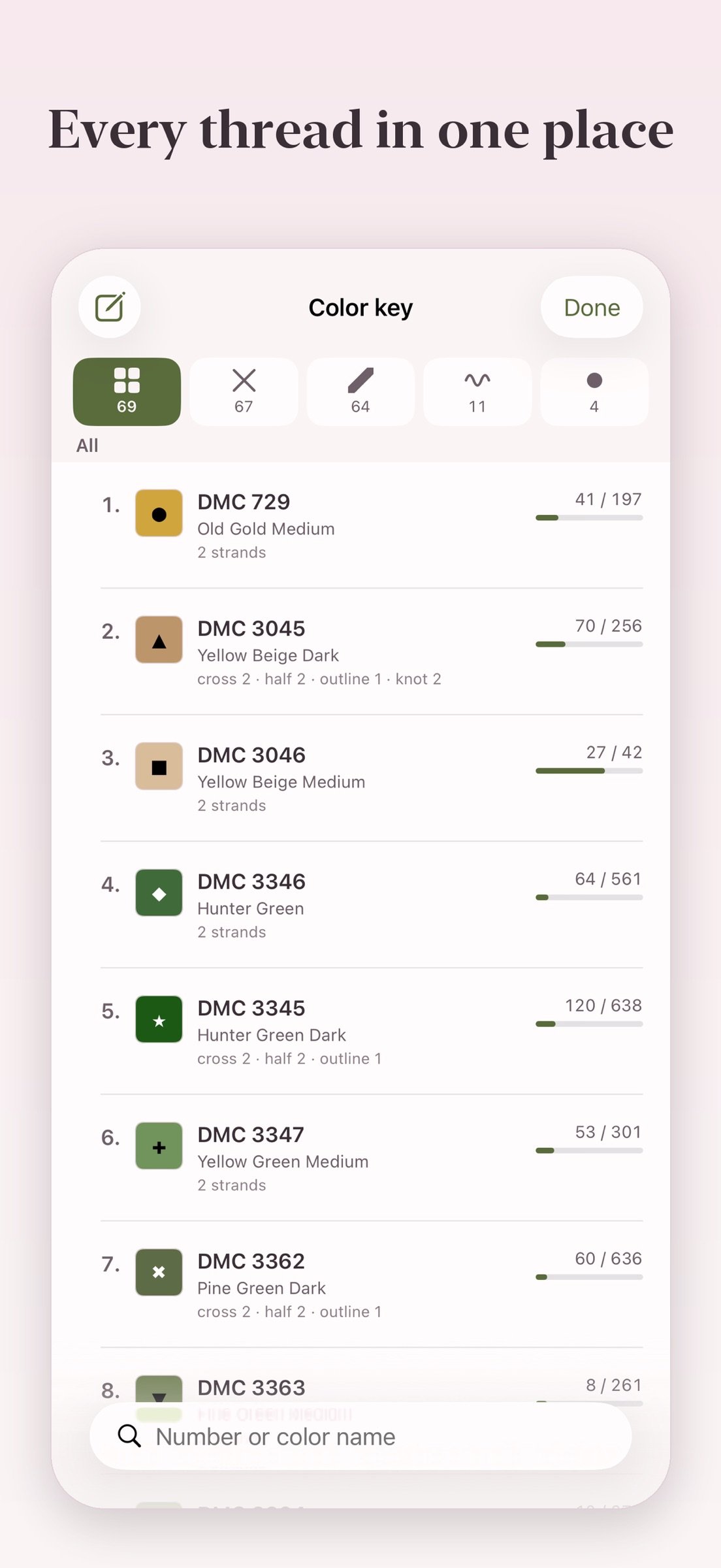
• Customize the symbols in your colour key.
• See each kind of stitch on its own tab of the colour key, and sort it by stitch count.
• Adjust grid line thickness and show or hide symbols.
• Pick the color you want to highlight completed stitches.
• Track your work with full and fractional stitches, backstitch, French knots and beads.
SEE YOUR PROGRESS
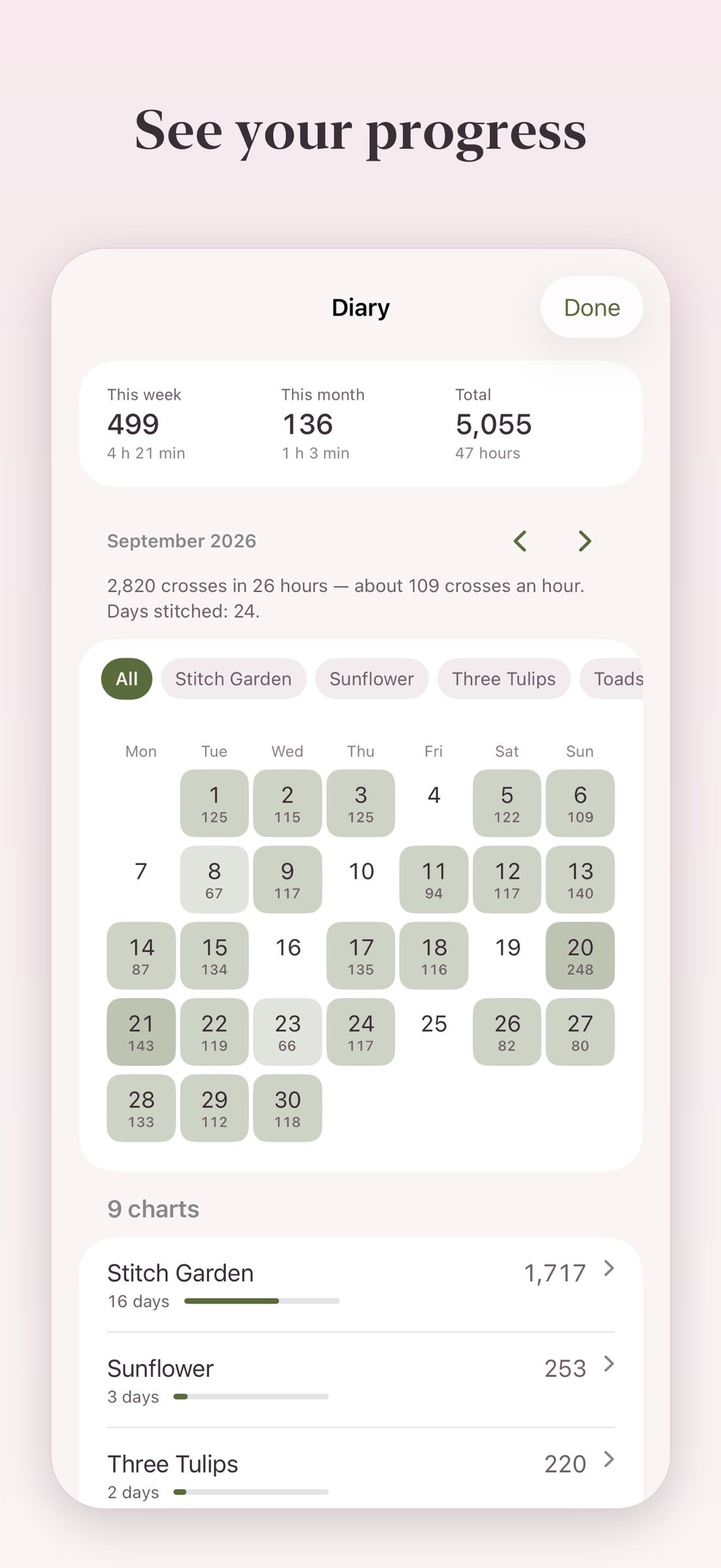
• Look back over your stitching days in a calendar, with a monthly breakdown by project.
• See weekly, monthly and total stitch counts, daily bests, streaks and stitching speed.
• See how much is done as a percent, for the whole chart and for each kind of stitch.
• Track your stitching sessions, with long pauses excluded.
• Get an estimated finish date based on your pace.
• Finish a chart and see it celebrated — then on your shelf with a rosette and the day you finished.
SET STITCHING GOALS
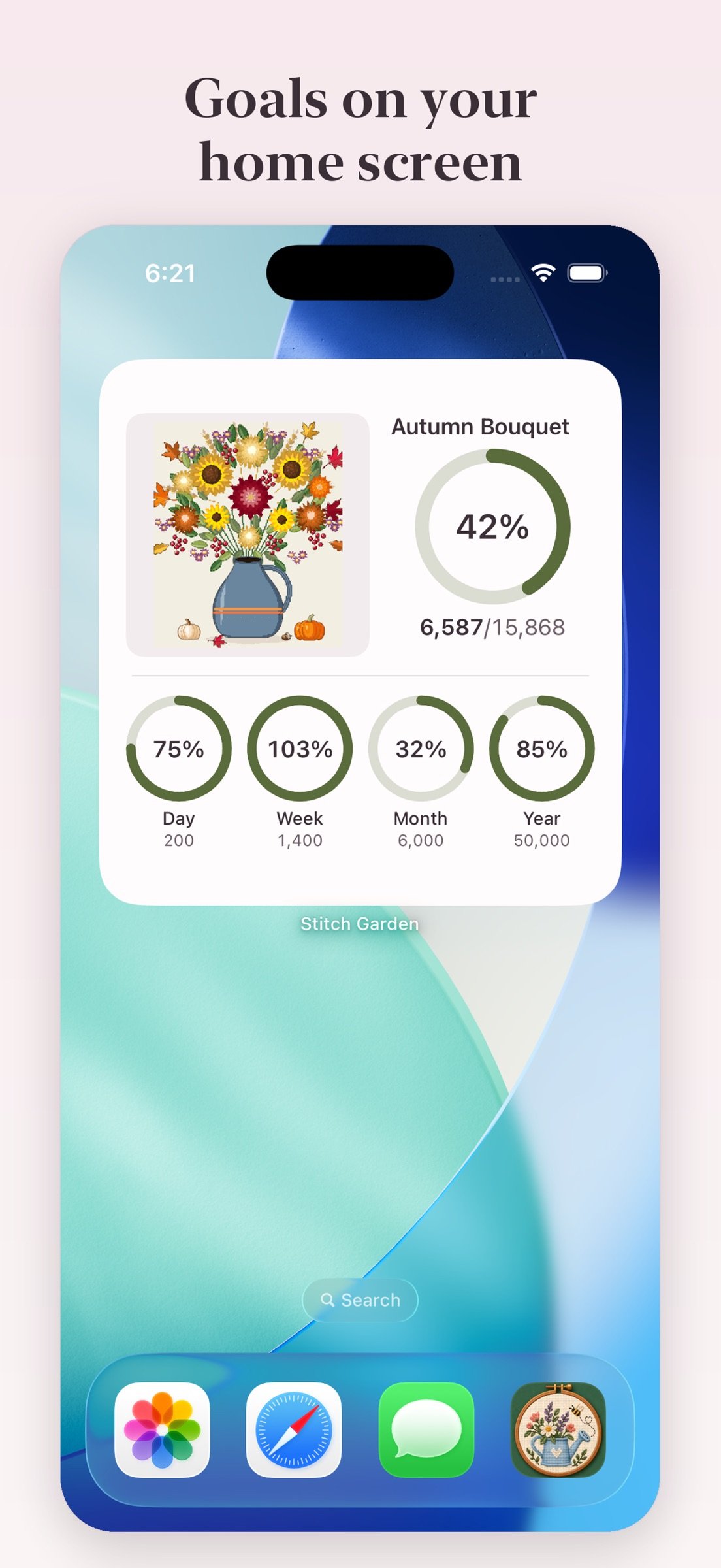
• Set yourself a number of crosses a day, a week, a month or a year, across all your charts.
• Follow each goal on a ring that shows when you fall behind and how many a day keeps you on pace.
• Reach a goal and a bee flies across your chart to celebrate it.
• See your goals and the chart you're working on in home screen widgets.
CAPTURE PHOTOS AND VIDEOS
• Save photos of your work with a record of your progress at the time.
• Create a video of your chart filling in or a slideshow of your progress photos.
• Show the chart alongside your photos and export a vertical video to share.
PLAN YOUR MATERIALS
• Estimate thread and bead quantities, with strand counts for each stitch type.
• Calculate fabric size from your fabric count and chosen margins.
• Add your own prices to estimate project costs.
• Build a shopping list that takes your existing thread stash into account.
• Use metric or imperial measurements.
CONTINUE ON ANOTHER DEVICE
• Export and import progress to continue on another device with the same chart.
• Sync your charts, progress, albums and goals between iPhone and iPad seamlessly through your own private iCloud.
PDF compatibility and the stitch types imported depend on how the chart was created. If a PDF can't be read completely, the app tells you instead of opening it with parts missing. Scans and photographs of paper charts are not supported.
One purchase. No subscription, ads or tracking. No need to create any separate account or complete registration.
License: Commercial
Open Pattern Maker (.xsd), Open Cross Stitch (.oxs), PCStitch (.pat) and PDF charts exported from design software, including symbol-only and black-and-white prints and charts laid out as an image — not scans or photos of paper charts. A sample chart is included, so you can explore the app as soon as you open it.
STITCH WITH EASE
• Tap or drag to mark completed stitches. Erase marks, undo and redo.
• Fill a whole colour in one press.
• Highlight each symbol to find its stitches across the whole chart, and lock the colour so a stray tap doesn't switch it.
• See how many stitches to work in each run, along rows, columns or both — without counting each square on the screen.
• Keep track of parked needles so you know where to return.
• Select a rectangular or freehand work region to focus on one part of the chart.
• Find your way around large charts with the navigator and rulers.
• Mark the centre of the chart, and the centre of every block of ten.
• Use the app in any of eleven languages.
ORGANISE YOUR CHARTS
• Gather charts into albums — by designer, by season, by what's next.
• Keep a chart in several albums at once; nothing disappears from your shelf.
• Search, filter and sort within each album.
YOUR CHART, YOUR WAY
• Hide what you don't need with layers — symbols, crosses, half stitches, quarters, backstitch, French knots, beads or your marked progress. Each chart remembers its own.
• Rotate the chart in quarter turns to match the way you position your canvas.
• Customize the symbols in your colour key.
• See each kind of stitch on its own tab of the colour key, and sort it by stitch count.
• Adjust grid line thickness and show or hide symbols.
• Pick the color you want to highlight completed stitches.
• Track your work with full and fractional stitches, backstitch, French knots and beads.
SEE YOUR PROGRESS
• Look back over your stitching days in a calendar, with a monthly breakdown by project.
• See weekly, monthly and total stitch counts, daily bests, streaks and stitching speed.
• See how much is done as a percent, for the whole chart and for each kind of stitch.
• Track your stitching sessions, with long pauses excluded.
• Get an estimated finish date based on your pace.
• Finish a chart and see it celebrated — then on your shelf with a rosette and the day you finished.
SET STITCHING GOALS
• Set yourself a number of crosses a day, a week, a month or a year, across all your charts.
• Follow each goal on a ring that shows when you fall behind and how many a day keeps you on pace.
• Reach a goal and a bee flies across your chart to celebrate it.
• See your goals and the chart you're working on in home screen widgets.
CAPTURE PHOTOS AND VIDEOS
• Save photos of your work with a record of your progress at the time.
• Create a video of your chart filling in or a slideshow of your progress photos.
• Show the chart alongside your photos and export a vertical video to share.
PLAN YOUR MATERIALS
• Estimate thread and bead quantities, with strand counts for each stitch type.
• Calculate fabric size from your fabric count and chosen margins.
• Add your own prices to estimate project costs.
• Build a shopping list that takes your existing thread stash into account.
• Use metric or imperial measurements.
CONTINUE ON ANOTHER DEVICE
• Export and import progress to continue on another device with the same chart.
• Sync your charts, progress, albums and goals between iPhone and iPad seamlessly through your own private iCloud.
PDF compatibility and the stitch types imported depend on how the chart was created. If a PDF can't be read completely, the app tells you instead of opening it with parts missing. Scans and photographs of paper charts are not supported.
One purchase. No subscription, ads or tracking. No need to create any separate account or complete registration.
License: Commercial
| Release info | Update on Nov 13, 2026 |
|---|---|
| Release notes | • Mirror a chart horizontally, vertically or both, right under Chart rotation in its settings. |
| Listing data | App Store |
Reviews
No reviews yet. Be the first to review Stitch Garden.
Used Stitch Garden? Tell other visitors what you thought.
Log in to write a reviewOther products by this publisher
- "No Distractions" for YouTube 4.10 ----
- #Bible 11.6 "Incredible App - My sister shared this app with me a few weeks ago and it is truly incredible.
- #filmphotography 1.4.2 So, you decided to shoot on film?
- $quirrel 1.5.1 $quirrel Budget & Finance helps you plan each paycheck, track spending, manage debt, and see what is safe to spend before the next payday.
- % Percentage Calculator Pro 1.41 This is the Pro version of % Percentage Calculator.
Most viewed iOS Lifestyle
-
1
 Shefa Gold 1.6.2.5
More than 100 new and delicious Hallelu-Yah chants to exalt and bless and celebrate the simple fact of existence.
-
2
 Light Language Grid Creator 6.4
Light Language Grid Creator lets you create Grids with 3D shapes and colours, then export them as images.
-
3
 UltiPro 3.0
Ulti Servives is your one stop destination for your day by day services.
-
4
 CHAI 2.198
Our app revolutionizes the way we interact with AI chatbots.
-
5
 CopperKnob 2.1.1
CopperKnob is an App which allows you to browse over 185,000 line dance stepsheets from the CopperKnob website.
-
6
 Booksy for Customers 26.11.1000
Self-care, on your schedule.
-
7
 Anker eufy 6.1.31
The new all-in-one eufy app that designed to bring together all your favorite eufy products—eufy Security, eufy Clean, eufy Baby, eufy Life, and eufy Pet—into one seamless platform.
-
8
 12 Steps Companion 3.0.9
First developed in 2008, 12 Steps Companion was the world’s first recovery app.
-
9
 Roomba Home 3.4
The Roomba® Home App is compatible with Roomba® 100, 200, 400, 500, 700, 800, and Mini series robots sold after March 2025.
-
10
 Tesla 4.62.5
The Tesla app puts owners in direct communication with their vehicles and energy products anytime, anywhere.
Most downloaded iOS Lifestyle
-
1
Light Language Grid Creator 6.4
Light Language Grid Creator lets you create Grids with 3D shapes and colours, then export them as images.
-
2
 Pieceful 3.1.0
Capture briefly. Remember deeply.
-
3
UltiPro 3.0
Ulti Servives is your one stop destination for your day by day services.
-
4
 Joguman Daily Calendar 1.0.14
New drawings every day, and every day feels brand new.
-
5
 Electronic Rosary 4.0.3
The Rosary (from Latin rosarium, meaning "rose garden") is a traditional Catholic devotion.
-
6
 Core Values 1.0.1
Core Values: Find Yours is a guided self-reflection exercise that helps you identify your top five values that matter most to you.
-
7
CopperKnob 2.1.1
CopperKnob is an App which allows you to browse over 185,000 line dance stepsheets from the CopperKnob website.
-
8
 Santa Christmas Snowing 1.1.0
Experience the magic of Christmas right on your wrist!
-
9
 Flush Toilet Finder Pro 26.4.6
Flush Toilet Finder Pro is the quickest, simplest way of finding a public bathroom or restroom.
-
10
CHAI 2.198
Our app revolutionizes the way we interact with AI chatbots.