
Stay On Target 1138 12.1
Some pilots, at the critical moment, switch off their targeting computer and go with their gut.
Download
88.39 MB
24downloads
1this week
FreeCommercial
0reviews
Screenshots
About Stay On Target 1138
Some pilots, at the critical moment, switch off their targeting computer and go with their gut. Yours now tells the time -- so maybe leave it on.
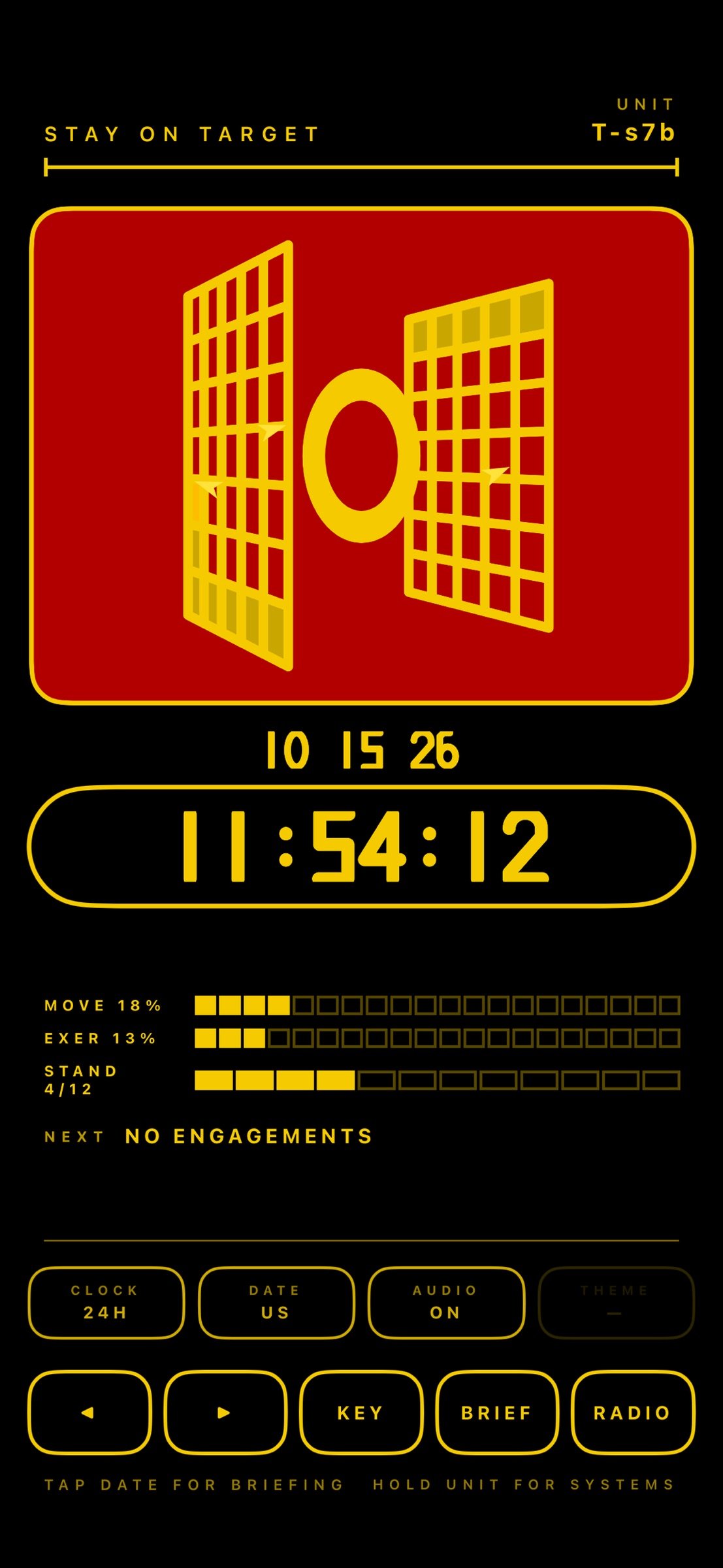
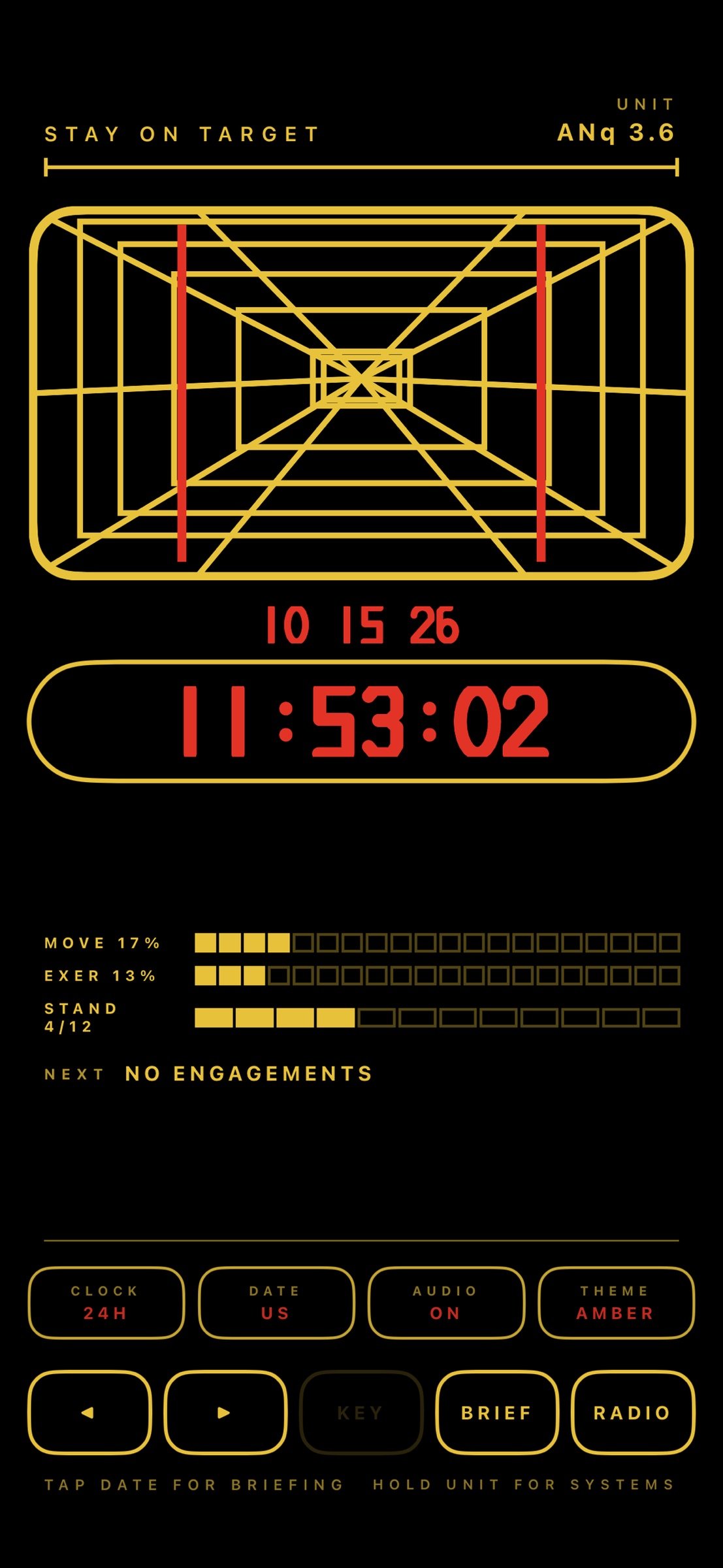
A wireframe tunnel. Red range lines closing in. A crosshair that locks on and holds. Stay On Target turns your Apple Watch into a 1970s vector targeting display, with the time underneath in a big angular red readout. It is, technically, a clock.
Spin the crown and the radio crackles -- short pilot callouts, recorded for this app.
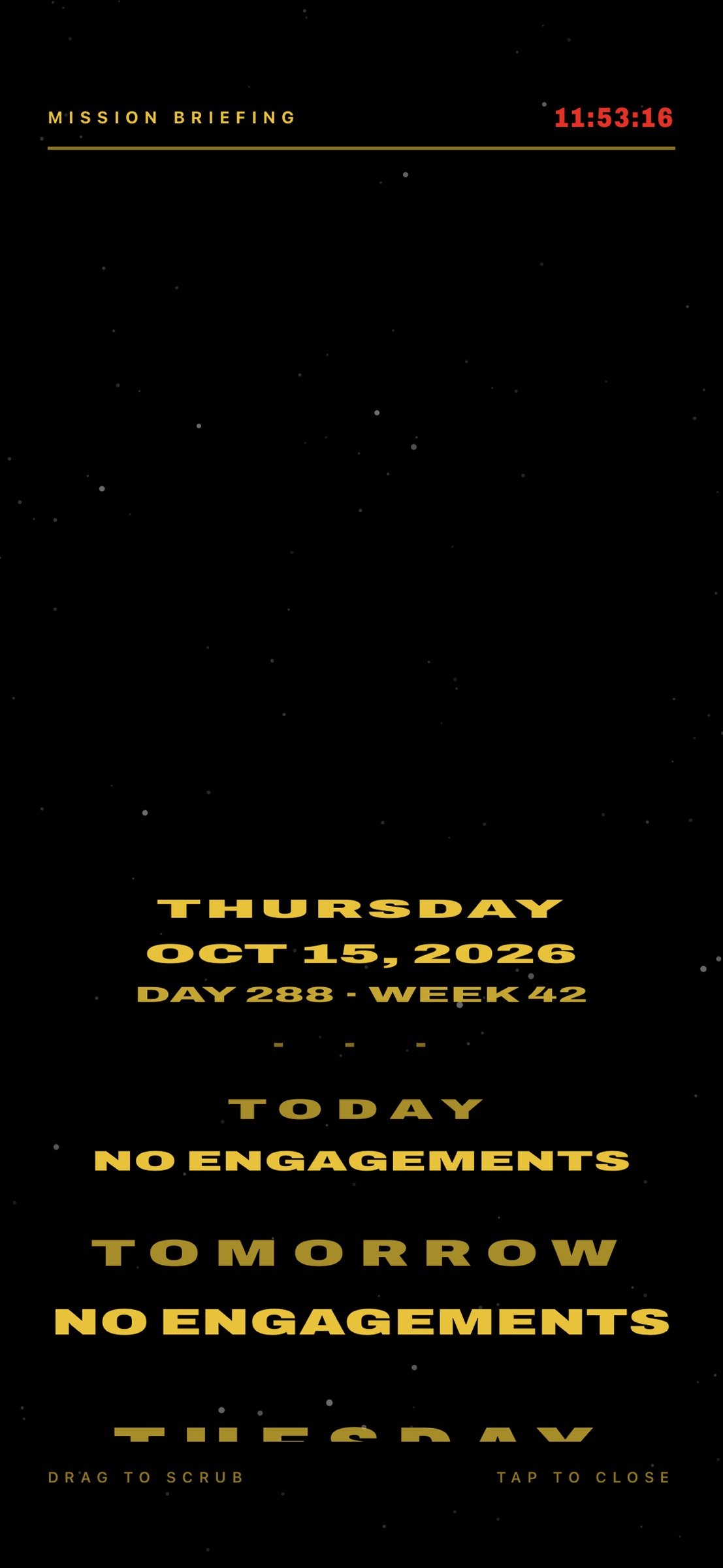
Tap the date and your week scrolls away into the distance as a text crawl: today, tomorrow, and every day after that with something on it. Drag it with a finger or spin the crown to move through at your own pace. Nothing booked? It says so, and it sounds pleased for you.
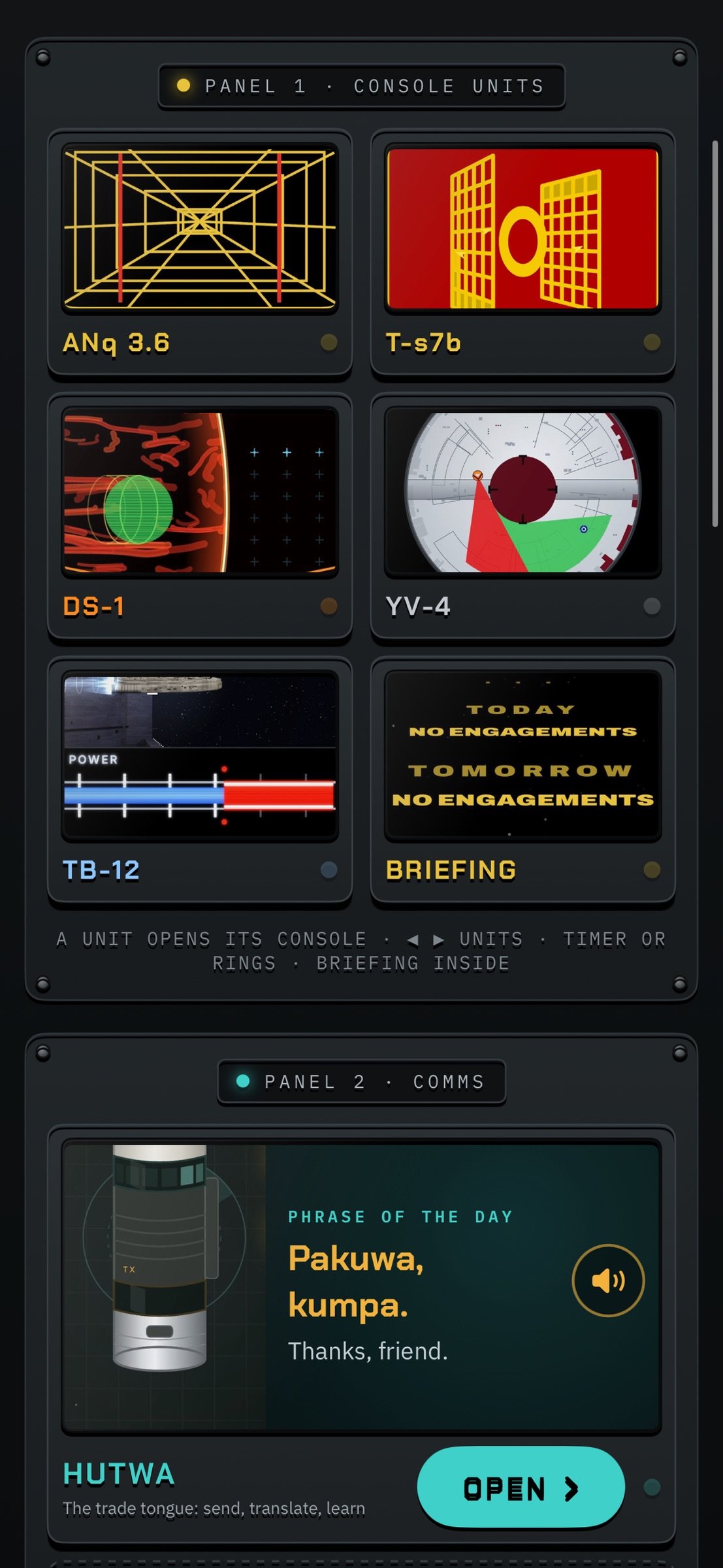
FOUR UNITS
- ANq 3.6 -- the tunnel: receding frames and rays, a twelve-second loop of range sweep, lock-on and chevrons. Amber or phosphor green.
- T-s7b -- the range grid: two gridded gates swinging through space, gold on crimson, a ship marker between them, contacts curving past. The gates fill with your rings.
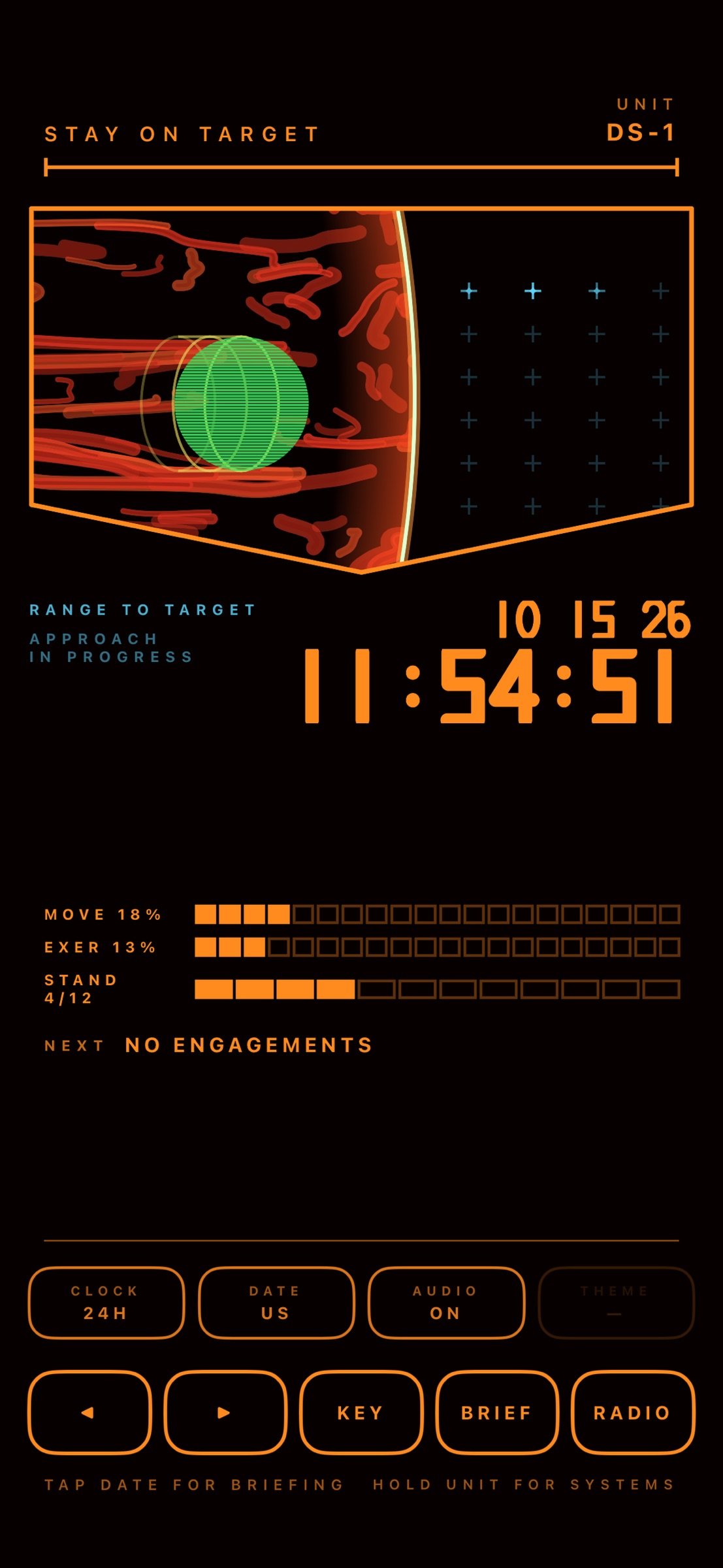
- DS-1 -- the orbital approach: a red planet edge to edge, a green moon coming out from behind it as your Move ring fills, stars lighting with Exercise, a reticle filling with Stand. Close everything and it locks on.
- YV-4 -- the base tracker: the war room's plotting table. A planet dead centre, a tracker coming round it with a flashing red cone of sight that eats into the green as your Move ring fills, until it lands on your moon. Stand lights the rim scale, Exercise grows the moon.
Long-press for SYSTEMS to switch units. KEY shows what each readout means.
ON IPHONE TOO
The iPhone app is the console the display is mounted in: each unit on its own screen shape, with the date, clock, ring bars and your next appointment around it. Turn it sideways for the full console, or press FULL and keep only the display. The Mission Briefing crawl plays across the whole screen. One purchase covers both.
TWO GAMES
Tap GAMES on the iPhone console. Both are included.
Dust Runners: haul relief cargo across a desert world on a hover speeder. Twenty runs over a day shift and a night shift. Keep right, dodge the haulers, hop the rocks, blind raiders with dust and deliver on time. Three speeders, a garage of upgrades, three stars on every run.
Pilot training simulator: take the controls. Twenty short missions: dogfights, convoy escorts, carrier strikes and low runs down a narrow channel, each with its own sky and its own twist. Earn up to three stars on every mission, replay for the ones you missed, and open the next. The cockpit's targeting computer is the ANq 3.6 from this app.
WHAT IT DOES
- Always-on display: the clock keeps time while the animation rests
- Amber or phosphor green on the tunnel -- tap to switch cockpits
- Radio callouts on the crown -- every unit has its own, and two of them read the dial to you -- silenced with one tap when you're in a meeting and your wrist starts talking
- Mission Briefing: your week's appointments as a receding crawl -- drag or spin to scrub through it
- Rings, steps, resting heart rate and last night's sleep, read straight off the watch
- Countdown timers on the watch: turn the crown to set, tap the clock to start
- 12 or 24 hour, whichever way you were trained
- The watch app runs on its own; the iPhone app is optional. No account, no setup
- Collects nothing. We genuinely have no idea who you are
Tip: Settings -> General -> Return to Clock -> 1 hour. Now it stays up like a real watch face every time you raise your wrist.
Don't get cocky.
[link removed]
License: Commercial
| Release info | Update on Nov 20, 2026 |
|---|---|
| Release notes | VERSION 12.1 NEW: DUET, DANCE WITH THE DROID Record yourself copying his moves and get a vertical video ready to post. Tap Duet on the Dance Floor. • Pick a layout: half and half, or the droid in a small window while you fill the frame • He counts you in on the beat, then dances a full routine to a random song or one you pick • The move he's on and the one coming next run big along the bottom, so you always know what's next • Change the song or the routine, or skip to the next move, right from the screen • You're both mirrored, like a dance studio mirror: when he lifts his right hand, you lift yours • Records up to 60 seconds, with the song itself under the video, not picked up by the microphone • Saved to Photos, with Share one tap away MORE SWAGGER • Every droid dances with more bounce, sway and attitude, and a late head nod on the beat • New flourishes between moves: shimmies, hip pops, body rolls, claps and more • Two moves reworked: a crouched reach for the hologram message, and a new two-handed strike VERSION 12.0 HUTWA ON YOUR WRIST • New: the WR-7 Wrist Relay for Apple Watch. On the watch face, open SYSTEMS and tap HUTWA • Hold TALK, say it in English, let go. Your iPhone turns your voice into text, and your watch speaks it back in Hutwa • Pick your relay: Chrome Relay, Twin Band or Cipher Tape. Turn the Digital Crown to switch between them • Send it from your wrist with TRANSMIT, or tap Via iPhone to finish it in WhatsApp or Messages • Tap a Hutwa link on your watch and the message decodes word by word, with a tap on your wrist for each word • Code book: 12 quick phrases for when you can't talk, plus a log of your last 20 messages • Burn after reading: decoded messages can self-destruct on your watch. The original stays in your chat • Your voice goes only to your own iPhone. Nothing is sent to us DICTIONARY • New Numbers filter: zero to a billion, in counting order • Loanwords are now called Trade Talk VERSION 11.2 A SMALLER APP • Stay On Target 1138 |
| Listing data | App Store |
Reviews
No reviews yet. Be the first to review Stay On Target 1138.
Used Stay On Target 1138? Tell other visitors what you thought.
Log in to write a reviewOther products by this publisher
- "No Distractions" for YouTube 4.10 ----
- #Bible 11.6.1 "Incredible App - My sister shared this app with me a few weeks ago and it is truly incredible.
- #filmphotography 1.4.2 So, you decided to shoot on film?
- #LookBusy Fake Calendar Events 1.0.6 Look Busy scans your work calendar for open time slots and fills them with realistic-looking (but secretly fake) work events.
- #Small Talk Is Canceled 1.0.2 #Small Talk Is Canceled — Conversations That Matter
Most viewed iOS Utilities
-
1
 Device Lab 1.9.1
Device Lab is an on-device reference and toolkit for your hardware — hardware monitoring, spec references, chip and device comparisons, system information, and practical utilities, so you can understand and manage the devices you use with more struc…
-
2
 APTV 2.4.10
APTV,?????????????? IPTV M3U???,?????????????????
-
3
 VibeSDR 11.0.16
VibeSDR is a mobile-first software-defined radio (SDR) receiver — and far more than a single-server client.
-
4
 V2Box 10.2.0
V2box - VPN Internet network proxy , Supports multiple proxy protocols, such as Shadowsocks, V2ray, Vmess, Trojan , SSH , Socks, Ping Tunnel, Hysteria2, DNSTT, Wireguard
-
5
 DXClock 4.0.0
Connect, collaborate, and operate smarter with DX Clock — the ultimate meeting place for amateur radio operators.
-
6
 ECHOCAT 1.6.0
ECHOCAT is the iPhone and iPad companion for POTACAT, the desktop app for amateur radio operators chasing Parks on the Air (POTA), Summits on the Air (SOTA), Worldwide Bunkers on the Air (WWBOTA), Tiles on the Air and DX.
-
7
 Demod 1.6
Demod turns your iPhone into a software-defined radio receiver.
-
8
 Ally Pro 1.4.0
Ally Pro – Amiibo & NFC Tool gives advanced collectors complete control over their Amiibo library.
-
9
 DuckDuckGo, optional Duck.ai 7.246.0
At DuckDuckGo, we believe the best way to protect your personal information from hackers, scammers, and privacy-invasive companies is to stop it from being collected at all.
-
10
 DRC 2.0.1
A simple to use app to help calculate any dilution ratio.
Most downloaded iOS Utilities
-
1
Demod 1.6
Demod turns your iPhone into a software-defined radio receiver.
-
2
 Rat And Mouse Sound Repeller 2.8
Keep mice and rats away overnight with ultrasonic waves and predator sounds.
-
3
 Guardio 2026.110.3
Protect your identity, accounts, and online activity from scams and digital threats with Guardio.
-
4
 Screen Mirroring With Miracast 2.0
Turn your iPhone into a complete TV companion.
-
5
 Fontcase 2.0.1
Fontcase is an app that lets you install custom fonts on iOS and iPadOS.
-
6
 ParkenDD 2.0.2
ParkenDD shows a list of available public parking lots in several cities.
-
7
 PickerFull 9.18
Export colors from photos as HEX, PDF, RGB, HSB/HSV, HSBA, HSL, LUV, LCH, YUV, YCBCR, YIQ, CMYK, Grayscale, XYZ, L*a*b* (CIE), CSSVAR, SASSVAR, CSSHSL, CSSRGB, AndroidXML, FlutterDart, UnityColor32, Float, Objective-C, Swift, SwiftLiteral, SwiftUI
-
8
 Passepartout, VPN Client 3.12.8
Protect your online privacy with Passepartout, a smart VPN client seamlessly integrated with iOS, macOS, iPadOS, and tvOS.
-
9
 Universal TV Remote Control* 2.6.9
Control your Smart TV effortlessly with iMote — the ultimate universal remote control for TV.
-
10
 Royal TSi 2.5.4
Royal TSi provides easy and secure access to your remote systems (RDP, VNC, SSH, etc.) by allowing you to open your Royal TS documents created with Royal TSX (for macOS) or Royal TS (for Windows).