
Speak News 2.26.2
Speak News reads stories from RSS/Atom news feeds, web pages, Wikipedia pages, or Google News queries to you using text-to-speech.
Download
22.93 MB
16downloads
5this week
FreeCommercial
0reviews
Screenshots


About Speak News
Speak News reads stories from RSS/Atom news feeds, web pages, Wikipedia pages, or Google News queries to you using text-to-speech. Speak News app is built for iPhone, iPad, and iPod touch. Use Siri to open Speak News and listen to news stories hands-free using the earphones remote control. Just say “Hey Siri, Open Speak News” and the app will start reading your current news stories.
Complete Features
• Use Siri to open the app and listen to stories.
• Use Siri Shortcuts to perform several common activities with voice commands.
• Bookmarks can be RSS/Atom news feeds, web pages, Wikipedia pages, Google News queries, or Speak News keyword queries. Speak News queries can be created and performed while offline, searching the stories cached on the device.
• iCloud bookmark syncing
• Import bookmarks from a Feedly OPML feed library URL.
• Multitasking allows updating news feeds in the background while reading or listening to news in the foreground.
• Automatically selects appropriate international speech voices based on story language.
• Toolbar functions in a feed view include Play/Pause, Stop, Previous, Next, Update All Feeds, View Mode, Share, Settings.
• Share news headlines and links, or entire news feeds through the standard iOS Share social media activities view, including Message, Mail, Notes, Reminders, Twitter, Google+, Flipboard, Facebook, Evernote, etc.
• Current story info and Play/Pause, Previous, Next functions are available in the media player controls in the device's lock screen and Control Center.
• Speak News automatically rotates through available voices for the current language for each story. This gives more variety and distinction in the sequence of spoken news stories. For instance, in English, this gives U.S. , U.K. Ireland, New Zealand, and Australian voices.
• All stories are saved on your device for later reading and listening while offline.
• Efficient text-only story display makes loading and reading faster, and saves money on your cell phone plan by downloading minimal data.
• Display Styles include White, Light Gray, Sepia, Dark Gray, Dark Red, and Black. The "dark mode" Black and Dark Red styles are ideal for reading in dark environments.
• All text is responsive to the user's preferred text size as set in Settings > Display & Brightness > Text Size, and Settings > General > Accessibility > Larger Text.
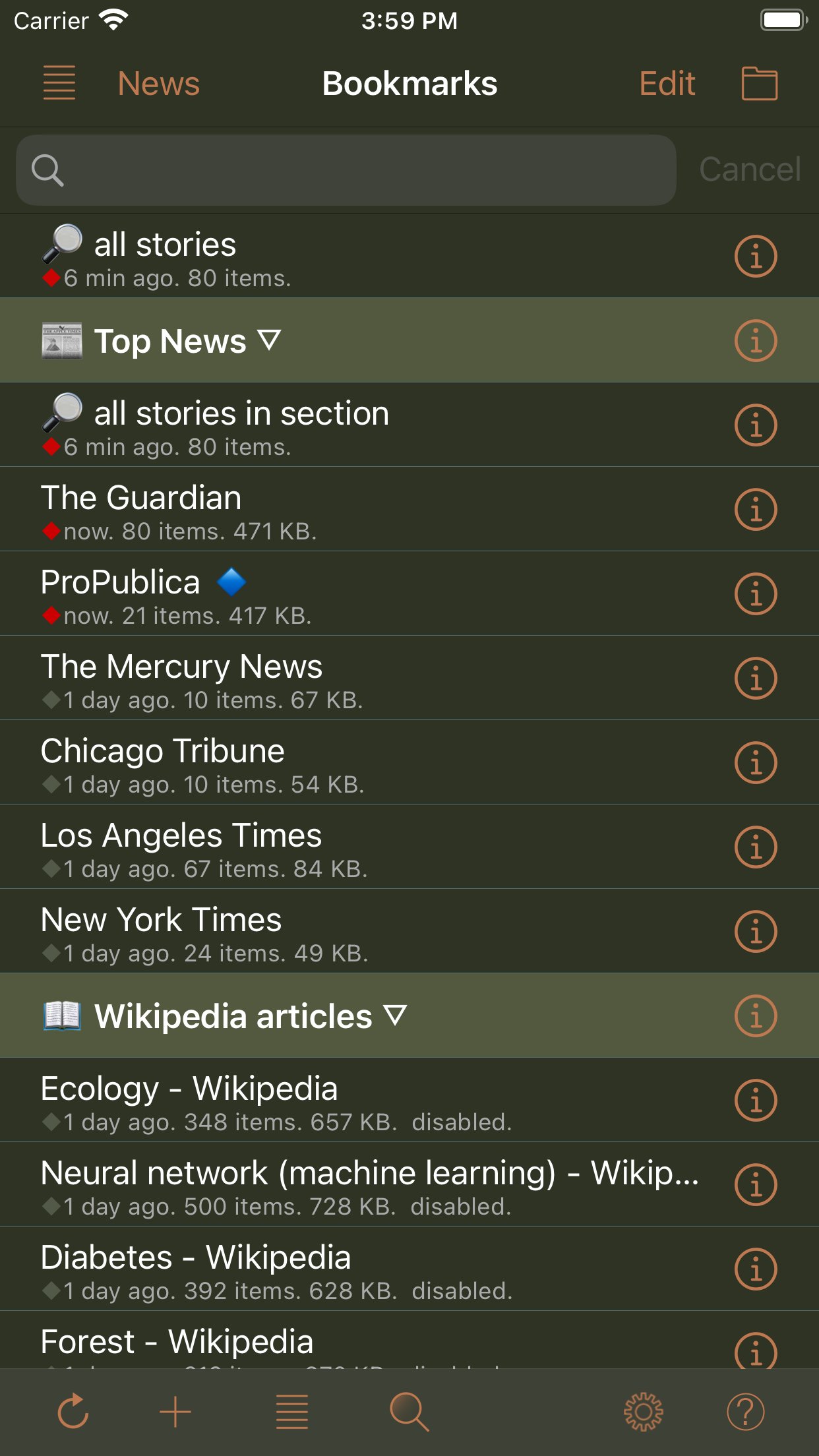
• Toolbar functions in the Bookmarks view include New Bookmark, Go To Section, Find, Settings, Library, and Edit.
• Today Widget displays scrolling list of stories from current feed.
• Use the remote control on earphones to speak and pause stories, move to next or previous stories, or select a new RSS feed from your bookmarks.
• Create your own bookmarks and bookmark sections.
• Import bookmarks from Imaja’s Speak News RSS Feeds Library featuring a broad selection of essential and informative news feeds.
• Settings includes many controls for news story display, auto-reload, speech and auto-scrolling behavior, and user-interface sounds.
• Keyboard shortcuts are supported for Speak News functions for use with external Bluetooth keyboards.
• RSS feed details are viewable in the Edit Bookmark view.
• Word Usage action displays statistics on word frequencies in a story or a complete feed.
• Speak News supports a custom URL scheme for adding bookmarks.
Remote Control with Earphones
Tap the center button:
• One time to play or pause the speech.
• Two times to skip to the next story.
• Three times to skip to the previous story.
• Five times to enter Bookmark Selection Mode. In Bookmark Selection Mode, listen for the desired bookmark name and tap one time to open and start speaking the feed.
Settings
Use the Settings view to configure the text display, graphic style and behavior of Speak News.
Visit imaja.com/speaknews for more details and screenshots.
Follow @SpeakNewsApp on Twitter.
License: Commercial
Complete Features
• Use Siri to open the app and listen to stories.
• Use Siri Shortcuts to perform several common activities with voice commands.
• Bookmarks can be RSS/Atom news feeds, web pages, Wikipedia pages, Google News queries, or Speak News keyword queries. Speak News queries can be created and performed while offline, searching the stories cached on the device.
• iCloud bookmark syncing
• Import bookmarks from a Feedly OPML feed library URL.
• Multitasking allows updating news feeds in the background while reading or listening to news in the foreground.
• Automatically selects appropriate international speech voices based on story language.
• Toolbar functions in a feed view include Play/Pause, Stop, Previous, Next, Update All Feeds, View Mode, Share, Settings.
• Share news headlines and links, or entire news feeds through the standard iOS Share social media activities view, including Message, Mail, Notes, Reminders, Twitter, Google+, Flipboard, Facebook, Evernote, etc.
• Current story info and Play/Pause, Previous, Next functions are available in the media player controls in the device's lock screen and Control Center.
• Speak News automatically rotates through available voices for the current language for each story. This gives more variety and distinction in the sequence of spoken news stories. For instance, in English, this gives U.S. , U.K. Ireland, New Zealand, and Australian voices.
• All stories are saved on your device for later reading and listening while offline.
• Efficient text-only story display makes loading and reading faster, and saves money on your cell phone plan by downloading minimal data.
• Display Styles include White, Light Gray, Sepia, Dark Gray, Dark Red, and Black. The "dark mode" Black and Dark Red styles are ideal for reading in dark environments.
• All text is responsive to the user's preferred text size as set in Settings > Display & Brightness > Text Size, and Settings > General > Accessibility > Larger Text.
• Toolbar functions in the Bookmarks view include New Bookmark, Go To Section, Find, Settings, Library, and Edit.
• Today Widget displays scrolling list of stories from current feed.
• Use the remote control on earphones to speak and pause stories, move to next or previous stories, or select a new RSS feed from your bookmarks.
• Create your own bookmarks and bookmark sections.
• Import bookmarks from Imaja’s Speak News RSS Feeds Library featuring a broad selection of essential and informative news feeds.
• Settings includes many controls for news story display, auto-reload, speech and auto-scrolling behavior, and user-interface sounds.
• Keyboard shortcuts are supported for Speak News functions for use with external Bluetooth keyboards.
• RSS feed details are viewable in the Edit Bookmark view.
• Word Usage action displays statistics on word frequencies in a story or a complete feed.
• Speak News supports a custom URL scheme for adding bookmarks.
Remote Control with Earphones
Tap the center button:
• One time to play or pause the speech.
• Two times to skip to the next story.
• Three times to skip to the previous story.
• Five times to enter Bookmark Selection Mode. In Bookmark Selection Mode, listen for the desired bookmark name and tap one time to open and start speaking the feed.
Settings
Use the Settings view to configure the text display, graphic style and behavior of Speak News.
Visit imaja.com/speaknews for more details and screenshots.
Follow @SpeakNewsApp on Twitter.
License: Commercial
| Release info | New Release on Sep 21, 2026 |
|---|---|
| Release notes | Speak News gets bug fixes and modernization: * Add New Bookmark - Add Manually action now properly displays the Edit Bookmark popover view on iPad. * Bug fix: News view would go blank if a background bookmark update failed. * Modernized app transitions to foreground and background. |
| Listing data | App Store |
Reviews
No reviews yet. Be the first to review Speak News.
Used Speak News? Tell other visitors what you thought.
Log in to write a reviewOther products by this publisher
- "No Distractions" for YouTube 4.10 ----
- #Bible 11.5 "Incredible App - My sister shared this app with me a few weeks ago and it is truly incredible.
- #filmphotography 1.4.2 So, you decided to shoot on film?
- $quirrel 1.5.1 $quirrel Budget & Finance helps you plan each paycheck, track spending, manage debt, and see what is safe to spend before the next payday.
- % Percentage Calculator Pro 1.41 This is the Pro version of % Percentage Calculator.
Most viewed iOS News
-
1
 The People's Poll 1.0.1
People’s Poll puts the 2026 midterm polls in one place: every Senate and governor race and every House district with published polls, the polling average for each race, how it has moved, and a link to every poll behind it.
-
2
 content 1.3.2
The internet used to feel different.
-
3
 NYTimes 11.98.1
Discover original reporting and understand the events shaping the world in The New York Times app.
-
4
 Current 1.0.15
Current is an RSS reader built on a simple idea: your feed should never make you feel behind.
-
5
 NBC LA 8.10.1
The NBC LA app is your trusted source for local news, First Alert Weather forecasts and breaking alerts.
-
6
 LingRoll 2.1.1
LingRoll brings reading and listening together with flexible ebook layouts, rich TTS tools, and practical file management.
- 7 Substack 3.23.3 Substack is a new media app that connects you with the creators, ideas, and communities you care about most.
-
8
 The Post 113.114.5590
The Post – Your Neighborhood, Your News, Your World
-
9
 NewsBreak 26.45.1
Get daily news and events sent straight to your phone, because small news makes a big difference to communities!
-
10
 Readest 0.12.20
Readest is an ebook reader for people who read a lot, and who want their books, notes and reading position on whatever device is nearest.
Most downloaded iOS News
-
1
 KMBC 9 News 5.15.2344
Take the KMBC 9 News app with you everywhere you go and be the first to know of breaking news happening in Kansas City and the surrounding area.
-
2
NewsBreak 26.45.1
Get daily news and events sent straight to your phone, because small news makes a big difference to communities!
-
3
NYTimes 11.98.1
Discover original reporting and understand the events shaping the world in The New York Times app.
-
4
 Novelink 1.6.1
Novelink - a link from the novels to your heart, a bridge from the real world to your fantasy dreams.
-
5
 Fizz 1.63.0
Fizz is your go-to place to connect with the people who matter to you most.
-
6
 Electoral Map Maker 2024 1.9.1
Electoral Map Maker 2024: Unleash Your Inner Political Strategist!
-
7
content 1.3.2
The internet used to feel different.
-
8
 Esh Tanach ?? ??? 7.2
With EshTanach you can read all the Tanach Tora Neviim Ketuvim with Perush Rashi and Mezudat David and Mezudat Zion.
-
9
 Thai National Lottery 1.3.1
===========================================================
- 10 Substack 3.23.3 Substack is a new media app that connects you with the creators, ideas, and communities you care about most.