
Show Pocket 1.0.12
Show Pocket is for AV crew: the people who get a booking email on Tuesday, a schedule change on Thursday, and a per diem question three weeks after the show wrapped.
Download
8.34 MB
27downloads
8this week
FreeCommercial
0reviews
Screenshots
About Show Pocket
Show Pocket is for AV crew: the people who get a booking email on Tuesday, a schedule change on Thursday, and a per diem question three weeks after the show wrapped. Freelance or on staff.
It holds the booking, the days, the bag, and the money, and it stops you retyping any of it.
YOUR BOOKINGS, ON THEIR OWN
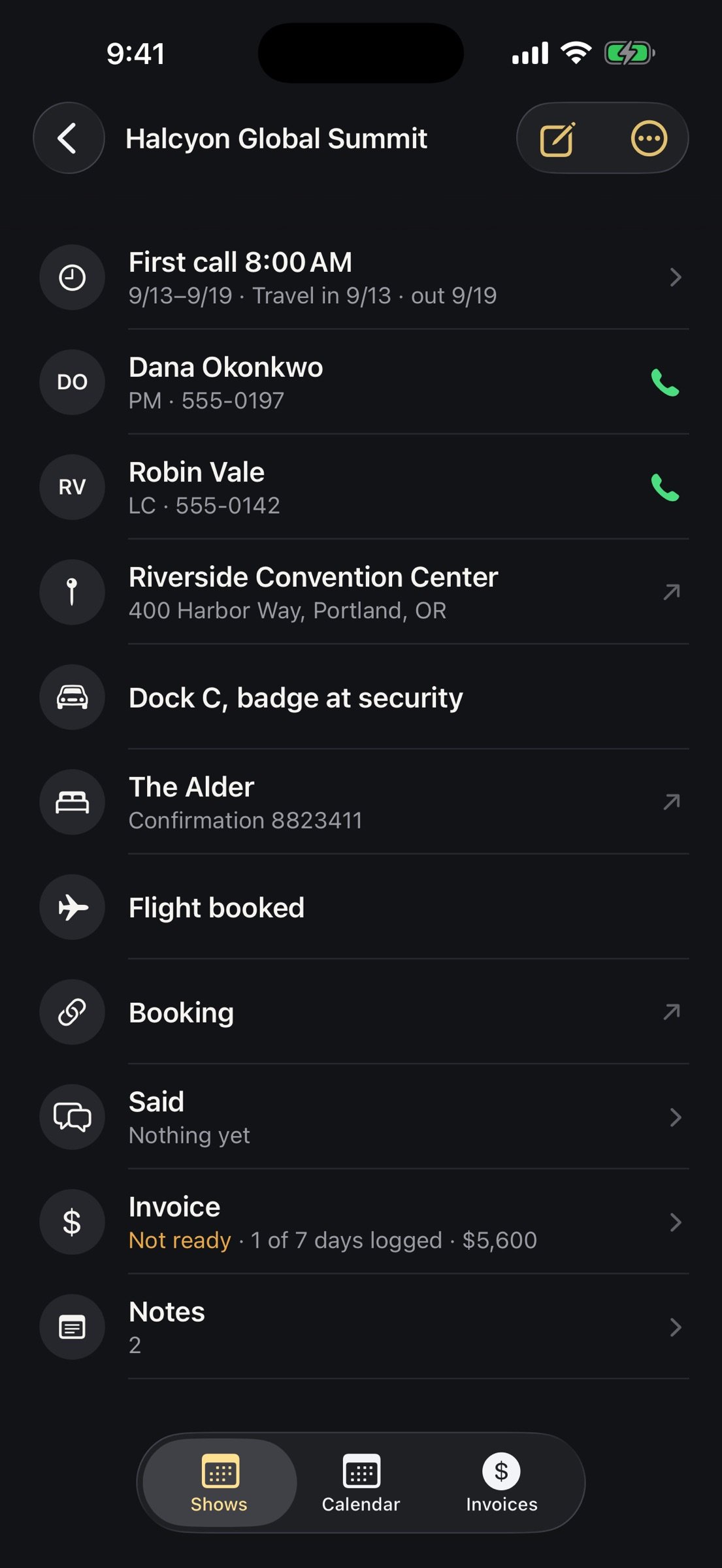
If your company's crewing system gives you a personal calendar link, paste it once. Every booking becomes a show with its dates, your position, the project manager and the labor coordinator, and a date that moves there moves here with the old one still on record.
GET A BOOKING IN WITHOUT TYPING
Share a booking email or a vendor booking page straight into the app. Dates, venue, room, rate, PO and contacts are read out of it. Or import from your calendar, which finds booking codes in your event titles. Or paste the email. Or type it. Nothing is required except, eventually, a job code.
WHEN SOURCES DISAGREE, IT SAYS SO
A booking confirm says one date and the calendar block says another. That is normal in this job, and most apps quietly pick one. Show Pocket shows you both, and who said what, so you decide. It also catches double bookings before you are standing in the wrong city, and nudges you about holds that have gone stale.
HOURS, OVERTIME, DOUBLE TIME
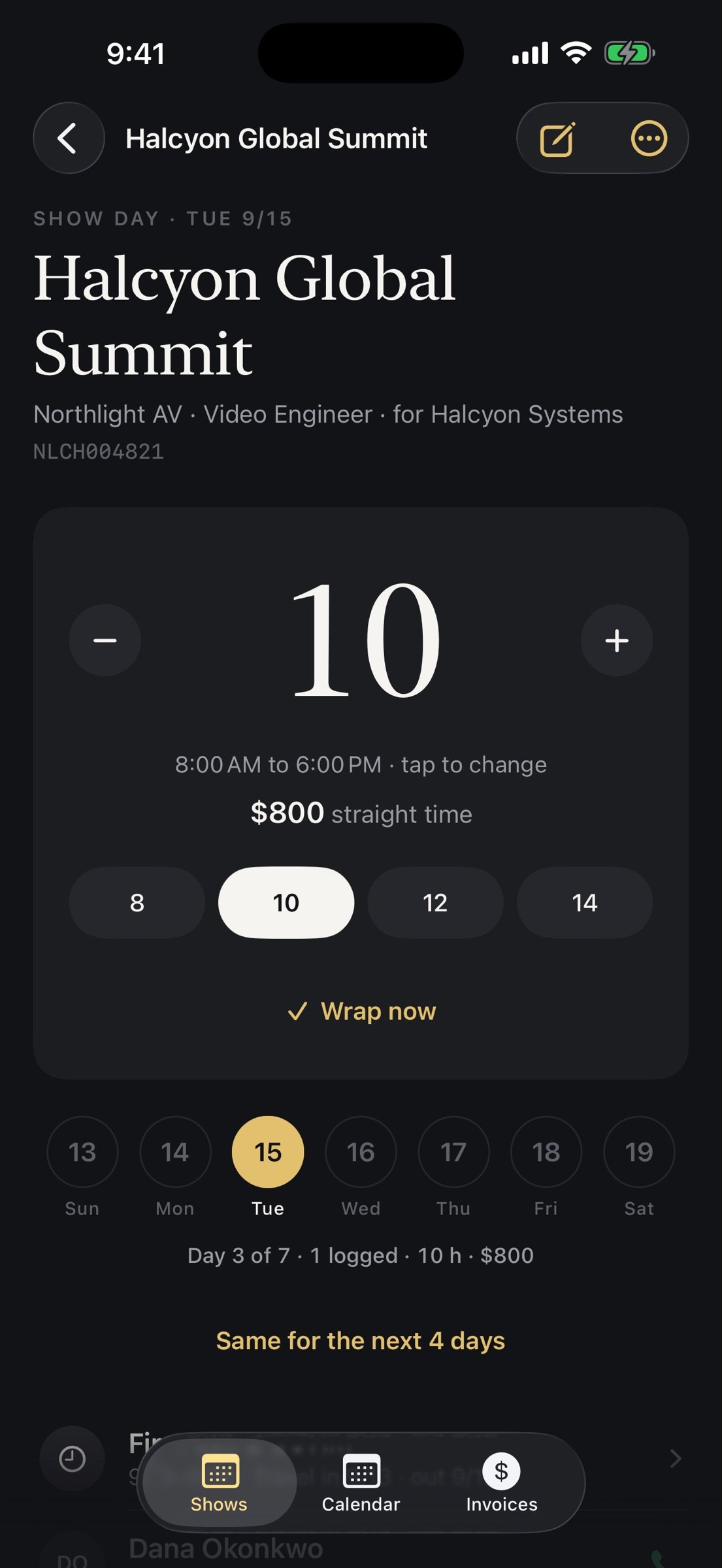
Log what you actually worked and the split is done for you, using that booking's own thresholds, because a ten-hour day is common and eight and twelve both turn up. Fill a long show forward in one tap. Walk into the venue and the clock offers to start; walk out after a full day and it wraps.
PER DIEM THAT SURVIVES BEING QUESTIONED
Federal rates are built into the app and looked up from the venue postcode, so the locality is exact rather than a guess from a city name. Every day draws the full rate, travel days included. Mark the meals a client provided and they come off that day. Set your home base and nearby work is treated as a local hire, where there is usually nothing to claim.
PACKED FROM THE DATES
A Pack tab for the trip you are leaving on. Shirts, socks and the rest counted for the days away, up to your laundry rule. The kit for your role. The short list you always forget. Back-to-back shows pack as one trip.
OUT-OF-POCKET COSTS
Flights, car rides, parking. Each one dated, filed where your books file it, and marked billable or not. Scan a receipt with the camera, pick a photo, or share one from Mail, and the amount, date and merchant are read out of it. A Lyft statement with several rides becomes several expenses.
INVOICE WITHOUT RETYPING
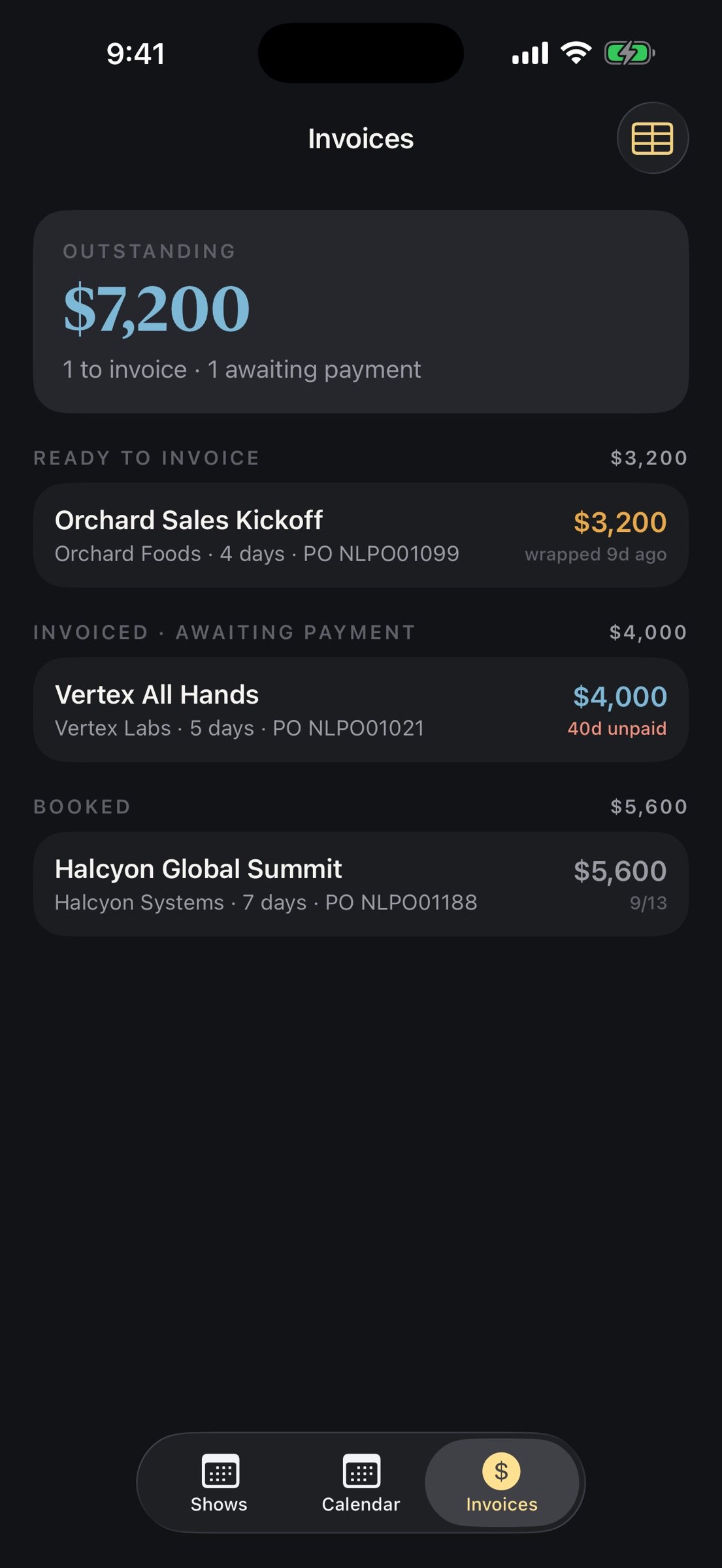
Export straight into QuickBooks Online, one line per day, dated, with overtime against the day it happened. Or send a PDF invoice with your logo. Point each role you work at what it bills as, once, and every invoice after that is a file you import.
ON STAFF? PAID BY THE HOUR
Switch to On staff and the Invoices tab becomes Hours: this pay period, time and a half and double time by your company's rules, after tax, with a timesheet to send. Put the company's shops in and walking in starts the clock on a shop day, no booking needed.
YOUR MONTH, AT A GLANCE
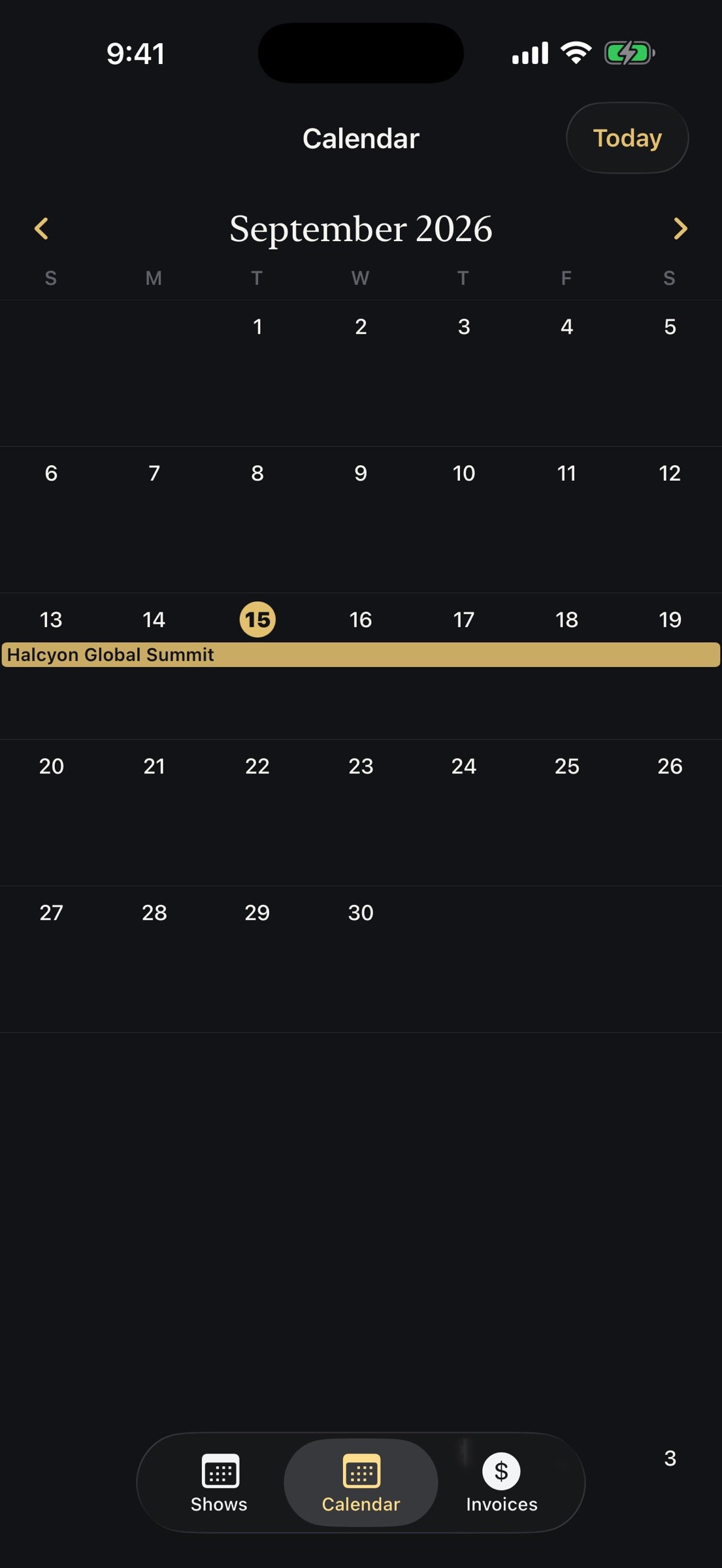
A calendar showing every booking across the month, holds included, so the next question about your availability takes a second to answer. Put your shows on the phone's calendar and share it with the people at home.
NO ACCOUNT. NO SERVERS. NOTHING COLLECTED.
There is nothing to sign up for. Your bookings live on your phone and sync through your own private iCloud account, which means the developer cannot see them. Not as a policy, but because there is no server for them to reach. No analytics, no tracking, no third-party code of any kind.
Built dark, because it gets used in dark rooms during shows.
Made by a working video engineer, for the way this trade actually runs.
License: Commercial
| Release info | Update on Oct 27, 2026 |
|---|---|
| Release notes | • Opening the app while already at the shop starts the shop clock, the same as at a venue. • Switching the arrival clock on asks for its three permissions on one screen, Location set to Always, Precise Location and notifications, each with a check mark or a button. • A first open in three screens: how you work, where your bookings come from, and those three permissions. Then you are in. • Pack says when it has combined back to back shows into one trip, and names them. A month on the road with a night between two shows can be joined by hand, and a show that touches the one before can be packed separately, both from the Pack menu. • When a trip runs longer than the laundry setting, the clothes list says Wash weekly next to the count. Tap it to change how often. • Typing into a show no longer lags behind the keyboard. Every letter used to rewrite the calendar and reset every reminder. • The arrival clock starts today's clock only from today's venue. Driving through next week's circle on the way in used to start it at the wrong place. On staff, the shop's circle no longer ends a lunch taken from a venue. • Correcting the in time while the clock runs now moves the lock screen clock too. It used to keep counting from the old time while the home screen widget showed the new one. |
| Listing data | App Store |
Reviews
No reviews yet. Be the first to review Show Pocket.
Used Show Pocket? Tell other visitors what you thought.
Log in to write a reviewOther products by this publisher
- "No Distractions" for YouTube 4.10 ----
- #Bible 11.6.1 "Incredible App - My sister shared this app with me a few weeks ago and it is truly incredible.
- #filmphotography 1.4.2 So, you decided to shoot on film?
- #LookBusy Fake Calendar Events 1.0.6 Look Busy scans your work calendar for open time slots and fills them with realistic-looking (but secretly fake) work events.
- #Small Talk Is Canceled 1.0.2 #Small Talk Is Canceled — Conversations That Matter
Most viewed iOS Business
-
1
 Navy Federal Credit Union 2026.10.2
Bank easy with the Navy Federal mobile app!
-
2
 Paycom 8.0.14
If you or your company use Paycom’s HR and software, the Paycom app helps you manage everyday HR and payroll tasks in one place — like checking your schedule, requesting time off and reviewing your pay.
-
3
 Entrust Identity 26.4.0
The Entrust Identity mobile application is the new Entrust mobile platform for delivering strong identity credentials to both employee and consumer users.
- 4 % Percentage Calculator Pro 1.41 This is the Pro version of % Percentage Calculator.
-
5
 Intune Company Portal 5.2610.0
Microsoft Intune helps organizations manage access to corporate apps, data, and resources.
-
6
 ParkNYC Powered by Flowbird 2.2.1
Have you ever been late to an important meeting and you can’t find a parking spot?
-
7
 Budget-Beacon 1.5
Budget Beacon connects to your Apple Wallet to help you understand and manage your spending.
- 8 $quirrel 1.5.1 $quirrel Budget & Finance helps you plan each paycheck, track spending, manage debt, and see what is safe to spend before the next payday.
-
9
 Shopify 11.2646.0
Shopify: build your online store, sell anywhere, run your business
-
10
 MiniVAN Touch 9.4.7
miniVAN Touch is a mobile canvassing application that integrates with websites provided by NGP VAN.
Most downloaded iOS Business
-
1
ParkNYC Powered by Flowbird 2.2.1
Have you ever been late to an important meeting and you can’t find a parking spot?
-
2
Budget-Beacon 1.5
Budget Beacon connects to your Apple Wallet to help you understand and manage your spending.
-
3
 Rocket.Chat 4.78.1
Rocket.Chat Secure CommsOS™ is a communication platform that unifies messaging, voice, video, AI, and mission-critical applications—ensuring uncompromising security, compliance, and operational efficiency for governments, defense, and critical infra…
-
4
 Receivable Payment Ledger2026 1.1
Payment Ledger is a fully offline accounts receivable management tool for small businesses, shops, wholesalers, and salespeople who need to track customer debts and payment progress.
-
5
 Business Timesheet 6.0
Are you looking for timesheet to track the work hours spent on hourly, daily or weekly basis accurately?
-
6
 Simple Budget Envelopes 2.2.1
An incredibly simple app, perfect for keeping track of how much money remains in your budget.
-
7
 Cvent Events 2.9.0
Cvent Events is your place to easily plan out your event experience, find where you need to go next, network with other attendees, and learn more about sponsors and exhibitors.
-
8
 Power Apps 3.26112.10
Get Power Apps to conveniently access your work or school apps no matter where you are: at home, on the road, in the field, off-campus, at the airport, or at the beach – anywhere life takes you.
-
9
 Vola 4.9.02
Vola is the only cash advance app built for Real-Time Payments (RTP).
-
10
 Checkbook Pro 3.3.5
An easy & quick way to manage your daily finances, Checkbook Pro keeps track of your credit card charges, cash expenditures...etc.