
17downloads
1this week
FreeFreeware
0reviews
Screenshots
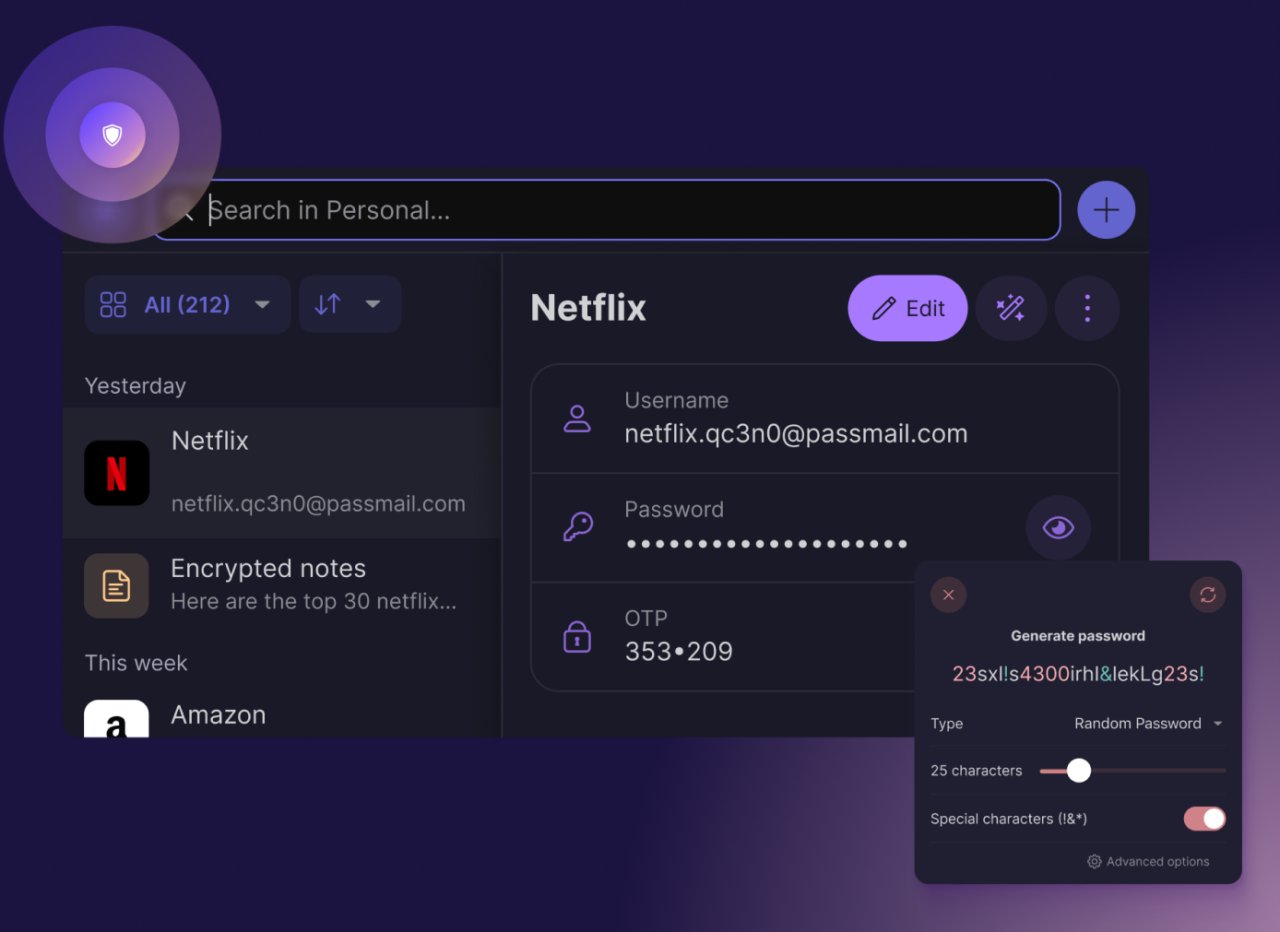
About Proton Pass
Get the password manager created by the scientists who met at CERN behind Proton Mail, the world’s
largest encrypted email provider. Proton Pass is open source, end-to-end encrypted, and protected
by Swiss privacy laws.
Pass offers more than other free password managers and has no ads or data collection. You can
use it for free forever on all your devices to create and store unlimited passwords, autofill logins,
generate 2FA codes, create email aliases, secure your notes, and more.
How can Proton Pass be free forever?
We offer Pass for free because everyone deserves online privacy and security. This is possible
thanks to our supportive community on paid plans. If you would like to support our work and get
access to premium features, consider upgrading your plan.
Protect more than just your passwords.
Join over 100 million people who have signed up for Proton’s privacy ecosystem, which includes
Proton Mail, Proton Drive, Proton Calendar, Proton VPN, and more. Take back control of your privacy
online with our encrypted email, calendar, file storage, and VPN.
Protect your logins and their metadata with battle-tested end-to-end encryption
While many other password managers only encrypt your password, Proton Pass uses end-to-end encryption
on all your stored login details (including your username, the website address, and more). Pass
protects your information with the same battle-tested encryption libraries all Proton services
use.
Audit Pass’s open-source code
Like all other Proton services, Pass is open source and built on the principle of trust through
transparency. As scientists, we know that transparency and peer review lead to better security.
All Proton Pass apps are open source, meaning anyone can verify our security claims for themselves.
With Proton Pass, you can:
• Store and auto-sync unlimited logins on unlimited devices: You can create, store, and manage
your credentials from anywhere with our browser extensions and apps for Android and iPhone/iPad.
• Sign in faster with Proton Pass autofill: You no longer need to copy and paste your username
and password. Easily and securely log in with Proton Pass autofill technology.
• Avoid weak passwords: With our built-in secure password generator, you can easily generate
strong, unique, and random passwords based on the security requirements for every website you
sign up to.
• Safely store encrypted notes: You can save private notes in Pass and access them on all your
devices.
• Protect Proton Pass with biometric login access: You can add an extra layer of protection
to Proton Pass by using your fingerprint or face to unlock the app.
• Create unique email addresses with hide-my-email aliases: Proton Pass helps you hide your
personal email address with email aliases. Keep spam out of your inbox, avoid being tracked everywhere,
and protect yourself from data breaches.
• Make 2FA easy with our built-in authenticator: With Pass’s integrated 2FA authenticator,
using 2FA is finally fast and convenient. Easily add a 2FA code for any website and autofill
it when you log in.
• Easily organize and share your sensitive data with vaults: Manage your logins, secure notes,
and email aliases with vaults. Share individual items or an entire vault with your family, friends,
or colleagues.
• Quick offline access to your login data: Access your stored passwords and notes in Pass from
wherever you are, even when your phone has no internet connection.
• Secure your Pass account with additional security measures: Protect all your data with another
layer of protection, either with TOTP or U2F/FIDO2 security keys.
• Get unlimited email forwards: There’s no limit on the number of emails you can have forwarded
from your alias to your inbox.
License: GPL-3.0
| Release info | Update on Nov 19, 2026 |
|---|---|
| Related tags | password manager vault |
| Listing data | Flathub |
Reviews
No reviews yet. Be the first to review Proton Pass.
Used Proton Pass? Tell other visitors what you thought.
Log in to write a reviewOther products by this publisher
- "No Distractions" for YouTube 4.10 ----
- #Bible 11.6.1 "Incredible App - My sister shared this app with me a few weeks ago and it is truly incredible.
- #filmphotography 1.4.2 So, you decided to shoot on film?
- #LookBusy Fake Calendar Events 1.0.6 Look Busy scans your work calendar for open time slots and fills them with realistic-looking (but secretly fake) work events.
- #Small Talk Is Canceled 1.0.2 #Small Talk Is Canceled — Conversations That Matter
Most viewed Linux Utilities
-
1
 Press 0.4.0
Music library compressor
-
2
 Anytype 0.57.8-alpha
The everything app for those who celebrate trust and autonomy
- 3 vCard Studio 1.5.0 Contact management application
-
4
 Secrets 14.1
Manage your passwords
-
5
 SlimeVR 21.1.0
Accessible full-body tracking in VR
-
6
 openterfaceQT 0.5.33
App control openterface-Mini-KVM
-
7
 Tasks 0.3.1
Get things done
-
8
 Luna 1.1.6
An amazing calendar widget
-
9
 Barrier 2.4.0-5.15-23.08
Barrier - Share mouse and keyboard over the local network
-
10
 Greenery 1.0.0
Crypto bookkeeping wallet
Most downloaded Linux Utilities
-
1
 FormatLab 2026.11.3
Convert Video, Audio and Images
-
2
 Millisecond 0.2.3
Optimize for low latency
-
3
 VNote 4.14.1
A pleasant note-taking platform
-
4
 NeoRegex 3.2.0
Regular expression editor and tester.
-
5
openterfaceQT 0.5.33
App control openterface-Mini-KVM
-
6
 Vikunja 2.8.0
The open-source to-do app
-
7
 JRomManager 3.0.5
A Mame and Retrogaming Rom Manager
-
8
 Lenspect 1.0.7
Scan files for threats
-
9
 RustDiff 1.0.6
Semantic JSON, XML and SQL comparator
-
10
 QR Scanner 1.1.0
A QR code scanner/generator