PDF Joiner & Merger 15.2
Merge pages of choice from one pdf with pages of another PDF files.
Download
6.64 MB
12downloads
5this week
FreeCommercial
0reviews
Screenshots
About PDF Joiner & Merger
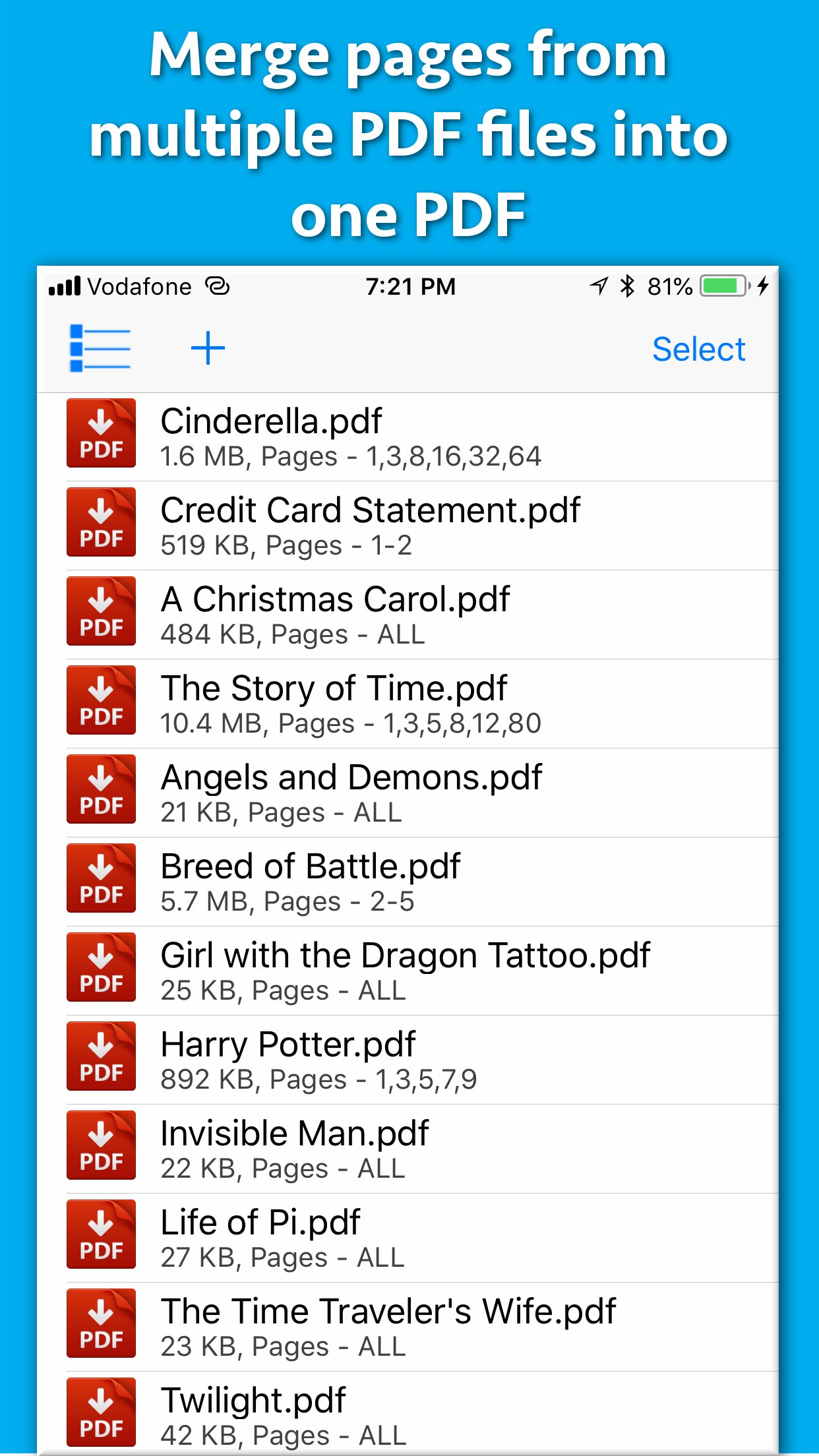
Merge pages of choice from one pdf with pages of another PDF files. The application offers various cutomizations to merge the PDF files.
For example : You could merge page 2 and 4 of a PDF with page number 30 and 32 of another PDF.The resulting PDF will contain 4 combined pages from both PDF files.
You could also merge a range of pages of a PDF with other PDF. For example : You could merge from page 5 to 10 of a PDF with page number 30 to 50 or another PDF.
Apart from this, the entire PDF could be merged with the other PDF files as well.
The application could combine pages of choice from even hundreds of PDF files at once.
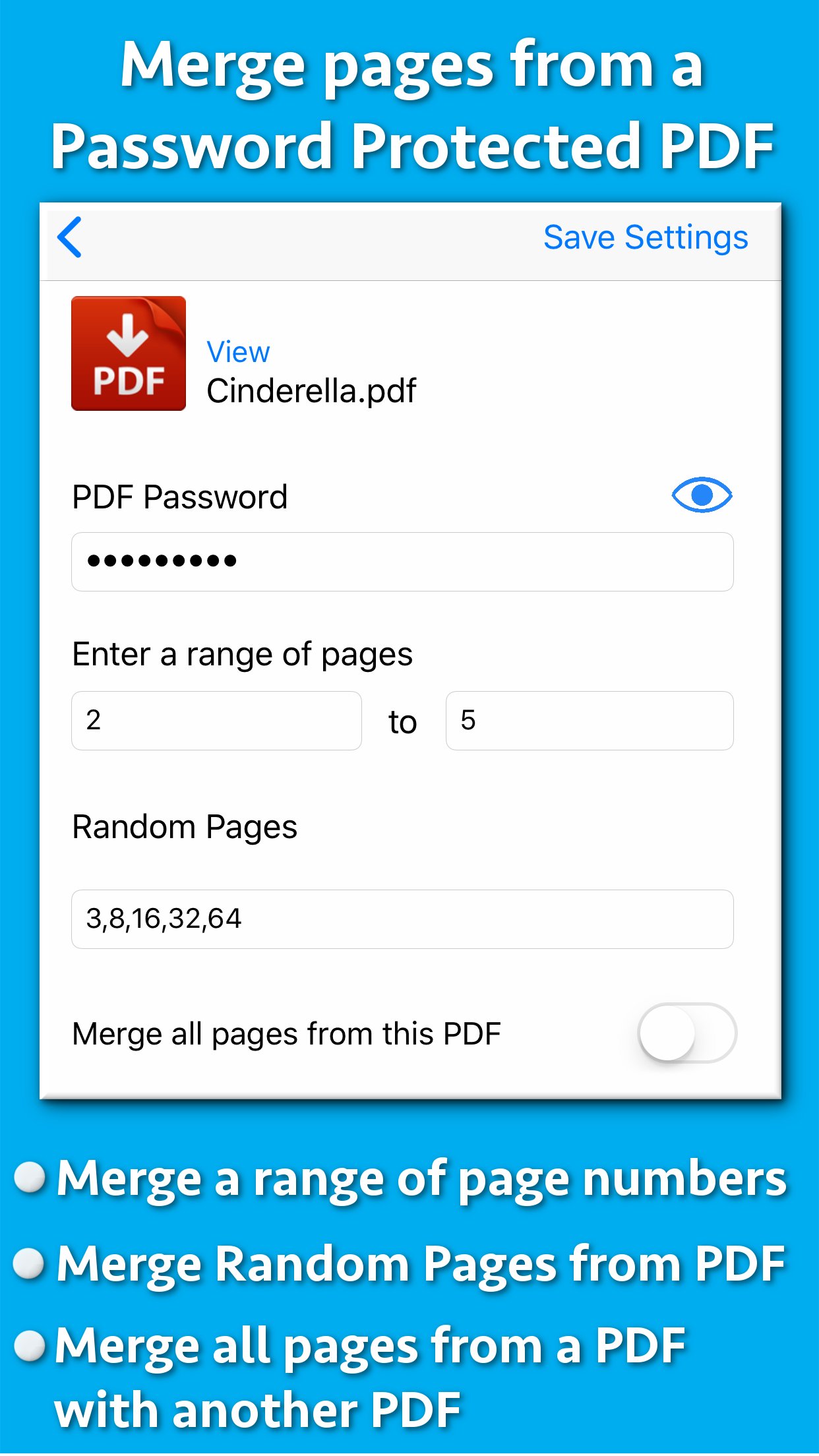
The application also supports Password protected PDF. This means that once you provide the password, the password protected PDF could be merged easily with other PDF files.The resulting PDF file will not ask for the password.
The application also retains all annotations and links in the created PDF files.If you have added annotations and links to a PDF file, these will be retained when the application creates the Merged PDF files.
Merging multiple PDF files help to reduce the clutter of PDF files. It also helps to organise the similar topics, novels, pages from books, study topics or the project documentations together.
Using the application, you could have your own collection of various categorized PDF. You could combine and keep all of your favourite books, titles, topics or notes together.This will help to find and share these materials easily whenever required.This also simplifies managing PDF files.
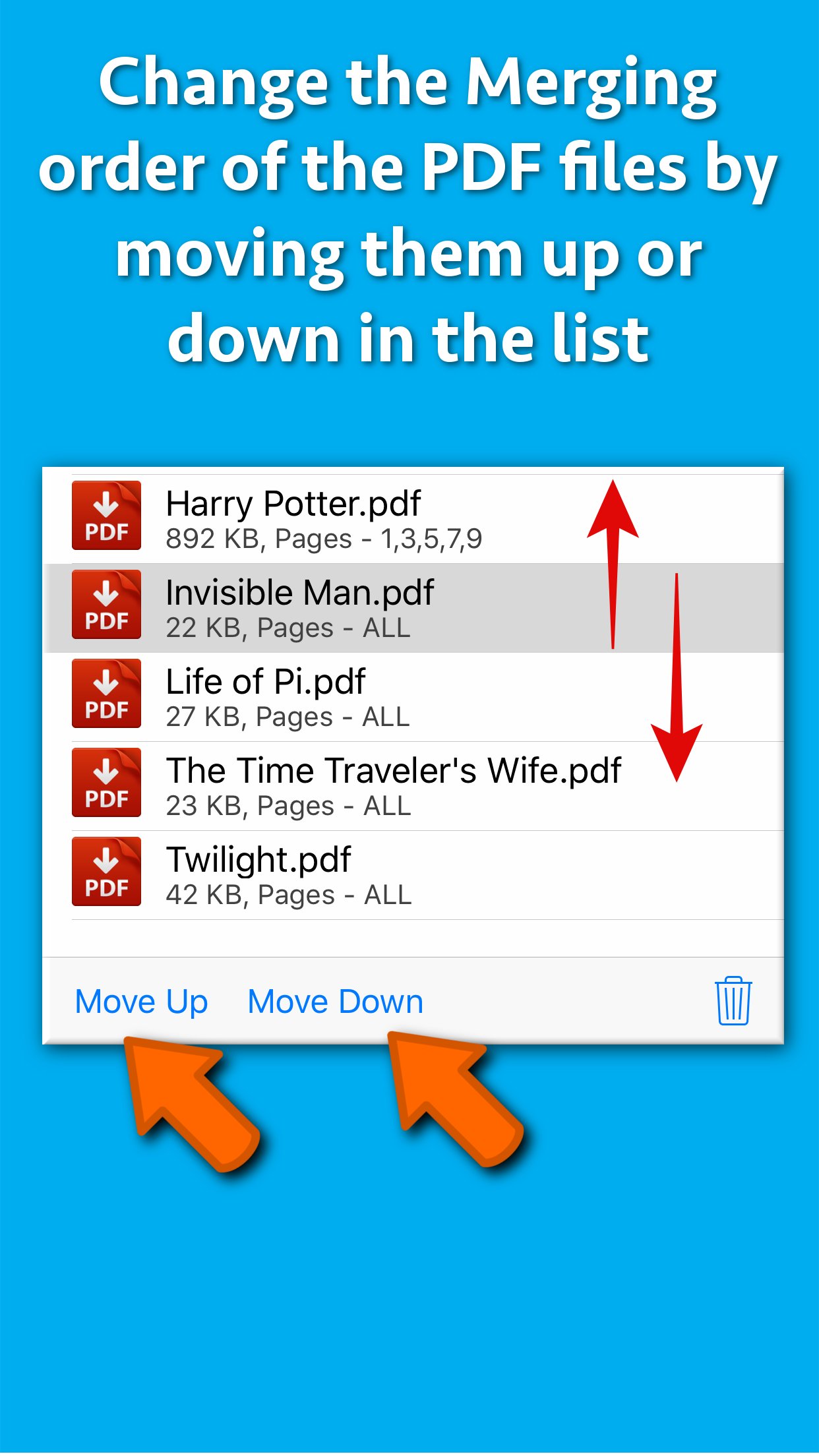
In order to merge the PDF files, just add them to the application.After you add the PDF files, their merging order could be adjusted using the "Move Up" and "Move Down" buttons.
The application comes with its inbuilt PDF previewer.Using this, you could directly preview the PDF files that are added to the application.The previewer also previews the password protected PDF files.
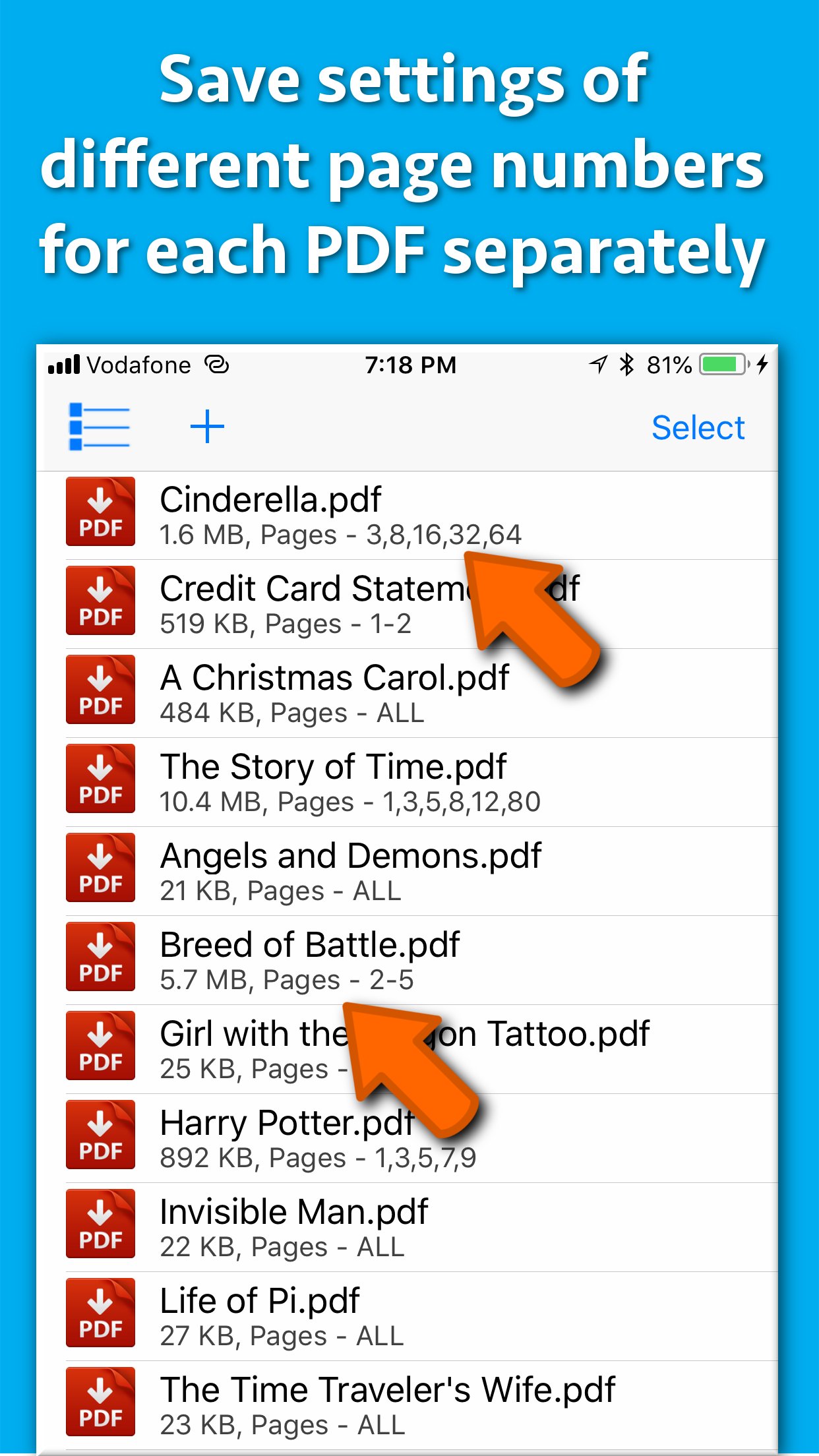
The below optional settings could be adjusted for each and every PDF separately as well :
a) Password : Provide a password if applicable
b) Page Range : Provide a range of pages if required.For example pages from 1 to 10
c) Random Pages : Provide a comma separated values of pages from PDF. For example : You could specify random page numbers like 1,3,5,7,9,42,95
If you want to consider all pages for merging, please check the checkbox named "Merge all pages from this PDF".
Once all settings are made, please save these settings.Different settings of page numbers and passwords could be saved for each PDF separately.
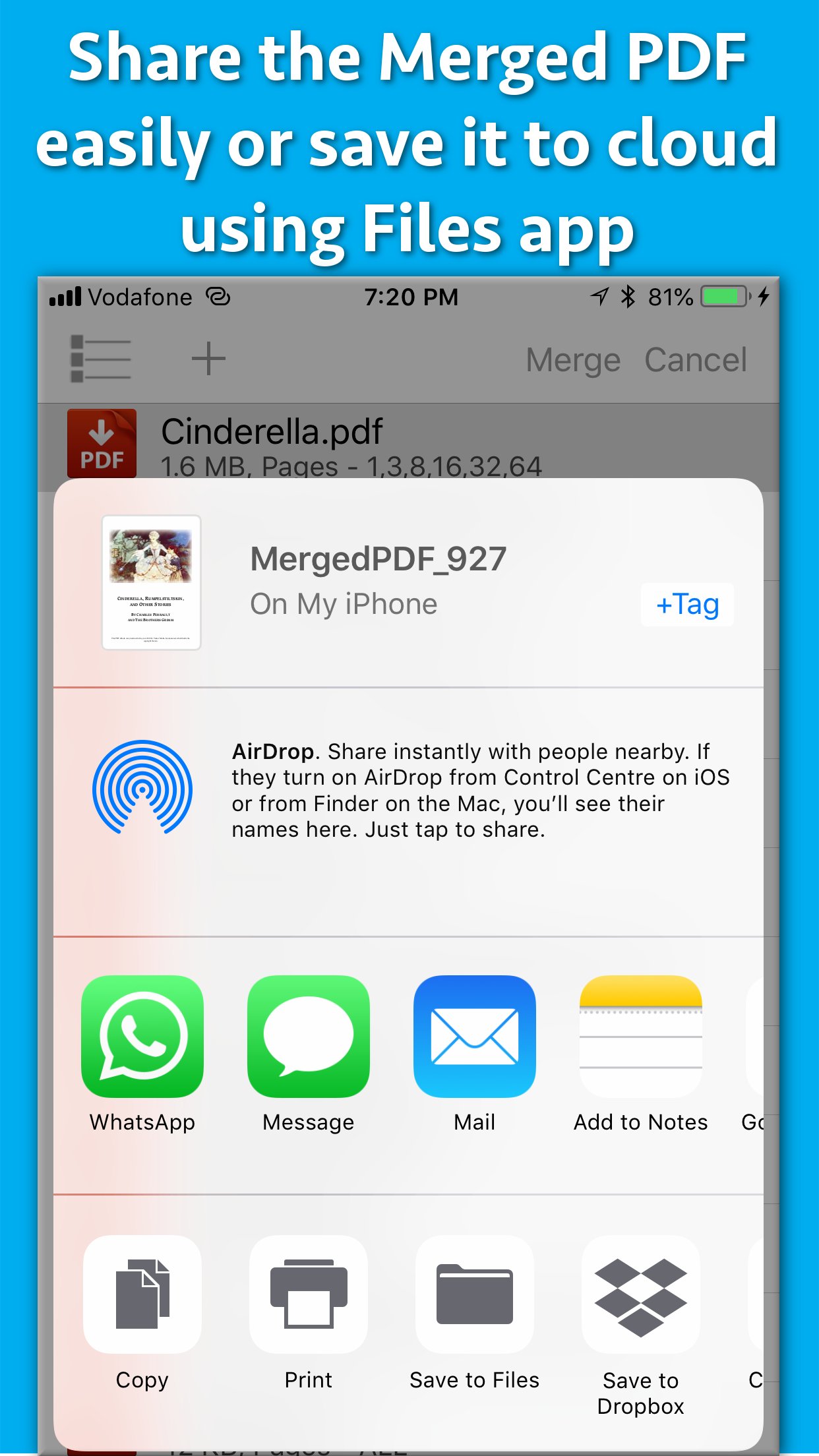
The application supports batch processing.This means that you could merge even hundreds of PDF files into one PDF.The Merged PDF files could be saved to cloud using the Files application.These could also be shared with other applications.
License: Commercial
For example : You could merge page 2 and 4 of a PDF with page number 30 and 32 of another PDF.The resulting PDF will contain 4 combined pages from both PDF files.
You could also merge a range of pages of a PDF with other PDF. For example : You could merge from page 5 to 10 of a PDF with page number 30 to 50 or another PDF.
Apart from this, the entire PDF could be merged with the other PDF files as well.
The application could combine pages of choice from even hundreds of PDF files at once.
The application also supports Password protected PDF. This means that once you provide the password, the password protected PDF could be merged easily with other PDF files.The resulting PDF file will not ask for the password.
The application also retains all annotations and links in the created PDF files.If you have added annotations and links to a PDF file, these will be retained when the application creates the Merged PDF files.
Merging multiple PDF files help to reduce the clutter of PDF files. It also helps to organise the similar topics, novels, pages from books, study topics or the project documentations together.
Using the application, you could have your own collection of various categorized PDF. You could combine and keep all of your favourite books, titles, topics or notes together.This will help to find and share these materials easily whenever required.This also simplifies managing PDF files.
In order to merge the PDF files, just add them to the application.After you add the PDF files, their merging order could be adjusted using the "Move Up" and "Move Down" buttons.
The application comes with its inbuilt PDF previewer.Using this, you could directly preview the PDF files that are added to the application.The previewer also previews the password protected PDF files.
The below optional settings could be adjusted for each and every PDF separately as well :
a) Password : Provide a password if applicable
b) Page Range : Provide a range of pages if required.For example pages from 1 to 10
c) Random Pages : Provide a comma separated values of pages from PDF. For example : You could specify random page numbers like 1,3,5,7,9,42,95
If you want to consider all pages for merging, please check the checkbox named "Merge all pages from this PDF".
Once all settings are made, please save these settings.Different settings of page numbers and passwords could be saved for each PDF separately.
The application supports batch processing.This means that you could merge even hundreds of PDF files into one PDF.The Merged PDF files could be saved to cloud using the Files application.These could also be shared with other applications.
License: Commercial
| Release info | New Release on Oct 28, 2025 |
|---|---|
| Release notes | - Minor bug fixes |
| Listing data | App Store |
Reviews
No reviews yet. Be the first to review PDF Joiner & Merger.
Used PDF Joiner & Merger? Tell other visitors what you thought.
Log in to write a reviewOther products by this publisher
- "No Distractions" for YouTube 4.10 ----
- #Bible 11.6.1 "Incredible App - My sister shared this app with me a few weeks ago and it is truly incredible.
- #filmphotography 1.4.2 So, you decided to shoot on film?
- $quirrel 1.5.1 $quirrel Budget & Finance helps you plan each paycheck, track spending, manage debt, and see what is safe to spend before the next payday.
- % Percentage Calculator Pro 1.41 This is the Pro version of % Percentage Calculator.
Most viewed iOS Business
-
1
 Navy Federal Credit Union 2026.10.2
Bank easy with the Navy Federal mobile app!
-
2
 Paycom 8.0.14
If you or your company use Paycom’s HR and software, the Paycom app helps you manage everyday HR and payroll tasks in one place — like checking your schedule, requesting time off and reviewing your pay.
-
3
 Entrust Identity 26.4.0
The Entrust Identity mobile application is the new Entrust mobile platform for delivering strong identity credentials to both employee and consumer users.
- 4 % Percentage Calculator Pro 1.41 This is the Pro version of % Percentage Calculator.
-
5
 Intune Company Portal 5.2610.0
Microsoft Intune helps organizations manage access to corporate apps, data, and resources.
-
6
 ParkNYC Powered by Flowbird 2.2.1
Have you ever been late to an important meeting and you can’t find a parking spot?
-
7
 Shopify 11.2646.0
Shopify: build your online store, sell anywhere, run your business
- 8 $quirrel 1.5.1 $quirrel Budget & Finance helps you plan each paycheck, track spending, manage debt, and see what is safe to spend before the next payday.
-
9
 Budget-Beacon 1.5
Budget Beacon connects to your Apple Wallet to help you understand and manage your spending.
-
10
 MiniVAN Touch 9.4.7
miniVAN Touch is a mobile canvassing application that integrates with websites provided by NGP VAN.
Most downloaded iOS Business
-
1
ParkNYC Powered by Flowbird 2.2.1
Have you ever been late to an important meeting and you can’t find a parking spot?
-
2
Budget-Beacon 1.5
Budget Beacon connects to your Apple Wallet to help you understand and manage your spending.
-
3
 Rocket.Chat 4.78.1
Rocket.Chat Secure CommsOS™ is a communication platform that unifies messaging, voice, video, AI, and mission-critical applications—ensuring uncompromising security, compliance, and operational efficiency for governments, defense, and critical infra…
-
4
 Business Timesheet 6.0
Are you looking for timesheet to track the work hours spent on hourly, daily or weekly basis accurately?
-
5
 Receivable Payment Ledger2026 1.1
Payment Ledger is a fully offline accounts receivable management tool for small businesses, shops, wholesalers, and salespeople who need to track customer debts and payment progress.
-
6
 Cvent Events 2.9.0
Cvent Events is your place to easily plan out your event experience, find where you need to go next, network with other attendees, and learn more about sponsors and exhibitors.
-
7
 Simple Budget Envelopes 2.2.1
An incredibly simple app, perfect for keeping track of how much money remains in your budget.
-
8
 Vola 4.9.02
Vola is the only cash advance app built for Real-Time Payments (RTP).
-
9
 Power Apps 3.26112.10
Get Power Apps to conveniently access your work or school apps no matter where you are: at home, on the road, in the field, off-campus, at the airport, or at the beach – anywhere life takes you.
-
10
 Checkbook Pro 3.3.5
An easy & quick way to manage your daily finances, Checkbook Pro keeps track of your credit card charges, cash expenditures...etc.