Parallax Monitor 2.1
Parallax Monitor is a professional monitoring and camera-control app for Nikon Z and RED cinema cameras.
Download
78.56 MB
13downloads
5this week
FreeCommercial
0reviews
Screenshots
About Parallax Monitor
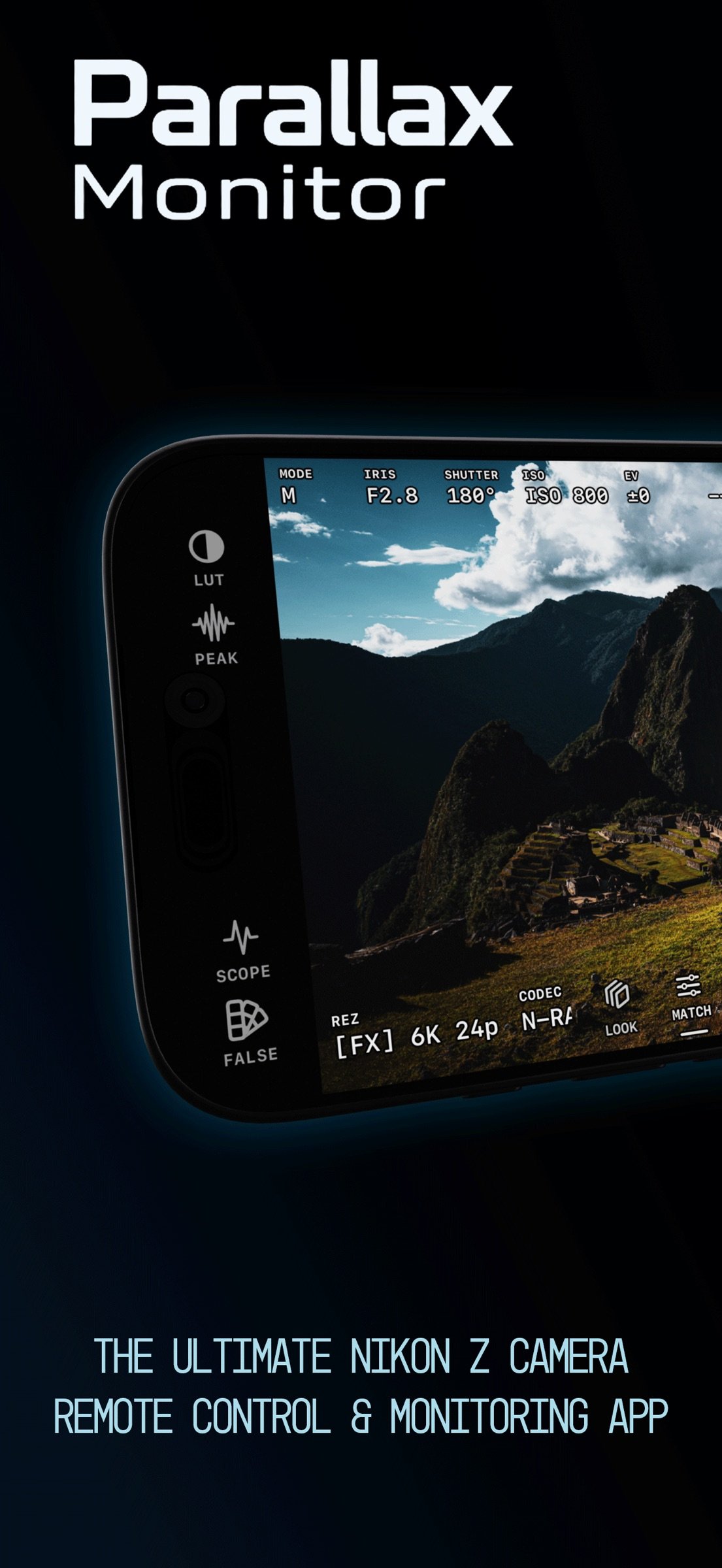
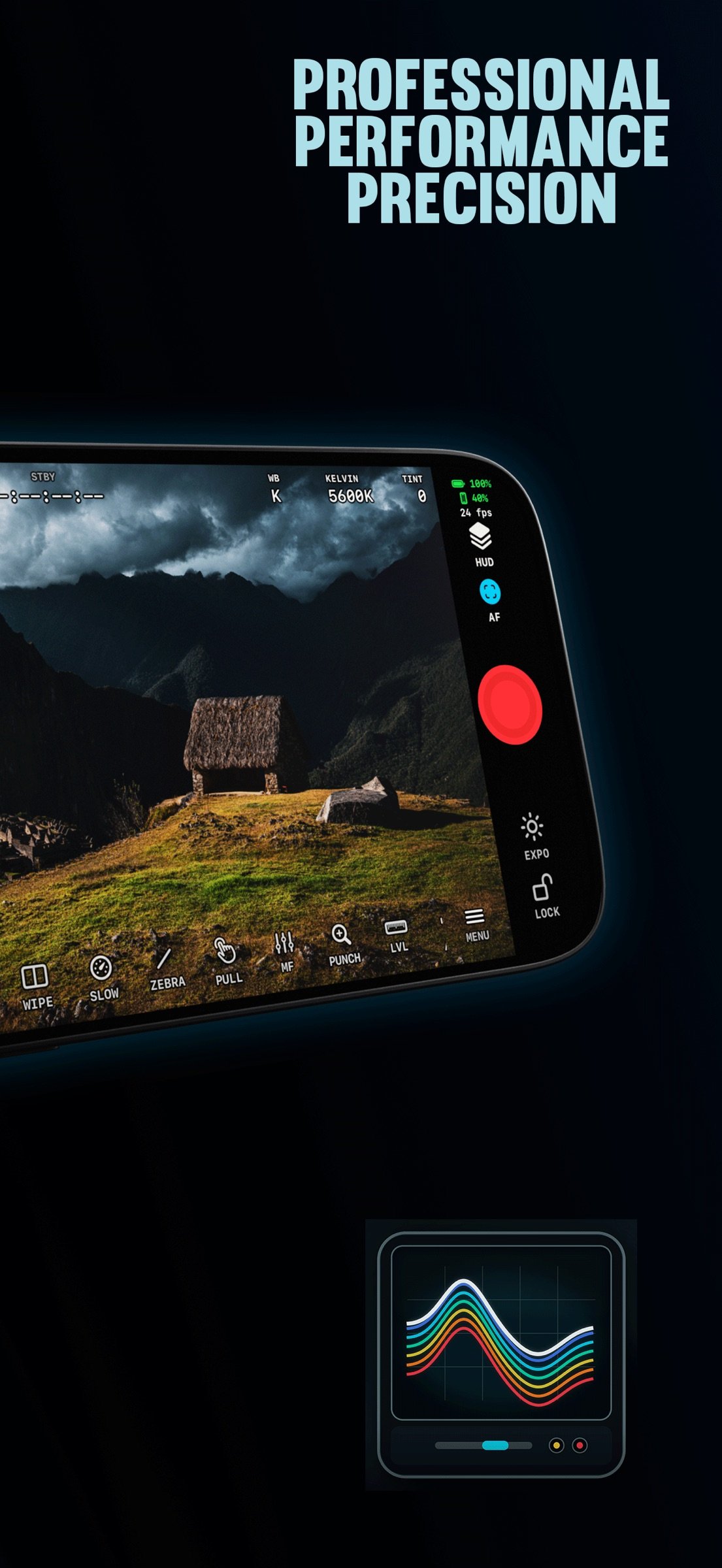
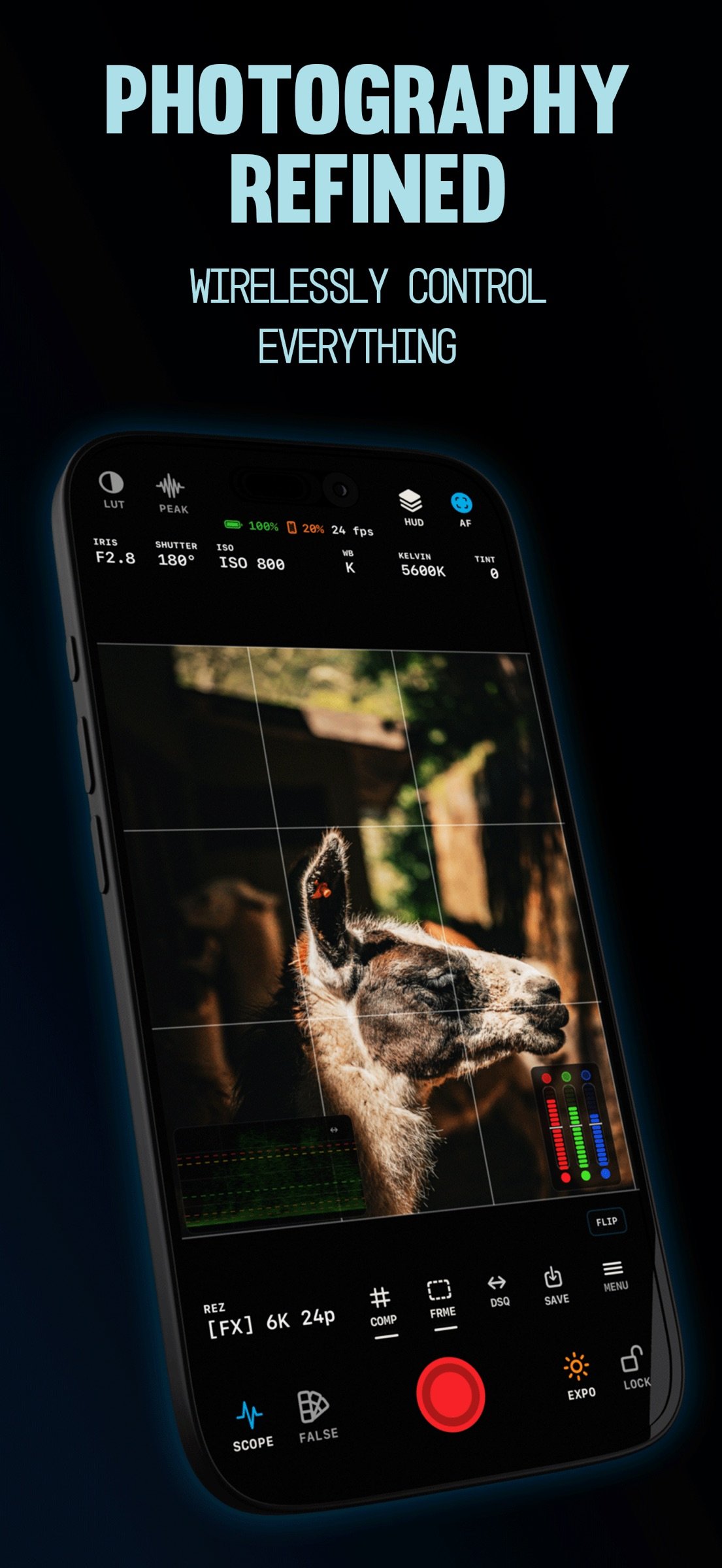
Parallax Monitor is a professional monitoring and camera-control app for Nikon Z and RED cinema cameras. It turns an iPhone or iPad into a field monitor and remote for video, stills, and timelapse, with LUT preview, HDMI monitoring, exposure and focus tools, multi-camera monitoring, and card playback.
Designed for the Nikon Z-Series & Modern RED Cameras.
EXPOSURE
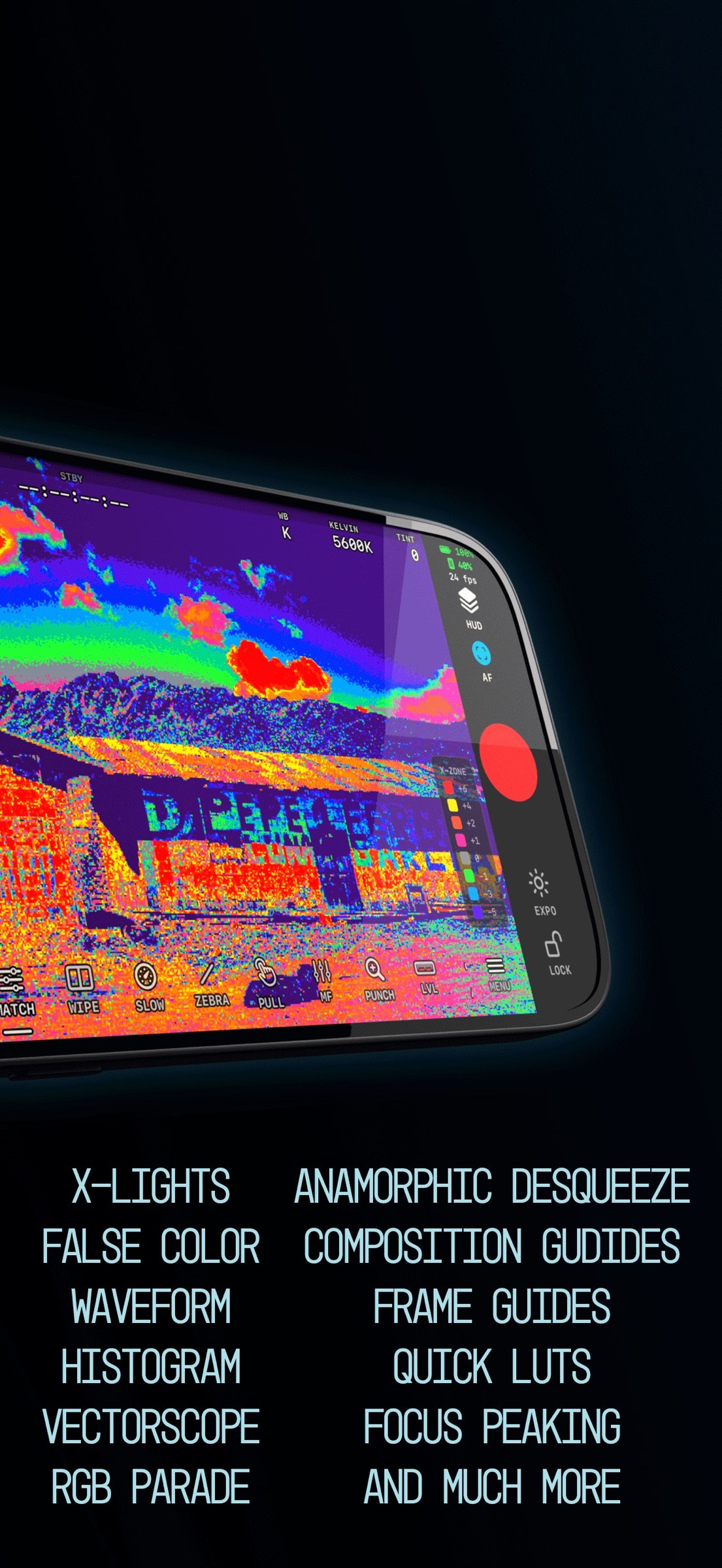
• X-Lights: Parallax's custom exposure algorithm, tuned for each camera's log profile
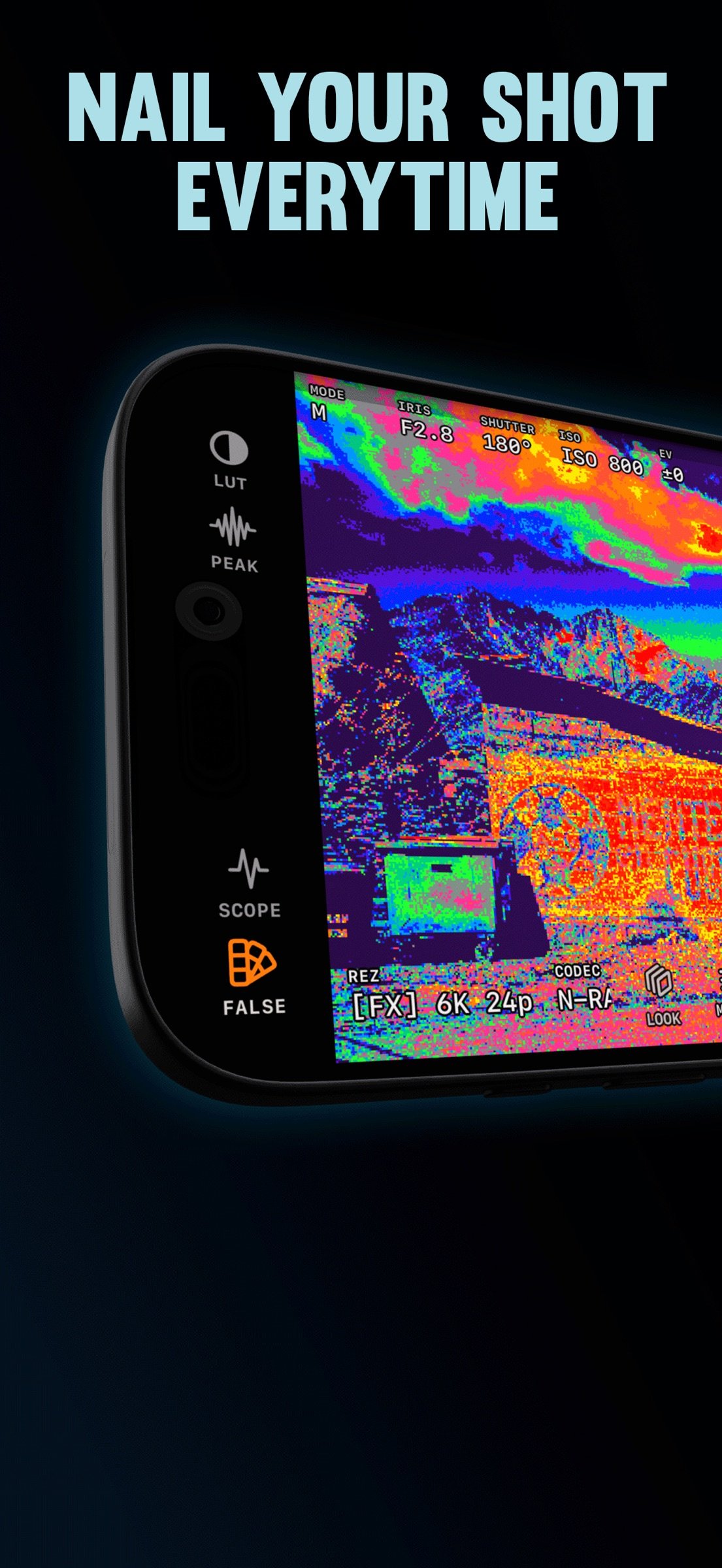
• R3D & N-Log custom Guided Waveform, RGB parade, histogram, and vectorscope
• False color, zebras, and X-Posts
• N-Log-aware thresholds applied automatically when recording in N-Log
• LUT preview with bundled N-Log and RED looks, or your own .cube files
The monitoring look and the exposure analysis are kept separate, so a LUT never masks clipped highlights or crushed shadows.
SEEMO AND HDMI MONITORING
Use an Accsoon SeeMo on iPhone or iPad, or a USB-C HDMI adapter on iPad, as your Live View picture while Parallax keeps controlling the camera. Adapter color is matched to the camera automatically.
STILLS, TIMELAPSE AND FOCUS STACKING
• Dedicated stills mode with its own exposure readouts and controls
• Fire the shutter from the screen, your volume buttons, or a Bluetooth shutter
• Release mode, burst, and self-timer control
• Bulb and Time long exposures
• Image quality including RAW + JPEG, image area, and Picture Control
• Automated focus stacking from 2 to 100 frames with adjustable focus steps
• Interval and timelapse capture with start delay, shot count or duration, and in-app MP4 assembly
• Instant photo review with zoom, RAW + JPEG pairs, bursts, and save to Photos
• Non-CPU lens profiles for manual lenses
FOCUS AND FRAMING
• GPU-based focus peaking with adjustable sensitivity and a monochrome background option
• Tap to focus, Focus Punch, AF mode and area selection
• Frame guides: 2.39, 2.00, 1.85, 4:3, 1:1, 4:5, 9:16, safe areas, rule of thirds, golden ratio, and custom ratios
• Multiple simultaneous guides with adjustable mattes and opacity
• Anamorphic desqueeze at 1.33x, 1.5x, 1.8x, and 2x
• Camera level, audio meters, recording border, and timer
• Layouts for iPhone, iPad and iPhone Duo, with ROTATE for portrait rigs
• Configurable toolbars and hot corners, with complete layouts saved as presets
CAMERA CONTROL
Aperture, ISO, dual base ISO, shutter speed or shutter angle, exposure compensation, white balance and Kelvin, resolution, frame rate, codec, card slot, timecode, audio levels, and record start and stop.
MULTICAM
Monitor and control multiple cameras from a single grid over Wi-Fi and USB, including mixed Nikon and several RED cameras. Timecode Jam-Sync, Group record, a shared exposure control rail, and per-camera battery status and audio meters. Any camera can be promoted to full-screen Live View.
PLAYBACK AND REVIEW
• Browse the camera card and play clips, including H.265
• Preview playback through any LUT, with A/B comparison
• Save original clips or LUT-applied copies to Photos
REMOTE VIEWER SCREENS
Nearby iPhones and iPads join as read-only monitors for directors, clients, or focus pullers.
RED CAMERAS
Supports RED KOMODO, KOMODO-X, and V-RAPTOR over Wi-Fi or USB-C: ISO, shutter, ND, white balance, frame rate, codec, and record control, full Live View monitoring, and tap autofocus.
CONNECTION
• Wi-Fi, camera access point, or USB-C
• Join the camera's Wi-Fi from inside the app
• Guided setup and one-tap reconnect
• Live Activities for recording and timelapse progress on the Lock Screen and Dynamic Island
LANGUAGES
Parallax Monitor is available in 21 languages. Switch languages at any time in the app.
COMPATIBILITY
Tested with the Nikon ZR, Z8, Z9, Z6III, Zf, and Z50II, and RED KOMODO, KOMODO-X, and V-RAPTOR. Available features vary by camera model, firmware, connection type, and iPhone or iPad model.
Parallax Monitor is developed independently and is not affiliated with or endorsed by Nikon, RED, or their subsidiaries.
License: Commercial
Designed for the Nikon Z-Series & Modern RED Cameras.
EXPOSURE
• X-Lights: Parallax's custom exposure algorithm, tuned for each camera's log profile
• R3D & N-Log custom Guided Waveform, RGB parade, histogram, and vectorscope
• False color, zebras, and X-Posts
• N-Log-aware thresholds applied automatically when recording in N-Log
• LUT preview with bundled N-Log and RED looks, or your own .cube files
The monitoring look and the exposure analysis are kept separate, so a LUT never masks clipped highlights or crushed shadows.
SEEMO AND HDMI MONITORING
Use an Accsoon SeeMo on iPhone or iPad, or a USB-C HDMI adapter on iPad, as your Live View picture while Parallax keeps controlling the camera. Adapter color is matched to the camera automatically.
STILLS, TIMELAPSE AND FOCUS STACKING
• Dedicated stills mode with its own exposure readouts and controls
• Fire the shutter from the screen, your volume buttons, or a Bluetooth shutter
• Release mode, burst, and self-timer control
• Bulb and Time long exposures
• Image quality including RAW + JPEG, image area, and Picture Control
• Automated focus stacking from 2 to 100 frames with adjustable focus steps
• Interval and timelapse capture with start delay, shot count or duration, and in-app MP4 assembly
• Instant photo review with zoom, RAW + JPEG pairs, bursts, and save to Photos
• Non-CPU lens profiles for manual lenses
FOCUS AND FRAMING
• GPU-based focus peaking with adjustable sensitivity and a monochrome background option
• Tap to focus, Focus Punch, AF mode and area selection
• Frame guides: 2.39, 2.00, 1.85, 4:3, 1:1, 4:5, 9:16, safe areas, rule of thirds, golden ratio, and custom ratios
• Multiple simultaneous guides with adjustable mattes and opacity
• Anamorphic desqueeze at 1.33x, 1.5x, 1.8x, and 2x
• Camera level, audio meters, recording border, and timer
• Layouts for iPhone, iPad and iPhone Duo, with ROTATE for portrait rigs
• Configurable toolbars and hot corners, with complete layouts saved as presets
CAMERA CONTROL
Aperture, ISO, dual base ISO, shutter speed or shutter angle, exposure compensation, white balance and Kelvin, resolution, frame rate, codec, card slot, timecode, audio levels, and record start and stop.
MULTICAM
Monitor and control multiple cameras from a single grid over Wi-Fi and USB, including mixed Nikon and several RED cameras. Timecode Jam-Sync, Group record, a shared exposure control rail, and per-camera battery status and audio meters. Any camera can be promoted to full-screen Live View.
PLAYBACK AND REVIEW
• Browse the camera card and play clips, including H.265
• Preview playback through any LUT, with A/B comparison
• Save original clips or LUT-applied copies to Photos
REMOTE VIEWER SCREENS
Nearby iPhones and iPads join as read-only monitors for directors, clients, or focus pullers.
RED CAMERAS
Supports RED KOMODO, KOMODO-X, and V-RAPTOR over Wi-Fi or USB-C: ISO, shutter, ND, white balance, frame rate, codec, and record control, full Live View monitoring, and tap autofocus.
CONNECTION
• Wi-Fi, camera access point, or USB-C
• Join the camera's Wi-Fi from inside the app
• Guided setup and one-tap reconnect
• Live Activities for recording and timelapse progress on the Lock Screen and Dynamic Island
LANGUAGES
Parallax Monitor is available in 21 languages. Switch languages at any time in the app.
COMPATIBILITY
Tested with the Nikon ZR, Z8, Z9, Z6III, Zf, and Z50II, and RED KOMODO, KOMODO-X, and V-RAPTOR. Available features vary by camera model, firmware, connection type, and iPhone or iPad model.
Parallax Monitor is developed independently and is not affiliated with or endorsed by Nikon, RED, or their subsidiaries.
License: Commercial
| Release info | Update on Nov 03, 2026 |
|---|---|
| Release notes | Parallax Monitor 2.1 brings Accsoon SeeMo support, HDMI monitoring on iPad, layouts built for every screen including iPhone Duo, Multicam with several REDs, and much steadier connections. Thank you again to our beta testers! NEW: ACCSOON SEEMO • Use an Accsoon SeeMo as your Live View picture on iPhone or iPad while Parallax keeps controlling the camera • Tap the picture source chip to switch between SeeMo and the camera's own preview • Your LUT and touch AF stay put when you switch NEW: HDMI MONITORING ON IPAD • Plug a USB-C HDMI adapter into your iPad to view the camera's HDMI output as your Live View picture while Parallax keeps controlling the camera. Monitoring only; the camera does the recording • HDMI color is matched to the camera automatically, before your LUT, and each adapter is remembered • Runs at the camera's frame rate, with no tearing at 24, 25 and 30p • Full-resolution false color and zebras on the HDMI picture • The picture comes back by itself when the HDMI signal drops, such as when the camera menu opens NEW: BUILT FOR IPHONE DUO AND EVERY SCREEN • iPhone Duo: iPad layouts on the open screen, full-screen pages on the closed one • Modern is now the default interface. A saved Classic choice is kept • Controls sit in the black around the picture on iPhone and iPad, portrait and landscape • ROTATE turns the picture in 90° steps, and tap focus and punch-in follow the turn. Long-press to move it, or hide it in Advanced • Mount the phone upside down on a rig and the whole interface turns with it NEW: MULTICAM WITH SEVERAL REDS • Run several REDs at once alongside your Nikons • Find and add REDs right from the Multicam page • Group record, timecode jam and the shared exposure rail cover every RED • Promote a camera, record, and return to the grid without interrupting the take NEW: JOIN THE CAMERA'S WI-FI IN THE APP • Join the camera's own Wi-Fi from inside the app, then press OK on the camera • Rejoins by itself if iOS drifts away, and returns your p |
| Listing data | App Store |
Reviews
No reviews yet. Be the first to review Parallax Monitor.
Used Parallax Monitor? Tell other visitors what you thought.
Log in to write a reviewOther products by this publisher
- "No Distractions" for YouTube 4.10 ----
- #Bible 11.6 "Incredible App - My sister shared this app with me a few weeks ago and it is truly incredible.
- #filmphotography 1.4.2 So, you decided to shoot on film?
- $quirrel 1.5.1 $quirrel Budget & Finance helps you plan each paycheck, track spending, manage debt, and see what is safe to spend before the next payday.
- % Percentage Calculator Pro 1.41 This is the Pro version of % Percentage Calculator.
Most viewed iOS Photo & Video
-
1
 ShortDiShow 2.0
Drama Quest Island — An offline interactive short-drama adventure.
-
2
 Infuse 8.5.10
Infuse: Enterprise provides the same great features as the standard version of Infuse and includes permanent access to all Pro features via a traditional paid app.
-
3
 AI Video Generator 2.0.2
Vixel – AI Video Generator
-
4
 OPlayer 4.8
Play all your videos directly without having to convert them!
-
5
 Necrometer II 1.2
Necrometer II is a paranormal investigation companion designed for ghost hunters and researchers.
-
6
 CapCut 20.1.0
CapCut offers easy-to-use video editing functions, in-APP fonts and effects, advanced features such as keyframe animation, smooth slow-motion, chroma key, and stabilization, to help you capture and snip moments.
-
7
 Ai Photo 1.1.2
AI Photo Retouch – BG Eraser
-
8
 Treblo 1.6.0
Make songs with the world's best AI music model.
-
9
 TouchSiren Delta 3.1
--------------------------------------------------------------
-
10
 CNU 3.0.12
CNU?????????????????????,???????????????
Most downloaded iOS Photo & Video
-
1
Infuse 8.5.10
Infuse: Enterprise provides the same great features as the standard version of Infuse and includes permanent access to all Pro features via a traditional paid app.
-
2
 DJI Fly 1.21.18
DJI Fly is designed to help pilots fly drones with ease.
-
3
 Analog Radio 3.0
The iPhone and iPad devices don't have the FM/AM radio antenna installed.
-
4
 TurboCollage Automatic 1.2.4
#1 Easy automatic photo collage maker for iPhone & iPad.
-
5
 ReelyGo 1.1.42
ReelyGo: Your Daily Drama Escape
-
6
 AGAIN. Rehearsal Notes 2.0.1
AGAIN. is the rehearsal app that remembers why the band stopped — and, new in Version 2, who said what in a writing session or a table read.
-
7
 Rozeta Sequencer Suite 1.3.16
Rozeta is a suite of MIDI sequencers and controllers that lets you explore a new, freeform approach to sequencing and controlling mobile music apps.
-
8
Treblo 1.6.0
Make songs with the world's best AI music model.
-
9
 Pop Dot Comics 1.48
Create a comic worthy of the Sunday newspaper or your favorite pulp-fiction cover.
-
10
 SSS IPTV, Simple, Smart Super 1.0.2
An Easiest way to watch TV Online or Movies or Series, Bring your Own list M3u,