
Paperback Mobile 1.1
Paperback is a fast, fully accessible reader for ebooks, documents and audio books.
Download
13.93 MB
21downloads
5this week
FreeCommercial
0reviews
Screenshots
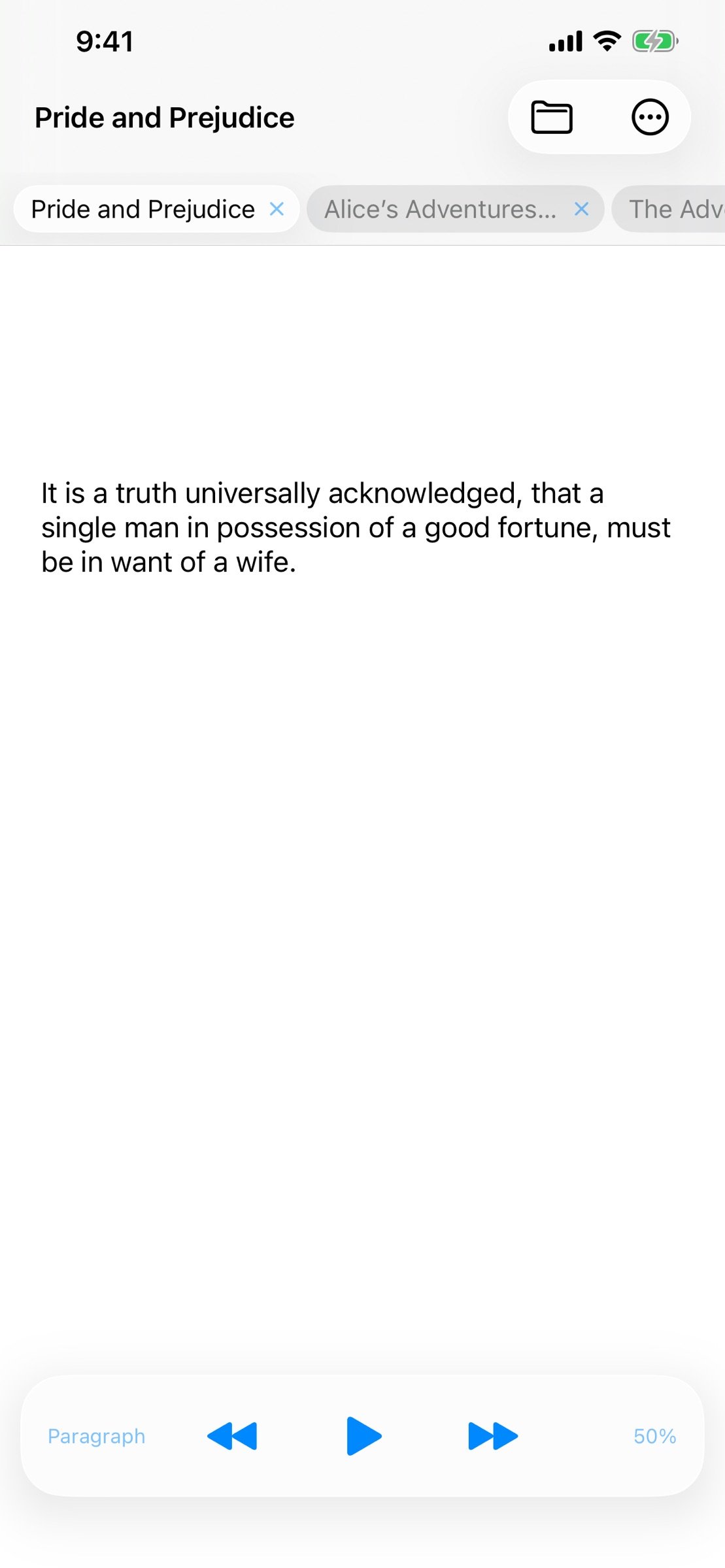
About Paperback Mobile
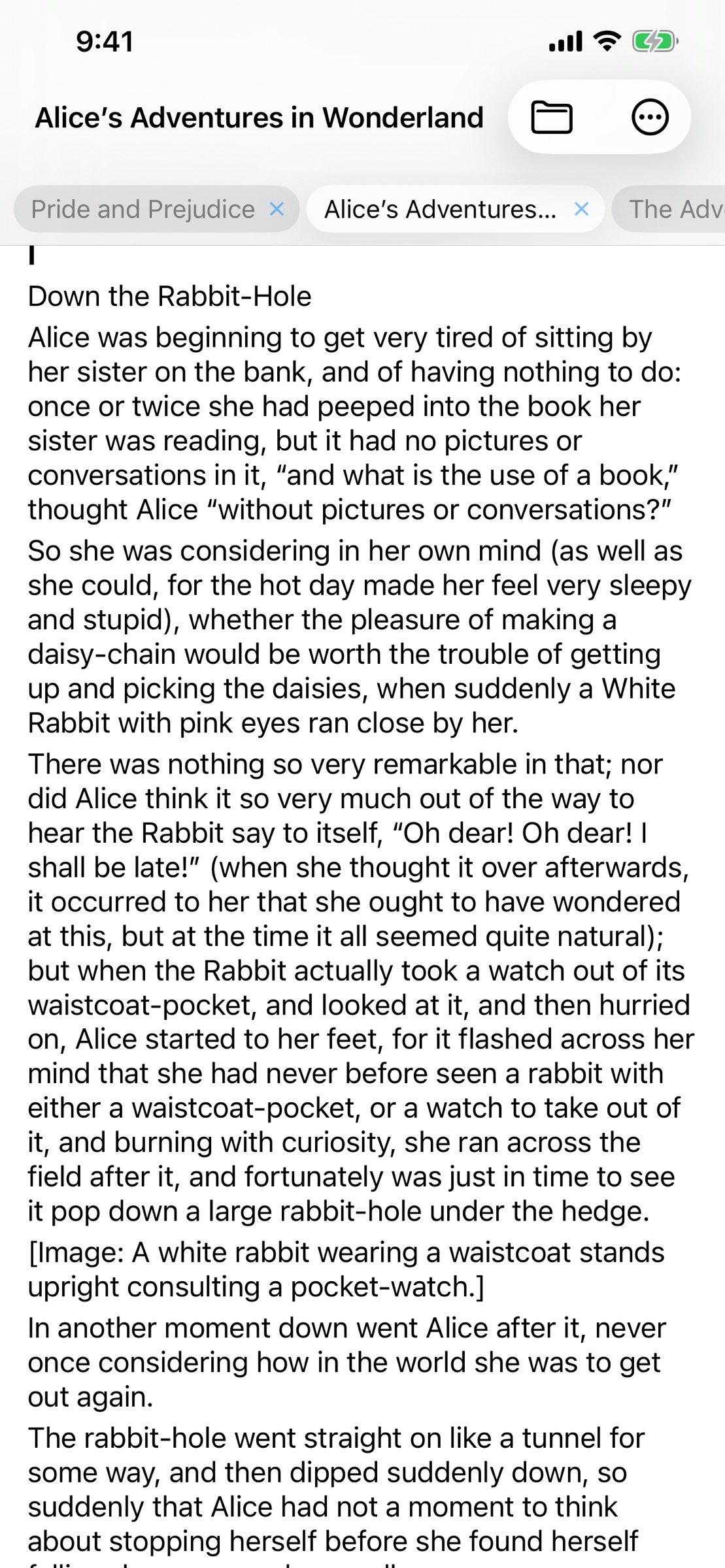
Paperback is a fast, fully accessible reader for ebooks, documents and audio books. It opens over twenty formats and speaks fifteen languages.
Paperback has two ways to read a document. In text mode, you read the text with your screen reader. In read aloud mode, Paperback reads the text to you with the voice you pick in Settings, and keeps going in the background and from the lock screen. Switch between them from the More Options menu. Audio books, like DAISY, M4B, and MP3 books, play their own recording instead.
The reading bar
The bar at the bottom of the screen has, from left to right:
o The navigation unit, such as paragraph, heading, page, or link. Swipe up or down on it to change it.
o Previous, play, and next buttons. Previous and next move by the navigation unit.
o The speech rate. Swipe up or down on it to change how fast Paperback reads.
You can also swipe up or down on the play button to move by the navigation unit, without reaching for the previous and next buttons. If that is all you use, the Hide previous and next buttons setting takes them out of your screen reader's way. The Swipe up moves forward setting picks which way a swipe goes.
The More Options menu is where everything else lives.
o Switch to TTS Mode or Switch to Text Mode: moves between read aloud mode and text mode, described above. In text mode, a Read Aloud item starts and pauses reading aloud without leaving text mode.
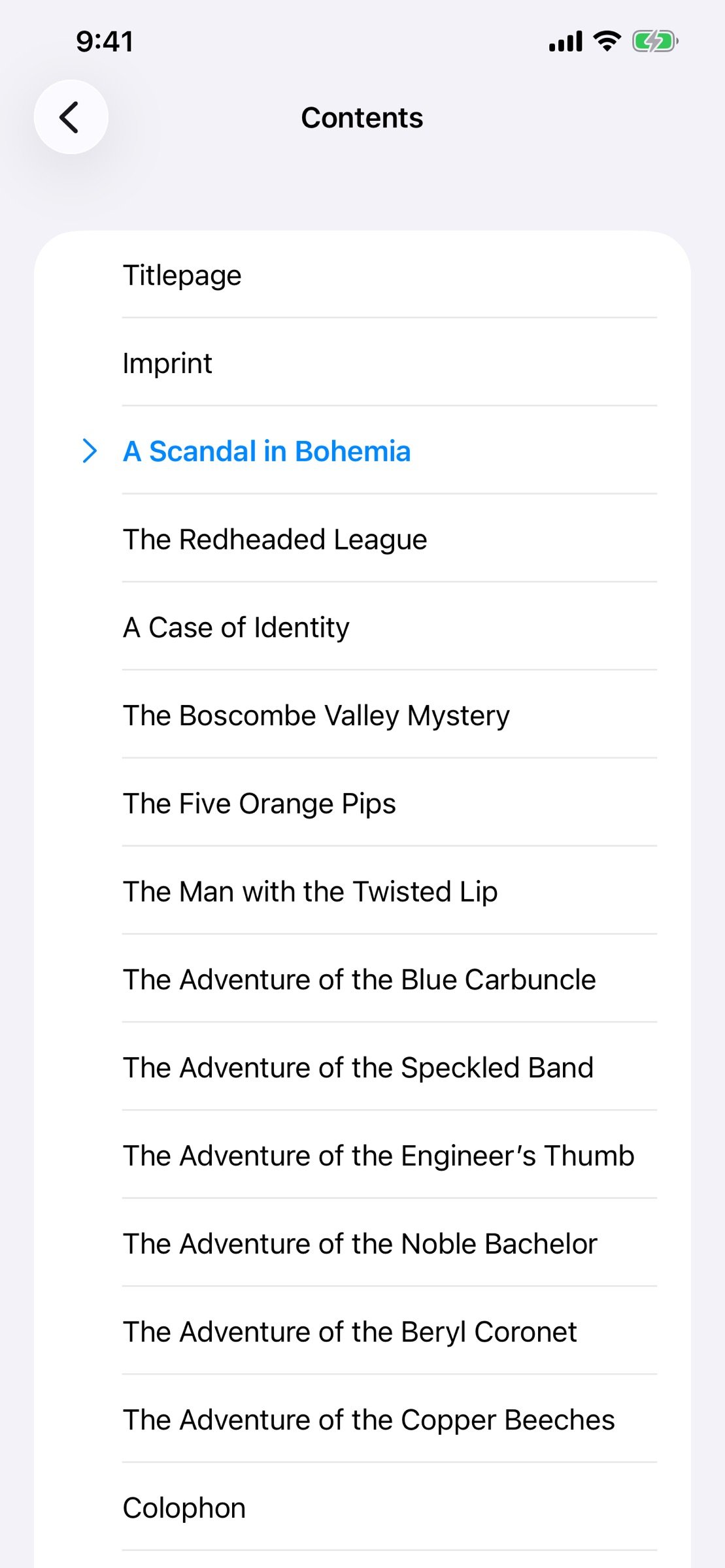
o Table of Contents: the book's chapters, opened at the one you're reading. Pick one to go straight to it. Entries with chapters under them can be expanded and collapsed with VoiceOver actions.
o Elements: a list of the document's headings or links. Switch between the two with the Type picker, then pick one to go to it.
o Find: type what to look for, or pick an earlier search from Search History, and choose whether to match case, match whole words only, or use a regular expression. Find Previous and Find Next jump to a match and say where it landed, and Find stays open so you can keep going. In read aloud mode, Find also shows up as a navigation unit on the reading bar, so you can step through the matches from there too.
o Go To: jump to a line, a page, or a percentage through the document. Pick which with the Mode picker.
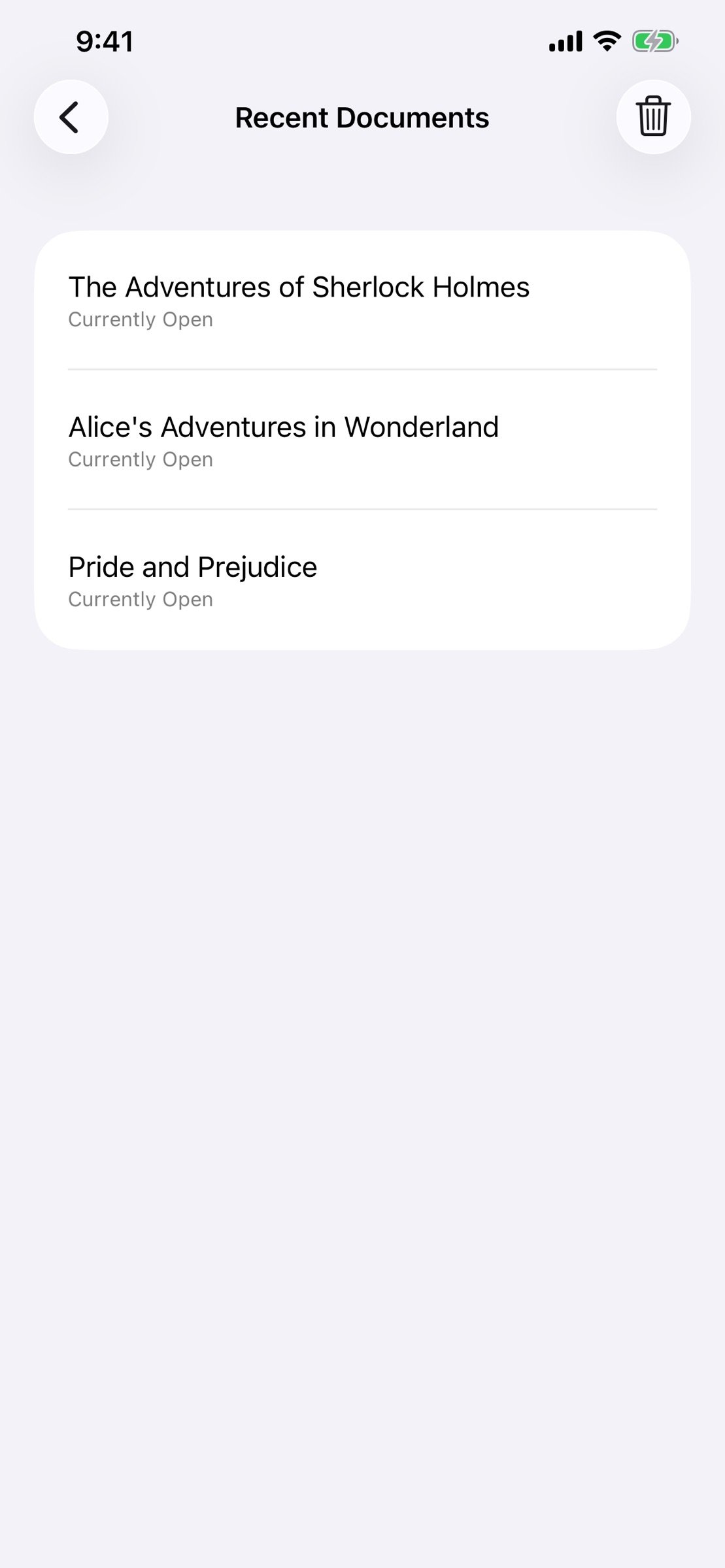
o Recent Documents: every document you've opened, each marked as currently open, closed, or file missing. Each one has two VoiceOver actions: Remove takes it off the list, and Locate lets you find a document whose file has moved. Clear Recent Documents empties the list without deleting any documents.
o Word Count: the number of words in the document.
o Document Info: the title, the author, the file name, and the line and character counts.
o Export: saves the document as plain text, HTML, or Markdown.
o Sleep Timer: stops reading after 5, 10, 15, 30, 45, or 60 minutes, or a time of your own. Open it again while it's running to see how long is left, or to cancel it.
o Help: opens the readme.
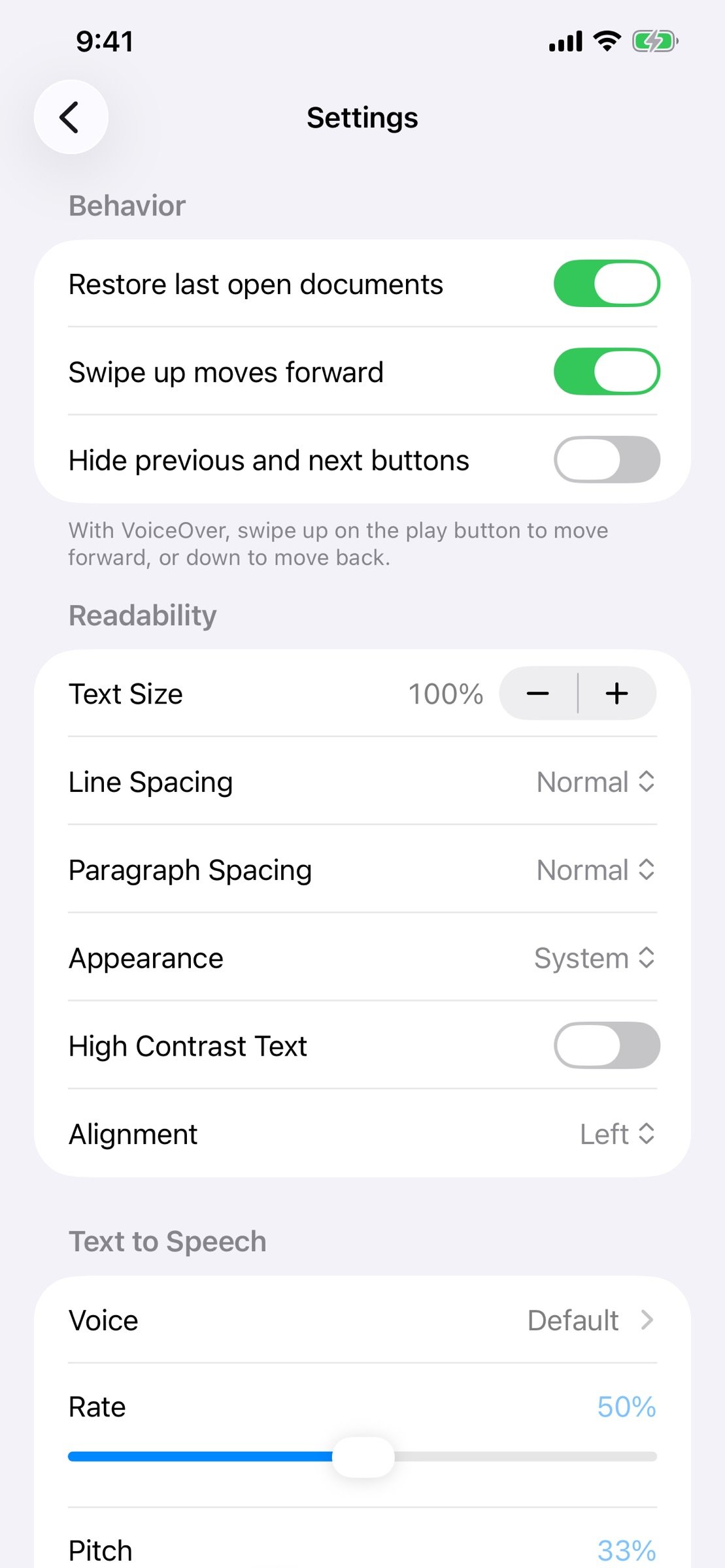
o Settings:
o Text to speech: the voice, speech rate, and pitch, a Play Sample button to hear them, and the pause between paragraphs. This is also where the speech dictionary is: rules that change how words are spoken, for every voice or just some.
o Readability: text size, line spacing, paragraph spacing, alignment, and high contrast text, as well as light and dark appearance.
o Behavior: whether to reopen your documents when the app starts, which way a swipe on the play button moves, and whether to hide the previous and next buttons.
License: Commercial
| Release info | Update on Nov 06, 2026 |
|---|---|
| Release notes | Paperback 1.1 rebuilds text mode for VoiceOver and brings a new PDF engine, documents from links, and support for decades of older files. VoiceOver • Text mode is rebuilt for VoiceOver. Read All goes through the whole book, the rotors reach all of it, and lists and tables are real lists and tables. • Three-finger flicks turn pages, and a three-finger tap gives the page and percentage. Reading • A voice, rate, and pitch for each book, from Speech for This Book. • Keep reading continuously after a Find. • Text mode is remembered. • Document Info shows your progress, and an audio book's file count and running time. • A Language row in Settings, and new Slovak, Ukrainian, and Hungarian translations. Documents • Open a document from a link. • Open password-protected documents. • Share zipped DAISY books and MP3 audio books to Paperback. • A faster PDF engine, with better headings and titles. • Support for older Word, Write, and PowerPoint 95 files, and zipped FictionBook. • Word lists, footnotes, endnotes, and comments. Audio books • Speeds up to 4x, remembered between sessions. • Volume controls. • The sleep timer stops audio books. Fixes • Many fixes for PDF, RTF, Word, PowerPoint, and DAISY books. |
| Listing data | App Store |
Reviews
No reviews yet. Be the first to review Paperback Mobile.
Used Paperback Mobile? Tell other visitors what you thought.
Log in to write a reviewOther products by this publisher
- "No Distractions" for YouTube 4.10 ----
- #Bible 11.6.1 "Incredible App - My sister shared this app with me a few weeks ago and it is truly incredible.
- #filmphotography 1.4.2 So, you decided to shoot on film?
- #LookBusy Fake Calendar Events 1.0.6 Look Busy scans your work calendar for open time slots and fills them with realistic-looking (but secretly fake) work events.
- #Small Talk Is Canceled 1.0.2 #Small Talk Is Canceled — Conversations That Matter
Most viewed iOS News
-
1
 The People's Poll 1.0.1
People’s Poll puts the 2026 midterm polls in one place: every Senate and governor race and every House district with published polls, the polling average for each race, how it has moved, and a link to every poll behind it.
-
2
 NYTimes 12.1.0
Discover original reporting and understand the events shaping the world in The New York Times app.
-
3
 content 1.3.2
The internet used to feel different.
-
4
 LingRoll 2.1.2
LingRoll brings reading and listening together with flexible ebook layouts, rich TTS tools, and practical file management.
-
5
 NewsBreak 26.46.0
Get daily news and events sent straight to your phone, because small news makes a big difference to communities!
-
6
 Current 1.0.15
Current is an RSS reader built on a simple idea: your feed should never make you feel behind.
-
7
 Readest 0.12.20
Readest is an ebook reader for people who read a lot, and who want their books, notes and reading position on whatever device is nearest.
-
8
 NBC LA 8.10.1
The NBC LA app is your trusted source for local news, First Alert Weather forecasts and breaking alerts.
-
9
 Ground News 4.39.0
Get all your news in one place on an eye-opening platform that shows you the bias, reliability and ownership of every source you read.
-
10
 Substack 3.26.0
Substack is a new media app that connects you with the creators, ideas, and communities you care about most.
Most downloaded iOS News
-
1
 KMBC 9 News 5.15.2344
Take the KMBC 9 News app with you everywhere you go and be the first to know of breaking news happening in Kansas City and the surrounding area.
-
2
 Color Goods™ 2.0.12
Explore hundreds of adorable pages—from cute animals and cozy spaces to tasty treats and fun seasonal themes.
-
3
Readest 0.12.20
Readest is an ebook reader for people who read a lot, and who want their books, notes and reading position on whatever device is nearest.
-
4
 MPLS Crime Watch 1.7
Know your city. MPLS Crime Watch turns Minneapolis public-safety data into a clear, live picture of what's happening around you.
-
5
 MSN 34.5.441125001
The MSN app keeps you informed, productive, and entertained with tailored content, real-time weather, stock tracking, short videos and more.
-
6
NewsBreak 26.46.0
Get daily news and events sent straight to your phone, because small news makes a big difference to communities!
-
7
 The Free Press 1.1.4
We publish investigative stories and provocative commentary about the world as it actually is—with the quality once expected from the legacy press, and the fearlessness of the new.
-
8
 NITAS 91.1
Ad free version of the Doctor Who News App.
-
9
 Marvel Unlimited 7.101.0
Marvel Unlimited is the premier subscription service to access over 30,000 digital comics.
-
10
 Novelink 1.6.1
Novelink - a link from the novels to your heart, a bridge from the real world to your fantasy dreams.