
PairFree 0.4.0
One light app for earbuds of many brands. No account, no internet, no tracking
Download
3.55 MB · PairFree-0.4.0.apk
15downloads
15this week
FreeFreeware
0reviews
Screenshots


About PairFree
PairFree aims to be one app for the settings of nearly any earbuds and headphones. It replaces heavy, brand-specific apps with a light, fast one that talks to your earbuds directly over Bluetooth.
Why PairFree:
• No account: nothing to sign up for or log in to
• No internet: the app has no internet permission, so it cannot go online
• Nothing leaves your phone unless you share it yourself, such as a device report or an equalizer profile. No ads, no analytics, no crash reports, no cloud backup of your settings
• One app to rule them all: the same screens for every brand, instead of one vendor app each
• Few permissions: Bluetooth, for earbuds you have already paired, and notifications for the optional status notification. For JBL models alone, finding nearby devices, asked for only when you open one and never used for your location. No location, no contacts
• Small and quick: about 3 MB, with no login and no server to wait for
• Open source (GPL-3.0), with every protocol documented and tested in its repository
• Your equalizer as files: save your own curves, and export and share them
Supported brands:
• SOUNDPEATS: tried on the H3 and Air5 Pro+. Other models use the same protocol and should work
• Soundcore (Anker): 39 models, tried on the Space A40. Built on the open-source OpenSCQ30
• Samsung Galaxy Buds: 16 models, from the 2019 Buds to the Buds4 Pro, not yet tried on real earbuds. Built on the open-source GalaxyBudsClient and Samsung's own plugin
• Sony: 24 models, from the WH-1000XM2 to the WH-1000XM6, WF-1000XM5 and LinkBuds, not yet tried on real headphones. Written from Sony's own app and checked against the open-source Gadgetbridge
• Bose: 22 models, from the QC35 to the QC Ultra 2 headphones and earbuds, not yet tried with PairFree. Written from Bose's own app and the open-source bosectl. PairFree never signs in to Bose's cloud, so anything that needs it stays out of reach
• AirPods and Beats on Apple's chips: 30 models, not yet tried with PairFree. Ported from the open-source LibrePods. Android 17 is needed, or a Pixel on Android 16 QPR3, or a OnePlus, OPPO or realme phone on Android 16
• JBL: 83 models, from the Tune 520BT to the Live Buds 4, not yet tried with PairFree. Written from JBL's own app and checked against the open-source JblTray
What it controls, on the models that have each:
• Battery for each earbud and the case
• Noise control: off, noise cancelling, transparency or ambient sound, with their scenes and levels
• The equalizer: the brand's presets, your own curves and saved profiles
• Touch controls: what each tap and hold does on each earbud, and turning touch off
• Game mode, two devices at once, LDAC and LE Audio
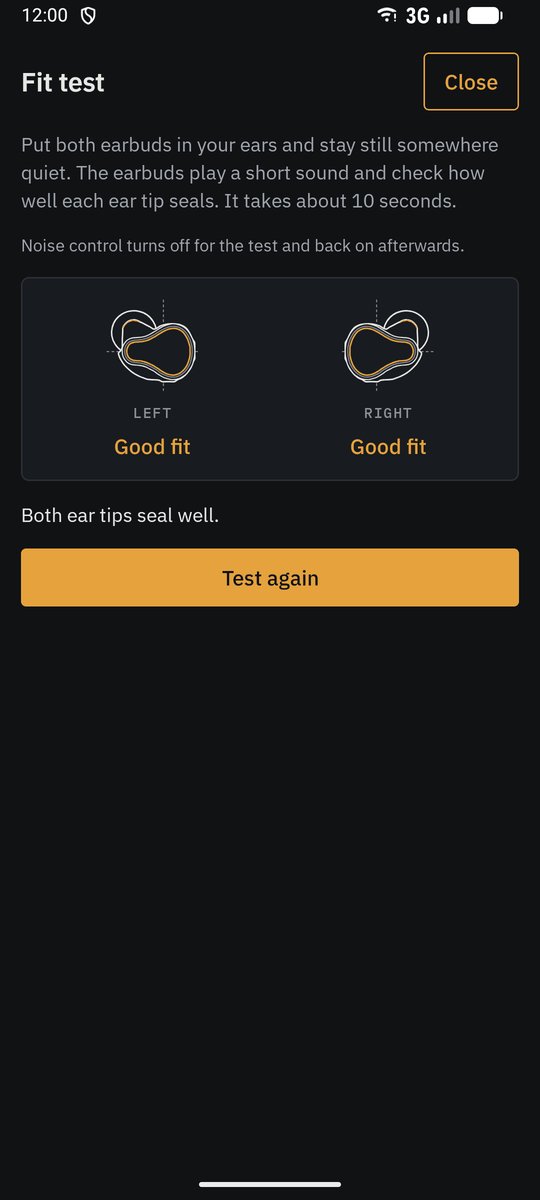
• The ear tip fit test, find my earbuds, voice prompts and water drain
• Settings only one brand has, such as each Galaxy Bud's ambient sound level, voice detect, Sony's speak-to-chat and DSEE upscaling, Bose's listening modes, JBL's TalkThru, or the AirPods' Conversation Awareness
• A status notification with the battery and buttons for noise control and game mode, in place of Google's Fast Pair notification if you like
PairFree shows only what your earbuds support. If your model has not been tried, the Device tab copies a device report you can send, so it can be added for everyone. Record from the official app goes further: it reads, on your phone, what the brand's own app sends to your earbuds when you change a setting (and on SOUNDPEATS earbuds the equalizer curves), so PairFree can learn to do the same. It keeps nothing but the messages exchanged with your earbuds, and the report it makes masks their address and serial number.
Close the brand's own app before using PairFree: only one app can control the earbuds at a time.
PairFree is an independent project. It is not affiliated with or endorsed by SOUNDPEATS, Anker, Samsung, Sony, Bose, Harman (JBL) or Apple.
License: GPL-3.0-or-later
Why PairFree:
• No account: nothing to sign up for or log in to
• No internet: the app has no internet permission, so it cannot go online
• Nothing leaves your phone unless you share it yourself, such as a device report or an equalizer profile. No ads, no analytics, no crash reports, no cloud backup of your settings
• One app to rule them all: the same screens for every brand, instead of one vendor app each
• Few permissions: Bluetooth, for earbuds you have already paired, and notifications for the optional status notification. For JBL models alone, finding nearby devices, asked for only when you open one and never used for your location. No location, no contacts
• Small and quick: about 3 MB, with no login and no server to wait for
• Open source (GPL-3.0), with every protocol documented and tested in its repository
• Your equalizer as files: save your own curves, and export and share them
Supported brands:
• SOUNDPEATS: tried on the H3 and Air5 Pro+. Other models use the same protocol and should work
• Soundcore (Anker): 39 models, tried on the Space A40. Built on the open-source OpenSCQ30
• Samsung Galaxy Buds: 16 models, from the 2019 Buds to the Buds4 Pro, not yet tried on real earbuds. Built on the open-source GalaxyBudsClient and Samsung's own plugin
• Sony: 24 models, from the WH-1000XM2 to the WH-1000XM6, WF-1000XM5 and LinkBuds, not yet tried on real headphones. Written from Sony's own app and checked against the open-source Gadgetbridge
• Bose: 22 models, from the QC35 to the QC Ultra 2 headphones and earbuds, not yet tried with PairFree. Written from Bose's own app and the open-source bosectl. PairFree never signs in to Bose's cloud, so anything that needs it stays out of reach
• AirPods and Beats on Apple's chips: 30 models, not yet tried with PairFree. Ported from the open-source LibrePods. Android 17 is needed, or a Pixel on Android 16 QPR3, or a OnePlus, OPPO or realme phone on Android 16
• JBL: 83 models, from the Tune 520BT to the Live Buds 4, not yet tried with PairFree. Written from JBL's own app and checked against the open-source JblTray
What it controls, on the models that have each:
• Battery for each earbud and the case
• Noise control: off, noise cancelling, transparency or ambient sound, with their scenes and levels
• The equalizer: the brand's presets, your own curves and saved profiles
• Touch controls: what each tap and hold does on each earbud, and turning touch off
• Game mode, two devices at once, LDAC and LE Audio
• The ear tip fit test, find my earbuds, voice prompts and water drain
• Settings only one brand has, such as each Galaxy Bud's ambient sound level, voice detect, Sony's speak-to-chat and DSEE upscaling, Bose's listening modes, JBL's TalkThru, or the AirPods' Conversation Awareness
• A status notification with the battery and buttons for noise control and game mode, in place of Google's Fast Pair notification if you like
PairFree shows only what your earbuds support. If your model has not been tried, the Device tab copies a device report you can send, so it can be added for everyone. Record from the official app goes further: it reads, on your phone, what the brand's own app sends to your earbuds when you change a setting (and on SOUNDPEATS earbuds the equalizer curves), so PairFree can learn to do the same. It keeps nothing but the messages exchanged with your earbuds, and the report it makes masks their address and serial number.
Close the brand's own app before using PairFree: only one app can control the earbuds at a time.
PairFree is an independent project. It is not affiliated with or endorsed by SOUNDPEATS, Anker, Samsung, Sony, Bose, Harman (JBL) or Apple.
License: GPL-3.0-or-later
| Release info | Update on Oct 30, 2026 |
|---|---|
| Release notes | PairFree is an open replacement for earbud brands' own apps: it controls SOUNDPEATS, Soundcore (Anker), Samsung Galaxy Buds, Sony, Bose, JBL, AirPods and Apple-chip Beats, Nothing and CMF, and now Google Pixel Buds, from one app. It never uses the internet and has no account. Install: download PairFree-0.4.0.apk below and open it, or get it from F-Droid once it is listed there. It updates 0.3.3 in place. Changes since 0.3.3 • Google Pixel Buds (#4): the Pixel Buds (2020), A-Series, Pro, Pro 2 and 2a, written from Google's own Pixel Buds app. • Pro, Pro 2 and 2a: battery, noise control (adaptive on the Pro 2), the five-band equalizer with Google's presets and the curve saved on the earbuds, volume EQ, conversation detection, mono, balance, press and hold on each earbud (noise control, digital assistant or Live Translate), the modes it steps through, tap to mute, head gestures, in-ear detection, multipoint and case sounds. • Pixel Buds (2020) and A-Series: battery, bass boost (and its level on the A-Series), loudness compensation, Adaptive Sound, attention alerts on the 2020 model, in-ear and sharing detection, touch controls on or off. • Not tried on real Pixel Buds yet: a device report from any model helps, from the 2020 model and the A-Series most. • Not yet: finding the earbuds, the ear tip seal check. Spatial audio and head tracking stay in Android's own settings. • JBL Live Buds 3 now counts as tried: a user's pair worked in PairFree 0.3.2, by their device report (#4). • The F-Droid description lists every brand again, with the models tried. Tried on real earbuds: by the project's owner, the SOUNDPEATS H3 and Air5 Pro+ and the Soundcore Space A40; from users' device reports, the SOUNDPEATS C30 and TRUEFREE Clip C10, the Soundcore AeroClip and Sleep A20, and the JBL Live Buds 3. A device report from any other model helps: open the model in PairFree and use Copy device report. Please paste only PairFree's report into an issue, never an Android bug… |
| Listing data | F-Droid |
Reviews
No reviews yet. Be the first to review PairFree.
Used PairFree? Tell other visitors what you thought.
Log in to write a reviewOther products by this publisher
- "No Distractions" for YouTube 4.10 ----
- #Bible 11.5 "Incredible App - My sister shared this app with me a few weeks ago and it is truly incredible.
- #filmphotography 1.4.2 So, you decided to shoot on film?
- $quirrel 1.5.1 $quirrel Budget & Finance helps you plan each paycheck, track spending, manage debt, and see what is safe to spend before the next payday.
- % Percentage Calculator Pro 1.41 This is the Pro version of % Percentage Calculator.
Most viewed Android Internet
-
1
 Offline Web Search 1.0.38
Search curated websites, blogs, and RSS feeds completely offline and privately.
-
2
 Nextcloud Pantry 0.38.0
Shared household lists, photos & notes on your own server — and on your watch.
- 3 Husk 1.4 Turn a spare Android phone into a remote camera and control rig
-
4
 Brevier 0.19.2
A reading browser: the web without JavaScript, set in your own type
- 5 Intra 1.5.1 Encrypted DNS client
- 6 Phylax 2.13 Viewer for Frigate NVR with smart URL switching and notifications
- 7 Jami 20260807-01 Share, freely and privately
- 8 Webthingify 1.1 Turn your Android device into a web thing (Mozilla IoT compatible)
-
9
 Atrium 1.10.0
Control your self-hosted media stack from one app
- 10 Data Monitor v2.4.0 Track all your data usage - at one place
Most downloaded Android Internet
- 1 Intra 1.5.1 Encrypted DNS client
-
2
 QED 3.1.4+fdroid
Unofficial frontend for the web services of the QED e.V.
-
3
 SlimSocial for Facebook 26.10.08
Browse Facebook
- 4 atop 1.0.0 Choose today's text
- 5 Disroot app 2.2.3 Disroot app is like your Swiss Army knife to the Disroot platform
-
6
 RemotePointer 3.2
Digital Laser Pointer and Mouse Control for Presentations
-
7
 Torrents Digger 1.2.8
Dig Torrents from Internet.
-
8
 TTRSS-Reader 1.98.2
An RSS reader for Tiny Tiny RSS
- 9 UntrackMe Lite 1.30.0 Transform Youtube, Twitter & Instagram links to their free and open source alter
-
10
 Binary Kitchen Doorlock 2.5
Binary Kitchen's Open Sesame