6downloads
2this week
FreeCommercial
0reviews
Screenshots
About OpLine
OpLine - AllStarLink in Your Pocket
Connect to AllStarLink nodes anywhere your iPhone has signal. OpLine is a fast, native iOS client for licensed amateur radio operators who want a clean, reliable way to get on the network without desktop tools or generic SIP clients.
KEY FEATURES
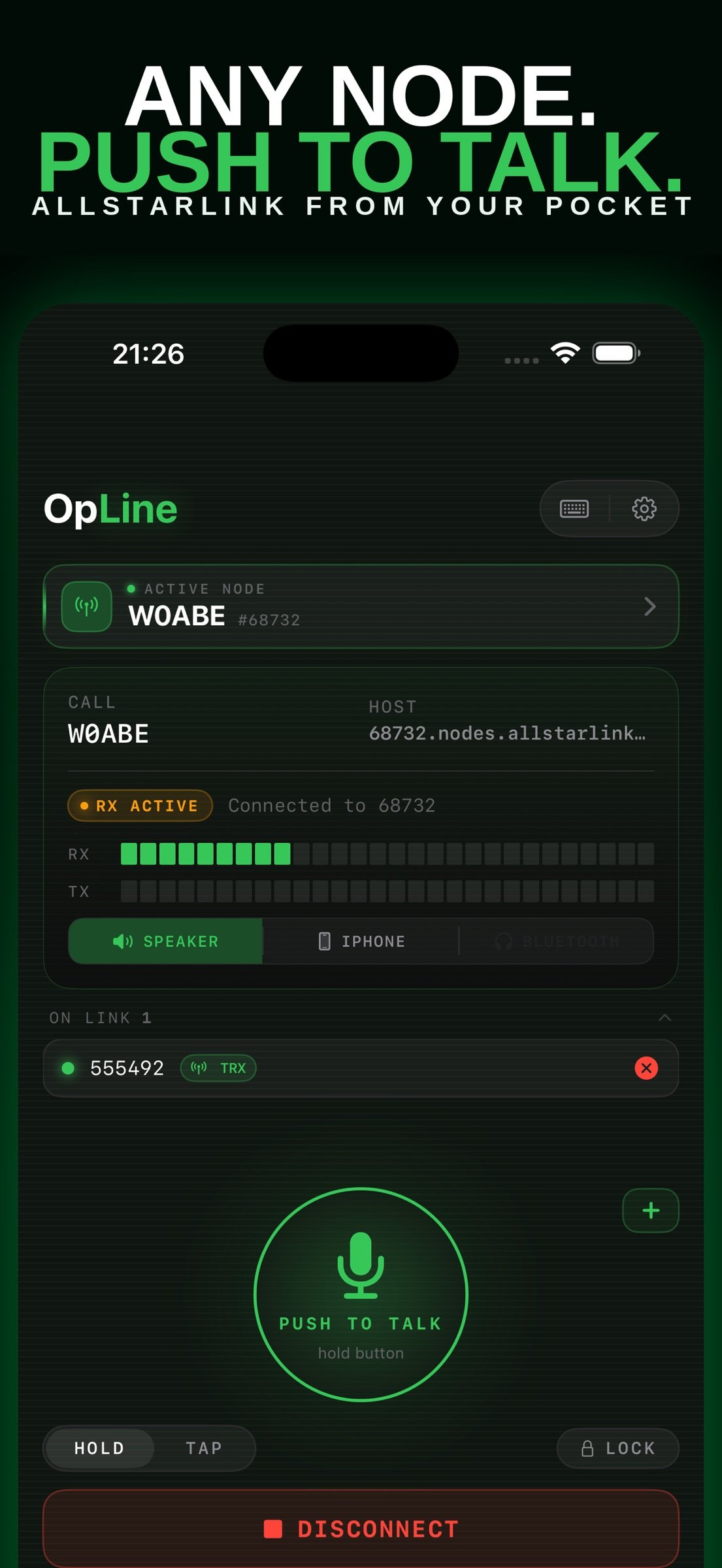
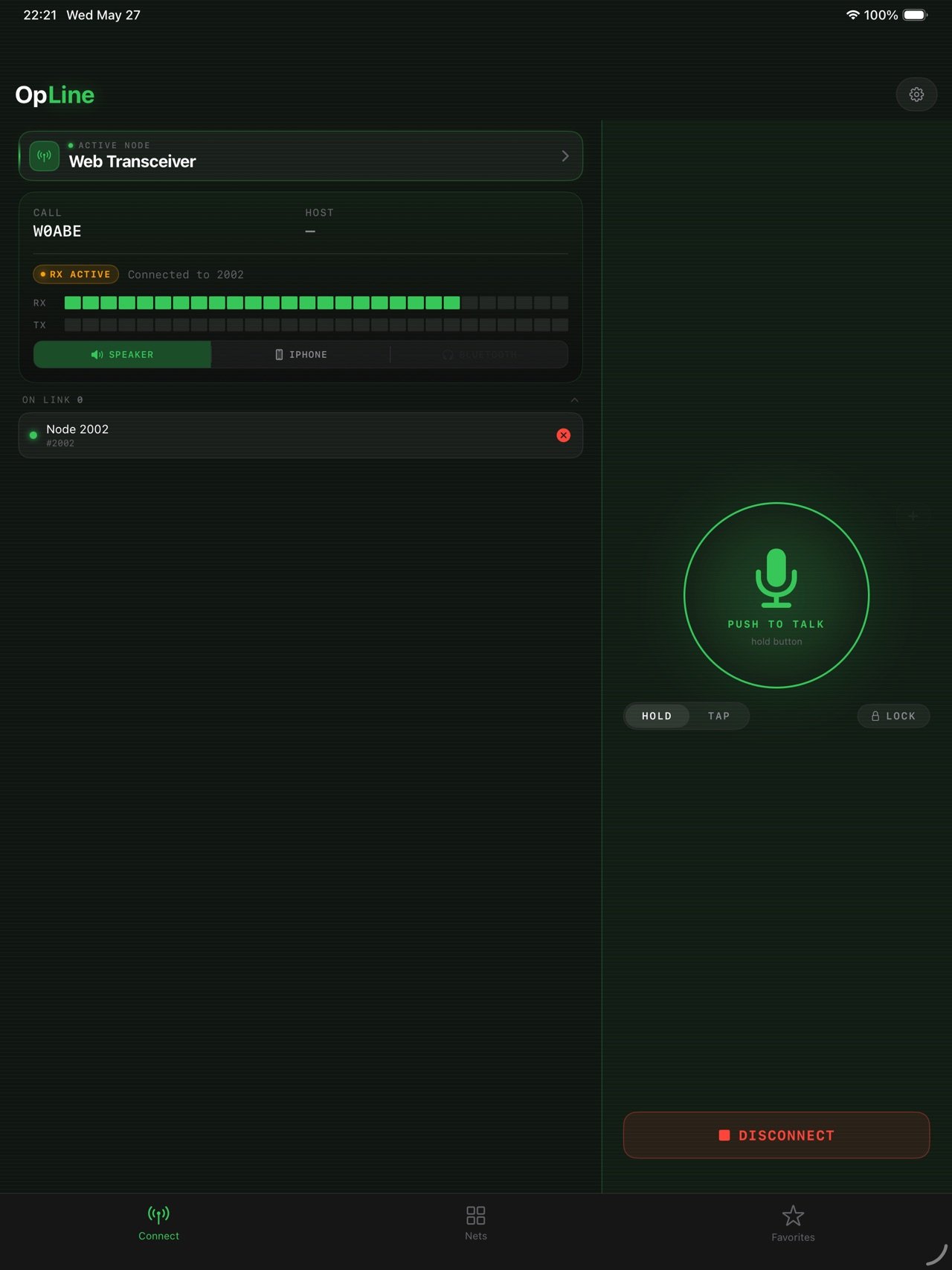
Push to Talk
Hold-to-talk or tap-to-toggle. Lock the mic when you need both hands free. Designed to feel like a real radio.
Keyed Nodes
See which nodes are transmitting across the network right now, busiest first, and tap to jump in.
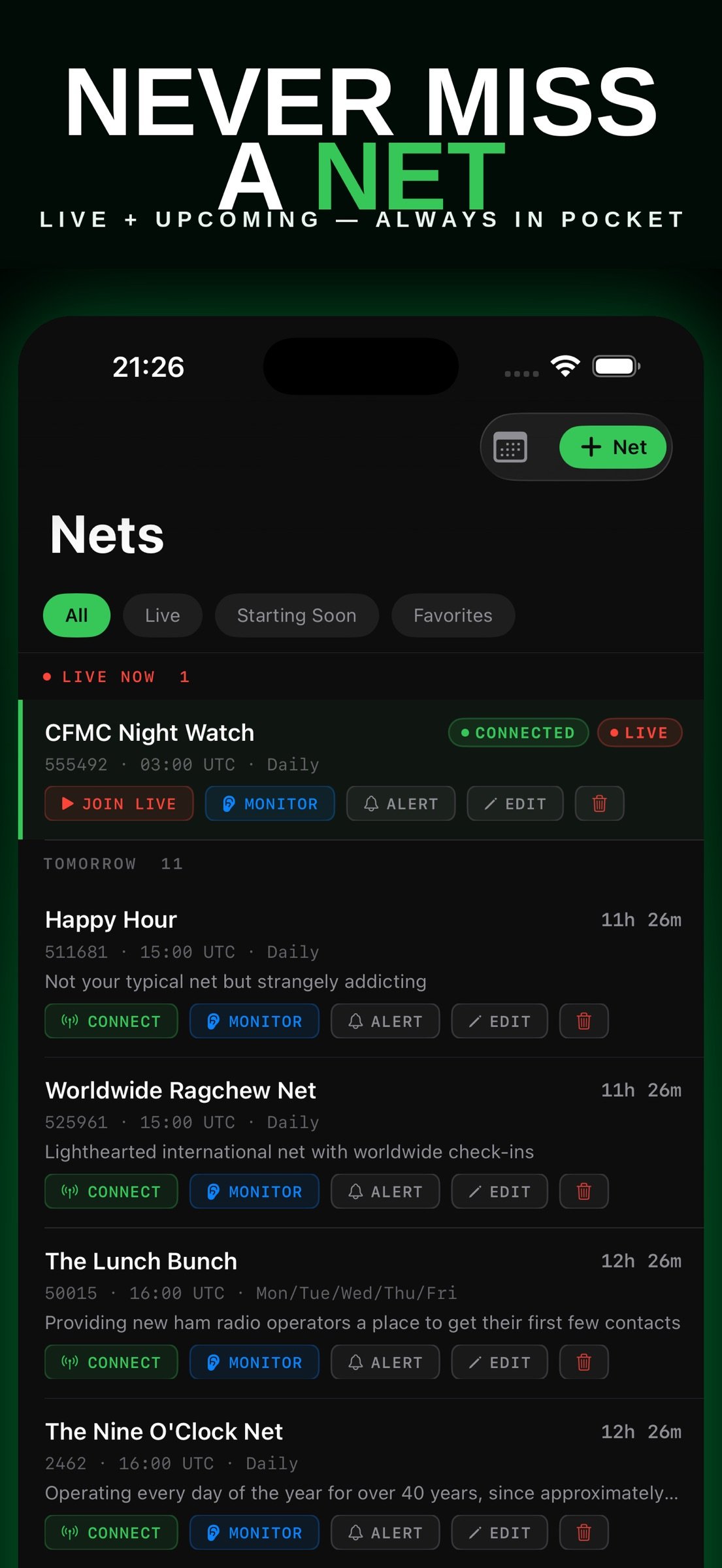
Live Net Schedule
Browse upcoming nets, filter by region or favorites, and set reminders before they start.
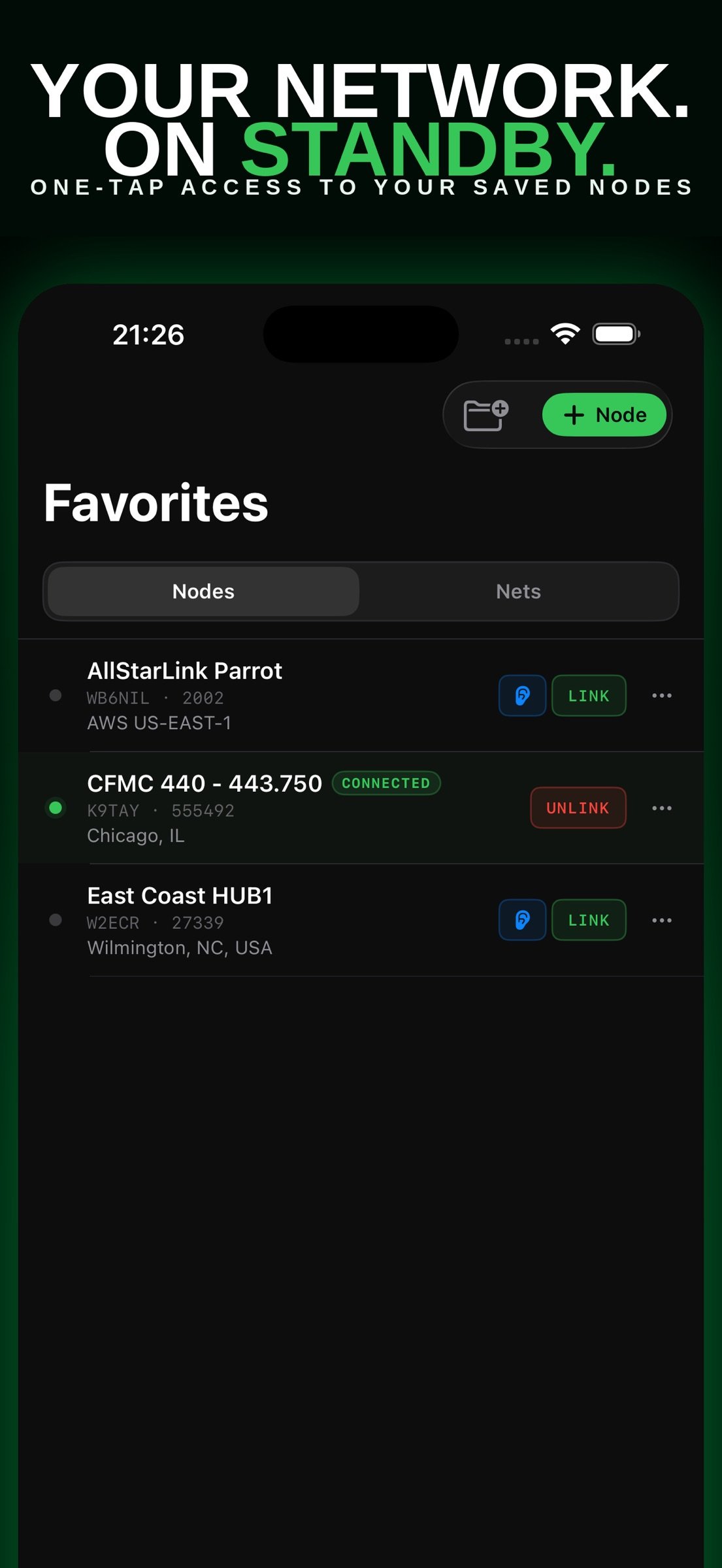
Smart Favorites
Save your daily-driver nodes and the nets you actually attend.
Real-Time Telemetry
RX/TX meters, connection status, and who is linked to the node you are on.
Bluetooth and Hands Free
Bluetooth PTT handsets, mic selection, Lock Screen controls, widgets, Siri, and the Action Button.
OPLINE PULSE (optional subscription)
Pulse is the network, around the clock: a map of busy hubs, which hubs are talking right now, a push when a node you follow wakes up, how busy AllStar was over the last day or week, talk-time history for the hubs people follow, and the nets that really run, verified against what the network actually did.
Pulse Monthly: $1.99 per month. Pulse Annual: $12.99 per year. New subscribers get the first week free. Payment is charged to your Apple Account at confirmation. The subscription renews automatically unless cancelled at least 24 hours before the end of the current period, and can be managed in your Apple Account settings. Everything else in OpLine is included in the one-time purchase and always will be.
Bought OpLine before Pulse existed? Your first year of Pulse is free. It switches on by itself.
Terms of Use: [link removed]
Privacy Policy: [link removed]
REQUIREMENTS
- A valid amateur radio license and call sign are required to transmit.
- An AllStarLink node connection. Your own ASL3 Raspberry Pi node is recommended; see opline.app/setup for a free build guide.
- Standard amateur radio rules apply: identify with your call sign and follow Part 97 or your country's equivalent.
WHY OPLINE
Most AllStarLink clients started as desktop tools and were retrofitted for mobile. OpLine was designed iPhone-first: instant connect, sub-second PTT response, clean telemetry, and a UI that respects your time. No ads. No account. The app is a one-time purchase; Pulse is optional.
Built by a licensed ham who wanted a better way to get on the air from a phone.
NEW TO HAM RADIO?
Visit opline.app/license for a quick guide to getting your Technician license, the only license you need to use OpLine.
73,
OpLine
License: Commercial
Connect to AllStarLink nodes anywhere your iPhone has signal. OpLine is a fast, native iOS client for licensed amateur radio operators who want a clean, reliable way to get on the network without desktop tools or generic SIP clients.
KEY FEATURES
Push to Talk
Hold-to-talk or tap-to-toggle. Lock the mic when you need both hands free. Designed to feel like a real radio.
Keyed Nodes
See which nodes are transmitting across the network right now, busiest first, and tap to jump in.
Live Net Schedule
Browse upcoming nets, filter by region or favorites, and set reminders before they start.
Smart Favorites
Save your daily-driver nodes and the nets you actually attend.
Real-Time Telemetry
RX/TX meters, connection status, and who is linked to the node you are on.
Bluetooth and Hands Free
Bluetooth PTT handsets, mic selection, Lock Screen controls, widgets, Siri, and the Action Button.
OPLINE PULSE (optional subscription)
Pulse is the network, around the clock: a map of busy hubs, which hubs are talking right now, a push when a node you follow wakes up, how busy AllStar was over the last day or week, talk-time history for the hubs people follow, and the nets that really run, verified against what the network actually did.
Pulse Monthly: $1.99 per month. Pulse Annual: $12.99 per year. New subscribers get the first week free. Payment is charged to your Apple Account at confirmation. The subscription renews automatically unless cancelled at least 24 hours before the end of the current period, and can be managed in your Apple Account settings. Everything else in OpLine is included in the one-time purchase and always will be.
Bought OpLine before Pulse existed? Your first year of Pulse is free. It switches on by itself.
Terms of Use: [link removed]
Privacy Policy: [link removed]
REQUIREMENTS
- A valid amateur radio license and call sign are required to transmit.
- An AllStarLink node connection. Your own ASL3 Raspberry Pi node is recommended; see opline.app/setup for a free build guide.
- Standard amateur radio rules apply: identify with your call sign and follow Part 97 or your country's equivalent.
WHY OPLINE
Most AllStarLink clients started as desktop tools and were retrofitted for mobile. OpLine was designed iPhone-first: instant connect, sub-second PTT response, clean telemetry, and a UI that respects your time. No ads. No account. The app is a one-time purchase; Pulse is optional.
Built by a licensed ham who wanted a better way to get on the air from a phone.
NEW TO HAM RADIO?
Visit opline.app/license for a quick guide to getting your Technician license, the only license you need to use OpLine.
73,
OpLine
License: Commercial
| Release info | Update on Oct 21, 2026 |
|---|---|
| Release notes | OpLine 1.6 introduces OpLine Pulse, an optional subscription for the live network view. PULSE - Map: every keyed node and busy hub, with the hot ones pulsing. - Hub chatter: which hubs are talking right now. - Alerts: a push when a node you follow wakes up. - Network history: how busy AllStar was over the last day or week. - Node history: talk time on the hubs people follow, with their nets marked. - Verified nets: every net OpLine knows about, with whether it really runs and how late it tends to start. A net heard on several nodes is one entry. ALSO - Favorites and Nets give their title row to the list. - AllStarLink's new App Authentication is supported behind the scenes, ready for the switchover. - When the server is busy, you see the last connected list it had for a node, with its age, instead of an error. |
| Listing data | App Store |
Reviews
No reviews yet. Be the first to review OpLine.
Used OpLine? Tell other visitors what you thought.
Log in to write a reviewOther products by this publisher
- "No Distractions" for YouTube 4.10 ----
- #Bible 11.5 "Incredible App - My sister shared this app with me a few weeks ago and it is truly incredible.
- #filmphotography 1.4.2 So, you decided to shoot on film?
- $quirrel 1.5.1 $quirrel Budget & Finance helps you plan each paycheck, track spending, manage debt, and see what is safe to spend before the next payday.
- % Percentage Calculator Pro 1.41 This is the Pro version of % Percentage Calculator.
Most viewed iOS Communication
-
1
 TFG LIVE 1.0.1
TFG LIVE : Chat, Video, Live
-
2
 rednote 9.54
Dear rednote villagers,
-
3
 Element X 26.10.8
Freedom to communicate on your own terms
-
4
 DefaultSMS 1.2
Popular messaging platforms such as Telegram, WhatsApp and Signal has yet to support the new Default Apps option in Settings, which would have allowed your iPhone to automatically use these apps instead of the stock Messages app for sending messages…
-
5
 Bumpy 2.6.64
FIND YOUR INTERNATIONAL SOULMATE WITH BUMPY
-
6
 BLK 12.19.0
BLK
-
7
 WhatsApp Messenger 26.43.75
Bring your group together on WhatsApp.
-
8
 LINE 26.17.0
LINE is transforming the way people communicate, closing the distance between family, friends, and loved ones—for free.
-
9
 Clapper v14.7.0
Welcome to Clapper, one of the fastest-growing social media platforms focused on promoting real lives, connections and communities.
-
10
 BFF 3.2.33
Join millions already using the new Bumble BFF to connect, chat, and build friendships that last.
Most downloaded iOS Communication
-
1
rednote 9.54
Dear rednote villagers,
-
2
 WebComm 2.4
Access your iPhone photos, contacts, and messages from any web browser.
-
3
TFG LIVE 1.0.1
TFG LIVE : Chat, Video, Live
-
4
 Instants, an Instagram app 454.0
Introducing Instants, a new app from Instagram.
-
5
 GettingOut 3.4.5
Stay Connected to Those Who Matter Most
-
6
BLK 12.19.0
BLK
-
7
 GroupMe 16.35
GroupMe - the free, simple way to stay in touch with the people who matter most.
-
8
Bumpy 2.6.64
FIND YOUR INTERNATIONAL SOULMATE WITH BUMPY
-
9
Element X 26.10.8
Freedom to communicate on your own terms
-
10
 Hunch Dating App 3.2.41
Hunch is built for one thing: getting you on a real date, faster and with less effort.