Open Road Race Timer 7.5
The Open Road Race Timer is designed for high speed automobile racing on closed highways.
Download
1.64 MB
24downloads
9this week
FreeCommercial
0reviews
Screenshots
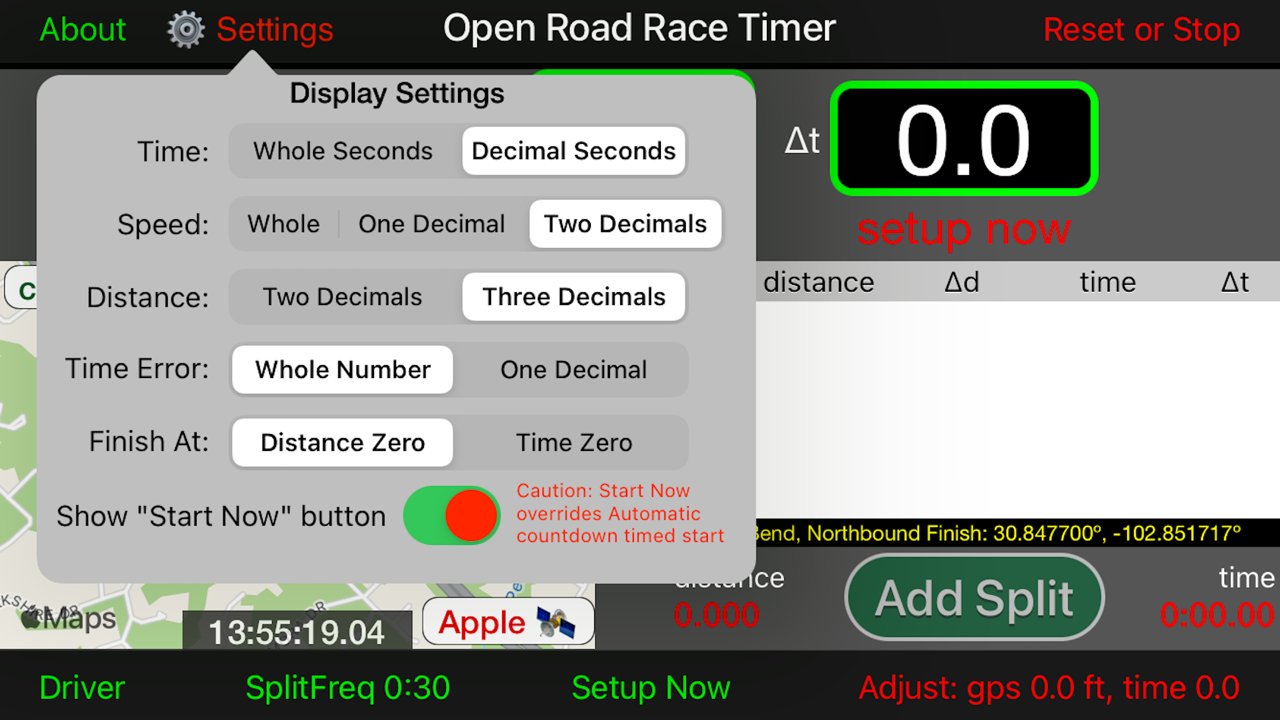
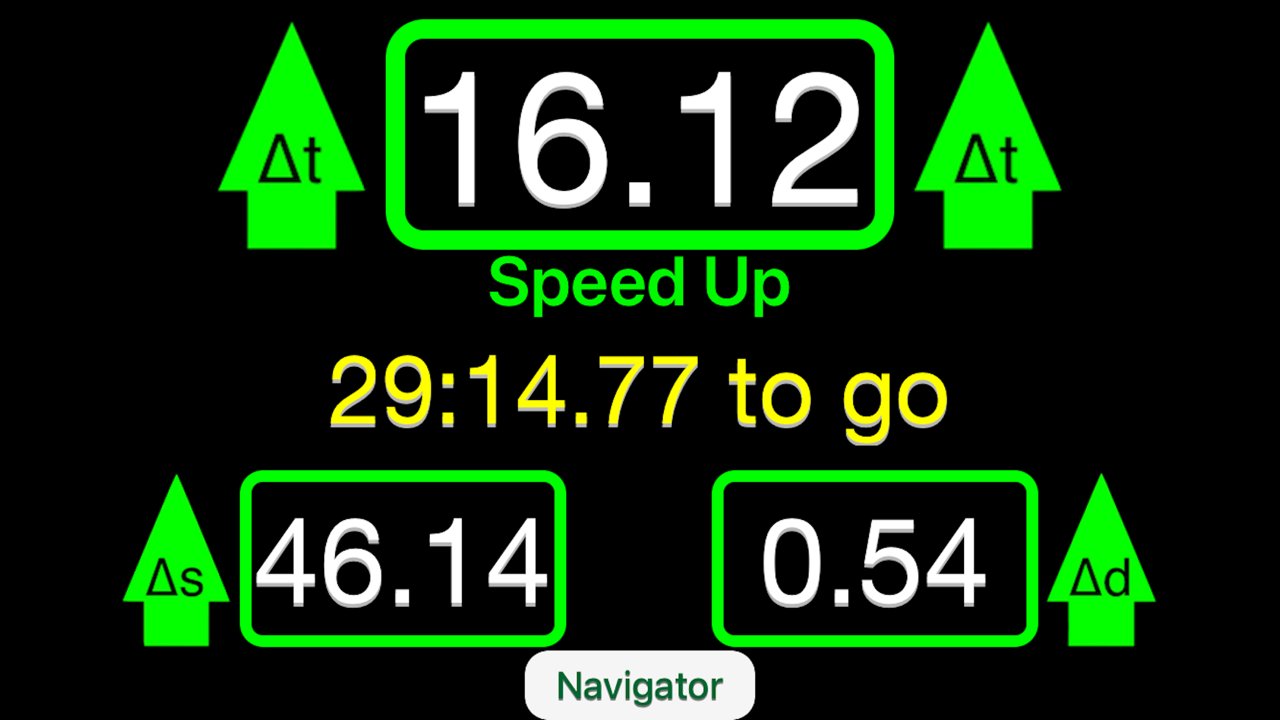
About Open Road Race Timer
The Open Road Race Timer is designed for high speed automobile racing on closed highways. The race objective is to travel a course of known length at a set rate of speed. That combination of speed and distance translates into a target time to reach the finish line.
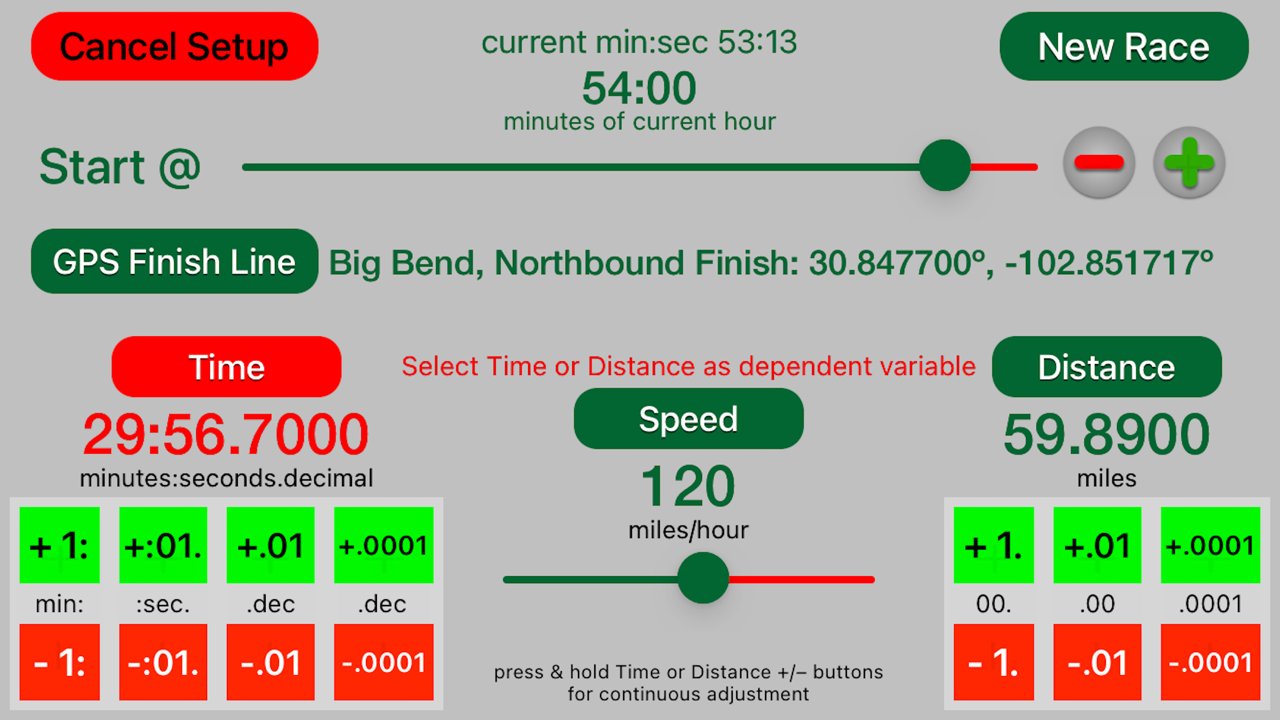
Your starting time will also be assigned as some minute or half minute after the hour in which the race begins. Set the conditions of speed, distance and compute the time in the app Setup and let the app count down to the start of your race.
If the computed time is not identical to the official time down to the ten thousandths of a second, touch the "Distance" button to activate the plus and minus below the time to make fine adjustments. Time is the most critical variable for displays and computations.
The clock will countdown to an automatic start. If possible, synchronize your app's clock to the offical race clock before you start.
Alternatively, you may show a Start Now button on the main screen by chosing the option on a switch in Settings and use this button to initiate the start. Caution, however, the automatic countdown timed start is much more precise and reliable than any human could possibly be.
Speeds can be set at 5 mph increments from 60 to 170 miles per hour. Shorter distances and slower speeds can be used for practice.
Settings allow you to change the precison of various displays. Also, there is a setting that determines whether the app stops computing at the Finish Line based upon either the official time or the official distance. By default, the choice is to stop app computations when the distance to the official finish line reaches zero.
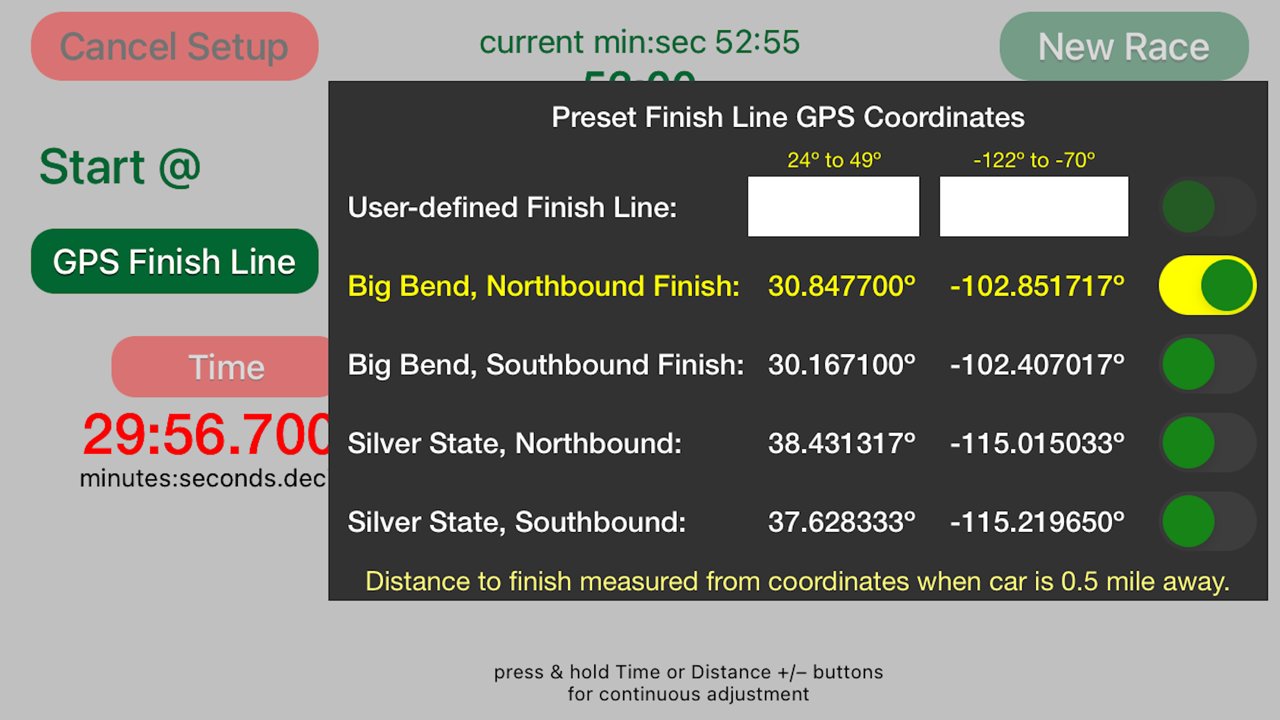
Optionally, you may input the Finish Line GPS coordinates. For your convenience, four preset Finish Line coordinates are included for both the Northbound and Southbound segments of Big Bend and Silver State Classic courses, but verify these coordinates with the race organizer.
If you chose the Finish Line coordinates option in the Setup, then the Time Error to the Finish Line is computed when you are within one-half mile of the Finish Line.
For races with out and back stages where the total error is the average between two runs, you can use this time to judge the best time target +/– on the return stage.
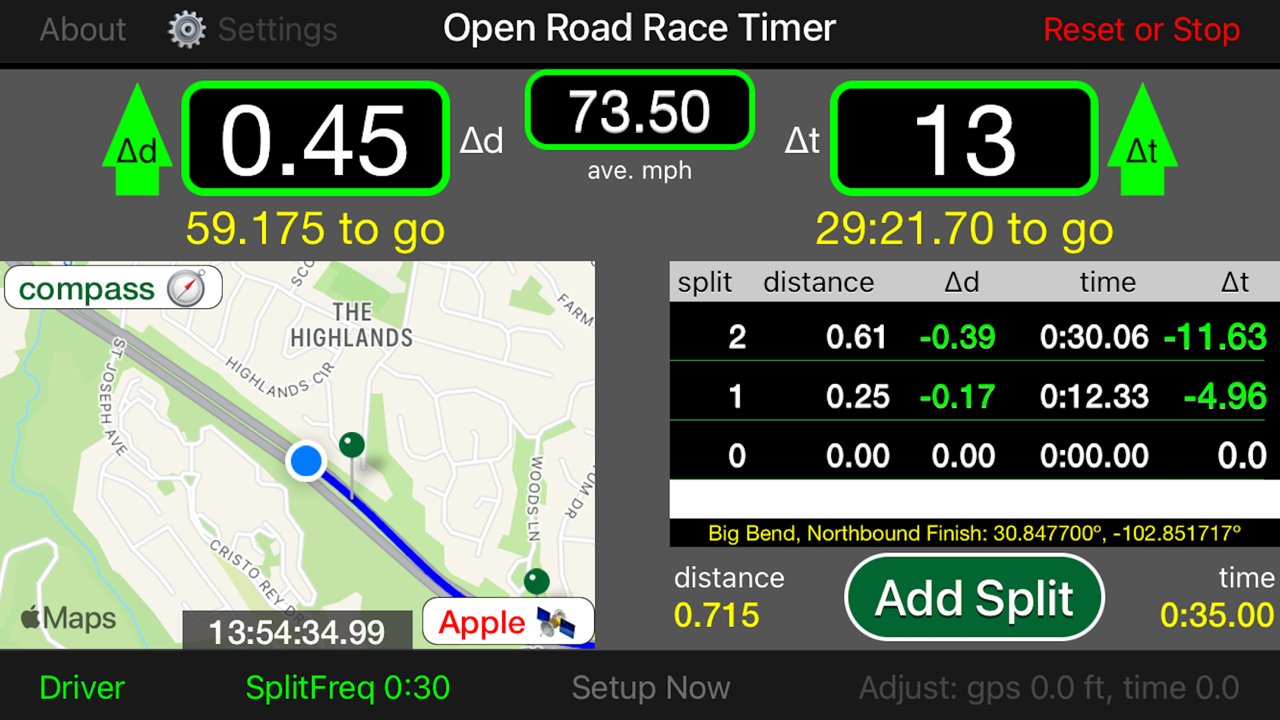
GPS inputs trace the path along the rally route. Measurements of actual versus ideal time and distance will be shown in seconds ahead or behind schedule. Also, you may record time and distance covered and the error against the ideal course time and distance by touching the Add Split button. Also, you may set automatic split computations at increments of 30 seconds, 1 minute, 3 minutes and 5 minutes.
You may fine-tune the app's distance between GPS receiver and front wheels (if necessary) and clock time figures to the rally's official measures with the options in the Adjustments popup. Unlock to make adjustments and lock to save the changes you make and to prevent inadvertent changes.
If the app's Time of Day (T.O.D.) clock shown at the bottom of the map view (or in the center of the display in the iPad version) does not match the rally's official clock, you may synchronize the two clocks by making small adjustments as required.
App Settings allow you to change the display of Time, Speed, and Distance as well as permitting the display of Time error to be in whole numbers or decimals.
For better GPS reception and improved accuracy, third-party wireless GPS receivers are recommended. This app has been tested with Bluetooth connectivity to a Dual XGPS150A GPS Receiver. This app works with both iPhones and iPads, even those without Cellular connectivity. However, there can only be one Apple device with Bluetooth activated within range of the Dual Receiver. Place devices not running this app in Airplane mode and be sure that the Dual Receiver is connected with the device and app you are using.
Disclaimer: Continued use of GPS running in the background can dramatically decrease battery life.
License: Commercial
Your starting time will also be assigned as some minute or half minute after the hour in which the race begins. Set the conditions of speed, distance and compute the time in the app Setup and let the app count down to the start of your race.
If the computed time is not identical to the official time down to the ten thousandths of a second, touch the "Distance" button to activate the plus and minus below the time to make fine adjustments. Time is the most critical variable for displays and computations.
The clock will countdown to an automatic start. If possible, synchronize your app's clock to the offical race clock before you start.
Alternatively, you may show a Start Now button on the main screen by chosing the option on a switch in Settings and use this button to initiate the start. Caution, however, the automatic countdown timed start is much more precise and reliable than any human could possibly be.
Speeds can be set at 5 mph increments from 60 to 170 miles per hour. Shorter distances and slower speeds can be used for practice.
Settings allow you to change the precison of various displays. Also, there is a setting that determines whether the app stops computing at the Finish Line based upon either the official time or the official distance. By default, the choice is to stop app computations when the distance to the official finish line reaches zero.
Optionally, you may input the Finish Line GPS coordinates. For your convenience, four preset Finish Line coordinates are included for both the Northbound and Southbound segments of Big Bend and Silver State Classic courses, but verify these coordinates with the race organizer.
If you chose the Finish Line coordinates option in the Setup, then the Time Error to the Finish Line is computed when you are within one-half mile of the Finish Line.
For races with out and back stages where the total error is the average between two runs, you can use this time to judge the best time target +/– on the return stage.
GPS inputs trace the path along the rally route. Measurements of actual versus ideal time and distance will be shown in seconds ahead or behind schedule. Also, you may record time and distance covered and the error against the ideal course time and distance by touching the Add Split button. Also, you may set automatic split computations at increments of 30 seconds, 1 minute, 3 minutes and 5 minutes.
You may fine-tune the app's distance between GPS receiver and front wheels (if necessary) and clock time figures to the rally's official measures with the options in the Adjustments popup. Unlock to make adjustments and lock to save the changes you make and to prevent inadvertent changes.
If the app's Time of Day (T.O.D.) clock shown at the bottom of the map view (or in the center of the display in the iPad version) does not match the rally's official clock, you may synchronize the two clocks by making small adjustments as required.
App Settings allow you to change the display of Time, Speed, and Distance as well as permitting the display of Time error to be in whole numbers or decimals.
For better GPS reception and improved accuracy, third-party wireless GPS receivers are recommended. This app has been tested with Bluetooth connectivity to a Dual XGPS150A GPS Receiver. This app works with both iPhones and iPads, even those without Cellular connectivity. However, there can only be one Apple device with Bluetooth activated within range of the Dual Receiver. Place devices not running this app in Airplane mode and be sure that the Dual Receiver is connected with the device and app you are using.
Disclaimer: Continued use of GPS running in the background can dramatically decrease battery life.
License: Commercial
| Release info | New Release on Sep 29, 2022 |
|---|---|
| Release notes | - Fixed bug that sometimes causes average mph display to produce odd results. |
| Listing data | App Store |
Reviews
No reviews yet. Be the first to review Open Road Race Timer.
Used Open Road Race Timer? Tell other visitors what you thought.
Log in to write a reviewOther products by this publisher
- "No Distractions" for YouTube 4.10 ----
- #Bible 11.6 "Incredible App - My sister shared this app with me a few weeks ago and it is truly incredible.
- #filmphotography 1.4.2 So, you decided to shoot on film?
- $quirrel 1.5.1 $quirrel Budget & Finance helps you plan each paycheck, track spending, manage debt, and see what is safe to spend before the next payday.
- % Percentage Calculator Pro 1.41 This is the Pro version of % Percentage Calculator.
Most viewed iOS Sports
-
1
 VolleyWrite Buddy 2.4
The VolleyWrite Buddy connects to the Windows version (for now) of VolleyWrite via bluetooth or WiFi.
-
2
 ZephyrAir 1.5.4
ZEPHYRAIR — Stop Guessing...
-
3
 Draft Edge 1.1.2
STOP FOLLOWING THE EXPERTS.
-
4
 FlyBox 6.0
FlyBox is your personal fly fishing reference and collection manager for iPhone, iPad, and Mac.
-
5
 Fox Magnet 1.0
On the edge of the field you're sitting on the ground in camouflage with a distressed rabbit decoy in front of you.
-
6
 Avalanche Inclinometer 1.0.1
Avy savvy backcountry skiers and riders know that three things count when it comes to the terrain’s influence on avalanches: the slope, the elevation, and the (compass) aspect.
-
7
 DraftKings 5.56.0
Now Live in All 50 States!
-
8
 TCS Toronto WaterfrontMarathon 5.2
The TCS Toronto Waterfront Marathon is Canada’s premier running event and the grand finale of the Canada Running Series.
-
9
 ESPN 8.29.1
All of ESPN. All in One Place.
-
10
 Adult 1-6 4.0
Learn to Skate USA, the premier source for all things figure skating, has teamed up with Rink Tank Interactive to bring you the ' Learn to Skate USA 'Skate Coach' app series for iOS!
Most downloaded iOS Sports
-
1
 Coyote Magnet 2.1
Coyote Magnet puts 79 full-quality predator sounds in your pocket, recorded clean and organized the way a hunt actually unfolds.
-
2
TCS Toronto WaterfrontMarathon 5.2
The TCS Toronto Waterfront Marathon is Canada’s premier running event and the grand finale of the Canada Running Series.
-
3
Adult 1-6 4.0
Learn to Skate USA, the premier source for all things figure skating, has teamed up with Rink Tank Interactive to bring you the ' Learn to Skate USA 'Skate Coach' app series for iOS!
-
4
ZephyrAir 1.5.4
ZEPHYRAIR — Stop Guessing...
-
5
Draft Edge 1.1.2
STOP FOLLOWING THE EXPERTS.
-
6
 Spectrum SportsNet 5.0.1
Stay connected with the Lakers, Dodgers, and Sparks with the Spectrum SportsNet app!
-
7
 100 Climbs of Italy 4.3
The 100 greatest Cycling Climbs of Italy App is an indispensable tool if you’re planning a cycling trip to Italy.
-
8
VolleyWrite Buddy 2.4
The VolleyWrite Buddy connects to the Windows version (for now) of VolleyWrite via bluetooth or WiFi.
-
9
DraftKings 5.56.0
Now Live in All 50 States!
-
10
 ChiMarathon 14.1
The Bank of America Chicago Marathon App, Powered by Tata Consultancy Services is the perfect resource to prepare for the 2026 Bank of America Chicago Marathon.