
Oksigenia SOS 4.3.2
Smart safety and distress alerts with fall and inactivity detection.
Download
19.77 MB
37downloads
15this week
FreeFreeware
0reviews
Screenshots
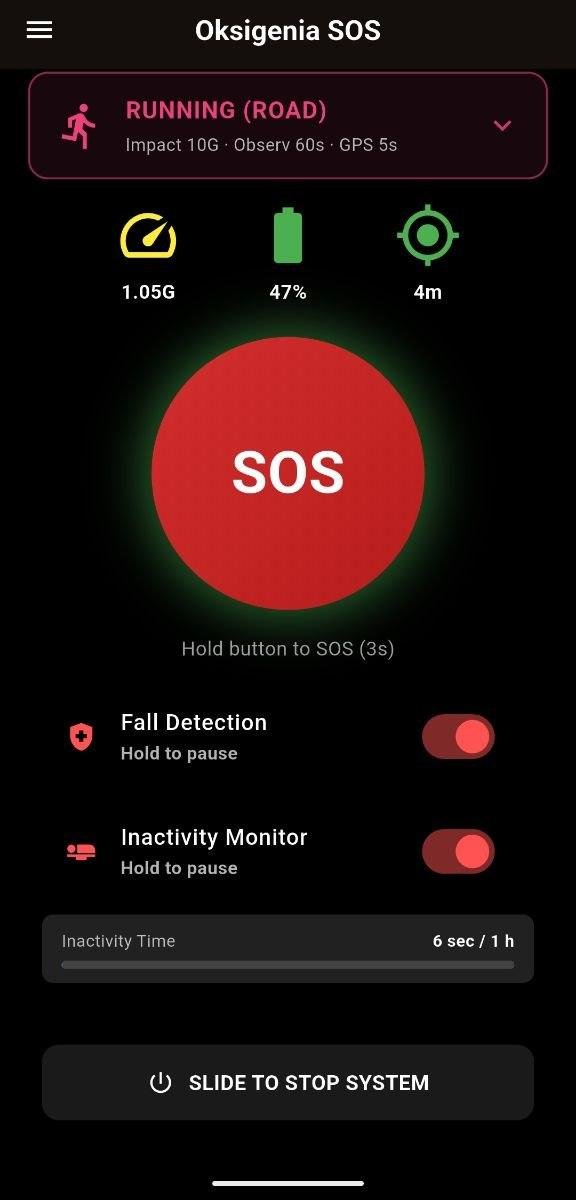
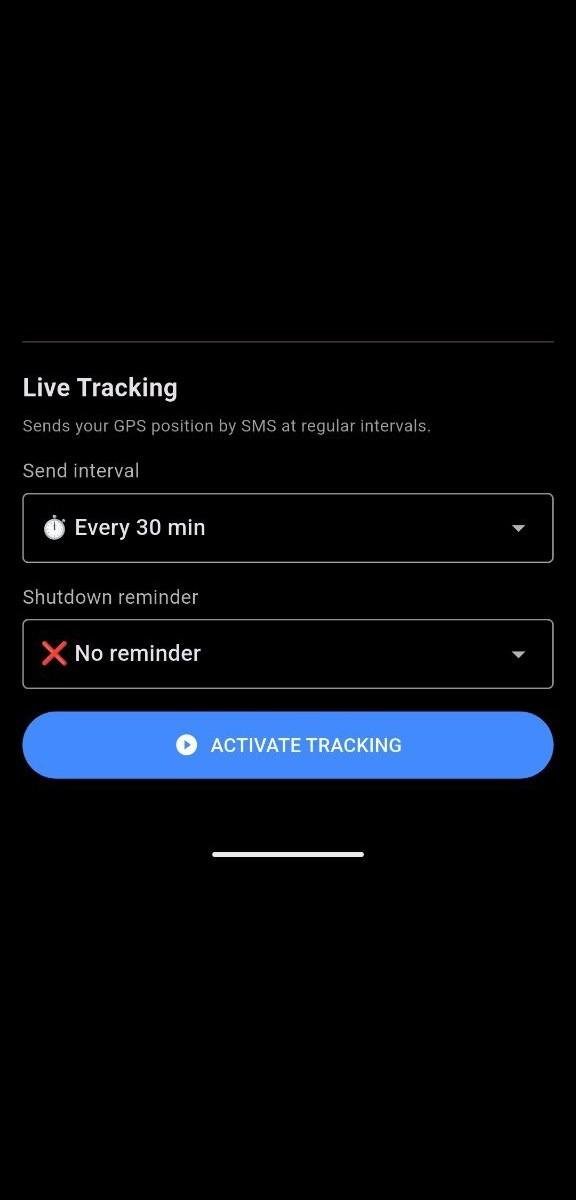
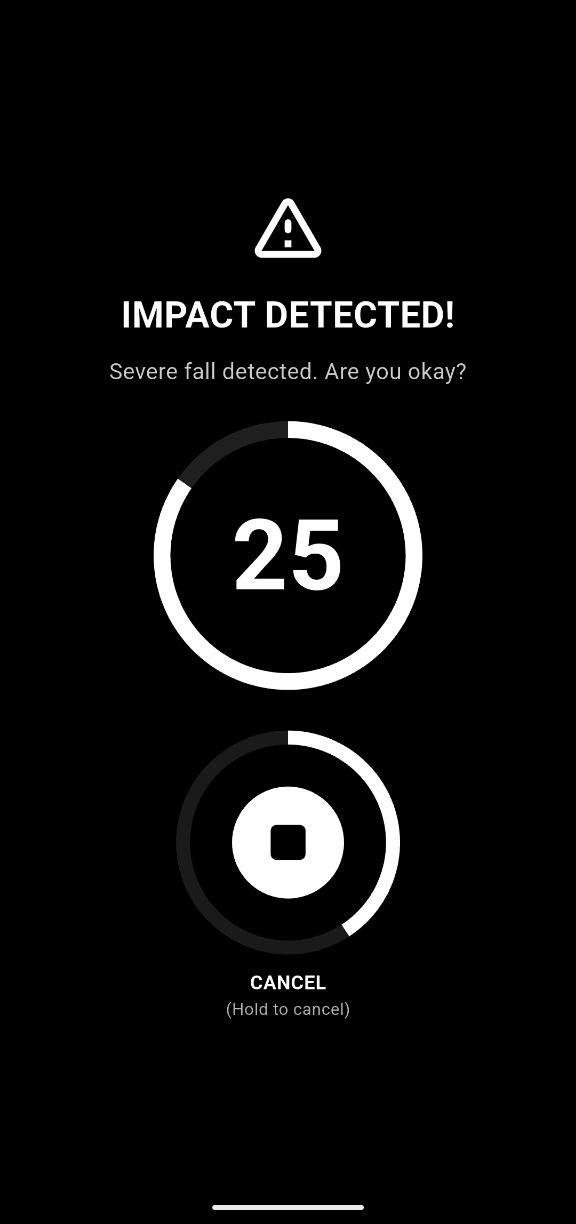
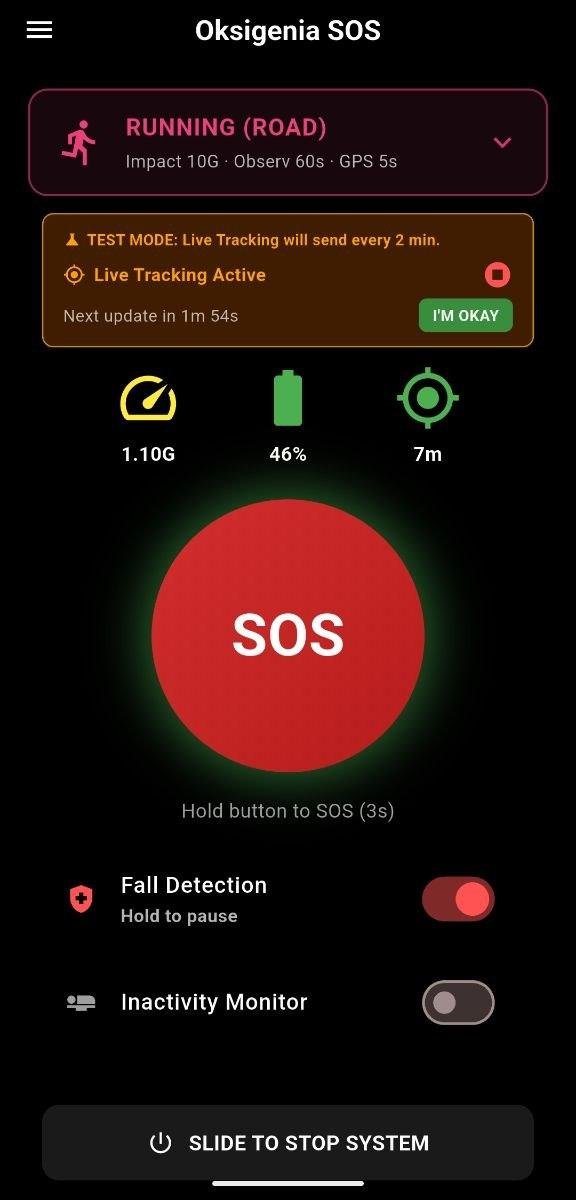
About Oksigenia SOS
Oksigenia SOS is an offline-first personal safety app for outdoor sports and high-risk environments. No account, no cloud, no Google Services required — everything runs on your device.
When something goes wrong, it sends an SMS alert with your GPS coordinates to your emergency contact. No internet connection needed.
Smart Fall Detection (Smart Sentinel)
The accelerometer monitors you continuously at high frequency. A sudden impact triggers an observation window. If sustained walking movement is detected during that window, the alarm is dismissed automatically — false positives from drops or normal jolts won't fire the SOS. If no rhythmic movement is detected, the SOS is sent.
Activity profiles
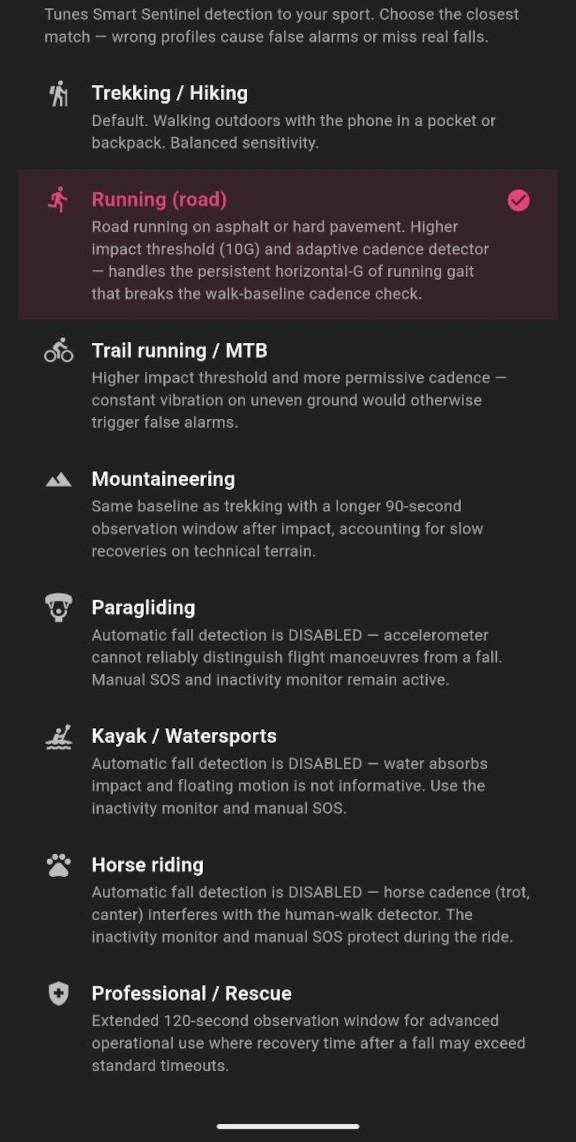
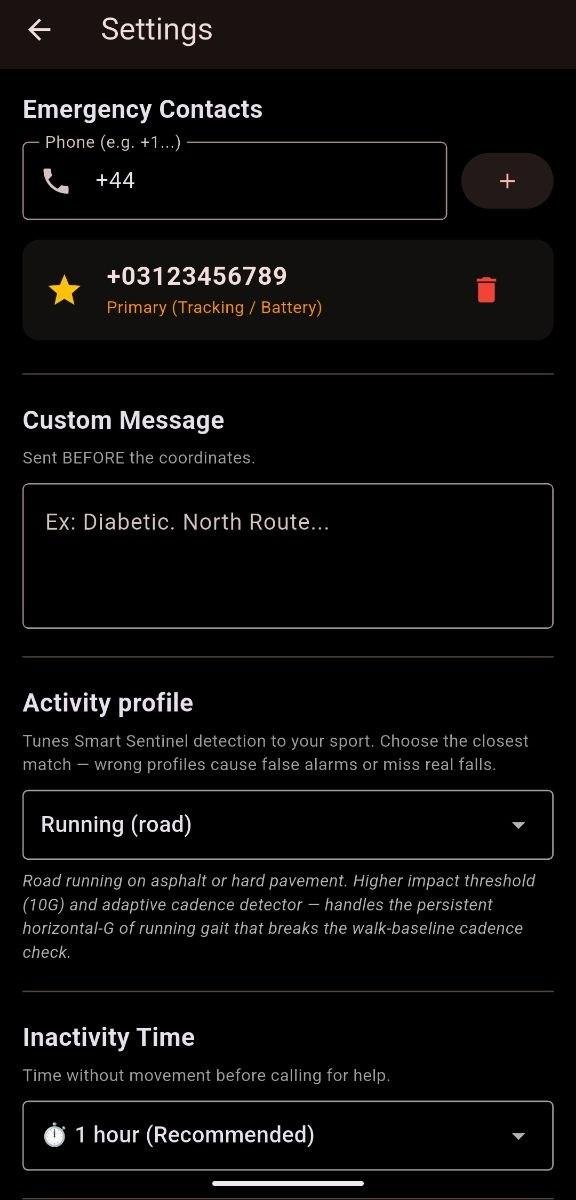
Pick the profile that matches what you're doing — Smart Sentinel adapts its sensitivity:
- Trekking / Hiking: balanced default for walking outdoors.
- Running (road): tuned for the sustained high-G cadence of road running, with an adaptive rhythm detector.
- Trail running / MTB: higher impact threshold for terrain with constant vibration.
- Mountaineering: longer observation window for slow recoveries on technical ground.
- Paragliding / Kayak / Watersports: automatic fall detection is disabled (the sensor cannot reliably interpret flight or water motion); inactivity monitor and manual SOS remain active.
- Professional / Rescue: extended observation window for advanced operational use.
Inactivity Monitor (Dead Man's Switch)
Set a check-in timer. If you don't confirm you're OK before it expires, the alert is sent automatically. Essential for solo adventures where a fall might leave you conscious but unable to call for help.
Live Tracking
Send your GPS position by SMS every 30, 60 or 120 minutes. Pause, resume or check in manually at any time — without stopping the monitoring session.
Dying Gasp
When the battery drops below 5%, a final SMS with your last GPS position is sent automatically before the phone shuts down.
Privacy and Compatibility
- No account or registration required
- All data stays on your device — no cloud sync, no telemetry
- No trackers, no analytics, no ads
- Works on de-Googled phones (GrapheneOS, MicroG)
- Open source under GPLv3
About the permissions
Oksigenia SOS asks for sensitive permissions because its job is to call for help when you cannot. Each one maps to a single rescue function:
- SMS: sends the alert. SMS is the only channel that works in the mountains without internet.
- Location, including "Allow all the time" (background location): when you fall, your phone is in your pocket with the screen off and the app in the background. Without background access, Android can deny a fresh GPS fix at exactly that moment, and the SOS would leave without usable coordinates. Your position is read only when an alert or tracking update is being sent, and it travels exclusively inside the SMS to the contacts you configured — it is never uploaded anywhere. The app has no network access at all: it does not even request the INTERNET permission.
- Motion sensors / physical activity: fall and inactivity detection.
- Battery exemption: so Android doesn't kill the monitoring service mid-route.
A safety app that prioritised permission minimalism over getting your coordinates to a rescuer would be failing at its only job. The privacy guarantee here is structural, not cosmetic: everything stays on the device.
Available in 11 languages.
IMPORTANT: Oksigenia SOS is a support tool and does not replace professional emergency services. Its operation depends on mobile coverage, GPS signal and battery level.
License: GPL-3.0-only
When something goes wrong, it sends an SMS alert with your GPS coordinates to your emergency contact. No internet connection needed.
Smart Fall Detection (Smart Sentinel)
The accelerometer monitors you continuously at high frequency. A sudden impact triggers an observation window. If sustained walking movement is detected during that window, the alarm is dismissed automatically — false positives from drops or normal jolts won't fire the SOS. If no rhythmic movement is detected, the SOS is sent.
Activity profiles
Pick the profile that matches what you're doing — Smart Sentinel adapts its sensitivity:
- Trekking / Hiking: balanced default for walking outdoors.
- Running (road): tuned for the sustained high-G cadence of road running, with an adaptive rhythm detector.
- Trail running / MTB: higher impact threshold for terrain with constant vibration.
- Mountaineering: longer observation window for slow recoveries on technical ground.
- Paragliding / Kayak / Watersports: automatic fall detection is disabled (the sensor cannot reliably interpret flight or water motion); inactivity monitor and manual SOS remain active.
- Professional / Rescue: extended observation window for advanced operational use.
Inactivity Monitor (Dead Man's Switch)
Set a check-in timer. If you don't confirm you're OK before it expires, the alert is sent automatically. Essential for solo adventures where a fall might leave you conscious but unable to call for help.
Live Tracking
Send your GPS position by SMS every 30, 60 or 120 minutes. Pause, resume or check in manually at any time — without stopping the monitoring session.
Dying Gasp
When the battery drops below 5%, a final SMS with your last GPS position is sent automatically before the phone shuts down.
Privacy and Compatibility
- No account or registration required
- All data stays on your device — no cloud sync, no telemetry
- No trackers, no analytics, no ads
- Works on de-Googled phones (GrapheneOS, MicroG)
- Open source under GPLv3
About the permissions
Oksigenia SOS asks for sensitive permissions because its job is to call for help when you cannot. Each one maps to a single rescue function:
- SMS: sends the alert. SMS is the only channel that works in the mountains without internet.
- Location, including "Allow all the time" (background location): when you fall, your phone is in your pocket with the screen off and the app in the background. Without background access, Android can deny a fresh GPS fix at exactly that moment, and the SOS would leave without usable coordinates. Your position is read only when an alert or tracking update is being sent, and it travels exclusively inside the SMS to the contacts you configured — it is never uploaded anywhere. The app has no network access at all: it does not even request the INTERNET permission.
- Motion sensors / physical activity: fall and inactivity detection.
- Battery exemption: so Android doesn't kill the monitoring service mid-route.
A safety app that prioritised permission minimalism over getting your coordinates to a rescuer would be failing at its only job. The privacy guarantee here is structural, not cosmetic: everything stays on the device.
Available in 11 languages.
IMPORTANT: Oksigenia SOS is a support tool and does not replace professional emergency services. Its operation depends on mobile coverage, GPS signal and battery level.
License: GPL-3.0-only
| Release info | Update on Oct 27, 2026 |
|---|---|
| Release notes | v4.3.2 -- No network access at all + SMS limit check o SMS limit check: past a per-app limit, Android holds an app's SMS behind an "Allow / Deny" dialog that never times out, so part of an SOS could stay on the phone. The app now reads that limit (LineageOS: Trust -> SMS message limit) and warns you if your SOS doesn't fit, telling you what to set. Parts held by that dialog are no longer counted as sent. o Removed the app's last network call: a legacy version check that fetched a file from oksigenia.com every time the app opened. The file no longer existed, so it did nothing, but it still contacted a server. o The INTERNET permission is gone: Oksigenia SOS can no longer connect to the network in any way. Alerts were always SMS-only and still are; updates keep arriving through F-Droid, IzzyOnDroid and GitHub Releases. o Same signing key, one permission fewer; updates cleanly over any previous install. |
| Listing data | F-Droid |
Reviews
No reviews yet. Be the first to review Oksigenia SOS.
Used Oksigenia SOS? Tell other visitors what you thought.
Log in to write a reviewOther products by this publisher
- "No Distractions" for YouTube 4.10 ----
- #Bible 11.6 "Incredible App - My sister shared this app with me a few weeks ago and it is truly incredible.
- #filmphotography 1.4.2 So, you decided to shoot on film?
- $quirrel 1.5.1 $quirrel Budget & Finance helps you plan each paycheck, track spending, manage debt, and see what is safe to spend before the next payday.
- % Percentage Calculator Pro 1.41 This is the Pro version of % Percentage Calculator.
Most viewed Android Connectivity
- 1 XrayFA 1.7.4 XrayFA is a fast, secure, and user-friendly Android client for Xray-core.
-
2
 Pulse 0.99.0-pulse
Garmin watch companion — your data stays on your phone
-
3
 Airplane Scheduler 3.0
Automatically switch airplane mode on a schedule
- 4 Device Connect 0.12.1 Yet another tool to connect Android phone with desktop
- 5 JMP SIM Manager jmp-v1.7.2 Companion app for the JMP eSIM Adapter
-
6
 FocusMastodon 2.12.0.20240624
FocusMastodon is a bright and colourful Mastodon client
- 7 getgovroam 2.3.1(2693) Configure the govroam Wi-Fi network securely and correctly
-
8
 SimpleX Chat 7.1.2
SimpleX Chat - e2e encrypted messenger without any user IDs - private by design!
-
9
 AwakeOnLANMobile 1.0.2
Send WakeOnLAN packets (IPv4/IPv6) over the internet, includes a CIDR scanner
- 10 DumDum 1.1.6 Simple VPN over SOCKS/HTTP/HTTPS proxy
Most downloaded Android Connectivity
- 1 DCC++Throttle 1.5.2065 Application to drive DCC-EX command station via Bluetooth
- 2 Vento RealVNC backend 8 RealVNC plugin for the Vento remote desktop client
-
3
 xlog2 0.6.10
Peer-to-peer amateur-radio field logbook that syncs with the xlog2 desktop
- 4 Pixel 5G 3.1.1 Config pixel modem NR mode
-
5
 Qetara 1.4.5
Share files and messages between nearby devices on your local network
-
6
 Mages 5.3.7
Experimental Matrix client made using Compose Multiplatform (and Rust).
- 7 Vento RustDesk backend 8 RustDesk plugin for the Vento remote desktop client
-
8
 Network Survey 2.0
Survey cellular, Wi-Fi, Bluetooth and GNSS, then log, stream or upload the data
-
9
 RemotePhone 2.2.0
Mirror and control your Android phone from Linux over WiFi
-
10
 MateDroid 1.12.0
View Tesla vehicle data from your self-hosted Teslamate instance