Name Color 2.5
A lot of information in everyday life requires that you be able to determine colors and assign them correctly.
Download
1.86 MB
7downloads
1this week
FreeCommercial
0reviews
Screenshots
About Name Color
A lot of information in everyday life requires that you be able to determine colors and assign them correctly. Some people can't do this because they can't see or distinguish all colors. This color vision deficiency ranges from seeing fewer colors than most people to not seeing any colors at all. Not seeing colors, i.e. true color blindness, is very rare. The most common form of color vision deficiency is the inability to distinguish between the colors red and green, i.e. red-green blindness.
The app determines the names of colors. It can be of help to people who cannot see and name all colors (color ametropia, color blindness).
How it works
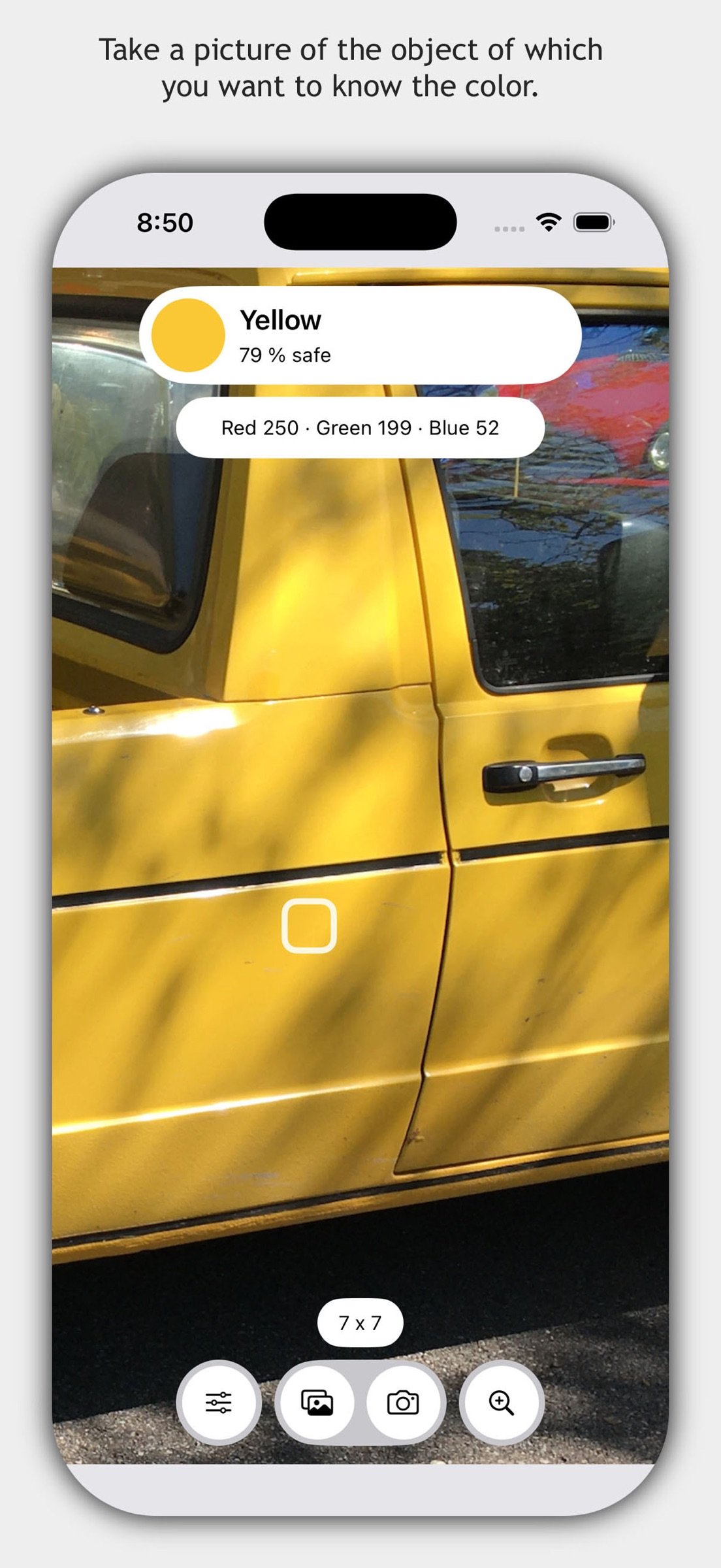
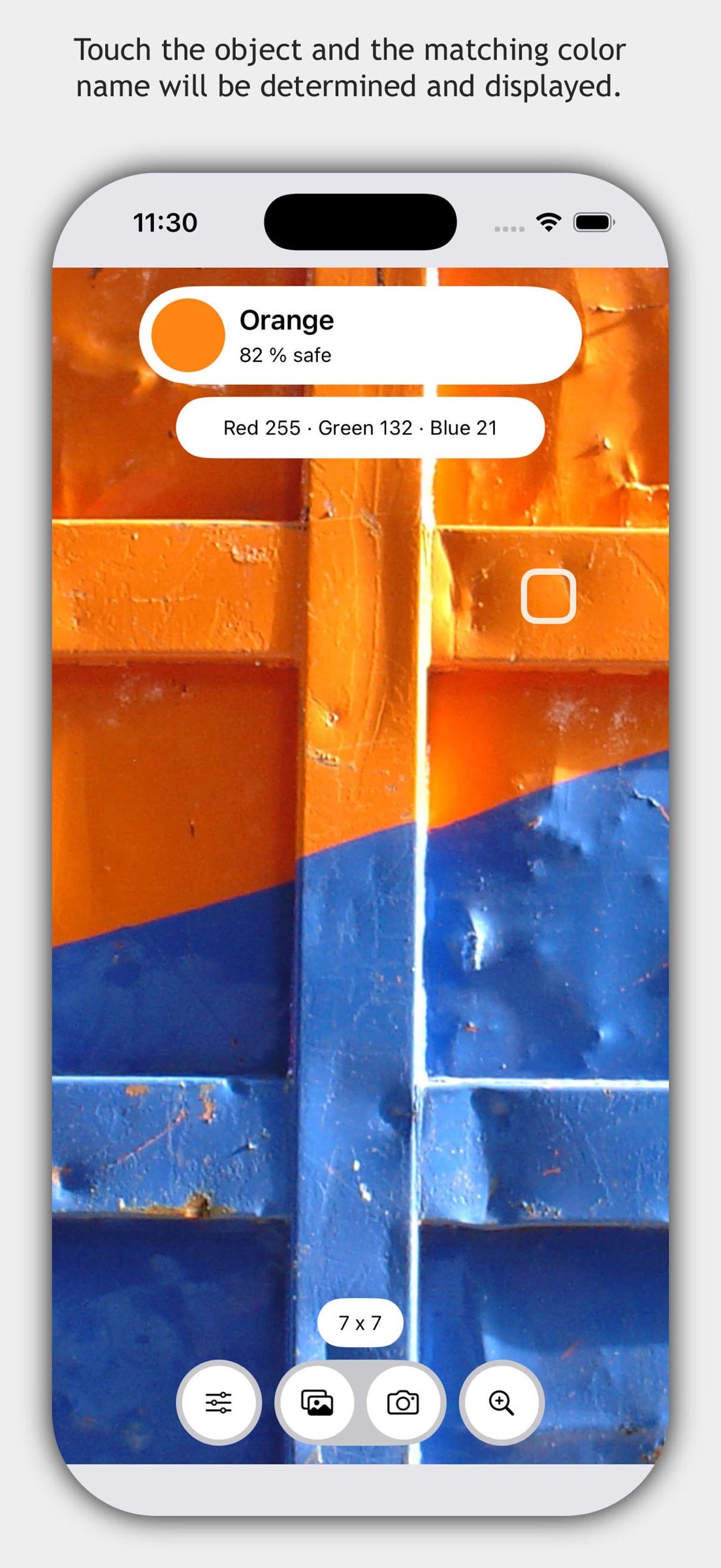
Take a picture of the object of which you want to know the color. Touch the object and the matching color name will be determined and displayed. Or use color sliders for red, green and blue to create or try out colors. For each color you select in the color slider, the color name is determined and displayed.
You can switch the zoom mode on and off with a long press gesture. The zoom mode can also be activated with the magnifying glass icon at the bottom right. If the color of which you want to know the name is covered by parts of the menu, you can hide all control elements. To do this, touch the determined color name at the top right next to the color field.
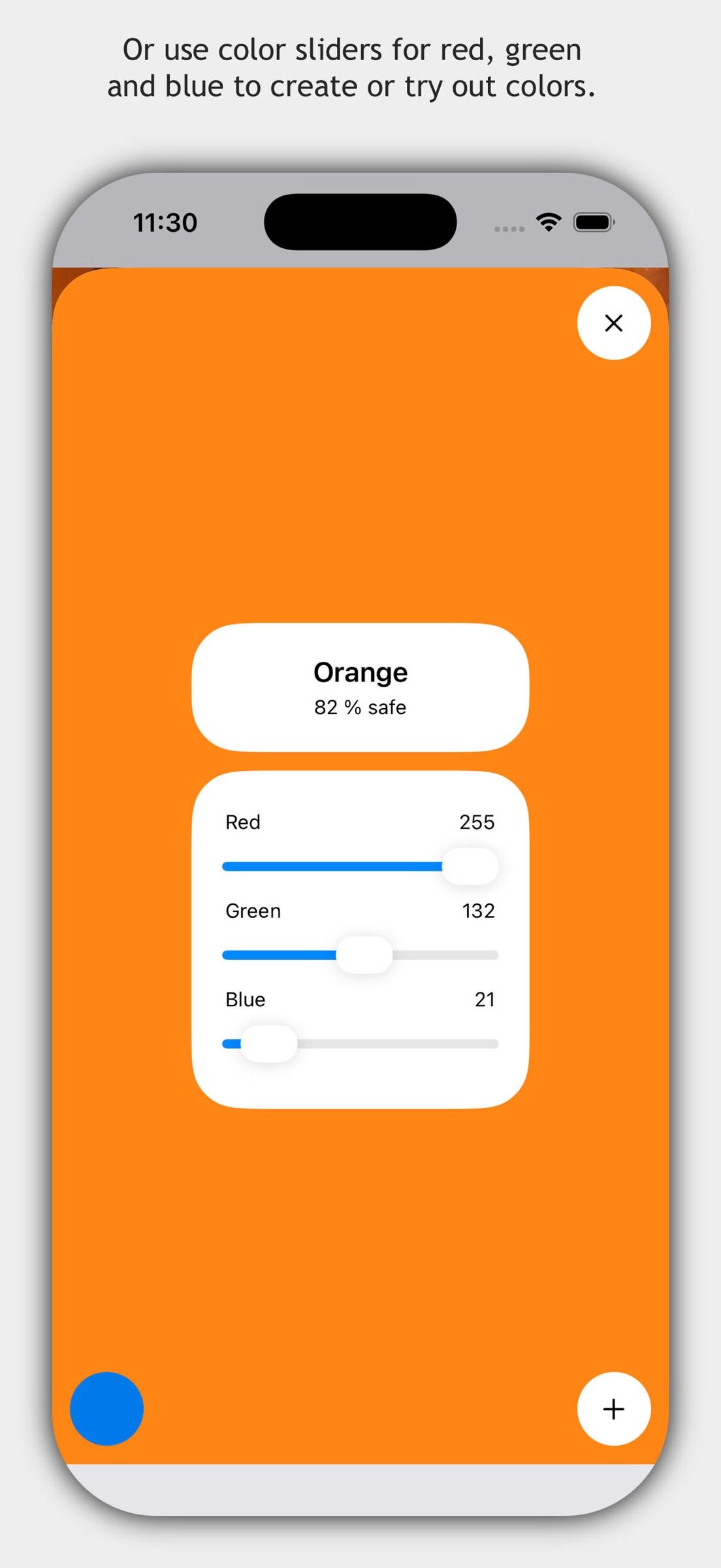
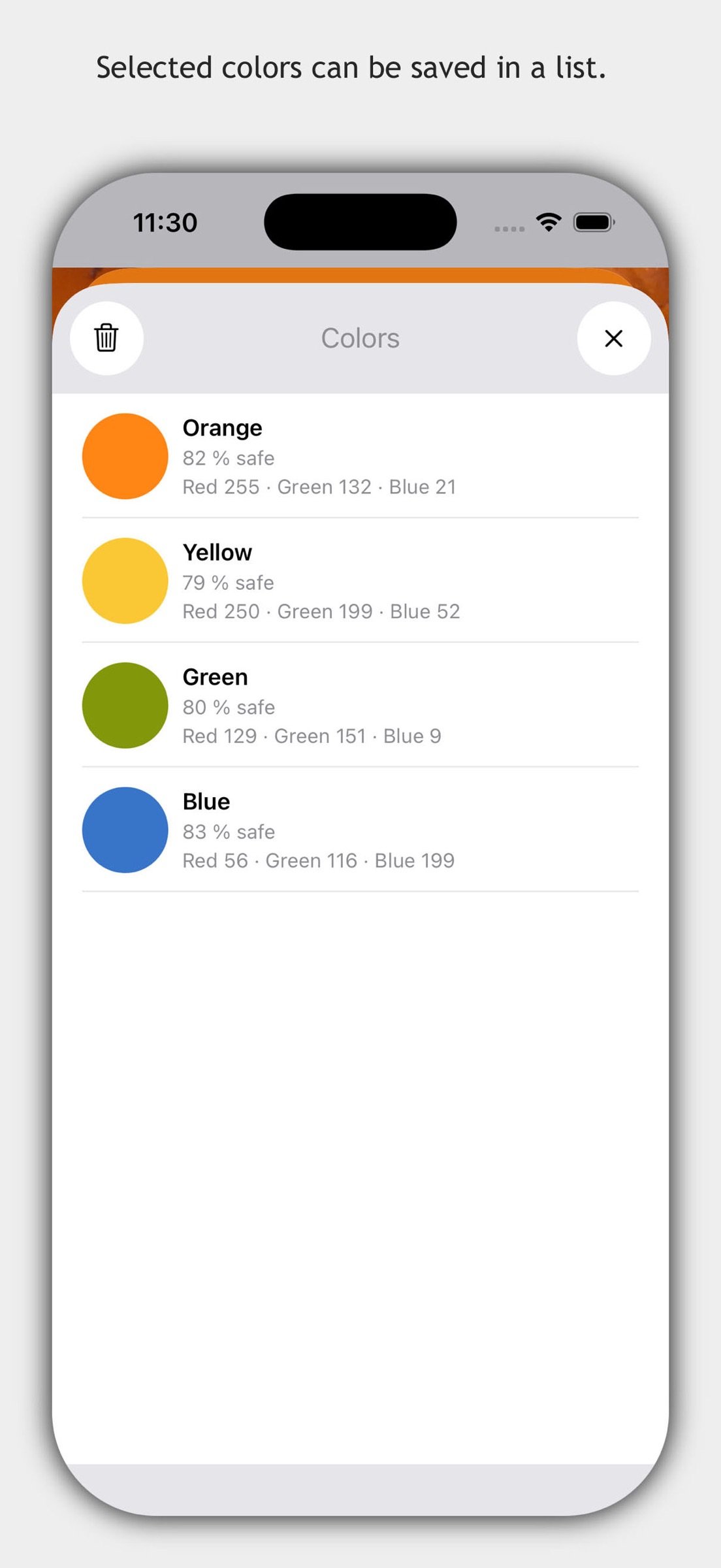
You can activate the color slider for red, green and blue with the color field at the top left. In addition to the currently selected color, the complementary color is also displayed in the color slider. If the color slider is active, you can save the current color with the plus icon at the bottom right. To do this, the option "Adopt result" must be selected in the default settings. The color is displayed in a list. This can be useful if you want to keep a specific color setting to later compare it to another color.
Settings
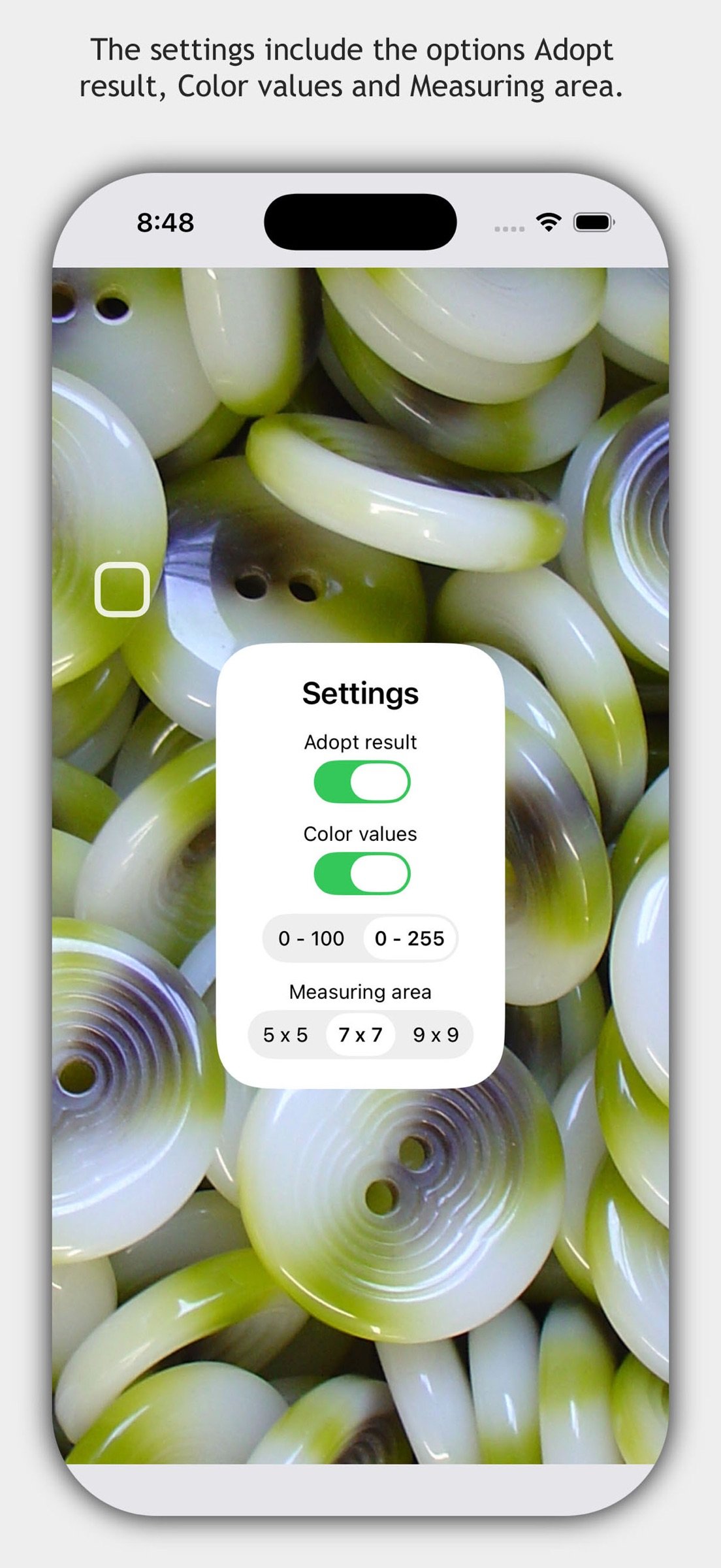
The default settings of the app are opened with the icon at the bottom left. Here you can find the options "Adopt result", "Color values" and "Measuring area". "Adopt result" means the determined color value is transferred to the next view. With the "Color values" option, you can display the color values for red, green and blue in addition to the determined color name. The color values can be displayed in increments from 0 to 100 and in increments from 0 to 255. "Measuring area" controls the number of pixels used to calculate the color name.
Important information
The naming of colors is a complex process that is influenced by general and individual color perception, experience and the current lighting situation. For this reason, a percentage value is calculated for each color name, which indicates how reliable the result is.
The app does not collect, store or transmit any personal data. The app is intended as an aid for colorblind people. The app is not suitable for a medical examination. Liability for the correctness of all color names determined with the app is not accepted.
License: Commercial
The app determines the names of colors. It can be of help to people who cannot see and name all colors (color ametropia, color blindness).
How it works
Take a picture of the object of which you want to know the color. Touch the object and the matching color name will be determined and displayed. Or use color sliders for red, green and blue to create or try out colors. For each color you select in the color slider, the color name is determined and displayed.
You can switch the zoom mode on and off with a long press gesture. The zoom mode can also be activated with the magnifying glass icon at the bottom right. If the color of which you want to know the name is covered by parts of the menu, you can hide all control elements. To do this, touch the determined color name at the top right next to the color field.
You can activate the color slider for red, green and blue with the color field at the top left. In addition to the currently selected color, the complementary color is also displayed in the color slider. If the color slider is active, you can save the current color with the plus icon at the bottom right. To do this, the option "Adopt result" must be selected in the default settings. The color is displayed in a list. This can be useful if you want to keep a specific color setting to later compare it to another color.
Settings
The default settings of the app are opened with the icon at the bottom left. Here you can find the options "Adopt result", "Color values" and "Measuring area". "Adopt result" means the determined color value is transferred to the next view. With the "Color values" option, you can display the color values for red, green and blue in addition to the determined color name. The color values can be displayed in increments from 0 to 100 and in increments from 0 to 255. "Measuring area" controls the number of pixels used to calculate the color name.
Important information
The naming of colors is a complex process that is influenced by general and individual color perception, experience and the current lighting situation. For this reason, a percentage value is calculated for each color name, which indicates how reliable the result is.
The app does not collect, store or transmit any personal data. The app is intended as an aid for colorblind people. The app is not suitable for a medical examination. Liability for the correctness of all color names determined with the app is not accepted.
License: Commercial
| Release info | Update on Oct 28, 2026 |
|---|---|
| Release notes | Color recognition has been expanded and improved. The usability of the app has been improved. Small errors have been corrected. |
| Listing data | App Store |
Reviews
No reviews yet. Be the first to review Name Color.
Used Name Color? Tell other visitors what you thought.
Log in to write a reviewOther products by this publisher
- "No Distractions" for YouTube 4.10 ----
- #Bible 11.6 "Incredible App - My sister shared this app with me a few weeks ago and it is truly incredible.
- #filmphotography 1.4.2 So, you decided to shoot on film?
- $quirrel 1.5.1 $quirrel Budget & Finance helps you plan each paycheck, track spending, manage debt, and see what is safe to spend before the next payday.
- % Percentage Calculator Pro 1.41 This is the Pro version of % Percentage Calculator.
Most viewed iOS Health & Fitness
-
1
 Cal AI 26.45.0
HOW TO USE CAL AI:
-
2
 HealthPatch 1.0.3
Take Full Control of Your Apple Health Workout Data
-
3
 Dysphagia 2.3
Excellent visual tool to aid professionals in educating patients and families about swallowing disorders.
-
4
 Environments 1.7
Environments is a historic catalog of long form field recordings created for the way you live.
-
5
 Stromno 1.2
Stromno app allows you easily broadcast your heart rate data from Apple Watch and show it on live stream.
-
6
 I am 7.8.0
How many negative thoughts have been repeating in your mind?
-
7
 AllTrails 26.11.11
Whether you hike, bike, run, or walk, AllTrails is your companion and guide to the outdoors.
-
8
 Periodic Timer + 4.8
Keep track of time without being distracted by the device!
-
9
 2026 Long Beach Marathon 3.2.2
Long Beach Marathon app is for race day tracking to receive turn-by-turn instructions and for your friends and family to track your progress in real-time.
-
10
 Fitness Test Pro Elite 3.5.6
Fitness Test Pro Elite is a fitness test calculator for the Army, Navy, Air Force, Marine Corps, Coast Guard and special operations screening tests.
Most downloaded iOS Health & Fitness
-
1
HealthPatch 1.0.3
Take Full Control of Your Apple Health Workout Data
-
2
Stromno 1.2
Stromno app allows you easily broadcast your heart rate data from Apple Watch and show it on live stream.
-
3
 TonalBloom Sound Bath 1.0
TonalBloom turns your iPhone into a tactile sound bath instrument with singing bowl tones, warm drones, shimmer controls, and saved local patches.
-
4
 Fitness Data Sync 1.2
Tired of subscriptions just to sync your own fitness data?
-
5
 Adrian James 5.0.2019010401
Adrian James 6 Pack Abs Workout has become an international sensation.
-
6
 BrainWave 11.0.2
Advanced Binaural Brainwave Entrainment combined with Ambient Music, Nature Sounds, Other Audio Apps or your own iTunes Music.
-
7
Fitness Test Pro Elite 3.5.6
Fitness Test Pro Elite is a fitness test calculator for the Army, Navy, Air Force, Marine Corps, Coast Guard and special operations screening tests.
-
8
 Epic Haiku & Limerick 11.9.3
Haiku provides authorized clinical users of Epic’s Electronic Health Record with secure access to clinic schedules, hospital patient lists, health summaries, test results and notes.
-
9
 VagusCalm 1.5.0
WHY VAGUSCALM?
-
10
 Flo Cycle & Period Tracker 10.10.0
Flo Health is a science-backed cycle, ovulation, pregnancy, and period tracker with over 570 million downloads worldwide.*