N0RMA 0.7.0
Spot trackers, drones and camera-like Wi-Fi. Nothing leaves your phone.
Download
1.19 MB
10downloads
1this week
FreeFreeware
0reviews
Screenshots
About N0RMA
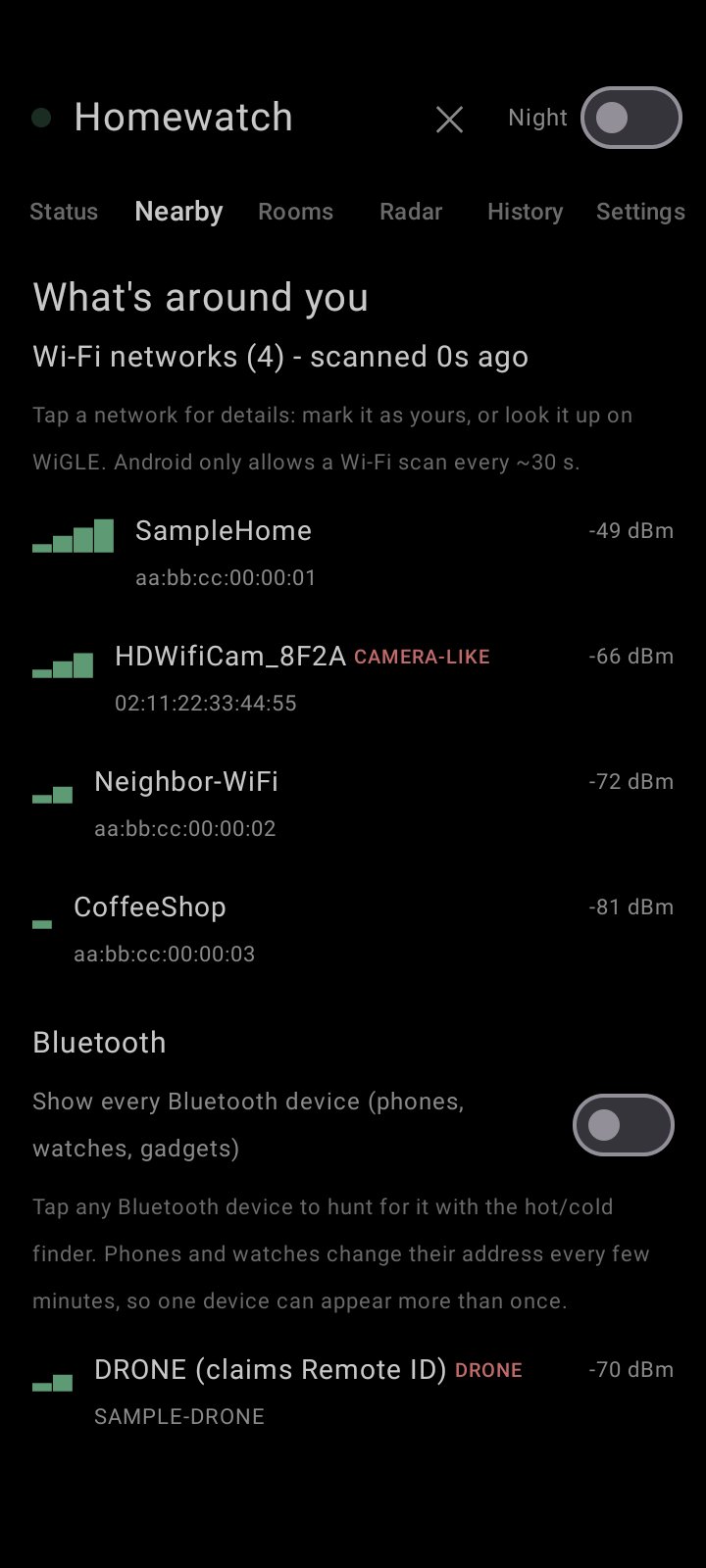
N0RMA helps you check whether anything nearby is tracking or watching you - using only your phone's own Bluetooth and Wi-Fi radios. No account, no cloud, no ads, no analytics. It cannot even connect to the internet.
WHAT IT DOES
- Finds Bluetooth trackers that are separated from their owner (Apple Find My / AirTag-style, Tile, Samsung SmartTag, Chipolo) and ignores normal "owner nearby" signals
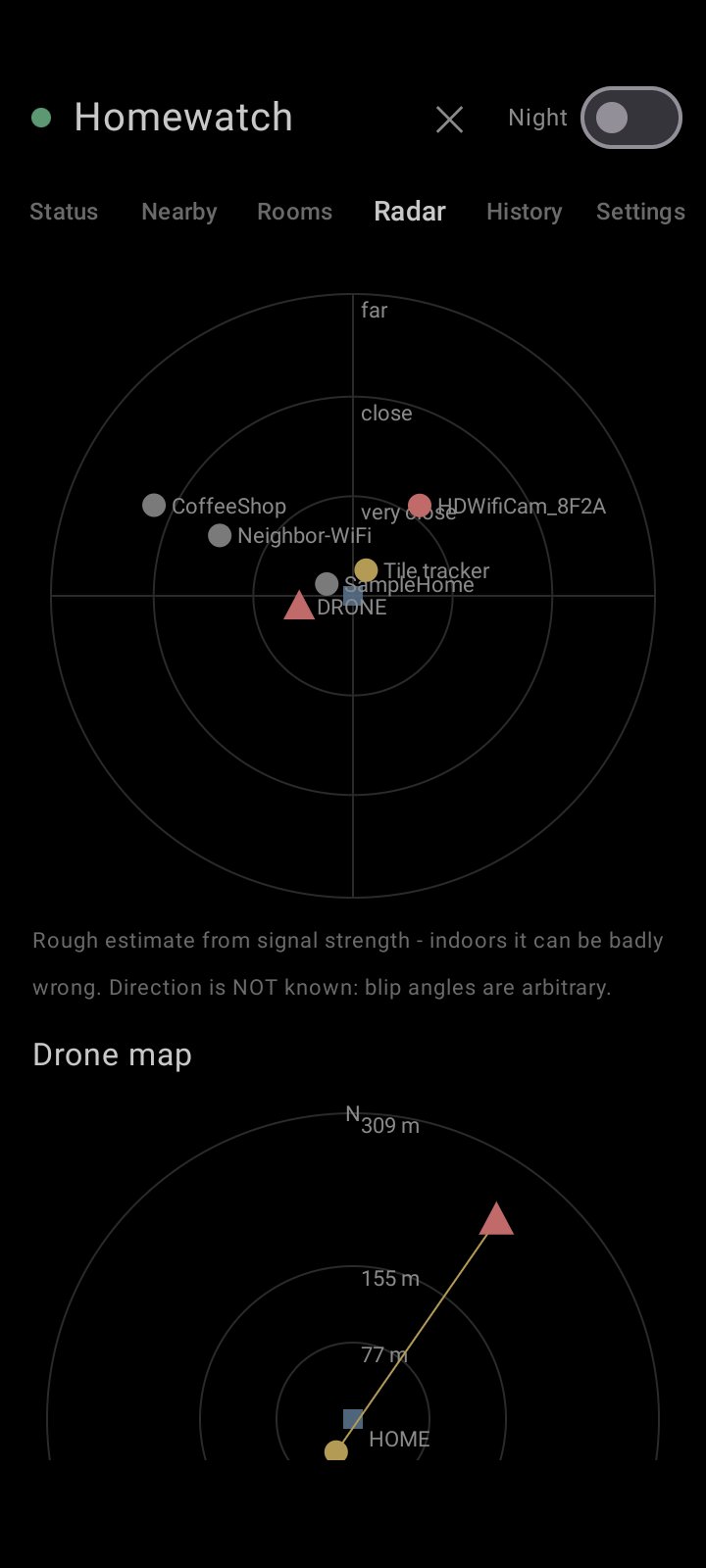
- Listens for FAA Remote ID drone broadcasts over Bluetooth and Wi-Fi, worded honestly as claims (Remote ID can be faked)
- Flags camera-like and drone-like Wi-Fi networks
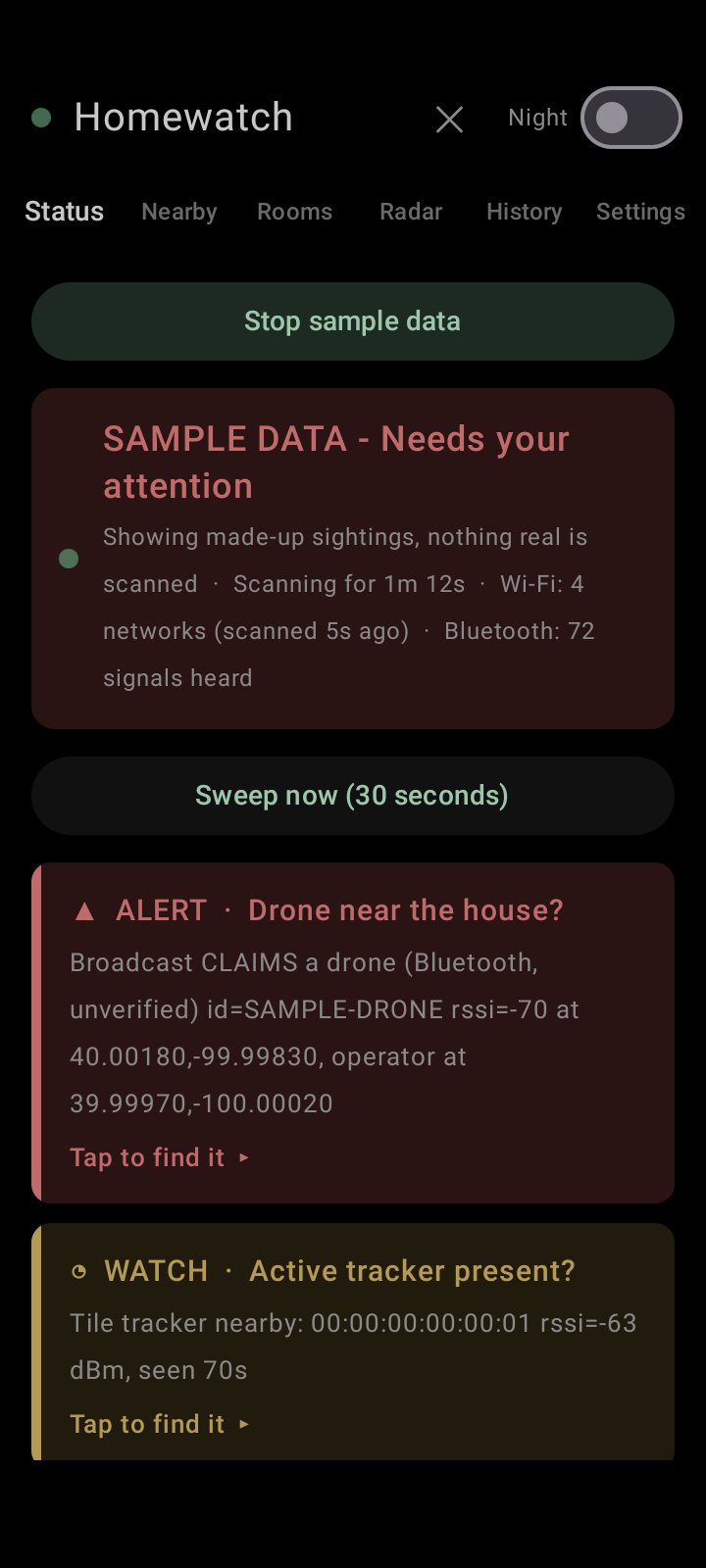
- Tells you in plain words: "All clear", "Keeping an eye on something" or "Needs your attention" - with live proof it is working
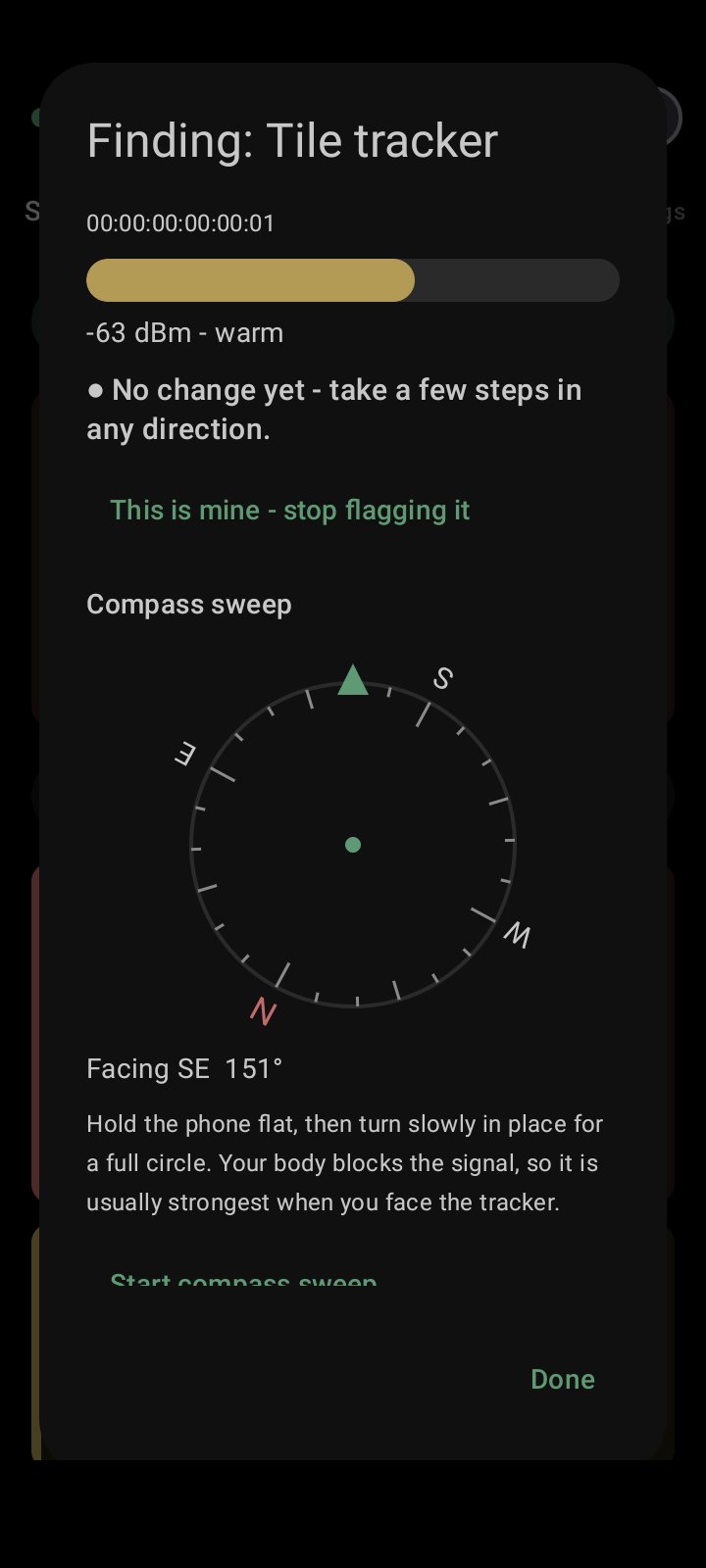
- Tap-to-find: tap an alert for a hot/cold meter, warmer/colder arrow, a real compass sweep, and a GPS+compass arrow for drones that broadcast a position
- Room sweeps: build a baseline per room, spot what is NEW, and see which room a device is probably in
- Survey walks: log what you hear while you walk, see rough source positions, and save a KML (Google Earth) or WiGLE-format file - saved locally, nothing uploads
- "This is mine" for your own trackers and camera-like sources so they stop flagging
- Smart devices: nearby gadgets grouped by maker, plus a privacy checklist (Amazon Sidewalk, Ring/Alexa accounts, router)
- Physical-inspection checklist per room, and a camera-lens finder that uses the torch to spot lens glints in a dark room
- Sweep report: which rooms you swept and inspected, what was NOT checked, and what was flagged - it never says a place is "clear"
- Dark, low-glare screens and a dim-red night mode, so searching at night does not light up the street
- Discreet mode: neutral notifications hidden on the lock screen, PIN lock, hidden from recents and screenshots, a Notes/Weather disguise, one-tap quick exit
- "Try it with sample data" shows every screen working before you trust it with anything real
HONEST LIMITS
A quiet screen is NOT a guarantee of safety. A phone cannot see drones without Remote ID, cameras that only record to an SD card, cellular/GPS trackers, or most hidden devices. Signal-strength distance and direction are rough estimates, and walls bend them. Android limits how often Wi-Fi can be scanned and needs the Location switch on (N0RMA does not read, save or send your location). Some phones stop background apps to save battery.
PRIVACY
Everything stays on the phone. There is no internet permission. The camera permission is used only by the Lens finder, only while it is open: pictures are analysed in memory and thrown away, never saved or sent. History is deleted after 30 days, and you can delete everything with one tap. Drone operator positions are shown live and never saved. The optional address search for your home uses Android's own lookup service; GPS and typed coordinates send nothing.
SAFETY
If you find something you do not own, leave it where it is, photograph it, and contact local law enforcement. Never shoot at, jam or interfere with a drone. If you feel unsafe (for example because of a stalker or abusive partner), contact local police or a hotline; in the US, the National Domestic Violence Hotline is 1-800-799-7233.
Detect-only: N0RMA never jams, spoofs or transmits. Free and open source (MIT).
WHAT IT DOES
- Finds Bluetooth trackers that are separated from their owner (Apple Find My / AirTag-style, Tile, Samsung SmartTag, Chipolo) and ignores normal "owner nearby" signals
- Listens for FAA Remote ID drone broadcasts over Bluetooth and Wi-Fi, worded honestly as claims (Remote ID can be faked)
- Flags camera-like and drone-like Wi-Fi networks
- Tells you in plain words: "All clear", "Keeping an eye on something" or "Needs your attention" - with live proof it is working
- Tap-to-find: tap an alert for a hot/cold meter, warmer/colder arrow, a real compass sweep, and a GPS+compass arrow for drones that broadcast a position
- Room sweeps: build a baseline per room, spot what is NEW, and see which room a device is probably in
- Survey walks: log what you hear while you walk, see rough source positions, and save a KML (Google Earth) or WiGLE-format file - saved locally, nothing uploads
- "This is mine" for your own trackers and camera-like sources so they stop flagging
- Smart devices: nearby gadgets grouped by maker, plus a privacy checklist (Amazon Sidewalk, Ring/Alexa accounts, router)
- Physical-inspection checklist per room, and a camera-lens finder that uses the torch to spot lens glints in a dark room
- Sweep report: which rooms you swept and inspected, what was NOT checked, and what was flagged - it never says a place is "clear"
- Dark, low-glare screens and a dim-red night mode, so searching at night does not light up the street
- Discreet mode: neutral notifications hidden on the lock screen, PIN lock, hidden from recents and screenshots, a Notes/Weather disguise, one-tap quick exit
- "Try it with sample data" shows every screen working before you trust it with anything real
HONEST LIMITS
A quiet screen is NOT a guarantee of safety. A phone cannot see drones without Remote ID, cameras that only record to an SD card, cellular/GPS trackers, or most hidden devices. Signal-strength distance and direction are rough estimates, and walls bend them. Android limits how often Wi-Fi can be scanned and needs the Location switch on (N0RMA does not read, save or send your location). Some phones stop background apps to save battery.
PRIVACY
Everything stays on the phone. There is no internet permission. The camera permission is used only by the Lens finder, only while it is open: pictures are analysed in memory and thrown away, never saved or sent. History is deleted after 30 days, and you can delete everything with one tap. Drone operator positions are shown live and never saved. The optional address search for your home uses Android's own lookup service; GPS and typed coordinates send nothing.
SAFETY
If you find something you do not own, leave it where it is, photograph it, and contact local law enforcement. Never shoot at, jam or interfere with a drone. If you feel unsafe (for example because of a stalker or abusive partner), contact local police or a hotline; in the US, the National Domestic Violence Hotline is 1-800-799-7233.
Detect-only: N0RMA never jams, spoofs or transmits. Free and open source (MIT).
| Release info | New Release on Oct 25, 2026 |
|---|---|
| Release notes | Version 0.7.0 - Two live radars (Bluetooth, Wi-Fi) with plain-language results; Find it, Watch it, This is mine - Walk the whole house: a GPS-free room-by-room check of what is inside your home and what is a neighbor's - New calm home screen, Rebaseline, four themes, lower battery use - New app ID io.github.sloppytopp.n0rma: install it, then uninstall the old Homewatch app |
| Listing data | F-Droid |
Reviews
No reviews yet. Be the first to review N0RMA.
Used N0RMA? Tell other visitors what you thought.
Log in to write a reviewOther products by this publisher
- "No Distractions" for YouTube 4.10 ----
- #Bible 11.6 "Incredible App - My sister shared this app with me a few weeks ago and it is truly incredible.
- #filmphotography 1.4.2 So, you decided to shoot on film?
- $quirrel 1.5.1 $quirrel Budget & Finance helps you plan each paycheck, track spending, manage debt, and see what is safe to spend before the next payday.
- % Percentage Calculator Pro 1.41 This is the Pro version of % Percentage Calculator.
Most viewed Android Connectivity
- 1 XrayFA 1.7.4 XrayFA is a fast, secure, and user-friendly Android client for Xray-core.
-
2
 Pulse 0.99.0-pulse
Garmin watch companion — your data stays on your phone
- 3 Device Connect 0.12.1 Yet another tool to connect Android phone with desktop
-
4
 Airplane Scheduler 3.0
Automatically switch airplane mode on a schedule
- 5 JMP SIM Manager jmp-v1.7.2 Companion app for the JMP eSIM Adapter
-
6
 FocusMastodon 2.12.0.20240624
FocusMastodon is a bright and colourful Mastodon client
- 7 getgovroam 2.3.1(2693) Configure the govroam Wi-Fi network securely and correctly
-
8
 SimpleX Chat 7.1.2
SimpleX Chat - e2e encrypted messenger without any user IDs - private by design!
-
9
 AwakeOnLANMobile 1.0.2
Send WakeOnLAN packets (IPv4/IPv6) over the internet, includes a CIDR scanner
- 10 DumDum 1.1.6 Simple VPN over SOCKS/HTTP/HTTPS proxy
Most downloaded Android Connectivity
- 1 Vento RustDesk backend 8 RustDesk plugin for the Vento remote desktop client
- 2 DCC++Throttle 1.5.2065 Application to drive DCC-EX command station via Bluetooth
- 3 Vento RealVNC backend 8 RealVNC plugin for the Vento remote desktop client
-
4
 xlog2 0.6.10
Peer-to-peer amateur-radio field logbook that syncs with the xlog2 desktop
- 5 Pixel 5G 3.1.1 Config pixel modem NR mode
-
6
 Qetara 1.4.5
Share files and messages between nearby devices on your local network
-
7
 Mages 5.3.7
Experimental Matrix client made using Compose Multiplatform (and Rust).
-
8
 Network Survey 2.0
Survey cellular, Wi-Fi, Bluetooth and GNSS, then log, stream or upload the data
-
9
 RemotePhone 2.2.0
Mirror and control your Android phone from Linux over WiFi
-
10
 MateDroid 1.12.0
View Tesla vehicle data from your self-hosted Teslamate instance