
12downloads
2this week
FreeCommercial
0reviews
Screenshots
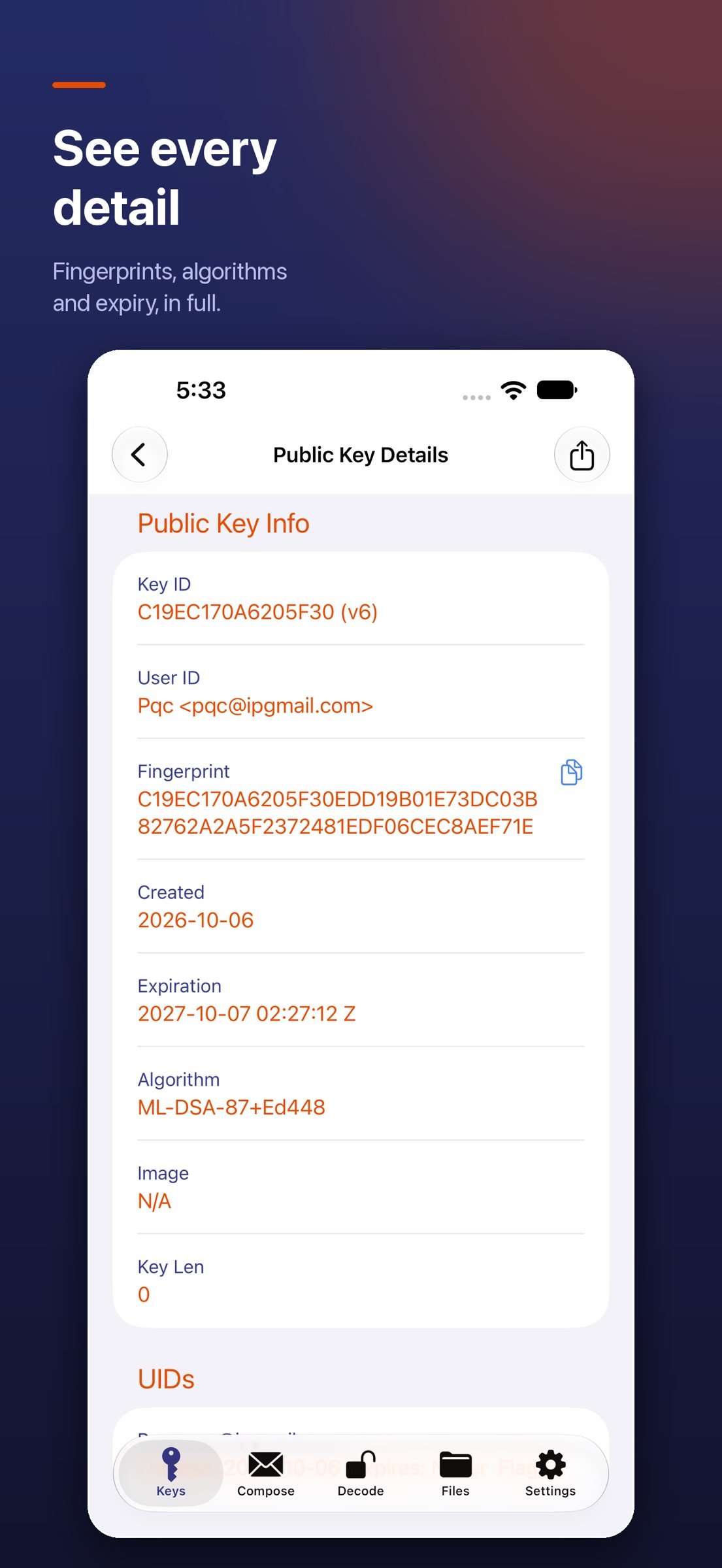
About iPGMail
iPGMail is a complete OpenPGP client for iPhone and iPad. Encrypt, decrypt, and digitally sign email and files using the same RFC 9580 / RFC 4880 standard you already use with GnuPG, Mailvelope, Thunderbird, ProtonMail's PGP exports, and any other OpenPGP-compatible tool.
Bring your existing PGP identity to iOS or generate a new one in the app. Your private keys are stored in a private local database with the highest data-protection class and are unlocked only by Touch ID or Face ID. All cryptography runs locally — your keys and message content never leave your device.
CRYPTO & INTEROPERABILITY
• OpenPGP v4 and v6 (RFC 9580 / RFC 4880, RFC 6637) — fully interoperable with GnuPG, Mailvelope, Thunderbird, ProtonMail PGP exports, and any other compliant tool
• Post-quantum encryption (RFC 9980): import, encrypt to, and verify signatures from hybrid ML-KEM + ML-DSA keys, which pair NIST-standardized post-quantum algorithms with proven elliptic-curve cryptography
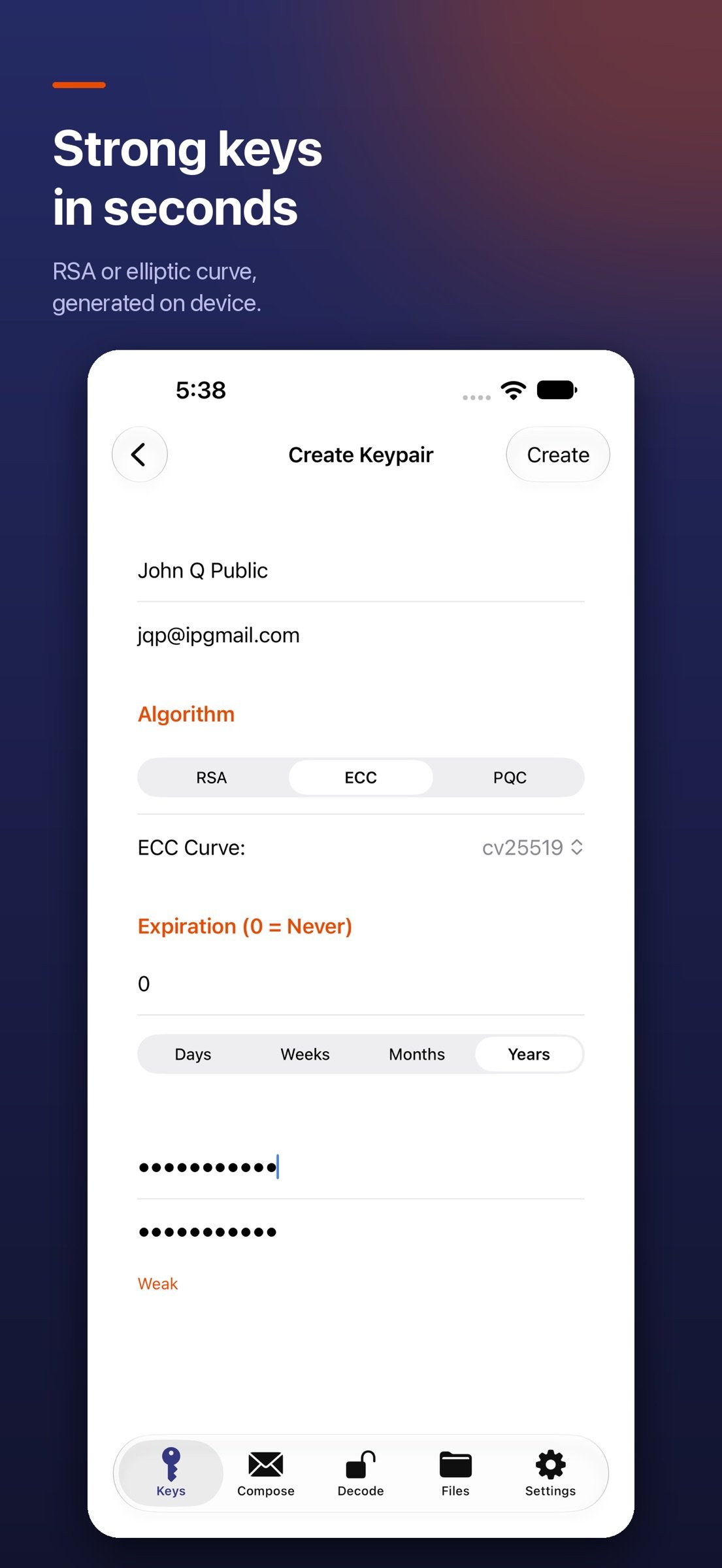
• Optional post-quantum key generation: create v6 ML-DSA-65 + ML-KEM-768 or ML-DSA-87 + ML-KEM-1024 keys (turn on in Settings › Advanced)
• Public-key algorithms: RSA, DSA, ECDSA, EdDSA (Ed25519, Ed448), ECDH (Curve25519, X448), ML-KEM, ML-DSA
• Symmetric ciphers including AES-256, with modern AEAD encryption on PGP v6 (SEIPDv2) messages
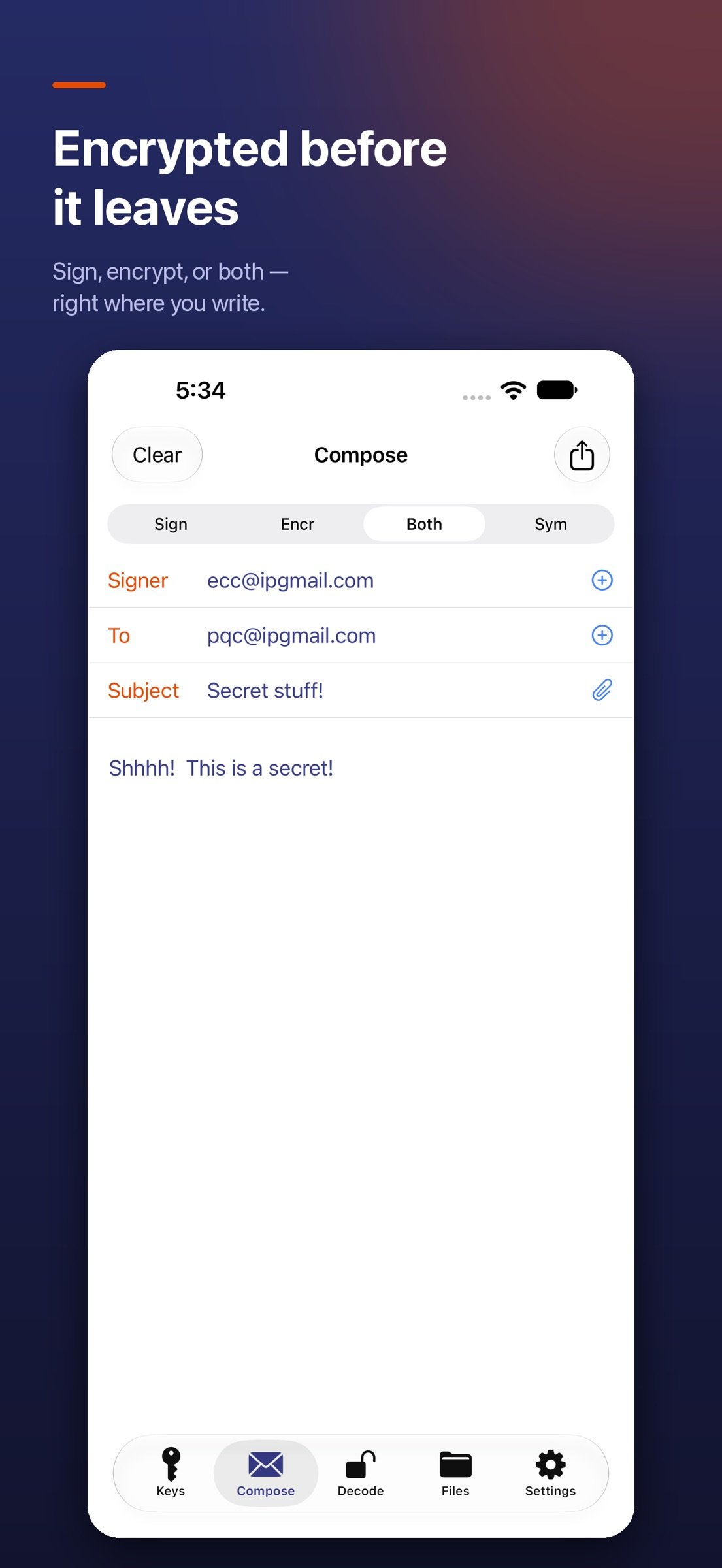
• PGP/MIME for encrypted email; standard ASCII-armored output for any plain-text channel
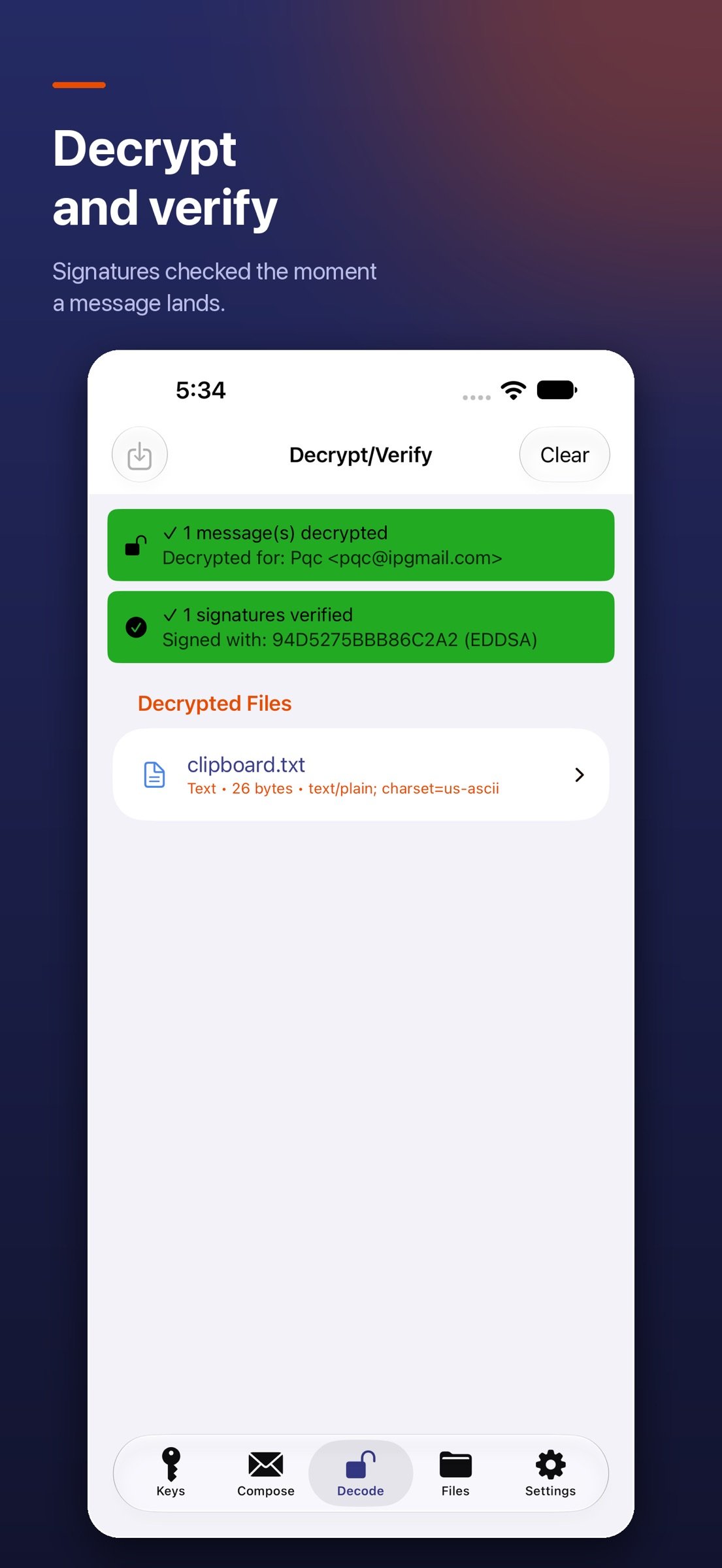
• Detached and inline signatures; sign-only mode for authenticated but readable messages
• Symmetric (password-based) file encryption
• Encrypt to multiple recipients in a single message, mixing classic and post-quantum keys
EMAIL
• Send encrypted email directly from the app via SMTP — works with iCloud, Gmail, Outlook / Hotmail, Yahoo, AOL, Fastmail, GMX, Yandex, mail.ru, QQ, Comcast, and any custom SMTP server
• Google OAuth2 for password-free Gmail authentication
• Reply with quoted plaintext ("> " prefix) so encrypted threads read like normal email
• Or hand off to your default mail app via the standard iOS share sheet
KEY MANAGEMENT
• Generate new keypairs in-app with strong defaults (ECC or RSA)
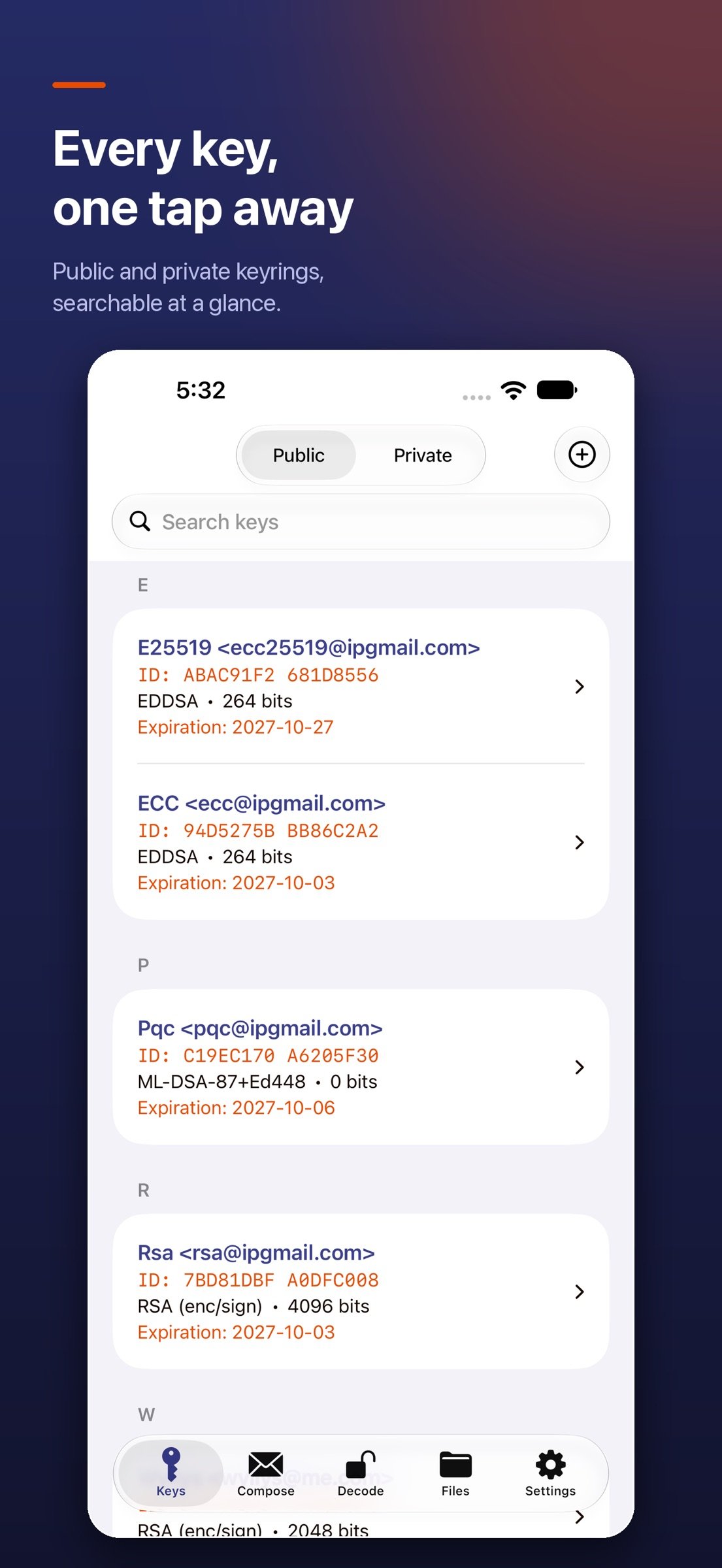
• Import existing public and private keys (ASCII-armored or binary)
• Search SKS / hkps key servers and Keybase to find recipient keys
• Attach your public key to outgoing messages so recipients can import it directly
• Inspect key flags, expiration, signatures, and user IDs
FILES
• Quick Look preview of decrypted content in-place
• Receive encrypted attachments directly from iOS Mail.app — no copy/paste required
• Read .pgp, .gpg, .asc, and .sig files from anywhere via the Files app, AirDrop, iCloud Drive, Dropbox, or the system clipboard
• Open URL handler for the x-ipgmail:// scheme so other apps can hand work to iPGMail
iPAD-OPTIMIZED
• Sidebar navigation and full keyboard shortcut support
• Optimized layouts for Split View and Stage Manager
PRIVACY POSTURE
• Private keys are stored locally in a secured private database and unlocked only by Touch ID / Face ID
• All encryption, decryption, signing, and verification happens on-device
• No account creation, no cloud middleman, no third-party access to your message content
• Open standard — your keys and messages stay portable to any other OpenPGP tool, on any platform
WHO IT'S FOR
Built for journalists, activists, security professionals, lawyers, developers, and anyone who already uses PGP on the desktop and wants the same workflow on iOS. Bring your existing key, decrypt your inbox, sign and send — without surrendering custody of your keys to anyone.
License: Commercial
Bring your existing PGP identity to iOS or generate a new one in the app. Your private keys are stored in a private local database with the highest data-protection class and are unlocked only by Touch ID or Face ID. All cryptography runs locally — your keys and message content never leave your device.
CRYPTO & INTEROPERABILITY
• OpenPGP v4 and v6 (RFC 9580 / RFC 4880, RFC 6637) — fully interoperable with GnuPG, Mailvelope, Thunderbird, ProtonMail PGP exports, and any other compliant tool
• Post-quantum encryption (RFC 9980): import, encrypt to, and verify signatures from hybrid ML-KEM + ML-DSA keys, which pair NIST-standardized post-quantum algorithms with proven elliptic-curve cryptography
• Optional post-quantum key generation: create v6 ML-DSA-65 + ML-KEM-768 or ML-DSA-87 + ML-KEM-1024 keys (turn on in Settings › Advanced)
• Public-key algorithms: RSA, DSA, ECDSA, EdDSA (Ed25519, Ed448), ECDH (Curve25519, X448), ML-KEM, ML-DSA
• Symmetric ciphers including AES-256, with modern AEAD encryption on PGP v6 (SEIPDv2) messages
• PGP/MIME for encrypted email; standard ASCII-armored output for any plain-text channel
• Detached and inline signatures; sign-only mode for authenticated but readable messages
• Symmetric (password-based) file encryption
• Encrypt to multiple recipients in a single message, mixing classic and post-quantum keys
• Send encrypted email directly from the app via SMTP — works with iCloud, Gmail, Outlook / Hotmail, Yahoo, AOL, Fastmail, GMX, Yandex, mail.ru, QQ, Comcast, and any custom SMTP server
• Google OAuth2 for password-free Gmail authentication
• Reply with quoted plaintext ("> " prefix) so encrypted threads read like normal email
• Or hand off to your default mail app via the standard iOS share sheet
KEY MANAGEMENT
• Generate new keypairs in-app with strong defaults (ECC or RSA)
• Import existing public and private keys (ASCII-armored or binary)
• Search SKS / hkps key servers and Keybase to find recipient keys
• Attach your public key to outgoing messages so recipients can import it directly
• Inspect key flags, expiration, signatures, and user IDs
FILES
• Quick Look preview of decrypted content in-place
• Receive encrypted attachments directly from iOS Mail.app — no copy/paste required
• Read .pgp, .gpg, .asc, and .sig files from anywhere via the Files app, AirDrop, iCloud Drive, Dropbox, or the system clipboard
• Open URL handler for the x-ipgmail:// scheme so other apps can hand work to iPGMail
iPAD-OPTIMIZED
• Sidebar navigation and full keyboard shortcut support
• Optimized layouts for Split View and Stage Manager
PRIVACY POSTURE
• Private keys are stored locally in a secured private database and unlocked only by Touch ID / Face ID
• All encryption, decryption, signing, and verification happens on-device
• No account creation, no cloud middleman, no third-party access to your message content
• Open standard — your keys and messages stay portable to any other OpenPGP tool, on any platform
WHO IT'S FOR
Built for journalists, activists, security professionals, lawyers, developers, and anyone who already uses PGP on the desktop and wants the same workflow on iOS. Bring your existing key, decrypt your inbox, sign and send — without surrendering custody of your keys to anyone.
License: Commercial
| Release info | Update on Nov 05, 2026 |
|---|---|
| Release notes | Siri, Shortcuts and Spotlight support * Ask Siri: "Decrypt clipboard with iPGMail" opens the Decode tab and decrypts the message you copied. "Encrypt clipboard for NAME with iPGMail" encrypts the copied text for that person and puts the encrypted message back on the clipboard. * New Shortcuts actions: Encrypt Text, Encrypt File, Decrypt Text and Decrypt File. Encrypt for one or more keys, sign with your own key, or require a valid signature before anything is decrypted. Use them in your own shortcuts and automations. * Encrypted messages and files you create from Siri or Shortcuts are also saved in the Files tab. * Find your keys in Spotlight by name, email, key ID or fingerprint, and tap one to open it in iPGMail (iOS 18 or later). Or say "Show key in iPGMail". * Your app lock still applies: when iPGMail is locked with a PIN or Face ID, it asks you to unlock before decrypting or showing a key, and it asks for a key's password when needed. * Prefer to keep key names out of Spotlight and Siri? Turn off "Show Keys in Spotlight & Siri" in Settings. * Siri phrases and actions are available in English, German and Spanish. |
| Listing data | App Store |
Reviews
No reviews yet. Be the first to review iPGMail.
Used iPGMail? Tell other visitors what you thought.
Log in to write a reviewOther products by this publisher
- "No Distractions" for YouTube 4.10 ----
- #Bible 11.6 "Incredible App - My sister shared this app with me a few weeks ago and it is truly incredible.
- #filmphotography 1.4.2 So, you decided to shoot on film?
- $quirrel 1.5.1 $quirrel Budget & Finance helps you plan each paycheck, track spending, manage debt, and see what is safe to spend before the next payday.
- % Percentage Calculator Pro 1.41 This is the Pro version of % Percentage Calculator.
Most viewed iOS Utilities
-
1
 Device Lab 1.8.5
Device Lab ??????????????????????? App,?????????????????????????????????,????????????????????????
-
2
 APTV 2.4.9
APTV,?????????????? IPTV M3U???,?????????????????
-
3
 VibeSDR 11.0.16
VibeSDR is a mobile-first software-defined radio (SDR) receiver — and far more than a single-server client.
-
4
 DXClock 4.0.0
Connect, collaborate, and operate smarter with DX Clock — the ultimate meeting place for amateur radio operators.
-
5
 ECHOCAT 1.5.2
ECHOCAT is the iPhone and iPad companion for POTACAT, the desktop app for amateur radio operators chasing Parks on the Air (POTA), Summits on the Air (SOTA), Worldwide Bunkers on the Air (WWBOTA), Tiles on the Air and DX.
-
6
 iNetTools 11.0
iNetTools Pro is the Pro Version of iNetTools.
-
7
 DRC 2.0.1
A simple to use app to help calculate any dilution ratio.
-
8
 Ally Pro 1.4.0
Ally Pro – Amiibo & NFC Tool gives advanced collectors complete control over their Amiibo library.
-
9
 RigCalc 1.0
RigCalc puts the everyday drilling calculations you need on the rig floor, in the mud pit, or in the office into one fast, offline app.
-
10
 Demod 1.6
Demod turns your iPhone into a software-defined radio receiver.
Most downloaded iOS Utilities
-
1
 Rat And Mouse Sound Repeller 2.8
Keep mice and rats away overnight with ultrasonic waves and predator sounds.
-
2
Demod 1.6
Demod turns your iPhone into a software-defined radio receiver.
-
3
 Screen Mirroring With Miracast 2.0
Turn your iPhone into a complete TV companion.
-
4
 Guardio 2026.105.1
Guardio protects every part of your digital life: your devices, identity, accounts, and activity, so you can browse, shop, text, and bank online with confidence.
-
5
 Fontcase 2.0.1
Fontcase is an app that lets you install custom fonts on iOS and iPadOS.
-
6
 PickerFull 9.18
Export colors from photos as HEX, PDF, RGB, HSB/HSV, HSBA, HSL, LUV, LCH, YUV, YCBCR, YIQ, CMYK, Grayscale, XYZ, L*a*b* (CIE), CSSVAR, SASSVAR, CSSHSL, CSSRGB, AndroidXML, FlutterDart, UnityColor32, Float, Objective-C, Swift, SwiftLiteral, SwiftUI
-
7
DRC 2.0.1
A simple to use app to help calculate any dilution ratio.
-
8
 DuckDuckGo, optional Duck.ai 7.245.0
At DuckDuckGo, we believe the best way to protect your personal information from hackers, scammers, and privacy-invasive companies is to stop it from being collected at all.
-
9
 PDF Reader 1.3.1
Turbo PDF: Scanner & Editor is a highly reliable scanner application that effectively transforms your smartphone into a robust PDF scanner.
-
10
RigCalc 1.0
RigCalc puts the everyday drilling calculations you need on the rig floor, in the mud pit, or in the office into one fast, offline app.