
GigPocket 2.0.1
Most people stop tracking their gig work because it takes too long.
Download
9.97 MB
15downloads
1this week
FreeFreeware
0reviews
Screenshots
About GigPocket
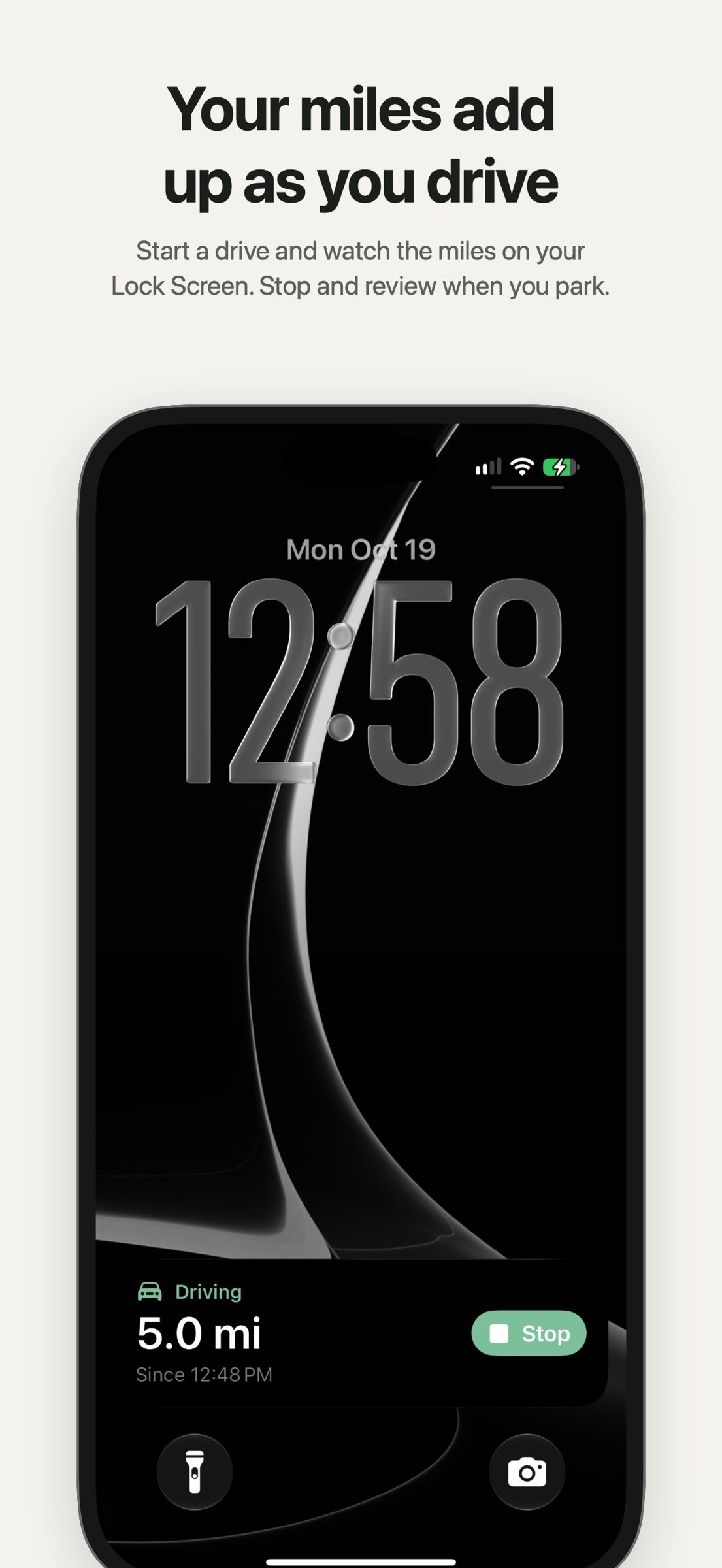
Most people stop tracking their gig work because it takes too long. GigPocket 2 is built so it doesn't: start a drive with Siri or from your car's screen, watch the miles add up on your Lock Screen, and log a shift in a few taps.
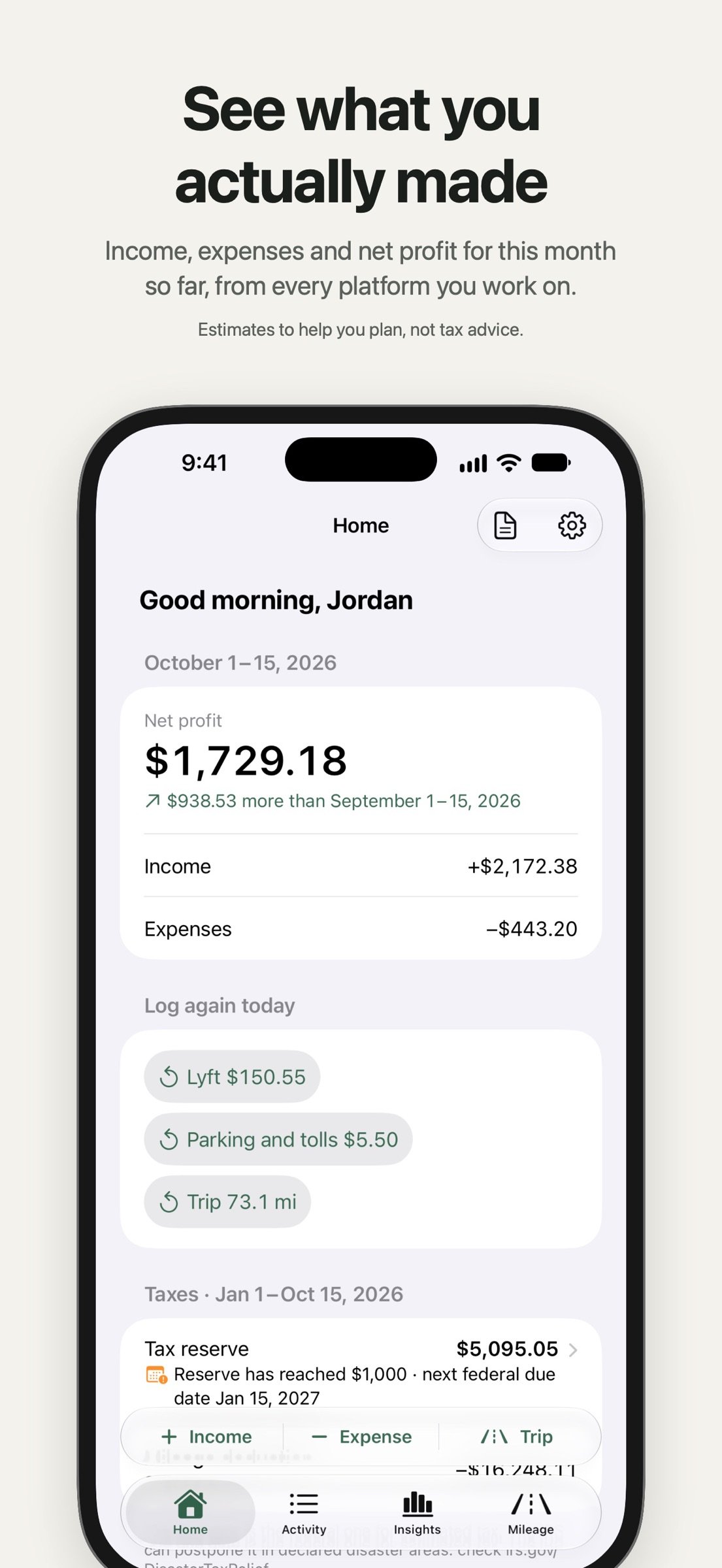
GigPocket keeps the money side of gig work in one place: what you earned on each platform, what you spent, the miles you drove, and an estimate of what to set aside for tax. Free to try for 5 days, then one purchase for life: no subscription, no account, no ads.
START A DRIVE WITHOUT OPENING THE APP
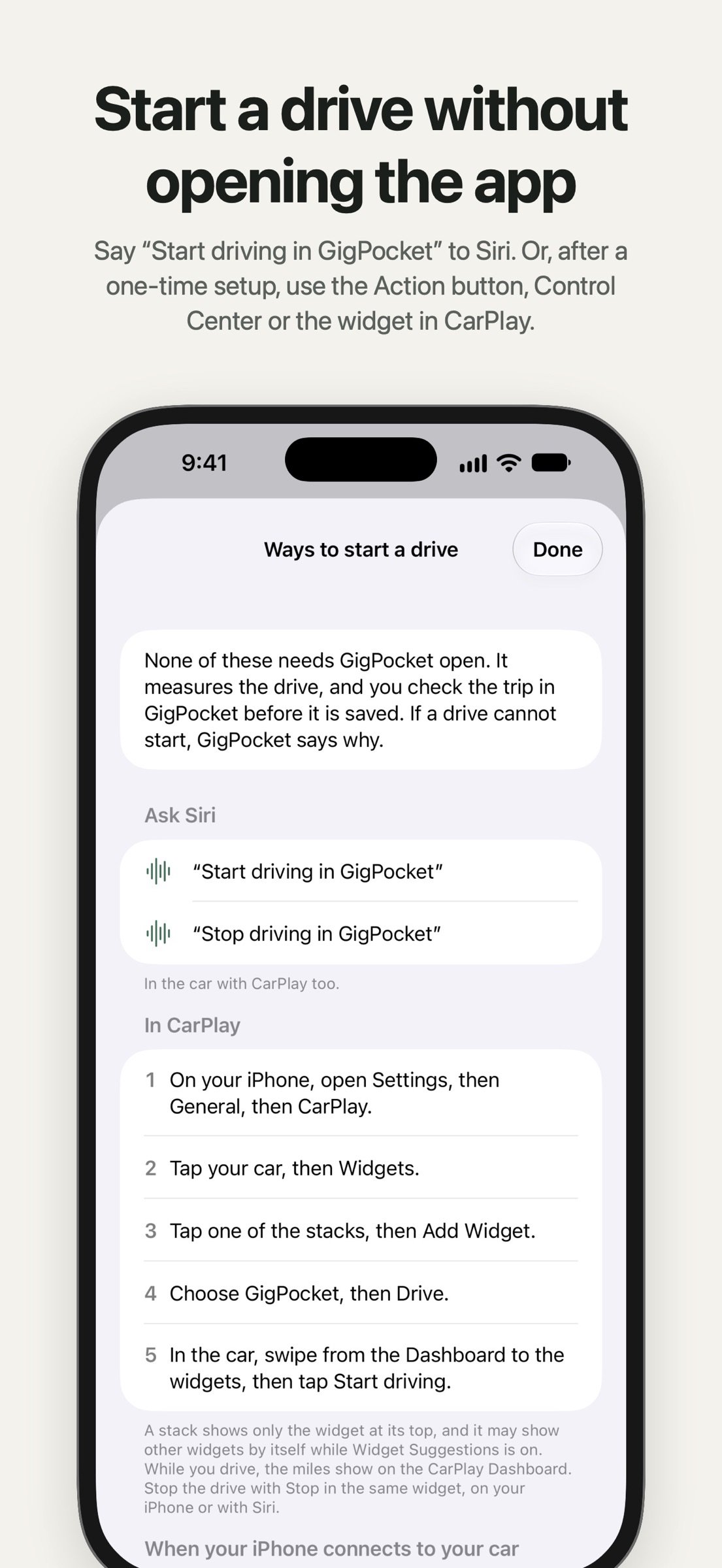
• Say "Start driving in GigPocket" to Siri.
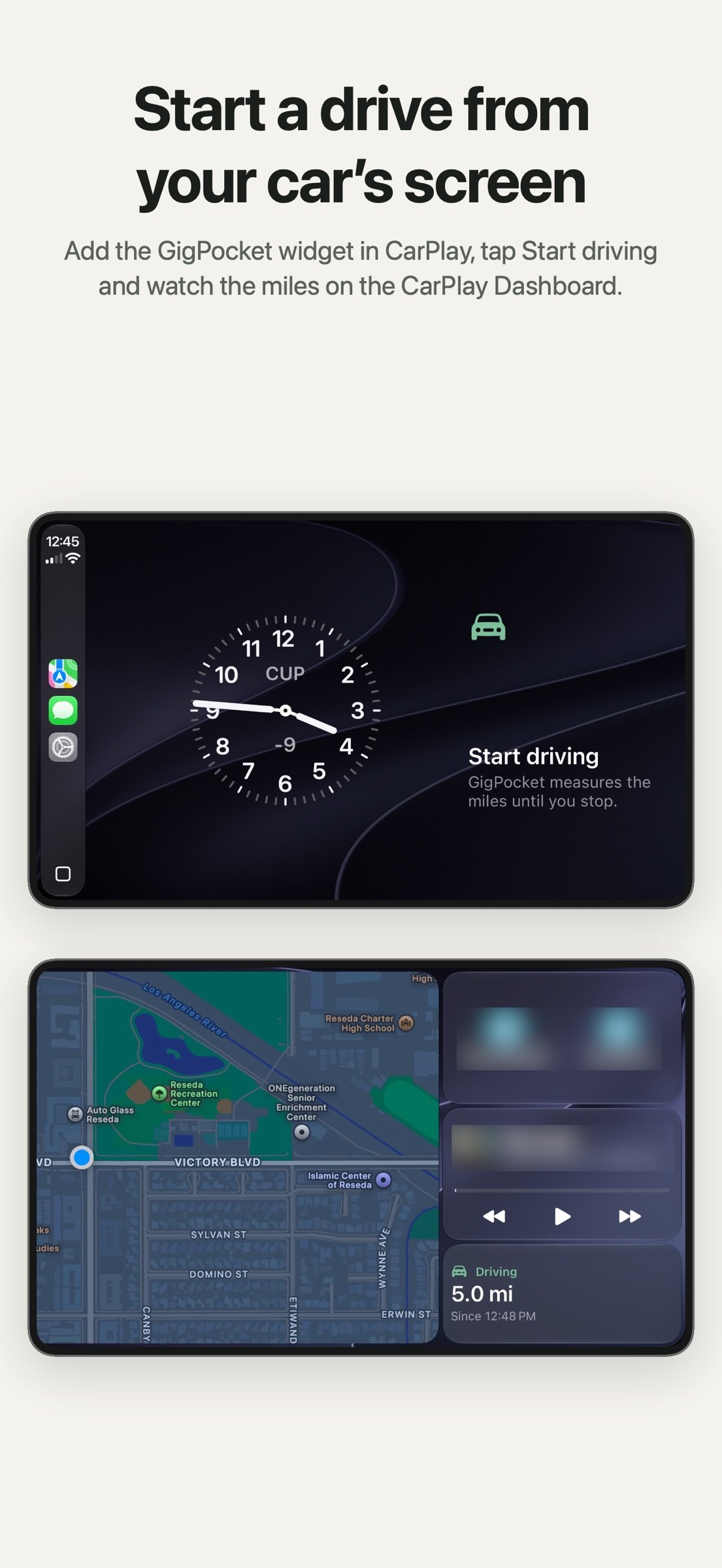
• Or start one from the GigPocket widget in CarPlay, the Action button, Control Center or a Shortcuts automation for your car, after a one-time setup the app shows you step by step.
• GigPocket measures the miles from your location, on your device, until you stop. Watch them on the Lock Screen and the CarPlay Dashboard, and tap Stop on the Lock Screen or in the widget, in CarPlay too.
• Check the trip before it is saved, or type odometer readings instead.
LOG IT IN A FEW TAPS
• Income with its platform, hours and a note. Type the business miles of the shift and the trip is logged with the same save. Commuting miles don't count.
• Expenses by category, with receipts from the camera, your photo library or a PDF file.
• Repeat a recent entry instead of typing it again.
• Comes ready for Uber, Lyft, DoorDash, Uber Eats, Instacart, Amazon Flex and Grubhub, and you can add any platform or freelance work of your own.
SEE WHAT YOU ACTUALLY MADE
• Net profit for this month so far, compared with the same days of last month.
• Activity by week, month, year or all time, filtered by platform and category.
• Insights: projected income for the month, your best day of the week and your top platform.
MILEAGE AT THE IRS RATE OF EACH TRIP'S DATE
• Each trip uses the IRS standard mileage rate in force on its date, or a custom rate you set.
• The estimated deduction for any week, month, year or platform.
• A trip that lacks a purpose or a destination says so, so your mileage log can have the date, miles, destination and purpose of each trip.
• Optional: enter the total miles you drove in a year, and the business use of your vehicle comes from your business miles divided by that total.
TAX ESTIMATES TO HELP YOU PLAN
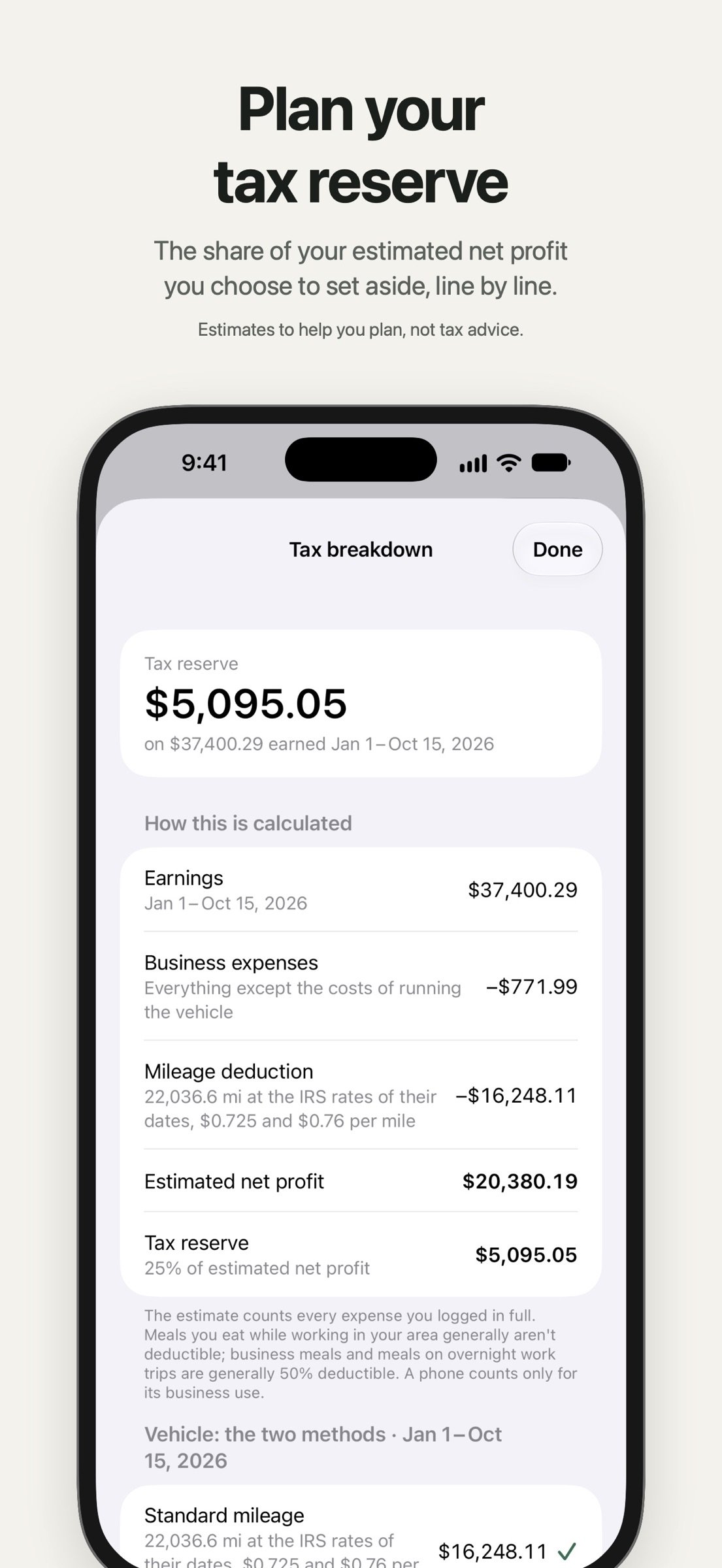
• Tax reserve: the share of your estimated net profit you choose to set aside. 25% is a common rule of thumb.
• The standard mileage rate and your actual vehicle expenses, side by side, and which is larger. Actual expenses are what you logged; they leave out depreciation of a car you own. The IRS limits when each method can be used: for a car you own, standard mileage is allowed only if you used it in the car's first year in your business, and a leased car keeps one method for the whole lease. Each car uses one method for the whole year. You can set the method in Settings.
• Business parking fees and tolls count with either method.
• The next federal due date for estimated tax.
These are estimates to help you plan, not tax advice.
TAX REPORTS
Organized to help you fill in Schedule C, for a year, a quarter or the year to date:
• Mileage log (PDF): the date, miles, destination and purpose of each trip.
• Income & expenses (PDF): every income and expense, with an estimate of net profit.
• Transactions and mileage as CSV files, for a spreadsheet or your accountant.
YOUR DATA STAYS YOURS
• No account and no sign-in. GigPocket has no servers and makes no network connections of its own.
• Your location is used only while a drive you started runs, on your device, and never leaves it; only the trip you save is kept.
• Automatic backup to your own iCloud Drive, if you turn it on. Restore any backup from the list, version 1's too.
• Export a backup file and your receipts.
For rideshare drivers, delivery couriers, shoppers and anyone with 1099 income who drives for business. A new design for iPhone and iPad, in light and dark mode.
GigPocket keeps the money side of gig work in one place: what you earned on each platform, what you spent, the miles you drove, and an estimate of what to set aside for tax. Free to try for 5 days, then one purchase for life: no subscription, no account, no ads.
START A DRIVE WITHOUT OPENING THE APP
• Say "Start driving in GigPocket" to Siri.
• Or start one from the GigPocket widget in CarPlay, the Action button, Control Center or a Shortcuts automation for your car, after a one-time setup the app shows you step by step.
• GigPocket measures the miles from your location, on your device, until you stop. Watch them on the Lock Screen and the CarPlay Dashboard, and tap Stop on the Lock Screen or in the widget, in CarPlay too.
• Check the trip before it is saved, or type odometer readings instead.
LOG IT IN A FEW TAPS
• Income with its platform, hours and a note. Type the business miles of the shift and the trip is logged with the same save. Commuting miles don't count.
• Expenses by category, with receipts from the camera, your photo library or a PDF file.
• Repeat a recent entry instead of typing it again.
• Comes ready for Uber, Lyft, DoorDash, Uber Eats, Instacart, Amazon Flex and Grubhub, and you can add any platform or freelance work of your own.
SEE WHAT YOU ACTUALLY MADE
• Net profit for this month so far, compared with the same days of last month.
• Activity by week, month, year or all time, filtered by platform and category.
• Insights: projected income for the month, your best day of the week and your top platform.
MILEAGE AT THE IRS RATE OF EACH TRIP'S DATE
• Each trip uses the IRS standard mileage rate in force on its date, or a custom rate you set.
• The estimated deduction for any week, month, year or platform.
• A trip that lacks a purpose or a destination says so, so your mileage log can have the date, miles, destination and purpose of each trip.
• Optional: enter the total miles you drove in a year, and the business use of your vehicle comes from your business miles divided by that total.
TAX ESTIMATES TO HELP YOU PLAN
• Tax reserve: the share of your estimated net profit you choose to set aside. 25% is a common rule of thumb.
• The standard mileage rate and your actual vehicle expenses, side by side, and which is larger. Actual expenses are what you logged; they leave out depreciation of a car you own. The IRS limits when each method can be used: for a car you own, standard mileage is allowed only if you used it in the car's first year in your business, and a leased car keeps one method for the whole lease. Each car uses one method for the whole year. You can set the method in Settings.
• Business parking fees and tolls count with either method.
• The next federal due date for estimated tax.
These are estimates to help you plan, not tax advice.
TAX REPORTS
Organized to help you fill in Schedule C, for a year, a quarter or the year to date:
• Mileage log (PDF): the date, miles, destination and purpose of each trip.
• Income & expenses (PDF): every income and expense, with an estimate of net profit.
• Transactions and mileage as CSV files, for a spreadsheet or your accountant.
YOUR DATA STAYS YOURS
• No account and no sign-in. GigPocket has no servers and makes no network connections of its own.
• Your location is used only while a drive you started runs, on your device, and never leaves it; only the trip you save is kept.
• Automatic backup to your own iCloud Drive, if you turn it on. Restore any backup from the list, version 1's too.
• Export a backup file and your receipts.
For rideshare drivers, delivery couriers, shoppers and anyone with 1099 income who drives for business. A new design for iPhone and iPad, in light and dark mode.
| Release info | Update on Oct 21, 2026 |
|---|---|
| Release notes | GigPocket 2 is rebuilt from the ground up as a native iPhone and iPad app, with a new design and less to type. Bought version 1? Everything stays included, with nothing to buy. New downloads are free to try for 5 days, then one purchase for life, no subscription. START DRIVING Tap Start driving in the Mileage tab and GigPocket measures the drive's miles from your location, on your device, until you stop. The location never leaves the device, and you check the trip before it is saved. Or start without opening the app: say "Start driving in GigPocket" to Siri, or, after a one-time setup the app shows you, use the GigPocket widget in CarPlay, the Action button, Control Center or a Shortcuts automation for your car. The Lock Screen shows the miles so far and has Stop, and the CarPlay Dashboard shows them too. You can also type the odometer readings at the start and end of a trip instead of its miles. YOUR DATA COMES WITH YOU The first time it opens, GigPocket 2 reads everything version 1 left on your device: income, expenses, trips, categories, platforms and settings. There is nothing to do, and version 1's own files are left as they were. Settings shows what was read under Import report. If something could not be read, the app says so and never starts empty. RECEIPTS ARE BACK Receipts attached in version 1 that stopped showing after an app update show again, and are included when you export your attachments. MILEAGE AT THE IRS RATE OF EACH TRIP'S DATE Unless you set a rate of your own, version 1 counted every trip at 70¢ a mile. GigPocket 2 uses the IRS standard mileage rate of each trip's date: • 2026 trips: 72.5¢ through June 30 and 76¢ from July 1, so your estimated mileage deduction for 2026 goes up. • 2025 trips: 70¢, as before. • Trips from 2024 or earlier: the IRS rate of their own year, which was lower than the 70¢ version 1 counted. If you used version 1's mileage figures on a return for 2024 or an earlier year, a tax professional can tell you whether any |
| Listing data | App Store |
Reviews
No reviews yet. Be the first to review GigPocket.
Used GigPocket? Tell other visitors what you thought.
Log in to write a reviewOther products by this publisher
- "No Distractions" for YouTube 4.10 ----
- #Bible 11.6 "Incredible App - My sister shared this app with me a few weeks ago and it is truly incredible.
- #filmphotography 1.4.2 So, you decided to shoot on film?
- $quirrel 1.5.1 $quirrel Budget & Finance helps you plan each paycheck, track spending, manage debt, and see what is safe to spend before the next payday.
- % Percentage Calculator Pro 1.41 This is the Pro version of % Percentage Calculator.
Most viewed iOS Business
-
1
 Navy Federal Credit Union 2026.10.1
Bank easy with the Navy Federal mobile app!
-
2
 Paycom 8.0.14
If you or your company use Paycom’s HR and software, the Paycom app helps you manage everyday HR and payroll tasks in one place — like checking your schedule, requesting time off and reviewing your pay.
-
3
 Entrust Identity 26.3.0
The Entrust Identity mobile application is the new Entrust mobile platform for delivering strong identity credentials to both employee and consumer users.
-
4
 Intune Company Portal 5.2610.0
Microsoft Intune helps organizations manage access to corporate apps, data, and resources.
- 5 % Percentage Calculator Pro 1.41 This is the Pro version of % Percentage Calculator.
-
6
 ParkNYC Powered by Flowbird 2.2
Have you ever been late to an important meeting and you can’t find a parking spot?
-
7
 Shopify 11.2644.1
Shopify: build your online store, sell anywhere, run your business
-
8
 Budget-Beacon 1.5
Budget Beacon connects to your Apple Wallet to help you understand and manage your spending.
-
9
 MiniVAN Touch 9.4.6
miniVAN Touch is a mobile canvassing application that integrates with websites provided by NGP VAN.
-
10
 Muha Members 2.0.3
With Muha Members, you’re now equipped to verify authenticity like a pro and protect yourself from counterfeits.
Most downloaded iOS Business
-
1
ParkNYC Powered by Flowbird 2.2
Have you ever been late to an important meeting and you can’t find a parking spot?
-
2
Budget-Beacon 1.5
Budget Beacon connects to your Apple Wallet to help you understand and manage your spending.
-
3
 Rocket.Chat 4.78.1
Rocket.Chat Secure CommsOS™ is a communication platform that unifies messaging, voice, video, AI, and mission-critical applications—ensuring uncompromising security, compliance, and operational efficiency for governments, defense, and critical infra…
-
4
 Business Timesheet 6.0
Are you looking for timesheet to track the work hours spent on hourly, daily or weekly basis accurately?
-
5
 Cvent Events 2.8.0
Cvent Events is your place to easily plan out your event experience, find where you need to go next, network with other attendees, and learn more about sponsors and exhibitors.
-
6
 Receivable Payment Ledger2026 1.1
Payment Ledger is a fully offline accounts receivable management tool for small businesses, shops, wholesalers, and salespeople who need to track customer debts and payment progress.
-
7
 Simple Budget Envelopes 2.2.1
An incredibly simple app, perfect for keeping track of how much money remains in your budget.
-
8
 Vola 4.9.01
Vola is the only cash advance app built for Real-Time Payments (RTP).
- 9 % Percentage Calculator Pro 1.41 This is the Pro version of % Percentage Calculator.
- 10 $quirrel 1.5.1 $quirrel Budget & Finance helps you plan each paycheck, track spending, manage debt, and see what is safe to spend before the next payday.