0downloads
0this week
FreeCommercial
0reviews
Screenshots
About Geo Measure
Any area. Any distance. On a map.
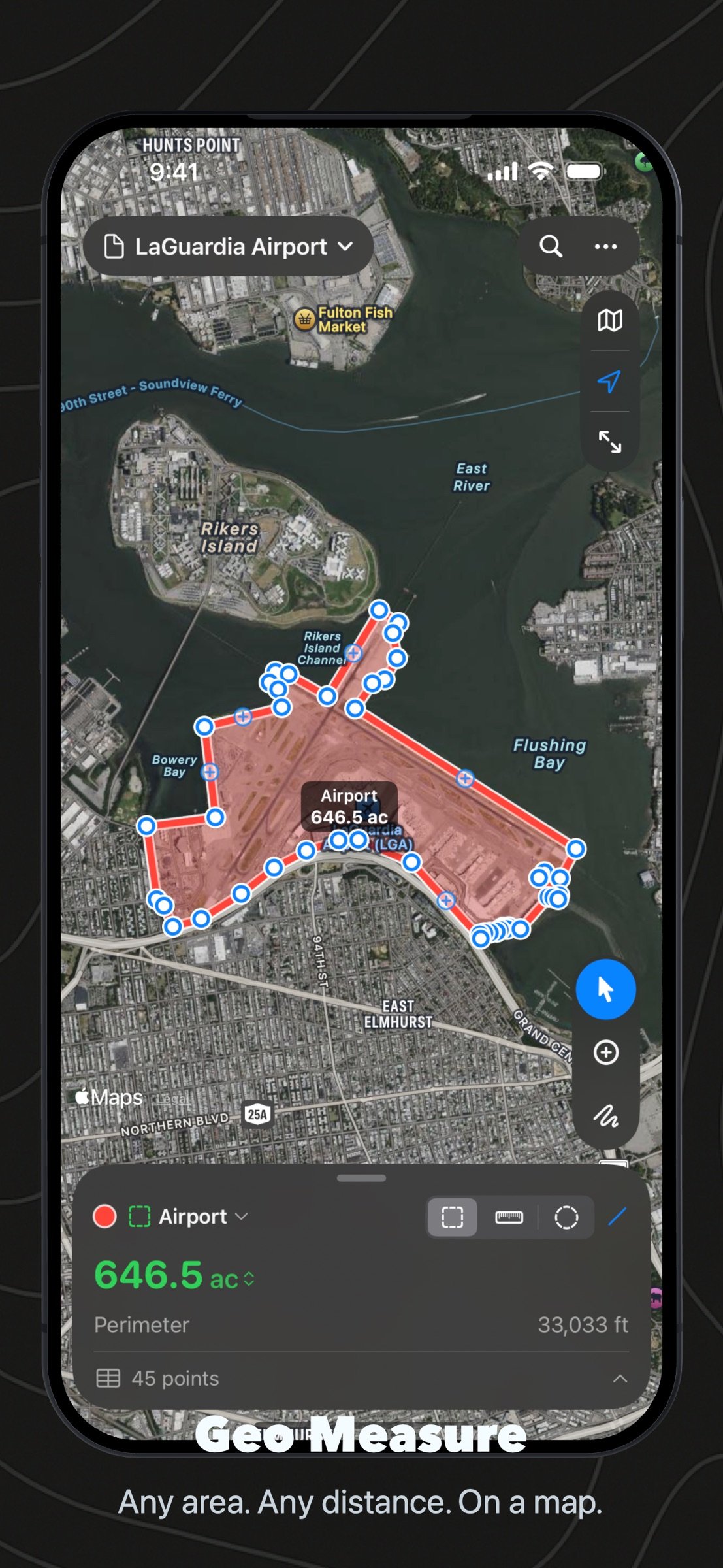
How many acres is that field? How far is the walk to the station? How much fence does the new lot need? Geo Measure answers on a map: tap the corners, read the number. On iPhone, iPad, Mac and Apple Vision Pro, from one purchase.
TAP, DRAG, BEND
Tap the map to drop points. Drag a pin to move it, with a loupe that shows exactly where it sits. Tap the small dot on an edge to bend it. Tap a pin to delete it. Every step is undoable.
ALONG ROADS AND PATHS
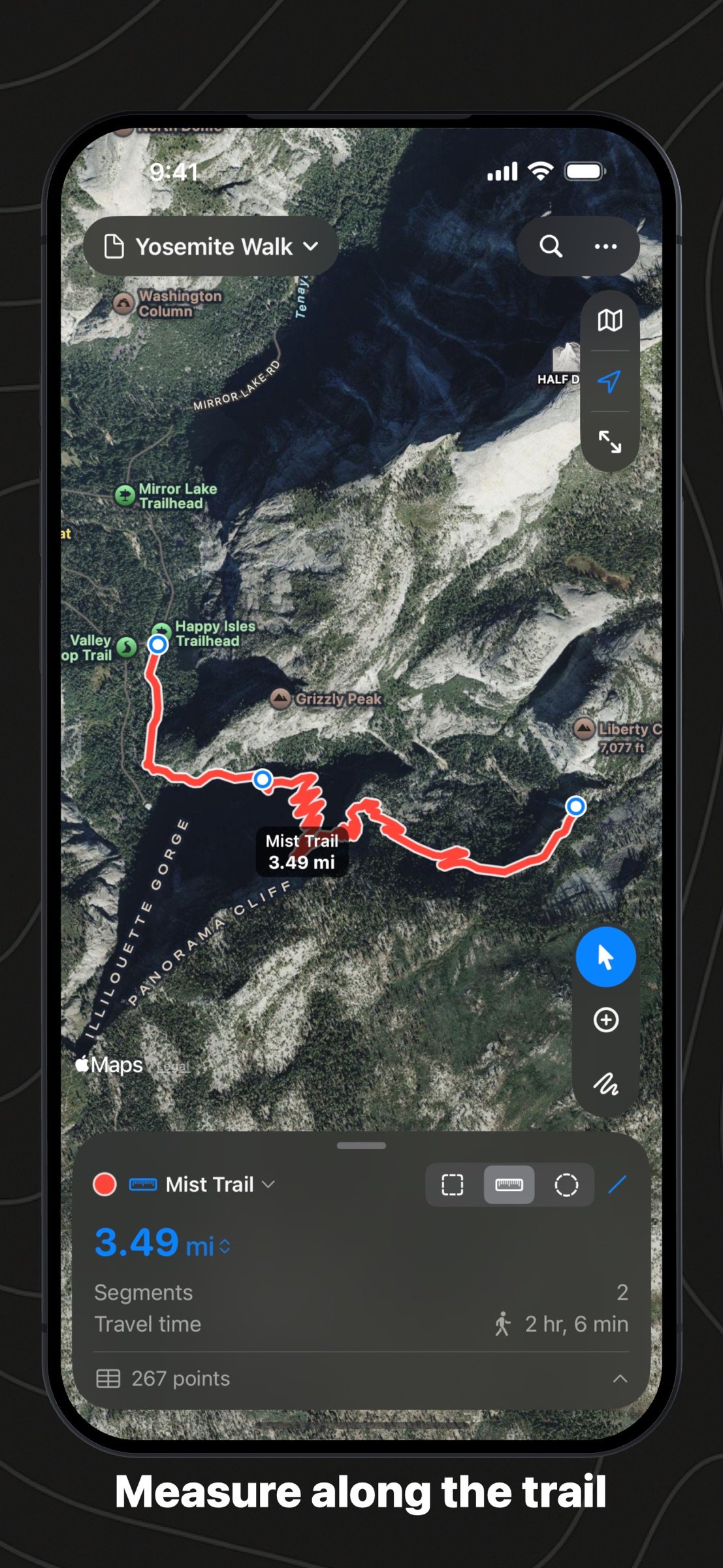
Measure the walk, the ride or the drive the way you would really go: pick Walking, Cycling or Driving and each tap follows the paths and roads there, with Apple Maps' travel time. Drag a point and the route finds its way again; an area closes along the roads too.
EVERY POINT IN A TABLE
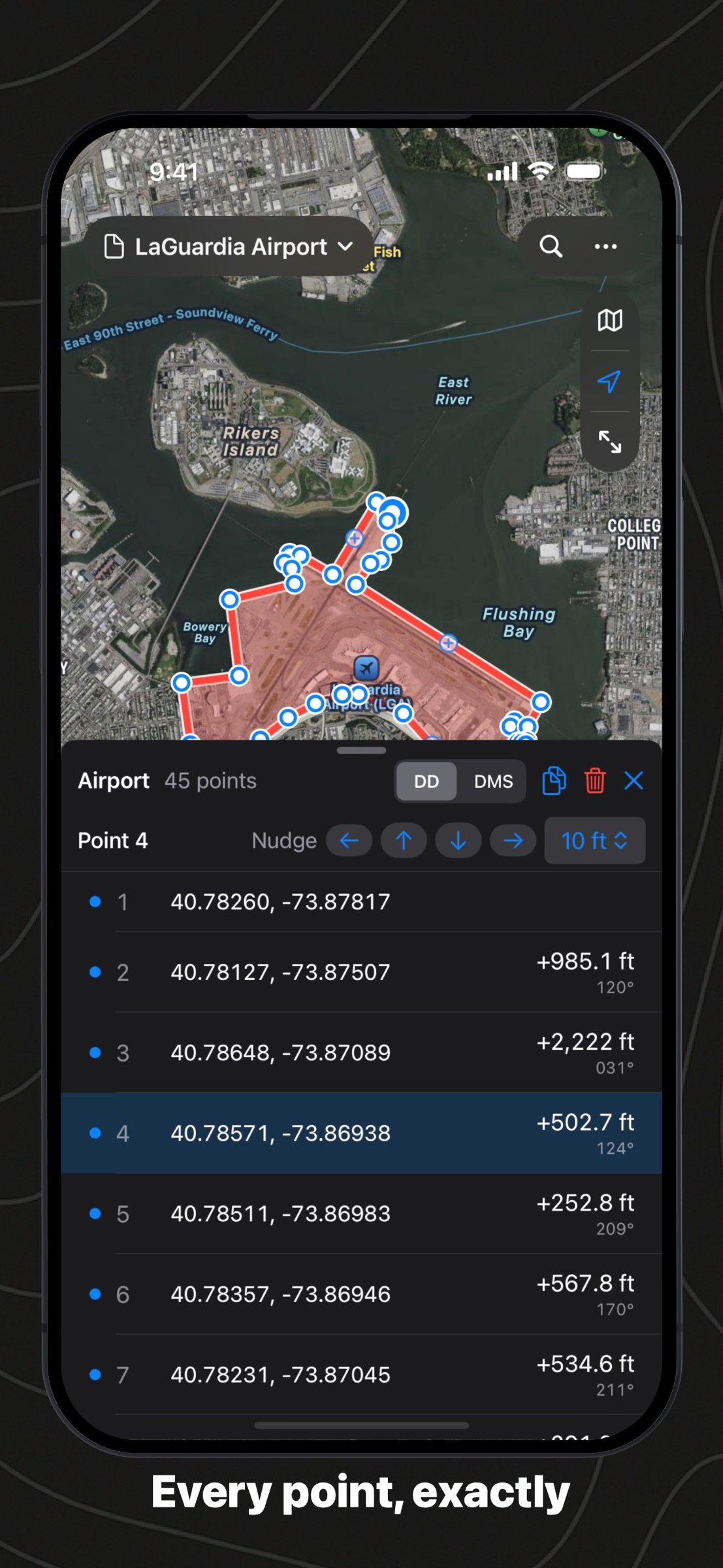
Open the points table under the map: coordinates, leg, bearing and running distance for every point. Type a coordinate in place, nudge a point by a metre or a foot, delete several at once, or copy them all to a spreadsheet.
AREAS, DISTANCES AND CIRCLES, IN ONE FILE
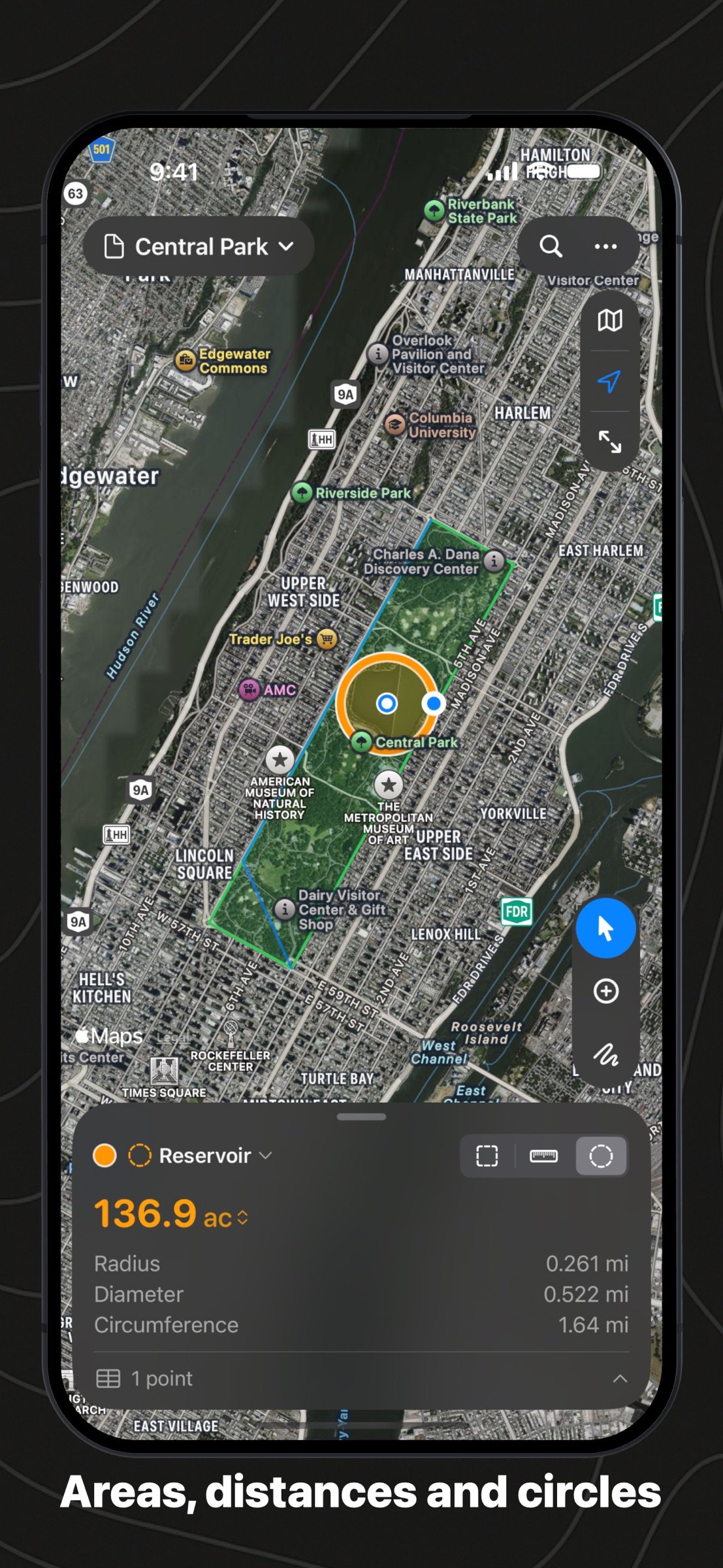
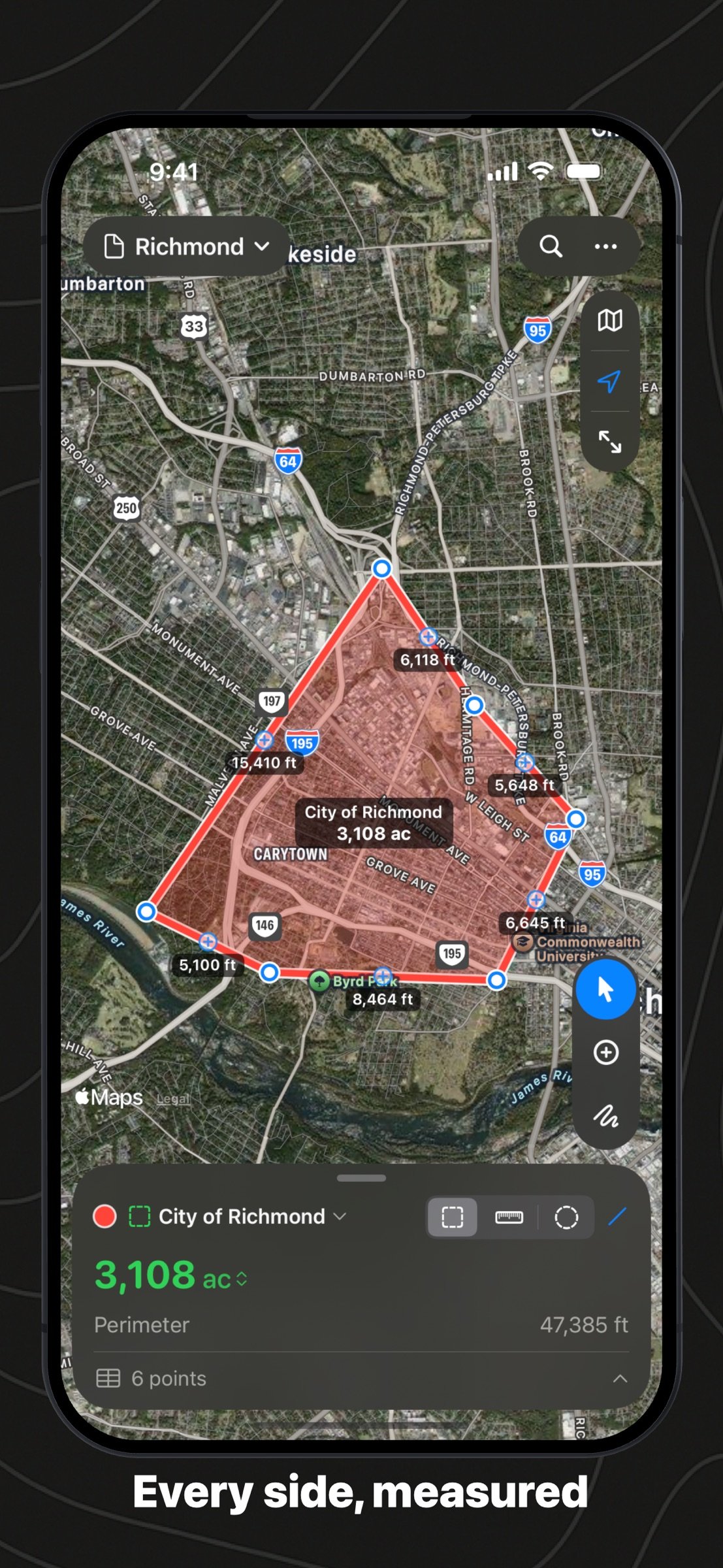
Keep several shapes in one document: the north field, the fence line, the sprinkler's reach. Each has a name and a colour, and the totals add up at the bottom. Circles by radius, with diameter and circumference.
THE RIGHT NUMBER
Areas and distances are computed on the WGS84 ellipsoid, the way surveying software does, so a plot in Norway and a lot in Kenya are both right. Acres, hectares, ares, square feet, square yards, square metres, square miles, square kilometres and tsubo; kilometres, miles, metres, feet, yards and nautical miles. The outline warns you when it crosses itself.
EVERY POINT, WRITTEN DOWN
Coordinates in decimal degrees or degrees, minutes and seconds; the length and bearing of every leg; the perimeter. Type a coordinate to add a point exactly. Add the point where you stand, or walk the boundary and let the phone drop a point every few metres.
IN AND OUT
Export GeoJSON, KML for Google Earth, CSV for a spreadsheet, GPX for a GPS, a PNG of the map, or a PDF report with the map and every point. Import GeoJSON, KML and GPX. Print from the Mac and from the phone.
MADE FOR THE MAC
Documents in windows, autosave and versions, a full menu bar: ?1, ?2, ?3 for a new area, distance or circle, ?0 to fit, ?F to search, ? to delete a point, ?, for settings. Drop a file on the map to import it.
ON IPHONE AND IPAD
The map fills the screen and a small card carries the number. Trace a shape with a finger or the Pencil. Files live in Files and iCloud Drive and open on every device.
YOURS STAYS YOURS
No account, no server, no tracking. Your measurements are files on your device, and in your iCloud Drive if you put them there. One purchase, no subscription, no in-app purchases. In English, German, French, Spanish and Japanese.
License: Commercial
How many acres is that field? How far is the walk to the station? How much fence does the new lot need? Geo Measure answers on a map: tap the corners, read the number. On iPhone, iPad, Mac and Apple Vision Pro, from one purchase.
TAP, DRAG, BEND
Tap the map to drop points. Drag a pin to move it, with a loupe that shows exactly where it sits. Tap the small dot on an edge to bend it. Tap a pin to delete it. Every step is undoable.
ALONG ROADS AND PATHS
Measure the walk, the ride or the drive the way you would really go: pick Walking, Cycling or Driving and each tap follows the paths and roads there, with Apple Maps' travel time. Drag a point and the route finds its way again; an area closes along the roads too.
EVERY POINT IN A TABLE
Open the points table under the map: coordinates, leg, bearing and running distance for every point. Type a coordinate in place, nudge a point by a metre or a foot, delete several at once, or copy them all to a spreadsheet.
AREAS, DISTANCES AND CIRCLES, IN ONE FILE
Keep several shapes in one document: the north field, the fence line, the sprinkler's reach. Each has a name and a colour, and the totals add up at the bottom. Circles by radius, with diameter and circumference.
THE RIGHT NUMBER
Areas and distances are computed on the WGS84 ellipsoid, the way surveying software does, so a plot in Norway and a lot in Kenya are both right. Acres, hectares, ares, square feet, square yards, square metres, square miles, square kilometres and tsubo; kilometres, miles, metres, feet, yards and nautical miles. The outline warns you when it crosses itself.
EVERY POINT, WRITTEN DOWN
Coordinates in decimal degrees or degrees, minutes and seconds; the length and bearing of every leg; the perimeter. Type a coordinate to add a point exactly. Add the point where you stand, or walk the boundary and let the phone drop a point every few metres.
IN AND OUT
Export GeoJSON, KML for Google Earth, CSV for a spreadsheet, GPX for a GPS, a PNG of the map, or a PDF report with the map and every point. Import GeoJSON, KML and GPX. Print from the Mac and from the phone.
MADE FOR THE MAC
Documents in windows, autosave and versions, a full menu bar: ?1, ?2, ?3 for a new area, distance or circle, ?0 to fit, ?F to search, ? to delete a point, ?, for settings. Drop a file on the map to import it.
ON IPHONE AND IPAD
The map fills the screen and a small card carries the number. Trace a shape with a finger or the Pencil. Files live in Files and iCloud Drive and open on every device.
YOURS STAYS YOURS
No account, no server, no tracking. Your measurements are files on your device, and in your iCloud Drive if you put them there. One purchase, no subscription, no in-app purchases. In English, German, French, Spanish and Japanese.
License: Commercial
| Release info | New Release on Oct 01, 2026 |
|---|---|
| Release notes | New in 3.1: o Follow roads and paths: choose Walking, Cycling or Driving and each tap follows the way there, with the travel time. Drag a point and its legs find the way again; areas close along the roads too. o A table of every point under the map: coordinates, leg, bearing and running distance. Type a coordinate in place, nudge a point north, south, east or west, delete several at once, copy as CSV. o Select and Add Points: pan and pick shapes without adding points by mistake. o Cleaner drawing: points sit on the line, lines are wider with a halo on the selected shape, and the small + on an edge adds a point. o On the Mac, trace freehand with ?-drag. |
| Listing data | App Store |
Reviews
No reviews yet. Be the first to review Geo Measure.
Used Geo Measure? Tell other visitors what you thought.
Log in to write a reviewOther products by this publisher
- #Bible 11.5 "Incredible App - My sister shared this app with me a few weeks ago and it is truly incredible.
- % Percentage Calculator Pro 1.41 This is the Pro version of % Percentage Calculator.
- (beat) for iOS 0.5.8 An elegant Fountain screenwriting app, created by a screenwriter for screenwriters.
- (Deep) HIARCS Chess Explorer 1.14 Chess database, analysis and game playing program
- (How to) Pronounce PRO 1.5.6 This is a PRO version of (How to) Pronounce.
Most viewed iOS Navigation
-
1
 CARFACE Car Widgets & Lyrics 1.1.3
Create personalized in-car displays with custom widgets, dashboard-style screens, fun sound effects, photos, vehicle-inspired visuals, and glanceable information that match the way you drive.
CARFACE Car Widgets & Lyrics 1.1.3
Create personalized in-car displays with custom widgets, dashboard-style screens, fun sound effects, photos, vehicle-inspired visuals, and glanceable information that match the way you drive.
-
2
 American Airlines 2026.30
With the American Airlines app, you’re covered with the information you need exactly when you need it.
American Airlines 2026.30
With the American Airlines app, you’re covered with the information you need exactly when you need it.
-
3
 Uber 3.743.10001
Join the millions of riders who trust Uber for their everyday travel needs.
Uber 3.743.10001
Join the millions of riders who trust Uber for their everyday travel needs.
-
4
 Turo 26.41.0
Turo is a better car rental app for travelers who want to rent a car without the rental counter.
Turo 26.41.0
Turo is a better car rental app for travelers who want to rent a car without the rental counter.
-
5
 Lyft 2026.39.32
Get where you’re going with Lyft.
Lyft 2026.39.32
Get where you’re going with Lyft.
-
6
 Waymo 152
Get there with The World’s Most Experienced Driver™
Waymo 152
Get there with The World’s Most Experienced Driver™
-
7
 United Airlines 4.2.99
Meet the United app
United Airlines 4.2.99
Meet the United app
-
8
 U-Haul 3.11.9
Get moving in minutes with U-Haul, your local moving truck rental.
U-Haul 3.11.9
Get moving in minutes with U-Haul, your local moving truck rental.
-
9
 Global Entry Appointment 5.0
The main purpose of this app is to help you find the soonest appointments near you.
Global Entry Appointment 5.0
The main purpose of this app is to help you find the soonest appointments near you.
-
10
 Fly Delta 7.16.1
Welcome to Fly Delta, Delta’s award winning iOS app.
Fly Delta 7.16.1
Welcome to Fly Delta, Delta’s award winning iOS app.
Most downloaded iOS Navigation
-
1
 Airbnb 26.42
AIRBNB MORE THAN AN AIRBNB
Airbnb 26.42
AIRBNB MORE THAN AN AIRBNB
-
2
 Southwest Airlines 13.35.1
The Southwest® app makes travel easy.
Southwest Airlines 13.35.1
The Southwest® app makes travel easy.
-
3
 Marriott Bonvoy 10.113.0
Book directly with Marriott Bonvoy to enjoy exclusive offers, take the stress out of travel planning, and find the best hotel deals.
Marriott Bonvoy 10.113.0
Book directly with Marriott Bonvoy to enjoy exclusive offers, take the stress out of travel planning, and find the best hotel deals.
-
4
 Hilton Honors 2026.10.6
Book hotels through the Hilton Honors app for the best rates available.
Hilton Honors 2026.10.6
Book hotels through the Hilton Honors app for the best rates available.
-
5
 Google Earth 10.121.84
Create and collaborate on immersive, data-driven maps from anywhere, with the new Google Earth.
Google Earth 10.121.84
Create and collaborate on immersive, data-driven maps from anywhere, with the new Google Earth.
-
6
Global Entry Appointment 5.0
The main purpose of this app is to help you find the soonest appointments near you.
-
7
 MyBusSF 2026 1.02
Save your favorite San Francisco Muni stops & routes, and see when the next buses will arrive.
MyBusSF 2026 1.02
Save your favorite San Francisco Muni stops & routes, and see when the next buses will arrive.
-
8
 Hot Air 15.19
Hot Air is a complete balloon flight companion, built by balloon pilots for balloon pilots.
Hot Air 15.19
Hot Air is a complete balloon flight companion, built by balloon pilots for balloon pilots.
-
9
Uber 3.743.10001
Join the millions of riders who trust Uber for their everyday travel needs.
-
10
American Airlines 2026.30
With the American Airlines app, you’re covered with the information you need exactly when you need it.