
FanEar 2.0.3
Thinking about buying an AI voice recorder, recording card, or digital voice pen?
Download
494.94 MB
4downloads
0this week
FreeCommercial
0reviews
Screenshots
About FanEar
Thinking about buying an AI voice recorder, recording card, or digital voice pen? If you already wear an Apple Watch, install FanEar and start right away—pay once and keep using it.
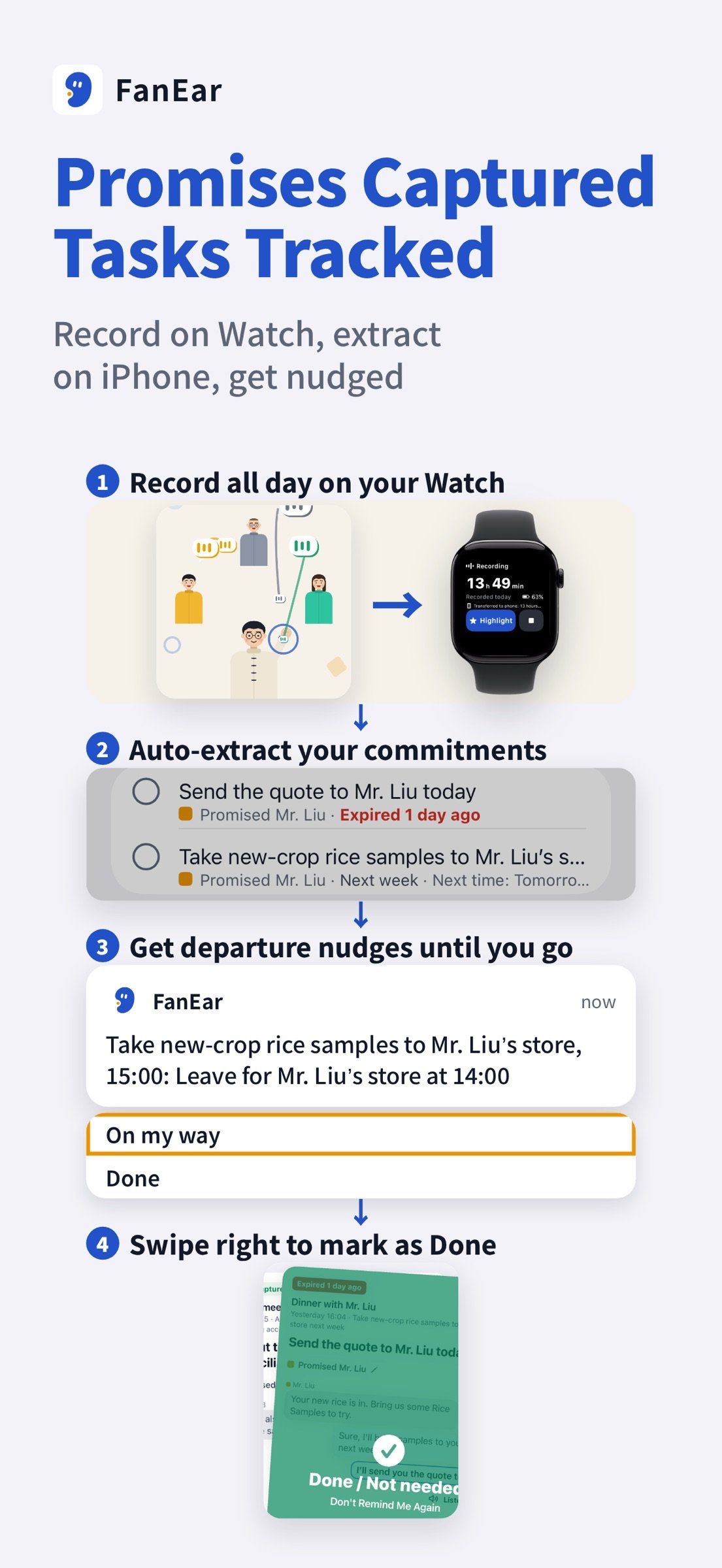
Why record on your Watch? You already wear it every day—nothing extra to carry or charge—and once you open FanEar, your recordings are transcribed, organized, and turned into to-dos on your iPhone that remind you until they're done. I have ADHD and forget promises immediately, so I rely on FanEar: in the single week of October 21 to 27, it pulled 118 things I promised to do straight out of my recordings.
[Wear Your Watch All Day, See Your Whole Day on Your Phone]
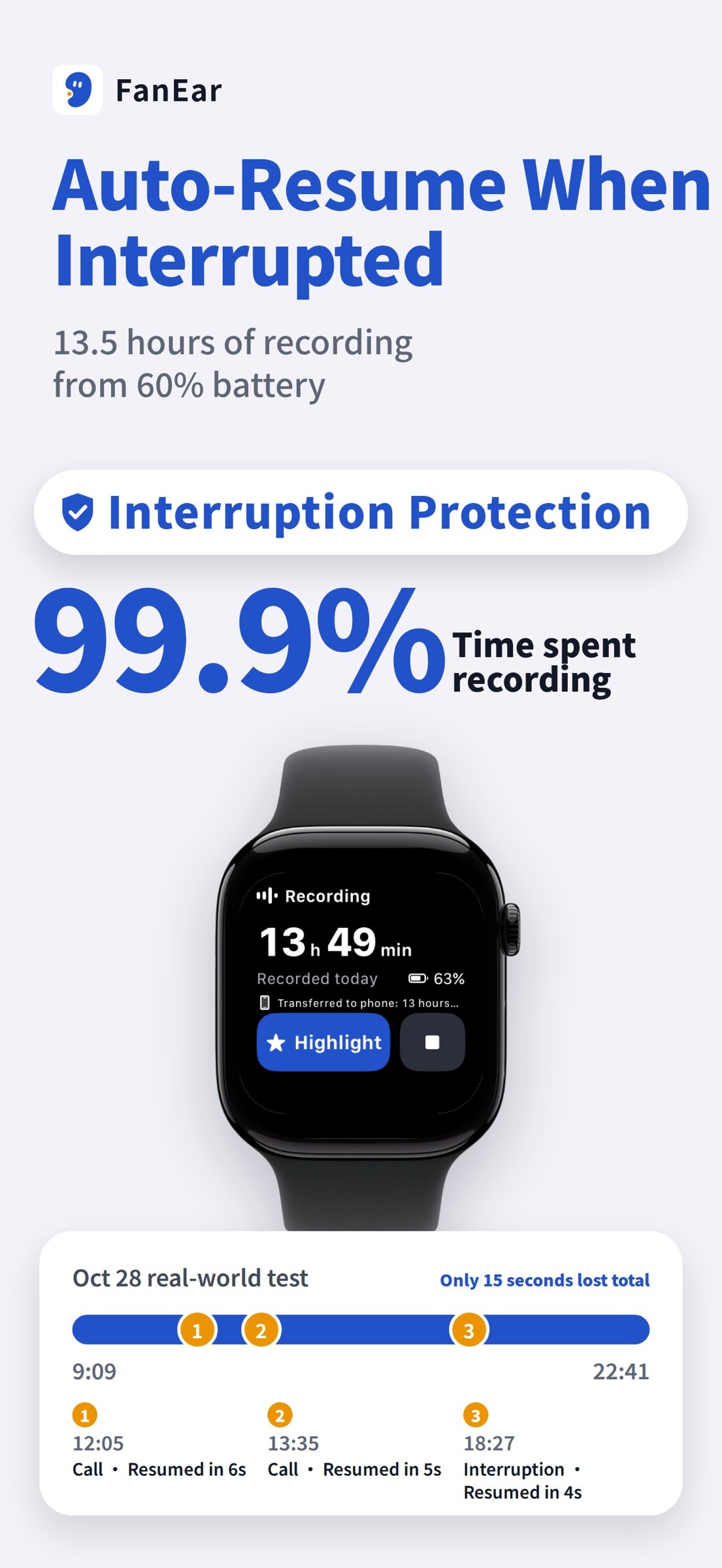
Open FanEar on your Watch to record continuously, and check your iPhone anytime to see conversations sorted into time-block cards showing topics, speakers, durations, and to-dos at a glance. On my own Watch starting at 60% battery, I recorded from 9:09 AM to 10:41 PM—99.9% of those 13.5 hours was actively recording.
[Meeting Minutes Ready the Moment Your Meeting Ends]
Once a meeting is recorded, a meeting card appears in Today: who was there, what was discussed, and which to-dos are done or still have no owner. You're notified when the minutes are ready; long-press a conclusion to jump back to the text of that line, or tap Share minutes to send them out.
[Said You'd Look Into It? Xiaoer Checks First]
When you say you'll go look something up, Xiaoer researches it and puts a short report in Today: key findings, what it couldn't find, the original words, and a message ready to send.
[Still Saying “I’ll Send It Tomorrow”? It Circles Back]
When the same thing keeps slipping for days, Xiaoer digs it back up: which days you mentioned it, what pushed it aside, and a suggested next step.
[Built-In Auto-Resume: Interrupted by Calls or Alarms? It Picks Right Back Up]
Instead of losing the rest after an incoming call, alarm, or Siri cuts you off, FanEar's anti-interruption technology automatically resumes recording the moment the interruption ends. In my real-world test on October 28 (13.5 hours starting at 60% battery), it was interrupted 3 times, resumed within 6 seconds each time, and lost only 15 seconds in total.
[Doesn't Just Take Notes—Actually Pushes You to Get Things Done]
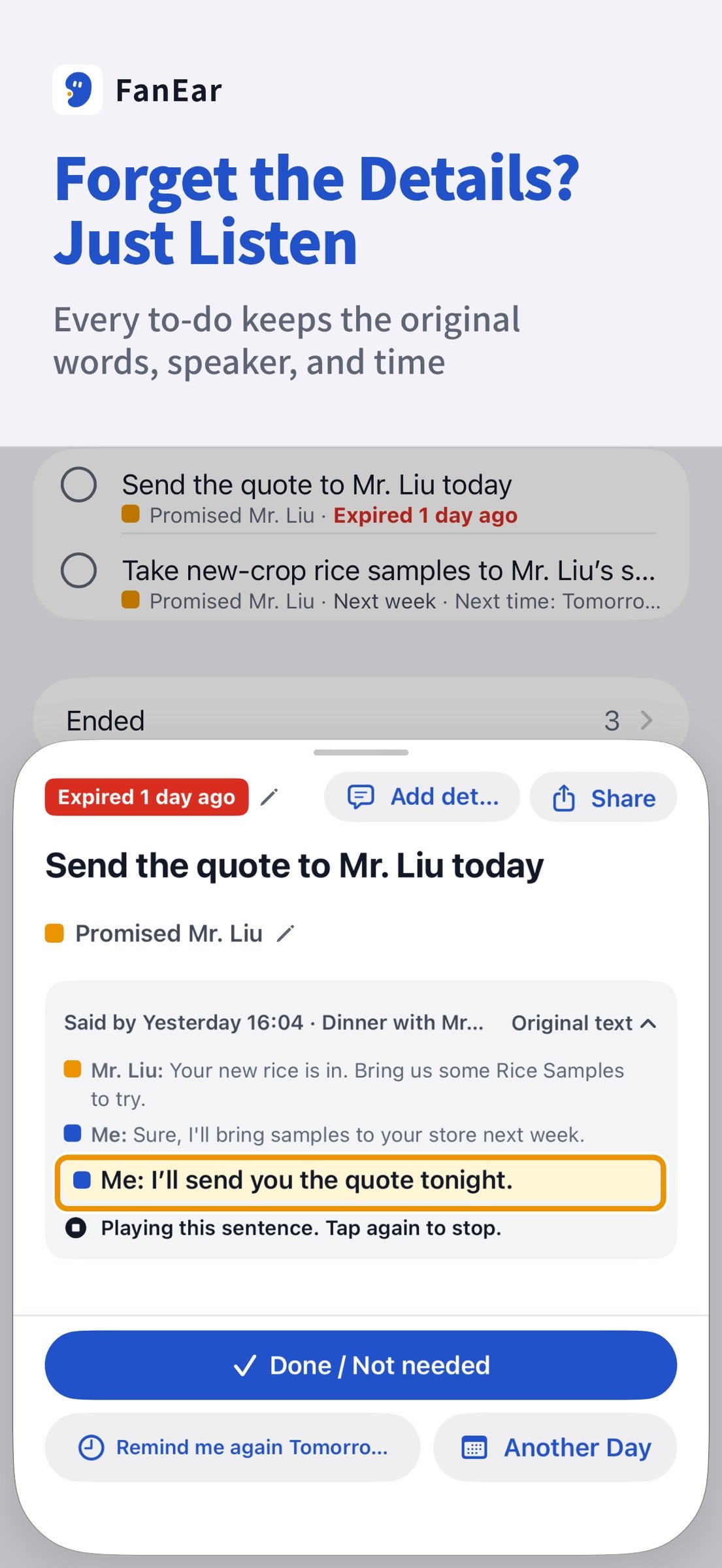
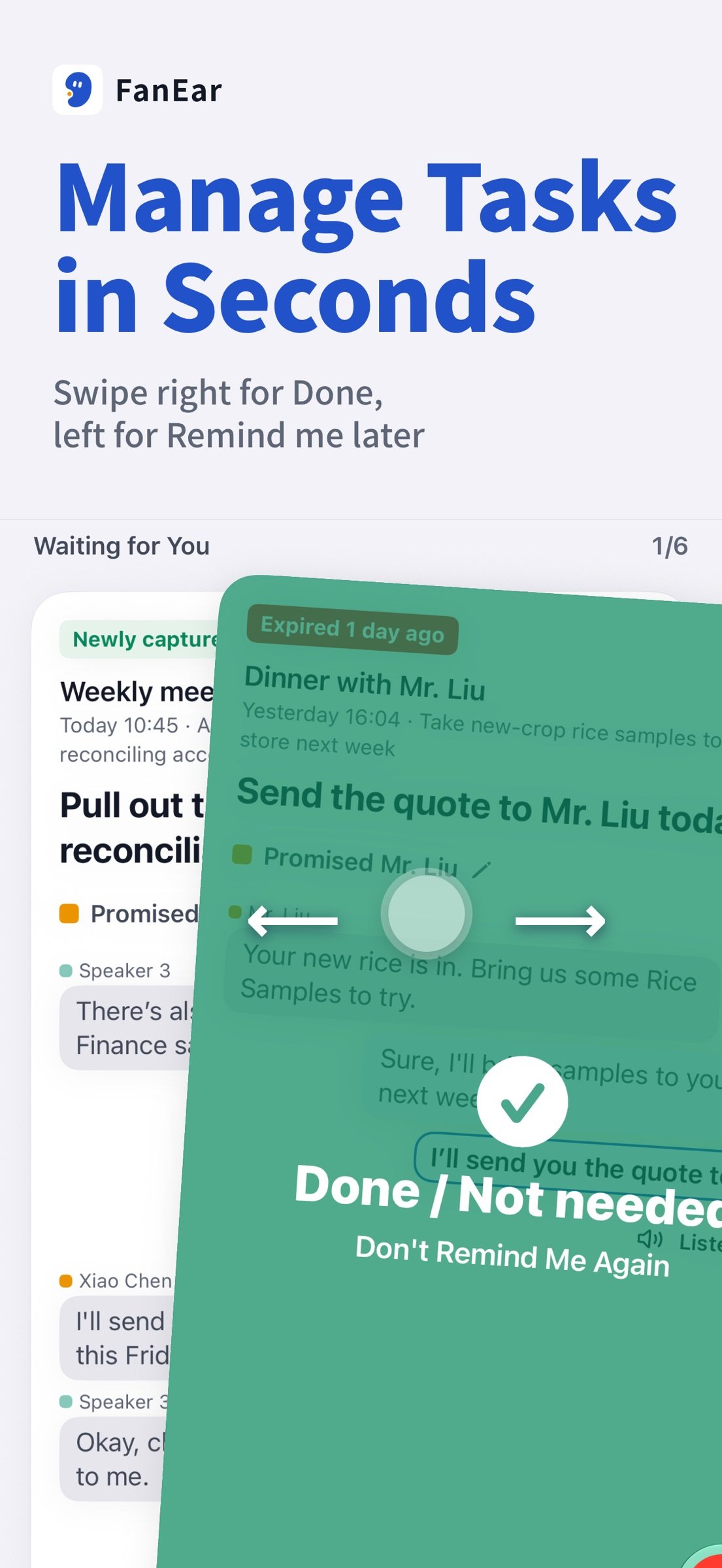
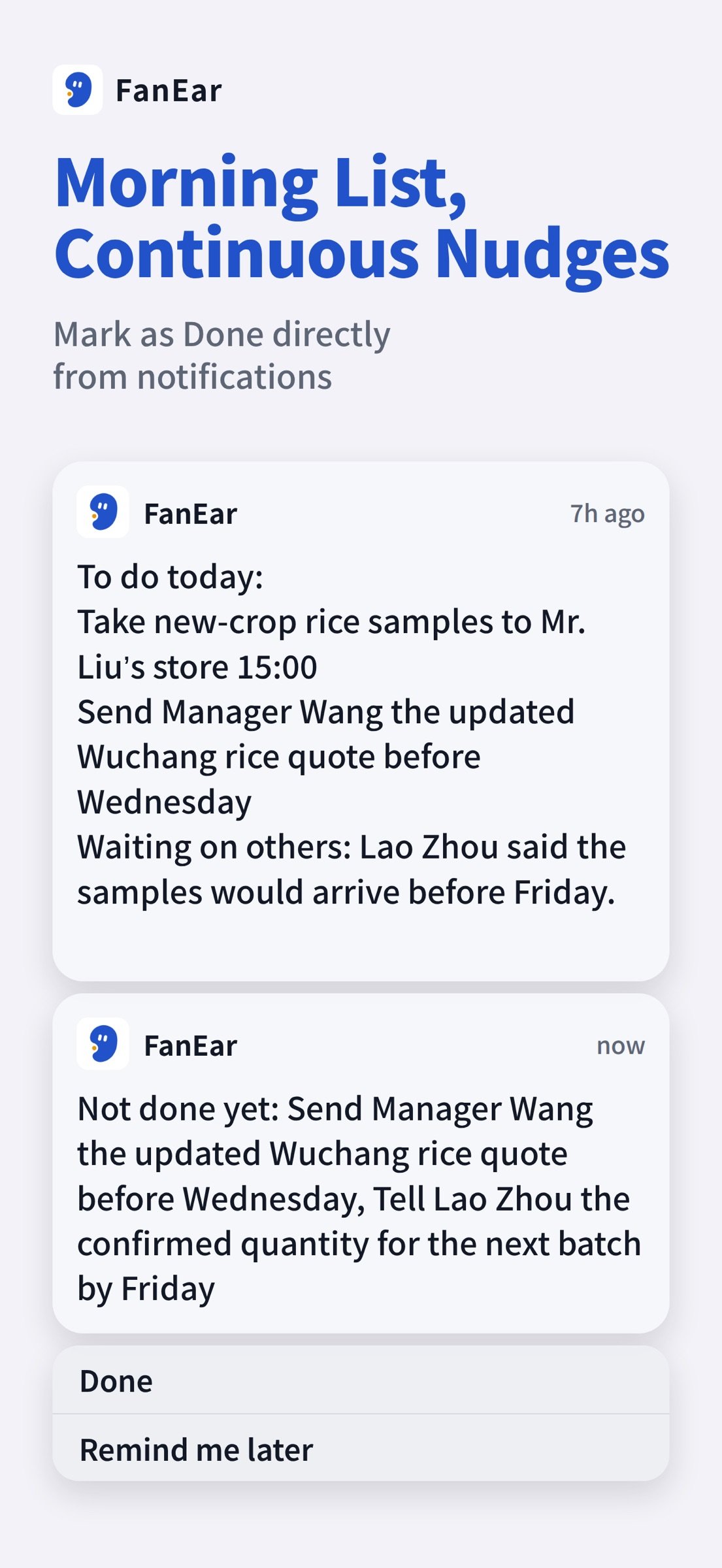
FanEar extracts both what you promised others and what others promised you into to-do cards with the exact quote and original audio—swipe right to mark done, or left to reschedule. You get your task list at 8:30 AM, location-based departure alerts that nudge you every 5 minutes until you head out, follow-up nudges at noon, afternoon, and evening, plus timely reminders to follow up on others' promises.
[Conversations Organized, Plus an Assistant That Cares About You]
Each conversation page features speaker recognition, timestamped highlights, sorted action items, and a built-in assistant, Xiaoer, who answers questions like what you promised last Wednesday with one-tap citations to the original quote.
[Buy Once, No Extra Charges for Features]
FanEar is a one-time purchase: pay once and keep using it, with no memberships or paid features; if you downloaded it before, updates and reinstalls cost nothing. Bring your own API key from your preferred AI provider for cloud transcription and organization, with zero markup from us; offline on-device transcription also works, though cloud is recommended for higher accuracy and speaker recognition. We have no accounts, ad tracking, or data sales, and your recordings, transcripts, health data, and AI requests do not touch our servers.
Notes: Requires an iPhone (iOS 17 or later) and a paired Apple Watch. Real-world test numbers come from my own Watch on default settings. Transcription and to-do extraction can make mistakes—please double-check important matters yourself. Always inform others and get their consent before recording.
Privacy Policy: [link removed]
Terms of Use: [link removed]
License: Commercial
Why record on your Watch? You already wear it every day—nothing extra to carry or charge—and once you open FanEar, your recordings are transcribed, organized, and turned into to-dos on your iPhone that remind you until they're done. I have ADHD and forget promises immediately, so I rely on FanEar: in the single week of October 21 to 27, it pulled 118 things I promised to do straight out of my recordings.
[Wear Your Watch All Day, See Your Whole Day on Your Phone]
Open FanEar on your Watch to record continuously, and check your iPhone anytime to see conversations sorted into time-block cards showing topics, speakers, durations, and to-dos at a glance. On my own Watch starting at 60% battery, I recorded from 9:09 AM to 10:41 PM—99.9% of those 13.5 hours was actively recording.
[Meeting Minutes Ready the Moment Your Meeting Ends]
Once a meeting is recorded, a meeting card appears in Today: who was there, what was discussed, and which to-dos are done or still have no owner. You're notified when the minutes are ready; long-press a conclusion to jump back to the text of that line, or tap Share minutes to send them out.
[Said You'd Look Into It? Xiaoer Checks First]
When you say you'll go look something up, Xiaoer researches it and puts a short report in Today: key findings, what it couldn't find, the original words, and a message ready to send.
[Still Saying “I’ll Send It Tomorrow”? It Circles Back]
When the same thing keeps slipping for days, Xiaoer digs it back up: which days you mentioned it, what pushed it aside, and a suggested next step.
[Built-In Auto-Resume: Interrupted by Calls or Alarms? It Picks Right Back Up]
Instead of losing the rest after an incoming call, alarm, or Siri cuts you off, FanEar's anti-interruption technology automatically resumes recording the moment the interruption ends. In my real-world test on October 28 (13.5 hours starting at 60% battery), it was interrupted 3 times, resumed within 6 seconds each time, and lost only 15 seconds in total.
[Doesn't Just Take Notes—Actually Pushes You to Get Things Done]
FanEar extracts both what you promised others and what others promised you into to-do cards with the exact quote and original audio—swipe right to mark done, or left to reschedule. You get your task list at 8:30 AM, location-based departure alerts that nudge you every 5 minutes until you head out, follow-up nudges at noon, afternoon, and evening, plus timely reminders to follow up on others' promises.
[Conversations Organized, Plus an Assistant That Cares About You]
Each conversation page features speaker recognition, timestamped highlights, sorted action items, and a built-in assistant, Xiaoer, who answers questions like what you promised last Wednesday with one-tap citations to the original quote.
[Buy Once, No Extra Charges for Features]
FanEar is a one-time purchase: pay once and keep using it, with no memberships or paid features; if you downloaded it before, updates and reinstalls cost nothing. Bring your own API key from your preferred AI provider for cloud transcription and organization, with zero markup from us; offline on-device transcription also works, though cloud is recommended for higher accuracy and speaker recognition. We have no accounts, ad tracking, or data sales, and your recordings, transcripts, health data, and AI requests do not touch our servers.
Notes: Requires an iPhone (iOS 17 or later) and a paired Apple Watch. Real-world test numbers come from my own Watch on default settings. Transcription and to-do extraction can make mistakes—please double-check important matters yourself. Always inform others and get their consent before recording.
Privacy Policy: [link removed]
Terms of Use: [link removed]
License: Commercial
| Release info | Update on Nov 22, 2026 |
|---|---|
| Release notes | FanEar 2.0.3 fixes a few issues to make recording on your watch, sharing recordings, and switching back to Home smoother. · When you play a podcast or music on your watch while recording, the audio plays only through your AirPods and stays out of the recording. · When you share a segment’s PDF summary or export the segment itself, the content starts at the beginning of that segment, even when two segments are part of the same recording. · Switching from Xiaoer back to Home is smoother. We fixed an issue that occasionally caused the app to freeze on iOS 17 and 18. |
| Listing data | App Store |
Reviews
No reviews yet. Be the first to review FanEar.
Used FanEar? Tell other visitors what you thought.
Log in to write a reviewOther products by this publisher
- "No Distractions" for YouTube 4.10 ----
- #Bible 11.6.1 "Incredible App - My sister shared this app with me a few weeks ago and it is truly incredible.
- #filmphotography 1.4.2 So, you decided to shoot on film?
- #LookBusy Fake Calendar Events 1.0.6 Look Busy scans your work calendar for open time slots and fills them with realistic-looking (but secretly fake) work events.
- #Small Talk Is Canceled 1.0.2 #Small Talk Is Canceled — Conversations That Matter
Most viewed iOS Lifestyle
-
1
 Shefa Gold 1.6.2.5
More than 100 new and delicious Hallelu-Yah chants to exalt and bless and celebrate the simple fact of existence.
-
2
 Light Language Grid Creator 6.4.1
Light Language Grid Creator lets you create Grids with 3D shapes and colours, then export them as images.
-
3
 UltiPro 3.0
Ulti Servives is your one stop destination for your day by day services.
-
4
 Joguman Daily Calendar 1.0.14
New drawings every day, and every day feels brand new.
-
5
 CHAI 2.198
Our app revolutionizes the way we interact with AI chatbots.
-
6
 Anker eufy 6.1.40
The new all-in-one eufy app that designed to bring together all your favorite eufy products—eufy Security, eufy Clean, eufy Baby, eufy Life, and eufy Pet—into one seamless platform.
-
7
 Tesla 4.63.0
The Tesla app puts owners in direct communication with their vehicles and energy products anytime, anywhere.
-
8
 Booksy for Customers 26.11.1600
Self-care, on your schedule.
-
9
 12 Steps Companion 3.0.9
First developed in 2008, 12 Steps Companion was the world’s first recovery app.
-
10
 CopperKnob 2.1.1
CopperKnob is an App which allows you to browse over 185,000 line dance stepsheets from the CopperKnob website.
Most downloaded iOS Lifestyle
-
1
Light Language Grid Creator 6.4.1
Light Language Grid Creator lets you create Grids with 3D shapes and colours, then export them as images.
-
2
 Pieceful 3.1.0
Capture briefly. Remember deeply.
-
3
UltiPro 3.0
Ulti Servives is your one stop destination for your day by day services.
-
4
Joguman Daily Calendar 1.0.14
New drawings every day, and every day feels brand new.
-
5
 Electronic Rosary 4.0.3
The Rosary (from Latin rosarium, meaning "rose garden") is a traditional Catholic devotion.
-
6
 Core Values 1.0.1
Core Values: Find Yours is a guided self-reflection exercise that helps you identify your top five values that matter most to you.
-
7
 Santa Christmas Snowing 1.1.0
Experience the magic of Christmas right on your wrist!
-
8
 Horoscope $ 7.0.15
Experience astrology without limits.
-
9
CHAI 2.198
Our app revolutionizes the way we interact with AI chatbots.
-
10
CopperKnob 2.1.1
CopperKnob is an App which allows you to browse over 185,000 line dance stepsheets from the CopperKnob website.