
15downloads
4this week
FreeCommercial
0reviews
Screenshots



About Enduro CheckPoint Two
There are two similar apps from this developer
- 'Enduro CheckPoint' requires external odometer
- 'Enduro CheckPoint Two' uses GPS or Bluetooth (odometer not required)
Enduro CheckPoint Two Features-
Constant display of -
- Mileage
- On-Time, Early, Late indication is seconds
- Next Possible Check Mileage
- Current route sheet average speed
- Next Reset or Free Time
- Seconds on check point clock
- (new) Actual speed
Visual warning when within 20 seconds of upcoming check
'GO' indicator whenever safe to move forward
Automatic mileage advance at resets
Reset Countdown timer
Free Time Countdown timer
Selectable GPS or Bluetooth mileage input
Selectable audio (beep) indication of on-time and early
Swipe left or right to adjust mileage in one tenth mile increments
Three mile clear ahead rider input after check point
Setup -
The app opens to the setup screen
Rider inputs race data -
- Race Start time of day
- Key time, taken from system clock, can be adjusted to match clock at sign up
- Row Number
- If Bluetooth is used, rider also inputs wheel circumference
- Rider selects Bluetooth if desired
- Rider selects audio cues if desired
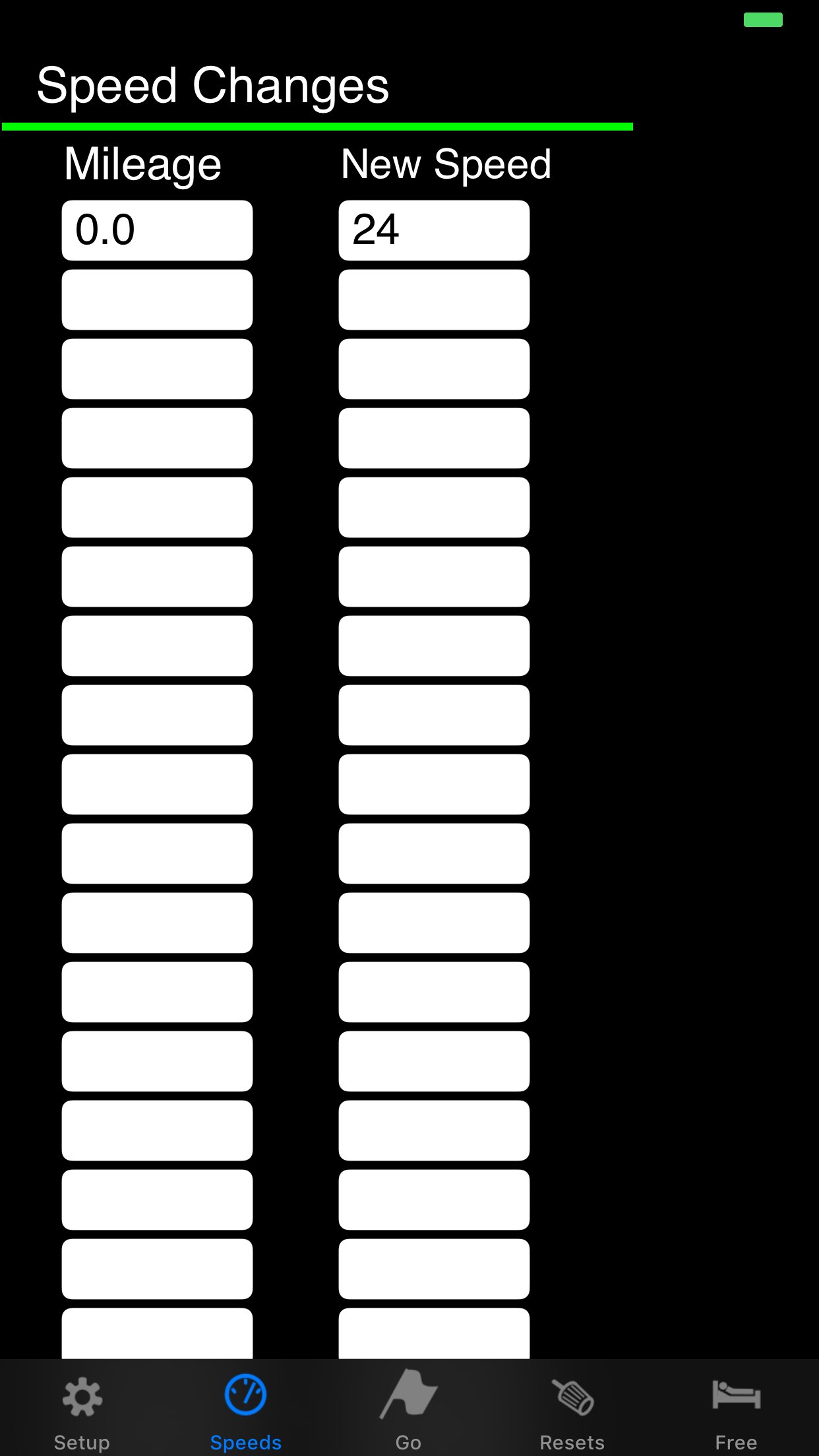
Speed Changes, Resets, Free Times
Separate input pages are used to input all timekeeping feature of the race from the club's route sheet.
Rider inputs every speed change, reset and free time.
(new) Reset to Zero:
In resets, enter the reset (example) from 32 to 0
In 'speeds' and 'freetime' enter ' 000 0' one one line to separate entries associated with different loops
Operation
Once all data has been input, Rider clicks on 'GO' tab
Prior to start time, the app will countdown to start time.
When start time arrives, app begins timekeeping automatically.
While on time (within rider minute) display will indicate 'on-time', and display a numeric value
1 - 59 of seconds into riders minute
While on time rider will hear (optionally) a single beep every three seconds.
When Early (more than 59 seconds ahead of ideal time) display will indicate 'early', and display a numeric value
in minutes:seconds of time early
When early rider will hear (optionally) a double beep every three seconds.
When Late (more than 60 seconds behind ideal time, display will indicate 'late', and display a numeric value
in minutes:seconds of time late. When late, there is no audio cue.
When On-Time, this portion of the display is green text
When Early, this portion of the display is lght blue text
When On-Time, this portion of the display is yellow text
Whenever it is safe to proceed (not early, not in reset,free time, or approaching possible) 'GO' is displayed in green in upper left
As a check is approached, a yellow warning appears in upper left ex: 'Check 12.4'
As a check is approached the 'Check Time Seconds' display changes to yellow, as it counts up to the '0' check entry time.
When check entry time arrives, yellow 'Check 12.4' changes to green 'GO', and a burst of beeps indicates safe to enter.
When Late, the check advisory does not appear, and 'GO' remains in display.
When riding on time and a reset or free time mileage is reached, The upper left display will show time remaining at that way-point.
Free time and reset countdowns are not displayed when late or early.
Mileage can be corrected in 0.1 mile increments with a single swipe of the screen.
Each swipe to the right adds .01, each swipe to the left subtracts 0.1.
At a check point or gas stop, the next three miles can be cleared of possibles display with a triple tap on the screen.
If done in error, use a second triple tap.
more info [link removed]
License: Commercial
| Release info | New Release on Apr 17, 2024 |
|---|---|
| Release notes | Version 2.2 adds capability to use a handlebar mounted audio remote control device to advance mileage and for brand-x riders, advance row number. - press next / previous to increase / decrease mileage - press play / pause to enter row change mode , then press next / previous to change row. Press play pause again to exit row change mode. - press + / - to change volume of beeps used to tell rider when on time or early. Without a audio remote control device, brand-x riders will still need to use setup screen to change row number If audio remote control device is used once, on screen swipe to advance mileage will be deactivated. This will eliminate any possibility of rain/wet screen causing unwanted mileage advances. When selecting a 'audio clicker' device be sure to select a waterproof model. Inexpensive models work fine. BlueTooth pairing is required on some models. Search Amazon 'waterproof Bluetooth media button'. No need to spend more than about USD $20 |
| Listing data | App Store |
Reviews
No reviews yet. Be the first to review Enduro CheckPoint Two.
Used Enduro CheckPoint Two? Tell other visitors what you thought.
Log in to write a reviewOther products by this publisher
- "No Distractions" for YouTube 4.10 ----
- #Bible 11.6.1 "Incredible App - My sister shared this app with me a few weeks ago and it is truly incredible.
- #filmphotography 1.4.2 So, you decided to shoot on film?
- #LookBusy Fake Calendar Events 1.0.6 Look Busy scans your work calendar for open time slots and fills them with realistic-looking (but secretly fake) work events.
- #Small Talk Is Canceled 1.0.2 #Small Talk Is Canceled — Conversations That Matter
Most viewed iOS Sports
-
1
 ZephyrAir 1.5.4
ZEPHYRAIR — Stop Guessing...
-
2
 VolleyWrite Buddy 2.4
The VolleyWrite Buddy connects to the Windows version (for now) of VolleyWrite via bluetooth or WiFi.
-
3
 Draft Edge 1.1.2
STOP FOLLOWING THE EXPERTS.
-
4
 RallyCam 1.0.7
Never lose a great point again.
-
5
 FlyBox 6.4
FlyBox is your personal fly fishing reference and collection manager for iPhone, iPad, and Mac.
-
6
 TCS Toronto WaterfrontMarathon 5.2
The TCS Toronto Waterfront Marathon is Canada’s premier running event and the grand finale of the Canada Running Series.
-
7
 Adult 1-6 4.0
Learn to Skate USA, the premier source for all things figure skating, has teamed up with Rink Tank Interactive to bring you the ' Learn to Skate USA 'Skate Coach' app series for iOS!
-
8
 Fox Magnet 1.0
On the edge of the field you're sitting on the ground in camouflage with a distressed rabbit decoy in front of you.
-
9
 Spectrum SportsNet 5.0.1
Stay connected with the Lakers, Dodgers, and Sparks with the Spectrum SportsNet app!
-
10
 ESPN 8.30.1
All of ESPN. All in One Place.
Most downloaded iOS Sports
-
1
 Coyote Magnet 2.1
Coyote Magnet puts 79 full-quality predator sounds in your pocket, recorded clean and organized the way a hunt actually unfolds.
-
2
ZephyrAir 1.5.4
ZEPHYRAIR — Stop Guessing...
-
3
Draft Edge 1.1.2
STOP FOLLOWING THE EXPERTS.
-
4
TCS Toronto WaterfrontMarathon 5.2
The TCS Toronto Waterfront Marathon is Canada’s premier running event and the grand finale of the Canada Running Series.
-
5
Adult 1-6 4.0
Learn to Skate USA, the premier source for all things figure skating, has teamed up with Rink Tank Interactive to bring you the ' Learn to Skate USA 'Skate Coach' app series for iOS!
-
6
Spectrum SportsNet 5.0.1
Stay connected with the Lakers, Dodgers, and Sparks with the Spectrum SportsNet app!
-
7
 ESPN Fantasy Sports & More 9.13.0
With the #1 fantasy sports app, fantasy sports are always in-season.
-
8
 100 Climbs of Italy 4.3
The 100 greatest Cycling Climbs of Italy App is an indispensable tool if you’re planning a cycling trip to Italy.
-
9
VolleyWrite Buddy 2.4
The VolleyWrite Buddy connects to the Windows version (for now) of VolleyWrite via bluetooth or WiFi.
-
10
 Playing Time 1.8
If you coach sports, or are a parent of a child involved in youth sports, you know how difficult it can be to keep track of how much playing time each player is getting.