
Duo Keyboard 1.1.1
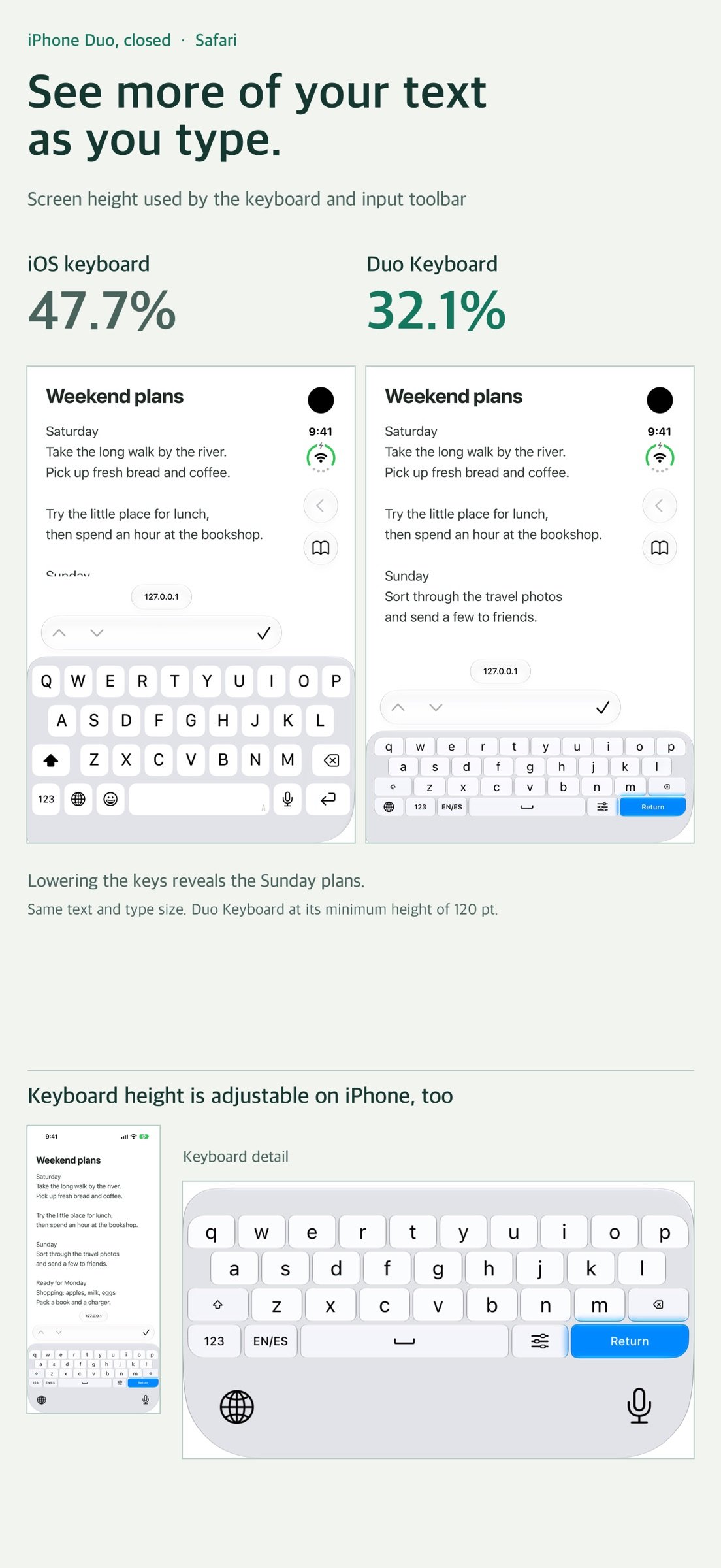
On a closed iPhone Duo, lower the keyboard to keep more of the message in view while you write your reply.
Download
145.36 MB
0downloads
0this week
FreeCommercial
0reviews
Screenshots
About Duo Keyboard
On a closed iPhone Duo, lower the keyboard to keep more of the message in view while you write your reply.
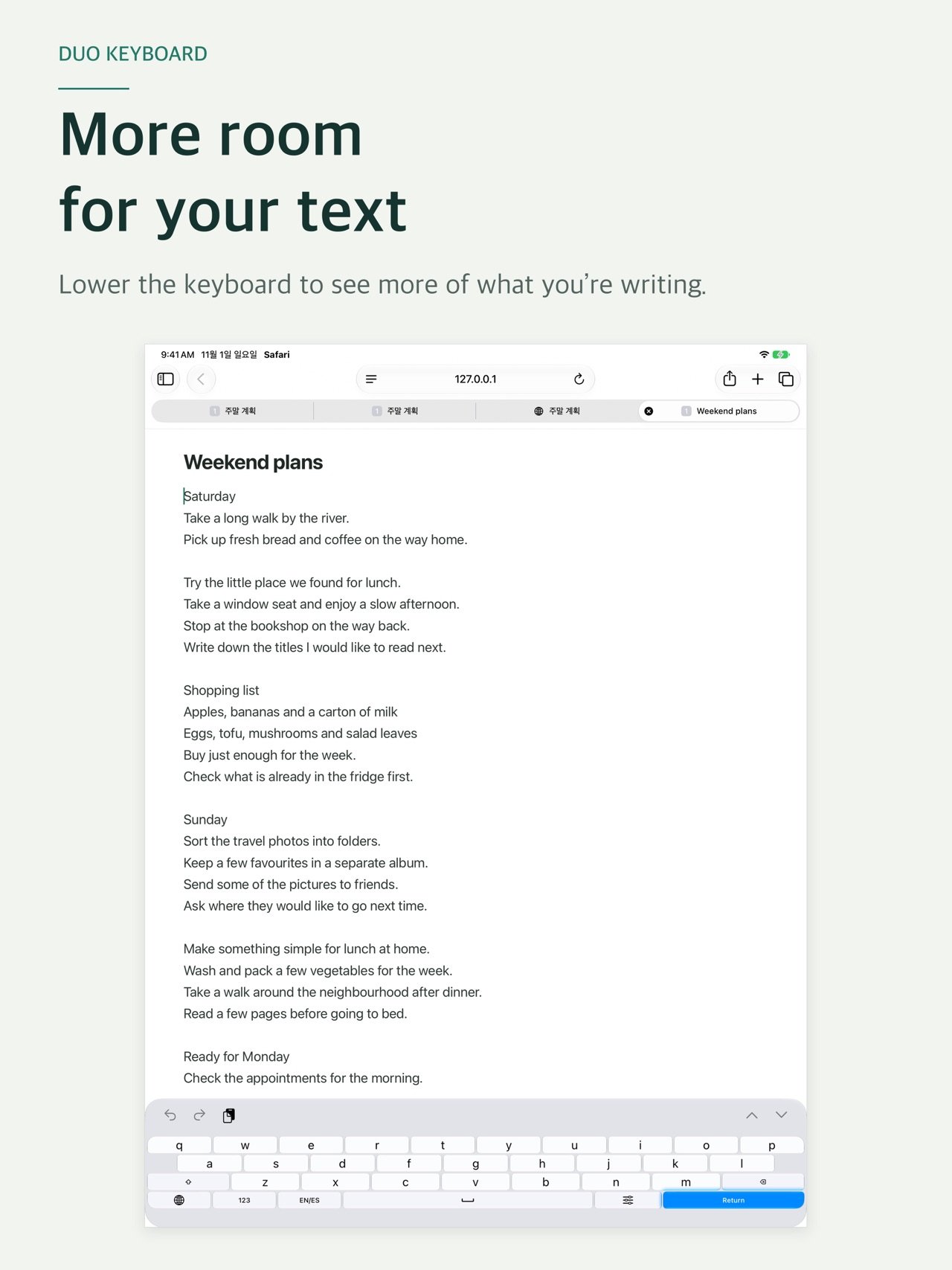
Look for Sunday’s plans in the first screenshot. With the same Safari note open, switching from the English system keyboard to Duo Keyboard at 120 pt reduced the keyboard and input toolbar from 47.7% to 32.1% of the screen height. Two more lines of the note came into view. This example was measured on a closed iPhone Duo simulator in portrait on iOS 27.1.
WHEN YOU CHANGE HANDS
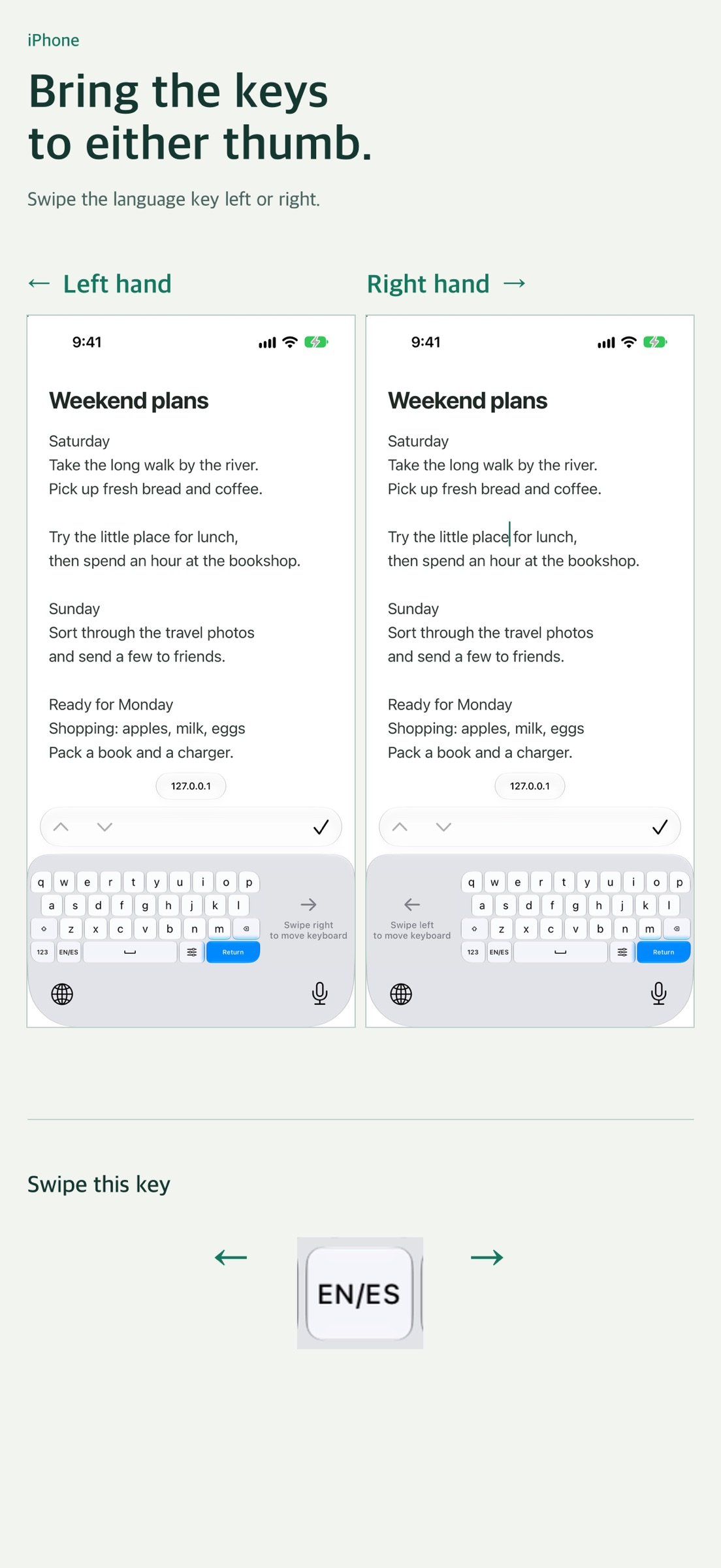
Swipe the language switch key left for a left-handed keyboard or right for a right-handed keyboard. You can also swipe the empty space beside the keys to bring them over to the other side.
WHEN YOU OPEN YOUR DUO
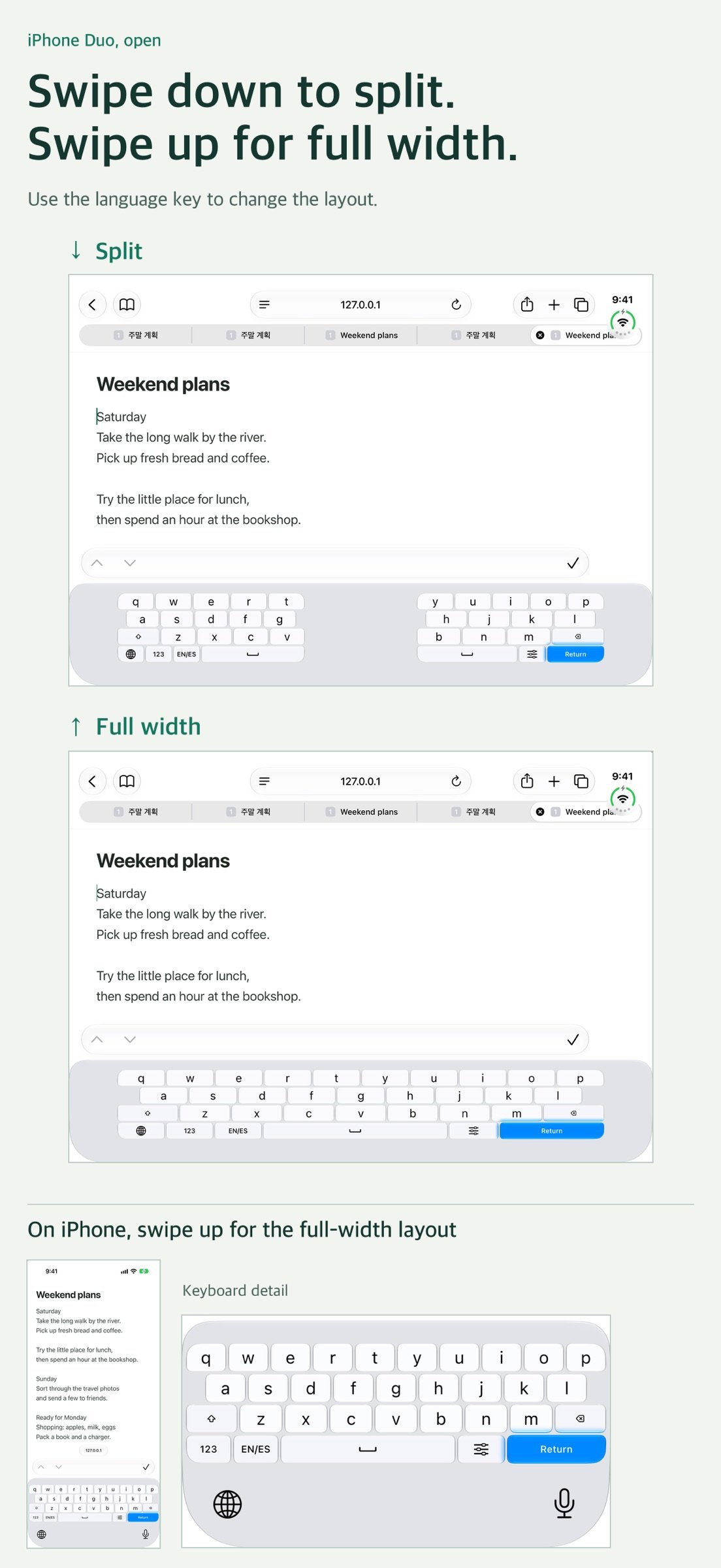
On a wide screen, swipe down on the switch key to split the keys between your thumbs. Swipe up to bring them back together at full width. Duo Keyboard remembers your size and position separately for narrow and wide screens.
YOUR SIZE AND LANGUAGES
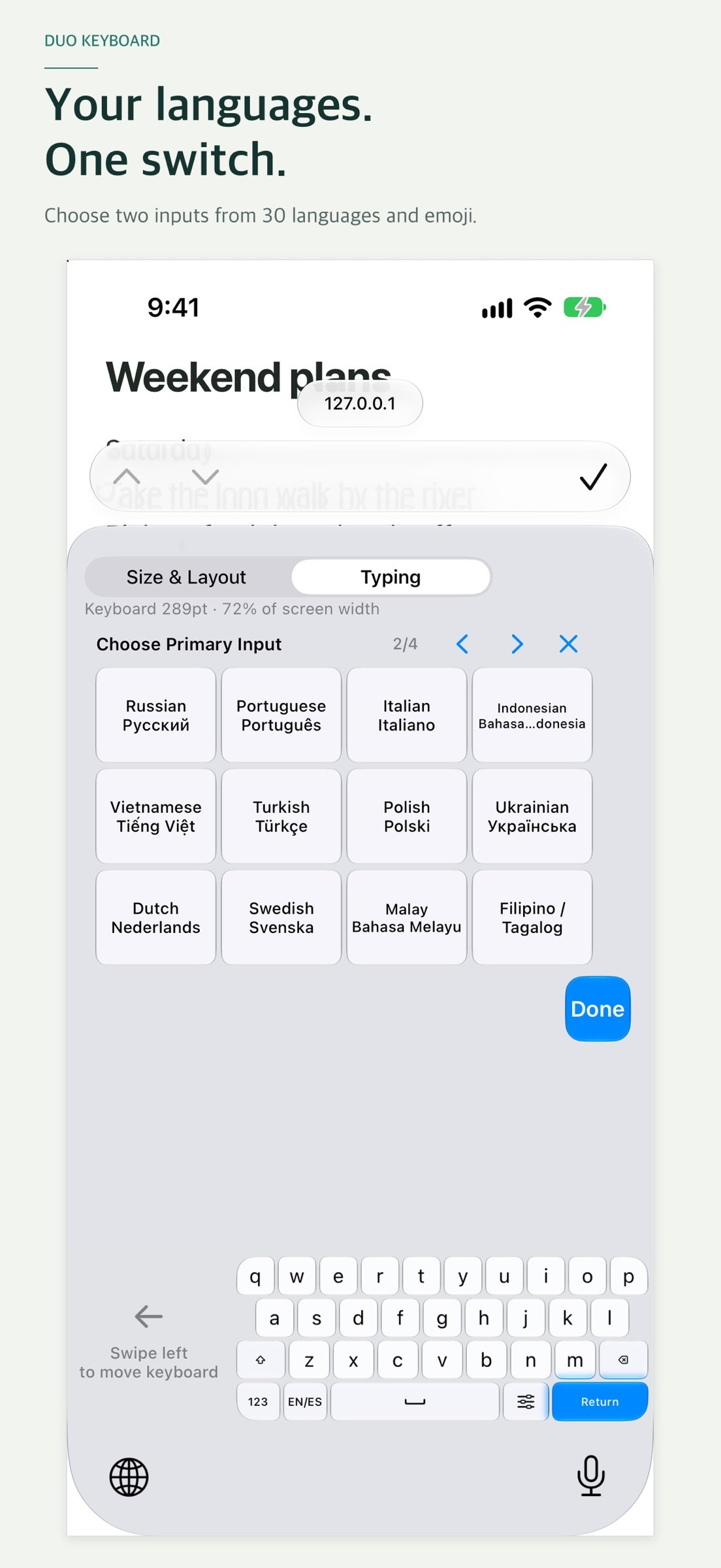
Hold the switch key to open settings above the keyboard. Adjust height and width while watching the keys change. In Typing, choose two inputs from 30 languages and emoji, then tap the switch key to swap between them. Try Korean and English, English and Spanish, or French and emoji. One purchase includes all layouts.
30 INPUT LANGUAGES
Korean, English, Spanish, French, German, Russian, Portuguese, Italian, Indonesian, Vietnamese, Turkish, Polish, Ukrainian, Dutch, Swedish, Malay, Filipino/Tagalog, Arabic, Hindi, Thai, Bengali, Urdu, Persian, Chinese, Japanese, Marathi, Javanese, Nigerian Pidgin, Telugu and Tamil.
Chinese supports Pinyin with Simplified and Traditional conversion; Japanese supports romaji with kana and kanji conversion; Vietnamese supports Telex. Arabic, Hindi, Thai, Bengali, Urdu, Persian, Marathi, Telugu and Tamil use paged character entry. Javanese uses Latin script. General autocorrection and next-word prediction are not provided.
FAMILIAR LAYOUTS, USEFUL CONTROLS
• English QWERTY and 12-key
• Korean QWERTY, Danmoum, Cheonjiin, Naratgeul, Cheonjiin Plus and Vega
• Three-column number and symbol pads for compact layouts
• Optional number row and settings key, switch-key placement and English auto-capitalization
• Adjustable glass opacity; Liquid Glass on iOS 26 and later, with a compatible appearance on earlier supported versions
• Swipe on Space to move the text cursor
• Return follows the input field's action; hold it for a newline
NO FULL ACCESS REQUIRED
Keyboard input is not logged or automatically transmitted. All typing, including Chinese and Japanese conversion, runs on your device. Full Access is not required. Optional bug reports are emails you review and send yourself; the report and reply address are received for support.
GET STARTED
1. Open Settings > General > Keyboard > Keyboards.
2. Tap Add New Keyboard and choose Duo Keyboard.
3. In a text field, hold the globe key and select Duo Keyboard.
4. Hold the actual keyboard's switch key to set size, placement and inputs.
BEFORE YOU BUY
• iOS controls the available width and bottom system area. Margins may remain on some devices or in some apps. Split mode requires a wide enough input area.
• Empty areas around or between the keys remain part of the keyboard. They do not reveal the document underneath. There is no free-floating keyboard or system mouse pointer.
• iOS may use its own keyboard in password or certain phone fields, and in apps that disallow third-party keyboards. Some fields do not accept newlines.
• In-app practice settings are separate from the actual keyboard's saved settings.
• On a wide screen, after moving the keys and reopening the keyboard, the previous position may briefly appear before the saved position is displayed.
License: Commercial
Look for Sunday’s plans in the first screenshot. With the same Safari note open, switching from the English system keyboard to Duo Keyboard at 120 pt reduced the keyboard and input toolbar from 47.7% to 32.1% of the screen height. Two more lines of the note came into view. This example was measured on a closed iPhone Duo simulator in portrait on iOS 27.1.
WHEN YOU CHANGE HANDS
Swipe the language switch key left for a left-handed keyboard or right for a right-handed keyboard. You can also swipe the empty space beside the keys to bring them over to the other side.
WHEN YOU OPEN YOUR DUO
On a wide screen, swipe down on the switch key to split the keys between your thumbs. Swipe up to bring them back together at full width. Duo Keyboard remembers your size and position separately for narrow and wide screens.
YOUR SIZE AND LANGUAGES
Hold the switch key to open settings above the keyboard. Adjust height and width while watching the keys change. In Typing, choose two inputs from 30 languages and emoji, then tap the switch key to swap between them. Try Korean and English, English and Spanish, or French and emoji. One purchase includes all layouts.
30 INPUT LANGUAGES
Korean, English, Spanish, French, German, Russian, Portuguese, Italian, Indonesian, Vietnamese, Turkish, Polish, Ukrainian, Dutch, Swedish, Malay, Filipino/Tagalog, Arabic, Hindi, Thai, Bengali, Urdu, Persian, Chinese, Japanese, Marathi, Javanese, Nigerian Pidgin, Telugu and Tamil.
Chinese supports Pinyin with Simplified and Traditional conversion; Japanese supports romaji with kana and kanji conversion; Vietnamese supports Telex. Arabic, Hindi, Thai, Bengali, Urdu, Persian, Marathi, Telugu and Tamil use paged character entry. Javanese uses Latin script. General autocorrection and next-word prediction are not provided.
FAMILIAR LAYOUTS, USEFUL CONTROLS
• English QWERTY and 12-key
• Korean QWERTY, Danmoum, Cheonjiin, Naratgeul, Cheonjiin Plus and Vega
• Three-column number and symbol pads for compact layouts
• Optional number row and settings key, switch-key placement and English auto-capitalization
• Adjustable glass opacity; Liquid Glass on iOS 26 and later, with a compatible appearance on earlier supported versions
• Swipe on Space to move the text cursor
• Return follows the input field's action; hold it for a newline
NO FULL ACCESS REQUIRED
Keyboard input is not logged or automatically transmitted. All typing, including Chinese and Japanese conversion, runs on your device. Full Access is not required. Optional bug reports are emails you review and send yourself; the report and reply address are received for support.
GET STARTED
1. Open Settings > General > Keyboard > Keyboards.
2. Tap Add New Keyboard and choose Duo Keyboard.
3. In a text field, hold the globe key and select Duo Keyboard.
4. Hold the actual keyboard's switch key to set size, placement and inputs.
BEFORE YOU BUY
• iOS controls the available width and bottom system area. Margins may remain on some devices or in some apps. Split mode requires a wide enough input area.
• Empty areas around or between the keys remain part of the keyboard. They do not reveal the document underneath. There is no free-floating keyboard or system mouse pointer.
• iOS may use its own keyboard in password or certain phone fields, and in apps that disallow third-party keyboards. Some fields do not accept newlines.
• In-app practice settings are separate from the actual keyboard's saved settings.
• On a wide screen, after moving the keys and reopening the keyboard, the previous position may briefly appear before the saved position is displayed.
License: Commercial
| Release info | New Release on Nov 06, 2026 |
|---|---|
| Release notes | The new App Store screenshots compare the system keyboard and Duo Keyboard on the same text on a closed iPhone Duo. They also show how to switch hands and how to move between split and full width on the open display. |
| Listing data | App Store |
Reviews
No reviews yet. Be the first to review Duo Keyboard.
Used Duo Keyboard? Tell other visitors what you thought.
Log in to write a reviewOther products by this publisher
- "No Distractions" for YouTube 4.10 ----
- #Bible 11.6 "Incredible App - My sister shared this app with me a few weeks ago and it is truly incredible.
- #filmphotography 1.4.2 So, you decided to shoot on film?
- $quirrel 1.5.1 $quirrel Budget & Finance helps you plan each paycheck, track spending, manage debt, and see what is safe to spend before the next payday.
- % Percentage Calculator Pro 1.41 This is the Pro version of % Percentage Calculator.
Most viewed iOS Utilities
-
1
 Device Lab 1.8.6
Device Lab ??????????????????????? App,?????????????????????????????????,????????????????????????
-
2
 APTV 2.4.10
APTV,?????????????? IPTV M3U???,?????????????????
-
3
 VibeSDR 11.0.16
VibeSDR is a mobile-first software-defined radio (SDR) receiver — and far more than a single-server client.
-
4
 DXClock 4.0.0
Connect, collaborate, and operate smarter with DX Clock — the ultimate meeting place for amateur radio operators.
-
5
 ECHOCAT 1.5.2
ECHOCAT is the iPhone and iPad companion for POTACAT, the desktop app for amateur radio operators chasing Parks on the Air (POTA), Summits on the Air (SOTA), Worldwide Bunkers on the Air (WWBOTA), Tiles on the Air and DX.
-
6
 iNetTools 11.0
iNetTools Pro is the Pro Version of iNetTools.
-
7
 Ally Pro 1.4.0
Ally Pro – Amiibo & NFC Tool gives advanced collectors complete control over their Amiibo library.
-
8
 DRC 2.0.1
A simple to use app to help calculate any dilution ratio.
-
9
 RigCalc 1.0
RigCalc puts the everyday drilling calculations you need on the rig floor, in the mud pit, or in the office into one fast, offline app.
-
10
 DuckDuckGo, optional Duck.ai 7.245.0
At DuckDuckGo, we believe the best way to protect your personal information from hackers, scammers, and privacy-invasive companies is to stop it from being collected at all.
Most downloaded iOS Utilities
-
1
 Rat And Mouse Sound Repeller 2.8
Keep mice and rats away overnight with ultrasonic waves and predator sounds.
-
2
 Demod 1.6
Demod turns your iPhone into a software-defined radio receiver.
-
3
 Guardio 2026.105.1
Guardio protects every part of your digital life: your devices, identity, accounts, and activity, so you can browse, shop, text, and bank online with confidence.
-
4
 Screen Mirroring With Miracast 2.0
Turn your iPhone into a complete TV companion.
-
5
 Fontcase 2.0.1
Fontcase is an app that lets you install custom fonts on iOS and iPadOS.
-
6
 ParkenDD 2.0.2
ParkenDD shows a list of available public parking lots in several cities.
-
7
 PickerFull 9.18
Export colors from photos as HEX, PDF, RGB, HSB/HSV, HSBA, HSL, LUV, LCH, YUV, YCBCR, YIQ, CMYK, Grayscale, XYZ, L*a*b* (CIE), CSSVAR, SASSVAR, CSSHSL, CSSRGB, AndroidXML, FlutterDart, UnityColor32, Float, Objective-C, Swift, SwiftLiteral, SwiftUI
-
8
 Royal TSi 2.5.4
Royal TSi provides easy and secure access to your remote systems (RDP, VNC, SSH, etc.) by allowing you to open your Royal TS documents created with Royal TSX (for macOS) or Royal TS (for Windows).
-
9
DRC 2.0.1
A simple to use app to help calculate any dilution ratio.
-
10
DuckDuckGo, optional Duck.ai 7.245.0
At DuckDuckGo, we believe the best way to protect your personal information from hackers, scammers, and privacy-invasive companies is to stop it from being collected at all.