
Duesday 2.0
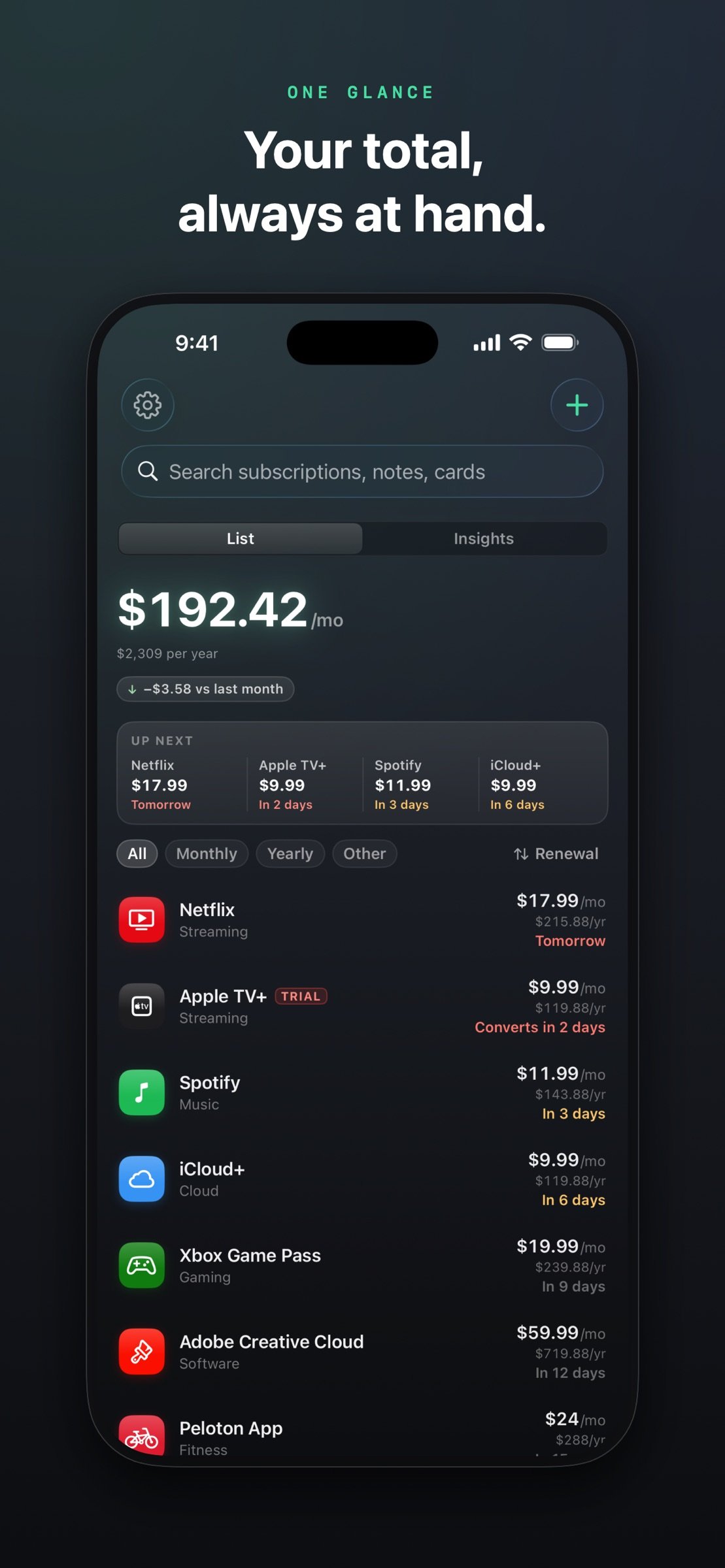
Duesday is a subscription tracker that keeps your total monthly spend one glance away — on your Home Screen, your Lock Screen, and at the top of the app — and catches every renewal before it charges, not after.
Download
2.47 MB
10downloads
0this week
FreeCommercial
0reviews
Screenshots
About Duesday
Duesday is a subscription tracker that keeps your total monthly spend one glance away — on your Home Screen, your Lock Screen, and at the top of the app — and catches every renewal before it charges, not after.
Open it and you get the full picture: every subscription sorted by renewal date, what's charging this week, and how your spending has changed since last month. On iPad, the list and your insights share the screen side by side.
WIDGETS THAT DO THE NAGGING
Home Screen and Lock Screen widgets show the monthly total, what's charging next, and where the money goes — in whichever accent color you've picked.
RENEWAL REMINDERS THAT ARRIVE IN TIME
Monthly plans get three days' warning, yearly plans get two weeks — both adjustable per subscription. If the service has a known cancellation page, the reminder takes you straight there.
CATCH FREE TRIALS BEFORE THEY CONVERT
Mark anything as a trial and Duesday warns you three days before it becomes a paid plan, then again the day before. The most expensive subscription is the one you forgot you started.
ADD A SUBSCRIPTION IN ABOUT 10 SECONDS
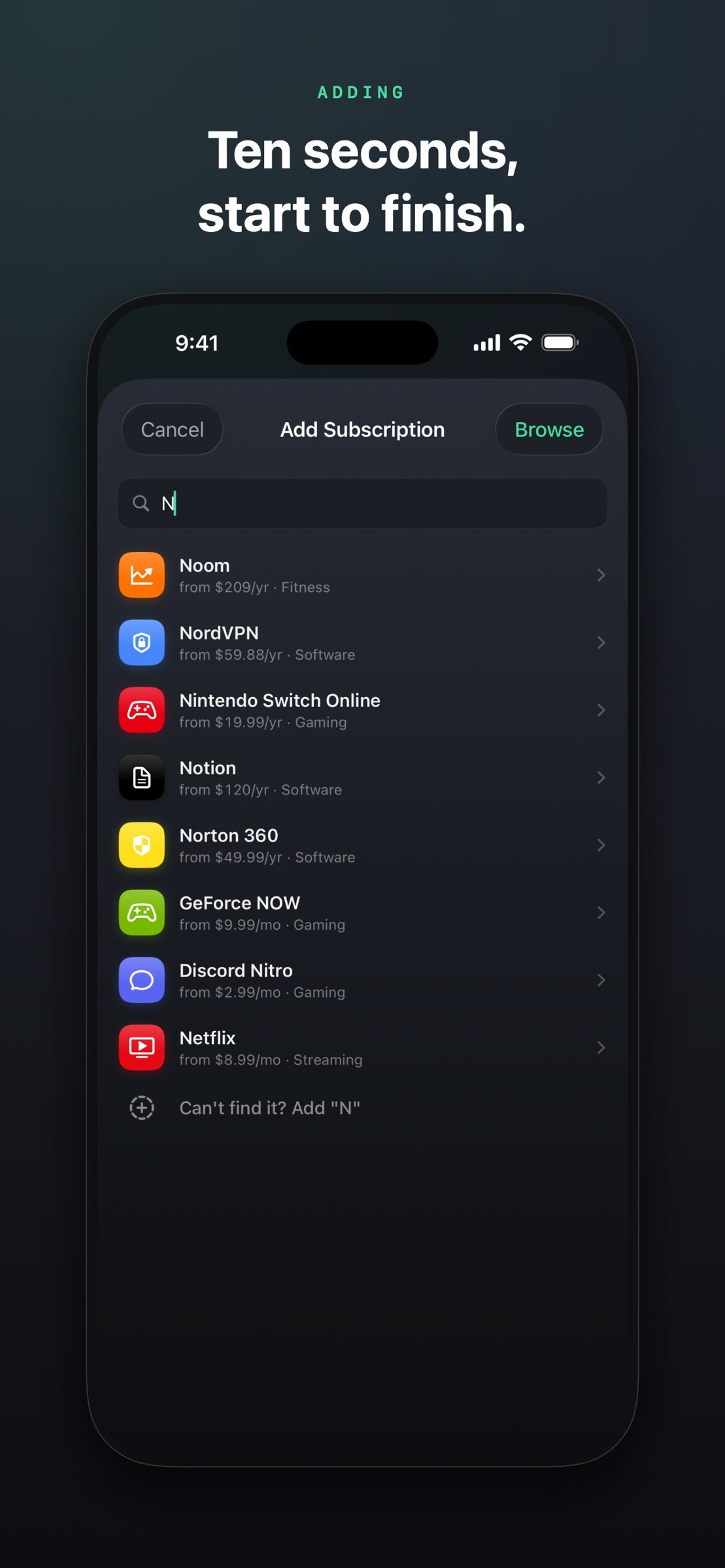
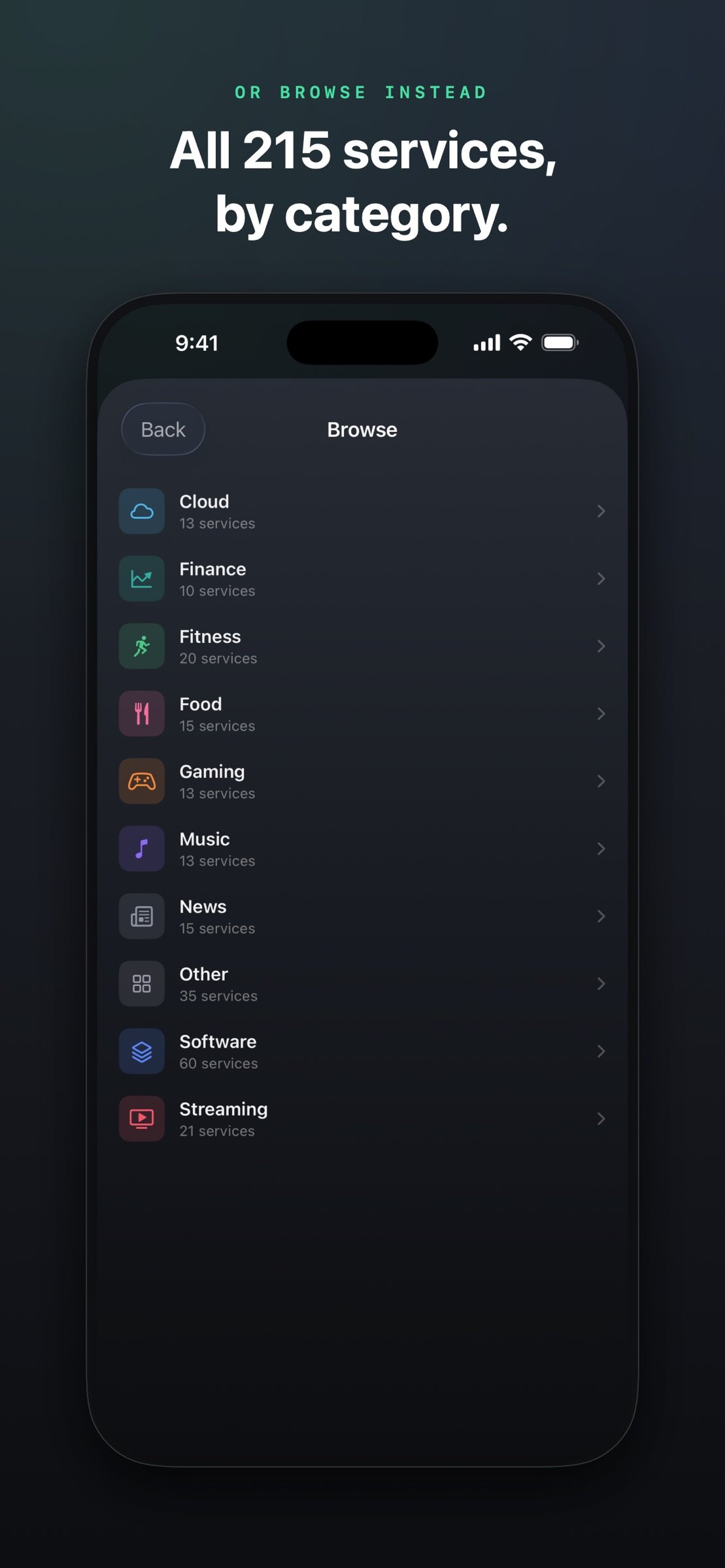
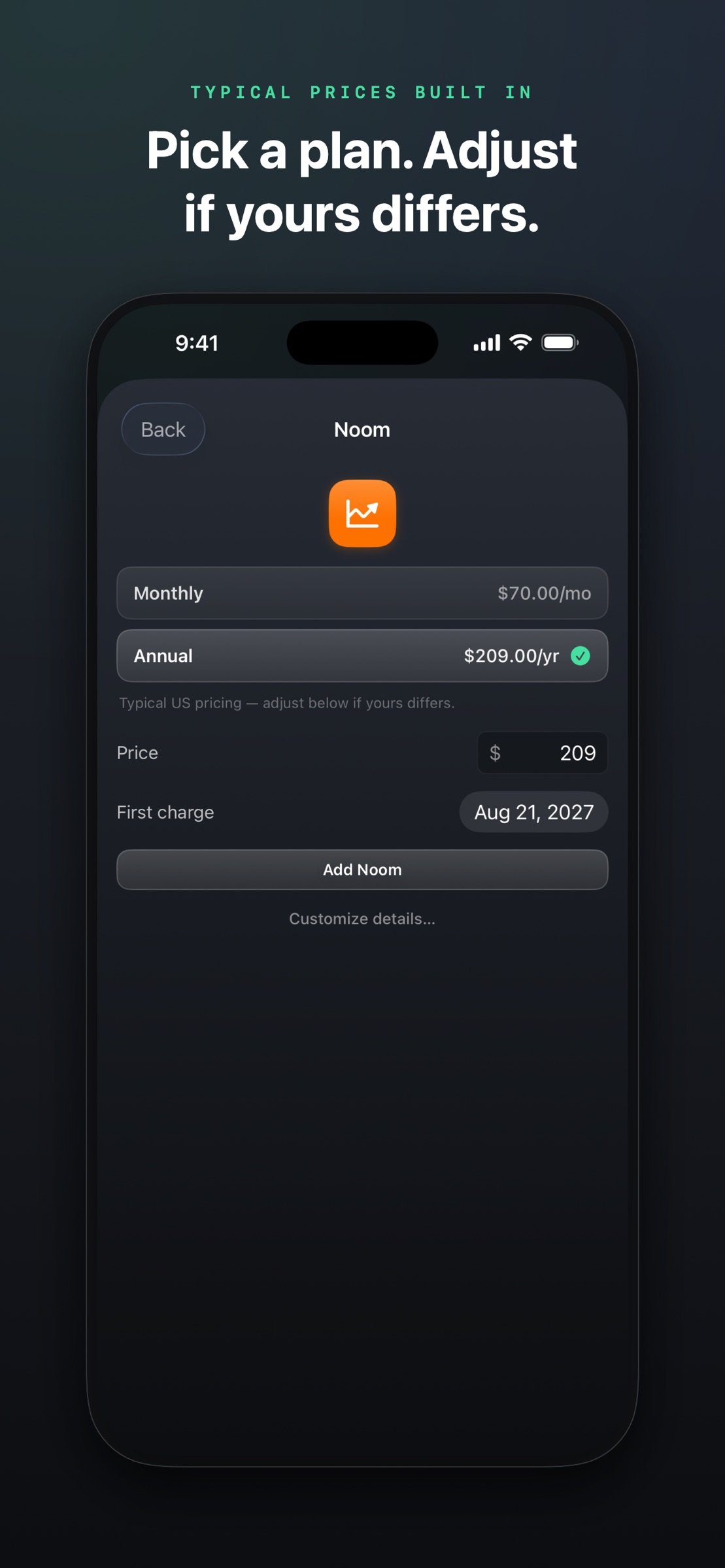
Type a few letters and pick from 215 built-in services — Netflix, Spotify, iCloud+, Adobe, YouTube Premium, Disney+, gyms, meal kits, and more — each with plan tiers and typical prices pre-filled, and editable, because your price is the one that counts. Or browse the whole catalog by category. Anything unusual goes in through the custom form.
SEE WHERE THE MONEY GOES
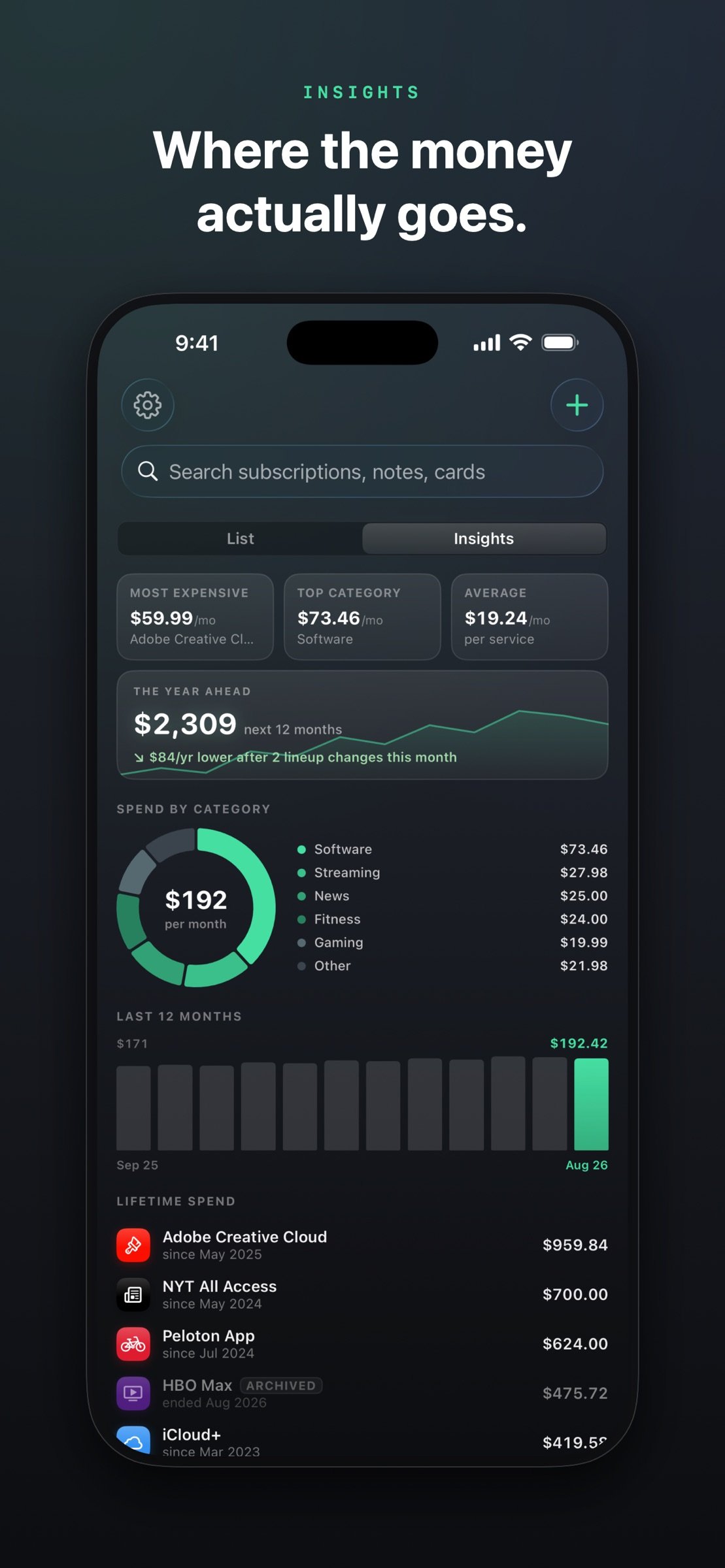
A spend-by-category chart, a 12-month history, and a lifetime tally per service that answers the uncomfortable question: how much have I actually paid Netflix since 2023? And The Year Ahead shows what the next 12 months will cost at today's lineup — and how your recent additions and cancellations changed it.
SYNC THROUGH YOUR OWN ICLOUD
Optional, and off by default. Turn it on and your iPhone, iPad and Mac stay in step — add a subscription on your phone and it's everywhere in seconds. Everything goes through your own iCloud account, never through us.
ALSO ON YOUR MAC
One purchase covers all three. On the Mac, Duesday lives in the menu bar — your total right next to the clock.
MAKE IT YOURS
Twelve accent colors, one tap away in Settings. The whole app restyles instantly, widgets included.
SPLITTING A FAMILY PLAN?
Track just your share. The totals stay honest.
THE SMALL STUFF DONE RIGHT
Ask Siri what's due this week, export renewals to your calendar, search your notes and payment methods, snooze a reminder by a day. Full VoiceOver support.
PRIVATE BY DESIGN
No account. No bank login. No tracking. Your data lives on your devices — and in your own iCloud if you turn sync on. The only other network request is an anonymous refresh of the built-in price list, which you can switch off. Export everything to CSV or JSON whenever you want.
If you've been looking for a subscription manager that doesn't want your bank credentials, doesn't need an account, and isn't itself a subscription — this is it. Duesday is a one-time purchase, native Swift on every platform. Requires iOS 17 or later; the Mac app needs macOS 14.
License: Commercial
Open it and you get the full picture: every subscription sorted by renewal date, what's charging this week, and how your spending has changed since last month. On iPad, the list and your insights share the screen side by side.
WIDGETS THAT DO THE NAGGING
Home Screen and Lock Screen widgets show the monthly total, what's charging next, and where the money goes — in whichever accent color you've picked.
RENEWAL REMINDERS THAT ARRIVE IN TIME
Monthly plans get three days' warning, yearly plans get two weeks — both adjustable per subscription. If the service has a known cancellation page, the reminder takes you straight there.
CATCH FREE TRIALS BEFORE THEY CONVERT
Mark anything as a trial and Duesday warns you three days before it becomes a paid plan, then again the day before. The most expensive subscription is the one you forgot you started.
ADD A SUBSCRIPTION IN ABOUT 10 SECONDS
Type a few letters and pick from 215 built-in services — Netflix, Spotify, iCloud+, Adobe, YouTube Premium, Disney+, gyms, meal kits, and more — each with plan tiers and typical prices pre-filled, and editable, because your price is the one that counts. Or browse the whole catalog by category. Anything unusual goes in through the custom form.
SEE WHERE THE MONEY GOES
A spend-by-category chart, a 12-month history, and a lifetime tally per service that answers the uncomfortable question: how much have I actually paid Netflix since 2023? And The Year Ahead shows what the next 12 months will cost at today's lineup — and how your recent additions and cancellations changed it.
SYNC THROUGH YOUR OWN ICLOUD
Optional, and off by default. Turn it on and your iPhone, iPad and Mac stay in step — add a subscription on your phone and it's everywhere in seconds. Everything goes through your own iCloud account, never through us.
ALSO ON YOUR MAC
One purchase covers all three. On the Mac, Duesday lives in the menu bar — your total right next to the clock.
MAKE IT YOURS
Twelve accent colors, one tap away in Settings. The whole app restyles instantly, widgets included.
SPLITTING A FAMILY PLAN?
Track just your share. The totals stay honest.
THE SMALL STUFF DONE RIGHT
Ask Siri what's due this week, export renewals to your calendar, search your notes and payment methods, snooze a reminder by a day. Full VoiceOver support.
PRIVATE BY DESIGN
No account. No bank login. No tracking. Your data lives on your devices — and in your own iCloud if you turn sync on. The only other network request is an anonymous refresh of the built-in price list, which you can switch off. Export everything to CSV or JSON whenever you want.
If you've been looking for a subscription manager that doesn't want your bank credentials, doesn't need an account, and isn't itself a subscription — this is it. Duesday is a one-time purchase, native Swift on every platform. Requires iOS 17 or later; the Mac app needs macOS 14.
License: Commercial
| Release info | New Release on Sep 03, 2026 |
|---|---|
| Listing data | App Store |
Reviews
No reviews yet. Be the first to review Duesday.
Used Duesday? Tell other visitors what you thought.
Log in to write a reviewOther products by this publisher
- "No Distractions" for YouTube 4.10 ----
- #Bible 11.6 "Incredible App - My sister shared this app with me a few weeks ago and it is truly incredible.
- #filmphotography 1.4.2 So, you decided to shoot on film?
- $quirrel 1.5.1 $quirrel Budget & Finance helps you plan each paycheck, track spending, manage debt, and see what is safe to spend before the next payday.
- % Percentage Calculator Pro 1.41 This is the Pro version of % Percentage Calculator.
Most viewed iOS Business
-
1
 Navy Federal Credit Union 2026.10.2
Bank easy with the Navy Federal mobile app!
-
2
 Paycom 8.0.14
If you or your company use Paycom’s HR and software, the Paycom app helps you manage everyday HR and payroll tasks in one place — like checking your schedule, requesting time off and reviewing your pay.
-
3
 Entrust Identity 26.4.0
The Entrust Identity mobile application is the new Entrust mobile platform for delivering strong identity credentials to both employee and consumer users.
-
4
 Intune Company Portal 5.2610.0
Microsoft Intune helps organizations manage access to corporate apps, data, and resources.
- 5 % Percentage Calculator Pro 1.41 This is the Pro version of % Percentage Calculator.
-
6
 Shopify 11.2645.0
Shopify: build your online store, sell anywhere, run your business
-
7
 ParkNYC Powered by Flowbird 2.2
Have you ever been late to an important meeting and you can’t find a parking spot?
-
8
 Budget-Beacon 1.5
Budget Beacon connects to your Apple Wallet to help you understand and manage your spending.
- 9 $quirrel 1.5.1 $quirrel Budget & Finance helps you plan each paycheck, track spending, manage debt, and see what is safe to spend before the next payday.
-
10
 MiniVAN Touch 9.4.6
miniVAN Touch is a mobile canvassing application that integrates with websites provided by NGP VAN.
Most downloaded iOS Business
-
1
ParkNYC Powered by Flowbird 2.2
Have you ever been late to an important meeting and you can’t find a parking spot?
-
2
Budget-Beacon 1.5
Budget Beacon connects to your Apple Wallet to help you understand and manage your spending.
-
3
 Rocket.Chat 4.78.1
Rocket.Chat Secure CommsOS™ is a communication platform that unifies messaging, voice, video, AI, and mission-critical applications—ensuring uncompromising security, compliance, and operational efficiency for governments, defense, and critical infra…
-
4
 Business Timesheet 6.0
Are you looking for timesheet to track the work hours spent on hourly, daily or weekly basis accurately?
-
5
 Receivable Payment Ledger2026 1.1
Payment Ledger is a fully offline accounts receivable management tool for small businesses, shops, wholesalers, and salespeople who need to track customer debts and payment progress.
-
6
 Cvent Events 2.8.1
Cvent Events is your place to easily plan out your event experience, find where you need to go next, network with other attendees, and learn more about sponsors and exhibitors.
-
7
 Simple Budget Envelopes 2.2.1
An incredibly simple app, perfect for keeping track of how much money remains in your budget.
-
8
 Vola 4.9.01
Vola is the only cash advance app built for Real-Time Payments (RTP).
-
9
 Power Apps 3.26103.23
Get Power Apps to conveniently access your work or school apps no matter where you are: at home, on the road, in the field, off-campus, at the airport, or at the beach – anywhere life takes you.
- 10 $quirrel 1.5.1 $quirrel Budget & Finance helps you plan each paycheck, track spending, manage debt, and see what is safe to spend before the next payday.