
Digital Bearing Compass 3.3
Transform your iPhone or iPad into a high-precision bearing compass.
Download
0.92 MB
5downloads
0this week
FreeCommercial
0reviews
Screenshots
About Digital Bearing Compass
Transform your iPhone or iPad into a high-precision bearing compass. Use Augmented Reality (AR) for instant cross bearings, position fixing, and distance calculations—100% offline, subscription-free, and fully private.
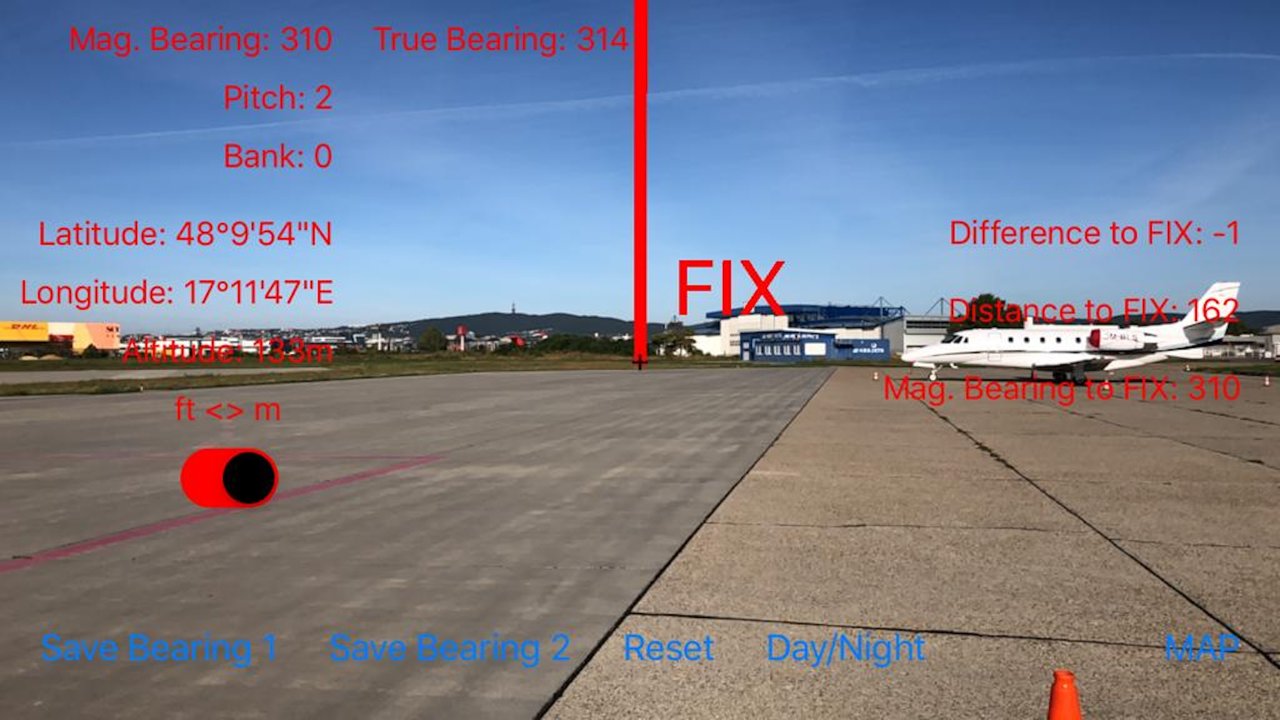
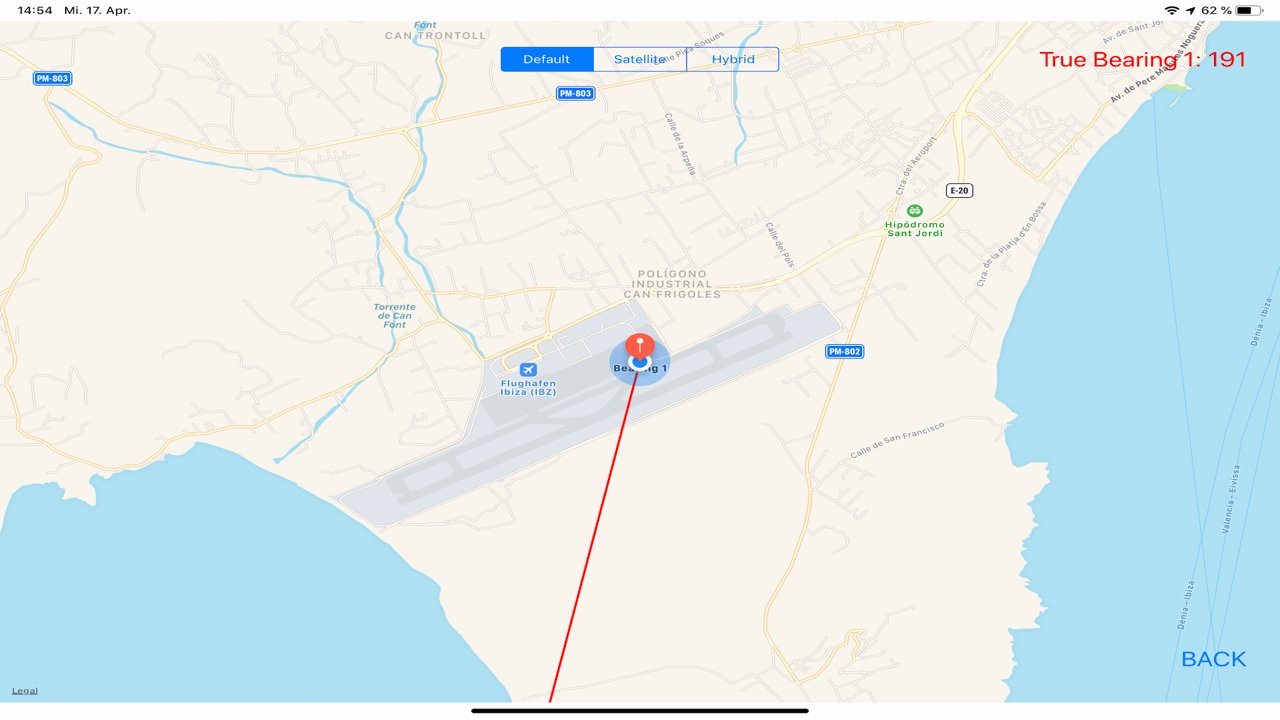
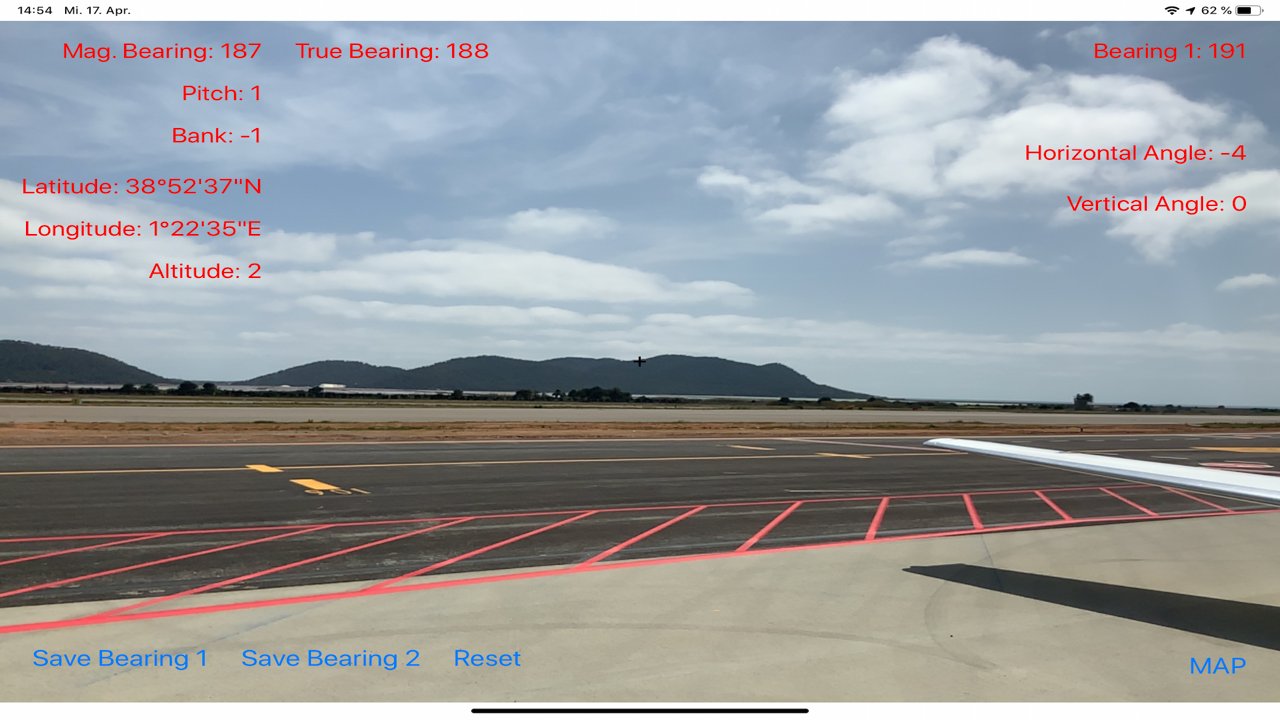
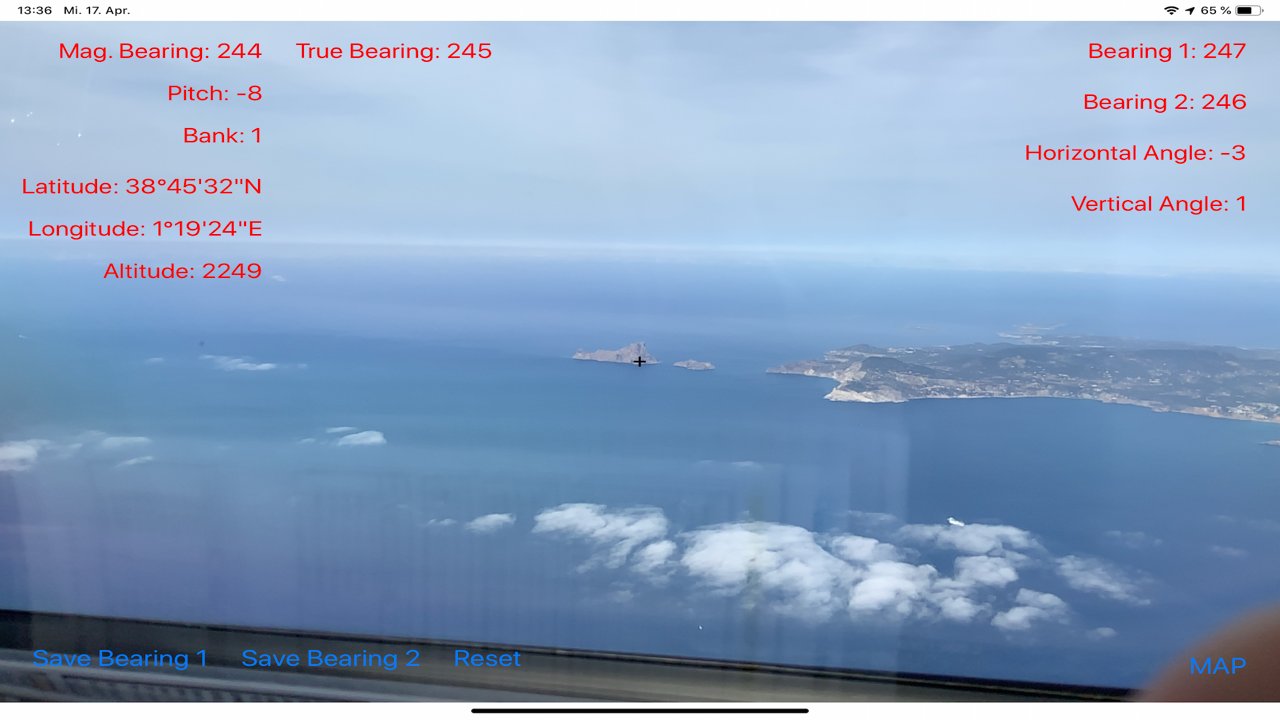
Are you a pilot, sailor or an outdoor adventurer ? Then the Digital Bearing Compass augmented reality app will be a valuable tool for you. Aim at objects in sight and directly read the true and magnetic bearing. Then you can check your bearings on the map. In addition, the current position, including the altitude above sea level is displayed.
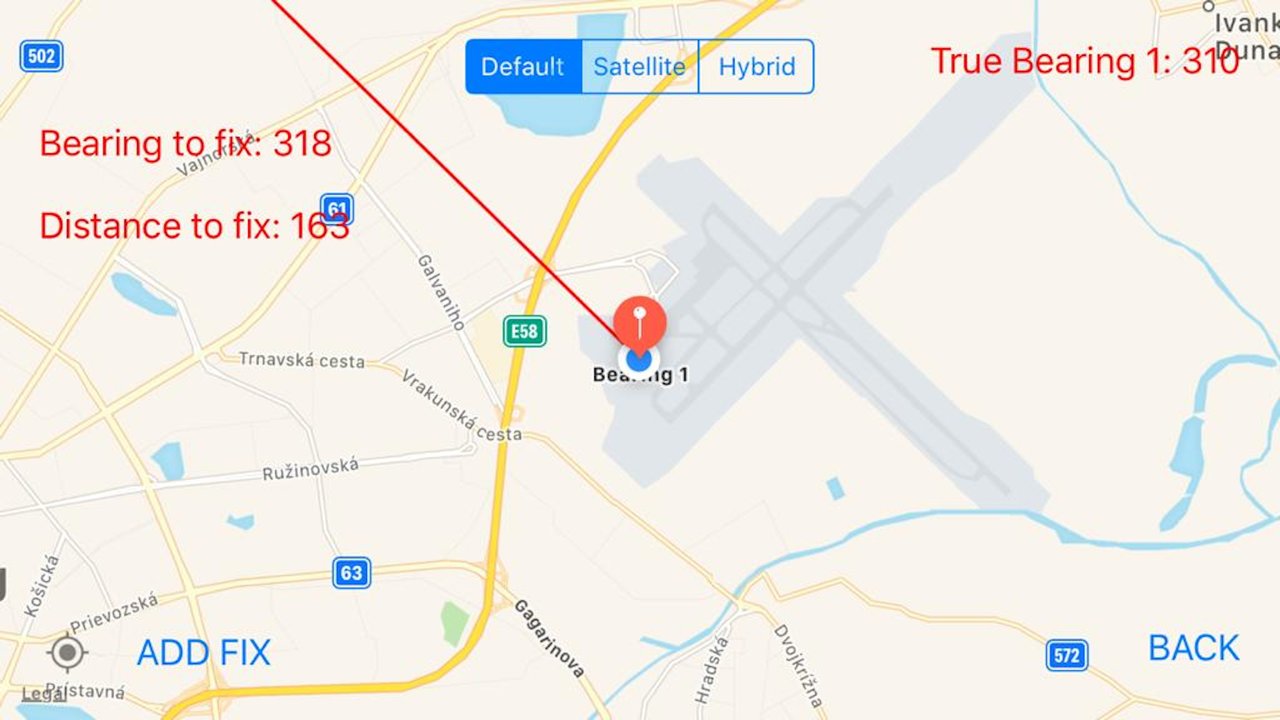
Or you can set a fix in the map view. Bearing and distance to the fix is constantly computed. In the camera view, the difference angle between current bearing and the fix is also displayed. There is also a red marker at the location of the fix in camera view displayed by augmented reality technology.
Since version 3.x you can also set a mark on the current location. This mark is also displayed in the camera view. The app shows the distance and bearing to this marked location.
By taking 2 bearings or by using the fix, you can measure the angle between 2 points or objects ... if you are a sailor or yachtsman, you know what you can do with this information. You can use them directly for navigation, since this corresponds to the functionality of a sextant. You can also use trigonometry to determine the size of a distant object. By getting 2 bearings you can also apply the method of cross bearing directly. The bearings are automatically saved, so they will be available when you start the app the next time.
Benefits:
- The App uses the high-tech sensors of your iPhone or iPad to measure orientation, device and declination (the angle between the direction to Geographic North and Magnetic North, pilots call it variation).
- Augmented reality technology, available since iOS 11. The app will also be continuously improved, further developed and equipped with new features.
- You can switch between camera mode and map mode.
- The angle between 2 points or objects can be measured.
- A fix can be set in map view which is shown also in camera view.
- You can set a mark on the actual position. This mark is also displayed in the camera view.
- The position and direction of the bearings and the fix are drawn in the map.
- This way a cross bearing is possible.
- day/night mode
- you can choose between different coordinate formats
- you can choose between different distance and altitude units
- the cardinal directions are shown in the camera view
No matter if you are a pilot, seal, scientist, astronomer, technician, geographer or outdoor athlete, you will find the app extremely valuable for your orientation and navigation. And it is fun.
Please note that some sensors require a time to calibrate. Sometimes it might be the case that after starting the app, for a few seconds a wrong direction will be displayed. The camera should be moved slowly back and forth in this case so that the device can perform the calibration.
The app needs the permission to use the GPS. No data will be sent from the app to the outside world.
The app also uses augmented reality, a brand new technology which is supported only by the newest devices. You need at least an iPhone 6s or later, an iPad pro 2nd generation or later, or an iPad 2017 or later. Future devices will all support augmented reality.
License: Commercial
Are you a pilot, sailor or an outdoor adventurer ? Then the Digital Bearing Compass augmented reality app will be a valuable tool for you. Aim at objects in sight and directly read the true and magnetic bearing. Then you can check your bearings on the map. In addition, the current position, including the altitude above sea level is displayed.
Or you can set a fix in the map view. Bearing and distance to the fix is constantly computed. In the camera view, the difference angle between current bearing and the fix is also displayed. There is also a red marker at the location of the fix in camera view displayed by augmented reality technology.
Since version 3.x you can also set a mark on the current location. This mark is also displayed in the camera view. The app shows the distance and bearing to this marked location.
By taking 2 bearings or by using the fix, you can measure the angle between 2 points or objects ... if you are a sailor or yachtsman, you know what you can do with this information. You can use them directly for navigation, since this corresponds to the functionality of a sextant. You can also use trigonometry to determine the size of a distant object. By getting 2 bearings you can also apply the method of cross bearing directly. The bearings are automatically saved, so they will be available when you start the app the next time.
Benefits:
- The App uses the high-tech sensors of your iPhone or iPad to measure orientation, device and declination (the angle between the direction to Geographic North and Magnetic North, pilots call it variation).
- Augmented reality technology, available since iOS 11. The app will also be continuously improved, further developed and equipped with new features.
- You can switch between camera mode and map mode.
- The angle between 2 points or objects can be measured.
- A fix can be set in map view which is shown also in camera view.
- You can set a mark on the actual position. This mark is also displayed in the camera view.
- The position and direction of the bearings and the fix are drawn in the map.
- This way a cross bearing is possible.
- day/night mode
- you can choose between different coordinate formats
- you can choose between different distance and altitude units
- the cardinal directions are shown in the camera view
No matter if you are a pilot, seal, scientist, astronomer, technician, geographer or outdoor athlete, you will find the app extremely valuable for your orientation and navigation. And it is fun.
Please note that some sensors require a time to calibrate. Sometimes it might be the case that after starting the app, for a few seconds a wrong direction will be displayed. The camera should be moved slowly back and forth in this case so that the device can perform the calibration.
The app needs the permission to use the GPS. No data will be sent from the app to the outside world.
The app also uses augmented reality, a brand new technology which is supported only by the newest devices. You need at least an iPhone 6s or later, an iPad pro 2nd generation or later, or an iPad 2017 or later. Future devices will all support augmented reality.
License: Commercial
| Release info | New Release on Jun 17, 2026 |
|---|---|
| Release notes | Changelog: 3.3: - Updated the app for the new iOS Versions. -- Fixed a small bug 3.2: - snapshot of a satellite view picture pops up when tapping on the fix in the map view 3.1: - Updated the app for the new iOS Versions. - slight changes of the UI |
| Listing data | App Store |
Reviews
No reviews yet. Be the first to review Digital Bearing Compass.
Used Digital Bearing Compass? Tell other visitors what you thought.
Log in to write a reviewOther products by this publisher
- "No Distractions" for YouTube 4.10 ----
- #Bible 11.6 "Incredible App - My sister shared this app with me a few weeks ago and it is truly incredible.
- #filmphotography 1.4.2 So, you decided to shoot on film?
- $quirrel 1.5.1 $quirrel Budget & Finance helps you plan each paycheck, track spending, manage debt, and see what is safe to spend before the next payday.
- % Percentage Calculator Pro 1.41 This is the Pro version of % Percentage Calculator.
Most viewed iOS Navigation
-
1
 Compass App 1.0.5
Find your direction with style.
-
2
 CARFACE Car Widgets & Lyrics 1.2.0
Make every drive feel more personal with CarFace.
-
3
 iGlide Lite 2.9.66
NaviLogic iGlide - the Soaring Navigation app for iOS
-
4
 Turo 26.45.0
Turo is a better car rental app for travelers who want to rent a car without the rental counter.
-
5
 Open Road 1.2
Open Road is the one driving app for your iPhone.
-
6
 Fly Delta 7.17.3
Welcome to Fly Delta, Delta’s award winning iOS app.
-
7
 Amtrak 6.1.8
Discover the convenience of traveling with Amtrak.
-
8
 Kruger Birding by Firefinch 7.6.0
Go birding in South Africa's foremost birding spot: the world renowned Kruger National Park!
-
9
 Uber 3.747.10000
Join the millions of riders who trust Uber for their everyday travel needs.
-
10
 Lyft 2026.42.3
Get where you’re going with Lyft.
Most downloaded iOS Navigation
-
1
 Live Traffic 2.4
Navigate the globe with live traffic updates, satellite views, and location tools that make every journey clearer, smarter, and more confident from the very first tap.
-
2
 Peru’s Best 2.5
PERU’S BEST is the ideal travel guide to this extraordinary country.
-
3
 Grand Egyptian Museum (GEM) 0.1.060
You could call this a coincidence but the acronym of the Grand Egyptian Museum is an apt title for the GEM, which is truly one!
-
4
 Pocket Luach Deluxe 60058
Pocket Luach Deluxe is a Jewish calendar, zmanim, Siddur, Tehillim, and personal-event companion for iPhone, iPad, and Apple Watch.
-
5
 Outdoor Photography Magazine 7.2.10
Outdoor Photography is the magazine for photographers who are passionate about being out in wild places, seeing inspiring nature and having great adventures.
-
6
 Passeporté 1.3.2
Passeporté reads the NFC chip in your biometric passport or national eID card, verifies its authenticity, and stores the data securely on your device.
-
7
 Great Circle Map 1.7.5
A globe you can turn in any direction, including straight over the poles.
-
8
 UK Map 4.12
* Unlimited free map downloads based on Ordnance Survey® OpenData, at 1:25,000 and 1:10,000 scales, and now also paid map downloads at 1:50,000, 1:25,000 and 1:10,000 scales, just like the paper maps.
-
9
 Cell Phone Towers World Map 1.1.6
219 countres !! The world's largest Database of Cell & Net Towers
-
10
 Connecticut-Parks & Trails 1.0
App Feature