
1downloads
1this week
FreeCommercial
0reviews
Screenshots
About DailyRation
DAILYRATION
A nutrition tracker for people who cook and don't want another account or subscription.
If you make most of your food from real ingredients and you've spent ten minutes inside a mainstream nutrition app wondering where the recipe button is, this is for you. DailyRation treats recipes as the main thing — not a premium upsell — and gets out of your way.
WHAT IT DOES
• Over 350 ingredients on day one. Eggs, olive oil, black beans, oats, tofu — the stuff you actually cook with is already there with full USDA nutrition data.
• Scan a barcode. Point your camera at a product barcode and the app looks it up instantly.
• Scan a nutrition label. No barcode? Photograph the nutrition facts panel and the app reads it.
• Search two databases. The full USDA FoodData Central catalog for whole foods, plus Open Food Facts for the branded and packaged products USDA doesn't carry. One tap switches between them.
• Enter it yourself. For anything else, add an ingredient manually with your own nutrition data.
• Cook a recipe once, log it forever. Build a recipe from ingredients. Every time you eat it, log it with one tap.
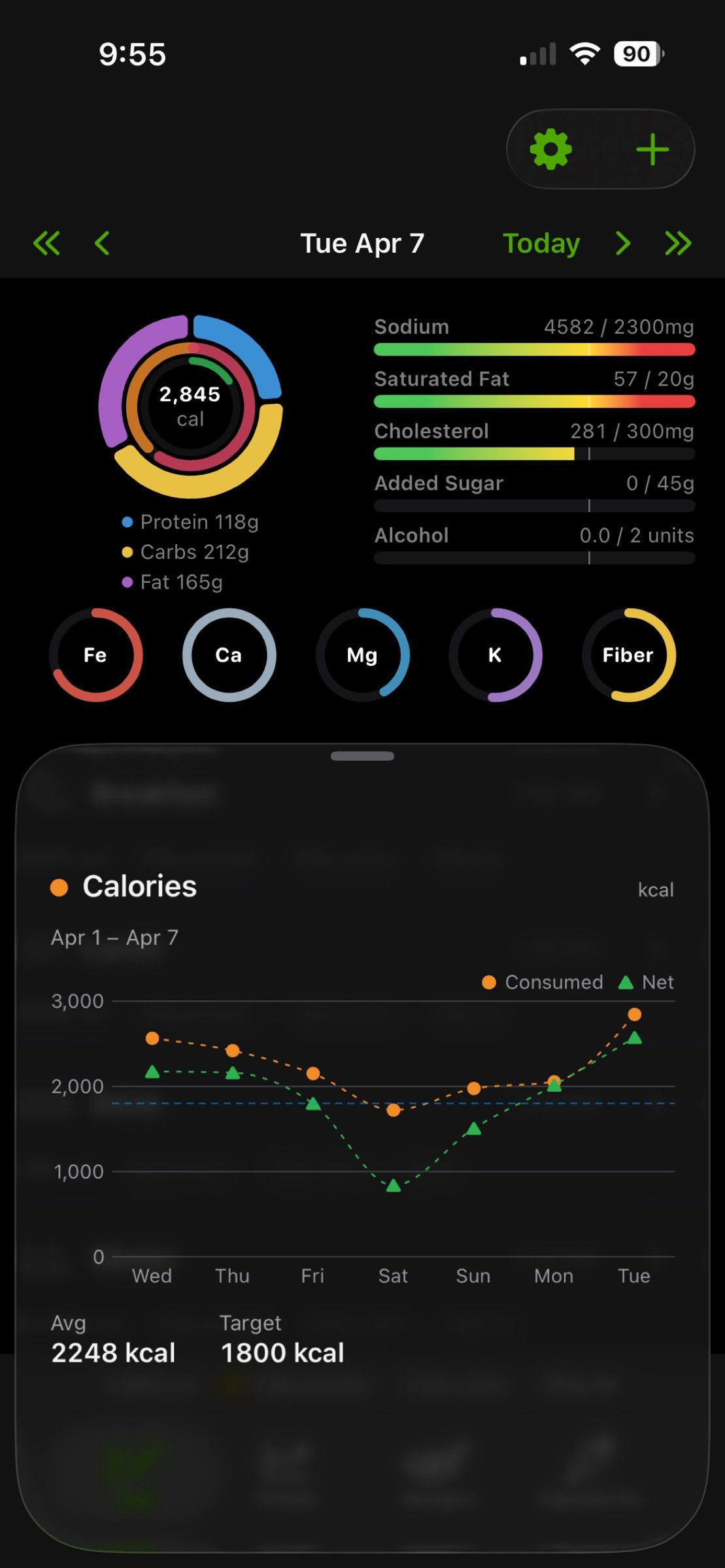
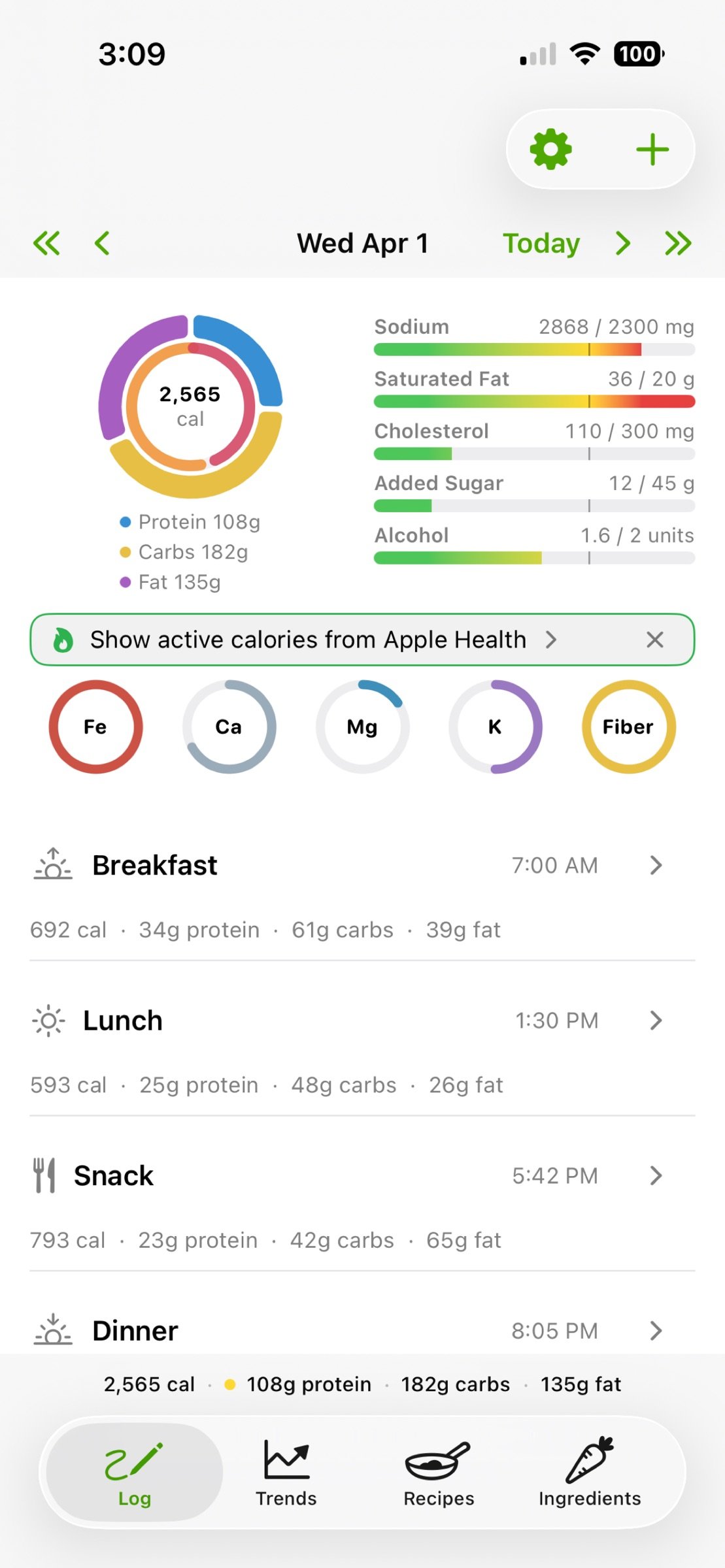
• See your day at a glance. Calories, protein, carbs, fat, plus the micronutrients you care about — all on one screen.
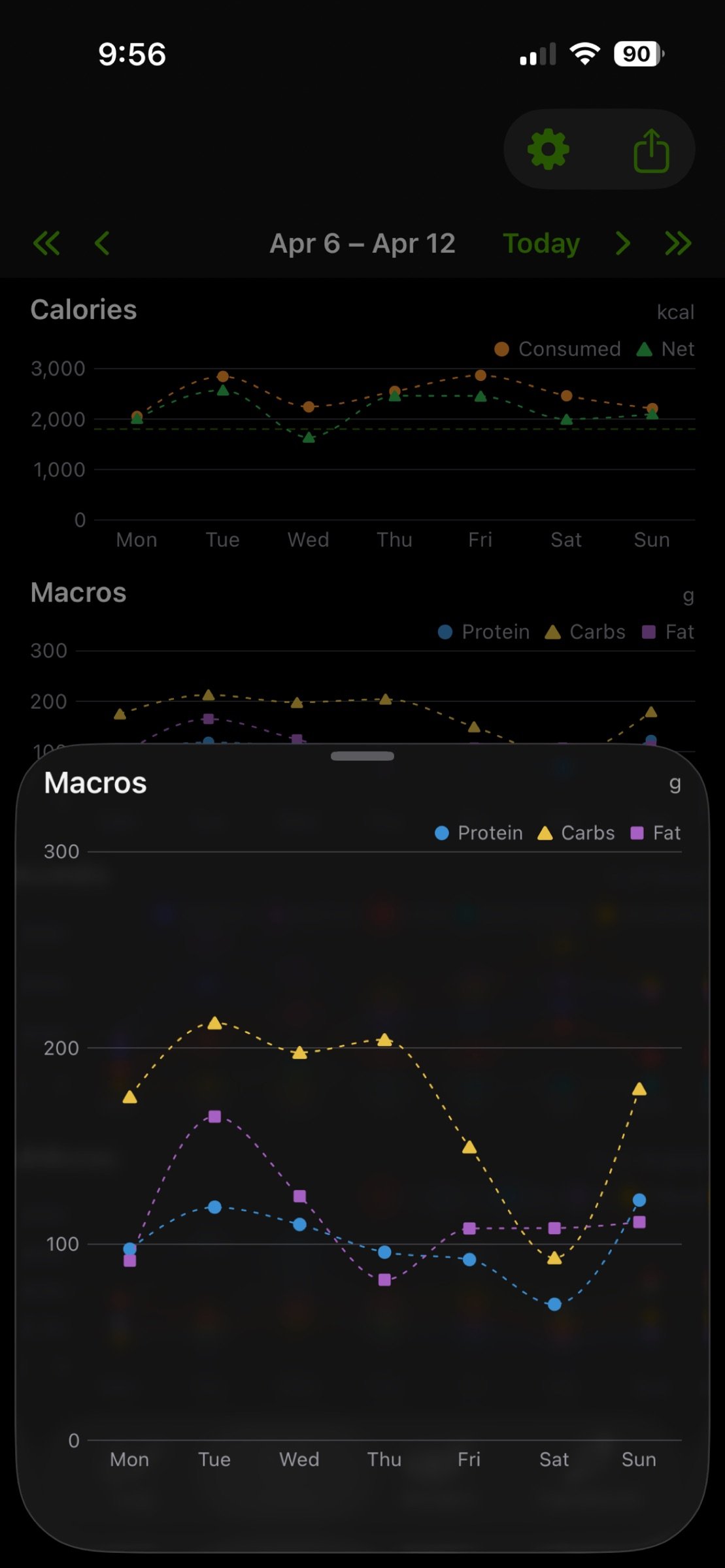
• Trends across days and weeks. Tap any nutrient to see a 7-day chart with your target line.
• iCloud sync, on by default. Recipes, ingredients, and meals follow you across devices. No account, no signup, no password. Turn it off in Settings if you'd rather stay device-only.
FOUR TABS
Log. Your day. A chart header shows macros, calories vs. target, micronutrients, and limits. Below that, the meals you've logged. Swipe left or right to walk through previous days. Tap any nutrient on the chart to open a 7-day trend popup.
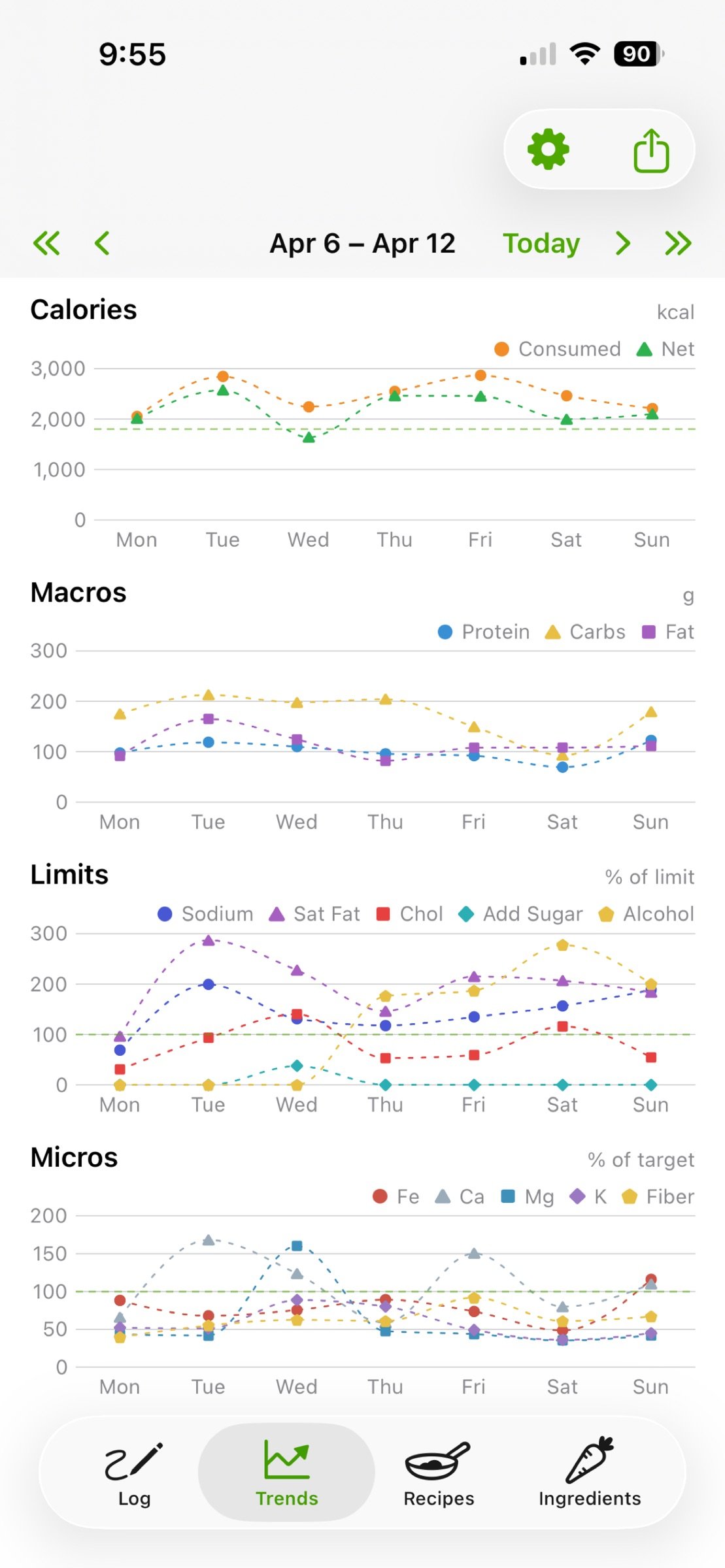
Trends. The 7-day view. Line charts for calories, macros, limits, and micronutrients, each with a target line. Navigate week by week to see how your week shaped up.
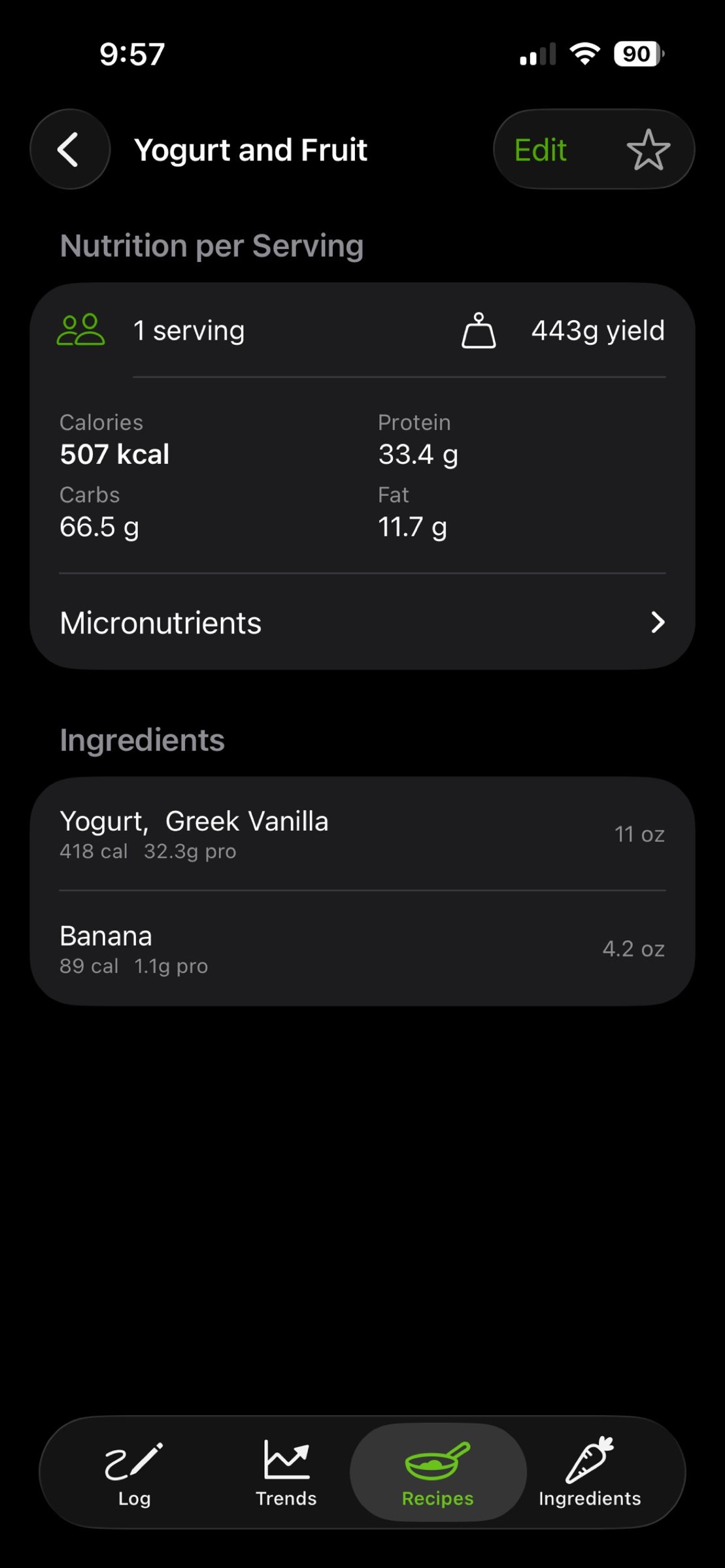
Recipes. Your cookbook. Each recipe is a list of ingredients with quantities. Nutrition is computed from the ingredients. When you log a recipe, it captures a snapshot — tweaking the recipe later won't change your history.
Ingredients. Your pantry. Every ingredient from a barcode scan, label scan, USDA or Open Food Facts search, or manual entry, with its full nutrition breakdown.
READING THE CHART HEADER
• Macro donut on the left: protein, carbs, fat. Tap a wedge for that nutrient's trend.
• Calorie ring in the center: progress toward your calorie target. Past target it shifts toward red.
• Active energy ring (optional, via Apple Health): how much you've burned, scaled against the same target.
• Limit bars on the right — Sodium / Saturated Fat / Cholesterol / Added Sugar / Alcohol: green to amber to red as you approach your daily limit. Toggle each independently in Settings.
• Micro rings below — Iron / Calcium / Magnesium / Potassium / Fiber: small rings that fill toward your daily target. Each toggleable in Settings.
APPLE HEALTH
Off by default. Show active calories reads your active energy burned from Apple Health and renders a green ring inside the calorie ring, scaled to your calorie target. The app only reads from Health; it doesn't write anything back.
PRIVACY
There is no DailyRation server. Your data lives on your device. With iCloud sync on (default), it also lives in your private iCloud database — accessible only by you. You can turn sync off in Settings. Ingredient search and barcode lookups query USDA and Open Food Facts directly from your device; nothing personal is sent. Nothing is collected, sold, or transmitted.
REQUIREMENTS
• iPhone or iPad running iOS 17+
• Mac running macOS 14+
License: Commercial
A nutrition tracker for people who cook and don't want another account or subscription.
If you make most of your food from real ingredients and you've spent ten minutes inside a mainstream nutrition app wondering where the recipe button is, this is for you. DailyRation treats recipes as the main thing — not a premium upsell — and gets out of your way.
WHAT IT DOES
• Over 350 ingredients on day one. Eggs, olive oil, black beans, oats, tofu — the stuff you actually cook with is already there with full USDA nutrition data.
• Scan a barcode. Point your camera at a product barcode and the app looks it up instantly.
• Scan a nutrition label. No barcode? Photograph the nutrition facts panel and the app reads it.
• Search two databases. The full USDA FoodData Central catalog for whole foods, plus Open Food Facts for the branded and packaged products USDA doesn't carry. One tap switches between them.
• Enter it yourself. For anything else, add an ingredient manually with your own nutrition data.
• Cook a recipe once, log it forever. Build a recipe from ingredients. Every time you eat it, log it with one tap.
• See your day at a glance. Calories, protein, carbs, fat, plus the micronutrients you care about — all on one screen.
• Trends across days and weeks. Tap any nutrient to see a 7-day chart with your target line.
• iCloud sync, on by default. Recipes, ingredients, and meals follow you across devices. No account, no signup, no password. Turn it off in Settings if you'd rather stay device-only.
FOUR TABS
Log. Your day. A chart header shows macros, calories vs. target, micronutrients, and limits. Below that, the meals you've logged. Swipe left or right to walk through previous days. Tap any nutrient on the chart to open a 7-day trend popup.
Trends. The 7-day view. Line charts for calories, macros, limits, and micronutrients, each with a target line. Navigate week by week to see how your week shaped up.
Recipes. Your cookbook. Each recipe is a list of ingredients with quantities. Nutrition is computed from the ingredients. When you log a recipe, it captures a snapshot — tweaking the recipe later won't change your history.
Ingredients. Your pantry. Every ingredient from a barcode scan, label scan, USDA or Open Food Facts search, or manual entry, with its full nutrition breakdown.
READING THE CHART HEADER
• Macro donut on the left: protein, carbs, fat. Tap a wedge for that nutrient's trend.
• Calorie ring in the center: progress toward your calorie target. Past target it shifts toward red.
• Active energy ring (optional, via Apple Health): how much you've burned, scaled against the same target.
• Limit bars on the right — Sodium / Saturated Fat / Cholesterol / Added Sugar / Alcohol: green to amber to red as you approach your daily limit. Toggle each independently in Settings.
• Micro rings below — Iron / Calcium / Magnesium / Potassium / Fiber: small rings that fill toward your daily target. Each toggleable in Settings.
APPLE HEALTH
Off by default. Show active calories reads your active energy burned from Apple Health and renders a green ring inside the calorie ring, scaled to your calorie target. The app only reads from Health; it doesn't write anything back.
PRIVACY
There is no DailyRation server. Your data lives on your device. With iCloud sync on (default), it also lives in your private iCloud database — accessible only by you. You can turn sync off in Settings. Ingredient search and barcode lookups query USDA and Open Food Facts directly from your device; nothing personal is sent. Nothing is collected, sold, or transmitted.
REQUIREMENTS
• iPhone or iPad running iOS 17+
• Mac running macOS 14+
License: Commercial
| Release info | New Release on Jun 14, 2026 |
|---|---|
| Release notes | Fixes an issue where your ingredient library could show duplicate entries after setting up DailyRation on a new device. |
| Listing data | App Store |
Reviews
No reviews yet. Be the first to review DailyRation.
Used DailyRation? Tell other visitors what you thought.
Log in to write a reviewOther products by this publisher
- "No Distractions" for YouTube 4.10 ----
- #Bible 11.6 "Incredible App - My sister shared this app with me a few weeks ago and it is truly incredible.
- #filmphotography 1.4.2 So, you decided to shoot on film?
- $quirrel 1.5.1 $quirrel Budget & Finance helps you plan each paycheck, track spending, manage debt, and see what is safe to spend before the next payday.
- % Percentage Calculator Pro 1.41 This is the Pro version of % Percentage Calculator.
Most viewed iOS Health & Fitness
-
1
 Cal AI 26.45.0
HOW TO USE CAL AI:
-
2
 HealthPatch 1.0.3
Take Full Control of Your Apple Health Workout Data
-
3
 Environments 1.7
Environments is a historic catalog of long form field recordings created for the way you live.
-
4
 Dysphagia 2.3
Excellent visual tool to aid professionals in educating patients and families about swallowing disorders.
-
5
 Stromno 1.3.0
Stromno app allows you easily broadcast your heart rate data from Apple Watch and show it on live stream.
-
6
 I am 7.9.0
How many negative thoughts have been repeating in your mind?
-
7
 AllTrails 26.11.21
Whether you hike, bike, run, or walk, AllTrails is your companion and guide to the outdoors.
-
8
 Fitness Test Pro Elite 3.5.6
Fitness Test Pro Elite is a fitness test calculator for the Army, Navy, Air Force, Marine Corps, Coast Guard and special operations screening tests.
-
9
 Periodic Timer + 4.8
Keep track of time without being distracted by the device!
-
10
 2026 Long Beach Marathon 3.2.2
Long Beach Marathon app is for race day tracking to receive turn-by-turn instructions and for your friends and family to track your progress in real-time.
Most downloaded iOS Health & Fitness
-
1
HealthPatch 1.0.3
Take Full Control of Your Apple Health Workout Data
-
2
Stromno 1.3.0
Stromno app allows you easily broadcast your heart rate data from Apple Watch and show it on live stream.
-
3
 Fitness Data Sync 1.2
Tired of subscriptions just to sync your own fitness data?
-
4
 Adrian James 5.0.2019010401
Adrian James 6 Pack Abs Workout has become an international sensation.
-
5
 TonalBloom Sound Bath 1.0
TonalBloom turns your iPhone into a tactile sound bath instrument with singing bowl tones, warm drones, shimmer controls, and saved local patches.
-
6
 BrainWave 11.0.2
Advanced Binaural Brainwave Entrainment combined with Ambient Music, Nature Sounds, Other Audio Apps or your own iTunes Music.
-
7
Fitness Test Pro Elite 3.5.6
Fitness Test Pro Elite is a fitness test calculator for the Army, Navy, Air Force, Marine Corps, Coast Guard and special operations screening tests.
-
8
 Epic Haiku & Limerick 11.9.3
Haiku provides authorized clinical users of Epic’s Electronic Health Record with secure access to clinic schedules, hospital patient lists, health summaries, test results and notes.
-
9
 Flo Cycle & Period Tracker 10.10.0
Flo Health is a science-backed cycle, ovulation, pregnancy, and period tracker with over 570 million downloads worldwide.*
-
10
 VagusCalm 1.5.0
WHY VAGUSCALM?