
Couch Control for HomeKit & HA 2.8
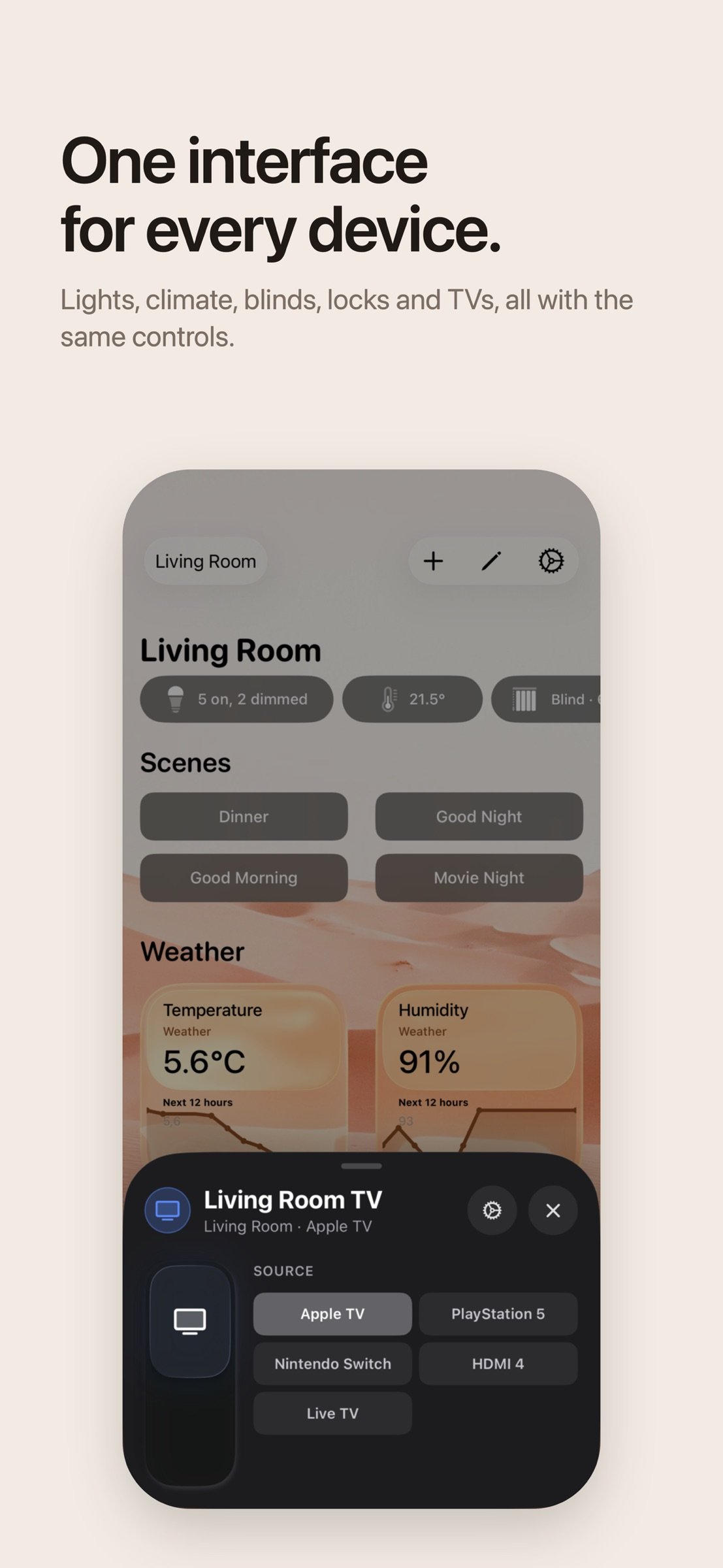
Couch Control turns your iPhone and iPad into the control center of your smart home.
Download
204.08 MB
4downloads
0this week
FreeCommercial
0reviews
Screenshots
About Couch Control for HomeKit & HA
Couch Control turns your iPhone and iPad into the control center of your smart home.
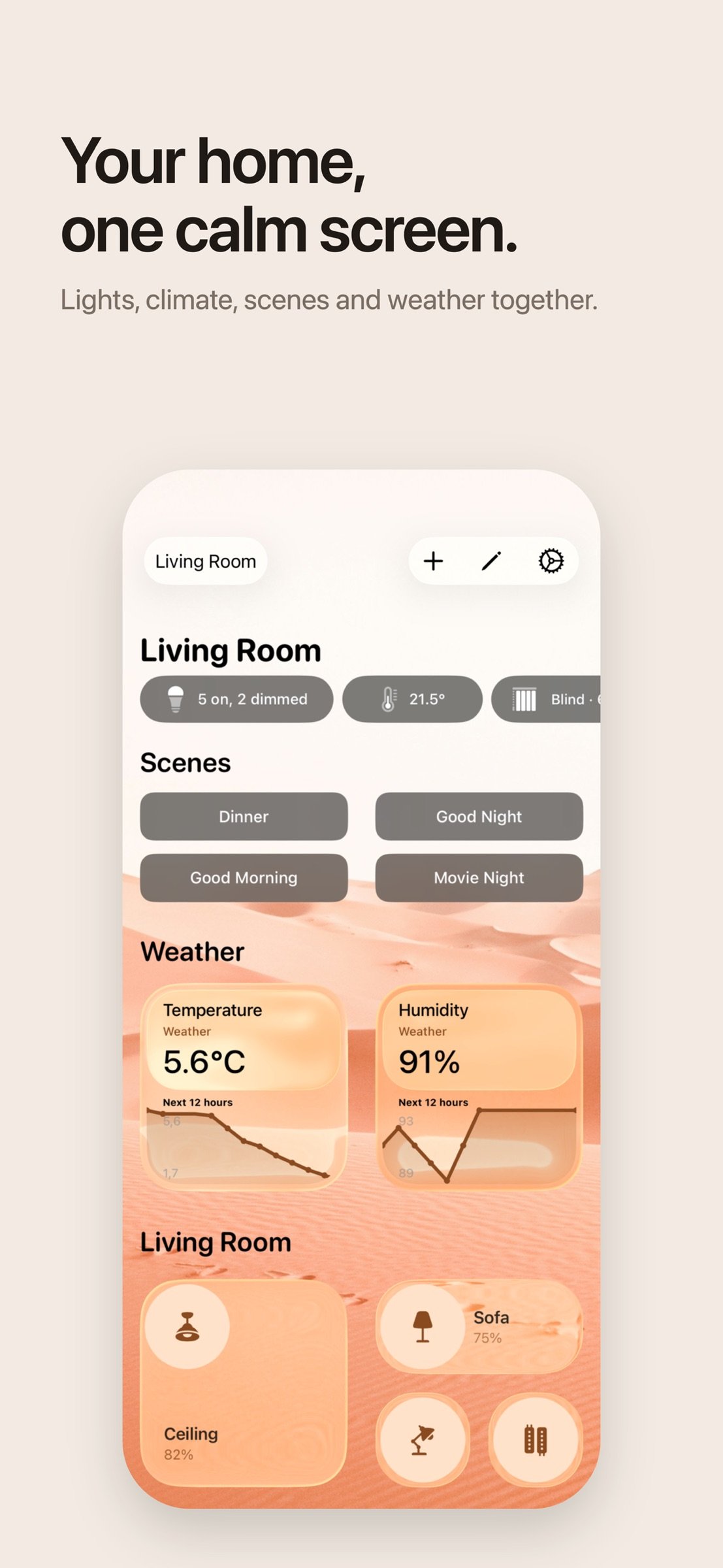
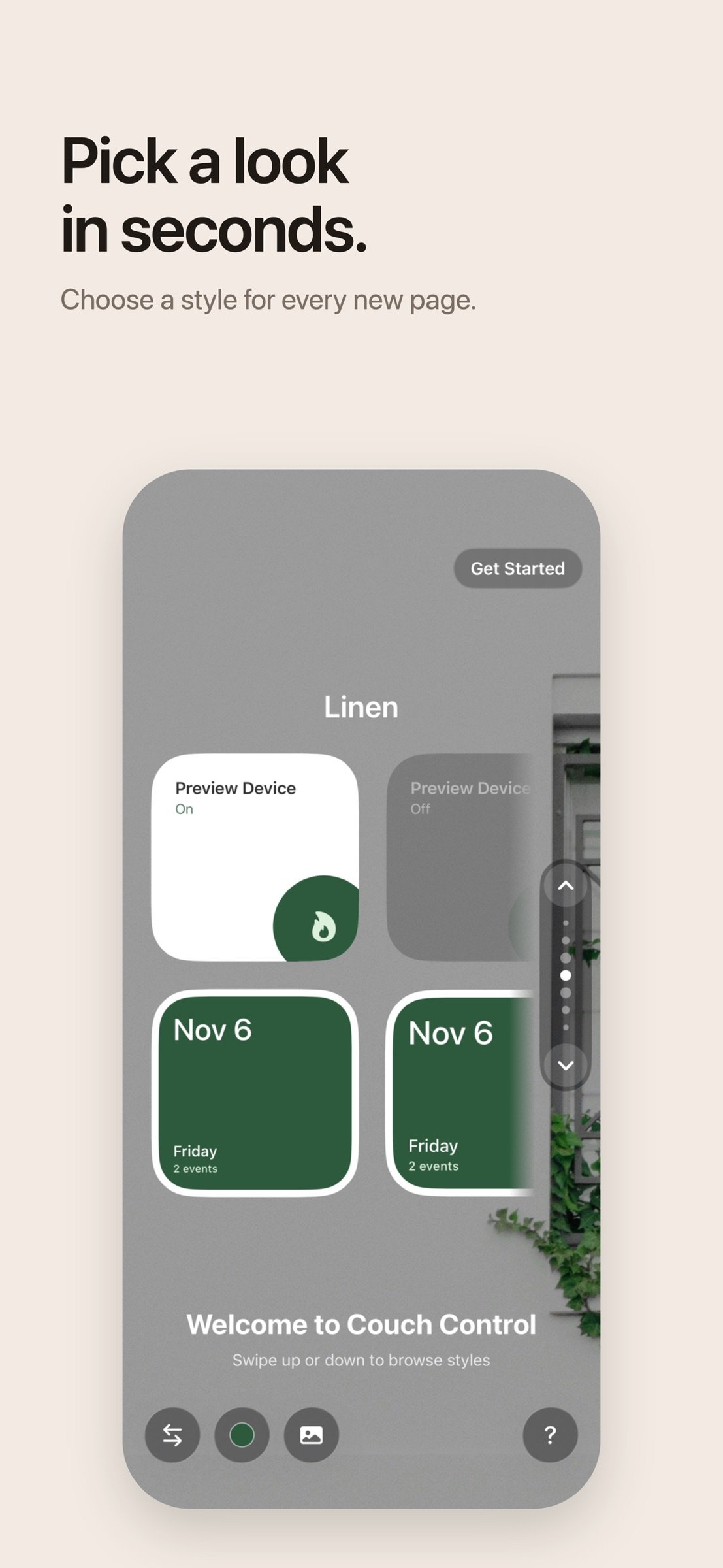
Instead of long device lists, you get customizable dashboards that look designed for your home -- and full-screen views for cameras, calendar, music, weather and sensor history.
BUILD A DASHBOARD THAT FEELS LIKE YOURS
Pages, layouts, colors and icons are all in your hands. Drop widgets onto the grid in five sizes, mix HomeKit and Home Assistant devices side by side, and add as many pages as you need. Every widget has its own background, colors, icon and typography; multi-toggle widgets put two or three devices in a single tile.
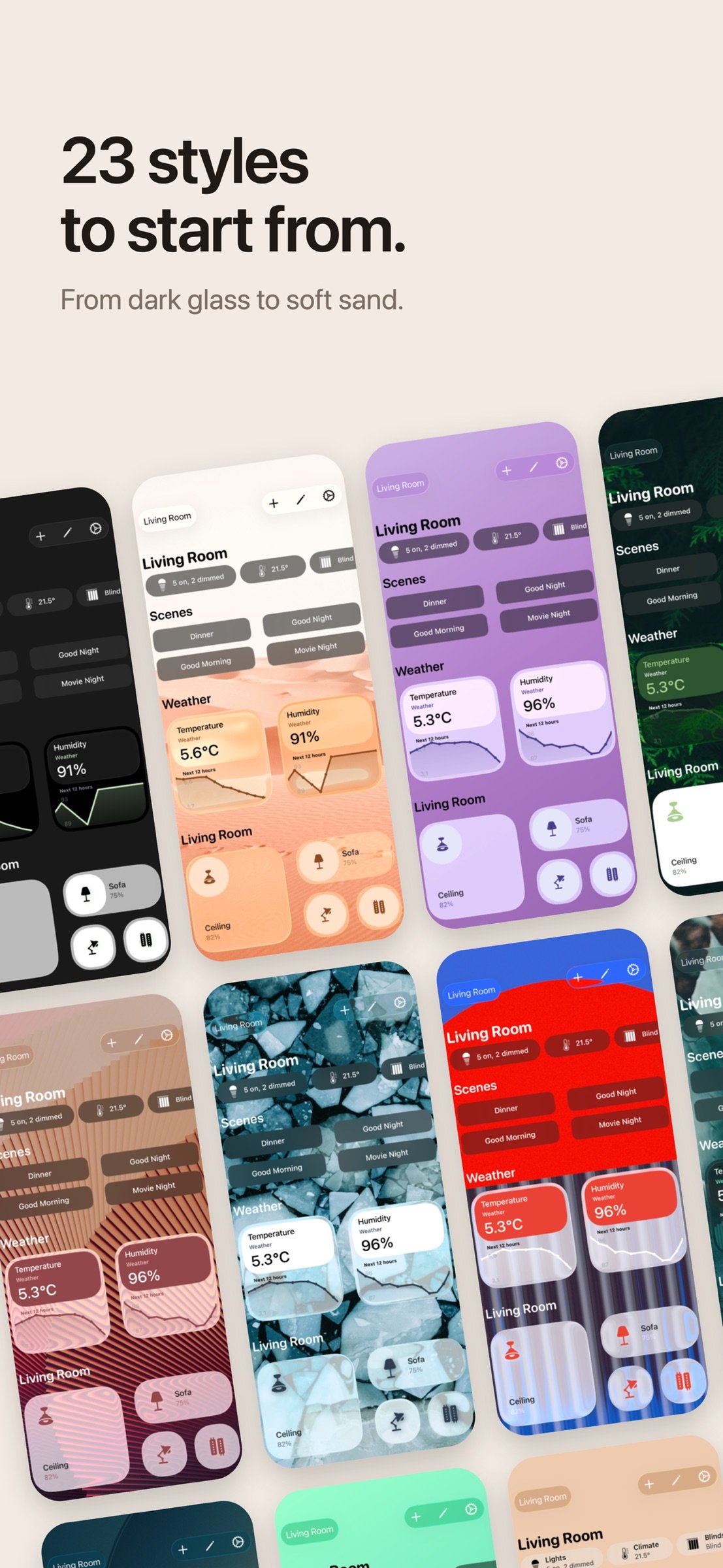
23 STYLES TO START FROM
Pick one of 23 ready-made styles -- from dark glass to soft sand -- and your first page is set up in seconds, rooms and scenes included. Or design your own: gradients, solid colors, your own photos or custom color pairs. Export a page as a .couchpage file to back it up or share it.
EVERY ROOM, ONE TAP AWAY
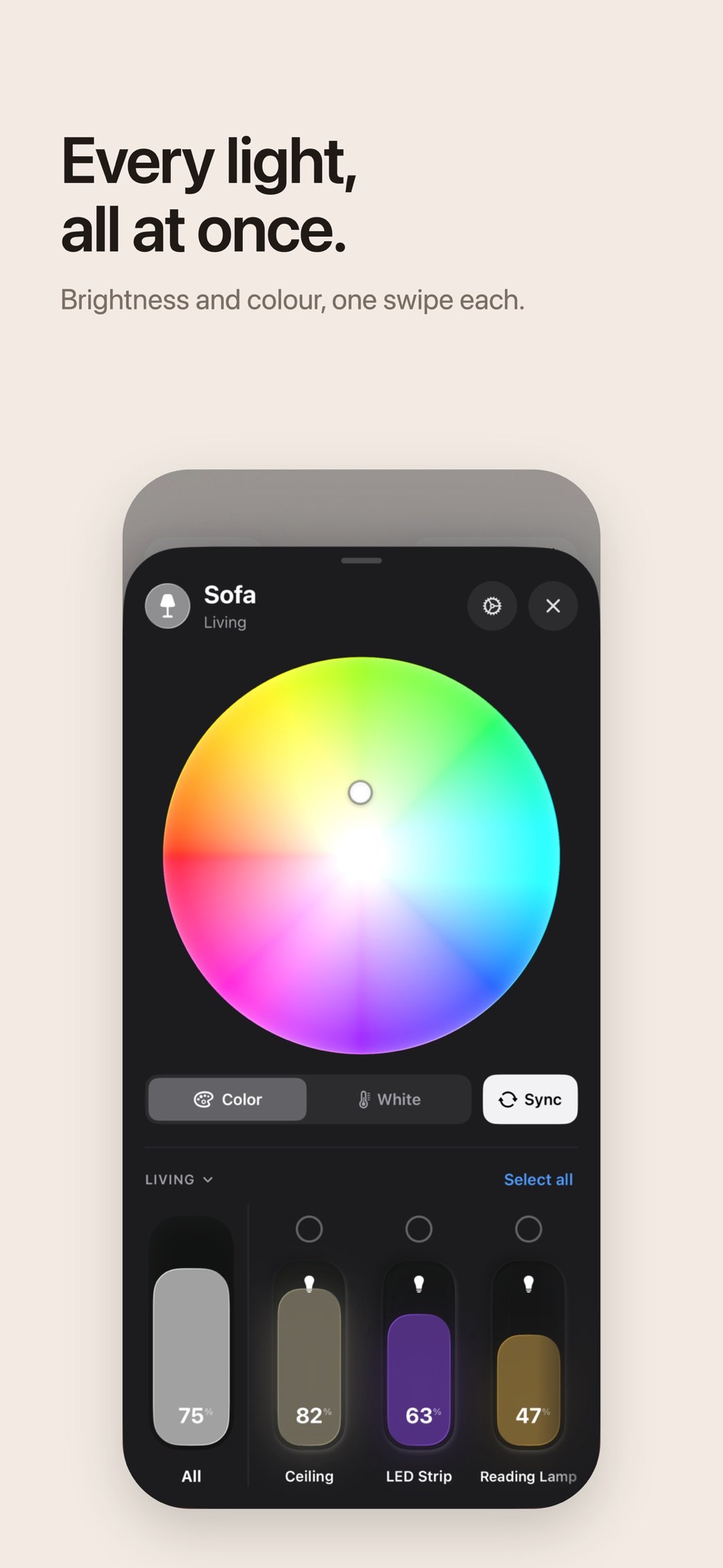
Control a whole room at once: every light with one brightness slider, color presets and a color wheel; every blind with position and tilt; every thermostat side by side with your automations next to them. On iPad, lights, blinds and climate are always one tap away at the top of the screen.
HOMEKIT SENSORS, NOW WITH HISTORY
HomeKit only shows you the current value. Couch Control records your HomeKit sensors while the app is open and charts them over time -- temperature, humidity, power and more. Any Home Assistant sensor can be charted from Home Assistant's history: temperature, humidity, power, energy, air quality, CO2, water flow, 50+ device classes in total.
WATCH 1, 4, OR UP TO 9 CAMERAS AT ONCE
Open any camera to a clean full-screen view, then add more -- Couch Control lays out a split view for up to nine streams at the same time, HomeKit and Home Assistant cameras in the same grid.
MUSIC & RECORDINGS
A full-screen music player with cover art and a library of artists, albums and tracks. The media browser plays what Home Assistant recorded -- Frigate clips, NAS folders, snapshots.
FULL-SCREEN CALENDAR & WEATHER
Today, upcoming and a whole month at a glance, with multiple color-coded calendars. A full-screen weather view with current conditions, hour-by-hour cards and a multi-day forecast. Weather data under each provider's open data license:
o MET Norway -- Norwegian Meteorological Institute, api.met.no (NLOD 2.0 / CC BY 4.0) -- global default
o Bright Sky -- Source: Deutscher Wetterdienst (DWD), distributed via brightsky.dev (DL-DE->BY-2.0) -- best for Germany/DACH
o National Weather Service (NOAA/NWS), weather.gov -- United States
Location search by Nominatim / OpenStreetMap.
NEWS, PHOTOS, TRAVEL TIME & DOORBELL
News widgets show the latest stories from RSS and Atom feeds. Photo widgets cycle through an album from your photo library. Travel time widgets show how long the drive to your places takes right now. When a HomeKit or Home Assistant doorbell rings, its live picture pops up over everything -- with a linked lock, the button to open the door too. Apple Health values like steps, heart rate and sleep work as sensors on iPhone and iPad, and you can import your own SVG icons.
A RESTING SCREEN FOR YOUR IPAD
Leave your iPad on its stand and it becomes a clock face with your sensors on it -- round or squircle, in the colors you pick.
PRIVATE BY DESIGN
No cloud account. No telemetry. No analytics. Home Assistant tokens are stored in the Keychain. Everything runs locally between your device and your home. HomeKit runs directly through Apple's encrypted HomeKit framework, with no relay through any server.
HOME ASSISTANT
Connects with a Long-Lived Access Token and processes only the entities you actually use.
ALSO ON APPLE TV
Couch Control runs on Apple TV too, with dashboards designed for the big screen and the Siri Remote.
License: Commercial
| Release info | Update on Nov 23, 2026 |
|---|---|
| Release notes | Bug fixes |
| Listing data | App Store |
Reviews
No reviews yet. Be the first to review Couch Control for HomeKit & HA.
Used Couch Control for HomeKit & HA? Tell other visitors what you thought.
Log in to write a reviewOther products by this publisher
- "No Distractions" for YouTube 4.10 ----
- #Bible 11.6.1 "Incredible App - My sister shared this app with me a few weeks ago and it is truly incredible.
- #filmphotography 1.4.2 So, you decided to shoot on film?
- #LookBusy Fake Calendar Events 1.0.6 Look Busy scans your work calendar for open time slots and fills them with realistic-looking (but secretly fake) work events.
- #Small Talk Is Canceled 1.0.2 #Small Talk Is Canceled — Conversations That Matter
Most viewed iOS Utilities
-
1
 Device Lab 1.9.1
Device Lab is an on-device reference and toolkit for your hardware — hardware monitoring, spec references, chip and device comparisons, system information, and practical utilities, so you can understand and manage the devices you use with more struc…
-
2
 APTV 2.4.10
APTV,?????????????? IPTV M3U???,?????????????????
-
3
 VibeSDR 11.0.16
VibeSDR is a mobile-first software-defined radio (SDR) receiver — and far more than a single-server client.
-
4
 V2Box 10.2.0
V2box - VPN Internet network proxy , Supports multiple proxy protocols, such as Shadowsocks, V2ray, Vmess, Trojan , SSH , Socks, Ping Tunnel, Hysteria2, DNSTT, Wireguard
-
5
 DXClock 4.0.0
Connect, collaborate, and operate smarter with DX Clock — the ultimate meeting place for amateur radio operators.
-
6
 Ally Pro 1.4.0
Ally Pro – Amiibo & NFC Tool gives advanced collectors complete control over their Amiibo library.
-
7
 Demod 1.6
Demod turns your iPhone into a software-defined radio receiver.
-
8
 ECHOCAT 1.6.0
ECHOCAT is the iPhone and iPad companion for POTACAT, the desktop app for amateur radio operators chasing Parks on the Air (POTA), Summits on the Air (SOTA), Worldwide Bunkers on the Air (WWBOTA), Tiles on the Air and DX.
-
9
 DuckDuckGo, optional Duck.ai 7.247.0
At DuckDuckGo, we believe the best way to protect your personal information from hackers, scammers, and privacy-invasive companies is to stop it from being collected at all.
-
10
 DRC 2.0.1
A simple to use app to help calculate any dilution ratio.
Most downloaded iOS Utilities
-
1
Demod 1.6
Demod turns your iPhone into a software-defined radio receiver.
-
2
 Rat And Mouse Sound Repeller 2.8
Keep mice and rats away overnight with ultrasonic waves and predator sounds.
-
3
 Guardio 2026.110.3
Protect your identity, accounts, and online activity from scams and digital threats with Guardio.
-
4
 Screen Mirroring With Miracast 2.0
Turn your iPhone into a complete TV companion.
-
5
 Fontcase 2.0.1
Fontcase is an app that lets you install custom fonts on iOS and iPadOS.
-
6
 ParkenDD 2.0.2
ParkenDD shows a list of available public parking lots in several cities.
-
7
 PickerFull 9.18
Export colors from photos as HEX, PDF, RGB, HSB/HSV, HSBA, HSL, LUV, LCH, YUV, YCBCR, YIQ, CMYK, Grayscale, XYZ, L*a*b* (CIE), CSSVAR, SASSVAR, CSSHSL, CSSRGB, AndroidXML, FlutterDart, UnityColor32, Float, Objective-C, Swift, SwiftLiteral, SwiftUI
-
8
 Passepartout, VPN Client 3.12.8
Protect your online privacy with Passepartout, a smart VPN client seamlessly integrated with iOS, macOS, iPadOS, and tvOS.
-
9
 Royal TSi 2.5.4
Royal TSi provides easy and secure access to your remote systems (RDP, VNC, SSH, etc.) by allowing you to open your Royal TS documents created with Royal TSX (for macOS) or Royal TS (for Windows).
-
10
 Universal TV Remote Control* 2.6.9
Control your Smart TV effortlessly with iMote — the ultimate universal remote control for TV.