Compass Eye Bearing Compass 3.0
Professional Augmented Reality Bearing Compass with real-time camera and map views, bearing markers and up to 8x zoom providing Compass Binocular features at a fraction of the cost.
Download
95.35 MB
17downloads
0this week
FreeCommercial
0reviews
Screenshots
About Compass Eye Bearing Compass
Professional Augmented Reality Bearing Compass with real-time camera and map views, bearing markers and up to 8x zoom providing Compass Binocular features at a fraction of the cost.
"..works nicely, we tried it out at the Voiles d'Antibes...the Captain's response when trying it out was 'Cool!'." - Boatbookings, The World's Leading Online Yacht Charter Broker
Compass Eye can be used to help with navigation on land, sea or air as a bearing or marching compass.
Compass Eye is fully gimballed and works accurately in all orientations and angles when held vertical and horizontal.
“This app is a compass on steroids! It is fully gimballed so it will work in any orientation on your iPhone or iPad. You can use it on land while hiking or as a hand bearing compass on the ocean or in the air while flying.” i-Marine Apps
"The app's compass works way better than the iOS default compass and I don't have to wave my iPhone in the air every time I launch the app." Gizmodo Review (App of The Day, 6th December).
MAIN FEATURES
- Real time, accurate in all orientations
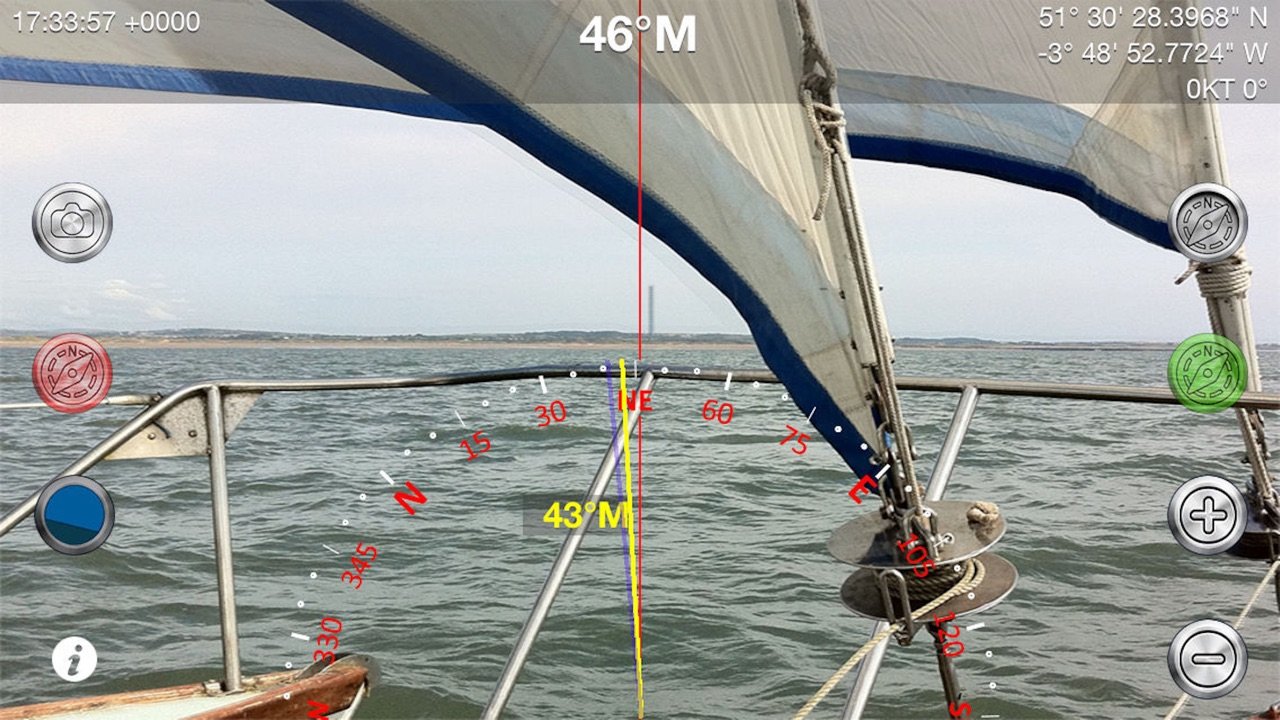
- Compass overlaid on live camera view
- 8x Digital zoom
- Back, transit, or collision bearing markers
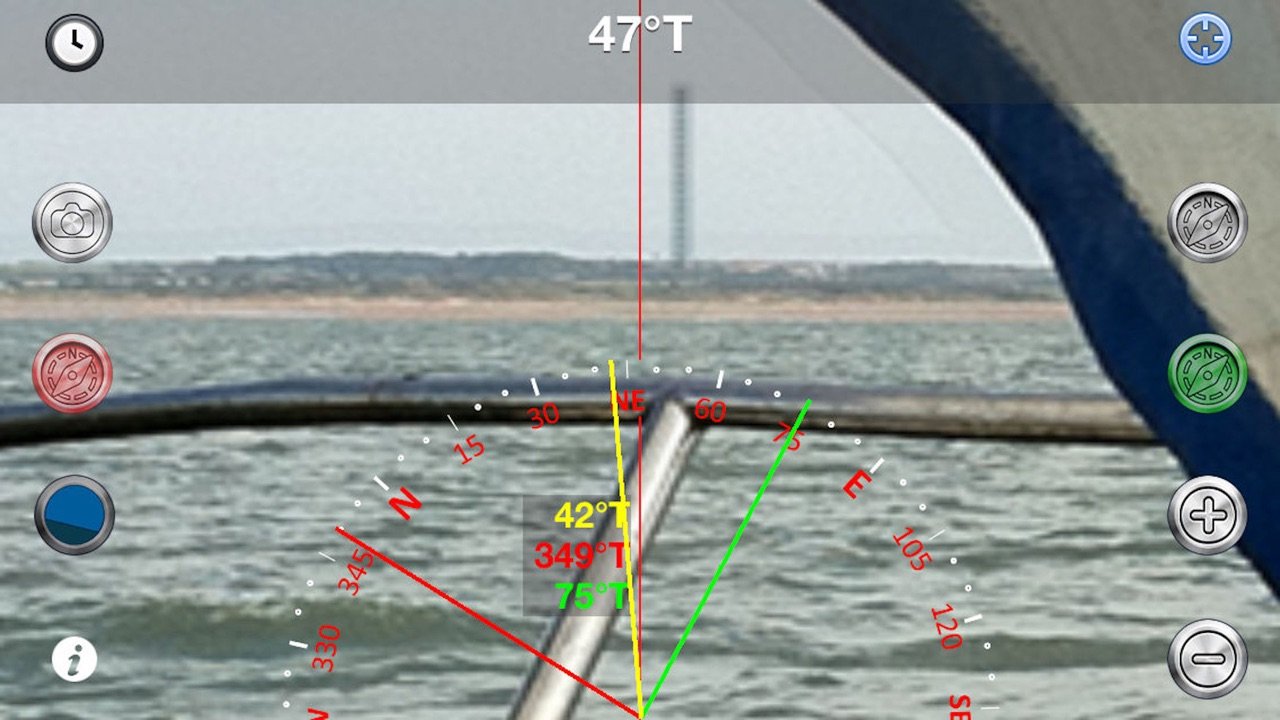
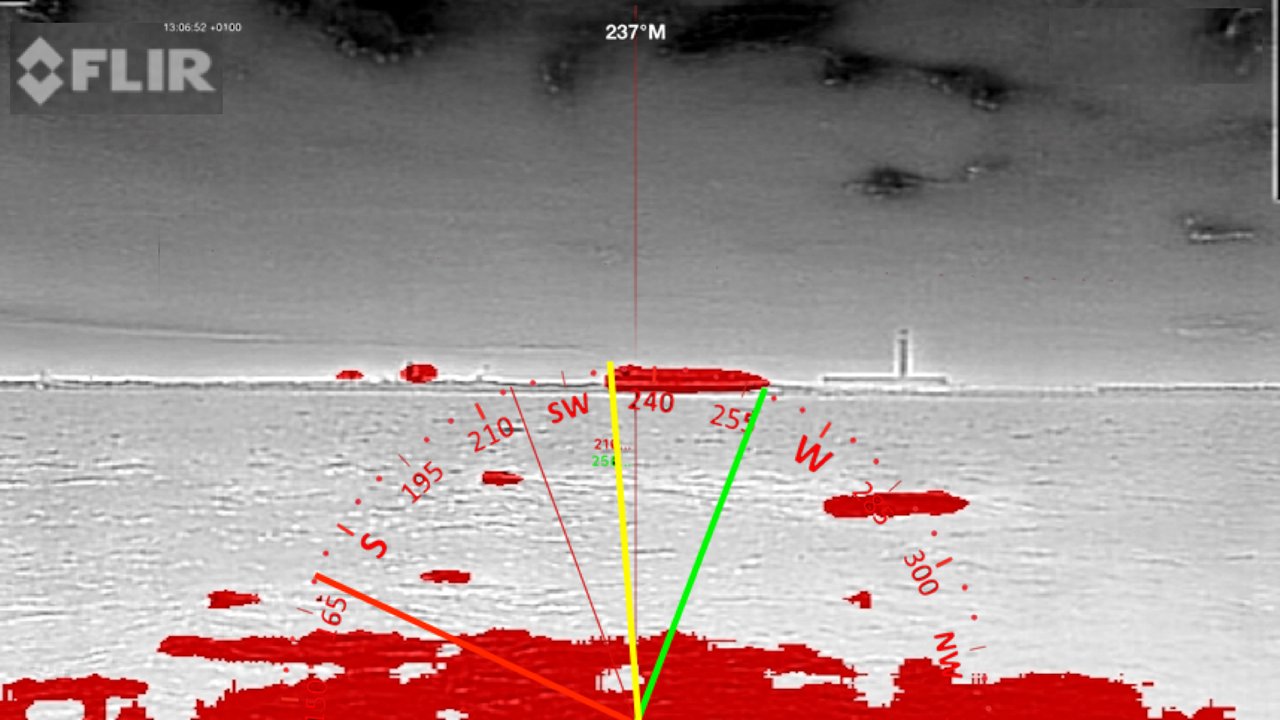
- Draggable Green and red bearing lines
- Triangulation bearings
- Optional time, date and GPS location information
- Magnetic or True North setting with variation based on location
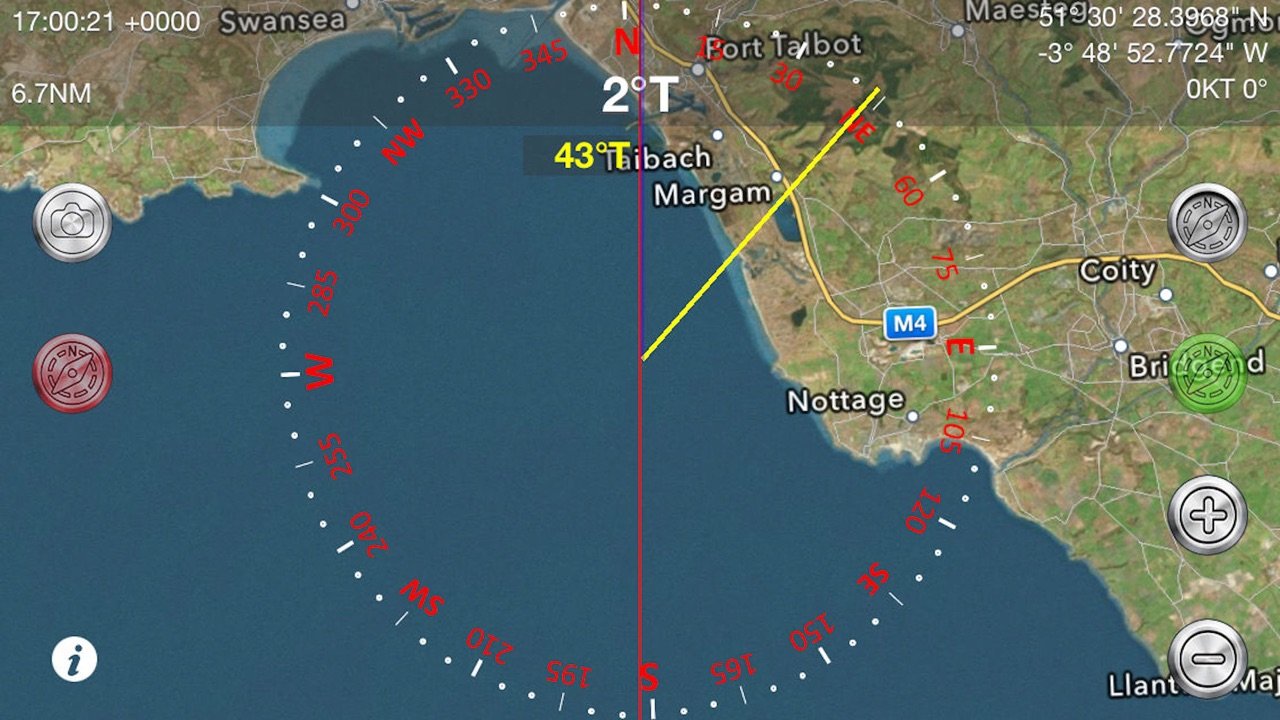
- Live map view with position and track
- Artificial Horizon with roll and pitch readout
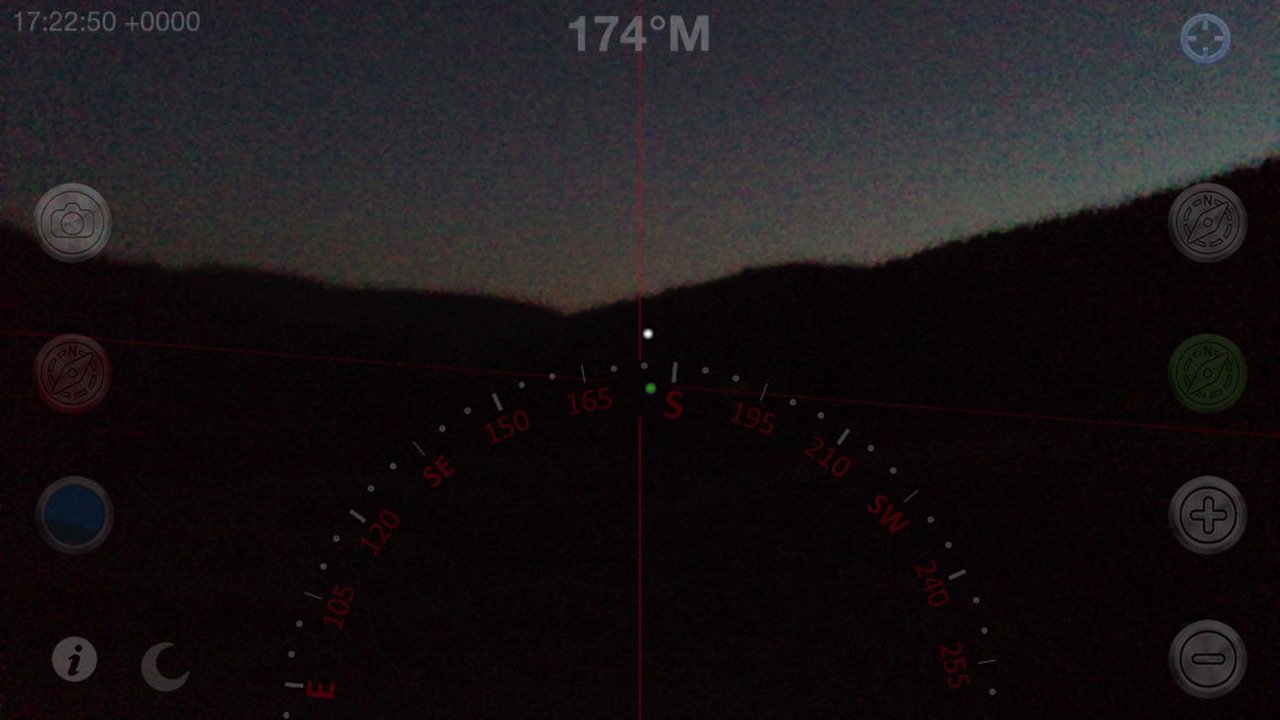
- Night Vision and FLIROne® Infra-red support
- Location sharing
- Longitude and latitude degree display in DD° MM.mmm', DD° MM' SS.ss" and now DD.ddd°
- iOS Dark mode support
- Full screen on iPhoneX and later devices
Enabling GPS also shows the Speed Over Ground (SOG) , Course Over Ground (COG) and optional COG bearing (purple).
HOW TO USE
Taking a bearing - look through your iPhone at the distant object, line it up with the centre line and read off the bearing! Zoom in to get more accuracy.
Setting a bearing - look through your iPhone at the point you want to get to, tap the Bearing button (Top right) and follow the yellow bearing line.
Setting a bearing from the map - lay the iPhone flat, rotate or drag a bearing line to line up with the point you are aiming for and follow that bearing.
Triangulation - use the three bearing lines - yellow green and red to take bearings on 3 points. Capture the view including compass, bearings, time and location information (Camera button on left of screen) and then use the photo to plot a fix on a chart.
Clearance bearings to a point on an approach - set one line to the minimum bearing (e.g. the angle the target must bear greater than) and the other line to the maximum bearing and navigate between the two. Use the colours according to the IALA lateral markings to help you remember which way to steer. e.g. in North America use red for the minimum bearing and green for the maximum (vice-versa in Europe!).
SPECIFICATIONS
Based on the iPhone camera the image specification at full zoom compares favourably with a 7x50 pair of binoculars:
- Field of Vision at 1000m at 8x: 122m
- Angle of view at 8x: approx 7 degrees
- ISO 3200 or better.
NAVIGATION SAFETY
Compass Eye should only be used for basic navigation assistance. Never rely solely on the digital compass for determining direction, proximity or distance. The user is responsible for the prudent use of information provided by this application and must not use it for direct navigation.
Requirements: iOS device with back facing Camera, Magnetometer and accelerometer (gps is optional).
N.B. Battery consumption can go up considerably when the iPhone's GPS is enabled, Compass Eye allows you to turn off location display to preserve battery life.
Terms of Use: [link removed]
Privacy Policy: [link removed]
Support: help@pocketmariner.com
License: Commercial
"..works nicely, we tried it out at the Voiles d'Antibes...the Captain's response when trying it out was 'Cool!'." - Boatbookings, The World's Leading Online Yacht Charter Broker
Compass Eye can be used to help with navigation on land, sea or air as a bearing or marching compass.
Compass Eye is fully gimballed and works accurately in all orientations and angles when held vertical and horizontal.
“This app is a compass on steroids! It is fully gimballed so it will work in any orientation on your iPhone or iPad. You can use it on land while hiking or as a hand bearing compass on the ocean or in the air while flying.” i-Marine Apps
"The app's compass works way better than the iOS default compass and I don't have to wave my iPhone in the air every time I launch the app." Gizmodo Review (App of The Day, 6th December).
MAIN FEATURES
- Real time, accurate in all orientations
- Compass overlaid on live camera view
- 8x Digital zoom
- Back, transit, or collision bearing markers
- Draggable Green and red bearing lines
- Triangulation bearings
- Optional time, date and GPS location information
- Magnetic or True North setting with variation based on location
- Live map view with position and track
- Artificial Horizon with roll and pitch readout
- Night Vision and FLIROne® Infra-red support
- Location sharing
- Longitude and latitude degree display in DD° MM.mmm', DD° MM' SS.ss" and now DD.ddd°
- iOS Dark mode support
- Full screen on iPhoneX and later devices
Enabling GPS also shows the Speed Over Ground (SOG) , Course Over Ground (COG) and optional COG bearing (purple).
HOW TO USE
Taking a bearing - look through your iPhone at the distant object, line it up with the centre line and read off the bearing! Zoom in to get more accuracy.
Setting a bearing - look through your iPhone at the point you want to get to, tap the Bearing button (Top right) and follow the yellow bearing line.
Setting a bearing from the map - lay the iPhone flat, rotate or drag a bearing line to line up with the point you are aiming for and follow that bearing.
Triangulation - use the three bearing lines - yellow green and red to take bearings on 3 points. Capture the view including compass, bearings, time and location information (Camera button on left of screen) and then use the photo to plot a fix on a chart.
Clearance bearings to a point on an approach - set one line to the minimum bearing (e.g. the angle the target must bear greater than) and the other line to the maximum bearing and navigate between the two. Use the colours according to the IALA lateral markings to help you remember which way to steer. e.g. in North America use red for the minimum bearing and green for the maximum (vice-versa in Europe!).
SPECIFICATIONS
Based on the iPhone camera the image specification at full zoom compares favourably with a 7x50 pair of binoculars:
- Field of Vision at 1000m at 8x: 122m
- Angle of view at 8x: approx 7 degrees
- ISO 3200 or better.
NAVIGATION SAFETY
Compass Eye should only be used for basic navigation assistance. Never rely solely on the digital compass for determining direction, proximity or distance. The user is responsible for the prudent use of information provided by this application and must not use it for direct navigation.
Requirements: iOS device with back facing Camera, Magnetometer and accelerometer (gps is optional).
N.B. Battery consumption can go up considerably when the iPhone's GPS is enabled, Compass Eye allows you to turn off location display to preserve battery life.
Terms of Use: [link removed]
Privacy Policy: [link removed]
Support: help@pocketmariner.com
License: Commercial
| Release info | Update on Oct 27, 2026 |
|---|---|
| Release notes | Support and fix for iOS compass orientation api changes with iOS27 |
| Listing data | App Store |
Reviews
No reviews yet. Be the first to review Compass Eye Bearing Compass.
Used Compass Eye Bearing Compass? Tell other visitors what you thought.
Log in to write a reviewOther products by this publisher
- "No Distractions" for YouTube 4.10 ----
- #Bible 11.6 "Incredible App - My sister shared this app with me a few weeks ago and it is truly incredible.
- #filmphotography 1.4.2 So, you decided to shoot on film?
- $quirrel 1.5.1 $quirrel Budget & Finance helps you plan each paycheck, track spending, manage debt, and see what is safe to spend before the next payday.
- % Percentage Calculator Pro 1.41 This is the Pro version of % Percentage Calculator.
Most viewed iOS Navigation
-
1
 Compass App 1.0.5
Find your direction with style.
-
2
 CARFACE Car Widgets & Lyrics 1.2.0
Make every drive feel more personal with CarFace.
-
3
 iGlide Lite 2.9.66
NaviLogic iGlide - the Soaring Navigation app for iOS
-
4
 Turo 26.45.0
Turo is a better car rental app for travelers who want to rent a car without the rental counter.
-
5
 Open Road 1.2
Open Road is the one driving app for your iPhone.
-
6
 Fly Delta 7.17.3
Welcome to Fly Delta, Delta’s award winning iOS app.
-
7
 Amtrak 6.1.8
Discover the convenience of traveling with Amtrak.
-
8
 Kruger Birding by Firefinch 7.6.0
Go birding in South Africa's foremost birding spot: the world renowned Kruger National Park!
-
9
 Uber 3.747.10000
Join the millions of riders who trust Uber for their everyday travel needs.
-
10
 Lyft 2026.42.3
Get where you’re going with Lyft.
Most downloaded iOS Navigation
-
1
 Live Traffic 2.4
Navigate the globe with live traffic updates, satellite views, and location tools that make every journey clearer, smarter, and more confident from the very first tap.
-
2
 Peru’s Best 2.5
PERU’S BEST is the ideal travel guide to this extraordinary country.
-
3
 Grand Egyptian Museum (GEM) 0.1.060
You could call this a coincidence but the acronym of the Grand Egyptian Museum is an apt title for the GEM, which is truly one!
-
4
 Pocket Luach Deluxe 60058
Pocket Luach Deluxe is a Jewish calendar, zmanim, Siddur, Tehillim, and personal-event companion for iPhone, iPad, and Apple Watch.
-
5
 Outdoor Photography Magazine 7.2.10
Outdoor Photography is the magazine for photographers who are passionate about being out in wild places, seeing inspiring nature and having great adventures.
-
6
 Passeporté 1.3.2
Passeporté reads the NFC chip in your biometric passport or national eID card, verifies its authenticity, and stores the data securely on your device.
-
7
 Great Circle Map 1.7.5
A globe you can turn in any direction, including straight over the poles.
-
8
 UK Map 4.12
* Unlimited free map downloads based on Ordnance Survey® OpenData, at 1:25,000 and 1:10,000 scales, and now also paid map downloads at 1:50,000, 1:25,000 and 1:10,000 scales, just like the paper maps.
-
9
 Cell Phone Towers World Map 1.1.6
219 countres !! The world's largest Database of Cell & Net Towers
-
10
 Connecticut-Parks & Trails 1.0
App Feature