
Augview Compass 1.0.4
Augview Compass is a high-accuracy compass application supporting:
Download
189.22 MB
13downloads
3this week
FreeCommercial
0reviews
Screenshots
About Augview Compass
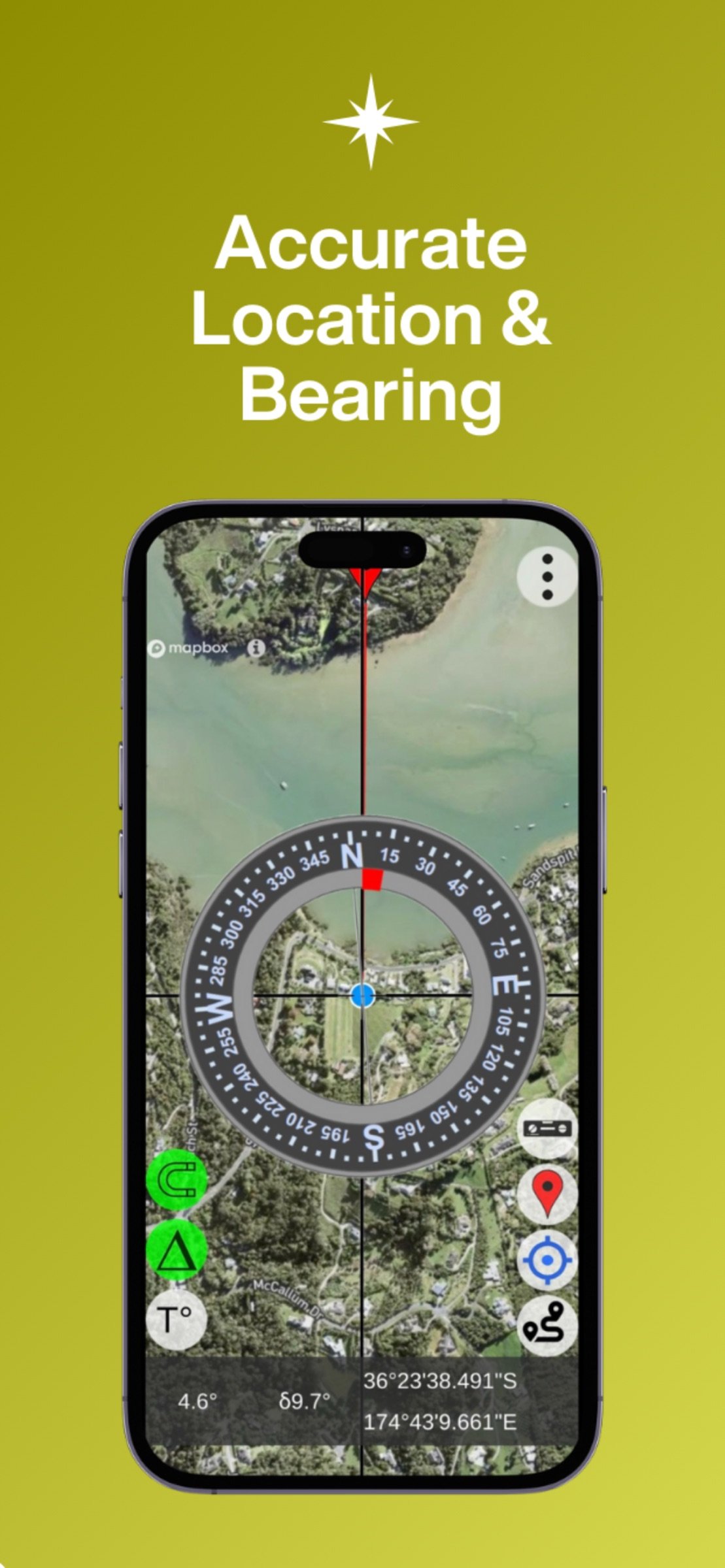
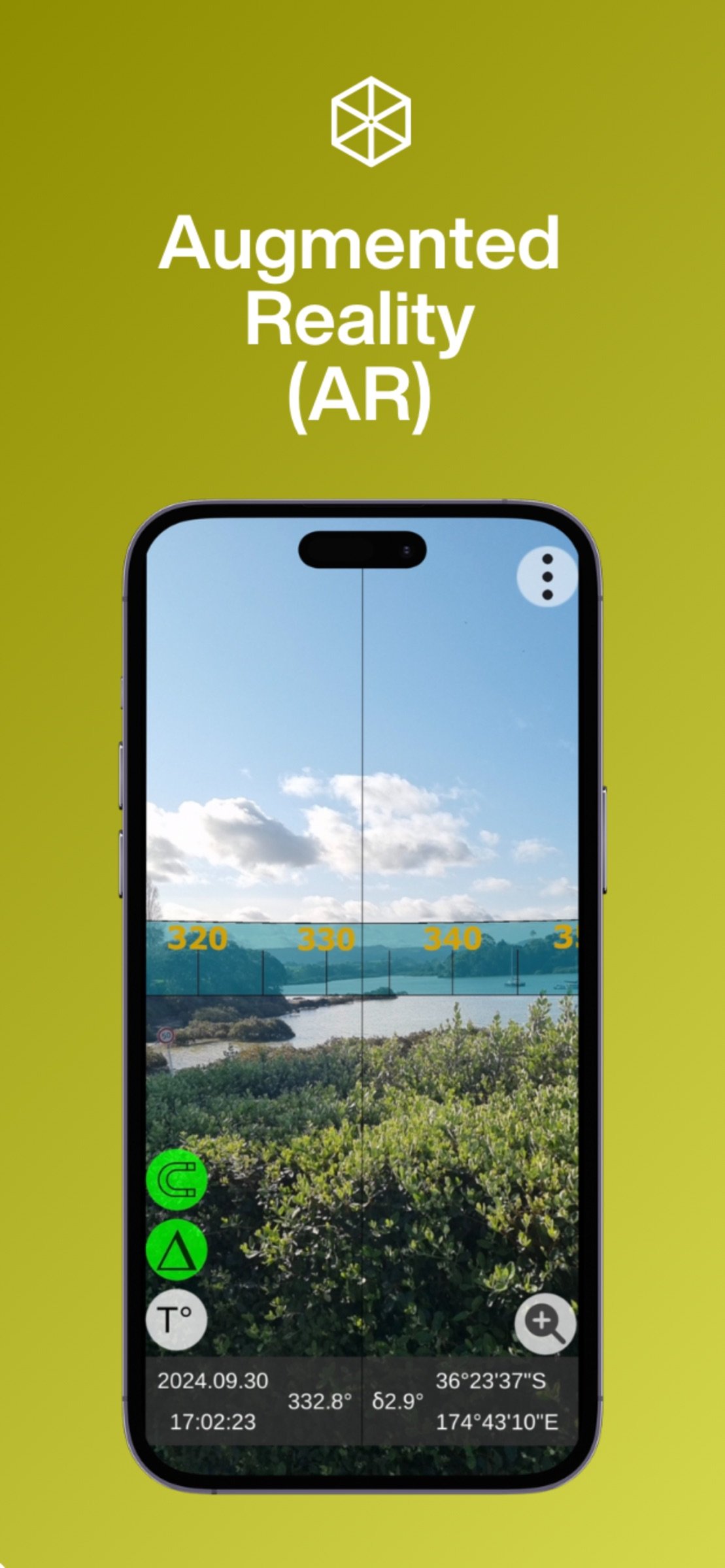
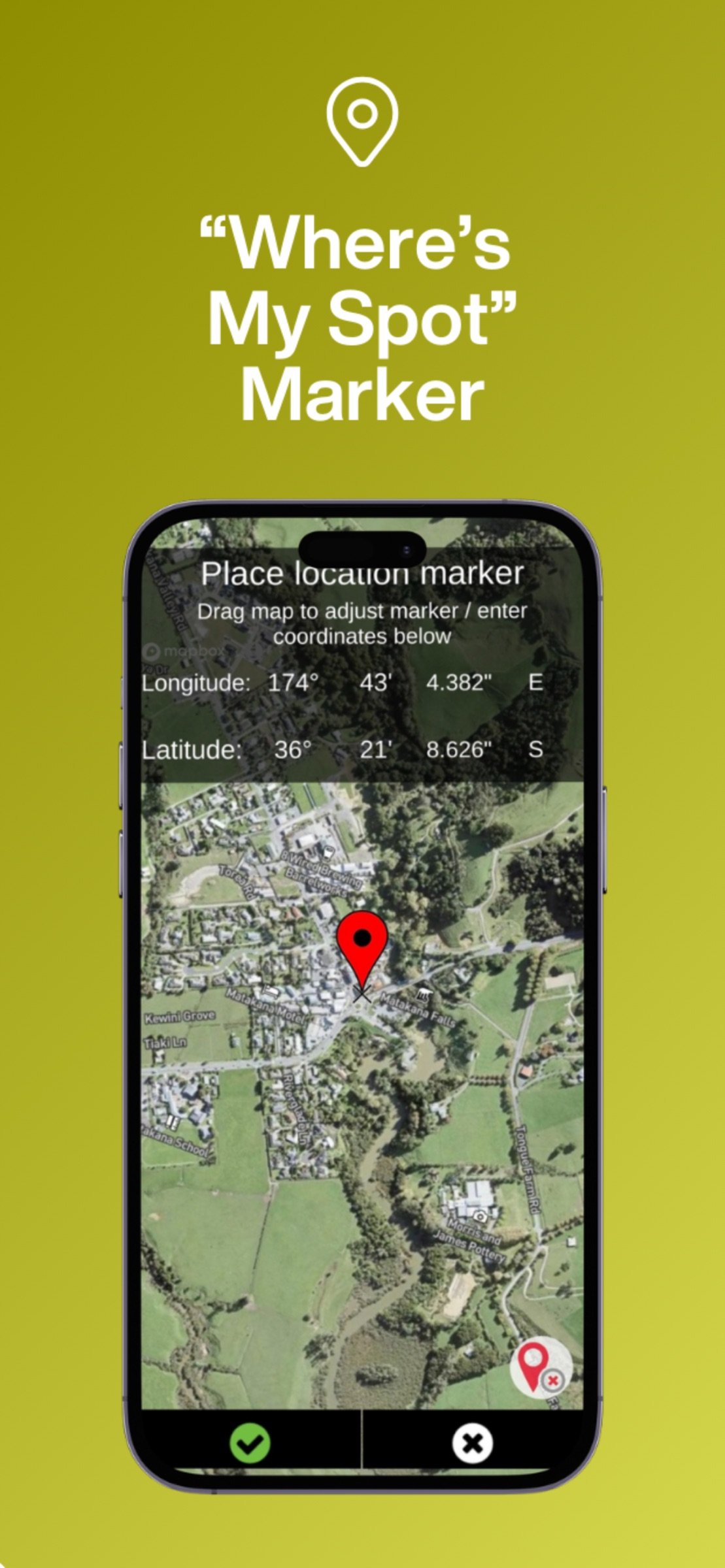
Augview Compass is a high-accuracy compass application supporting:
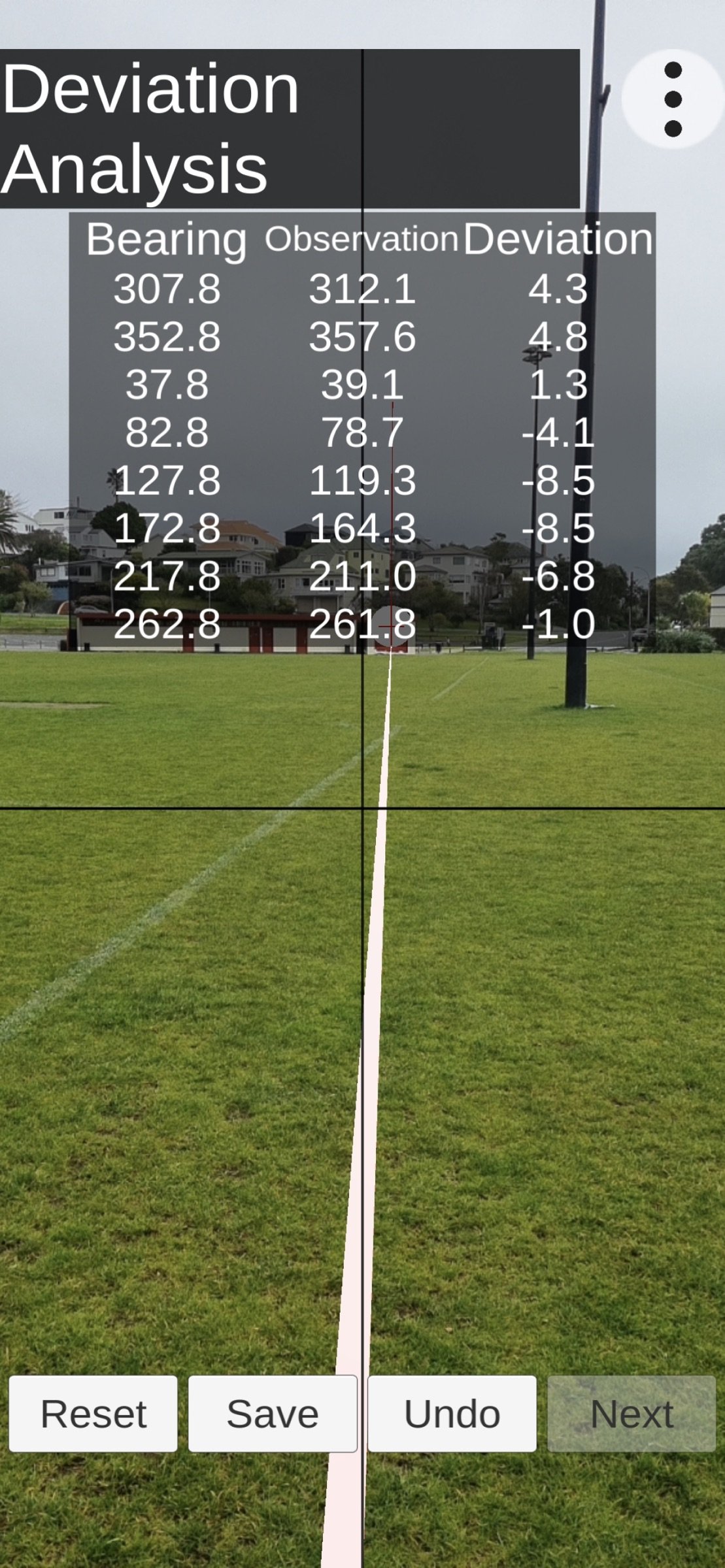
• Compass Deviation Error measurement & correction
• Map navigation compass
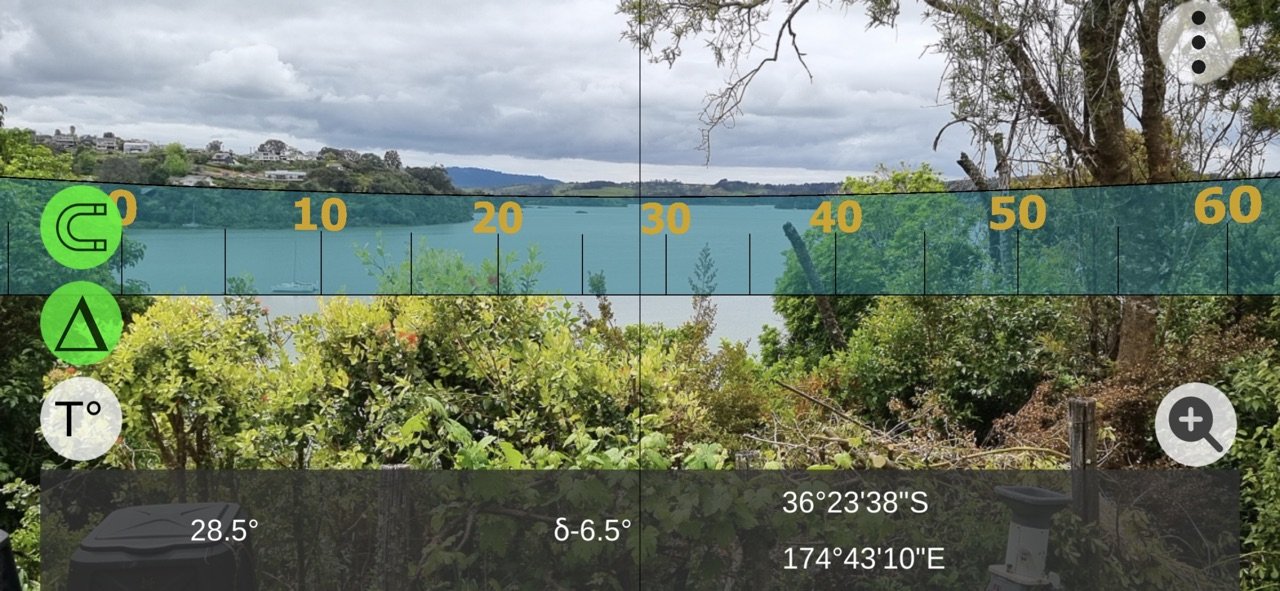
• Augmented Reality compass
• Map marker tracking
• Works in all orientations
Have you been frustrated by Compass apps that claim to be accurate, but turn out to be hopelessly inaccurate or not work at all in certain device orientations? This was one of the drivers for us to create the Augview Compass app - a compass app that is more accurate, that works in all orientations and that provides both a map view and an Augmented Reality (AR) view for ease of use.
The accuracy improvement is achieved by first measuring the Compass Deviation Error, and then deriving a function that provides a correction for any observed bearing.
Compass
Your phone or tablet incorporates various sensors that may be used to determine its location, its orientation and the way in which it is moving. We can compute the compass orientation by using a combination of these sensors.
The magnetometer is the primary sensor used to detect magnetic fields. It measures the Earth's magnetic field in three dimensions (X, Y, Z axes) and helps determine the direction relative to Magnetic North. However, the Earth's magnetic field is relatively weak, and the magnetometers used in our phones show high levels of signal noise, when compared with the Earth’s magnetic field strength. To reduce noise in the outputs, filters and smoothing algorithms are used. To improve the accuracy, outputs from the accelerometer and gyroscope are also integrated using a technique known as sensor integration.
Using the outputs from these three sensors, filtering algorithms and sensor fusion, we can determine a bearing relative to Magnetic North.
The Magnetic North Pole is the point on the earth’s surface at which the planet's magnetic field points vertically downward. The magnetic north pole moves over time. As of 2024, its location is 86° N, 142° East and modelling predicts that by 2025, it will have drifted westward to 138° East.
True North refers to the geographic North Pole, the point at the top of the Earth’s axis where all lines of longitude converge. This is the northern point of the Earth’s axis of rotation. True North is essential for mapping and GPS systems, as it provides a consistent reference for determining direction regardless of magnetic variations.
The angular difference between Magnetic North and True North is called magnetic declination. This angle varies depending on where you are on Earth and because the north and south magnetic poles move, magnetic declination at a fixed point on the earth’s surface changes over time. Fortunately, there are formulae and web sites that can provide the declination value for any given date and geographic location. To indicate whether a bearing is relative to True North or Magnetic North we use the symbols °T or °M.
Compass Calibration
The operating system running on your device, allows you to Calibrate the magnetometer, to help reduce error, and to compensate for:
• Sensor Drift
• Local Magnetic Interference
• Sensor and phone manufacturing issues
To help reduce these issues, manufacturers recommend rotating the device about each axis, and/or rotating the device in a figure of 8 motion. Augview recommends a systematic approach where you:
• Face north to be parallel with the earth’s magnetic field flux lines (to get maximum and minimum magnetic field strengths)
• Rotate the device slowly about each axis twice
• Hold the device flat and rotate about the vertical axis twice
Calibration should be performed regularly, and especially after charging the device or leaving it near other electrical devices.
Compass Deviation Error
This is the error remaining after magnetometer calibration has been performed. The Augview Compass app incorporates a procedure for measuring and compensating for compass deviation error.
License: Commercial
• Compass Deviation Error measurement & correction
• Map navigation compass
• Augmented Reality compass
• Map marker tracking
• Works in all orientations
Have you been frustrated by Compass apps that claim to be accurate, but turn out to be hopelessly inaccurate or not work at all in certain device orientations? This was one of the drivers for us to create the Augview Compass app - a compass app that is more accurate, that works in all orientations and that provides both a map view and an Augmented Reality (AR) view for ease of use.
The accuracy improvement is achieved by first measuring the Compass Deviation Error, and then deriving a function that provides a correction for any observed bearing.
Compass
Your phone or tablet incorporates various sensors that may be used to determine its location, its orientation and the way in which it is moving. We can compute the compass orientation by using a combination of these sensors.
The magnetometer is the primary sensor used to detect magnetic fields. It measures the Earth's magnetic field in three dimensions (X, Y, Z axes) and helps determine the direction relative to Magnetic North. However, the Earth's magnetic field is relatively weak, and the magnetometers used in our phones show high levels of signal noise, when compared with the Earth’s magnetic field strength. To reduce noise in the outputs, filters and smoothing algorithms are used. To improve the accuracy, outputs from the accelerometer and gyroscope are also integrated using a technique known as sensor integration.
Using the outputs from these three sensors, filtering algorithms and sensor fusion, we can determine a bearing relative to Magnetic North.
The Magnetic North Pole is the point on the earth’s surface at which the planet's magnetic field points vertically downward. The magnetic north pole moves over time. As of 2024, its location is 86° N, 142° East and modelling predicts that by 2025, it will have drifted westward to 138° East.
True North refers to the geographic North Pole, the point at the top of the Earth’s axis where all lines of longitude converge. This is the northern point of the Earth’s axis of rotation. True North is essential for mapping and GPS systems, as it provides a consistent reference for determining direction regardless of magnetic variations.
The angular difference between Magnetic North and True North is called magnetic declination. This angle varies depending on where you are on Earth and because the north and south magnetic poles move, magnetic declination at a fixed point on the earth’s surface changes over time. Fortunately, there are formulae and web sites that can provide the declination value for any given date and geographic location. To indicate whether a bearing is relative to True North or Magnetic North we use the symbols °T or °M.
Compass Calibration
The operating system running on your device, allows you to Calibrate the magnetometer, to help reduce error, and to compensate for:
• Sensor Drift
• Local Magnetic Interference
• Sensor and phone manufacturing issues
To help reduce these issues, manufacturers recommend rotating the device about each axis, and/or rotating the device in a figure of 8 motion. Augview recommends a systematic approach where you:
• Face north to be parallel with the earth’s magnetic field flux lines (to get maximum and minimum magnetic field strengths)
• Rotate the device slowly about each axis twice
• Hold the device flat and rotate about the vertical axis twice
Calibration should be performed regularly, and especially after charging the device or leaving it near other electrical devices.
Compass Deviation Error
This is the error remaining after magnetometer calibration has been performed. The Augview Compass app incorporates a procedure for measuring and compensating for compass deviation error.
License: Commercial
| Release info | New Release on Nov 05, 2025 |
|---|---|
| Release notes | Features: - Improved app security. - Updated sound effects. - Added sound toggle to settings. |
| Listing data | App Store |
Reviews
No reviews yet. Be the first to review Augview Compass.
Used Augview Compass? Tell other visitors what you thought.
Log in to write a reviewOther products by this publisher
- "No Distractions" for YouTube 4.10 ----
- #Bible 11.6.1 "Incredible App - My sister shared this app with me a few weeks ago and it is truly incredible.
- #filmphotography 1.4.2 So, you decided to shoot on film?
- $quirrel 1.5.1 $quirrel Budget & Finance helps you plan each paycheck, track spending, manage debt, and see what is safe to spend before the next payday.
- % Percentage Calculator Pro 1.41 This is the Pro version of % Percentage Calculator.
Most viewed iOS Navigation
-
1
 Compass App 1.0.5
Find your direction with style.
-
2
 CARFACE Car Widgets & Lyrics 1.2.1
Make every drive feel more personal with CarFace.
-
3
 Open Road 1.2
Open Road is the one driving app for your iPhone.
-
4
 iGlide Lite 2.9.66
NaviLogic iGlide - the Soaring Navigation app for iOS
-
5
 Pocket Luach Deluxe 60058
Pocket Luach Deluxe is a Jewish calendar, zmanim, Siddur, Tehillim, and personal-event companion for iPhone, iPad, and Apple Watch.
-
6
 Turo 26.46.0
Turo is a better car rental app for travelers who want to rent a car without the rental counter.
-
7
 Fly Delta 7.17.3
Welcome to Fly Delta, Delta’s award winning iOS app.
-
8
 Amtrak 6.1.8
Discover the convenience of traveling with Amtrak.
-
9
 Lyft 2026.44.3
Get where you’re going with Lyft.
-
10
 Passeporté 1.3.2
Passeporté reads the NFC chip in your biometric passport or national eID card, verifies its authenticity, and stores the data securely on your device.
Most downloaded iOS Navigation
-
1
 Live Traffic 2.4
Navigate the globe with live traffic updates, satellite views, and location tools that make every journey clearer, smarter, and more confident from the very first tap.
-
2
 Peru’s Best 2.5
PERU’S BEST is the ideal travel guide to this extraordinary country.
-
3
 Grand Egyptian Museum (GEM) 0.1.060
You could call this a coincidence but the acronym of the Grand Egyptian Museum is an apt title for the GEM, which is truly one!
-
4
 Outdoor Photography Magazine 7.2.10
Outdoor Photography is the magazine for photographers who are passionate about being out in wild places, seeing inspiring nature and having great adventures.
-
5
Pocket Luach Deluxe 60058
Pocket Luach Deluxe is a Jewish calendar, zmanim, Siddur, Tehillim, and personal-event companion for iPhone, iPad, and Apple Watch.
-
6
Passeporté 1.3.2
Passeporté reads the NFC chip in your biometric passport or national eID card, verifies its authenticity, and stores the data securely on your device.
-
7
 Connecticut-Parks & Trails 1.0
App Feature
-
8
 Great Circle Map 1.7.5
A globe you can turn in any direction, including straight over the poles.
-
9
 UK Map 4.12
* Unlimited free map downloads based on Ordnance Survey® OpenData, at 1:25,000 and 1:10,000 scales, and now also paid map downloads at 1:50,000, 1:25,000 and 1:10,000 scales, just like the paper maps.
-
10
 Cell Phone Towers World Map 1.1.6
219 countres !! The world's largest Database of Cell & Net Towers