Alt Time 1.4
Alt Time puts the times you actually need on your lock screen and home screen.
Download
6.83 MB
9downloads
1this week
FreeCommercial
0reviews
Screenshots
About Alt Time
Alt Time puts the times you actually need on your lock screen and home screen.
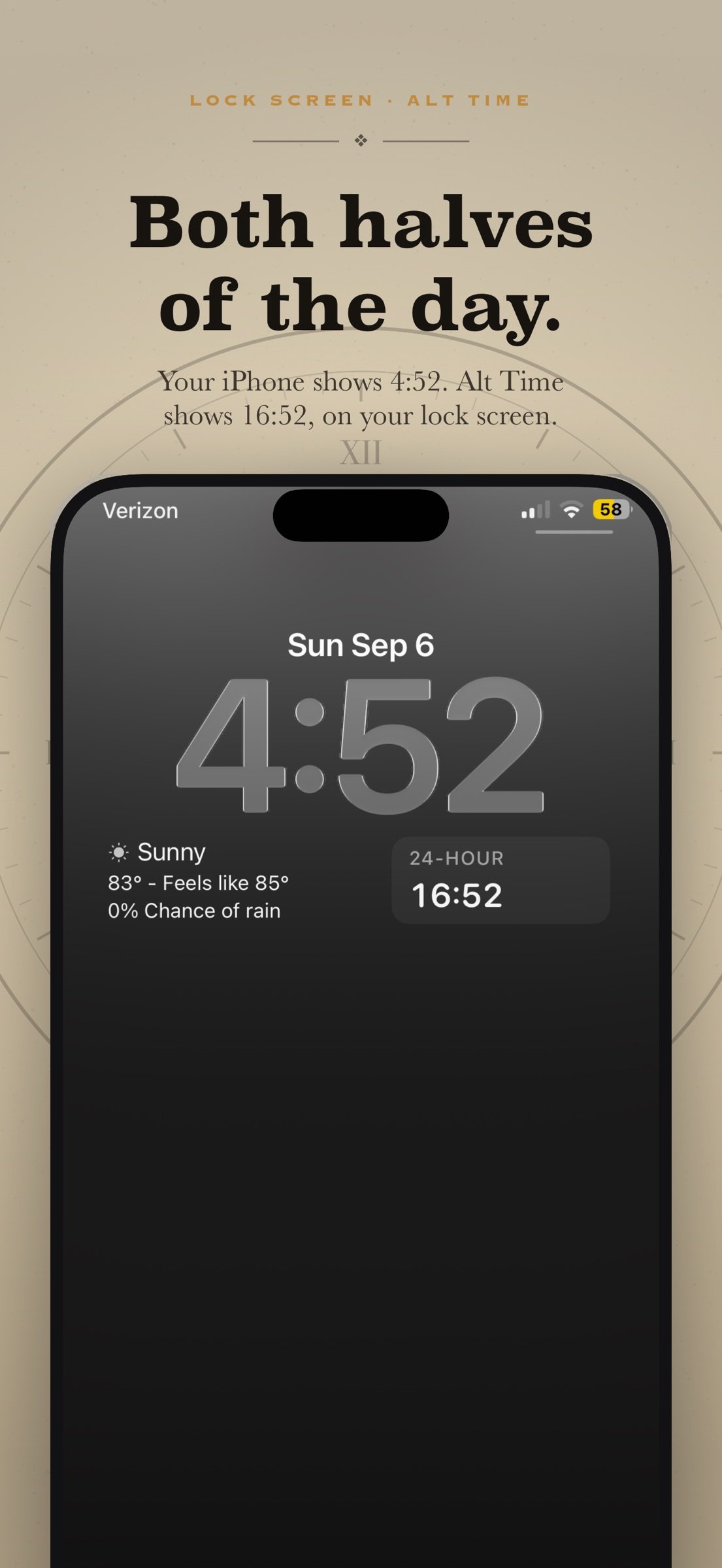
See the opposite of your iPhone's clock format at a glance. If your phone shows 12-hour, the widget shows 24-hour — and the other way round. It follows your system setting automatically, so there is nothing to keep in sync.
WHAT YOU GET
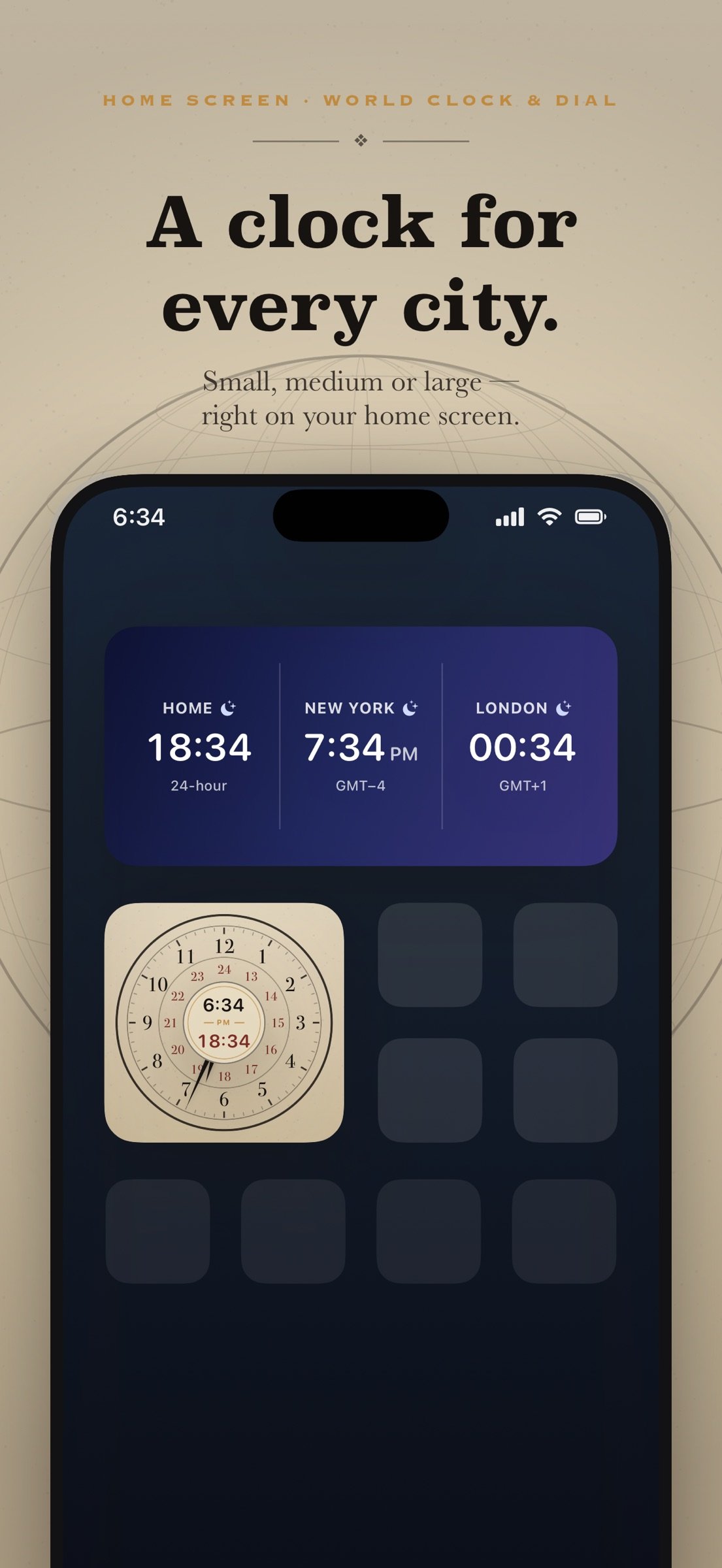
Dial — a home screen clock face with two rings of numbers: 1–12 outside, 13–24 inside. The hour hand points at both at once, and the centre shows the time both ways, like 5:57 PM and 17:57. Small, medium or large, in ten finishes including parchment and black enamel. Show your own time or any city from your world clock.
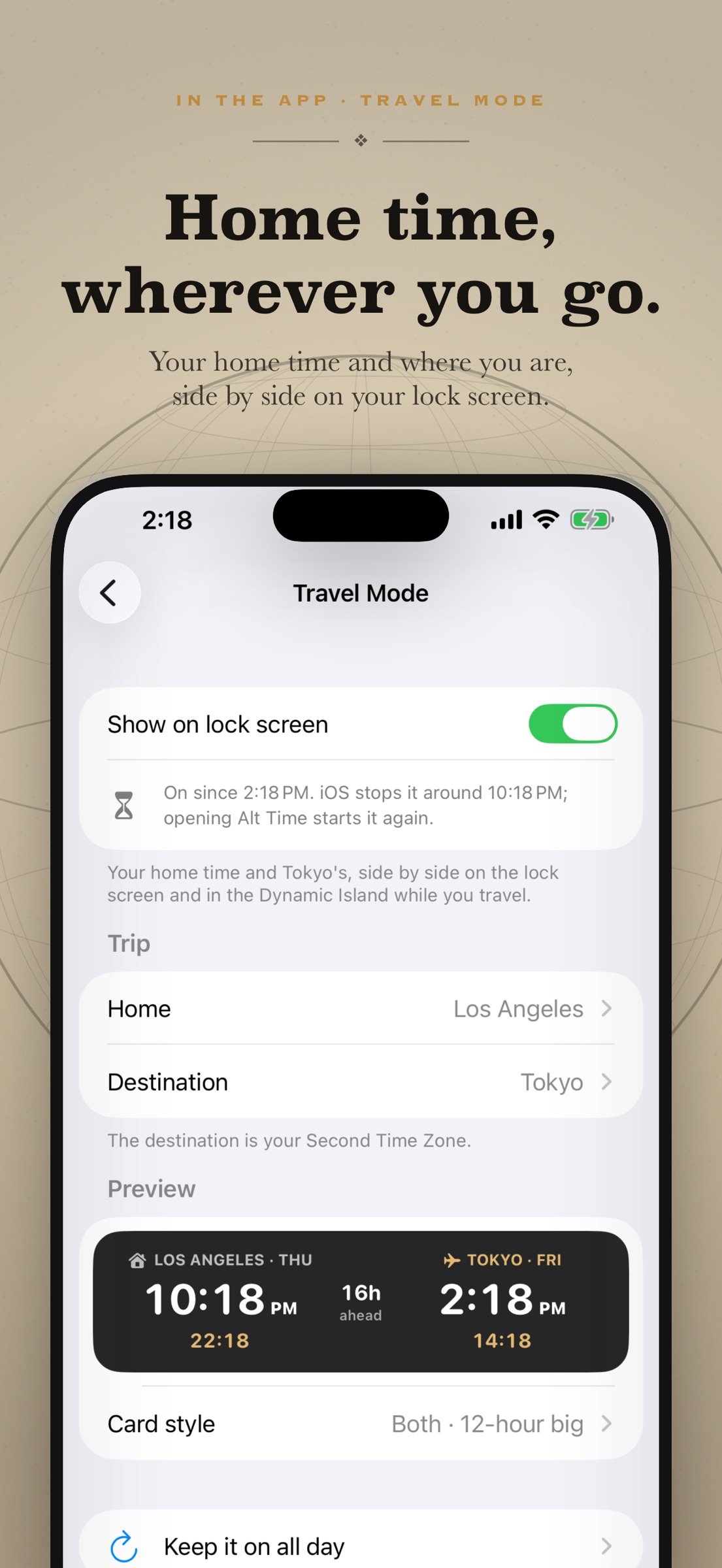
Travel Mode — your home time and the time where you are, side by side on your lock screen and in the Dynamic Island while you travel, with how far ahead or behind home you are. In 12-hour, 24-hour, or both. Start and stop it from Shortcuts or Siri. Requires iOS 18.
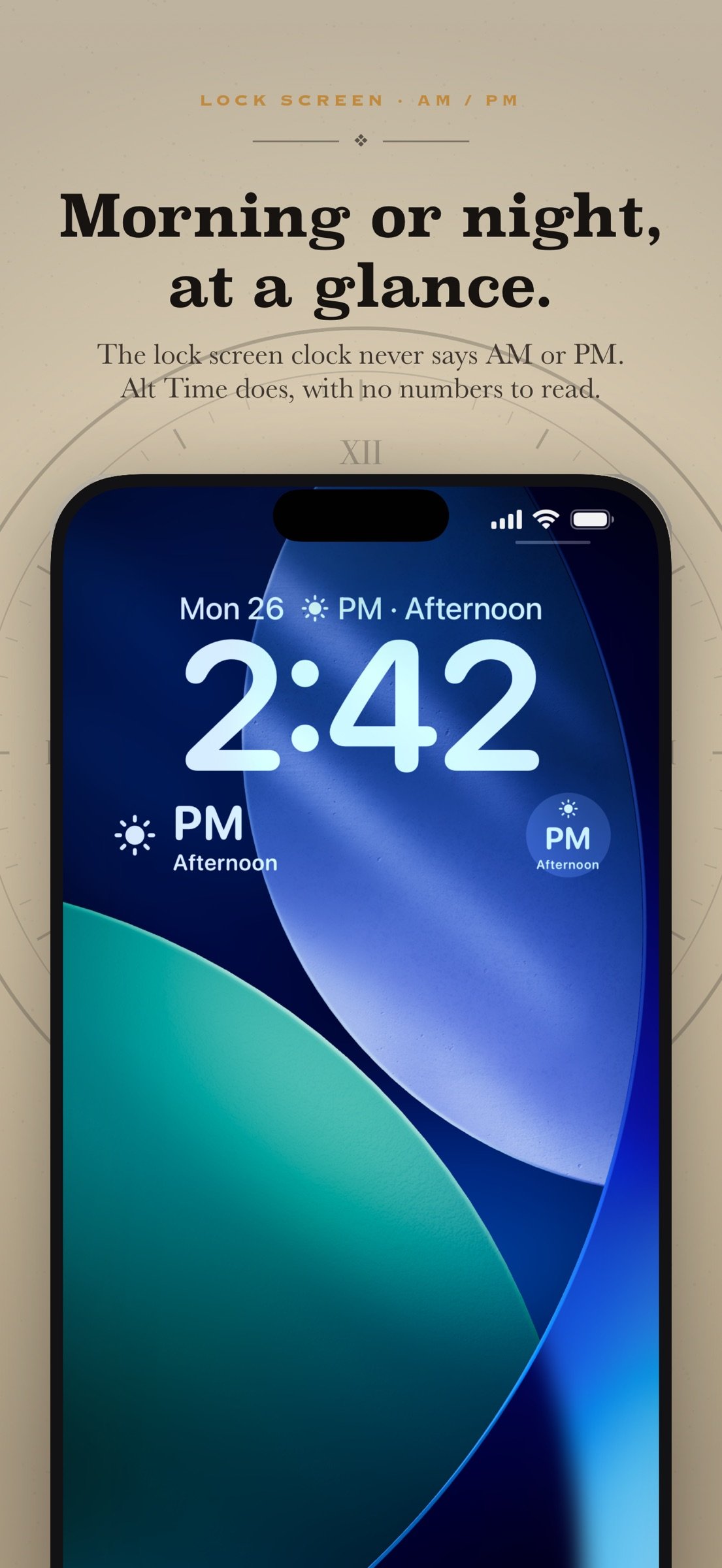
AM / PM — the lock screen clock never shows AM or PM. Three widgets do: just AM or PM, the time of day (Morning, Afternoon, Evening or Night), or both together, with no numbers to read. Put one beside the date or below the clock.
World clock — a home screen widget in small, medium or large, showing as many cities as you like in eight color finishes, with a sun and moon day-night glance. Looks right in StandBy.
Alternate 12h/24h time — always the opposite of your system setting, updated automatically.
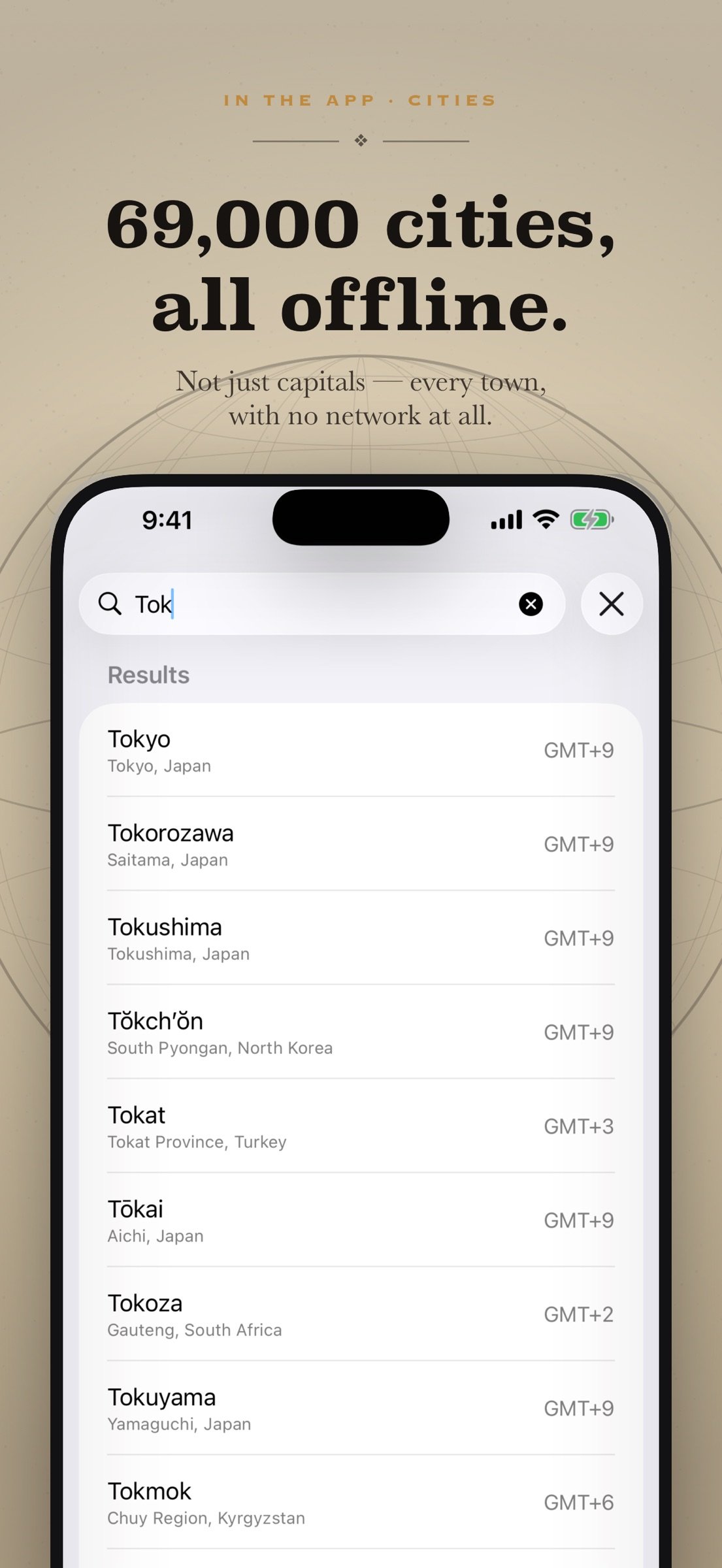
Second time zone — search about 69,000 cities, not just capitals, and see that city's time labeled with its name.
UTC / military time — 24-hour Zulu time for pilots, sailors, and anyone working across zones.
Dual-time widget — two times side by side in a single lock screen slot, sized to match.
Lock screen and home screen widgets, in circular and rectangular slots, tinted or clean, on iPhone and iPad. Every setting sits in one short menu that leads with your times, live.
COMPLETELY OFFLINE
The city database is built into the app. Searching it needs no network, so Alt Time works in Airplane Mode, on a plane, or with no signal at all. Nothing is uploaded, because there is nowhere for it to go.
NO SUBSCRIPTION
One purchase. No subscription, no ads, no account, and no data collected, stored or transmitted — ever.
Requires iOS 17 or iPadOS 17 or later. Travel Mode requires iOS 18 or later.
See every widget and how it works at mmhadventures.com/alttime
License: Commercial
See the opposite of your iPhone's clock format at a glance. If your phone shows 12-hour, the widget shows 24-hour — and the other way round. It follows your system setting automatically, so there is nothing to keep in sync.
WHAT YOU GET
Dial — a home screen clock face with two rings of numbers: 1–12 outside, 13–24 inside. The hour hand points at both at once, and the centre shows the time both ways, like 5:57 PM and 17:57. Small, medium or large, in ten finishes including parchment and black enamel. Show your own time or any city from your world clock.
Travel Mode — your home time and the time where you are, side by side on your lock screen and in the Dynamic Island while you travel, with how far ahead or behind home you are. In 12-hour, 24-hour, or both. Start and stop it from Shortcuts or Siri. Requires iOS 18.
AM / PM — the lock screen clock never shows AM or PM. Three widgets do: just AM or PM, the time of day (Morning, Afternoon, Evening or Night), or both together, with no numbers to read. Put one beside the date or below the clock.
World clock — a home screen widget in small, medium or large, showing as many cities as you like in eight color finishes, with a sun and moon day-night glance. Looks right in StandBy.
Alternate 12h/24h time — always the opposite of your system setting, updated automatically.
Second time zone — search about 69,000 cities, not just capitals, and see that city's time labeled with its name.
UTC / military time — 24-hour Zulu time for pilots, sailors, and anyone working across zones.
Dual-time widget — two times side by side in a single lock screen slot, sized to match.
Lock screen and home screen widgets, in circular and rectangular slots, tinted or clean, on iPhone and iPad. Every setting sits in one short menu that leads with your times, live.
COMPLETELY OFFLINE
The city database is built into the app. Searching it needs no network, so Alt Time works in Airplane Mode, on a plane, or with no signal at all. Nothing is uploaded, because there is nowhere for it to go.
NO SUBSCRIPTION
One purchase. No subscription, no ads, no account, and no data collected, stored or transmitted — ever.
Requires iOS 17 or iPadOS 17 or later. Travel Mode requires iOS 18 or later.
See every widget and how it works at mmhadventures.com/alttime
License: Commercial
| Release info | Update on Oct 27, 2026 |
|---|---|
| Release notes | NEW: TRAVEL MODE Keep your home time on your lock screen while you travel. Your home city's time and the time where you are sit side by side on the lock screen and in the Dynamic Island, with how many hours ahead or behind home you are. • Pick home and destination from about 69,000 cities, offline • 12-hour, 24-hour, or both at once • Start and Stop Travel Mode from Shortcuts or Siri iOS ends every Live Activity after 8 hours. Opening Alt Time starts the card again, and the app shows you how to set up a Shortcuts automation that keeps it going all day. Travel Mode needs iOS 18 or later. NEW: AM / PM WIDGETS The lock screen clock never says AM or PM. Now it can. Three new lock screen widgets, with no numbers to read: • AM / PM — just AM or PM • Time of Day — Morning, Afternoon, Evening or Night • AM / PM + Time of Day — both together Put one next to the date above the clock, or in a widget slot below it. NOW ON IPAD Every Alt Time widget now works on iPad too: lock screen, home screen and Travel Mode. The settings screen sits in a comfortable column on the big screen. A NEW SETTINGS SCREEN Settings are now a short menu that leads with your times: each row shows its time big, with the feature underneath. Tap a row to change it. ALSO • Larger text sizes fit better throughout the app • City search marks only the city you picked, not every city in its time zone • AM / PM always shows in capitals, whatever your region • A new World Clock widget now shows its color in Edit Widget, starting with your default color See every widget at mmhadventures.com/alttime |
| Listing data | App Store |
Reviews
No reviews yet. Be the first to review Alt Time.
Used Alt Time? Tell other visitors what you thought.
Log in to write a reviewOther products by this publisher
- "No Distractions" for YouTube 4.10 ----
- #Bible 11.6.1 "Incredible App - My sister shared this app with me a few weeks ago and it is truly incredible.
- #filmphotography 1.4.2 So, you decided to shoot on film?
- $quirrel 1.5.1 $quirrel Budget & Finance helps you plan each paycheck, track spending, manage debt, and see what is safe to spend before the next payday.
- % Percentage Calculator Pro 1.41 This is the Pro version of % Percentage Calculator.
Most viewed iOS Utilities
-
1
 Device Lab 1.8.9
Device Lab ??????????????????????? App,?????????????????????????????????,????????????????????????
-
2
 APTV 2.4.10
APTV,?????????????? IPTV M3U???,?????????????????
-
3
 VibeSDR 11.0.16
VibeSDR is a mobile-first software-defined radio (SDR) receiver — and far more than a single-server client.
-
4
 DXClock 4.0.0
Connect, collaborate, and operate smarter with DX Clock — the ultimate meeting place for amateur radio operators.
-
5
 ECHOCAT 1.5.2
ECHOCAT is the iPhone and iPad companion for POTACAT, the desktop app for amateur radio operators chasing Parks on the Air (POTA), Summits on the Air (SOTA), Worldwide Bunkers on the Air (WWBOTA), Tiles on the Air and DX.
-
6
 Demod 1.6
Demod turns your iPhone into a software-defined radio receiver.
-
7
 Ally Pro 1.4.0
Ally Pro – Amiibo & NFC Tool gives advanced collectors complete control over their Amiibo library.
-
8
 iNetTools 11.0
iNetTools Pro is the Pro Version of iNetTools.
-
9
 DuckDuckGo, optional Duck.ai 7.246.0
At DuckDuckGo, we believe the best way to protect your personal information from hackers, scammers, and privacy-invasive companies is to stop it from being collected at all.
-
10
 DRC 2.0.1
A simple to use app to help calculate any dilution ratio.
Most downloaded iOS Utilities
-
1
 Rat And Mouse Sound Repeller 2.8
Keep mice and rats away overnight with ultrasonic waves and predator sounds.
-
2
Demod 1.6
Demod turns your iPhone into a software-defined radio receiver.
-
3
 Guardio 2026.105.1
Guardio protects every part of your digital life: your devices, identity, accounts, and activity, so you can browse, shop, text, and bank online with confidence.
-
4
 Screen Mirroring With Miracast 2.0
Turn your iPhone into a complete TV companion.
-
5
 Fontcase 2.0.1
Fontcase is an app that lets you install custom fonts on iOS and iPadOS.
-
6
 ParkenDD 2.0.2
ParkenDD shows a list of available public parking lots in several cities.
-
7
 PickerFull 9.18
Export colors from photos as HEX, PDF, RGB, HSB/HSV, HSBA, HSL, LUV, LCH, YUV, YCBCR, YIQ, CMYK, Grayscale, XYZ, L*a*b* (CIE), CSSVAR, SASSVAR, CSSHSL, CSSRGB, AndroidXML, FlutterDart, UnityColor32, Float, Objective-C, Swift, SwiftLiteral, SwiftUI
-
8
 Royal TSi 2.5.4
Royal TSi provides easy and secure access to your remote systems (RDP, VNC, SSH, etc.) by allowing you to open your Royal TS documents created with Royal TSX (for macOS) or Royal TS (for Windows).
-
9
 Digi Voices 1.1.0
Digi Voice is a comprehensive digital radio client designed for licensed amateur radio operators, offering multi-protocol digital voice communication on iPhone, iPad, Mac, and Apple Watch.
-
10
DRC 2.0.1
A simple to use app to help calculate any dilution ratio.